Intercom
 Shopify
 Stripe
 Slack
Slack Notion
 Google Workspace
 Confluence

What Is Freshdesk? Features, Pricing and Freddy AI Explained (2026)


Freshdesk is the cloud help desk from Freshworks that turns customer emails, chats, calls and social messages into tickets, with paid plans from $19 per agent a month billed annually. Every plan includes the first 500 Freddy AI Agent sessions, and the Free Program is now a 6-month offer for 1 to 2 agents that no longer appears on the pricing page.
Key takeaways
- Freshdesk is Freshworks' cloud help desk, with paid plans at $19 for Growth, $55 for Pro and $89 for Enterprise per agent a month, billed annually.
- Every Freshdesk plan, Growth included, comes with the first 500 Freddy AI Agent sessions once per account, then charges $49 per 100 sessions.
- Freshdesk Omni, the omnichannel bundle with Freshchat and telephony, costs $29, $79 and $119 per agent a month on its three plans, billed annually.
- Freshdesk's Free Program is limited to 6 months and 1 to 2 agents and is no longer listed on the pricing page, while new accounts get a 14-day Enterprise trial.
- Freshworks was founded in 2010 in Chennai, India, originally under the name Freshdesk, and went public on the Nasdaq under ticker FRSH in September 2021.

Freshdesk is a cloud help desk made by Freshworks Inc. (Nasdaq: FRSH) that turns customer emails, chats, calls and social messages into trackable tickets, with paid plans at $19, $55 and $89 per agent a month billed annually. Every plan includes the first 500 Freddy AI Agent sessions once per account, then charges $49 per 100 sessions, and new accounts get a 14-day trial of the Enterprise plan (Freshdesk pricing, checked 24 September 2026).
| Question | Answer (checked 24 September 2026) |
|---|---|
| Made by | Freshworks Inc., Nasdaq: FRSH, headquartered in San Mateo, California |
| What it does | Ticketing, omnichannel inbox, automation, SLAs, knowledge base, reporting, Freddy AI |
| Paid plans | Growth $19, Pro $55, Enterprise $89 per agent a month, billed annually |
| Omnichannel edition | Freshdesk Omni: $29, $79 and $119 per agent a month, billed annually |
| AI Agent | First 500 sessions included on every plan (once per account), then $49 per 100 sessions |
| AI Copilot | $29 per agent a month, Pro and Enterprise only |
| Free option | 14-day trial on Enterprise; a Free Program for 1 to 2 agents for 6 months, not listed on the pricing page |
Who makes Freshdesk?
Freshdesk is the flagship product of Freshworks Inc. (NASDAQ: FRSH), a publicly traded software company. The history explains the product's personality:
- Freshworks was founded in 2010 in Chennai, India by Girish Mathrubootham and Shan Krishnasamy (Freshworks company history). Its first product was Freshdesk, and the company itself was called Freshdesk until it grew into a multi-product suite and renamed itself Freshworks.
- The company moved its headquarters to San Mateo, California in 2018 and went public on the Nasdaq (ticker FRSH) in September 2021 (Freshworks IPO).
Freshdesk was built as a cheaper, faster-to-deploy alternative to heavier incumbents, and that still shows. It tends to win on price and time-to-launch rather than on the deepest enterprise customization, which is the trade-off that matters when you compare it to Zendesk.
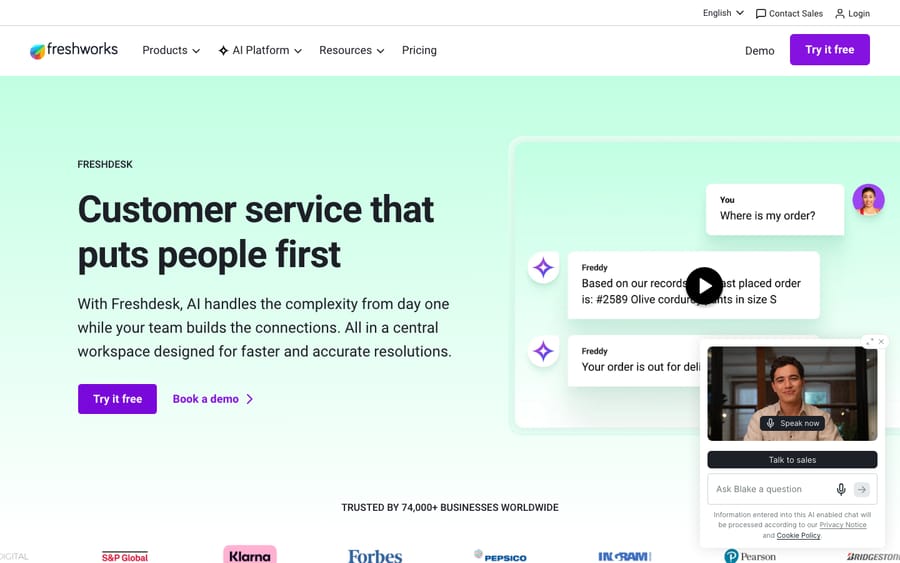
What does Freshdesk do?
Freshdesk is a ticketing system wrapped in channels, automations and AI. Here's what that includes.
1. Ticketing
Every customer request, whether an email, a chat message or a social post, becomes a ticket: one record with the full conversation, the customer's details, status, priority and assignee. Agents work from a shared queue, leave private notes for teammates, collaborate on a ticket and track it from "open" to "resolved." Everything else sits on this foundation. For the mechanics, see our explainer on the Freshdesk ticketing system.
2. Omnichannel support
Freshdesk pulls several contact channels into one view so agents don't switch between tools:
- Email: the shared inbox, converted to tickets.
- Live chat and messaging: a website chat widget and messaging, powered by Freshchat in Freshdesk Omni.
- Phone: built-in cloud telephony for call support.
- Social media: messages and mentions from channels like Facebook, Instagram and WhatsApp.
The result is one screen with a customer's history across channels, so this morning's chat and last week's email sit side by side.
3. Automation
Freshdesk automates the routing and housekeeping that eat an agent's day:
- Ticket routing and assignment: send tickets to the right team or agent by rules, skills or load.
- Prioritization and categorization: auto-tag and rank tickets so urgent ones surface first.
- SLA management: set targets such as "first response within 1 hour," and Freshdesk tracks them, escalates and flags breaches.
- Scenario automations and triggers: one-click multi-step actions and event-based workflows.
4. Freddy AI
Freddy is Freshworks' AI brand, and it plays three roles inside Freshdesk:
- Freddy AI Agent: a bot that resolves common, repetitive customer questions end to end before a human is involved. The first 500 sessions are included on Growth, Pro and Enterprise; after that it's $49 per 100 sessions.
- Freddy AI Copilot: an assistant for human agents that summarizes threads, suggests replies and translates messages. It's a $29-per-agent add-on, sold only on Pro and Enterprise.
- Freddy AI Insights: analytics for team leads that surface trends and performance.
Freshworks markets Freddy with figures like "up to 80% of resolutions." Treat that as a vendor best case. Real deflection depends on how good your knowledge base is and how repetitive your ticket mix is. Session pricing also bills every conversation the bot touches, resolved or not, so a bot that fails still costs you the session.
5. Knowledge base and self-service
Freshdesk includes a knowledge base and a customer help center so customers can find answers themselves. The same articles feed the AI: what helps a customer search the help center is what Freddy draws on to answer automatically.
6. Reporting and SLAs
Built-in dashboards and reports cover ticket volume, agent performance, response and resolution times, CSAT and SLA compliance. Higher plans add more customizable analytics. SLAs are both an automation feature and a reporting one: you set targets and measure against them.
How is Freshdesk different from Freshservice, Freshchat and Freshsales?
Freshworks names nearly everything "Fresh-something," which is where most of the confusion starts. Here's the breakdown.
| Product | What it is |
|---|---|
| Freshworks | The parent company and brand (NASDAQ: FRSH). Not a product, the umbrella over all of them. |
| Freshdesk | Customer support / help desk software for external customer service. |
| Freshservice | IT service management (ITSM): an internal service desk for IT teams (assets, incidents, employee requests). Launched 2014. Same company, different job. |
| Freshchat | Live chat and messaging software (formerly "Freshdesk Messaging"). Sold standalone or bundled into Freshdesk Omni. |
| Freshsales | CRM / sales software: pipelines and deals, not support. |
The short version: Freshdesk supports your customers, Freshservice supports your employees, Freshchat is the chat channel, Freshsales is sales, and Freshworks makes all of them.
Freshdesk vs. Freshdesk Omni
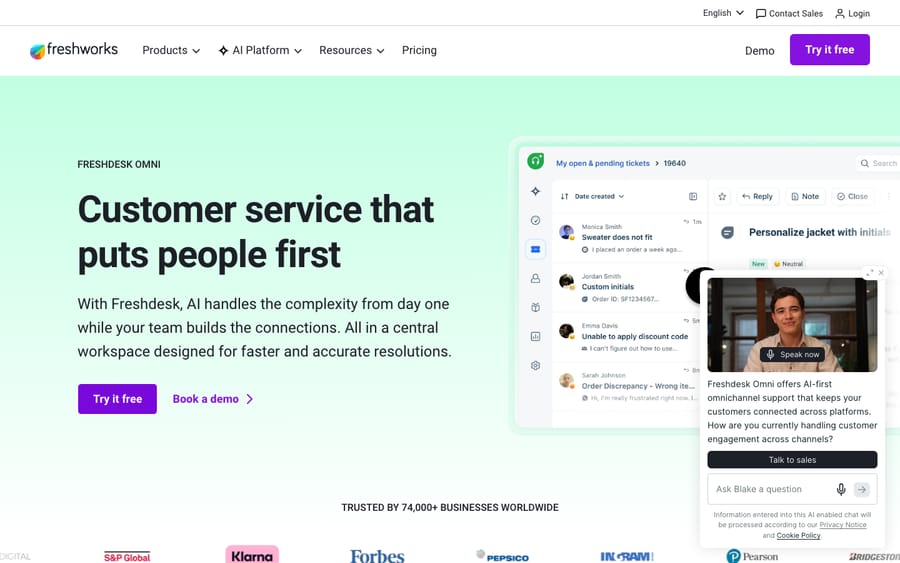
Freshdesk Omni (formerly the "Customer Service Suite") is Freshworks' omnichannel bundle. It combines Freshdesk ticketing with Freshchat live chat and built-in telephony, on its own price list: Growth $29, Pro $79 and Enterprise $119 per agent a month, billed annually (Freshdesk Omni pricing). Pick Omni if chat and phone matter from day one. Pick standard Freshdesk if email is your core and you'll add channels later. One practical difference: Freshworks documents the chat AI Agent as an Omni feature, while plain Freshdesk gets the email agent.
How much does Freshdesk cost?
Freshdesk prices per agent. On 24 September 2026, the standard plans billed annually were:
| Plan | Price (per agent/mo, annual) | Best for |
|---|---|---|
| Free Program | $0 for 6 months, 1 to 2 agents; not on the pricing page | Tiny teams trying the basics |
| Growth | $19 | Small teams that need real automation |
| Pro | $55 (marked most popular) | Growing teams needing custom workflows and Copilot |
| Enterprise | $89 | Larger teams needing governance, audit logs, skills routing |
Freddy AI Agent is metered separately: all three paid plans include the first 500 sessions, and more cost $49 per 100 sessions. Freshdesk's help article describes the 500 as a one-time allotment per account, not a monthly allowance, so at 3,000 sessions a month you buy 30 packs, or $1,470 on top of seats. The math is where the incentive shows: the vendor earns per conversation handled, so a busy month costs more whether or not the bot resolved anything.
The free option has shrunk. The Free Program is a 6-month program for 1 to 2 agents (email and social ticketing, a knowledge base, basic routing), after which you move to a paid plan or lose access. It no longer appears on the pricing page; you start it from Admin, then Account, then Plans and Billing (Freshdesk Free Program). New sign-ups get a 14-day trial of Enterprise instead. For plans, add-ons and the AI billing fine print, see Freshdesk pricing explained.
Who is Freshdesk for?
Freshdesk fits small and mid-market teams: startups, SMBs and growing support teams that want a working help desk quickly without a long implementation or a big budget.
It's a strong fit if you:
- Want to be running in days, not a quarter.
- Run a price-sensitive, email- and chat-first support operation.
- Value a gentle learning curve over maximum configurability.
It's a weaker fit if you need the deepest enterprise customization, the most sophisticated routing and analytics, or complex multi-brand operations. Heavier platforms pull ahead there.
What do users say about Freshdesk?
Here's how customers rate Freshdesk on the main review sites:
| Platform | Score | Reviews |
|---|---|---|
| G2 | 4.4 / 5 | 3,771 (September 2026) |
| Capterra | 4.5 / 5 | ~3,440 (June 2026) |
| TrustRadius | ~8.4 / 10 | hundreds (June 2026) |
The themes repeat across thousands of reviews. Users praise ease of use, fast setup and value for money. The common complaints are slow support from Freshworks itself, the cost of higher tiers and add-ons, and reporting that feels limited below the top plan.
Two representative reviews from Capterra:
"It has enabled us to provide faster and more efficient customer support, leading to increased customer satisfaction and loyalty." — Jessica M., Customer Service (Capterra, 2025)
"My digital agency uses Freshdesk for all our client support communication, and it's key to our communication and delivering fast, reliable support." — Chris O., President (Capterra, 2025)
How we sourced this: the G2 count is the September 2026 reading from our AI chatbot comparison; the Capterra and TrustRadius figures were read in June 2026 and not re-counted, because both sites block automated checks. Quotes are attributed reviews from Capterra's Freshdesk page, trimmed for length, not reworded. We don't run a configured Freshdesk tenant, so this section stands in for hands-on testing.
Is Freshdesk better than Zendesk?
Freshdesk and Zendesk are the two help desks most teams shortlist against each other.
- Freshdesk usually wins on price, speed to launch and simplicity. Its Growth plan is $19 an agent a month against Zendesk's $55 for Suite Team.
- Zendesk usually wins on depth, advanced automation, analytics, voice and enterprise scale, and usually costs more.
The right answer depends on your size, budget and complexity. We cover pricing, features and fit in Zendesk vs. Freshdesk.
Where does an AI agent layer fit with Freshdesk?
A help desk's native AI is good at deflecting repetitive questions with knowledge-base answers and at assisting agents. Many of the questions that pile up sit in between: they need a real answer pulled from your docs, past tickets or another system, resolved in the conversation.
That's the job of an AI agent layer like Macha. Macha isn't a help desk and doesn't replace Freshdesk. It connects to Freshdesk (and Zendesk, Gorgias and others), reads the customer's question, draws on your connected knowledge and ticket history, replies in the same thread and hands off to a human with context when it isn't confident. It bills per ticket rather than per session: $299 a month covers 750 tickets, however many messages each takes, and the Macha team sets up and monitors the agents. It's another integration to run and only as good as the knowledge you connect. You can try it with $50 of free usage, no credit card required.
How do you get started with Freshdesk?
- Start the 14-day trial at freshworks.com/freshdesk. It runs on the Enterprise plan, so you see every feature.
- Connect your support email so incoming requests become tickets.
- Add the channels you need (chat widget, phone, social), depending on whether you're on Freshdesk or Freshdesk Omni.
- Build your knowledge base with your most common answers. This also feeds the AI.
- Set up automations (routing rules, SLAs, canned responses) and invite your agents.
- Turn on Freddy if you want AI deflection and agent assist, and watch session usage against the 500 included.
Frequently asked questions
What is Freshdesk in simple terms? Freshdesk is cloud customer support software that turns every customer question, from email, chat, phone or social, into a trackable ticket, then gives your team automation and AI to resolve it in one place. It's made by Freshworks.
What does Freshdesk do? It centralizes customer support: ticketing, an omnichannel inbox (email, chat, phone, social), workflow automation, SLA tracking, a self-service knowledge base, reporting dashboards, and Freddy AI for automated resolution and agent assistance.
Who owns Freshdesk? Freshdesk is made and owned by Freshworks Inc., listed on the Nasdaq under the ticker FRSH. Freshworks was founded in 2010 in Chennai, India and is headquartered in San Mateo, California.
Is Freshdesk free? Not permanently. The Free Program runs 6 months for 1 to 2 agents with email and social ticketing and a knowledge base, and it's no longer listed on the pricing page. After that you upgrade or lose access. Paid plans start at $19 per agent a month (Growth, billed annually), and new accounts get a 14-day Enterprise trial.
What's the difference between Freshdesk and Freshservice? Freshdesk is for external customer support; Freshservice is for internal IT service management (ITSM), an IT and employee service desk. Same company, different audiences.
What's the difference between Freshdesk and Freshchat? Freshchat is Freshworks' live chat and messaging product (formerly Freshdesk Messaging). It powers the chat channel and is sold standalone or inside Freshdesk Omni; Freshdesk is the broader ticketing-led help desk.
Is Freshdesk better than Zendesk? Neither is better for everyone. Freshdesk tends to win on price, simplicity and fast setup; Zendesk on depth, advanced automation, analytics and enterprise scale. See our Zendesk vs. Freshdesk breakdown.
How much does Freddy AI Agent cost? Every Freshdesk plan includes the first 500 Freddy AI Agent sessions; after that it's $49 per 100 sessions. Freddy AI Copilot is a separate $29-per-agent add-on on Pro and Enterprise.
What should you check before choosing Freshdesk?
Check three numbers against your own volume: seats at $19, $55 or $89 per agent, AI Agent sessions past the included 500 at $49 per 100, and whether you need Omni's $29-to-$119 price list for chat and phone. If email is your main channel and your team is under a few dozen agents, Freshdesk is one of the cheapest capable help desks you can buy. Freshworks revises packaging often, so confirm figures on freshworks.com before you sign.
Add AI agents to your Freshdesk
Macha reads the ticket, drafts the reply and takes the action, inside the Freshdesk you already run.