





 Shopify
 Stripe
 Slack
Slack Notion
 Google Workspace
 Confluence

What Are the Best Freshdesk Marketplace Apps in 2026? Picks by Job


The best Freshdesk Marketplace apps are grouped by job: CRM context, telephony, time tracking, CSAT surveys and engineering handoff. Every pick installs from Admin, Apps, Get More Apps, and many third-party apps bill per user on top of Freshdesk.
Key takeaways
- The best Freshdesk Marketplace apps by job are HubSpot or Salesforce for CRM context, Five9 or Amazon Connect for calls, TimeCamp or Time Doctor for time, and Nicereply for CSAT.
- Time Doctor's Basic plan costs $8 per user a month, or $80 per user a year billed annually, with Standard at $14 and Premium at $20 a month.
- Freshdesk's native time tracking logs time per ticket as billable or unbillable, but per Time Doctor's own comparison it does not track idle time or monitor apps and websites.
- The CRM, Sales and Marketing category is the Freshdesk Marketplace's largest, and the gallery showed 101 apps in it when we captured it.
- Freshdesk Marketplace apps are labeled Public, Custom or In Development, and installed apps appear under Manage Apps separately from the gallery reached via Get More Apps.

The best Freshdesk Marketplace apps depend on the job: HubSpot or Salesforce for CRM context, Five9 or Amazon Connect for phone calls, TimeCamp or Time Doctor for time tracking, Nicereply or SurveySparrow for satisfaction surveys, and Atlassian Jira Plus for engineering handoff. All of them install from Admin → Apps → Get More Apps, and many charge their own per-user fee on top of Freshdesk.
| Your job | Category to browse | Reliable picks |
|---|---|---|
| See customer/deal context in the ticket | CRM, Sales & Marketing | HubSpot, Salesforce, Pipedrive, Zoho CRM |
| Handle phone calls in Freshdesk | Chat, Video & Telephony | Freshcaller, Five9, ZIWO, Amazon Connect |
| Track (and bill) agent time | Time Tracking | TimeCamp, Time Doctor, Clockify |
| Measure satisfaction / run QA | Surveys & Feedback | Nicereply, SurveySparrow, SmileBack |
| Hand work to engineering / ops | Productivity | Jira, Trello, Azure DevOps |
How does the Freshdesk Marketplace work?
You browse and install apps from Admin → Apps, then Get More Apps, which opens the marketplace gallery; already-installed apps live under Manage Apps. The public Freshworks Marketplace filters by Category, by Product, by Payment (free versus paid) and by App Types; the in-product gallery we captured also offered an AI Actions filter for apps that perform AI-assisted actions.
Two distinctions are worth knowing. First, apps are Public (published by Freshworks or a partner and available to everyone), Custom (private apps your team builds for internal use), or In Development. Second, "installed" and "available" are different lists: a fresh trial shows an empty Manage Apps view with a "Get started by installing Recommended Apps" prompt, a reminder that nothing is active until you install it. We cover the mechanics in the Freshdesk Marketplace explained; here the question is which apps are worth installing.
Which CRM apps give agents customer context in Freshdesk?
The job: stop agents from tab-switching to see who they're talking to. CRM, Sales & Marketing is the biggest category in the marketplace (the gallery showed 101 apps when we captured it), and it exists to pull customer, deal and account data into the ticket sidebar.
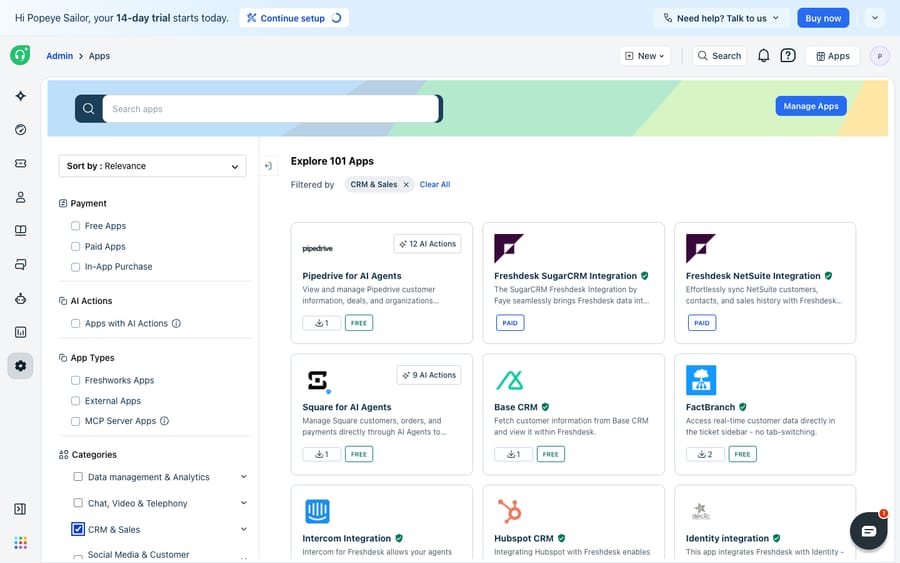
The reliable picks:
- HubSpot and Salesforce: the two heavyweights, surfacing contact, deal-stage and lifecycle data next to the ticket so support can see whether they're talking to a trial user or a six-figure account.
- Pipedrive: brings deal and pipeline context into Freshdesk for teams that run sales on Pipedrive.
- Zoho CRM, SugarCRM and NetSuite: mid-market and ERP-adjacent syncs for teams already standardised on those stacks.
- Intercom: links conversation history for teams that run Intercom alongside Freshdesk.
The caveat: most of these are read-context integrations, not two-way automation engines. They show you data; they rarely act on it.
Which apps connect phone calls to Freshdesk tickets?
The job: turn a phone call into a ticket without retyping anything. Voice support lives in the "Chat, Video & Telephony" category, where computer-telephony-integration (CTI) apps pop a caller's details on screen and log the call against a ticket automatically.
- Freshcaller / Freshdesk Contact Center: the native Freshworks option, tightest integration but a separate product and cost.
- Five9 CTI: the Freshdesk Telephony Partner Extension with Five9 brings enterprise contact-center features into the ticket.
- ZIWO and Amazon Connect: cloud-telephony options for teams that want their own carrier or already run on AWS.
Voice is where the marketplace earns its keep, because the alternative, a phone system that doesn't know about your help desk, means agents retyping every call.
Do you need a time-tracking app, or is Freshdesk's native timer enough?
The job: know where agent hours go, and bill for them. Freshdesk has native time tracking: agents can log time per ticket automatically or manually and mark it billable or unbillable. For many teams that's enough. But Time Doctor's own comparison says the native feature doesn't surface idle time, doesn't monitor apps or websites, and has no automatic offline tracking. If your reporting needs go past "hours per ticket", a dedicated app fills the gap.
- TimeCamp: records time spent on each client's case and rolls it into project-level reporting.
- Time Doctor: Basic costs $8 per user a month, or $80 per user a year billed annually (about $6.67 a month), per Time Doctor's pricing help article; Standard is $14 and Premium $20 a month. It adds idle tracking, productivity ratings and payroll integration.
- Clockify, Hubstaff and TMetric: lighter-weight timers with invoicing and scheduling, useful for agencies billing support by the hour.
Which apps measure CSAT and run surveys in Freshdesk?
The job: measure whether customers were happy, not just whether the ticket closed. Freshdesk includes a basic satisfaction survey, but the survey category exists because teams want richer feedback and reporting.
- Nicereply: CSAT, NPS and CES surveys with per-agent KPI tracking.
- SurveySparrow: triggers an NPS survey the moment a ticket closes.
- SmileBack: one-click smiley-face CSAT, popular for its response rates.
- SimpleSat and SurveyMonkey: add satisfaction surveys to resolution emails and deploy custom questionnaires on closure.
Which apps hand tickets to engineering or project tools?
The job: get an engineering or ops task out of the ticket and into the tool that owns it. When a ticket needs a bug fixed or a task done elsewhere, these apps create and link the work item without leaving Freshdesk.
- Atlassian Jira Plus: the standard for support-to-engineering handoff; a verified app that syncs Freshdesk tickets with Jira issues.
- Trello: turns tickets into cards for lighter workflows.
- Azure DevOps: links Freshdesk tickets to work items for Microsoft-stack teams.
If your job is dispatch and on-site work rather than a code ticket, that's a different category entirely: see Freshdesk field service management explained.
Where do Freshdesk Marketplace apps stop being the right tool?
For most of the jobs above an off-the-shelf app is the right answer. It's worth being clear about what the marketplace is, though, so you don't reach for it where it doesn't fit.
First, most marketplace apps are integrations, not automation. They bring data into the ticket or push a record out to another system. A CRM widget shows an agent the account tier; it doesn't decide what to do about it. A survey app records a score; it doesn't fix the thing that scored badly. Reading the ticket, understanding the request and writing the reply still land on a human.
Second, cost and quality vary. Many of the best apps are third-party and paid per user on top of Freshdesk, and integration depth varies. A "verified" badge from Freshworks signals a maintained app; an older community app may lag behind Freshdesk's own API changes. Check the ratings, install counts and last-updated date the gallery shows before you commit.
Third, and this is the gap an AI layer fills, none of these apps reason across your stack in one step. Answering "where's my order and can I get a refund?" might touch a CRM app, an order system and a returns policy at once, and no single marketplace widget stitches that together. That's the work the category of AI agents for customer service exists to do, and it's worth weighing the build-versus-buy tradeoff before you assume an app will get you there.
Macha is one such layer, and it is not a help desk competitor. It runs on top of the Freshdesk you already use as a native connector: you connect it with your subdomain and API key, and it reads and writes the same tickets your marketplace apps enrich. Where a CRM app shows an agent the context, Macha's agents use that context to draft or send grounded replies, triage by intent, and look up order or account status through a custom tool that turns a REST API into something the agent can call, as we walk through in how to automate Freshdesk with AI. (Macha's connector is for Freshdesk specifically, not Freshchat, Freshservice or Freshcaller. Macha bills per ticket, from $299 a month for up to 750 tickets: one conversation, charged once however many messages it takes, never per resolution.)
Use marketplace apps to give agents more context and more tools, and put an AI agent on top for the part an integration can't do: reasoning across all of it and answering.
FAQ
How do I install an app from the Freshdesk Marketplace? Go to Admin → Apps → Get More Apps to open the marketplace gallery, find the app, and install it. Installed apps then appear under Manage Apps. You can filter the gallery by category, by free versus paid, and by app type.
Are Freshdesk Marketplace apps free? Some are, some aren't. The gallery has a Payment filter for free versus paid apps. Many third-party apps (time trackers, CRMs, telephony) charge their own per-user subscription on top of Freshdesk; Time Doctor, for example, starts at $8 per user a month. A number of Freshworks-published utilities are free. Check the pricing note on each listing.
What's the difference between Public and Custom apps? Public apps are published by Freshworks or a partner and available to everyone in the marketplace. Custom apps are private apps your own team builds for internal use, and In Development covers apps still being built. The App Types filter lets you separate them.
Which is the best CRM app for Freshdesk? It depends on the CRM you already run. The point of these apps is to surface data from a system you use, so HubSpot, Salesforce, Pipedrive and Zoho CRM are the common picks. Match the app to your existing CRM rather than switching CRMs to suit an app.
Can I add AI to Freshdesk through the marketplace without replacing it? Yes. An AI agent layer like Macha connects to Freshdesk as a native connector and runs on top of your existing help desk and any marketplace apps you've installed. It handles the reasoning-heavy work (drafting grounded replies, triaging by intent, looking up data across systems) that most integration apps don't do.
Want agents that use all that context instead of just displaying it? Start a free trial of Macha and connect it to your Freshdesk in minutes.






