





 Shopify
 Stripe
 Slack
Slack Notion
 Google Workspace
 Confluence

How Does the Freshdesk Marketplace Work? Apps vs Custom Apps (2026)


The Freshdesk Marketplace lets you install public apps from Admin, Support Operations, Apps, or build private custom apps that only your account can see. Which path you can take depends on your plan, and neither path makes an app reason over a ticket for you.
Key takeaways
- The Freshdesk Marketplace has three app types: public Freshworks apps any customer can install, private custom apps for one account, and external apps that only link out.
- Freshdesk Marketplace apps are not available on the Free and Sprout plans and require Growth, Pro or Enterprise, while custom apps are listed for Pro and Enterprise only.
- Freshdesk custom apps skip the Freshworks review process and become available for installation within 30 minutes of submission.
- Freshdesk custom apps can sit on the Ticket Details page, Contact Details page, New Ticket screen or New Email composer, with up to three published versions live at once.
- Freshdesk's pricing page lists no free plan, with paid tiers at $19 per agent per month on Growth, $55 on Pro and $89 on Enterprise, billed annually.

The Freshdesk Marketplace is Freshworks' catalog of add-on apps, installed from Admin → Support Operations → Apps → Get More Apps, and it works through three app types: public Marketplace apps anyone can install, private custom apps built for one account, and external apps that only link out. Public apps run on the Growth, Pro and Enterprise plans; custom apps need Pro or Enterprise, skip Freshworks' review, and go live about 30 minutes after you submit them.
| App type | Who can install it | Reviewed? | Plans |
|---|---|---|---|
| Marketplace (Freshworks) app | Any Freshworks customer | Yes, before listing | Growth, Pro, Enterprise |
| Custom app | Only the account that built it | No; live ~30 min after submission | Pro, Enterprise |
| External app | Not installed; listing links to an outside website | n/a | n/a |
What is the Freshdesk Marketplace?
The Marketplace is a catalog of apps that extend Freshdesk without you writing (much) code. Some are built by Freshworks, most by third-party developers, and a handful you build yourself. Per Freshworks' Installing Apps from Freshworks Marketplace documentation, you reach it from Admin → Support Operations → Apps → Get More Apps, where you can filter by category or search for a specific integration, read the full listing, and install.
Under the hood, Freshworks recognizes three distinct app types, and the distinction decides how an app is distributed:
- Freshworks (Marketplace) apps: "publicly displayed in the Marketplace" and installable by any Freshworks customer.
- Custom apps: "private only to the customer using the product"; they never appear in the public gallery.
- External apps: not installed inside Freshdesk at all, just "listed in an external website."
That taxonomy comes from Freshworks' app submission process docs, and it's the mental model for the rest of this piece: public apps are shared with the world, custom apps stay inside your account.
How do you install a public app from the Marketplace?
For most integrations it takes a few minutes. A CRM connector, a translation tool or a survey app is a matter of finding the tile and authenticating.
- Go to Admin → Support Operations → Apps → Get More Apps.
- Browse by category (CRM & Sales, Productivity, Agent Productivity, and so on) or search for the app by name.
- Open the listing to read what it does, check the rating and install count, and confirm pricing. Some apps are free; others carry their own subscription on top of your Freshdesk seats.
- Click Install, enter the necessary credentials (usually an API key or an OAuth handshake), and the app is live.
If you want a shortlist of what's worth installing rather than a raw catalog, we've rounded up the best Freshdesk marketplace apps by job-to-be-done. Once an app is installed, it moves out of the browse gallery and into your own Apps list, which shows only the extensions you've enabled, so configuring or uninstalling any of them is one click.
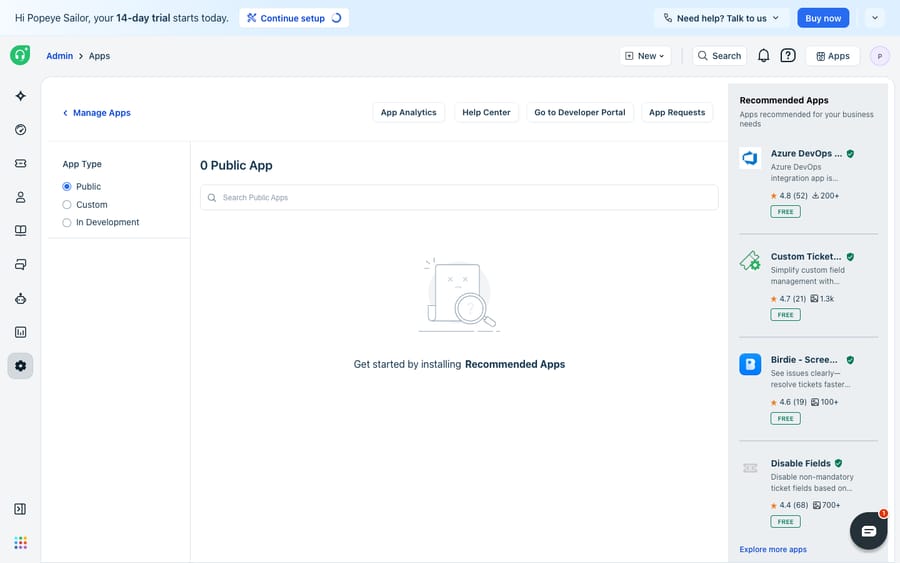
Notice the App Type filter in that Manage Apps view: Public, Custom, and In Development. That filter is the clearest window into the split: public apps you installed from the Marketplace, custom apps built for your account, and apps still being built and tested. On a fresh trial the list reads 0 Public App with a "get started by installing Recommended Apps" prompt, which is what you'd expect before anyone has installed anything.
What is a Freshdesk custom app?
A custom app is one you build for your account and nobody else's. Custom apps were earlier called Freshplugs, and per Freshworks' What is a Custom App? guide they are "installed only to your account." They exist to integrate with internal tools or implement workflows specific to your business. They aren't listed publicly and can't be shared with other Freshdesk instances.
The lifecycle differs from a public app in two ways. First, install scope is the whole point: a custom app is published and installed only in the account it was created in. Second, custom apps are "not subject to the review process" and become available for installation within 30 minutes of submission. A public Marketplace listing has to pass review because strangers will install it; a custom app skips that gate because only you will ever see it.
You build one on the Freshworks developer platform, pack the app, fill in the App Information and installation details, then Save and Publish. It then appears under Manage Apps → Custom Apps in your account, ready to install. Custom apps can be placed in four spots in the agent workspace: the Ticket Details page, the Contact Details page, the New Ticket screen, and the New Email composer. Freshworks allows a maximum of three published versions in the Apps gallery at once, so you can promote a new build while agents on an older version keep working.
Should you install a public app or build a custom one?
The choice comes down to whether the thing you need already exists and whether anyone else should be able to use it.
| Public Marketplace app | Custom app | |
|---|---|---|
| Who can install it | Any Freshworks customer | Only your account |
| Where it's listed | Public Marketplace gallery | Manage Apps → Custom Apps (private) |
| Review | Reviewed by Freshworks before listing | Not reviewed; live ~30 min after submission |
| Plans | Growth, Pro, Enterprise | Pro, Enterprise |
| Best for | Common integrations (CRM, billing, surveys) | Internal tools, account-specific workflows |
| Build effort | None: install and authenticate | You build and maintain it |
| Versions | Managed by the developer | Up to 3 published versions at once |
If an off-the-shelf tile does the job, install it and move on. If your workflow is specific (an internal inventory system, a bespoke approval flow), a custom app is the sanctioned way to wire it in without exposing it to anyone else, provided you're on Pro or above.
Which Freshdesk plans can use apps?
Freshworks' install guide says apps are not available on the Free and Sprout plans and are available on Growth, Pro and Enterprise (Freshdesk Omni follows the same three tiers). The custom-app guide is narrower: custom apps are listed for Pro and Enterprise on current Freshdesk plans, plus the legacy Garden, Estate and Forest plans. Growth customers can install Marketplace apps but shouldn't plan a custom build.
The Free plan is also no longer something you can pick: Freshdesk's pricing page lists no free plan today, only a 14-day trial and paid tiers starting at $19 per agent per month on Growth (billed annually), $55 on Pro and $89 on Enterprise. Confirm your own plan before you design a workflow around an app.
Where does the app model stop, and where does an AI layer pick up?
The Marketplace model does its job well: it distributes integrations cleanly, keeps public apps behind a review gate, and lets you build private apps without cluttering the public catalog. But it has a ceiling.
Most marketplace apps surface data; they don't reason over it. A CRM app can show an agent the customer's account panel next to the ticket. It can't read the ticket, work out what the customer is asking, decide which account field matters, and write the reply. A custom app can pull a record from your internal system into the ticket sidebar, but a human still has to interpret it and type the response. The app model moves information; it doesn't do the thinking. That's partly by design: Freshworks sells the reasoning layer separately as Freddy AI, so the app framework has little reason to do it for free.
That's the gap an AI agent layer fits into, and it's worth weighing the build-versus-buy tradeoff before you commit engineering time to a custom app that ultimately just displays a value. The broader category of AI agents for customer service exists to do the reasoning-heavy work a marketplace tile can't. Macha is one such layer: it runs on top of the Freshdesk you already use as a native connector. It doesn't replace Freshdesk, and it isn't a rival marketplace. You connect Macha to Freshdesk with your subdomain and API key, and it works the same tickets your apps already touch: reading the incoming message, deciding what to do, calling your own systems through a custom tool that turns a REST API into something an agent can invoke, and drafting or posting a grounded reply. Where a custom app would show an agent an order status, Macha can fetch it and write the answer around it, the automation step covered in how to automate Freshdesk with AI. (Macha's connector is for Freshdesk specifically, not Freshchat, Freshservice or Freshcaller. Macha bills per ticket: one conversation, charged once however many messages it takes, never per resolution.)
The division of labor: use Marketplace and custom apps for what they're built for, distributing integrations and surfacing data inside the agent workspace, and add an AI agent for the part the app model can't do, which is turning that data into a sent answer.
FAQ
Where do I install apps in Freshdesk? Go to Admin → Support Operations → Apps → Get More Apps. Browse or search the Marketplace, open a listing, click Install, and enter the required credentials. Installed apps then show up in your own Apps (Manage Apps) list.
What's the difference between a Marketplace app and a custom app? A Marketplace (Freshworks) app is publicly listed and installable by any Freshworks customer after passing review. A custom app is private to your account, never appears in the public gallery, isn't reviewed, and is available to install within 30 minutes of submission.
Are Freshdesk apps available on every plan? No. Freshworks says apps aren't available on the Free and Sprout plans. Marketplace apps need Growth, Pro or Enterprise; custom apps need Pro or Enterprise (or the legacy Garden, Estate or Forest plans).
Where do custom apps appear once I build them? Under Manage Apps → Custom Apps in your account. You can place them on the Ticket Details page, Contact Details page, the New Ticket screen, or the New Email composer, and Freshworks keeps up to three published versions live at once.
Can I add AI to Freshdesk without building a custom app or replacing Freshdesk? Yes. An AI agent layer like Macha connects to Freshdesk as a native connector and runs on top of your existing help desk. It reads tickets, calls your own tools, and drafts grounded replies, doing the reasoning a marketplace tile or custom app doesn't.
Ready to add the reasoning layer your marketplace apps can't? Start a free trial of Macha ($50 of usage, no credit card) and connect it to your Freshdesk with a subdomain and API key.






