





 Shopify
 Stripe
 Slack
Slack Notion
 Google Workspace
 Confluence

Front vs Kustomer (2026): Which Help Desk Fits Your Team?


Front suits email-first teams that want a shared inbox with public per-seat pricing, while Kustomer suits high-volume consumer brands that want every order and conversation on one customer timeline. Here is how their pricing, automation, channels and setup compare in 2026.
Key takeaways
- Front suits email-first teams with public pricing from $25 a seat a month, while Kustomer suits high-volume consumer brands and quotes prices only after a demo.
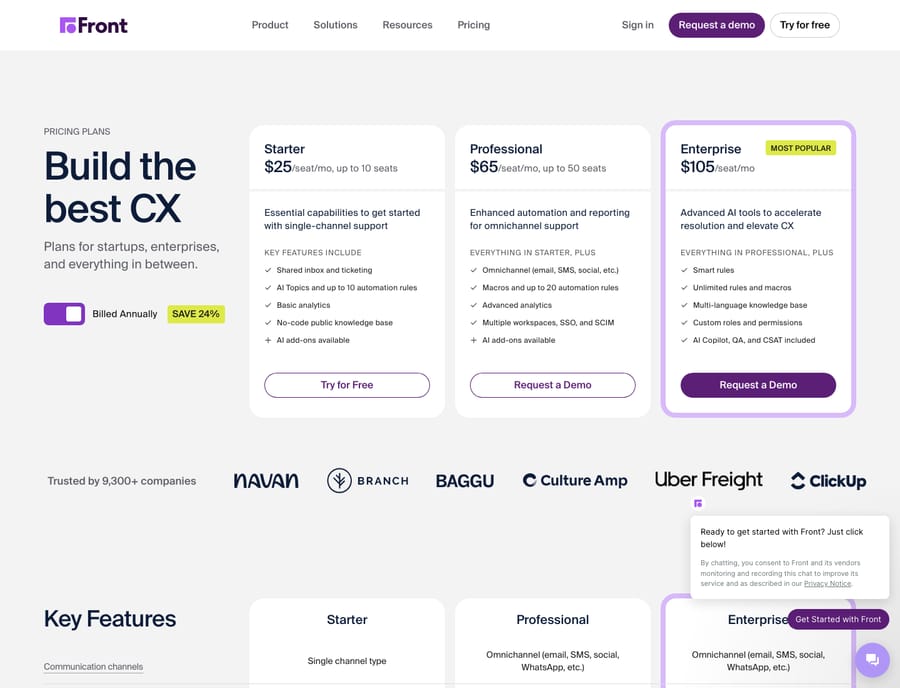
- Front lists three plans on its pricing page: Starter at $25, Professional at $65 and Enterprise at $105 per seat per month billed annually.
- Front caps automation at 10 rules on Starter and 20 on Professional, while Kustomer workflows can branch on order status and other customer data on the timeline.
- Kustomer's pricing page lists voice, SMS and WhatsApp as pay-as-you-go, with HIPAA and implementation billed separately at amounts it does not publish.
- Meta acquired Kustomer in 2022 and spun it out as an independent company in May 2023, so Kustomer is a standalone vendor again.

Front is the better pick for email-first teams that want a shared inbox with public pricing from $25 a seat a month, and Kustomer is the better pick for high-volume consumer brands that want every order and conversation on one customer timeline, at a price you only get from a sales call. Front publishes three tiers ($25, $65 and $105 a seat a month billed annually, checked on front.com/pricing on 24 September 2026). Kustomer's pricing page says "we don't post one-size-fits-all pricing."
How do Front and Kustomer compare at a glance?
| Front | Kustomer | |
|---|---|---|
| Best for | Email-first teams, ops/sales/support hybrids, SMBs to mid-market | High-volume consumer support, mid-market to enterprise CX |
| Pricing entry (24 Sept 2026) | Starter $25/seat/mo, up to 10 seats | No public price; quote after a demo |
| Shared-inbox / collaboration depth | Deep: inline comments, shared drafts, @mentions | Present, but centered on the customer timeline, not the thread |
| Automation | Rules and macros: 10 rules on Starter, 20 on Professional, unlimited on Enterprise | Workflows keyed to customer data; more capable, steeper to learn |
| Channels | Email, chat, SMS, WhatsApp, social; voice through integrations like Aircall and Dialpad | Email, chat, SMS, WhatsApp, native voice, social |
| Standout strength | Feels like collaborative email; fast to adopt | Unified customer timeline with full history and data |
How much do Front and Kustomer cost?
The clearest structural difference shows up before you compare a single feature: one vendor publishes its prices, the other doesn't.
Front lists three public tiers on its pricing page. On 24 September 2026, Starter is $25 a seat (capped at 10 seats), Professional is $65 (up to 50 seats) and Enterprise is $105 per seat per month billed annually, with a 24% saving for annual billing. AI is sold as add-ons on the lower tiers: Copilot $20 a seat, Smart QA $20, Smart CSAT $10, and Autopilot from $0.05 per conversation. Enterprise includes Copilot, Smart QA and Smart CSAT. There's a 14-day trial with Professional features and no card. That transparency makes Front easy to budget: you can size a team and know the number without a sales call.
Kustomer takes the opposite approach. Its pricing page says "Every CX team's setup is different, so we don't post one-size-fits-all pricing" and routes you to an ROI calculator and a demo. The page does list what gets billed on top: Kustomer Voice (talk, SMS and transcription) and WhatsApp are pay-as-you-go, and a HIPAA-enabled subscription and implementation are separate line items with no amount shown.
Third-party numbers fill some of the gap, and they should be read as estimates. Older trackers such as Chatarmin's pricing guide and Gorgias's Kustomer pricing breakdown cite an Enterprise plan at about $89 per user per month billed annually with an 8-seat minimum. eesel's May 2026 breakdown says the base price is no longer disclosed and lists AI separately: about $0.60 per engaged AI conversation and an agent copilot around $40 per user per month. None of that is on Kustomer's own page, so treat it as a starting point for the sales call, not a quote.
The incentive is easy to read. Front sells seats to teams that self-serve, so a public price shortens the sale. Kustomer sells a platform with implementation work attached, so it prices each deal after it has seen your volume. Front is cheaper to start and simpler to price; Kustomer is a bigger, sales-led commitment aimed at teams that will grow into a CRM-style platform.
Which is better for shared inbox collaboration?
This is Front's home turf. Front turns each channel into a shared, assignable thread where teammates can drop internal comments inline, build shared drafts together before a reply goes out, and @mention colleagues without CC'ing or forwarding. Anyone who already lives in email picks it up fast. Front documents this omnichannel, comment-driven model on its shared inbox product page, and it's the reason email-first teams adopt it so quickly.
Kustomer collaborates too, but the center of gravity is different. Its collaboration happens inside the customer timeline rather than beside a single message: when several agents touch a case, they see the customer's full history (past tickets, orders, lifetime value), which helps on complex, context-heavy cases, as the Guru comparison notes. The trade-off is that it feels less like working an inbox and more like operating a system of record.
If your team thinks in threads, Front feels natural. If it thinks in customers, Kustomer does.
Which has stronger automation?
Front's automation is rules and macros: a When/If/Then model for routing, tagging, assignment and templated replies. It's fast to set up and covers most support and ops workflows, but the rule count is capped by plan: up to 10 automation rules on Starter, 20 on Professional, and unlimited on Enterprise. See Front pricing explained for exactly what unlocks where.
Kustomer's automation is keyed to customer data: routing and escalation can branch on attributes, order status or behavior stored on the timeline, which supports data-aware workflows that Front's conditions can't easily match. G2's Front vs Kustomer comparison and reviewers flag this depth, alongside a steeper learning curve as the cost of it. Front is easier; Kustomer does more once configured.
Which channels does each support?
Both cover the main channels. Front centralizes email, live chat, SMS, WhatsApp, Facebook and Instagram, with voice via integrations like Aircall and Dialpad rather than a native phone system. Kustomer covers email, chat, SMS, WhatsApp and social, and sells its own Kustomer Voice on pay-as-you-go pricing. It treats each channel as another stream writing to the unified customer timeline, which suits high-volume consumer support where one customer contacts you several ways over time. For pure breadth the two are close; the real differences are native voice and the data model underneath.
Which is faster to set up?
Front is the faster start. Teams migrating from shared mailboxes are productive quickly because the mental model, an inbox you share, is familiar. That point comes up across review roundups and in our own Front app review. The 14-day trial is long enough to run a real queue through it before you pay.
Kustomer asks for more upfront. Reviewers repeatedly cite a steep learning curve, and implementation is a separate line on its pricing page. That work buys the unified data model, but it is work, and it's fair to name it.
What are the pros and cons of each?
Front, pros: transparent per-seat pricing; excellent inbox-native collaboration; fast to adopt; strong for blended support/sales/ops teams. Cons: rule limits and AI features are plan-gated or sold as add-ons; Starter stops at 10 seats; it's an inbox, not a full CRM, so deep customer-data workflows need integrations; per-seat costs add up at scale.
Kustomer, pros: unified customer timeline with full history and data; data-driven automation; native voice and strong omnichannel for high-volume consumer brands. Meta bought Kustomer in 2022 and spun it back out as an independent company in May 2023, so it's a standalone vendor again. Cons: no public pricing; steeper learning curve and separately priced implementation; reporting is a common complaint; can feel over-featured (and over-priced) for small teams.
Which should you choose?
Pick Front if you're an SMB or mid-market team that lives in email, wants collaborative shared inboxes across support, sales and ops, values transparent pricing, and needs to be productive in days rather than weeks. If you're weighing Front against the wider field, our best Front alternatives guide widens the lens.
Pick Kustomer if you're a mid-market-to-enterprise consumer brand handling high conversation volume, you need a single customer timeline with orders and history driving data-aware automation, and you have the budget and runway for a sales-led rollout. The context you gain is real; you pay for it in money and setup time for the CRM foundation underneath.
Neither is better for everyone. Front optimizes for collaborative email; Kustomer optimizes for customer data. Match the tool to how your team actually thinks about the work.
Can you add an AI agent on top of either one?
The inbox-vs-CRM choice doesn't have to be the AI choice. The platform routes, tags and stores the conversation, but a customer still has to be answered. A dedicated AI agent layer fits on top of the help desk you already picked rather than replacing it. Macha runs as that layer on Zendesk, Freshdesk, Gorgias, Front, HubSpot or Intercom. Front is on that list, through a live Macha–Front integration; Kustomer isn't, so a Kustomer team would use Kustomer's own AI or a vendor that integrates with it. On Front, Macha reads the conversation, works out intent rather than matching keywords, and drafts or sends a grounded reply, pulling real order or account data through a custom tool when needed. The broader category of AI agents for customer service exists for the reasoning a rule or a routing workflow can't do. Macha bills per ticket, one conversation charged once however many messages it takes, starting at $299 a month for up to 750 tickets, with setup and monitoring by the Macha team included.
FAQ
Is Front or Kustomer cheaper? Front is cheaper to start and easier to budget: on 24 September 2026 its public tiers are Starter $25, Professional $65 and Enterprise $105 per seat per month billed annually. Kustomer publishes no prices. Older third-party trackers cite an Enterprise plan around $89 per user per month billed annually with an 8-seat minimum, plus separately billed AI, voice and implementation; confirm any figure with Kustomer's sales team.
What's the core difference between Front and Kustomer? Front is an email-first shared inbox built around the conversation thread; Kustomer is a CRM-style omnichannel help desk built around a unified customer timeline. Front feels like collaborative Gmail; Kustomer feels like a CRM that answers messages.
Which is better for a small team? Front, in most cases. Its familiar shared-inbox model, transparent per-seat pricing, 14-day trial and fast onboarding suit SMBs. Kustomer's sales-led pricing, separate implementation and steeper learning curve are aimed at larger, higher-volume operations.
Does Front or Kustomer have better automation? Kustomer's automation goes further because it can branch on customer data stored on the timeline, but it's harder to learn. Front's rules and macros are easier to set up and cover most workflows, though Starter caps you at 10 rules and Professional at 20.
Is Kustomer still owned by Meta? No. Meta acquired Kustomer in 2022 and spun it out as an independent company in May 2023, as CNBC reported at the time.
Can I add AI to Front or Kustomer without switching tools? On Front, yes. An AI agent layer like Macha connects through a live integration and runs on top of it: Front keeps routing and storing conversations, and the agent reads each one, works out intent, and drafts or sends a grounded reply. Macha doesn't connect to Kustomer, so Kustomer teams would use Kustomer's built-in AI or another vendor.
Ready to turn a routed conversation into an answered one? Start a free trial of Macha and layer an AI agent on top of the help desk you already use.






