





 Shopify
 Stripe
 Slack
Slack Notion
 Google Workspace
 Confluence

What Is Freshdesk Field Service Management? Service Tasks, Plans and the $29 Technician Add-On (2026)


Freshdesk Field Service Management is an add-on that turns a support ticket into a scheduled on-site job for a field technician, at USD 29 per technician per month on the Pro and Enterprise plans. Below: how service tasks and appointments work, who needs the module, and where it stops.
Key takeaways
- Freshdesk Field Service Management costs USD 29 per field technician per month on top of the base subscription, according to Freshdesk's own field technician license article.
- Freshdesk lists field technician licenses on the Pro and Enterprise plans, so a Growth account at $19 per agent has to upgrade before it can add technicians.
- Freshdesk FSM prices by technician rather than ticket, so ten technicians cost $290 a month in licenses before any agent seats are counted.
- Freshdesk Field Service Management is built from service tasks, appointments and field technicians, tied together by a drag-and-drop scheduling dashboard and a technician mobile app.
- The Freshdesk Marketplace lists a Field Service Management category with 5 apps, including Zuper FSM and GoDeskless FSM, for accounts that can't use the native add-on.

Freshdesk Field Service Management (FSM) is an add-on that turns a support ticket into a scheduled on-site job, and it costs USD 29 per field technician per month on top of a Freshdesk Pro or Enterprise plan, according to Freshdesk's own field technician license article (checked 24 September 2026). It adds service tasks, appointments, a drag-and-drop scheduling dashboard and a technician mobile app.
| Question | Answer (checked 24 September 2026) |
|---|---|
| Price | USD 29 per field technician per month, on top of the base plan |
| Plans that can use it | Pro and Enterprise (legacy Estate and Forest) |
| Base plan prices | Pro $55, Enterprise $89 per agent per month, billed annually |
| Building blocks | Service task, appointment, field technician, scheduling dashboard |
| Where licenses live | Admin, Field Service Management, Manage |
| Alternatives | Marketplace FSM apps such as Zuper FSM and GoDeskless FSM |
What is Freshdesk Field Service Management?
FSM is not part of core Freshdesk ticketing. It's a separate add-on module you enable on top of your existing help desk, and it introduces a handful of new objects that the standard ticket model doesn't have. The core idea, per Freshworks' own introduction to Field Service Management, is to let a support agent turn a ticket into on-site work without leaving Freshdesk.
The three concepts to understand are:
- Service task: a job or task that can be scheduled and assigned to a field technician. It's spawned from a ticket and carries a summary of the customer's problem, their contact details and address, and essential fields like the appointment date and time. Think "install this unit at 14 Elm Street on Thursday at 2pm."
- Appointment: the scheduled date/time slot the service task is booked into. This is what a dispatcher juggles when balancing a day's worth of jobs across a crew.
- Field technician: a special kind of agent who works on-site rather than in the ticket queue, equipped with a mobile app to view assignments, get directions, log time, and capture a customer signature on completion.
Stitching those together is the scheduling dashboard, a calendar view where a dispatcher drags and drops service tasks onto technicians and time slots. It's the operational heart of the module.
Who actually needs Freshdesk FSM?
FSM is worth its overhead for a specific shape of business: one where resolving a support request routinely means dispatching a human to a physical location. If that sounds like your team, you're the target user.
Typical fits include:
- Equipment installers and maintainers: appliances, HVAC, medical devices, industrial machinery, where an install or repair is a scheduled on-site visit.
- Managed IT and telecoms: swapping hardware, running cable, on-premise fixes that can't be done remotely.
- Utilities and facilities: meter work, inspections, break-fix jobs booked into a technician's route.
If your support resolves almost entirely over email, chat, or phone, FSM is overhead you don't need; the standard ticket assignment and routing model already covers you. The tell is simple: do your tickets end with a reply, or with a van?
How do you set up FSM in Freshdesk?
First confirm your account is on Pro or Enterprise, since those are the plans Freshdesk lists for field technician licenses. Once the module is enabled, the workflow runs from ticket to technician like this:
- Enable the module. As an administrator, go to Admin → Support Operations → Field Service Management and click Enable. This is the switch that surfaces service tasks and the scheduling dashboard, per the setup guidance Freshworks and partners document.
- Shape the service task form. Service tasks get their own field set. To customize it, go to Admin → Workflows → Ticket Fields, where you'll find a dedicated Service Tasks section and drag in the fields you need (appointment window, equipment type, site notes). This reuses the same ticket fields and forms machinery you already know, just scoped to on-site jobs.
- Create a service task from a ticket. An agent handling an inbound ticket spins off a linked service task, carrying the customer's details and address across automatically.
- Schedule and assign. On the scheduling dashboard, a dispatcher drags the task onto a technician and an appointment slot, or reassigns it when the day shifts.
- Execute in the field. The technician picks it up in the mobile app, navigates to site, does the work, logs time, and captures a signature. The ticket and its service task update in step.
You can also automate the repetitive parts, for example auto-creating a service task whenever a ticket matches certain conditions, using FSM's own automation rules, which Freshworks documents separately for the module.
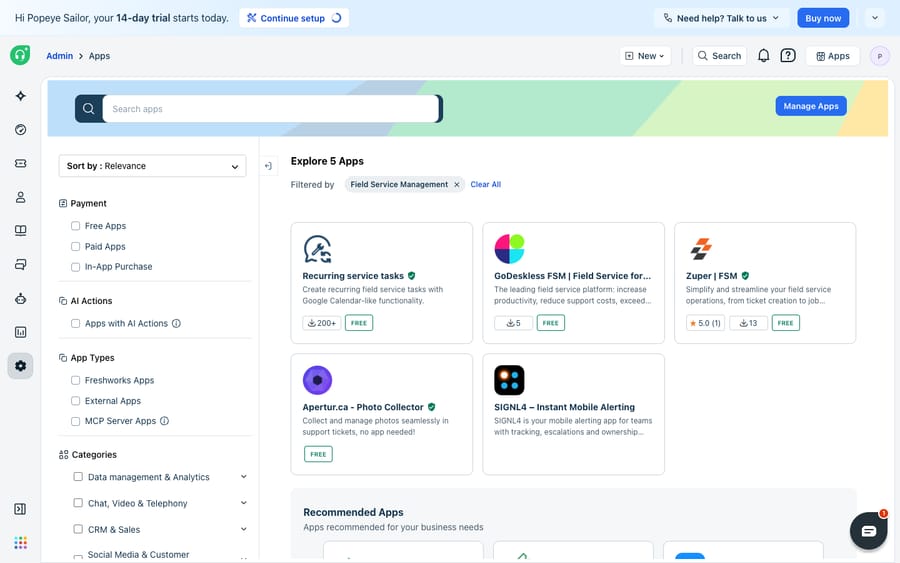
As the screenshot shows, even where the native module isn't switched on, the Freshdesk Marketplace carries a whole Field Service Management category, with apps like GoDeskless FSM, Zuper and SIGNL4, that bolt field-service capability onto the help desk. For many teams, the practical route to field service in Freshdesk is one of these marketplace apps rather than the native add-on.
How much does Freshdesk FSM cost?
FSM is priced as an add-on on top of your base Freshdesk subscription, and the unit is the field technician, not the ticket. Freshdesk's license article states it plainly: USD 29 per field technician per month, with licenses managed under Admin → Field Service Management → Manage. (Third-party breakdowns such as eesel's FSM guide quote the same figure.) Two caveats:
- It scales with headcount. Ten technicians cost roughly 10 times what one does: $290 a month in licenses before the agent seats. For a large field crew that add-on line becomes a real share of the bill, so model it before you commit.
- It sits on the upper plans. Freshdesk lists field technician licenses on Pro and Enterprise (and the legacy Estate and Forest plans). Pro is $55 and Enterprise $89 per agent per month billed annually (Freshdesk pricing), so a Growth account at $19 has to upgrade its agents first. The pricing page itself doesn't mention FSM, so confirm against your own account before you budget.
The incentive is worth naming: per-technician pricing means Freshworks earns more as your field crew grows, whether or not ticket volume does. A team with many part-time or seasonal technicians pays for each license, not for the work those technicians do.
Where does Freshdesk FSM stop?
Give FSM its due: for a support-led field operation, having the ticket, the service task, the appointment, and the technician's mobile app in one system is useful, and the scheduling dashboard's drag-and-drop is a clean way to run a day. The edges are worth knowing, though.
First, it's an add-on, not core Freshdesk, and it may not be on your menu. On the trial account we used, searching Admin for "field service" returned nothing, which is why the screenshot above shows the Marketplace rather than the native module. Freshdesk lists the licenses on Pro and Enterprise only, so step one is confirming your plan qualifies.
Second, it's architected around support tickets, not deep field workflows. Independent reviewers note the native module gives you basic scheduling and work-order management but leans light on things a dedicated FSM platform ships: GPS-based dispatch, robust offline mobile access, rich equipment service histories, and multi-territory scheduling, as Fieldproxy's comparison lays out. If your field operation is complex, a purpose-built FSM tool or a marketplace app may fit better than the native add-on.
Third, and this is the seam an AI layer addresses, FSM schedules and tracks the on-site work, but it doesn't handle the desk-bound conversation around it. The customer still emails "when is my technician arriving?", "can I reschedule?", "what did the last visit cover?", and someone still has to read those tickets, look up the answer, and reply. That reading-and-writing half is exactly what the broader category of AI agents for customer service exists to take on. Macha is one such layer: it runs on top of the Freshdesk you already use as a native connector. It doesn't replace your help desk, your FSM module, or your dispatchers. You connect it to Freshdesk with your subdomain and API key, and it reads and writes the same tickets, triaging inbound field-service requests by intent, drafting grounded replies about appointments and visit history, and looking up job status through a custom tool that turns your scheduling or ERP API into something the agent can call. (Macha's connector is for Freshdesk specifically, not Freshchat, Freshservice or Freshcaller. And Macha bills per ticket, from $299 a month for up to 750 tickets, one conversation charged once however many messages it takes, never per resolution.) If you want to see what that automation looks like in practice, we walk through it in how to automate Freshdesk with AI.
The clean division of labor: let FSM (or a marketplace app) own the scheduling and the technician on the ground, and layer an AI agent on top for the inbox conversation around each job, the part a scheduling dashboard was never meant to answer.
FAQ
What is Field Service Management in Freshdesk? It's a paid add-on module that lets a support ticket generate a schedulable, assignable job (a service task) for a field technician. It adds service tasks, appointments, a drag-and-drop scheduling dashboard, and a technician mobile app on top of standard Freshdesk ticketing.
How do I enable FSM in Freshdesk? As an administrator, go to Admin → Support Operations → Field Service Management and click Enable. Service task fields are then customized under Admin → Workflows → Ticket Fields, in a dedicated Service Tasks section. Freshdesk lists field technician licenses on the Pro and Enterprise plans.
How much does Freshdesk FSM cost? Freshdesk's own help article puts it at USD 29 per field technician per month, charged on top of your base subscription, which has to be Pro ($55 per agent per month billed annually) or Enterprise ($89).
What's the difference between a service task and a regular ticket? A regular ticket is a support conversation resolved at the desk. A service task is a linked on-site job: it carries the customer's address and an appointment date and time, and is scheduled to and completed by a field technician via the mobile app, rather than answered by an agent in the queue.
Can I add AI to Freshdesk field-service support without replacing Freshdesk? Yes. An AI agent layer like Macha connects to Freshdesk as a native connector and runs on top of your existing help desk and any FSM setup; it doesn't replace them. It handles the desk-bound conversation (triage, appointment questions, visit history) while FSM keeps owning the scheduling and the technician on-site.
Which Freshdesk plans include Field Service Management? Freshdesk lists field technician licenses on Pro and Enterprise, plus the legacy Estate and Forest plans. Growth accounts don't appear on that list, so they would need to upgrade or use a Marketplace app such as Zuper FSM or GoDeskless FSM.
Running field-service support on Freshdesk and want the inbox half to handle itself? Start a free trial of Macha and connect it to your Freshdesk in minutes.






