





 Shopify
 Stripe
 Slack
Slack Notion
 Google Workspace
 Confluence

Front vs Superhuman (2026): Which Should You Pick, Team Shared Inbox or Personal Email Speed?


Superhuman makes one person faster at their own Gmail or Outlook inbox, while Front turns a shared address like support@ into an assignable team workspace. Both start at $25 a user per month billed annually, but they solve different problems.
Key takeaways
- Pick Superhuman for one person's email speed and Front for a team shared inbox; both start at $25 a user per month billed annually.
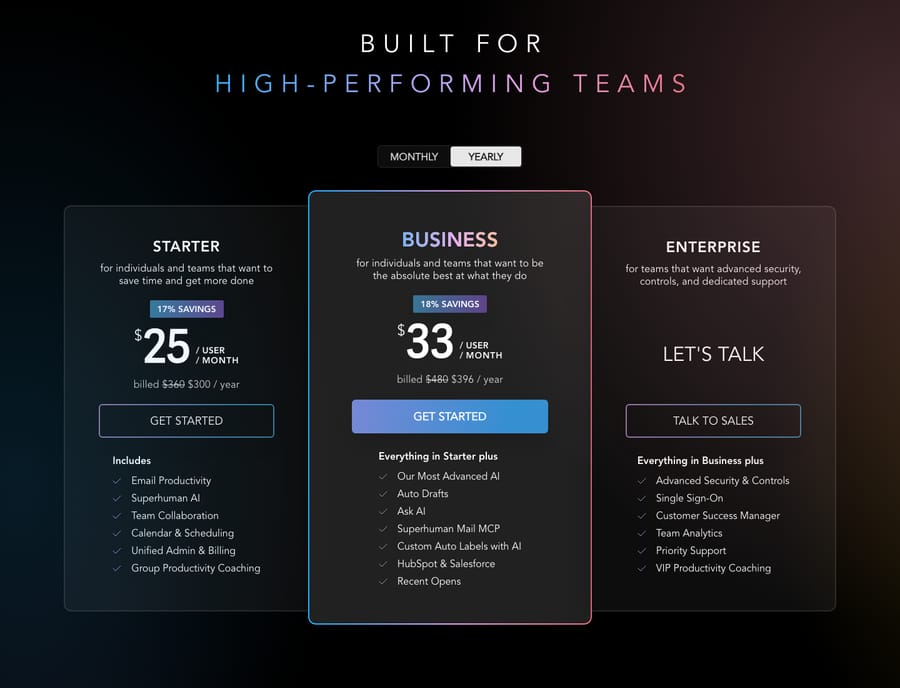
- Superhuman Starter at $25 includes Split Inbox, Write with AI, Auto Summarize, Snippets and Shared Conversations, while Business at $33 adds Auto Drafts, Ask AI and HubSpot and Salesforce integration.
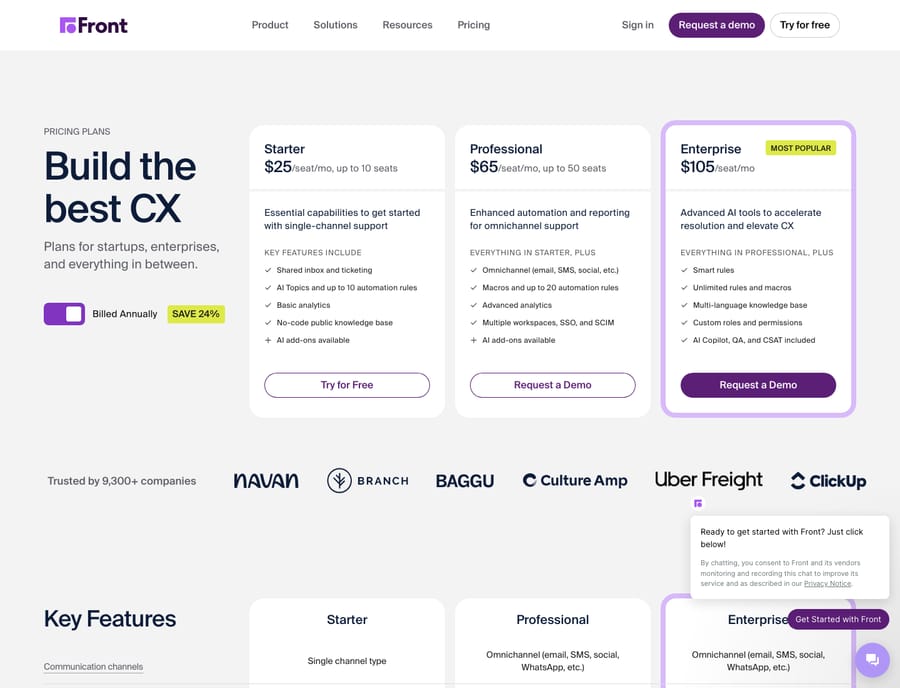
- Front Starter allows up to 10 seats, 1 workspace and 10 automation rules; Professional at $65 raises that to 50 seats, 5 workspaces and 20 rules with omnichannel inboxes.
- Front sells its AI as add-ons below Enterprise, with Copilot at $20 a seat per month and the Autopilot answering agent at $0.05 per conversation.
- Superhuman's annual billing saves 17% over monthly, and Front's annual billing saves 24% across its Starter, Professional and Enterprise tiers.
Pick Superhuman if one person needs to get through their own email faster, and pick Front if a team shares an address like support@ and needs assignment, internal comments and routing. Both start at $25 a user per month billed annually (Superhuman Starter, Front Starter), but Front's team features and omnichannel inbox start on the $65 Professional tier.
How do Front and Superhuman compare at a glance?
| Superhuman | Front | |
|---|---|---|
| Best for | Individuals and small teams who live in email and want raw speed | Support, sales, and ops teams sharing an inbox and collaborating on replies |
| Pricing entry (as of capture) | $25/user/mo (Starter, billed yearly) | $25/seat/mo (Starter, billed annually) |
| Collaboration / shared-inbox depth | Lightweight: shared conversations, team comments, shared drafts | Deep: true shared inboxes, assignment, internal comments, SLAs, workload |
| Automation | Personal automations (auto labels, auto archive, reminders, AI drafts) | Rules engine (When/If/Then), routing, assignment, macros; caps by plan |
| Channels | Email (Gmail + Outlook), on top of your existing account | Starter: one channel type (email, Front Chat or SMS). Professional and up: omnichannel |
| Standout strength | Keyboard-first speed + AI writing in your own tone | Turning a shared mailbox into an organized, assignable team workspace |
How much do Front and Superhuman cost in 2026?
Both tools land at the same entry price, which makes the comparison tempting. You are buying very different things for that number, so read past the headline.
Superhuman publishes two self-serve tiers plus a custom enterprise plan. On 24 September 2026, Superhuman's Mail plans page lists Starter at $25 per member per month and Business at $33 per member per month, billed annually (17% off monthly billing), with a "Let's talk" Enterprise tier for SSO, advanced security controls, team analytics and a customer success manager. Superhuman is now also the name of the company behind Grammarly, and every Mail plan lists Mail, Grammarly, Docs and Go together. Starter already includes the core experience: Split Inbox, keyboard-first navigation, Write with AI, Auto Summarize, Snippets, and the team features (Shared Conversations, Team Comments, Shared Drafts). Business adds Auto Drafts, Ask AI, Custom Auto Labels with AI, a Superhuman Mail MCP server, and HubSpot and Salesforce integration (Superhuman pricing).
Front publishes three tiers. On 24 September 2026, Front's pricing page lists Starter at $25 a seat per month (up to 10 seats), Professional at $65 (up to 50 seats) and Enterprise at $105, billed annually (save 24%). The jump from Starter to Professional is where Front opens up: omnichannel, up to 5 workspaces instead of 1, and 20 automation rules instead of 10. Front's AI features are add-ons below Enterprise: Copilot at $20 a seat per month, Smart QA at $20, Smart CSAT at $10, and the Autopilot answering agent at $0.05 per conversation. Enterprise includes Copilot, QA and CSAT. So a support team that wants Front plus its AI can spend well past the $25 entry line. We break the tiers down in Front pricing explained.
The takeaway: at $25 you can put either tool in front of a single user, but Superhuman keeps its full personal-productivity value at that price, while Front's team and AI muscle sits mostly on Professional and Enterprise.
Which one handles a shared team inbox better?
This is the axis that separates them, so it is worth being precise.
Front is a shared-inbox platform first. Several teammates open the same address, and Front gives everyone assignment, internal comments (visible to the team, invisible to the customer), collision detection so two people don't reply at once, SLAs, and workload views. Reviewers on G2 consistently praise exactly this: that it "removes the confusion that often comes with shared inboxes" and keeps response times down as volume grows (Front on G2). If your problem is "our team keeps stepping on each other in support@," Front is purpose-built for it. See Front's shared inbox explained for the full model.
Superhuman started as a single-player speed tool and has since added collaboration. Shared Conversations, Team Comments and Shared Drafts let you loop a colleague into an email thread and discuss it privately. That helps a small team, but it is lighter than Front: there is no true assignment-and-routing engine, no SLA tracking, and (a limitation reviewers name directly) no unified inbox for managing multiple accounts in one view (Superhuman on G2). Superhuman's collaboration is "help me on this thread," not "run our support queue."
How do their automation features differ?
Front ships a real rules engine: a When/If/Then model that triggers on inbound messages, tags, or assignments, tests conditions, and fires actions like routing, tagging, assigning (round-robin or load balancing), and templated replies. It is deterministic and dependable, though rules are capped by plan: up to 10 on Starter and 20 on Professional, unlimited on Enterprise. For a team that needs "billing emails go to the billing inbox, tagged, and assigned," that engine is the point.
Superhuman automates for the individual, not the queue: Auto Archive, Auto Reminders, Auto Labels, Auto Drafts (Business), and Voice and Tone Match for AI writing. Reviewers single out the AI: it drafts client emails "in your own tone" and remembers your preferences (Superhuman on G2). But it automates your inbox, not a shared team workflow with routing and SLAs.
Which channels does each one support?
Front Starter covers one channel type (email, Front Chat or SMS). From Professional up it is omnichannel: alongside email it pulls in SMS, WhatsApp, social and live chat, so a support team can work every channel from one place. Superhuman is email-only by design. It sits on top of your existing Gmail or Outlook account and makes that experience faster; it is not trying to be a multichannel help desk. If "we answer customers on WhatsApp and Instagram too" is on your list, that decides it.
Which is easier to learn?
Superhuman is famous for a fast, minimal interface and (historically) a guided onboarding session; the trade-off is a real learning curve on its shortcuts before the speed pays off, which reviewers mention. Front is intuitive for anyone who has used email, but the shared-inbox concepts (workspaces, rules, assignment) take some setup and admin thinking for a team to get right. Compare reviews on G2 directly, and note that the 15,873-review figure G2 shows for Superhuman covers all Superhuman products, Grammarly included, so it is not a Mail-only count (Superhuman on G2, Front on G2).
What are the pros and cons of each?
Superhuman pros: blistering keyboard-first speed; excellent AI writing that learns your tone; clean, distraction-free interface; sits on top of the Gmail/Outlook you already use; strong for high-volume individual senders (execs, founders, salespeople). Cons: premium pricing for what is fundamentally a personal email client; no true shared-queue routing, assignment, or SLAs; no unified multi-account inbox; email-only.
Front pros: best-in-class shared inbox with assignment, comments, and collision detection; a genuine rules/automation engine; omnichannel on higher tiers; strong analytics and SLAs for teams. Cons: the price and the good AI features climb quickly past the Starter tier; a learning curve for teams new to shared inboxes; reviewers note weaker two-way Outlook sync. For a wider field, see best Front alternatives and our Front app review.
Which should you choose?
- You are one person (or a founder/exec/salesperson) drowning in personal email → Superhuman. The speed and AI drafting are the whole value, and you keep your existing Gmail/Outlook.
- Your team shares support@, sales@, or hello@ and keeps double-replying → Front. Shared inboxes, assignment, and rules are exactly the problem it solves. Start with what Front is.
- A small team that mostly needs individual speed but occasionally loops each other in → Superhuman with Shared Conversations may be enough, and it is cheaper than paying for Front's team tiers.
- A growing support org that needs routing, SLAs, omnichannel, and analytics → Front, on Professional or Enterprise.
Can an AI agent answer customers on top of either one?
Neither of these ships an autonomous answering agent in the entry price, and that is fine: they are inboxes. Front sells Autopilot as a $0.05-per-conversation add-on. Whichever you choose, an AI agent layer can sit on top to actually resolve conversations rather than just organize them. That is the category of AI agents for customer service: agents that read a conversation, understand intent, pull a real order or account status through a custom tool, and draft or send a grounded reply. Macha is one such layer. It connects to the Front you already use via the Macha–Front integration and adds the resolution step on top of your shared inbox. Macha bills per ticket (one conversation, charged once however many messages it takes), from $299 a month for up to 750 tickets, with setup and monitoring by the Macha team included.
FAQ
Is Front or Superhuman better? Neither is universally better; they do different jobs. Superhuman makes an individual faster at their own email with keyboard shortcuts and AI drafting. Front makes a team good at a shared inbox with assignment, comments, and routing. Pick based on whether the problem is personal speed or team collaboration.
Can Superhuman replace a shared inbox like Front? Only lightly. Superhuman added Shared Conversations and Team Comments, which help a small team collaborate on a thread, but it lacks Front's true assignment engine, SLAs, routing rules, and unified multi-account inbox. For a real support or sales queue, Front is the fit.
How much do Front and Superhuman cost? On 24 September 2026, Superhuman lists Starter at $25 and Business at $33 per member per month billed annually, plus a custom Enterprise tier. Front lists Starter at $25, Professional at $65, and Enterprise at $105 per seat per month billed annually. Front's AI features are add-ons below Enterprise, such as Copilot at $20 a seat.
Does either one include an AI agent that answers customers automatically? Superhuman's AI drafts for the individual user; it does not autonomously resolve customer tickets. Front offers AI add-ons, including Autopilot at $0.05 per conversation. For autonomous, grounded resolution on top of your inbox, an AI agent layer like Macha connects to Front and handles that step.
Which has better reviews? Both are well reviewed on G2. Front's reviewers praise shared-inbox clarity; Superhuman's praise speed and AI writing. The 15,873 reviews G2 shows for Superhuman cover every Superhuman product, Grammarly included, so the counts are not comparable.
Ready to turn an organized inbox into resolved conversations? Start a free trial of Macha and connect it to your Front in minutes.






