





 Shopify
 Stripe
 Slack
Slack Notion
 Google Workspace
 Confluence

Where Is My Freshdesk API Key? How to Find, Use and Reset It


Your Freshdesk API key lives in your own agent profile, not in an admin console, because each key belongs to one agent and inherits that agent's permissions. Below is the exact click-path, how to use the key for Basic auth, and how to reset it safely.
Key takeaways
- The Freshdesk API key is found in each agent's Profile Settings, not in Admin, by clicking View API key and completing a reCAPTCHA challenge.
- Freshdesk's REST API v2 uses HTTP Basic Authentication, with the API key as the username and any string such as X as the password.
- Resetting a Freshdesk API key disconnects every app or integration using the old key, because each agent has only one key at a time.
- Freshdesk rate limits apply per account: Growth allows 100 API calls a minute with 50 for Ticket Create, Pro allows 400 and Enterprise allows 700.
- The Freshdesk Free plan gets 0 API calls a minute, so a key needs Growth, Pro, Enterprise, a trial or a legacy plan to work.

Your Freshdesk API key is in your own agent profile, not in Admin: click your profile picture (top right) → Profile Settings → View API key, then pass the reCAPTCHA to reveal it. You use it as the username in HTTP Basic auth against https://yourcompany.freshdesk.com/api/v2/.
| Question | Answer |
|---|---|
| Where is it? | Profile picture → Profile Settings → View API key (after reCAPTCHA) |
| Whose key is it? | One per agent; inherits that agent's role |
| How do you authenticate? | Basic auth: key as username, X as password |
| What does a reset do? | Disconnects every app using the old key |
| Rate limit | Per account: 100/min on Growth, 400 on Pro, 700 on Enterprise |
Why is the API key in your profile and not in Admin?
The first thing to understand is that in Freshdesk the API key is a per-agent credential, not an account-wide one you generate in an admin panel. Each agent has their own key, and any request made with it runs with that agent's role and permissions. Per Freshworks' How To Find Your API Key documentation, an agent with a restricted role will find the API scoped to exactly what that role can see and do — so a key belonging to a limited agent won't quietly hand out admin-level access.
This design has a nice consequence and an awkward one. The nice part: you can hand different integrations different agents' keys and each one is naturally sandboxed to that agent's scope. The awkward part: people go looking under Admin and can't find anything, because it isn't there.
How do you reveal the key in Profile Settings?
Here's the exact path. It's the same on the current Freshdesk plans and the older Blossom/Garden/Estate/Forest tiers.
- Log in to your Freshdesk support portal as the agent whose key you want.
- Click your profile picture in the top-right corner.
- Select Profile Settings.
- In the right-hand pane, click the View API key button.
- Complete the reCAPTCHA verification when prompted.
- Copy the revealed key and store it somewhere safe.
That reCAPTCHA step is deliberate, not a glitch. Freshdesk gates the reveal of the key value behind a human-verification challenge so that a hijacked browser session or an automated scraper can't silently lift the credential just by loading the settings page. It's a small friction that meaningfully raises the bar on casual theft.
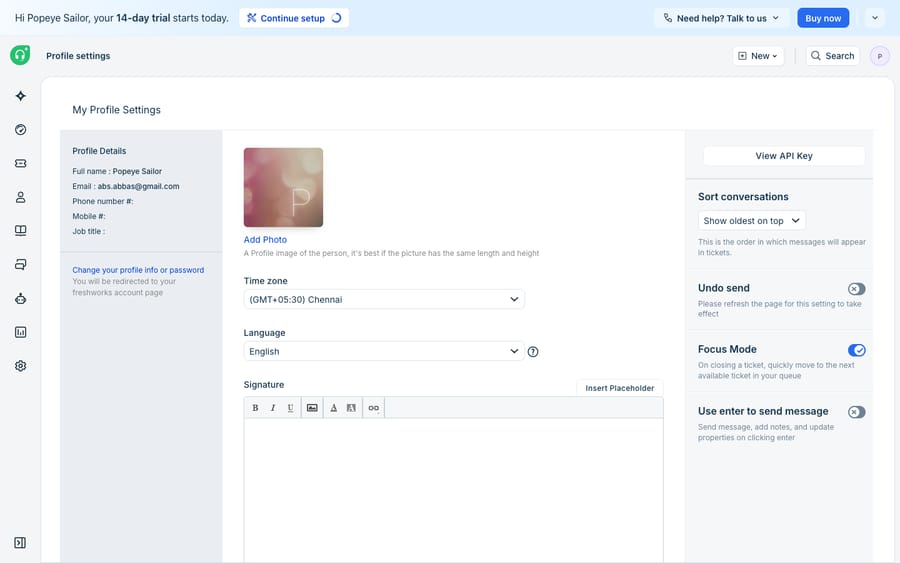
As the caption notes, the screenshot above shows the View API Key button in place but not the key itself — that's the real, expected UX. Freshdesk only renders the actual string after you clear the reCAPTCHA, so there's nothing to see (and nothing you should ever paste into a screenshot, a ticket, or a chat message).
How do you authenticate with the key?
Freshdesk's REST API v2 uses plain HTTP Basic Authentication. You pass your API key as the username and any non-empty string — conventionally the single character X — as the password. There's no OAuth 2.0 handshake for the v2 API; the key is your credential. The Freshworks developer API reference documents the base URL as https://<your-domain>.freshdesk.com/api/v2/.
A quick test to confirm the key works — fetching the first page of tickets:
curl -v -u YOUR_API_KEY:X \
  -H "Content-Type: application/json" \
  https://yourcompany.freshdesk.com/api/v2/tickets
Under the hood, curl -u Base64-encodes YOUR_API_KEY:X into an Authorization: Basic ... header. If you're building the header yourself instead of using curl's -u flag, encode that same key:X string:
{
  "request": "GET https://yourcompany.freshdesk.com/api/v2/tickets",
  "headers": {
    "Authorization": "Basic <base64 of YOUR_API_KEY:X>",
    "Content-Type": "application/json"
  }
}
A 200 OK with a JSON array of tickets means the key is valid. A 401 with an invalid_credentials error means the key is wrong, disabled, or belongs to a deactivated agent.
How and when should you reset the key?
If a key leaks — committed to a public repo, pasted in a chat, or handed to a vendor you've stopped working with — you rotate it by resetting it from the same Profile Settings screen. Be clear-eyed about the blast radius first, though. Per Freshworks' Where can I find my API key? article, resetting the key disconnects every app and integration currently using the old key — not just the one you're worried about. There's a single key per agent, so a reset is all-or-nothing for that agent.
Practical hygiene that follows from this:
- Use a dedicated service agent for integrations rather than a real person's account, so rotating a key doesn't disrupt a human's own tooling.
- Scope that agent's role to only what the integration needs — the key inherits the role, so a read-only integration should ride on a read-only agent.
- Rotate on a schedule, and immediately after anyone with access leaves.
- Never hard-code the key in client-side code, a mobile app, or anything that ships to a browser — it grants full API access at that agent's permission level.
Which plans get API access, and what are the rate limits?
The API key mechanism is simple and dependable, but it has real edges worth naming. First, plan gating: Freshworks' rate-limit table gives the Free plan 0 API calls a minute, so a key does nothing there. Freshdesk's pricing page no longer lists a free plan; its Free program covers up to 2 agents for 6 months. For the key to work you need Growth, Pro, or Enterprise, a trial, or one of the legacy Blossom/Garden/Estate/Forest plans.
Second, rate limits are account-wide and can bite fast. Per Freshworks' rate-limits documentation, the per-minute ceilings on current plans are:
| Plan | API calls / minute | Per-endpoint sub-limits (Ticket Create / Update / Tickets List / Contacts List) |
|---|---|---|
| Free | 0 (no API access) | None |
| Growth | 100 | 50 / 50 / 40 / 40 |
| Pro | 400 | 160 / 160 / 100 / 100 |
| Enterprise | 700 | 280 / 280 / 200 / 200 |
| Trial | 50 | For evaluation only |
Freshworks' developer reference also notes that even invalid requests count toward the limit, and that extra API calls can be purchased.
Those limits are per account, not per agent — spreading work across multiple agents' keys doesn't multiply your budget. Exceed them and you get an HTTP 429 with a Retry-After header telling you how long to back off. If you want the full breakdown of endpoints, auth, and pagination, we cover it in how to use the Freshdesk API.
Third — and this is the honest ceiling — a key gets you access, not behaviour. It authenticates a request; it doesn't read a ticket, understand the customer's problem, or decide what to do. Turning "I have a valid key" into "tickets get triaged, answered, and updated automatically" is exactly the build-versus-buy decision, because everything past authentication — polling, parsing, deciding, writing — is code you either write and maintain or hand to a platform.
That platform layer is where an AI agent for customer service fits, and it's worth being precise about the relationship. Macha runs on top of the Freshdesk you already use as a native connector — it is not a help desk replacement. You paste your subdomain and this same API key into Macha once, and from then on it reads and writes the same tickets your team does: drafting grounded replies, triaging by intent, and calling out to your own systems through a custom tool when an answer needs live order or account data. You don't write or babysit any of the Basic-auth plumbing above. (Macha connects to Freshdesk specifically, not Freshchat, Freshservice, or Freshcaller. Billing is per ticket, one conversation charged once however many messages it takes, never per resolution, from $299 a month for up to 750 tickets; the pricing page has the details.) If you'd rather see automation patterns before wiring anything up, how to automate Freshdesk with AI walks through the common ones.
The clean division: Freshdesk issues and scopes the key and stays the system of record; you decide whether the work on the other side of that key is yours to build or a layer to bolt on.
FAQ
Where is the Freshdesk API key located? In your agent Profile Settings, not in Admin. Click your profile picture (top right) → Profile Settings → View API key, then complete the reCAPTCHA. The key is specific to your agent account and inherits your role's permissions.
Why can't I see the key value on the settings page? Freshdesk hides the actual key behind a reCAPTCHA challenge and only reveals it after you pass verification. This prevents a hijacked session or scraper from lifting the credential just by loading the page. Seeing only a View API key button — not the key itself — is the expected behaviour.
How do I use the API key to authenticate? Freshdesk API v2 uses HTTP Basic Auth: pass the API key as the username and any dummy password (usually X). For example: curl -u YOUR_API_KEY:X https://yourcompany.freshdesk.com/api/v2/tickets. There's no OAuth 2.0 for the v2 API.
What happens when I reset my API key? Resetting generates a new key and disconnects every app or integration using the old one — not just a single app. There's one key per agent, so rotate deliberately and re-authenticate your integrations afterward.
Is the API key available on every Freshdesk plan? No. The Free plan (and the old Sprout plan) gets 0 API calls a minute. The API works on Growth (100 calls a minute), Pro (400) and Enterprise (700), on trials (50), and on the legacy Blossom/Garden/Estate/Forest plans. Confirm against your own plan.
What rate limit does my key get? Rate limits apply to the whole account, not to each key: Growth allows 100 calls a minute, Pro 400 and Enterprise 700. Exceeding the limit returns HTTP 429 with a Retry-After header.
Want the same key to do more than authenticate a script? Start a free trial of Macha and connect it to your Freshdesk in minutes.






