



 Intercom
 Shopify
 Stripe
 Slack
Slack Notion
 Google Workspace
 Confluence

How Do Freshdesk Reports and Analytics Work? (2026 Plan Guide)


Freshdesk's Analytics module gives every paid plan curated reports, but custom reports, drill-down, export and scheduled reports start on Pro. Here is what each report measures, how to use them day to day, and where an AI agent picks up once the dashboard has told you what's wrong.
Key takeaways
- Freshdesk Growth at $19 per agent per month includes curated reports only, while custom reports and widgets require the Pro plan at $55 or Enterprise at $89.
- Freshdesk Analytics refreshes its data every 30 minutes on all plans, so a backlog spike from the last few minutes will not appear in reports yet.
- Exporting to PDF or CSV, sharing and scheduling Freshdesk reports are Pro and Enterprise features, and only custom reports can be scheduled, so curated reports must be cloned first.
- Freshdesk curated reports include Helpdesk Performance, Ticket Volume, Ticket Lifecycle, Agent Performance, Group Performance, Average Handling Time and Customer Satisfaction Survey Results.
- Macha runs on top of Freshdesk as a native connector, reading the same tickets Freshdesk reports on and drafting grounded replies, triaging and triggering workflows.

Freshdesk reports live in the Analytics module and come in two kinds: curated reports, which every paid plan from Growth ($19 per agent per month billed annually) gets, and custom reports, which need Pro ($55) or Enterprise ($89). Growth teams can read the ready-made dashboards; building widgets, drilling into data, exporting, sharing and scheduling are all Pro-and-up features.
| Analytics feature | Growth ($19) | Pro ($55) | Enterprise ($89) |
|---|---|---|---|
| Curated reports | Yes | Yes | Yes |
| Custom reports and widgets | No | Yes | Yes |
| Widget-level filters | No | Yes | Yes |
| Three-level drill-down | No | Yes | Yes |
| Export (PDF/CSV), share, schedule | No | Yes | Yes |
| Data refresh | 30 minutes | 30 minutes | 30 minutes |
Prices are per agent per month on annual billing, from the Freshdesk pricing page; the feature split comes from Freshdesk's Analytics introduction, checked September 2026.
What is a Freshdesk report?
A Freshdesk report is a saved, visual read of your help-desk data: ticket volume, response and resolution times, SLA compliance, agent and group performance, and customer satisfaction, rendered as charts, tables and summary cards you can filter. It answers the question "is support actually working?" by turning the raw stream of tickets into something a team lead or ops manager can act on.
Freshdesk reporting splits into two kinds:
- Curated reports: pre-built dashboards Freshworks ships and maintains. The current set includes Helpdesk Performance, Ticket Volume, Ticket Lifecycle, Ticket Volume Trends, Timesheet Summary, Canned Response Report, Knowledge Base, Agent Performance, Group Performance, Performance Distribution, Average Handling Time, Customer Satisfaction Survey Results and Top Customer Analysis, per Freshdesk's curated reports overview. You can't edit them directly, but you can clone one into a custom report and change it from there.
- Custom reports: a builder where you pick a dataset (tickets, time entries, satisfaction ratings), choose metrics and dimensions, drop in widgets and save your own dashboard. This is where you answer questions the curated set doesn't, such as "resolution time for billing tickets, EU region, last quarter, by agent."
The metrics are the usual vocabulary of support ops: received / resolved / unresolved counts, first response time and resolution time (median or average), SLA % achieved, reopens, agent touches and CSAT. Once those live in a report, you can slice them by group, priority, channel, ticket type or any custom field you've defined.
What does the Analytics module look like?
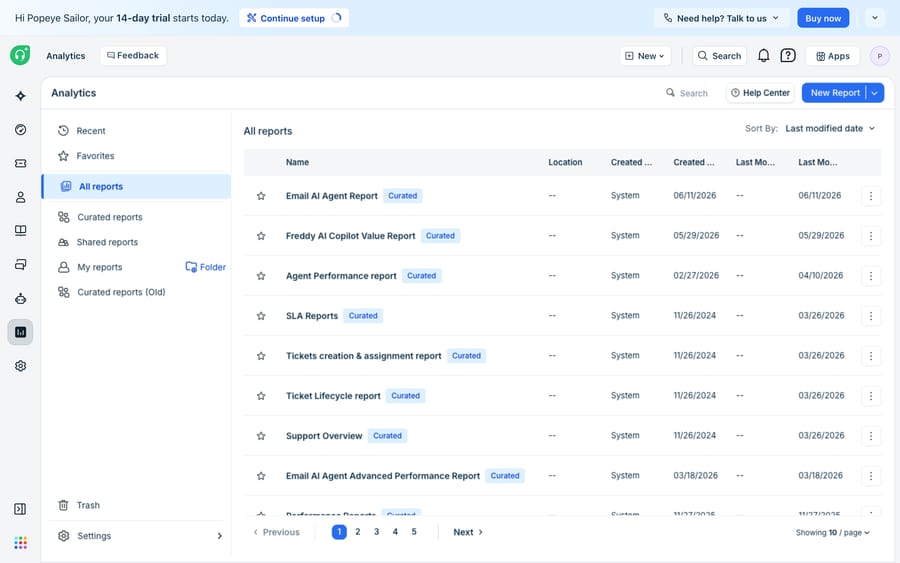
The left rail lists your reports: curated ones grouped at the top, saved custom reports below. Open any report and you get a canvas of widgets: a trend line for ticket volume, a bar chart of resolution time by group, a leaderboard for agents. A date range and filter bar sits across the top, so one report answers many questions depending on how you scope it. On Pro and Enterprise, widgets support three-level drill-down, so a bar on a chart is a few clicks from the tickets behind it.
One thing to know before you trust a chart during an incident: Freshdesk says the Analytics refresh time is 30 minutes on every plan. A backlog spike that started ten minutes ago won't show yet.
How do you use Freshdesk reports day to day?
In practice, a Freshdesk report is a filter-first exercise:
- Open a curated report for the fast answer. For "how did we do this week?", Helpdesk Performance and Ticket Volume already show received vs. resolved and the backlog. Set the date range and you're done.
- Apply filters to narrow the question. "Only high-priority, phone-channel tickets for the Billing group" is a couple of clicks, not a new report. Widget-level filters need Pro.
- Build a custom report when the curated set can't answer it. Open the builder, pick the tickets dataset, add a widget, choose a metric (say, median resolution time) and a dimension (agent, or week), and save. Stack widgets into one dashboard for your team, or clone a curated report as a starting point.
- Schedule and share. On Pro and Enterprise you can export to PDF or CSV, share reports and email them on a schedule: a daily backlog view to team leads, a weekly SLA summary to the ops lead. Freshdesk notes that only custom reports can be scheduled, so clone a curated report first if that's the one you want in inboxes.
A concrete example: to spot an SLA problem before it becomes a customer problem, open your SLA view, filter to the last 7 days and your frontline group, sort by % first-response SLA met, and drill through the worst priority band to read the tickets that breached. That loop of metric, filter, drill to tickets is most of what reporting is for.
The plan split matters more than it looks. A Growth team gets the curated dashboards and nothing it can change, schedule or export. Freshworks prices this way because reporting is one of the features managers feel most, and it's a reason to move a whole team from $19 to $55 a seat. If you need one scheduled report for leadership, price the Pro upgrade across every agent before you promise the dashboard.
Where do Freshdesk reports stop, and what can an AI agent add?
Freshdesk Analytics is good at measurement. What it doesn't do is act. A report can tell you first response time crept from 2 hours to 5, that reopens spiked on billing tickets, or that one macro is doing all the work. It can't read the tickets driving that trend, draft the replies that would have cleared them, or tell you whether an automation would have handled them safely. Reporting describes the backlog; it doesn't shrink it. No report answers "which of these incoming tickets could an agent resolve end to end tonight?"
That's the gap an AI agent layer fills. Macha runs on top of Freshdesk as a native connector. It isn't a Freshdesk replacement or a rival help desk; your tickets, SLAs and Analytics module stay where they are. Macha reads the same tickets Freshdesk reports on, then works them: drafting grounded replies, triaging and triggering workflows. (To be precise about scope: Macha connects to Freshdesk, the email and ticketing product, not to Freshchat, Freshservice or Freshcaller.)
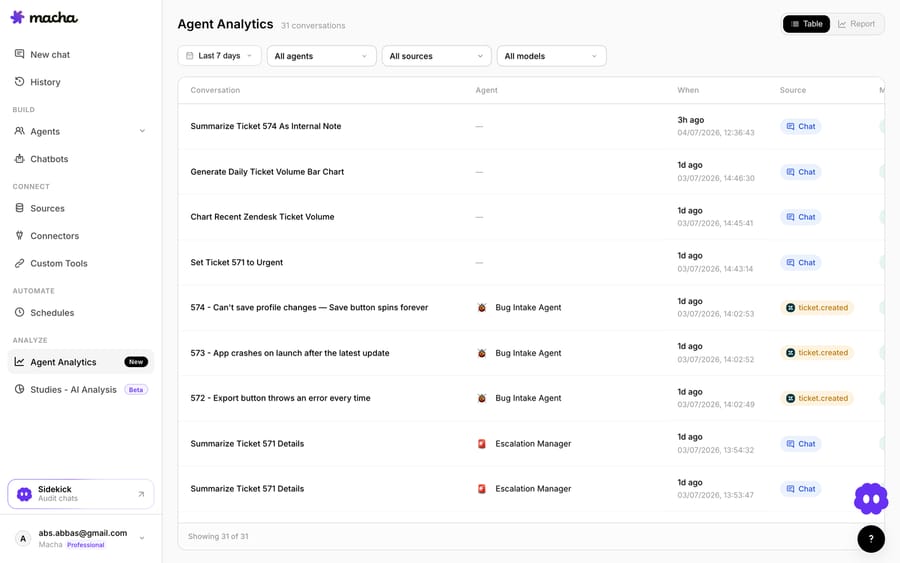
Where a Freshdesk report ends, these pieces begin. Custom tools turn any REST API (your order system, billing database, an internal status endpoint) into something the agent can call mid-ticket, so a reply rests on live data rather than a canned macro (more on custom tools). Analytics logs every agent run so you can see what the AI did, the reporting Freshdesk can't give you about automation. Studies grade an agent against your real historical tickets before it goes live, so "would this have resolved safely?" gets a graded answer instead of a guess. Sources ground answers in your help center and docs. Macha fits teams already running Zendesk, Freshdesk, Gorgias, Front, HubSpot or Intercom who want the agent working inside the ticket rather than in a separate tool.
If you're weighing whether to wire this up yourself or use a platform, we compared both paths in building an AI agent from scratch vs. a platform, and the broader landscape is covered in AI agents for customer service. For the automation side, how to automate Freshdesk with AI picks up where the reporting story leaves off.
Frequently asked questions
What is a Freshdesk report? A Freshdesk report is a saved, filterable dashboard in the Analytics module that shows help-desk metrics: ticket volume, first response and resolution times, SLA compliance, agent and group performance, and CSAT. Reports come in two forms: curated (pre-built by Freshworks) and custom (built from widgets).
What's the difference between curated and custom reports in Freshdesk? Curated reports are ready-made dashboards such as Helpdesk Performance, Ticket Volume and Agent Performance that populate the moment you open them, and they're on every plan from Growth. Custom reports let you build your own dashboards from the ticket, time-entry and satisfaction datasets, and they need Pro or Enterprise.
Can I schedule or export Freshdesk reports? Yes, on Pro and Enterprise. Those plans can export to PDF or CSV, share reports and schedule them by email. Only custom reports can be scheduled, so clone a curated report first. Growth has no export, sharing or scheduling in Analytics.
How often does Freshdesk Analytics refresh? Every 30 minutes, on all plans, according to Freshdesk's Analytics documentation. For live queue monitoring, work from ticket views rather than reports.
Can AI use my Freshdesk report data? Freshdesk's reports measure; they don't act. An AI agent layer like Macha connects natively on top of Freshdesk, reads the same tickets your reports summarize, and works them: drafting grounded replies, triaging and triggering workflows. Macha also logs every agent run in its own analytics and lets you grade an agent against real historical tickets with Studies before it touches a customer. (Macha connects to Freshdesk, not Freshchat, Freshservice or Freshcaller.)
Add AI agents to your Freshdesk
Macha reads the ticket, drafts the reply and takes the action, inside the Freshdesk you already run.





