





 Shopify
 Stripe
 Slack
Slack Notion
 Google Workspace
 Confluence

What Do Freshdesk API Errors 401, 403 and 429 Mean? Rate Limits by Plan (2026)


Freshdesk API calls fail with a 401 when the Authorization header is wrong, a 403 when the key's agent lacks permission, and a 429 when the account's per-minute budget runs out. The fixes are in the response itself: the JSON error body, the X-RateLimit headers and Retry-After.
Key takeaways
- A Freshdesk 429 means the whole account has used its per-minute API budget: 50 calls on a trial, 100 on Growth, 400 on Pro and 700 on Enterprise.
- A Freshdesk 401 means the Authorization header is missing or incorrect, such as a wrong API key or a Base64 mistake, and returns invalid_credentials in the JSON body.
- Freshdesk's Growth plan caps ticket creates and updates at 50 a minute and ticket or contact lists at 40, so one endpoint can starve while the overall budget looks healthy.
- Freshdesk returns X-RateLimit-Total, X-RateLimit-Remaining and X-RateLimit-Used-CurrentRequest on every response, and even invalid requests count towards the limit.
- On a Freshdesk 429, the Retry-After header gives the number of seconds to wait, so the retry should sleep that long plus jitter instead of retrying immediately.

A Freshdesk 401 means the Authorization header is missing or wrong, a 403 means the key's agent is not allowed to make that call, and a 429 means your account has used its per-minute API budget: 50 calls a minute on a trial, 100 on Growth, 400 on Pro and 700 on Enterprise. Every response tells you which one you hit and how much budget is left, so most of these errors are fixable from the response alone.
| Status | What Freshdesk means | First thing to check |
|---|---|---|
| 401 | Authorization header missing or incorrect | API key, Base64 encoding, header format |
| 403 | The agent behind the key isn't authorized for this call | The agent's role; try an admin key |
| 429 | The account's API rate limit is exhausted | The Retry-After header and other jobs on the account |
What do 401, 403 and 429 mean in the Freshdesk API?
Freshdesk documents a full table of status codes, but in day-to-day integration work these three account for almost every ticket a developer opens. Per Freshworks' Status codes and its reasons documentation and the API reference, here's what each one means and where to look first.
401: Authentication Failure. This is the most common and the most misdiagnosed. The docs define it plainly: the Authorization header is either missing or incorrect. In practice that means a wrong API key, a key from a different agent than you think, a typo in the Base64 encoding, or a request that forgot the auth header entirely. The JSON body returns {"code":"invalid_credentials", ...}. Note the trap: a 401 does not mean your account or endpoint is wrong. It means Freshdesk couldn't verify who you are. If the same key belongs to an agent who logs into the UI fine but the API call fails, you almost certainly have an encoding or header-format problem, not a bad key.
403: Access Denied. Authentication succeeded, but this identity isn't allowed to do this thing. The API reference says the agent whose credentials were used "was not authorized to perform this API call". Usually the agent behind the key lacks the role for the action (many admin endpoints require an admin key), or the account has hit a ceiling like an agent-seat limit. Swapping in a key from an account admin resolves most 403s.
429: Rate Limit Exceeded. "The API rate limit allotted for your Freshdesk domain has been exhausted." The limit belongs to the whole account, not to your key. The rest of this page is mostly about it, because it's the error that shows up exactly when an integration starts succeeding.
How do you read the X-RateLimit headers?
Freshdesk returns rate-limit headers on every response, success or failure, so you never have to guess how close you are. Per the Freshdesk API developer documentation, three headers matter:
X-RateLimit-Total: 700
X-RateLimit-Remaining: 426
X-RateLimit-Used-CurrentRequest: 1- X-RateLimit-Total is the total number of calls allowed per minute (here, an Enterprise account at 700).
- X-RateLimit-Remaining is how many calls you have left in the current window. This is the number to watch.
- X-RateLimit-Used-CurrentRequest is what the call you just made cost: usually 1, but some heavier operations cost more.
The practical rule: read X-RateLimit-Remaining on every response and slow down before it reaches zero, rather than firing blindly and catching 429s after the fact. The docs state that "even invalid requests count towards the rate limit", which is what the screenshot below shows: a 401 with bad credentials still decrements the counter.
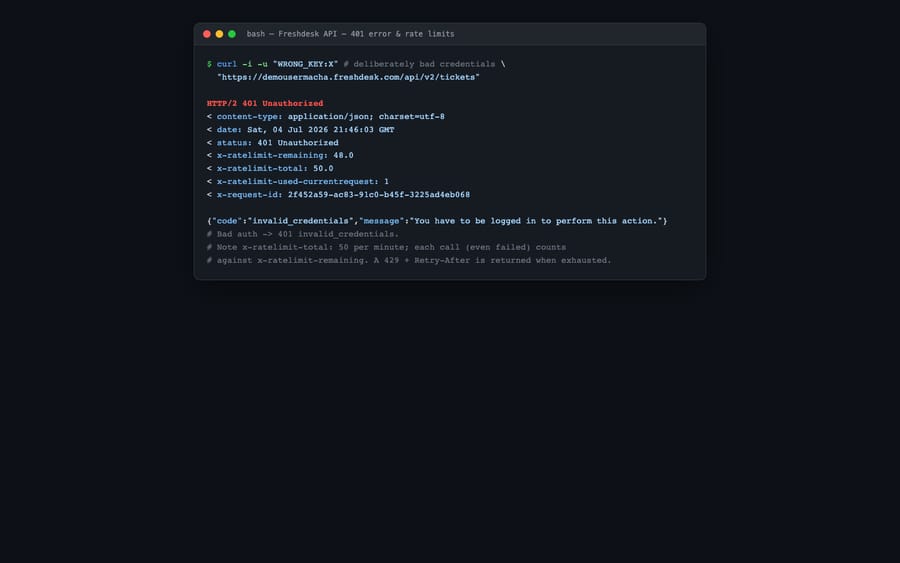
That capture is from the demousermacha demo account on a trial plan (note the x-ratelimit-total: 50): authentication failed, but the request still cost budget. If you're wiring up auth for the first time, our walkthroughs on how to find your Freshdesk API key and the broader Freshdesk API explained cover the credential side in detail.
What should your code do when Freshdesk returns a 429?
When you exhaust the limit, Freshdesk returns HTTP 429 with a Retry-After header giving the number of seconds to wait before your next request:
HTTP/1.1 429
Retry-After: 34
Don't retry immediately. Each retry is another request, and requests count against the budget whether they succeed or not. Instead:
- Catch the 429 specifically (don't lump it in with generic 5xx handling).
- Read
Retry-Afterand sleep for exactly that many seconds. Don't guess a fixed delay. - Add jitter, a small random offset on top of
Retry-After, so parallel workers don't all wake up and retry in the same instant. - Cap retries with exponential backoff for anything the header doesn't cover, so a persistent problem fails loudly instead of hammering forever.
A minimal pattern in pseudocode:
resp = call_freshdesk()
if resp.status == 429:
    wait = int(resp.headers["Retry-After"]) + random(0, 2)
    sleep(wait)
    retry()   # with a max-attempts cap
The better fix is not hitting 429 in the first place: watch X-RateLimit-Remaining, fetch the maximum 100 objects per page instead of making 100 separate calls, and cache anything that doesn't change every minute.
What are the Freshdesk API rate limits on each plan?
This is the number people most want and most often get wrong. Older guides (including an earlier version of this one) quote 200 calls a minute on Growth; the Freshdesk API reference and Freshworks' rate-limit article now list 100. The per-minute ceilings as of September 2026:
| Plan | Overall (calls/min) | Ticket create | Ticket update | Tickets list | Contacts list |
|---|---|---|---|---|---|
| Trial | 50 | n/a | n/a | n/a | n/a |
| Growth | 100 | 50 | 50 | 40 | 40 |
| Pro | 400 | 160 | 160 | 100 | 100 |
| Enterprise | 700 | 280 | 280 | 200 | 200 |
Accounts still on Freshdesk's older plans (Blossom, Garden, Estate, Forest) are limited per hour instead: 3,000 calls an hour on Blossom and Garden, 5,000 on Estate and Forest.
Two things trip people up here. First, the limit is account-wide, not per-key: every app, agent action and integration on the account draws from the same pool. Add a noisy third-party sync and your own script starts seeing 429s it never saw before. Second, there are per-endpoint sub-limits under the overall number: on Growth you can list tickets only 40 times a minute even though the overall budget is 100, so a paginating export can starve on one endpoint while the account budget looks healthy. Check the live table against your own plan before sizing a job.
What doesn't the Freshdesk API do for you?
Freshdesk's API is well-behaved. The status codes are documented, the error bodies are machine-parseable (a 400 returns an errors array naming the exact field and a code like missing_field), and the rate-limit headers hand you everything you need to stay under the ceiling. For a deterministic integration, that's about as good as REST APIs get.
But the API gives you plumbing (read a ticket, write a reply, list contacts) and leaves the reasoning to you. It won't decide whether a reply is correct, won't understand what the customer is asking, and won't know which of your internal systems holds the answer. Every 429-aware retry loop and pagination cursor you write is glue code that has nothing to do with the support problem itself.
That's where an AI agent layer fits, and it's worth understanding the category of AI agents for customer service before reaching for one. Macha is one such layer: it runs on top of the Freshdesk you already use as a native connector and does not replace your help desk or its API. You connect Macha to Freshdesk with your subdomain and API key, and it handles the same calls you'd otherwise script by hand (auth, pagination, rate-limit-aware backoff) while reading and writing the same tickets. On top of that it does the reasoning the raw API can't: drafting grounded replies, triaging by intent, and reaching into your own systems through a custom tool that wraps a REST API into something an agent can call. If you're weighing scripts against a platform, our guide on how to automate Freshdesk with AI walks the tradeoff. (Macha's connector is for Freshdesk specifically, not Freshchat, Freshservice or Freshcaller. Macha bills per ticket, starting at $299 a month for up to 750 tickets: one conversation, charged once however many messages it takes, never per resolution.)
The division of labour: let Freshdesk's API stay the system of record, and put an agent on top for the part the status codes and headers can't do, which is understanding and answering the ticket.
FAQ
What causes a 401 invalid_credentials error in Freshdesk? A 401 means the Authorization header is missing or incorrect: a wrong or mistyped API key, a key belonging to a different agent, or a Base64-encoding mistake. It does not mean your endpoint or account is wrong. If the agent can log into the Freshdesk UI but the API call fails, suspect a header-format or encoding problem rather than a bad key.
What is the difference between a 401 and a 403? A 401 is an authentication failure: Freshdesk can't verify who you are. A 403 is authorization: it verified you, but the agent behind the key isn't allowed to perform this call, often because it lacks an admin role or an account limit has been reached.
What are the Freshdesk API rate limits? Limits are per minute and account-wide: 50 calls a minute on a trial, 100 on Growth, 400 on Pro and 700 on Enterprise, with per-endpoint sub-limits underneath (Growth allows 40 ticket-list calls a minute). Accounts on older plans such as Blossom or Estate are limited per hour instead.
How do I handle a 429 Too Many Requests error? Catch the 429, read the Retry-After response header for the number of seconds to wait, sleep for that long plus a little random jitter, and cap your retries with exponential backoff. Better still, watch X-RateLimit-Remaining on every response and slow down before you hit zero.
Do failed API requests count against the Freshdesk rate limit? Yes. Freshdesk's API reference says even invalid requests count towards the rate limit, so a loop retrying a 401 or 400 burns budget that your working jobs need.
Can I add AI to Freshdesk without replacing it or writing rate-limit code? Yes. An AI agent layer like Macha connects to Freshdesk as a native connector and runs on top of your existing help desk. It handles the API plumbing (auth, pagination, backoff) for you, while Freshdesk stays the system of record for your tickets.
Ready to skip the retry loops and let agents work your Freshdesk tickets directly? Start a free trial of Macha and connect it to your Freshdesk in minutes.






