





 Shopify
 Stripe
 Slack
Slack Notion
 Google Workspace
 Confluence

How Does the Freshdesk API Work? Auth, Rate Limits and Endpoints (2026)


The Freshdesk REST API (v2) authenticates with your API key as the Basic auth username and caps calls per minute by plan, from 100 on Growth to 700 on Enterprise. Most production problems come from that shared per-account limit, so knowing the headers and sub-caps saves an outage.
Key takeaways
- The Freshdesk API v2 authenticates with HTTP Basic auth, using your API key as the username and any non-empty string such as X as the password.
- Freshdesk API rate limits are per minute and per account: 100 calls on Growth, 400 on Pro, 700 on Enterprise, 50 on trials and none on Free.
- On the Freshdesk Growth plan, ticket create and ticket update are each capped at 50 calls a minute, and even invalid requests count towards the limit.
- Every Freshdesk API response carries X-RateLimit-Total, X-RateLimit-Remaining and X-RateLimit-Used-CurrentRequest headers, and a 429 response adds Retry-After with the seconds to wait.
- Freshdesk list endpoints return 30 objects per page by default and up to 100 with per_page, while search stops at page 10, or 300 records.

The Freshdesk API is a REST API (v2) at https://{your-domain}.freshdesk.com/api/v2/, authenticated with your API key as the HTTP Basic username and any string such as X as the password, and rate-limited per minute by plan: 100 calls on Growth, 400 on Pro, 700 on Enterprise and 50 on a trial. The Free plan gets no API access. The limit is shared by every integration on the account, and even invalid requests count against it.
| Item | Value |
|---|---|
| Base URL | https://{your-domain}.freshdesk.com/api/v2/{resource} |
| Auth | HTTP Basic: API key as username, X as password |
| Rate limit | Per minute, per account: Growth 100, Pro 400, Enterprise 700, trial 50, Free 0 |
| Page size | 30 by default, 100 maximum with per_page |
| Search | 30 results a page, pages 1 to 10 (300 results) |
| Rate-limit error | 429 with a Retry-After header |
What can the Freshdesk API do, and what can't it?
The API is a full CRUD surface over the objects you see in the Freshdesk UI. You can create, read, update, and delete tickets, read and write contacts and companies, manage agents and groups, pull ticket conversations (the full reply thread), inspect ticket fields including your custom ones, and run server-side searches. Anything an agent can do to a ticket in the browser, you can generally script.
What it is not is a reasoning engine. The API will faithfully return a ticket's JSON or accept a new one, but it has no opinion about what the ticket means, what the right reply is, or which of your other systems holds the answer. It moves structured data in and out — the judgement stays with whatever (or whoever) is calling it. That distinction matters later when we talk about layering intelligence on top.
What is the Freshdesk API base URL?
Every request goes to your account's own subdomain, under the /api/v2/ path. Per the Freshdesk developer documentation, the shape is:
https://{your-domain}.freshdesk.com/api/v2/{resource}So listing tickets on an account at demousermacha.freshdesk.com is a GET to https://demousermacha.freshdesk.com/api/v2/tickets. The v2 in the path is the current stable version; v1 is legacy and should not be used for new work.
How do you authenticate with the Freshdesk API?
Freshdesk v2 uses HTTP Basic Authentication, but with a twist that confuses newcomers: your API key goes in the username field, and the password can be any non-empty string. X is the conventional throwaway value. There is no OAuth flow and no password to manage; the API key alone identifies and authorises you.
A minimal authenticated GET with curl looks like this:
curl -v -u YOUR_API_KEY:X \
  -H "Content-Type: application/json" \
  -X GET 'https://your-domain.freshdesk.com/api/v2/tickets'
Under the hood, -u YOUR_API_KEY:X base64-encodes the pair into an Authorization: Basic ... header. Your key lives in your agent Profile Settings. Freshdesk gates the reveal behind a reCAPTCHA, and we cover exactly where to click in how to find your Freshdesk API key. Treat the key like a password: it inherits your agent permissions, so a key belonging to an admin can do far more than one belonging to a restricted-scope agent.
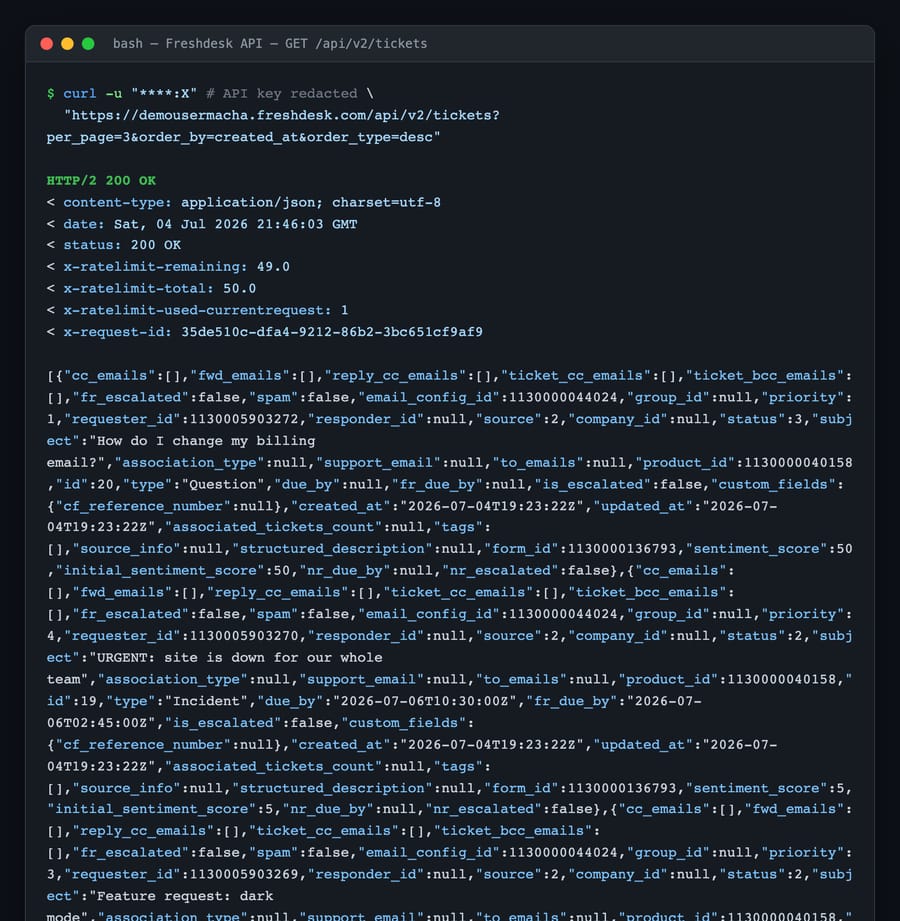
Here is a real, successful call against a live demo account: a GET /api/v2/tickets returning 200 with the rate-limit headers and JSON body intact:
What are the Freshdesk API rate limits?
This is the part that breaks integrations in production. Freshdesk enforces a per-minute call limit (it moved from an older per-hour model), and the ceiling depends on your plan. Per Freshdesk's support article on API rate limits (updated 6 August 2026) and the developer reference, checked 24 September 2026, the current figures are:
| Plan | Calls / minute | Notes |
|---|---|---|
| Free | 0 | No API access |
| Growth | 100 | Ticket create 50, ticket update 50, tickets list 40, contacts list 40 |
| Pro | 400 | Ticket create 160, ticket update 160, tickets list 100, contacts list 100 |
| Enterprise | 700 | Ticket create 280, ticket update 280, tickets list 200, contacts list 200 |
| Trial | 50 | Applies during any trial period |
Older accounts may still be on legacy limits; Freshdesk says to email [email protected] to switch to the per-minute limits or to buy extra API calls. Three properties bite people:
- The limit is per account, not per key. Every script, integration, and installed app that touches your Freshdesk draws from the same per-minute bucket. Add a marketing sync and a BI export on top of your AI tool and they compete. Some custom apps consume API calls too.
- Even failed requests count. Freshdesk's docs say even invalid requests count towards the limit, so a
401from a bad key or a400from a malformed body still consumes a call. Validate before you send. - Some endpoints have their own sub-limits. On Growth, for example, ticket create and update are capped at 50 a minute each even though the account ceiling is 100.
Which headers show how much of the rate limit is left?
You never have to guess where you stand. Freshdesk tells you on every response via headers:
X-RateLimit-Total: your account's ceiling for the window.X-RateLimit-Remaining: how many calls are left.X-RateLimit-Used-CurrentRequest: how many calls this request consumed (embedding extra information in a response costs more than one).Retry-After: present only on a429, telling you how many seconds to back off.
The screenshot above shows x-ratelimit-remaining: 49 against an x-ratelimit-total: 50 on that trial account; that one call spent a single unit. A well-behaved client watches X-RateLimit-Remaining and slows itself before it hits zero, rather than hammering the API and reacting to 429s after the fact.
Which Freshdesk API endpoints will you use first?
Most integrations live in a handful of resources. The essentials:
# List tickets (paginated, 30 per page by default)
GET  /api/v2/tickets

# Create a ticket
POST /api/v2/tickets

# Update a ticket (e.g. change status or priority)
PUT  /api/v2/tickets/{id}

# Pull the full conversation thread on a ticket
GET  /api/v2/tickets/{id}/conversations

# Contacts and companies
GET  /api/v2/contacts
GET  /api/v2/companies

# Discover fields, including custom ones
GET  /api/v2/ticket_fields

# Server-side search
GET  /api/v2/search/tickets?query="status:2"
A minimal ticket-creation body is just JSON: a subject, a description, a requester, a status, and a priority:
curl -v -u YOUR_API_KEY:X -H "Content-Type: application/json" \
  -X POST 'https://your-domain.freshdesk.com/api/v2/tickets' \
  -d '{
    "subject": "Order status question",
    "description": "Where is my order #4471?",
    "email": "[email protected]",
    "priority": 1,
    "status": 2
  }'
We walk through a real, verified version of that call, with the ticket it produced open in the UI, in how to create a ticket with the Freshdesk API.
Pagination is easy to get wrong. List endpoints return 30 objects per page by default; you can raise that to a maximum of 100 with per_page; larger values return an error. The search/filter endpoint is stricter: 30 results a page and pages 1 to 10 only, so 300 records per query. When more pages exist, Freshdesk returns a link header pointing at the next page; follow that rather than guessing offsets.
Which Freshdesk API error codes should you handle?
The API uses standard HTTP status codes and returns a structured JSON error body with a code, a human message, and often the offending field. The ones you will actually hit:
- 400 Bad Request: a validation problem in your payload (wrong type, missing required field). Read the
fieldandmessageto fix it. - 401 Unauthorized: missing or wrong API key. The body says
invalid_credentials. - 403 Forbidden: the key is valid but the agent lacks permission for that action.
- 404 Not Found: the resource (or the whole path) doesn't exist.
- 429 Too Many Requests: rate limit hit; read
Retry-Afterand back off. - 500: a server-side error on Freshdesk's end; retry with backoff.
We dig into the exact JSON shapes and a real 401 in Freshdesk API errors and rate limits.
Where does the raw Freshdesk API stop being enough?
Credit where it's due: the Freshdesk API is clean, predictable, and thoroughly documented. For moving data in and out — imports, exports, reporting, filing tickets from other systems — it's exactly what you want, and you rarely need anything more.
But the API is deliberately dumb, in the good sense. It hands you a ticket's JSON; it will not read that ticket, understand the customer's actual problem, and decide what to do. It enforces no logic of its own beyond validation. So the moment your goal shifts from "sync this data" to "answer this question," you're on the hook to build the hard part yourself: the reasoning, the retrieval from your other systems, the drafting, and — around all of it — the auth handling, pagination loops, retry-on-429 backoff, and rate-limit accounting we just covered. That's a real amount of engineering, and the per-account rate limit means every integration you add fights the same 100-to-700 calls-a-minute budget.
Some of this is also plan-gated: Free (Freshdesk's Free Program, for up to 2 agents for 6 months) has no API access at all, and moving from 100 calls a minute on Growth to 400 or 700 means paying for Pro or Enterprise. That is a normal SaaS shape, but it's the reality you're building against.
This is the seam where an AI agent layer fits, and it's worth understanding the build-versus-buy tradeoff before writing that plumbing yourself. The broader category of AI agents for customer service exists to do the reasoning the raw API can't. Macha is one such layer: it runs on top of the Freshdesk you already use as a native connector. It does not replace your help desk or its API. You connect Macha to Freshdesk with your subdomain and API key (the same credentials from this guide), and it handles the auth, pagination, and rate-limit backoff for you, then reads and writes the same tickets your integrations already touch — drafting grounded replies and looking up order or account status through a custom tool that turns one of your REST APIs into something the agent can call. (Macha's connector is for Freshdesk specifically, not Freshchat, Freshservice or Freshcaller. Macha bills per ticket, starting at $299 a month for up to 750 tickets: one conversation, charged once however many messages it takes, never per resolution. See the pricing breakdown.)
The clean division of labour: keep the Freshdesk API as your reliable read/write plane, and let an agent layer own the reasoning and the HTTP housekeeping on top of it.
FAQ
How do I authenticate with the Freshdesk API? Use HTTP Basic Authentication with your API key as the username and any non-empty string (commonly X) as the password — for example curl -u YOUR_API_KEY:X. There's no OAuth flow; the key alone authorises the request and inherits your agent's permissions. You'll find the key in your Freshdesk agent Profile Settings.
What are the Freshdesk API rate limits? They're per-minute and per-account, and depend on your plan: 100 calls a minute on Growth, 400 on Pro and 700 on Enterprise, with no API access on Free and trials capped at 50 a minute. The limit is shared across every integration on the account, ticket create, update and list endpoints have their own sub-caps, and even invalid requests count. Accounts not yet on per-minute limits can ask Freshdesk support to switch.
How many results does a Freshdesk API list call return? List endpoints return 30 objects per page by default and up to 100 with per_page. The search endpoint returns 30 results a page and stops at page 10, so one query can return at most 300 records; narrow the query and run it again to go further.
Which headers show my remaining rate limit? Every response includes X-RateLimit-Total (your ceiling), X-RateLimit-Remaining (calls left), and X-RateLimit-Used-CurrentRequest (what this call cost). On a 429, a Retry-After header tells you how many seconds to wait before retrying.
What's the base URL for the Freshdesk API? https://{your-domain}.freshdesk.com/api/v2/{resource}: always your own subdomain, over HTTPS, on the v2 path. For example, https://your-domain.freshdesk.com/api/v2/tickets to list tickets.
Can I add AI to Freshdesk through the API without replacing Freshdesk? Yes. An AI agent layer like Macha connects to Freshdesk using the same subdomain-and-API-key credentials from this guide and runs on top of your existing help desk. It doesn't replace it. It handles the auth, pagination, and rate-limit backoff for you, and reads and writes the same tickets your other integrations already touch.
Ready to build on your Freshdesk API without writing the plumbing? Start a free trial of Macha and connect it to your Freshdesk in minutes.






