





 Shopify
 Stripe
 Slack
Slack Notion
 Google Workspace
 Confluence

Front vs Tidio (2026): Which Is Better for a Small Support Team?


Front suits email-first teams of two or more that need a shared inbox and pay per seat, while Tidio suits small sites that live on website chat and pay per conversation. Here are the current prices, automation limits, channels and trade-offs for both.
Key takeaways
- Front suits email-first teams of two or more, while Tidio suits small sites that handle most support through website chat and want a free starting plan.
- Front charges $25, $65 or $105 a seat a month billed annually for Starter, Professional and Enterprise, so the bill tracks headcount rather than conversation volume.
- Tidio's free plan covers 50 billable conversations and 10 seats, Starter costs $24.17 a month for 100 conversations, and Plus now starts at $300 a month plus usage.
- Front caps automation at 10 rules on Starter and 20 on Professional, with unlimited rules and macros on Enterprise.
- Tidio says its Lyro AI agent resolves 67% of inquiries on average, and Lyro as an add-on starts at $32.50 a month for 50 conversations.

Front is the better pick for an email-first team of two or more that needs a collaborative shared inbox, at $25, $65 or $105 a seat a month billed annually; Tidio is the better pick for a small site that lives on website chat, with a free plan covering 50 billable conversations and paid plans from $24.17 a month (both pricing pages checked 24 September 2026). The deeper difference is the billing unit: Front charges per seat, so cost tracks headcount, and Tidio charges per conversation, so cost tracks volume.
How do Front and Tidio compare at a glance?
| Front | Tidio | |
|---|---|---|
| Best for | Teams that live in email and want a shared, collaborative inbox across channels | SMBs and e-commerce sites that want live chat plus a chatbot/AI agent on the website |
| Pricing entry | Starter $25/seat/mo (billed annually) | Free $0 (50 conversations); Starter $24.17/mo (billed annually, 100 conversations) |
| Billing unit | Per seat | Per billable conversation |
| Collaboration / shared-inbox depth | Deep: internal comments, assignment, shared drafts, @mentions | Lighter: chat assignment and departments, less email-team workflow |
| Automation | Rules engine (When/If/Then): up to 10 rules on Starter, 20 on Professional, unlimited on Enterprise | Flows (visual chatbot builder) + Lyro AI agent + ticketing automations |
| Channels | Email, SMS, WhatsApp, social, Front Chat (omnichannel on Professional+) | Website live chat, Messenger, Instagram, WhatsApp, email |
| Standout strength | Team collaboration on a shared inbox | Website chatbot + Lyro AI resolving routine questions in-widget |
Prices checked on 24 September 2026 on each vendor's pricing page; the screenshots below were captured on 5 July 2026. Always confirm current numbers before you buy.
How much do Front and Tidio cost?
The two products bill on completely different logic, which is the first thing to internalize.
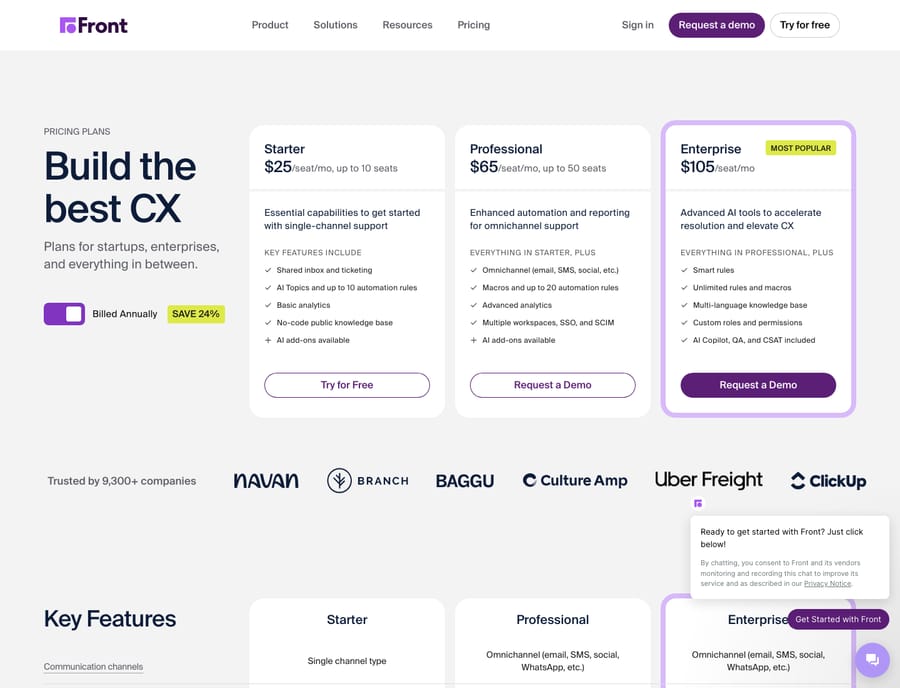
Front is priced per seat. Per Front's pricing page, the tiers are Starter at $25/seat/month, Professional at $65/seat/month, and Enterprise at $105/seat/month, all billed annually (the annual toggle advertises a 24% saving). Starter caps you at a single channel type and up to 10 seats; Professional unlocks omnichannel and up to 50 seats; Enterprise has no seat cap. Front's AI features are add-ons on the lower tiers: Copilot and Smart QA are $20/seat/month each, Smart CSAT is $10/seat/month, and the Autopilot answering agent starts at $0.05 per conversation, with Copilot, Smart QA and Smart CSAT included on Enterprise. For a full breakdown, our Front pricing explained guide walks through what unlocks where.
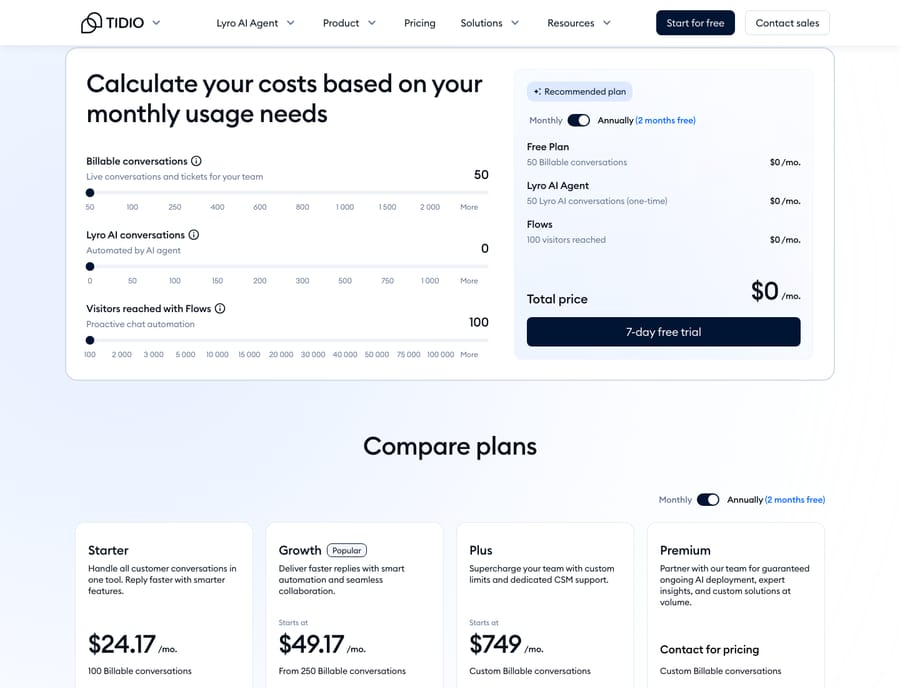
Tidio is priced per conversation, not per seat, which changes the math entirely. Per Tidio's pricing page, the plans are a Free tier ($0, 50 billable conversations, up to 10 seats), Starter at $24.17/month (100 conversations), Growth from $49.17/month (from 250 conversations), and Plus from $300/month plus monthly usage for larger accounts, with a custom Premium tier above that. The Starter and Growth figures are the annual-billing prices. Tidio's AI is metered too: Free and Starter include 50 one-off Lyro AI agent conversations, Lyro as an add-on starts at $32.50/month for 50 conversations, and the Flows chatbot builder is metered by visitors reached (100 a month on Free and Starter).
The practical read: a solo operator on a low-traffic site can get real value from Tidio's Free or Starter tier, whereas Front's per-seat floor means it earns its keep once two or more people share the inbox. Three Front Starter seats cost $75 a month billed annually, the same whether you handle 50 conversations or 5,000. On Tidio the seat count barely matters and the conversation count does. That's the incentive to watch: a per-conversation vendor makes more money as your volume grows, and the most common review complaint about Tidio is hitting the conversation ceiling sooner than expected and being pushed to upgrade or buy add-ons.
Which is better for shared-inbox collaboration?
This is Front's home turf. Front is built as a collaborative shared inbox: multiple teammates see the same mailbox, conversations get assigned to a clear owner, and you can leave internal comments and build shared drafts on a message instead of forwarding and CC-chaining. On G2, reviewers consistently praise exactly this: the shared inbox, @mentions, and clear ownership that stop messages being answered twice or dropped (Front reviews on G2). If your support, sales, or ops team lives in email and trips over each other, this collaboration layer is the reason to choose Front. Our Front shared inbox explained piece covers the model in depth.
Tidio's collaboration is lighter and framed around chat. You get automatic chat assignment, departments, and macros on the Growth tier, which is enough for a small team fielding website conversations, but it isn't trying to be an email-team workspace. Reviewers note the reporting is comparatively thin and the chatbot-to-human handover can feel rough (Tidio reviews on G2). If shared-inbox collaboration across email threads is the core of your job, Tidio will feel shallower than Front here.
How do Front's rules compare with Tidio's Flows and Lyro?
Both automate, but the automations look different because the tools do.
Front's automation is a rules engine. You build When / If / Then rules: when a message arrives, if it matches conditions, then route, tag, assign, or auto-reply. Front's pricing page caps Starter at 10 automation rules and Professional at 20, with unlimited rules and macros on Enterprise. It's deterministic and dependable: great for routing and tagging, but it matches on keywords, not meaning.
Tidio's automation is visitor-facing. Flows is a visual, drag-and-drop chatbot builder for pre-chat qualification, quote requests, and catching missed conversations, and Lyro is Tidio's AI agent that answers routine questions from your knowledge base. Tidio says Lyro resolves 67% of inquiries on average (Tidio's Lyro page), which is a vendor figure, and its custom Premium plan guarantees a 50% Lyro resolution rate. If your goal is to deflect repetitive website questions before a human is involved, Tidio's automation is aimed squarely at that; if your goal is to route and organize inbound email traffic, Front's is.
Which channels does each tool cover?
Front is omnichannel from the inbox outward. Starter limits you to one channel type, but Professional and Enterprise bring email, SMS, WhatsApp, social, and Front Chat into a single unified inbox, the whole point being that every channel lands in the same collaborative workspace.
Tidio is web-and-messaging-first. Its core is the website live-chat widget, extended to Messenger, Instagram, WhatsApp, and email. Reviewers like how quickly the widget goes live and how it centralizes social DMs that would otherwise need separate monitoring (Tidio reviews on Capterra). The gap is telling: Front's email handling is deeper and more team-oriented; Tidio's live-chat-and-bot experience on the website is more polished. Choose based on where your customers actually reach you.
Which is faster to set up?
Tidio wins on time-to-live. Reviewers repeatedly call out how fast the widget goes live and how easy basic live chat is to run; you can be chatting with visitors the same afternoon. Front is also described as intuitive once you're used to it, but there's a learning curve around the shared-inbox concept if your team has only ever used personal mailboxes, and reviewers ask for more in-app guidance (Front reviews on Capterra). Two honest snags to weigh: Front reviewers flag that two-way Outlook sync is no longer clean and that some integrations (e.g. HubSpot) are hit-or-miss; Tidio reviewers flag that the widget can affect page load speed and that useful automation lives behind paid tiers.
What are Front's pros and cons?
Pros
- Deep shared-inbox collaboration: internal comments, assignment, shared drafts, @mentions.
- Omnichannel on Professional+ (email, SMS, WhatsApp, social) in one workspace.
- Deterministic, dependable rules engine plus macros for routing and tagging.
- Clean, well-liked interface with responsive support and good docs.
Cons
- Per-seat pricing gets expensive for smaller teams, and AI features are mostly add-ons on lower tiers.
- Two-way Outlook sync is no longer reliable per recent reviews.
- Some integrations (HubSpot noted) can be inconsistent.
- Learning curve for teams new to the shared-inbox concept.
What are Tidio's pros and cons?
Pros
- Fast, polished website live-chat widget that goes live quickly.
- Strong chatbot tooling: Flows builder plus the Lyro AI agent for routine deflection.
- Free tier and low per-conversation entry, a good fit for solo operators and small e-commerce sites.
- Centralizes social DMs (Instagram, Messenger, WhatsApp) alongside chat.
Cons
- Conversation limits are hit sooner than expected; add-ons stack up and pricing feels layered.
- Lighter shared-inbox/email collaboration and thinner reporting than Front.
- Chatbot-to-human handover can be rough.
- Widget may affect website load speed for some users.
Which should you choose?
- You're an email-first support, sales, or ops team of 2+. Choose Front. The collaborative shared inbox, ownership, and rules are exactly what stops shared mailboxes descending into chaos.
- You're a solo operator or small e-commerce site that lives on website chat. Choose Tidio. The free/low-cost entry, fast widget, and Lyro AI agent deflecting routine questions are the better spend.
- Your customers mostly email you. Front. Your customers mostly chat from your website. Tidio.
- You want predictable per-head costs. Front. You have spiky, seasonal conversation volume and want to start free. Tidio, watching the conversation ceilings.
If neither is a perfect fit, our best Front alternatives roundup covers the wider field, and what is Front app plus our Front app review go deeper on Front specifically.
Can you add an AI agent on top of Front or Tidio?
Whichever inbox you land on, the reasoning-heavy work (reading a customer's actual question, checking their order or account, and writing a tailored answer) is a different job from routing and live chat. That's where an AI agent for customer service fits. Macha is that layer for teams on Zendesk, Freshdesk, Gorgias, Front, HubSpot or Intercom, and Front is one of them: see the Macha–Front integration. Tidio isn't among Macha's help-desk connectors, so on Tidio the AI layer is Lyro. On Front, Macha's agent reads a routed or incoming conversation, understands intent rather than keywords, and drafts or sends a grounded reply, pulling real order and account data through a connector or a custom tool. Macha bills per ticket, from $299 a month for up to 750 tickets: one conversation, charged once however many messages it takes, not per seat, so the cost tracks the volume you handle rather than the size of your team.
FAQ
Is Front or Tidio better for a small team? It depends on channel. For an email-first team of two or more sharing an inbox, Front's collaboration (comments, assignment, shared drafts) is the better fit. For a solo operator or small e-commerce site that mostly handles website chat, Tidio's free/low-cost entry and chatbot are usually the smarter spend.
How is Front's pricing different from Tidio's? Front bills per seat: $25/$65/$105 per seat/month across Starter, Professional, and Enterprise, billed annually. Tidio bills per conversation: Free (50 conversations), then Starter $24.17/mo and Growth from $49.17/mo billed annually, with Plus from $300/mo plus usage (checked 24 September 2026). Front's cost is predictable per head; Tidio's scales with conversation volume.
Does Tidio have a shared inbox like Front? Tidio has chat assignment, departments, and email in one place, but its collaboration is lighter and chat-centric. Front is purpose-built as a collaborative shared inbox for email-heavy teams, with deeper internal comments, ownership, and shared drafts.
Which one has better AI and chatbots? Tidio leads on website chatbot automation with its Flows builder and the Lyro AI agent for in-widget deflection. Front's AI (Copilot and Smart QA at $20/seat/month each, Autopilot from $0.05 per conversation) is add-on-based and oriented around the shared inbox. Your channel, website chat or email, should drive the choice.
Can I add AI on top of Front or Tidio instead of switching? On Front, yes. Macha runs on Zendesk, Freshdesk, Gorgias, Front, HubSpot or Intercom, Front included, and works on top of the help desk, reading conversations, understanding intent, and drafting or sending grounded replies without replacing the tool. Tidio isn't a Macha help-desk connector, so on Tidio your AI option is Lyro.
Ready to add an AI agent on top of your inbox? Start a free trial of Macha with $50 of free usage and no credit card, and connect it in minutes.






