





 Shopify
 Stripe
 Slack
Slack Notion
 Google Workspace
 Confluence

How Do You Create a Ticket with the Freshdesk API? (2026)


Creating a Freshdesk ticket over the API is one authenticated POST to /api/v2/tickets, but the requester field, the integer status and priority codes, and the attachment and custom-field syntax all have to be exact. Below is a working curl call, the errors you will see, and the current per-plan rate limits.
Key takeaways
- A Freshdesk ticket is created with one authenticated POST to /api/v2/tickets, using the API key as the basic-auth username and at least one requester identifier such as email.
- Freshdesk status, priority and source fields must be sent as integers, for example priority 1 for Low up to 4 for Urgent, or the call returns invalid_value.
- Attaching files to a Freshdesk ticket requires switching the request to multipart/form-data, and total attachment size per request is capped at 20 MB.
- Freshdesk custom fields go inside a custom_fields object with a cf_ prefix, so a field labeled Order Region becomes cf_order_region.
- Freshdesk's Growth plan allows 100 API calls a minute with 50 ticket creates, Pro allows 400 with 160, Enterprise 700 with 280, and the Free plan gets 0.

To create a ticket via the Freshdesk API, send one POST to /api/v2/tickets with your API key as the basic-auth username, a requester identifier such as email, and integer codes for status and priority (Open is 2, Medium is 2). A success returns HTTP 201 with the new ticket id. The API needs a paid plan or a trial: Freshdesk's Free plan gets 0 API calls a minute.
What endpoint and authentication does the Freshdesk API use?
Every ticket you create goes to the same place. Per the Freshdesk API reference, the endpoint is:
POST https://<your-domain>.freshdesk.com/api/v2/ticketsAuthentication is HTTP basic auth, but with a twist: your API key is the username and the password can be any dummy string (the convention is X). So the -u yourapikey:X you'll see in every curl example isn't a typo — Freshdesk ignores the password entirely. If you don't know where your key lives, it's on your agent profile page; we cover the exact steps in how to find your Freshdesk API key.
The one thing Freshdesk absolutely requires is a way to identify who the ticket is from. You must supply at least one of these:
requester_id— the numeric ID of an existing contactemail— creates a new contact if one doesn't already existphone— same, creates the contact if neededtwitter_id,facebook_id, orunique_external_id— for those channels
Beyond the requester, Freshdesk also enforces any ticket fields your admin has marked required for agents — by default that's subject, description, status, and priority. Miss one and you get a missing_field error back.
What does a working POST /tickets call look like?
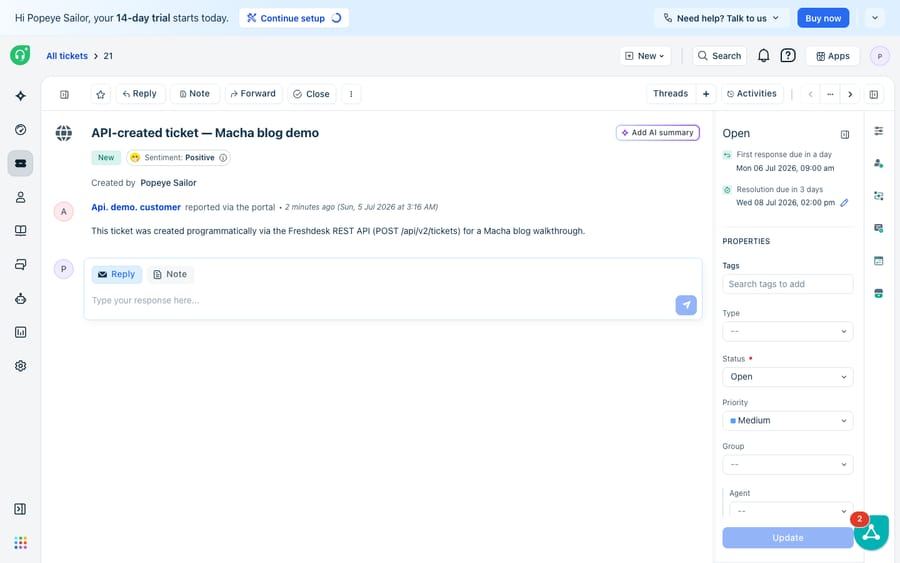
Here's a complete call that creates an Open, Medium-priority ticket from a customer's email address. Swap in your own subdomain and key.
curl -v -u YOUR_API_KEY:X \
  -H "Content-Type: application/json" \
  -X POST 'https://yourdomain.freshdesk.com/api/v2/tickets' \
  -d '{
    "subject": "Payment failed on checkout",
    "description": "Customer reports a card decline at the final step.",
    "email": "[email protected]",
    "priority": 2,
    "status": 2,
    "source": 2
  }'
A successful call returns HTTP 201 Created and the full ticket object as JSON, including the new id. That id is what you'll use for every follow-up call.
The catch that trips people up is that status, priority, and source are integers, not words. Send "priority": "high" and you'll get an invalid_value back. The mappings, straight from the Create a Ticket docs:
| Field | Value → integer |
|---|---|
status | Open 2 · Pending 3 · Resolved 4 · Closed 5 (default 2) |
priority | Low 1 · Medium 2 · High 3 · Urgent 4 (default 1) |
source | Email 1 · Portal 2 · Phone 3 · Chat 7 · Feedback Widget 9 · Outbound Email 10 (default 2) |
If you omit status, priority, or source, Freshdesk applies the defaults shown above — a Low-priority, Open ticket created via the Portal.
How do you attach files to a new ticket?
Attachments are where the request shape changes. You cannot send files as JSON — the moment you attach a file you must switch the whole request to multipart/form-data. That means dropping the -H "Content-Type: application/json" header and the -d body, and expressing every field as a -F form part instead:
curl -v -u YOUR_API_KEY:X \
  -F "[email protected]" \
  -F "subject=Screenshot of the checkout error" \
  -F "description=Attaching the console output and a screen recording." \
  -F "priority=2" \
  -F "status=2" \
  -F "attachments[]=@/Users/you/Desktop/error.png" \
  -F "attachments[]=@/Users/you/Desktop/console.txt" \
  -X POST 'https://yourdomain.freshdesk.com/api/v2/tickets'
Two limits worth remembering: attachments use the attachments[] array syntax (repeat it per file), and the total attachment size per request is capped at 20 MB. Go over and the call is rejected. The response echoes each attachment with its filename and a download URL.
How do you set custom fields?
If your ticket form has custom fields — a dropdown for Order Region, a checkbox for VIP, a text field for Account ID — you can populate them in the same POST. Custom fields go inside a custom_fields object, and each key is the field's API name: the label you gave it, lowercased with spaces as underscores and a cf_ prefix. So a field labelled "Order Region" becomes cf_order_region.
curl -v -u YOUR_API_KEY:X \
  -H "Content-Type: application/json" \
  -X POST 'https://yourdomain.freshdesk.com/api/v2/tickets' \
  -d '{
    "subject": "Refund request",
    "description": "Customer wants a refund on order #4471.",
    "email": "[email protected]",
    "priority": 3,
    "status": 2,
    "custom_fields": {
      "cf_order_region": "EU",
      "cf_vip": true,
      "cf_account_id": "ACC-90210"
    }
  }'
A few value-format rules save a round of debugging: dropdown fields must receive one of their exact configured choices (case-sensitive), checkboxes take a boolean true/false, and date fields expect YYYY-MM-DD. Send a dropdown value that isn't in the list and Freshdesk returns invalid_value naming the offending field. Freshworks documents the full pattern in its custom-fields-via-API guide.
Which errors will you actually hit?
Freshdesk's error bodies are helpfully specific — they name both the field and the reason. The common ones on a create call:
missing_field— a required attribute (oftenrequester_id/email, or an agent-required field) wasn't sent.invalid_value— a value is the wrong type or not an allowed option (the classic: sendingpriorityas a string, or an unlisted dropdown value).invalid_json— the request body isn't valid JSON, usually a stray comma or unescaped quote.invalid_credentials— a 401, meaning the API key is wrong or the account isn't allowed API access (the Free plan has none).
A validation failure returns HTTP 400 with a errors array pinpointing each problem, so read the body rather than guessing. We go deeper on the full catalogue in Freshdesk API errors and rate limits.
What are the Freshdesk ticket-creation rate limits?
This is the honest constraint. Freshdesk enforces a per-minute rate limit that varies by plan, and — the part people miss — a separate sub-limit specifically on ticket creation. Per the rate-limits article (updated 6 August 2026). Freshworks notes it is still moving accounts from per-hour to per-minute limits in batches, so check your response headers:
| Plan | Account limit / min | Ticket Create / min |
|---|---|---|
| Free | 0 | 0 (no API access) |
| Trial | 50 | Counts toward the 50 |
| Growth | 100 | 50 |
| Pro | 400 | 160 |
| Enterprise | 700 | 280 |
Two things follow. First, higher throughput is genuinely plan-gated — if you're bulk-importing tickets on Growth, 50 creates a minute is your ceiling regardless of how fast you can loop. Second, even failed requests count against your quota, so a buggy retry loop can rate-limit you on nothing but 400s. When you exceed the limit, Freshdesk returns HTTP 429 with a Retry-After header telling you how many seconds to wait — respect it rather than hammering.
Where does the raw API stop being enough?
The create-ticket API is excellent at exactly one thing: reliably turning a structured payload into a ticket. It's deterministic, well-documented, and fast. But notice what it doesn't do. It creates a container; it has no opinion about what's in the ticket. It won't read the customer's message, decide the real priority, route it to the right group, or draft a reply. If your intake mislabels an urgent outage as Medium, the API faithfully files it as Medium. And there's no reasoning step between "payload arrives" and "ticket exists" — whatever you send is what you get.
That gap is where an AI agent layer fits, and it's worth being clear this is a complement to the native API, not a replacement for it. The broader category of AI agents for customer service exists to do the reasoning-heavy work a REST endpoint can't. Macha is one such layer: it runs on top of the Freshdesk you already use as a native connector — it doesn't replace your help desk or its API. You connect Macha to Freshdesk with your subdomain and API key (the same key from this walkthrough), and it reads and writes the same tickets: triaging incoming ones by intent so priority and group are set correctly, drafting or posting grounded replies, and looking up order or account status through a custom tool that wraps your own REST API into something the agent can call. If you're already scripting ticket creation, the natural next step is automating Freshdesk with AI so those tickets get worked, not just filed. (Macha's connector is for Freshdesk specifically — not Freshchat, Freshservice, or Freshcaller. And it bills per ticket — one conversation, charged once however many messages it takes — not per resolution; see the pricing breakdown.) For the API fundamentals underneath all of this, our Freshdesk API explained primer covers auth, pagination, and the wider endpoint set.
The clean division of labour: use the create-ticket API as the deterministic system of record for getting tickets in, and layer an agent on top for the reasoning the endpoint was never meant to do.
FAQ
What is the minimum payload to create a Freshdesk ticket? A requester identifier (usually email or requester_id) plus any fields your admin marked required for agents — by default subject, description, status, and priority. Send them as JSON to POST /api/v2/tickets with your API key as the basic-auth username.
Why does "priority": "high" fail? Because priority, status, and source are integers, not strings. Use priority Low 1, Medium 2, High 3, Urgent 4; status Open 2, Pending 3, Resolved 4, Closed 5. A string returns invalid_value.
How do I attach a file when creating a ticket? Switch the request from JSON to multipart/form-data: drop the JSON content-type header and send each field and each attachments[]=@/path/to/file as a -F form part. Total attachments per request cap out at 20 MB.
How do I set a custom field? Put it inside a custom_fields object using the field's API name — the label lowercased with underscores and a cf_ prefix (e.g. cf_order_region). Dropdowns need an exact configured option, checkboxes take booleans, dates use YYYY-MM-DD.
What are the create-ticket rate limits? Per-minute and plan-gated: 0 on Free, 50/min on trial, 100/min on Growth (50 creates), 400/min on Pro (160 creates), 700/min on Enterprise (280 creates). Exceeding it returns HTTP 429 with a Retry-After header, and even failed requests count toward the quota.
Want the tickets you create to get answered, not just filed? Start with $50 of free usage on Macha, no credit card, and connect it to your Freshdesk with the same API key.






