Intercom
 Shopify
 Stripe
 Slack
Slack Notion
 Google Workspace
 Confluence

How Do You Configure Fin's Handoff to a Human? Rules, Workflows and the Automatic Handoff Message


Fin's handoff is set in two places: Fin AI Agent, Train, Escalations decides when Fin hands a conversation to a person, and a Workflow decides the routing and the message the customer sees. The automatic line Fin posts at the handoff has no off switch in the product, but you can steer its wording or replace it with your own workflow copy.
Key takeaways
- Fin's handoff to a human is configured in two places: Escalation Rules and Guidance under Fin AI Agent, Train, Escalations decide when, and Workflow branches decide the team and message.
- Fin's automatic handoff message has no toggle in the product; the working levers are tone of voice, Guidance on the wording, or a Send bot message step in a workflow branch.
- Intercom caps Escalation Guidance at 100 active rules at a time, and activating more returns an invalid parameters error until similar rules are combined or paused.
- Fin keeps replying until a teammate sends a customer-facing reply, so reassigning the conversation, changing ticket state or leaving an internal note does not end Fin's session.
- Fin bills $0.99 per outcome, including a Procedure handoff, but an ordinary escalation passed to your team without an outcome is not charged, and the 50-outcome minimum applies only off Intercom.

Fin's handoff to a human is configured in two places: Fin AI Agent › Train › Escalations decides when Fin hands a conversation over, and a Workflow branch after the Let Fin handle step decides which team gets it and what the customer reads. The automatic line Fin posts at the handoff has no off switch in the product, so you control it through tone, Guidance or your own workflow copy.
| What you want to change | Where it lives | Control you get |
|---|---|---|
| When Fin hands over, from data | Train › Escalations › Escalation Rules | Exact: fires on user, company or conversation attributes |
| When Fin hands over, from judgment | Train › Escalations › Escalation Guidance | Plain-language instructions, up to 100 active |
| Which team or inbox gets it | Workflows › Branches on Escalation | Exact: Assign conversation step per branch |
| Wording of the handoff line | Guidance, tone of voice, or a Send bot message step | Steered, not switched off |
| No human promised at all | Let Fin handle › Set expectation for human support | Toggle per workflow path |
How do you configure Fin's handoff in five steps?
- Open Fin AI Agent › Train › Escalations. Add an Escalation Rule when the trigger is data you already hold, and Escalation Guidance when it's something Fin has to read from the conversation.
- Set the rule's Audience and Channels, then click Save and Enable.
- Go to Fin AI Agent › Workflows, open the workflow that contains the Let Fin handle step, and add Branches after it with the condition set to Escalation.
- In each branch, add your own Send bot message step with the copy you want, then an Assign conversation step pointing at the right team or inbox.
- To keep Fin from setting a human expectation at all, open the Let Fin handle step and turn off Set expectation for human support.
Fin is available on Intercom's paid plans, and you need admin permissions to create or edit Workflows. Seats cost $29 a seat billed annually on Essential, $85 on Advanced and $132 on Expert (Intercom has also shown $19 for Essential in a live pricing test). Our Intercom pricing guide has the full picture.
When does Fin hand over before you configure anything?
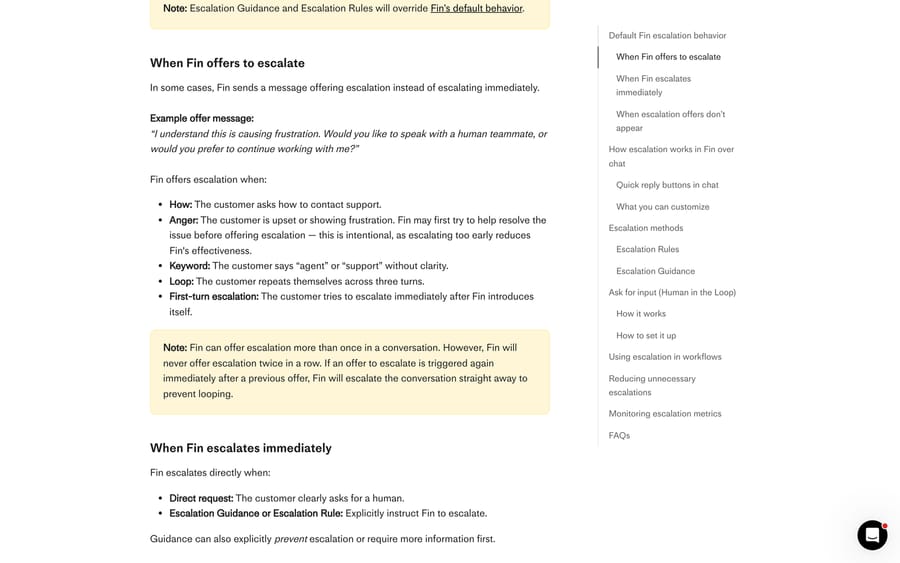
Out of the box, Intercom's escalation documentation says Fin escalates when a customer clearly asks for a human, when it detects strong frustration, and when the customer is stuck repeating themselves. Some of those produce an immediate handoff and some produce an offer, which is a message asking whether the customer wants a person, and the distinction matters because an offer is usually accepted.
Fin offers escalation in five situations: the customer asks how to contact support, the customer shows anger, the customer says "agent" or "support" without a clear question, the customer repeats themselves across three turns, and the customer tries to escalate on the turn right after Fin's introduction. Fin escalates straight away on a direct request for a human, or when a rule or guidance says to.
Two behaviors are easy to trip over. Fin will not offer escalation twice in a row: if a second offer would fire immediately after the first, Fin escalates instead, to stop the loop. And if no human routing target is configured, escalation offers don't appear at all; the conversation ends with a "get more help" outcome.
When should you use an Escalation Rule?
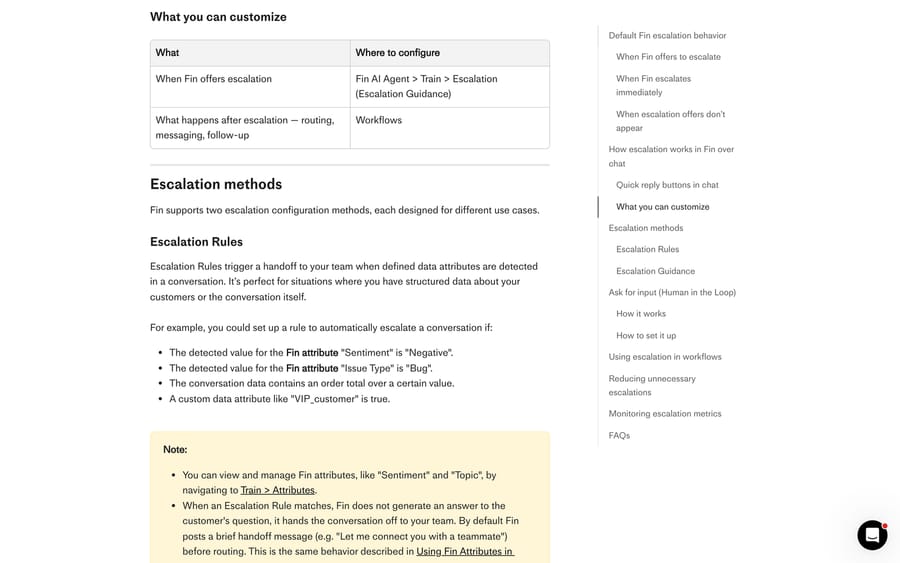
Rules fire on attributes, so they're the right tool when the thing that should trigger a handoff is already a value somewhere: a Fin attribute like Sentiment or Issue Type, a conversation data attribute, or something about the company.
To build one:
- Go to Fin AI Agent › Train › Escalations.
- Click + New under Escalation Rules and add the conditions. They can read user, company or conversation data.
- Set Audience (the default is Everyone) and Channels.
- Click Save and Enable.
One consequence to plan for: when a rule matches, Fin doesn't answer the question at all. It hands the conversation straight to your team, and Intercom's docs say Fin posts a brief handoff line such as "Let me connect you with a teammate" before routing. So a rule that's too broad converts answerable questions into tickets.
A useful trick for anyone wiring Fin to their own systems through Data connectors: you can't branch on an HTTP status code directly. Put a status field inside your API's JSON response, store it as a conversation data attribute, and write the rule against that attribute instead.
When should you use Escalation Guidance instead?
Guidance is written in plain language and handles the cases where no attribute exists. It can tell Fin to escalate immediately, to offer escalation rather than escalate, to ask a follow-up question first, or to avoid escalating at all. Same path, Train › Escalations, then + New under Escalation Guidance, pick an Audience, and Save and Enable.
Guidance that earns its place is narrow. Intercom's own documentation is unusually blunt about the failure mode: broad or generic guidance causes a sharp increase in escalations and a matching drop in resolution rate, and most customers accept an escalation offer when it's presented even when Fin could have answered. "Escalate if the customer is upset" is the example they warn against.
Two hard limits. You can have 100 active guidance rules at a time, and activating more returns an "invalid parameters" error, so combine or pause before you add. And guidance cannot say where to escalate. You can't write guidance that routes to the Sales team; Intercom's FAQ says so directly, and the destination belongs in a workflow branch.
Where do you choose which team gets the handoff?
Rules and Guidance decide when. Workflows decide what happens after, and if you skip this step your escalations land wherever your default assignment sends them.
- Create the rule or guidance first, in Train › Escalations.
- Open Fin AI Agent › Workflows and select the workflow with the Let Fin handle step.
- Add Branches after that step and set the condition to Escalation.
- Select the specific escalation guidance or rule to branch on.
- In each branch, add the actions you want: a message, a ticket, an assignment to a named team.
You can combine the escalation condition with other filters, so a free-plan customer and an enterprise customer can hit the same guidance and get different destinations. Workspace office hours are always respected when Fin hands over from a workflow, which means an out-of-hours handover follows your away behavior without extra configuration.
Can you edit or turn off Fin's automatic handoff message?
This is the question that brings most people here, and the honest answer is that there's no toggle for it.
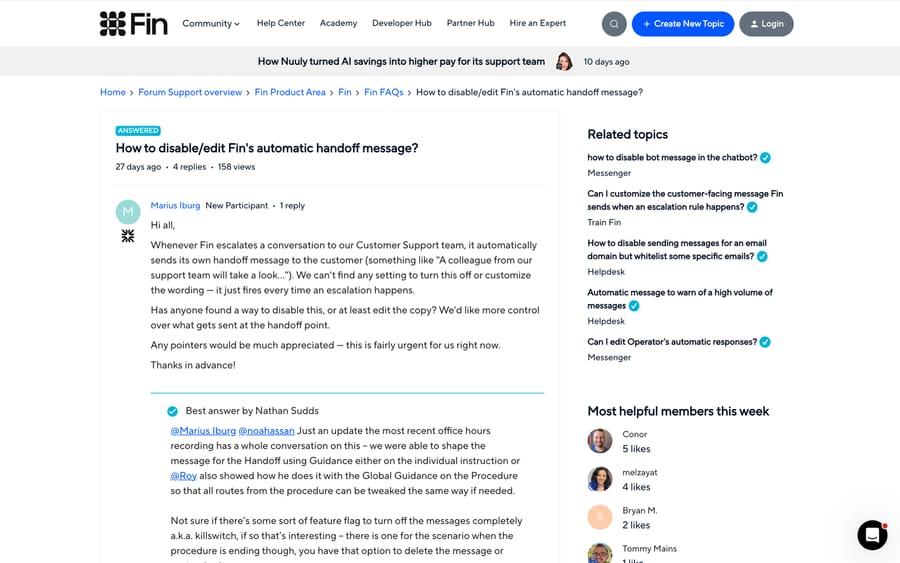
A community thread from August 24, 2026 describes it exactly: Fin posts its own line ("A colleague from our support team will take a look...") every time it escalates, and the poster could find no setting to turn it off or change the wording. An earlier thread from January 2026, with 763 views, asks the same thing about escalation rules. Both are still the reference threads on this.
Three levers actually work, in increasing order of control.
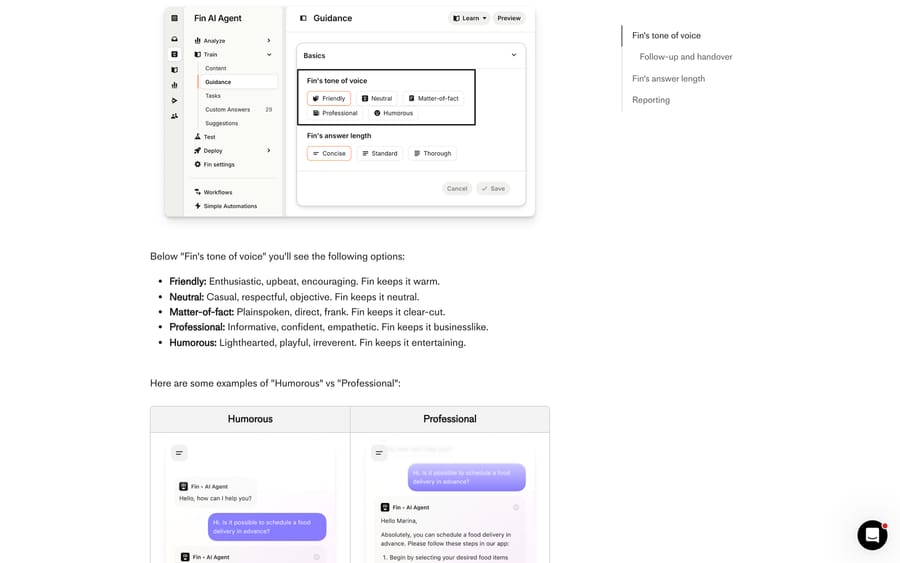
Shift the tone globally. Fin AI Agent › Train › Guidance › Basics sets Fin's tone of voice across five options (Friendly, Neutral, Matter-of-fact, Professional, Humorous) and its answer length. Per Intercom's tone of voice article, emoji appear only under Friendly and Humorous. This changes how the handoff line reads without changing what triggers it.
Shape the line with Guidance. The accepted answer in the August thread is that the handoff wording can be shaped through Guidance, either on the individual instruction or as global guidance on a Procedure so every route out of it reads the same way. Guidance is an instruction to Fin's model, so it steers the words; it can't render or suppress interface elements.
Write your own copy in a workflow branch. This is what the January thread settled on and it's the only method that gives you exact text per reason. Keep Fin's own escalation line as short and generic as guidance will allow, model each reason as its own rule, branch on it, and put a Send bot message step with your wording in each branch.
One further option exists but isn't documented. In the August thread the original poster reports that Intercom support applied a "killswitch" to turn the message off for their workspace. That's one customer's account of a support interaction, not a published setting, so treat it as a conversation to have with Intercom rather than a configuration you can make yourself.
How do you stop Fin promising a human, or replying after a teammate joins?
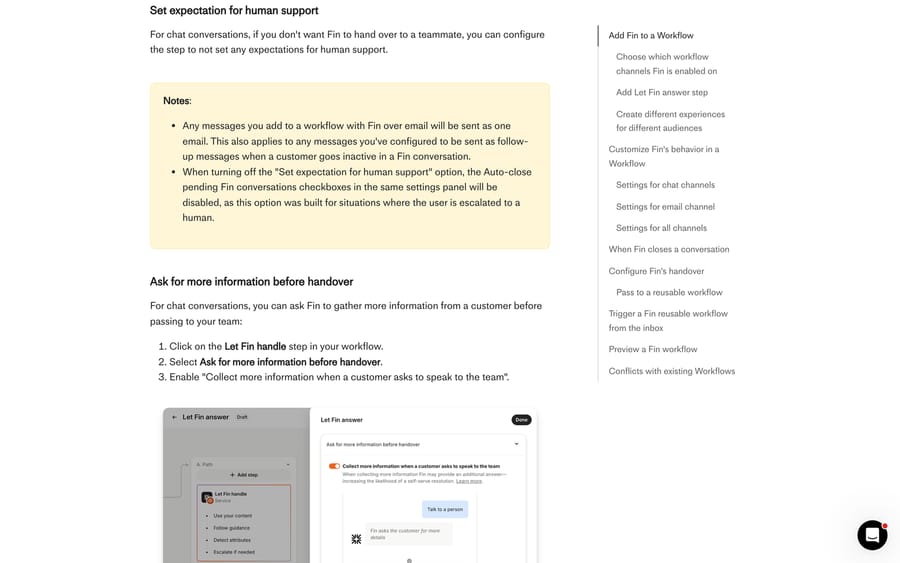
If you don't want Fin promising a human at all on a given path, open the Let Fin handle step and turn off Set expectation for human support. Intercom's workflow documentation notes that this also disables the auto-close checkboxes in the same panel, because those were designed for the escalation case.
The behavior worth memorizing is what ends Fin's session. Fin keeps responding until a teammate sends a customer-facing reply, or until Fin escalates or hands over itself. Reassigning the conversation, changing the ticket state and leaving an internal note do none of that. If you've watched Fin reply after a teammate "took" a conversation, this is why: nothing the teammate did was visible to the customer.
Going the other direction, Ask for more information before handover keeps Fin in the conversation one turn longer. Tick it in the Let Fin handle step and enable "Collect more information when a customer asks to speak to the team", and Fin asks for detail before passing over. If the customer doesn't reply, the conversation escalates anyway and doesn't count as a resolution. The chat inactivity timer behind that is 4 minutes and isn't configurable.
On email there's a middle setting, Ask for input, which pauses Fin on low-confidence replies and posts an "Ask a teammate" note instead of escalating. The teammate gives direction, Fin writes the reply, and the conversation stays with Fin. You set a confidence threshold, who to ask, and a fallback time after which Fin sends its original draft. It's in open beta, it's email only, and it isn't on standalone Fin plans, so check before you design around it.
Does a Fin handoff cost an outcome?
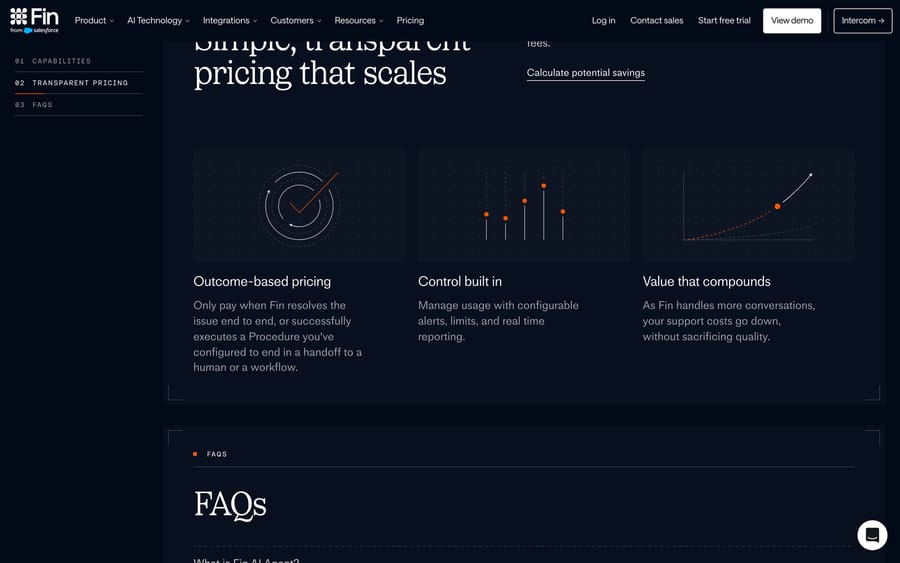
Fin is billed per outcome at $0.99, and the 50-outcome monthly minimum applies only when Fin runs on a help desk other than Intercom. Fin's pricing page (checked 24 September 2026) defines a billable outcome as a resolution, a Procedure handoff, a disqualification or a self-serve routing at $0.99 each, and a qualification at $9.99. Salesforce completed its acquisition of Fin on 10 September 2026, and the rate hasn't changed since. The sentence to hold onto is the next one: you are not charged when a conversation is simply passed to your team without an outcome.
That distinction is the incentive built into the meter, and it's worth reading twice before you design your escalation paths. An ordinary escalation is free. A Procedure you configured to end in a handoff is a billable outcome, because Fin did the job you asked it to do. Both of those are defensible; the point is that the two paths look identical to a customer and different on the invoice, so the shape of your Procedures is also the shape of your bill.
How do you tell whether your escalation setup is working?
Intercom exposes three things in Reports worth watching for the fortnight after a change: Fin AI Agent escalated conversations (the count), Fin AI Agent escalation rate (the percentage), and configuration based escalation reason, an attribute that tells you whether a given handoff came from "Guidance applied", "Escalation rule applied" or Fin's own judgment. If you add guidance and the rate jumps while resolutions fall, that attribute tells you which rule to narrow. Guidance suits teams who can watch that number weekly; if you already know you won't, start with one or two narrow rules instead of a dozen broad ones.
For the wider picture of what Fin does and where it fits, see our Fin explainer and the longer Fin AI Agent guide. The queue the handoff lands in is covered in our Intercom shared inbox guide.
How we researched this
We checked every path, label and limit on this page against Intercom's current help center on September 21, 2026, across the escalation guidance and rules article, the Fin in Workflows article and the tone of voice article, plus fin.ai's pricing page for the outcome definitions. We don't have an Intercom workspace, so nothing here was reproduced in a live instance and no screenshot is from a configured account. The community threads are linked so you can read the original reports rather than our summary of them.
Frequently asked questions
Where do I configure Fin's handoff to a human? In two places. Fin AI Agent, Train, Escalations holds Escalation Rules and Escalation Guidance, which decide when a handoff happens. Fin AI Agent, Workflows holds the branches that decide what happens next, including the message and the assignment.
Can I turn off Fin's automatic handoff message? Not from a setting in the product. You can change how it reads by adjusting Fin's tone of voice in Train, Guidance, Basics, shape the wording with Guidance, or keep Fin's line minimal and send your own copy from a Send bot message step in a workflow branch. One customer reports that Intercom support applied an internal switch for their workspace; that isn't documented as a self-serve option.
Why does Fin keep replying after my teammate took the conversation? Because only a customer-facing reply ends Fin's session. Reassigning the conversation, changing the ticket state or adding an internal note leaves Fin active. Send a visible reply, or move the path off the Let Fin handle step.
What is the difference between Escalation Rules and Escalation Guidance? Rules fire on data: a Fin attribute, a conversation attribute, a company field. Guidance is natural language for situations no attribute captures. Both override Fin's default escalation behavior, and both are capped in practice, with a limit of 100 active guidance rules.
Can I tell Fin which team to escalate to? No. Intercom's own FAQ says escalation guidance and rules can't name a destination. Create a branch per escalation reason in your Fin workflow and put the Assign conversation step there.
Does Fin respect office hours when it hands over? Yes. Intercom's workflow documentation states that workspace office hours are always respected when Fin does a handover from a workflow.
Does an escalation cost me a Fin outcome? Not on its own. Fin's pricing page says you are not charged when a conversation is simply passed to your team without an outcome. A Procedure you configured to end in a handoff to a human is a billable outcome at $0.99.
Is there a monthly minimum on Fin outcomes? Only off Intercom. Fin on another help desk carries a 50-outcome monthly minimum; Fin on the Intercom help desk is priced from $0.99 per outcome plus the seat price.
How do I stop Fin escalating too often? Narrow the guidance. Intercom warns that broad guidance raises the escalation rate and lowers resolutions, and that escalation offers are usually accepted. Prefer asking for clarification first, improve the knowledge sources behind the answers Fin is failing, and watch the configuration based escalation reason attribute to see which rule is firing.
Sources: Manage Fin AI Agent's escalation guidance and rules · Use Fin AI Agent in Workflows · Customize Fin AI Agent tone of voice and answer length · Fin pricing · How to disable/edit Fin's automatic handoff message? (Intercom Community) · Can I customize the customer-facing message Fin sends when an escalation rule happens? (Intercom Community)
Add AI agents to your Intercom
Macha reads the conversation, drafts the reply and takes the action, inside the Intercom you already run.