Intercom
 Shopify
 Stripe
 Slack
Slack Notion
 Google Workspace
 Confluence

Why Isn't Fin Answering From My Content? Sync, Ingestion and Preview-vs-Live Fixes


Open Fin AI Agent, go to Train, then Content, and check two columns before changing anything: Status and AI Agent, because most of the time a page is either not Live or not enabled for Fin. If both look right, the cause is a sync, crawler, audience or document problem, or the difference between Fin's Preview and live Fin.
Key takeaways
- Intercom's Fin usually ignores content because the item isn't Live or its Fin AI Agent toggle is off in Fin AI Agent > Train > Content.
- Intercom pauses scheduled re-crawls of a Fin website source after its first 90 days if none of its pages was used in a Fin answer in the previous 90 days.
- Intercom caps Fin website sync at 4,000 pages per source and 100 top-level domains, and moves very large or JavaScript-heavy sites from weekly to every 14 days.
- Fin can only read PDF or DOCX documents with selectable text, under 100 MB each, with a limit of 100 documents per workspace.
- Fin bills $0.99 per outcome and $9.99 per Qualification, and its 50-outcome monthly minimum applies only when Fin runs on a help desk other than Intercom.

When Intercom's Fin ignores your content, the item is usually not Live or has its Fin AI Agent toggle off in Fin AI Agent > Train > Content; after that come six causes in the order they show up on Intercom's community forum: an unfinished or failed sync, a firewall blocking the crawler, a page that synced without its text, an audience filter, an unreadable document, and a stuck ingestion queue. Fin's Preview panel also behaves differently from live Fin, which explains the "it works in Preview" reports.
| Cause | Quick check | Whose fix |
|---|---|---|
| 1. Sync unfinished, failed or paused | Status filter and View sync history on the website source | Yours (resync, narrow the crawl) |
| 2. Crawler blocked | Failed message says the website is preventing access | Yours (allowlist Intercom's proxy IPs) |
| 3. Page synced without its text | Compare stored text with the live page | Yours (Full crawler, clickable CSS selector) |
| 4. Audience filter | Filter Content by audience | Yours (widen the audience) |
| 5. Unreadable document | Try to select text in the PDF | Yours (OCR or DOCX, under 100 MB) |
| 6. Stuck ingestion queue | Sync history stuck on Processing | Intercom's (open a ticket) |
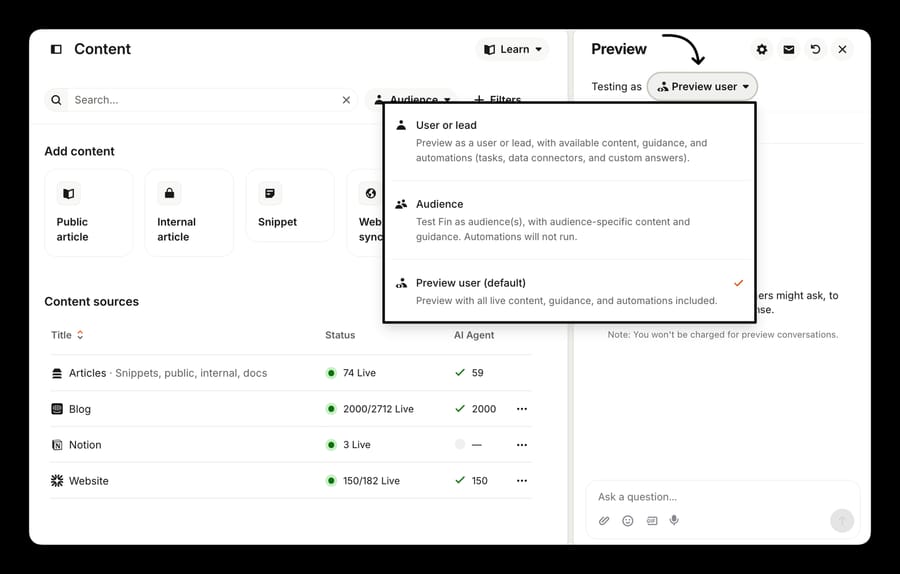
What should you check first when Fin ignores your content?
- In Fin AI Agent > Train > Content, confirm the item's status is Live (green). Draft articles are invisible to Fin.
- Open its Details panel and confirm the Fin AI Agent toggle is on. Snippets and uploaded documents have the same toggle.
- Check the Audience on that item. If it isn't Everyone, only matching customers can get answers from it.
- In Fin AI Agent > Deploy, confirm Fin is live on the channel you're testing.
That's Intercom's own list, from its "Why isn't Fin using my content?" checklist. If all four pass, work down the causes below.
Cause 1: has the sync finished, or did the page fail?
The most common cause in the forum threads, and the easiest to confirm.
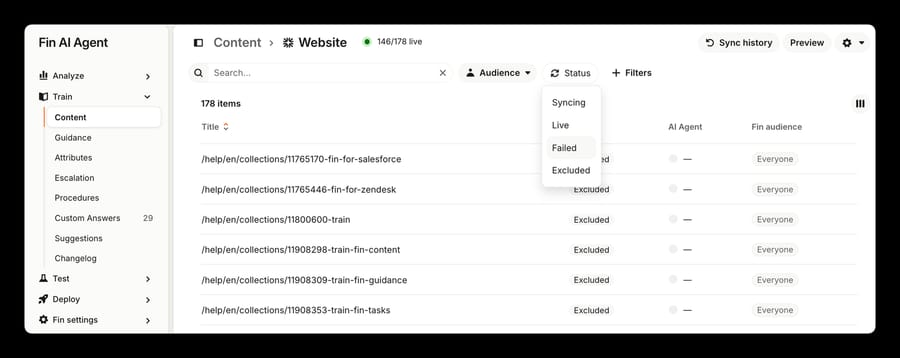
Check: open the website source and use the Status dropdown: Syncing, Live, Failed, Excluded. Then open the settings dropdown top right and select View sync history for the run-level view of synced, excluded and failed pages per run.
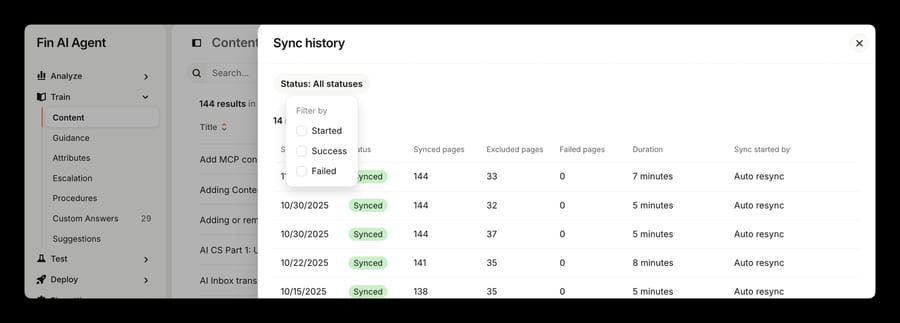
What it means: an initial sync takes anywhere from a few minutes to over an hour. An admin evaluating Fin for a college in January 2024 found the portal reporting the import ready while the bot answered nothing, came back two hours later to find it working, and posted the resolution himself.
Fix: if a page shows Failed, hover the status for the explanation, then hover the row, open the three-dot menu and select Resync. If the whole source looks stale, check the cadence rules, which changed and aren't obvious:
| Rule | What Intercom does |
|---|---|
| Normal cadence | Re-crawls a website source about once a week |
| Heavy sources | Very large sites and sites needing full JavaScript rendering move automatically to every 14 days |
| Unused sources | After the first 90 days, scheduled syncs pause if no page from the source was used in a Fin answer in the last 90 days |
| Paused sources | Pages stay live and answerable; only the re-crawl stops, so edits on your site aren't picked up |
| Sync now | Refreshes once but doesn't restart the schedule |
| Caps | 4,000 pages per source, 100 top-level domains per workspace |
That 90-day pause is the quiet one. Nothing breaks, nothing turns red, and your help center silently stops updating inside Fin.
Cause 2: is your own site blocking Intercom's crawler?
The cause people misattribute most, because the symptom is on Intercom's side and the fault is on yours.
Check: filter the source by Failed and read the message. Intercom publishes the strings. "The website is preventing us from accessing its content. Check if it's being blocked by an anti-crawler setting or firewall" is a session block or rate limit. A navigation timeout gives "This page couldn't be accessed. It may be slow to load or blocked by anti-crawler settings or a firewall."
What it means: Intercom's website sync sends no dedicated user-agent string, so your WAF, bot manager or rate limiter sees an unidentified headless browser and challenges it. Cloudflare bot fight mode, a block-unknown-bots rule and an aggressive rate limit all do this.
Fix: allowlist the static proxy IPs, then select the matching proxy region in the sync's Advanced settings. Intercom publishes five United States addresses (119.13.211.225, 161.123.167.215, 94.176.49.232, 185.223.56.90, 154.17.143.135) plus five for Europe and five for Australia. Rotating proxies exist for six countries, but a rotating pool can't be allowlisted.
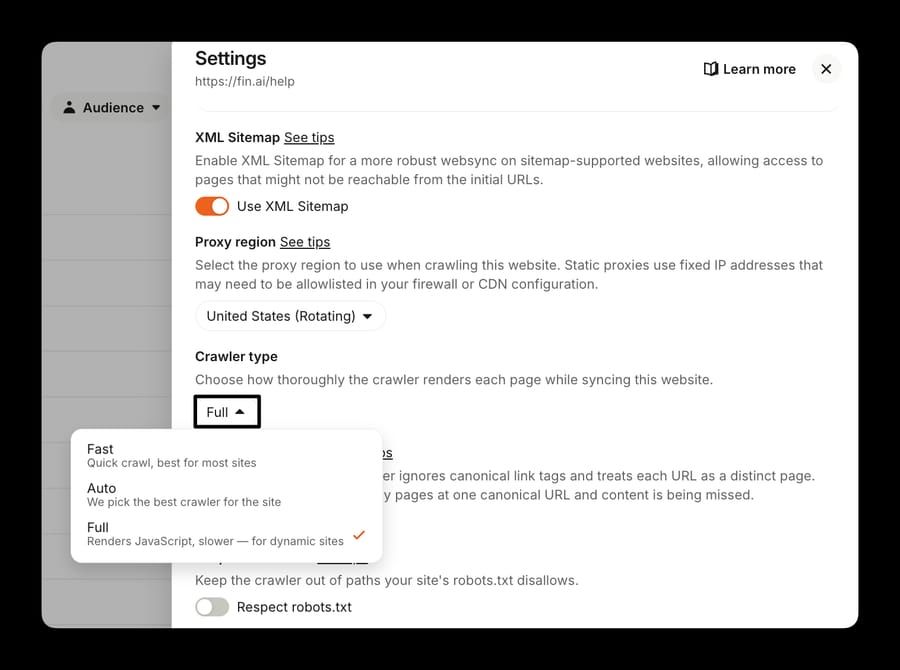
Two neighboring toggles produce the same symptom. Respect robots.txt is off by default; if somebody turned it on and your robots.txt disallows /help/, those pages stop syncing. Exclude query parameters is also off by default, and turning it on skips every URL with a ?, which drops real pages served at paths like /docs?page=intro. And if the content sits behind a login, stop here: website sync works with public URLs only.
Cause 3: did the page sync without its text?
A green Live status is no proof that Fin got the words. Intercom's own wording: "A successful sync doesn't always mean we were able to scrape all of the content on the page."
Check: open the synced page in Content, read what Intercom stored, and compare it against the live page.
What it means: two mechanisms account for nearly all of it. The first is JavaScript. The crawler has three modes: Fast reads HTML without running scripts, Auto picks and switches to Full when a site needs it, and Full loads each page in a browser. Intercom's own line is "Pages syncing empty or truncated usually means JavaScript rendering. Switch to Full and re-sync." The cost is that Full pushes a large source onto the 14-day schedule.
The second is collapsed content. In July 2025 an admin syncing a public FAQ asked why Fin kept answering "based on the FAQ structure" instead of answering; the answers sat inside clickable accordion rows the crawler never expanded. Three months earlier another admin reported nested steps and notes inside numbered lists weren't imported at all, and Intercom's Support Engineering team asked whether she'd set clickable CSS selectors.
Fix: use the Clickable CSS selector field in Advanced settings. It clicks matching DOM elements during the crawl so their text gets captured, and Intercom's own examples are [aria-expanded="false"] and #expand_section. Comma-separate for OR, chain without spaces for AND. If content appears late, Wait to load CSS selector holds the scraper until that element exists. Review CSS selectors to exclude too: navigation, headers, footers, modals and scripts are already stripped by default, and an over-broad selector of your own takes real content with it. One more bites documentation teams: website sync doesn't parse raw Markdown, so # headings need rendered HTML.
Cause 4: is audience targeting filtering the content out?
Check: in Content, use the Audience dropdown to filter by each audience and see what's visible to it. Intercom's advice is to set the audience to Everyone temporarily to confirm the cause.
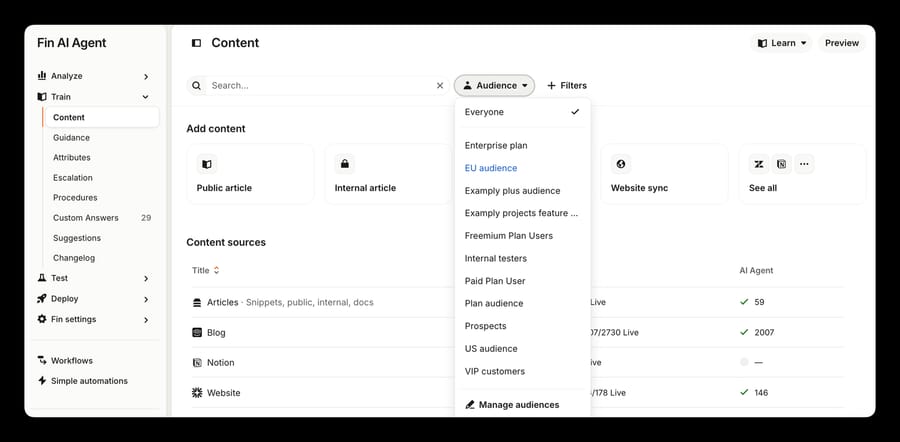
What it means: audience rules are a visibility filter. They decide what Fin is allowed to use for a given person; they don't push that content up the ranking. A fintech admin hit this in January 2026 with audience-targeted snippets Fin ignored in favor of general articles, and the consultant who answered stated the mechanism: audience targeting limits what Fin is allowed to use but doesn't force Fin to prioritize those snippets over other content.
Fix: if Fin is seeing nothing, widen the audience. If Fin is preferring the wrong source, move segment-specific content into separate articles with audience rules on the articles and keep snippets for short reusable pieces. Three traps in URL-based audience rules on a website sync: they apply retroactively to everything already ingested, they're capped at 10 per source, and they're additive, so removing one doesn't undo the assignments it made.
Cause 5: can Fin actually read the document?
Check: open the PDF and try to select text with your cursor. If you can't, Fin can't either.
What it means: Intercom's document rules are tighter than most people expect. Only text is supported, phrased in its docs as "if you can select the text from the PDF, Fin and Copilot can use it". Multi-column, encrypted and password-protected files aren't supported. Files over 100 MB can't be imported, each workspace is capped at 100 documents, only PDF and DOCX are accepted, you can upload 10 at a time, and content is usually available within about 10 minutes.
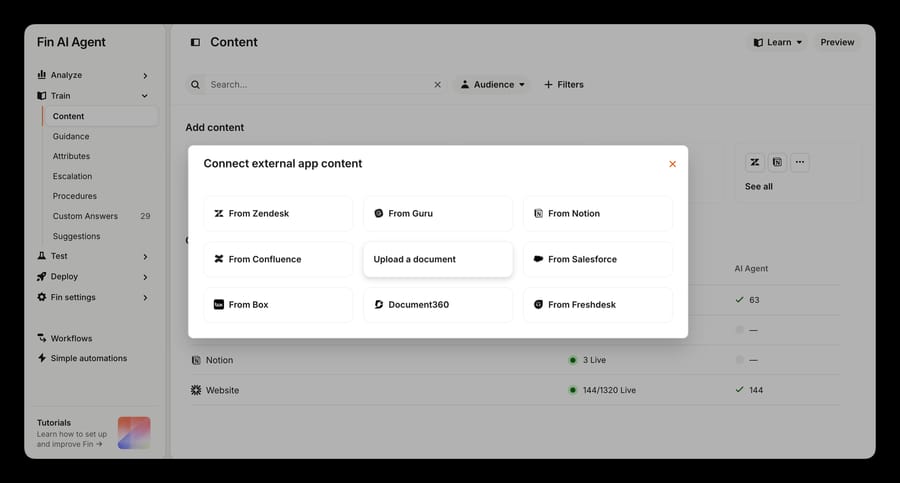
In January 2024 an admin whose synced URLs worked fine couldn't get Fin to use an uploaded PDF. The community's first guess was a flattened file with no text layer; Intercom Support took it to a private ticket and never published the cause.
Fix: run the file through OCR, convert it to DOCX, or paste the content into a public article. One adjacent failure looks unrelated: if Fin includes images from a PDF and customers see empty frames while agents see the picture, that's your site's Content Security Policy blocking https://*.intercom-attachments-N.com in img-src.
Cause 6: is the ingestion queue stuck?
The rarest cause, and the only one you can't fix yourself.
Check: Fin AI Agent > Train > Content > View sync history. A run stuck on Processing, or a content folder that spins and then reports itself empty, is the signature.
What it means: in February 2026 an admin uploaded roughly 125 text snippets split out of an 850 MB JSON export, after which Fin stopped ingesting anything new for about six weeks and kept quoting 2025 prices from cached content. Deleting the snippets and pausing the sync didn't clear it, and a second workspace reported the same symptom four days later. No Intercom employee replied. The accepted answer is a community member's, and its reset procedure, disabling Fin for 15 to 30 minutes then uploading a small trigger file, has no documentation behind it. Treat it that way.
Fix: open a ticket and ask Intercom Support to flush the ingestion queue, then change the loading pattern that caused it. Bulk-loading thousands of short Q&A pairs as individual items is the shape that produces this, and it's what another admin asked about in December 2024 with a 5,000-row CSV of sales tax questions; Intercom's answer was that no native path existed and it would need Zapier or the REST API. For large structured data, curate a small article set for the common questions and put the long tail behind a data connector Fin calls at answer time.
Why doesn't Fin's Preview match live Fin?
In October 2025 an admin pasted a customer's question into Fin's Preview, got a full answer, and watched live Fin tell the same customer "Sorry, I couldn't find information related to your question". The consultant who replied listed plausible causes; nobody in the thread named the mechanism. Intercom's Use Fin previews article does. Preview has three modes that behave differently from each other, and none is a faithful simulation of a stranger on your website.
| Testing as | What Intercom says it does | Where it diverges from live |
|---|---|---|
| Preview user (default) | Previews with all live content, guidance and automations included | Doesn't impersonate a customer, so nothing gets audience-matched the way a real visitor would be |
| Audience | Tests as an audience you've configured, with audience-specific content and guidance | Automations will not run |
| User or lead | Impersonates a real user or lead, with their content, guidance and automations | Closest to live; the only mode where you can choose real data for connected integrations |
Intercom documents five further divergences:
- Draft and paused guidance runs in Preview. All guidance types, draft, paused and live, are included in preview testing, so you can validate a rule that isn't live.
- Escalation audience filters don't apply in Audience or Preview user modes. Every live escalation rule and every piece of escalation guidance fires regardless of audience.
- Procedure audience gates don't apply. A procedure gated to an audience triggers whatever user you're testing as.
- Channel audience doesn't apply to the default preview user, so an email procedure can trigger while you're testing a web conversation.
- Data connectors return sample data for the default preview user. No live API call happens unless you test as a specific user and opt into real data.
Put plainly: Preview is a content and reasoning check, and a poor rehearsal for targeting, escalation and anything that calls an API. The October 2025 thread is the first row of that table. The admin tested as the default preview user while his customers arrived as Visitors and Leads, so anything scoped to logged-in Users was in scope for him and out of scope for them.
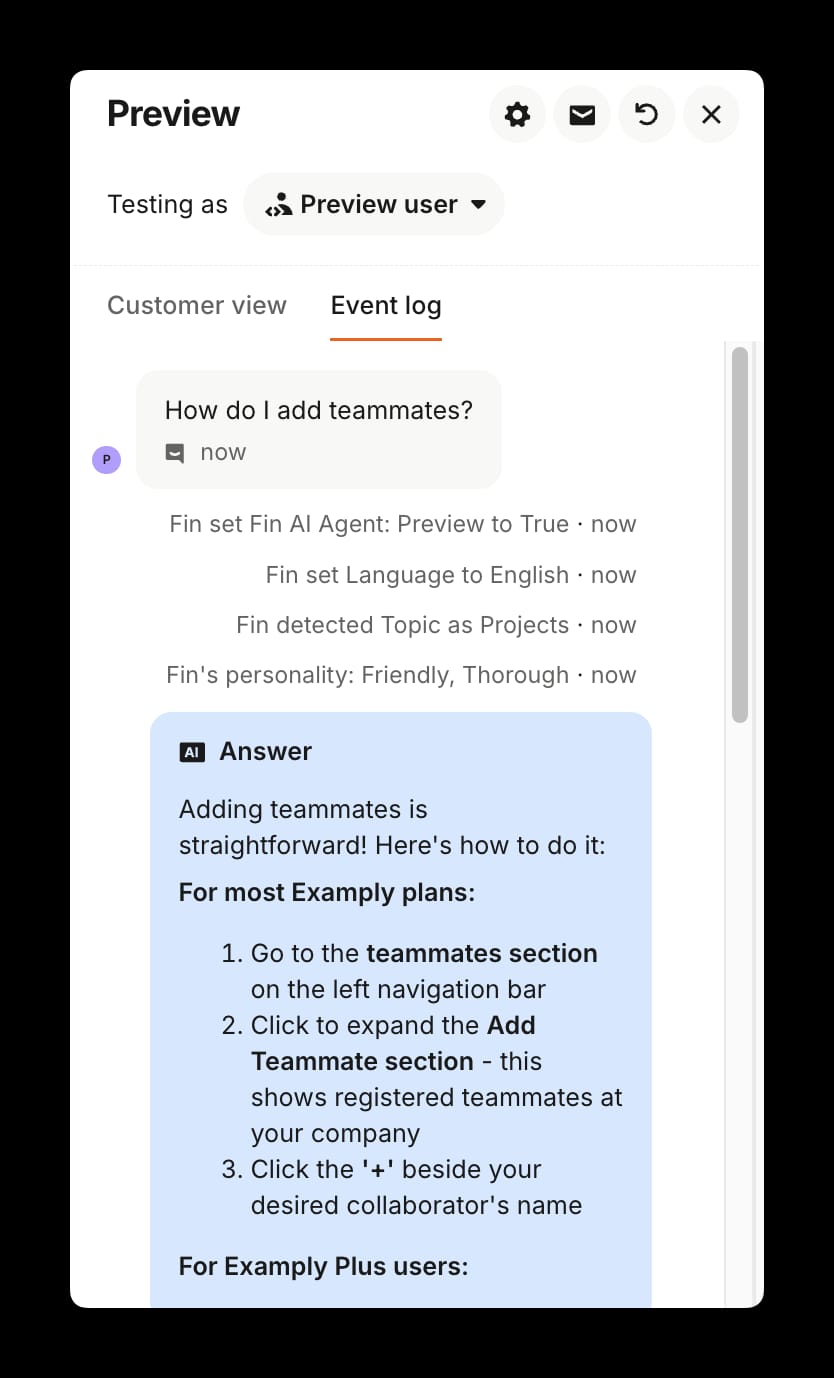
How to test properly: set Testing as to User or lead, pick a real contact matching the audience you care about, and enable real data for connected integrations. Then open the Event log tab beside Customer view, which shows which content, guidance and data Fin used. For content you haven't shipped, Intercom's documented workaround is an unlisted public article plus an internal-testers audience, since Fin can't read drafts at all. Preview conversations land in your inbox, are excluded from reporting, and aren't charged.
Which Fin behaviors look like bugs but aren't?
Confluence syncs as internal articles only. In September 2026 Intercom's Support Engineering team confirmed the integration syncs only as Internal Articles, with no setting to change it. Fin still answers from them; the customer sees no source link. Uploaded documents and snippets behave the same way by design.
Some public domains can never be synced. Intercom blocks a list of widely used sites, naming google.com, youtube.com, twitter.com, baidu.com and wikipedia.org as examples, and publishes the full list only on request. The opposite failure has happened: in September 2023 a workspace reported Fin adding over 700 Amazon URLs it had never been given, whose ingested text turned out to be those pages' cookie policies. That one was a real bug and Intercom fixed it.
What does a content gap cost, and where does an agent layer help?
Fin bills $0.99 per outcome: a Resolution, a Procedure handoff you configured, or a Disqualification at $0.99, and a Qualification at $9.99 (fin.ai/pricing, checked September 24, 2026). The 50-outcome monthly minimum applies only when Fin runs on a help desk other than Intercom. A conversation simply passed to your team without an outcome isn't charged. So a content gap costs nothing in Fin fees and everything in human handling time: the bill stays flat while your deflection rate falls and nobody in finance notices. The incentive that creates is mild but real. Fin earns more when it resolves more, which is aligned, and it earns nothing from telling you that 40% of your help center never got scraped. Our Fin pricing breakdown works the arithmetic at several volumes, and what Fin is and how it retrieves answers covers the retrieval model this post troubleshoots. Salesforce completed its acquisition of Fin on September 10, 2026, and nothing in that deal explains a behavior change in your workspace.
Most of what's above is ingestion plumbing, and switching vendors won't make a scanned PDF readable or teach a crawler to click an accordion. Every retrieval-based agent has these failure modes. One is worth a second look: if your real answers live in a database or an order system no crawler can reach, the fix is a tool call at answer time instead of better ingestion.
Macha is an AI agent layer that runs on the help desk a team already uses. On Intercom it reads conversations, replies or leaves a private note, assigns, tags and closes, with triggers on new conversations and new customer messages, and it calls custom API tools mid-answer. It suits support teams with a thin help center and a rich backend; it's the wrong fit if nobody has written the articles yet, because no agent layer fixes that. Pricing is one plan on monthly ticket volume from $299 a month for 750 tickets, about $0.40 a ticket, with setup and monitoring by our team included and $50 of free usage to start. The pricing page has every tier, and building an AI agent for Intercom covers the setup.
How we researched this
We do not have an Intercom workspace, so nothing here is first-hand and every screenshot comes from Intercom's own help center. On September 21, 2026 we pulled all 10,373 topics from community.intercom.com/sitemap-topics-1.xml, read 11 Fin content and ingestion threads in full instead of working from search snippets, and checked every path, limit and error string against Intercom's current documentation (the sync, document and pricing limits were re-checked on September 24, 2026): "Sync and manage websites" (updated within the last three weeks), "Add your content for Fin AI Agent", "Upload and manage documents" (July 29, 2026) and "Use Fin previews". What we could not verify: the community reset procedure in cause 6, which no Intercom employee has confirmed; the root cause of the February 2026 freeze, never published; and the cause of the January 2024 PDF failure, which Support moved to a private ticket.
Frequently asked questions
Why is Fin not using my article even though it's published? Publishing and enabling are separate steps. In Fin AI Agent > Train > Content, open the article's Details panel, check the Fin AI Agent toggle is on, then check the Audience. A published article with the toggle off is invisible to Fin, and an audience-scoped article is invisible to everyone outside that audience.
How often does Fin re-sync website content? About weekly. Large sites and sites needing full JavaScript rendering move automatically to every 14 days. After a source's first 90 days, scheduled syncs pause entirely if no page from it was used in a Fin answer in the previous 90 days. Sync now refreshes the content once but doesn't restart the schedule.
Why does Fin say a page synced when the content is missing? Intercom's documentation states that a successful sync doesn't always mean all the content was scraped. The usual causes are JavaScript rendering, fixed by switching the crawler type to Full and re-syncing, and collapsed sections such as accordions, which need a clickable CSS selector.
Can Fin read PDFs? Yes, if the text is selectable. Scanned or flattened PDFs with no text layer can't be read, and neither can multi-column layouts or encrypted files. Documents must be PDF or DOCX, under 100 MB, and a workspace is capped at 100 documents.
Why does Fin AI Preview give a different answer than live Fin? Because they're different environments. The default Preview user mode runs with all live content, guidance and automations included and doesn't impersonate a customer, so audience filters that apply to a real visitor don't apply to you. Draft and paused guidance also runs, escalation and procedure audience gates aren't enforced, and data connectors return sample data unless you test as a specific user with real data enabled.
How do I make Fin's Preview match live behavior? Set Testing as to User or lead, choose a real contact who matches the audience you're worried about, enable real data for connected integrations, and read the Event log tab to see which content and guidance Fin used. That's the only mode where audience matching and live API calls both behave as they will in production.
Is Intercom blocking my website crawler on purpose? Usually the block is yours. The Failed message "The website is preventing us from accessing its content" means your firewall, bot manager or rate limiter is challenging a crawler that sends no dedicated user-agent string. Allowlist Intercom's published static proxy IPs and pick the matching proxy region in Advanced settings.
Does previewing Fin cost anything? No. Preview conversations appear in your inbox, are excluded from reporting, and aren't charged. Fin bills $0.99 per outcome on live conversations, with Qualification at $9.99.
Sources: Sync and manage websites · Add your content for Fin AI Agent · Upload and manage documents · Use Fin previews · Create an Article (Intercom REST API) · FIN is stuck, clogged, frozen · Fin AI Preview doesn't match live behavior · Missing content when syncing information from our website · Need help syncing content from our website · PDF file is still not getting pulled into AI chatbot · Ingesting large amount of questions for Fin · Fin not using audience-targeted Snippets · Confluence sync as public · Is there a way to test Fin with draft content?
Add AI agents to your Intercom
Macha reads the conversation, drafts the reply and takes the action, inside the Intercom you already run.