Intercom
 Shopify
 Stripe
 Slack
Slack Notion
 Google Workspace
 Confluence

What Can an AI Support Agent Do in Loop Subscriptions? Pause, Skip, Swap and Cancel Through the API (2026)


Loop Subscriptions' Admin API (version 2026-04) documents 11 subscription changes an AI support agent can make with one store token sent as X-Loop-Token: pause, resume, skip the next order, cancel, reactivate, reschedule, place the next order now, swap a product, change frequency, change the shipping address and add a discount. Unlike Recharge, Loop has a real pause endpoint. Loop only lets you create API tokens on its Pro plan, though, and its own Gorgias and Zendesk integrations sit behind the same plan.
Key takeaways
- Loop's Admin API version 2026-04 lets an AI agent pause, skip, swap and cancel subscriptions with a token sent in the X-Loop-Token header, but tokens exist only on Loop's Pro plan at $399 a month.
- Loop finds a subscriber in one call, GET /customer/{email}/subscription, which returns each subscription's id and a status of ACTIVE, PAUSED, CANCELLED or EXPIRED.
- Gorgias AI Agent already skips, cancels, pauses and resumes Loop subscriptions for shoppers with a single subscription, while Loop's own Zendesk app only displays subscriptions and links to Loop's admin.
- Loop's API allows 50 requests per second per store, shared by every token and app on that store, and its Read all subscriptions endpoint is capped at 2 requests every 3 seconds.
- In our 28 September 2026 test, a Macha agent asked how long to pause before calling Loop, and a Loop call with a dummy token came back HTTP 401 "Invalid token".

Which Loop jobs can an AI agent do through the Loop Subscriptions API?
Every path below sits under https://api.loopsubscriptions.com/admin/2026-04/ and takes the token in X-Loop-Token. We read each page of the Loop API reference on 28 September 2026. "Custom API tool" means Macha's team builds the call during onboarding; Loop has no built-in Macha connector.
| Support job | Endpoint (2026-04) | Read / write | Who can do it today |
|---|---|---|---|
| Find a subscriber's subscriptions | GET /customer/{email}/subscription | Read | Loop's Gorgias widget and Zendesk app (display), a Macha custom tool |
| Upcoming orders and billing dates | GET /subscription/{id}/order/schedule | Read | Loop's apps (display), a Macha custom tool |
| Pause for a set time | POST /subscription/{id}/pause with pauseDuration | Write | Gorgias AI Agent (single subscription), Loop's Gorgias widget, a Macha custom tool |
| Resume a paused subscription | POST /subscription/{id}/resume | Write | Gorgias AI Agent, Loop's Gorgias widget, a Macha custom tool |
| Skip the next order | POST /subscription/{id}/skipNext | Write | Gorgias AI Agent, Loop's Gorgias widget, a Macha custom tool |
| Cancel | POST /subscription/{id}/cancel | Write | Gorgias AI Agent, Loop's Gorgias widget (with reason), a Macha custom tool (we'd route to a person) |
| Reactivate a canceled subscription | POST /subscription/{id}/reactivate | Write | Loop's Gorgias widget, a Macha custom tool |
| Move the next billing date | POST /subscription/{id}/reschedule with newBillingDateEpoch | Write | A Macha custom tool or a person in Loop |
| Ship the next order now | POST /subscription/{id}/placeOrder | Write | Loop's Gorgias widget, a person |
| Swap a product | PUT /subscription/{id}/line/{lineId}/swap | Write | A Macha custom tool or a person in Loop |
| Change frequency | PUT /subscription/{id}/frequency | Write | A Macha custom tool or a person in Loop |
| Change the shipping address | PUT /subscription/{id}/address | Write | A Macha custom tool or a person in Loop |
| Add a discount code | POST /subscription/{id}/discount | Write | A Macha custom tool (policy permitting) |
| Send the portal login link | POST /customer/{customerShopifyId}/loginLink | Write (email) | Loop's Gorgias widget, a Macha custom tool |
Two jobs aren't in the Admin API. Delaying an order by a number of days and sending the "update your payment method" email live in Loop's Storefront API, which authenticates with customer session and access tokens rather than the admin token, so they're not something an agent working tickets calls with X-Loop-Token. Loop's Gorgias widget can send the payment-update email for a human agent. Loop's API reference lists no refund endpoint; refunds happen on the Shopify order.
What subscribers actually ask
Loop tickets cluster around a short list, and most of them map to one row above:
- "Can you pause my box while I'm away?" (pause, with a length)
- "Skip next month, please." (skip next order)
- "Swap the dark roast for the decaf." (swap line)
- "Send it every six weeks instead." (frequency)
- "I moved, ship it to my new place." (address)
- "Cancel my subscription." (cancel, usually after a retention offer)
- "Why was I charged? I thought I'd paused." (read the status and billing dates, then a person if money has to go back)
How does the lookup work, from an email to the right subscription?
Loop's lookup is one call. GET /customer/{email}/subscription takes the requester's email in the path and returns every subscription on that customer, each with its Loop id, a status of ACTIVE, PAUSED, CANCELLED or EXPIRED, the next billing date as an epoch timestamp, and the product lines. There's no customer-id hop first, which is shorter than Recharge's customer, then subscriptions, then charges chain.
The subscription id then goes into every write. Loop accepts it in more than one form: the plain Loop id, loop-{id}, and on some endpoints, including skip and frequency changes, shopify-{id} for the Shopify subscription contract id. An agent should pass the Loop id from the lookup and not try to guess from an order number. If a customer writes from a different address than the one on the subscription, the lookup comes back empty; ask for the checkout email rather than searching wider. Loop's "Read all subscriptions" endpoint could search wider, but it's rate-limited to 2 requests every 3 seconds and isn't built for per-ticket lookups.
What the agent should check before any write:
- How many ACTIVE subscriptions. One: go ahead. More than one: list them by product and next billing date and ask which. This is the case Gorgias AI Agent hands off.
- The status. A
PAUSEDsubscription can be resumed, not paused again. ACANCELLEDone needs reactivate, not resume. - The next billing date. A skip only makes sense before the next order is created; after that, the order exists in Shopify and it's an order-cancel question.
What do Loop's Gorgias and Zendesk integrations already do?
Start with what Loop and your help desk already give you, because for some teams it's enough.
Loop's Gorgias integration is built by Loop, needs no API key on either side, and is available only on the Loop Pro plan. It shows the subscriber's subscriptions in the Gorgias sidebar, matched by email, and lets a human agent skip or place an order, reactivate, resume, pause or cancel, pick a cancellation reason configured in Loop, and send login-link and payment-update emails without leaving Gorgias.
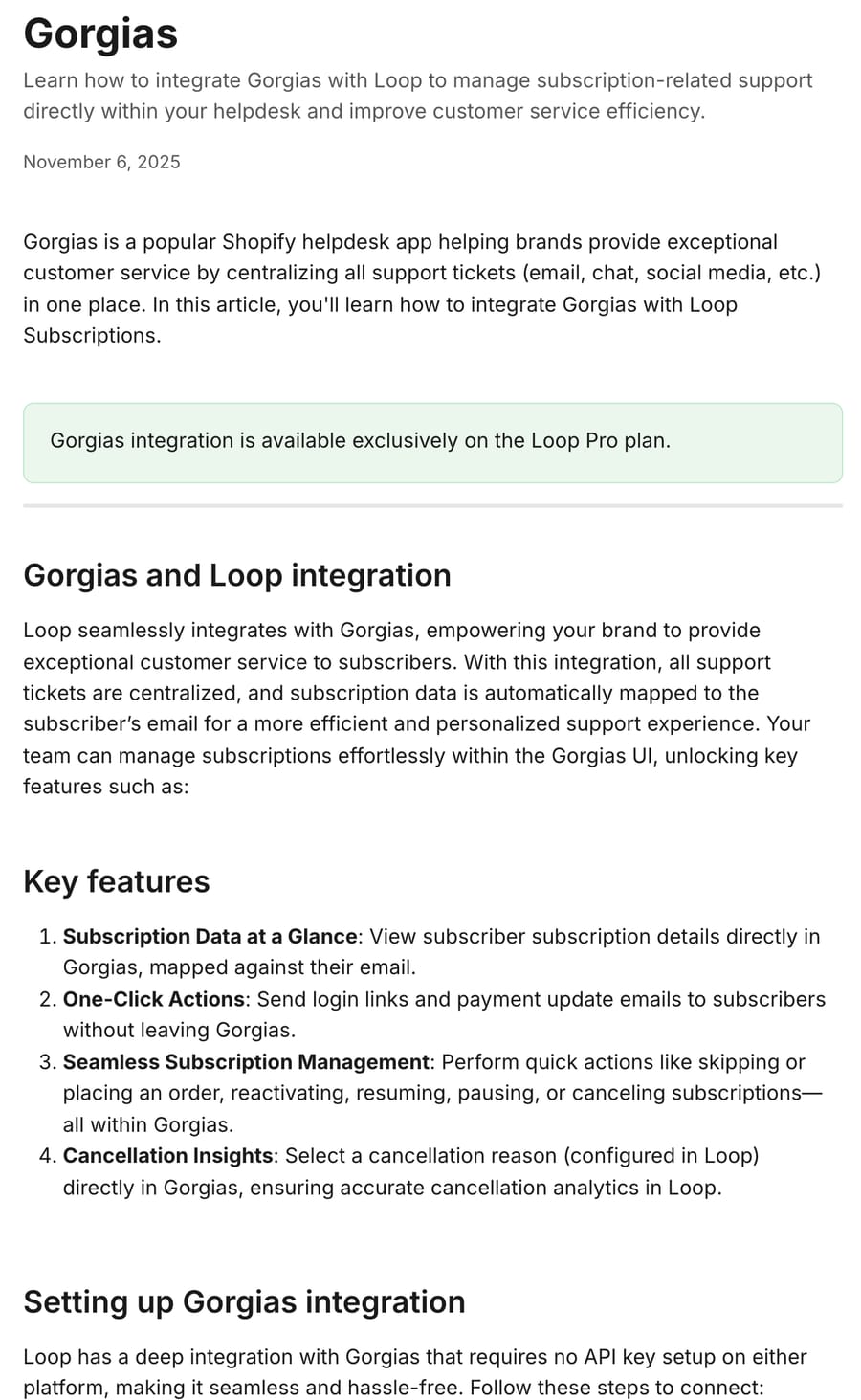
Gorgias AI Agent goes further and acts on its own. Its Loop Subscriptions actions skip the next shipment, cancel, pause and resume, using a Loop token with Read and Write access to subscription contracts, orders, customers and selling plans. Gorgias spells out the limits: "AI Agent is only able to skip, cancel, pause or resume a subscription in Loop if the shopper has a single subscription," and it can skip only before the order the shopper wants to skip is created. On cancel it collects a reason. If you're on Gorgias and most of your subscribers hold one subscription, turn this on first; it's documented and supported by Gorgias. Our Gorgias subscription automation guide covers that side.
Loop's Zendesk app is a read-only sidebar. The Zendesk Marketplace listing (read 28 September 2026) shows it as a free integration by Loop, version 1.0.0, last updated 18 June 2026, with "10+" installs and no ratings yet. It uses the requester's email to fetch and display that customer's subscriptions inside the ticket. To change anything, Loop's Zendesk setup article says you click the subscription ID and act in the Loop admin portal. It's also Pro-plan only.
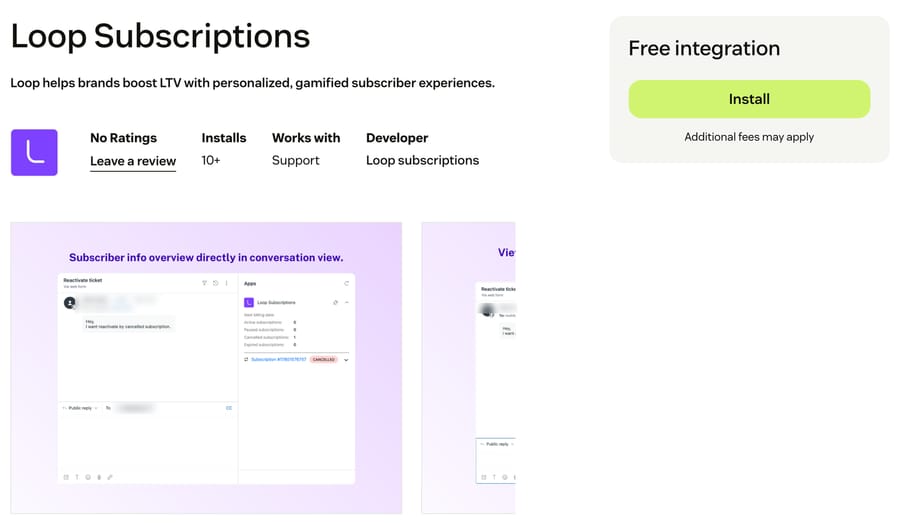
So an AI agent calling Loop's API adds something in four places: shoppers with more than one subscription, which Gorgias AI Agent hands to a person; Zendesk and other help desks, where Loop's app displays but doesn't act; jobs outside Gorgias AI Agent's four actions (swap, frequency, reschedule, address); and teams that want the same agent to also read the Shopify order, check a policy doc and write the internal note.
Loop's Pro plan price and API access
Loop's token documentation says tokens "can be accessed and created by users who have access to Loop's PRO plan." On its Shopify App Store listing (28 September 2026), Loop prices Starter at $99 a month plus 1.0% per transaction and Pro at $399 a month plus 0.75%, and "Admin/ Storefront APIs and webhooks" appears only on Pro. There's also a Free plan for up to 50 active subscriptions, and both paid plans list a 14-day free trial.
The fee structure tells you who the gate is aimed at. At $50,000 a month in subscription revenue, Starter costs $99 + $500 = $599 and Pro costs $399 + $375 = $774, so API access and the help-desk integrations cost $175 a month more. The lower transaction rate closes that gap as revenue grows: the two plans cost the same at $120,000 a month ($300 extra base fee divided by the 0.25-point rate difference), and above that Pro is cheaper. Loop's incentive is the transaction fee: it earns more as your subscription revenue grows, so it gates the features that larger brands need, APIs and help-desk integrations, on the plan that trades a higher base fee for a lower rate. A brand under about $120,000 a month pays extra for API access; above that, Pro is the cheaper plan anyway.
Which Loop actions should still need a person?
Loop's API will do all of the following. Whether an AI agent should is a policy call, and these are the ones we'd keep with a person or behind a strict instruction:
- Cancel. Loop's cancel endpoint takes a
cancellationFlowIdfor analytics, acomment, andnotifyCustomer, which defaults to true and sends Loop's cancellation email. Most brands run a retention offer first. Our instruction below has the agent collect the reason and hand off. - Prepaid subscriptions. Cancel has a
markForCancellationflag that only applies to prepaid plans; set wrong, it cancels a prepaid cycle the customer already paid for. Route prepaid cancels to a person. - Placing an order now.
placeOrderbills the card immediately. That's a charge, not a service change. - Discounts.
POST /subscription/{id}/discountaccepts any code the store has. Only let an agent apply codes your policy names. - Refunds and "I was charged after I paused". Loop has no refund endpoint. The agent reads the status and billing history, then hands a note to whoever refunds in Shopify.
How does Macha connect to Loop Subscriptions?
Loop connects to Macha through a custom API tool that Macha's team sets up during onboarding, using a Pro-plan token sent as X-Loop-Token. There's no built-in Loop connector and no Macha listing on Loop's side. The setup:
- The token. In Loop, Settings, then API tokens and webhooks, then Generate New Token. Loop recommends one token per integration so you can see which one made each call. Give it Read on subscription contracts and customers, and Read & write subscription contracts only if the agent will make changes.
- Read tools first. "Find subscriptions by email" and, if you need billing dates beyond the next one, "List order schedule". Each is tested with the Test button on the tool against a real subscriber before any write tool exists.
- Write tools, marked Write. Skip and resume usually come first, because they're a POST to a path with no required body. Pause is harder: it needs the subscription id in the URL and a
pauseDurationbody, and that combination runs into a limit in Macha's custom tools today (see below). The tool form labels the Write type "requires confirmation," but in a 28 September chat test on our demo org a custom Write tool for another app ran with no confirmation card, while Macha's built-in Zendesk writes did show one. On a triggered run, Write tools execute directly when the agent's instructions say they may. The instructions are the control. - Pin the version in the path. Loop puts the version in the URL (
/admin/2026-04/), not a header. Loop's 12 August 2026 changelog entry says v2026 arrived "while continuing to support existing v2023" and moved list endpoints to cursor-based pagination, but its developer site now labels 2023.10 deprecated. Build on 2026-04 and don't mix paths from the two versions in one agent.
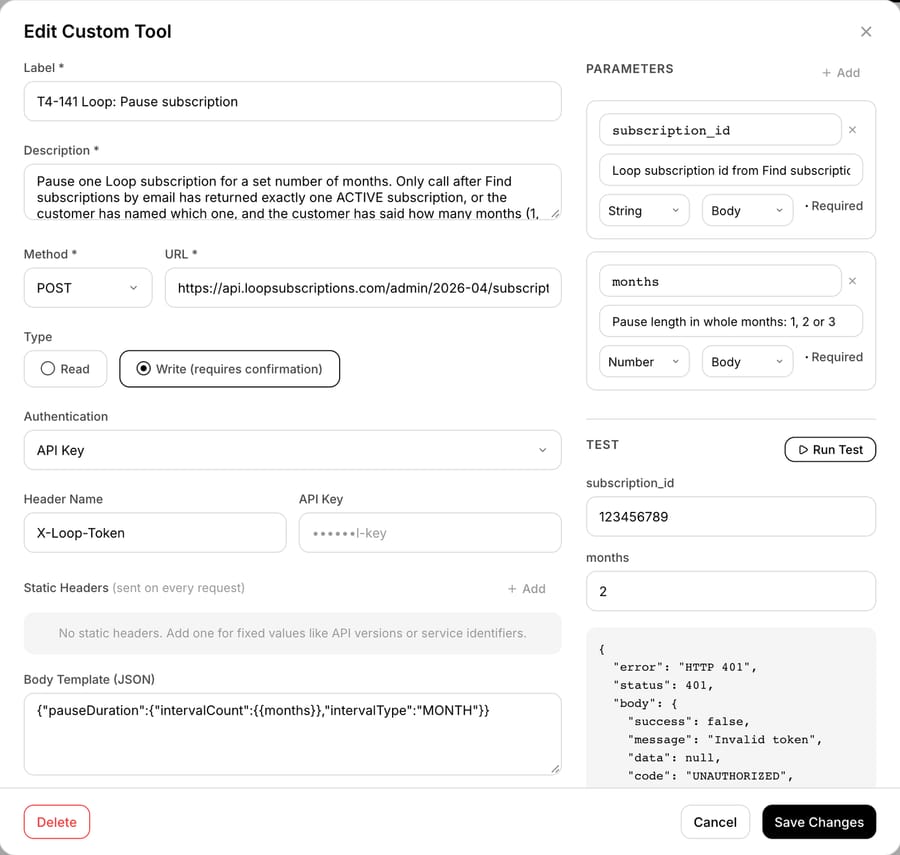
That's the first pause tool we built for this page, and it has a flaw a token swap won't fix. The body template sends {"pauseDuration":{"intervalCount":2,"intervalType":"MONTH"}}, with the 2 filled in from a number parameter called months, and the URL carries a subscription_id placeholder. In Macha's production custom-tool runner, when a tool has a body template, placeholders in the URL aren't substituted. So this tool sends the literal path, and with a real Pro-plan token we expect Loop to answer 404 rather than pause anything (inferred from that behavior, not observed). Run Test with subscription id 123456789 and 2 months returned Loop's own error body, {"success": false, "message": "Invalid token", "code": "UNAUTHORIZED"}, because the key is a placeholder and Loop checks the token before it resolves the path. That 401 proves the request reaches Loop's live API. It says nothing about the path.
Skip, resume and cancel don't hit this, because they need no body template: the whole path, id included, sits in the URL. For pause, keep the id out of a templated URL. If Loop accepts a pause with the id in the path and no body template, build it that way; otherwise have Macha's team build the call during onboarding and test it with a real token against a real subscription before the agent is allowed to use it. We haven't tested either route, since we don't have a Pro token.
Here's the agent instruction we used, written for acting rather than describing:
When a subscriber asks to pause, skip or cancel their Loop subscription:
1. Pause with no length given: ask whether they want one, two or three
   months, and stop. Don't call any Loop tool yet.
2. Otherwise call Loop: Find subscriptions by email with the requester's
   email. Only an ACTIVE subscription can be paused or skipped. A PAUSED
   one can only be resumed, so tell them it's already paused.
3. No ACTIVE subscription: reply that you can't find one under this email
   and ask for the email they used at checkout. More than one ACTIVE: list
   each by product and next billing date and ask which one. Don't guess.
4. Pause: call Loop: Pause subscription with the subscription id and
   the number of months, then reply with the month the subscription
   resumes. (Only once that tool has passed a real-token test.)
5. Skip: call Loop: Skip next order, then reply with the new next billing
   date from Find subscriptions by email.
6. Cancel: ask for the reason once. When they reply, add an internal note
   with the subscription id and the reason, tag loop_cancel, and tell them
   a teammate will confirm the cancellation today. Don't cancel it yourself.
7. Never promise a refund for a charge that already went through. Add an
   internal note for the billing team instead.
If any Loop tool returns an error, don't tell the customer what went wrong
inside our systems. Reply that a teammate is checking and will follow up
today, add an internal note with the tool name, the HTTP status and the
error message, and tag app_tool_error. Tag every ticket loop_ai.
Step 1 exists because a pause without a length is the most common incomplete request, and Loop treats a pause with no fixed duration as open-ended. The error paragraph exists because of an earlier run: an agent on the subscription apps comparison told a customer it was "unable to access our subscription system," which is true and no use to them.
What happened when we ran a Loop agent on test tickets?
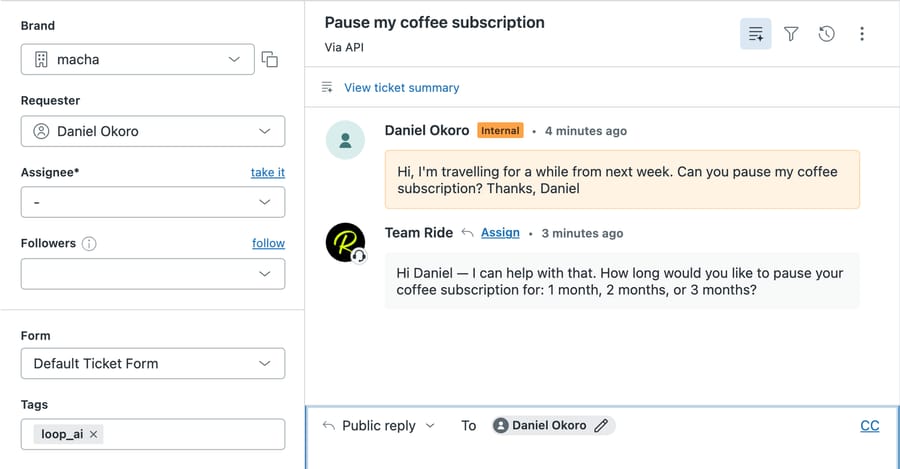
On 28 September 2026 we ran two Loop agents on made-up tickets in d3v-macha, our sandbox Zendesk, using Macha's test feature, which creates a real ticket and dispatches the agent the way a ticket-created trigger would. The requesters are invented and use @example.com addresses. The customer's message shows as an internal comment ("Via API") because that's how the test feature posts it; the agent's reply is public.
Ticket #1137, no pause length. The customer said they were going away from next week and asked us to pause their coffee subscription, with no length. The agent, built from the instruction above on GPT-5.4, replied 5 seconds after the ticket was created: "How long would you like to pause your coffee subscription for: 1 month, 2 months, or 3 months?" It read the ticket, posted the reply and tagged loop_ai. It called no Loop tool, which is what step 1 says.
Ticket #1125, length given. An earlier agent with a lookup tool only (no pause tool, because the instruction had a teammate run the pause) got "Can you pause my subscription for two months? Thanks, Grace." It went straight to Find subscriptions by email. Loop answered HTTP 401, "Invalid token", because the key was a placeholder. The agent replied 12 seconds after creation with a holding line, "A teammate is checking this for you and will follow up today," wrote an internal note with the tool name, the 401, the error, "Requested pause length: 2 months" and the requester email, and tagged app_tool_error and loop_ai. It didn't claim a pause.
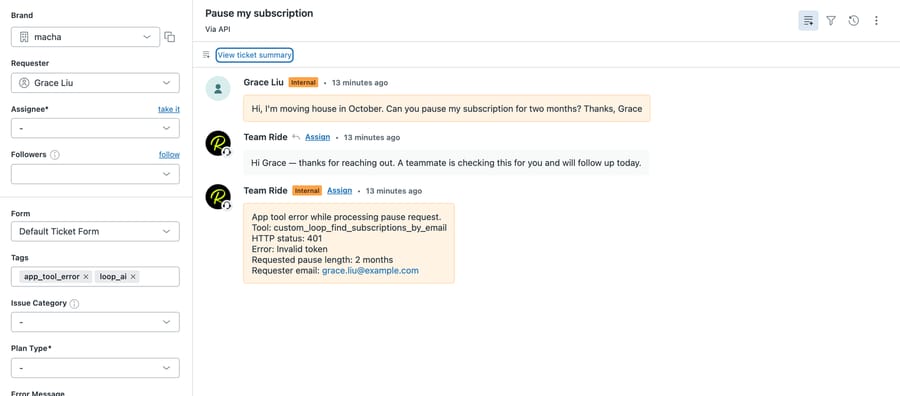
The test shows the agent follows the order of an instruction (ask first, then look up), and that it handles a failed Loop call without leaking the failure to the customer. Our Loop calls reached Loop's API and stopped at the token check, and the pause tool has the path problem described above. We haven't seen a successful Loop call, because we don't have a store on Loop's Pro plan, so the success path (the pause call and the resume date in the reply) is documented, not observed.
What goes wrong with a Loop AI integration?
- The plan and the token. Tokens are a Pro feature, so a plan change is the first thing to check when calls start failing. An agent that gets a 401 or 403 should hand off, not retry.
- Shared rate limits. Loop's rate limits are per store, not per key: 50 requests per second in a global pool, shared by Gorgias, the Zendesk app, your AI agent and every other integration on the store. Loop's 12 August 2026 changelog entry raised it 5x, from 10 requests per second. Some endpoints have their own pools: Read all subscriptions and Read all orders at 2 requests every 3 seconds, Read all customers at 1 a second, and address updates at 5 a second. Over the limit, Loop returns HTTP 429. One support ticket uses two or three calls, so support volume alone is unlikely to reach 50 a second; a bulk export running at the same time might hit an endpoint pool.
- The pause body. Loop's reference marks
pauseDurationas required, but its description says that without a fixed duration the subscription stays paused "indefinitely until manually resumed."intervalTypeacceptsDAY,MONTH,YEARorCUSTOM, andresumeDateEpochsets an exact resume date. Always send a duration. If a tool fills the count from a number parameter, check the body that reaches Loop on the first real-token call; our test stopped at the token check, so we never saw it. - Cancel emails by default.
notifyCustomerdefaults to true on cancel and on reschedule. If the agent also replies on the ticket, the customer gets two messages. Decide which one you want. - Frequency changes and discounts.
PUT /subscription/{id}/frequencyrequires adiscountType: keep the existing discount, apply the new frequency's discount, or a custom one. Leave it to the tool definition, not the model, so a frequency change doesn't silently change the price. - Version drift. Paths carry the version. A tool built on
/admin/2023-10/sits on a version Loop's developer site labels deprecated, and new fields (Loop's changelog addsexpiredAtto the 2026 subscription APIs, for example) land in the newer version first.
Where Macha fits
Macha fits teams at Loop brands on the Pro plan that run Zendesk, Freshdesk, Gorgias, Front, HubSpot or Intercom and want subscription changes made inside the ticket, including the multi-subscription shoppers Gorgias AI Agent hands off and the swaps, frequency and address changes outside its four actions. It's the wrong fit if you're on Gorgias and your subscribers mostly hold one subscription, because Gorgias AI Agent's Loop actions already cover skip, pause, resume and cancel there. Loop connects to Macha through a custom API tool that Macha's team sets up during onboarding with an X-Loop-Token; Shopify orders and refunds go through Macha's built-in Shopify connector, and the ticket side runs through the Zendesk or Gorgias connector. Pricing starts at $299/month for 750 tickets, charged per ticket rather than per action, so a ticket with a lookup and a pause is one charge. Custom API tools and the setup work are included on every plan, and you can try it on $50 of free usage (about 125 tickets), no credit card, no time limit. For the other subscription apps side by side, see the subscription apps comparison; for the Recharge build, the Recharge page; and for every Shopify app category, the Shopify app map.
FAQ
Does Loop Subscriptions have a public API? Yes. Loop publishes an Admin API at api.loopsubscriptions.com/admin, in version 2026-04 (with 2023-10 still documented but labeled deprecated), authenticated with a token in the X-Loop-Token header. Tokens can only be created on Loop's Pro plan, listed at $399 a month plus 0.75% per transaction.
Can the Loop API pause a subscription? Yes. POST /subscription/{id}/pause takes a pauseDuration with an intervalCount and an intervalType of DAY, MONTH, YEAR or CUSTOM, or a resumeDateEpoch. POST /subscription/{id}/resume ends the pause. Recharge's API, by contrast, has no pause endpoint.
Does Gorgias AI Agent work with Loop Subscriptions? Yes. Gorgias AI Agent has ready-made Loop actions to skip, cancel, pause and resume, but only when the shopper has a single subscription, and it can skip only before the next order is created. Loop's own Gorgias integration, on the Pro plan, adds a sidebar where human agents do the same and more.
Does Loop have a Zendesk app? Yes, a free app by Loop on the Zendesk Marketplace. It shows the requester's subscriptions in the ticket sidebar, matched by email, and links each subscription to the Loop admin portal for changes. It requires Loop's Pro plan and doesn't make changes from Zendesk itself.
What is Loop's API rate limit? 50 requests per second per store in a global pool shared by every token and app on the store. Some endpoints have separate pools, such as Read all subscriptions at 2 requests every 3 seconds and address updates at 5 a second. Over the limit, Loop returns HTTP 429.
Does Macha have a built-in Loop Subscriptions connector? No. Loop connects through a custom API tool that Macha's team sets up during onboarding, using your Pro-plan token in the X-Loop-Token header. Custom tools are included on every Macha plan.
How we researched this
On 28 September 2026 we read every Loop endpoint cited here in the markdown version of Loop's developer reference at developer.loopwork.co (pages for pause, resume, cancel, skip next order, reschedule, reactivate, place order, swap line, update frequency, update address, add discount, send login link, subscriptions by email, rate limits and admin API tokens), plus the changelog entries on version 2026-04 (12 August 2026) and the 5x rate-limit increase (12 August 2026), re-checked on 28 September. Loop's Gorgias and Zendesk integration details come from Loop's help center (articles 12741869 and 12741923) and the Zendesk Marketplace listing 1089616, read the same day in a headless browser; Gorgias AI Agent's Loop actions come from Gorgias's help center article 943225, updated 22 January 2026. Loop's prices and its 5.0 rating from 767 reviews come from its Shopify App Store listing on 28 September 2026; StoreLeads reported Loop on 4,412 Shopify stores in a report updated 25 September 2026. The ranking pages for "loop subscriptions api" are mostly Loop's help center and third-party connector listings, which don't cover the support endpoints.
Arithmetic: at $50,000 a month in subscription revenue, Starter is $99 + 1.0% × $50,000 = $599 and Pro is $399 + 0.75% × $50,000 = $774, a $175 difference. The plans cost the same where $300 (the base-fee gap) equals 0.25% of revenue, which is $120,000 a month.
Live on 28 September 2026: we built the custom tool "T4-141 Loop: Pause subscription" on our Macha Demo org with a placeholder key and ran its Test (HTTP 401, "Invalid token"); as configured, with a body template and the id as a URL placeholder, it wouldn't reach the right path with a real token, and ran two agents with Macha's test feature on made-up d3v-macha tickets #1125 and #1137. d3v-macha's own webhooks point at a development tunnel, which is why we used the test feature rather than a live trigger. We don't have a Loop Pro store, so no Loop write was run against a real subscription; every write on this page is documented, not tested. All tickets, names, emails and the agent instruction are synthetic; no customer data was used.
Resolve tickets automatically with AI agents
Macha's AI agents work on top of the help desk you already use — no code.