Intercom
 Shopify
 Stripe
 Slack
Slack Notion
 Google Workspace
 Confluence

What Can an AI Support Agent Do in Recharge? Skip, Cancel and Reschedule Subscriptions Through the API (2026)


Recharge's API (version 2021-11) documents seven subscription changes an AI support agent can make with one store token sent as X-Recharge-Access-Token: skip, unskip, cancel, reactivate, reschedule the next charge, move the subscription to another address, and change frequency, variant or quantity. It has no pause endpoint. Pausing is a customer-portal feature, so an agent can only approximate it by skipping charges or moving the next charge date.
Key takeaways
- Recharge's API version 2021-11 lets an AI agent skip, cancel and reschedule subscriptions with a store token sent in the X-Recharge-Access-Token header, but it documents no pause endpoint.
- Recharge finds a subscriber by email with GET /customers?email=, then lists subscriptions by customer_id and queued charges by customer_id and status=queued.
- Recharge's API allows a bucket of 40 calls per token that drains at 2 calls a second, and returns a 429 error when the bucket is full.
- Gorgias AI Agent can already cancel or skip a Recharge subscription natively, but only when the shopper has a single subscription; multiple subscriptions go to a human.
- Changing frequency through PUT /subscriptions/{id} removes skipped charges, so an AI agent should change frequency first and skip afterwards.

Which Recharge jobs can an AI agent do, and through which endpoint?
Every row below is a documented call in the Recharge API reference; we checked each one on 28 September 2026. "Custom API tool" means Macha's team builds the call for you during onboarding; Recharge has no built-in Macha connector.
| Support job | Endpoint (2021-11) | Scope | Read / write | Who can do it today |
|---|---|---|---|---|
| Find the subscriber | GET /customers?email= | read_customers | Read | Gorgias sidebar; a Macha custom API tool |
| List their subscriptions | GET /subscriptions?customer_id= | read_subscriptions | Read | Gorgias sidebar; a Macha custom API tool |
| "When is my next box?" | GET /charges?customer_id=&status=queued or GET /customers/{id}/delivery_schedule | read_orders / read_customers | Read | Gorgias sidebar; a Macha custom API tool |
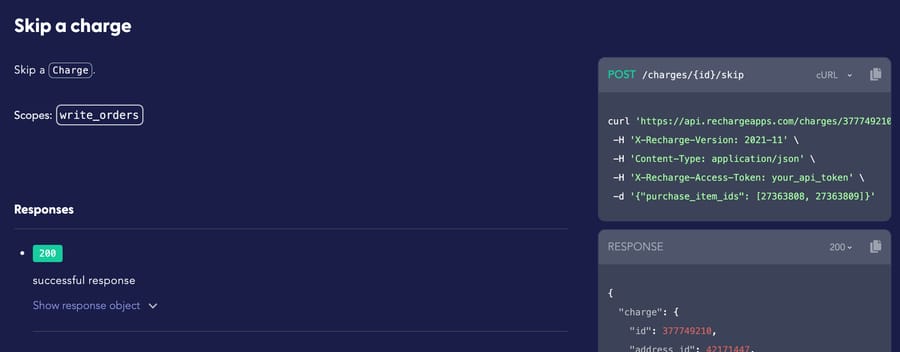
| Skip the next order | POST /charges/{id}/skip | write_orders | Write | Gorgias AI Agent (single subscription); a Macha custom API tool |
| Undo a skip | POST /charges/{id}/unskip | write_orders | Write | A Macha custom API tool; a human in Recharge |
| Cancel | POST /subscriptions/{id}/cancel (cancellation_reason required) | write_subscriptions | Write | Gorgias AI Agent (single subscription); a Macha custom API tool |
| Reactivate a canceled subscription | POST /subscriptions/{id}/activate | write_subscriptions | Write | A Macha custom API tool; a human |
| Move the next charge date | POST /subscriptions/{id}/set_next_charge_date | write_subscriptions | Write | A Macha custom API tool; a human |
| Ship to a different saved address | POST /subscriptions/{id}/change_address | write_subscriptions | Write | A Macha custom API tool; a human |
| Change frequency, flavor or quantity | PUT /subscriptions/{id} | write_subscriptions | Write | A Macha custom API tool; a human |
| Pause for two months | Not in the API reference | none | none | The subscriber in the Recharge customer portal; a human |
Refunds are deliberately missing from the list. Recharge documents POST /charges/{id}/refund, but on a Shopify store the money sits on the Shopify order. Macha's built-in Shopify connector has a Create Refund tool, a Write tool that asks for confirmation in chat. It refunds everything still refundable on the order, shipping included, and can't refund a partial amount, so "refund just the second bag" stays with a person.
What subscribers actually ask
The requests a Recharge subscriber sends support fall into four groups, and each maps to rows in the table above:
- "When is my next order, and how much will it be?" A read: the queued charge carries
scheduled_atand the total. - "Skip next month" or "push it back two weeks." A write: skip the queued charge, or set a new next charge date.
- "Cancel my subscription." A write with a required reason, which is where retention offers live.
- "I moved" or "send the vanilla one instead." A write on the subscription: a new address id, or a new
external_variant_id.
The awkward one is "pause," because customers use the word loosely and Recharge's API doesn't have it. The reference lists a subscription/paused webhook that fires "when a customer pauses a subscription from within the customer portal," and the subscription list filter accepts only three statuses: active, cancelled and expired. An agent that promises a pause through the API is promising something the API can't do. For the wider question of how skip, pause and cancel differ across apps, see how AI handles skip, pause and cancel requests.
How does the lookup work, from an email to the right charge?
The ticket arrives with an email address and nothing else. The agent needs three calls to reach something it can act on:
GET /customers?email=jane%[email protected]returns the Recharge customer and itsid. Recharge's reference warns that a plus sign in an email must be URL-encoded as%2B. If the tool doesn't encode it, the lookup fails for those customers and returns nothing.GET /subscriptions?customer_id=<id>&status=activereturns each active subscription withnext_charge_scheduled_at,is_skippableandis_swappable.GET /charges?customer_id=<id>&status=queuedreturns the upcoming charges. A skip acts on a charge id, with the subscription passed in the body aspurchase_item_ids(the oldersubscription_idsalso appears in the docs).
Two details change how you design the tools. A charge can bundle several subscriptions that share an address, so "skip my coffee but not my filters" means skipping one purchase item on a shared charge. And since 19 March 2025, List charges drops processed charges with a processed_at older than 90 days, so "what did you charge me in May?" can come back empty from the API while the merchant portal still shows it.
What does Recharge's Gorgias integration already do?
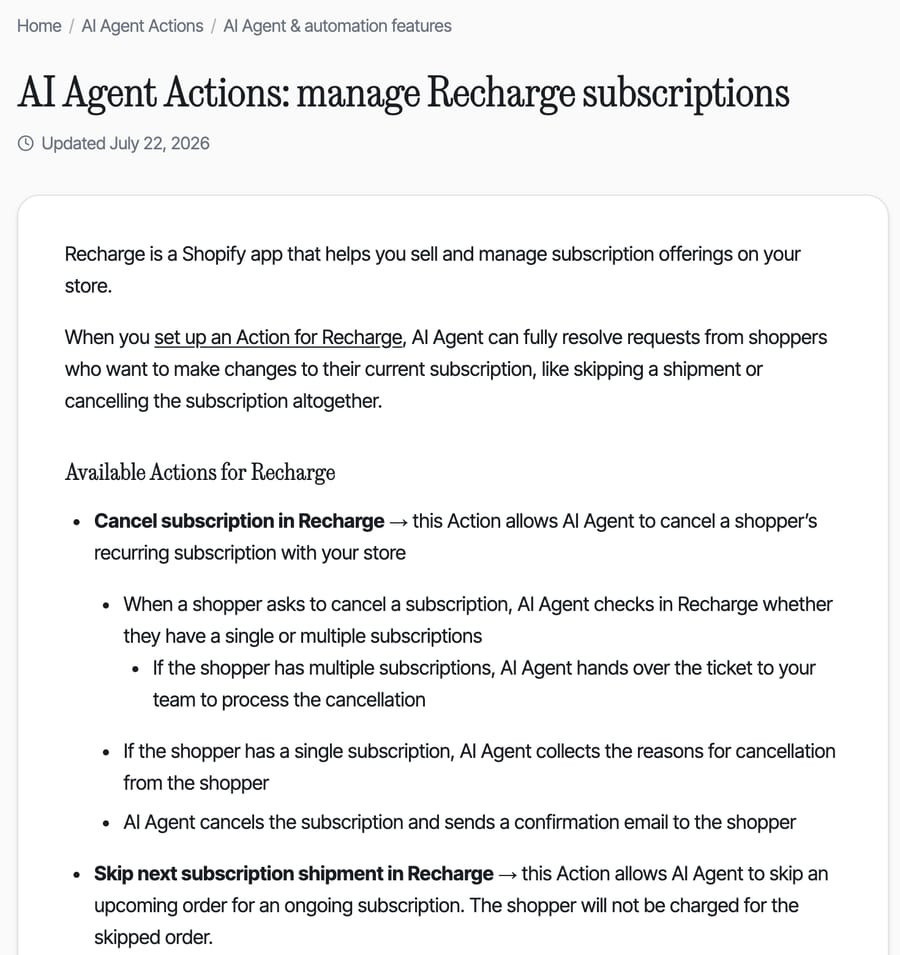
If you run Gorgias, its AI Agent already handles the two most common Recharge writes. Gorgias's help center (updated 22 July 2026) lists two Recharge actions, "Cancel subscription in Recharge" and "Skip next subscription shipment in Recharge." Both have the same limit: "AI Agent is only able to skip or cancel a subscription in Recharge if the shopper has a single subscription." Multi-subscription shoppers are handed to your team, and skips work only before the order is created. Our Recharge and Gorgias setup guide walks through the sidebar widget, and answering Recharge questions with AI in Gorgias covers where the native AI stops.
That leaves three gaps an AI agent layer can fill:
- Teams not on Gorgias. Recharge's API doesn't care which help desk the ticket sits in. A team on Zendesk, Freshdesk, Front, Intercom or HubSpot gets the same endpoints.
- Multi-subscription households. The API can skip one purchase item on a shared charge, which is the case Gorgias hands off.
- The jobs past skip and cancel: rescheduling, frequency changes, flavor swaps, address moves and reactivations are all documented calls with no native AI action behind them.
Gorgias's incentive is visible in the design. Its AI Agent is priced per automated interaction, so the actions it ships first are the high-volume, low-risk ones, and the edge cases go back to a seat. That's a reasonable default. It's also why the multi-subscription case, which a subscription brand with add-ons sees daily, stays manual.
Which Recharge actions should still need a person?
Write access is scoped per token, so the choice is yours rather than the agent's. We'd keep these with a human, or behind an explicit rule in the agent's instructions:
- Cancellations with a save offer. The API takes
cancellation_reasonand optionalcancellation_reason_comments, and it can apply a discount to a charge. Whether to offer 20% off before canceling is a retention policy, not a lookup. - Reactivations of long-canceled subscriptions, which can charge a card the customer has forgotten about.
- Refunds on Recharge charges. Route them through the Shopify order where possible.
- Anything the subscriber calls "pause" for longer than your skip policy allows. The agent can offer skips or a later charge date, and a person can decide the rest.
One ordering trap is worth writing into the instructions. Recharge's reference warns that updating order_interval_frequency, order_interval_unit or charge_interval_frequency "will remove skipped and manually changed charges." A customer who asks to "skip October and switch to every six weeks" has to get the frequency change first and the skip second, or the skip silently disappears.
How does Macha connect to Recharge?
Recharge connects through a custom API tool that Macha's team sets up during onboarding. There's no built-in connector and no Macha listing on Recharge's side. The setup looks like this:
- The token. A store owner creates it in Recharge under Tools & apps, then API tokens (only store owners can see API tokens by default). Give it read access to customers, subscriptions and orders, and write access only to what you want the agent to do: write_orders for skips, write_subscriptions for cancel, reschedule, address and frequency changes.
- The headers. Each tool sends the token as the API Key header
X-Recharge-Access-Tokenplus a fixedX-Recharge-Version: 2021-11. Macha's custom tools can send multiple fixed headers, so the version is pinned rather than left to the store default. Without it, calls use whatever version the store is set to. - Read tools first. Find customer, list subscriptions, list queued charges. We test each with the Test button on the tool against a real subscriber before any write tool exists.
- Write tools, marked Write. Skip, unskip, cancel, set next charge date. The tool form labels the Write type "requires confirmation," but don't lean on a confirmation card for a custom tool: in a 28 September chat test on our demo org, a custom Write tool for another app ran with no card, while Macha's built-in Zendesk writes did show one. On an autonomous trigger run, Write tools execute directly when the agent's instructions say they may. The instructions are the control, so they have to say exactly when to write and when to hand off.
A trimmed version of the instruction we'd give the agent, written for acting rather than describing:
Recharge subscriptions (tools: rc_find_customer, rc_list_subscriptions,
rc_list_queued_charges, rc_skip_charge, rc_set_next_charge_date, rc_cancel)

1. Look up the customer by the ticket requester's email. If no match,
   ask for the email on the subscription. Never guess.
2. List active subscriptions and queued charges. If there is more than one
   subscription, name each one (product + next date) before changing anything.
3. "Skip" or "pause for a month": skip the next queued charge for that
   subscription only (purchase_item_ids). Confirm the new next date.
4. "Pause" for longer than 2 charges: offer to skip up to 2 charges or move
   the next charge date. Do not say the subscription is paused.
5. Frequency change + skip in one request: change frequency first, then skip.
6. "Cancel": ask for the reason once, then offer the save discount in our
   policy doc. If they still want to cancel, cancel with that reason.
7. Refund requests or disputes: tag recharge-refund and hand off.
8. If a Recharge tool returns an error, don't tell the customer what failed.
   Retry once only on a 429; never retry a 401 or 403. Reply that a teammate is checking and will follow up today, add an
   internal note with the tool name, HTTP status and error message, and
   tag app_tool_error.
Rule 8 came out of testing. In an earlier run on a Loop Subscriptions agent, the agent told the customer it was "unable to access our subscription system," which is true and useless to them.
What happened when we ran a Recharge agent on a test ticket?
We built the read half of this on Macha Demo, our internal test org, on 28 September 2026, and ran it on a made-up ticket. We don't have a Recharge store, so every Recharge tool carried a placeholder key. That means the test proves the request shape and the agent's failure handling, not a successful skip.
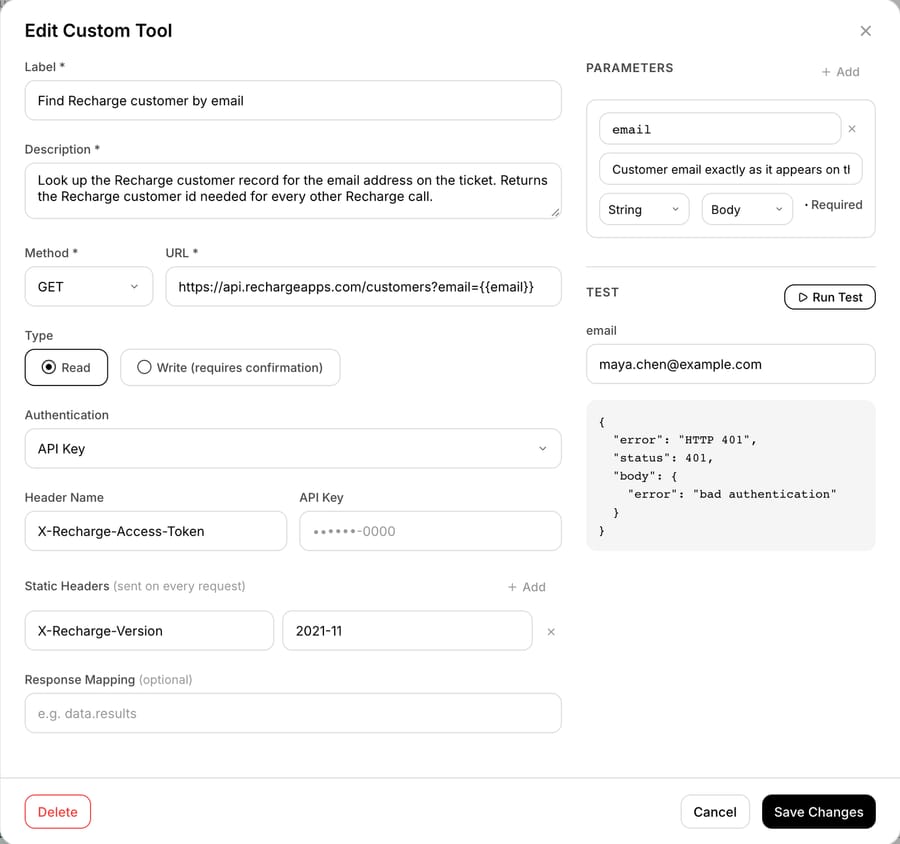
The tool. "Find Recharge customer by email" sends GET https://api.rechargeapps.com/customers?email={{email}} with the key in X-Recharge-Access-Token and a static X-Recharge-Version: 2021-11 header. Pressing Run Test with [email protected] got Recharge's live API to answer with HTTP 401 and the body {"error": "bad authentication"}. A 401 with a dummy key is the expected result: the call reached Recharge, and Recharge refused the key.
The agent. "Recharge skip and reschedule" had three Recharge read tools (find customer, list addresses, list queued charges) and Macha's built-in Zendesk tools for reading the ticket, replying, adding a note and tagging. We left the skip tool out on purpose: its instructions said to confirm the charge and product with the customer and have a teammate do the skip in Recharge. They also said never to cancel or refund, and carried the tool-error rule above.
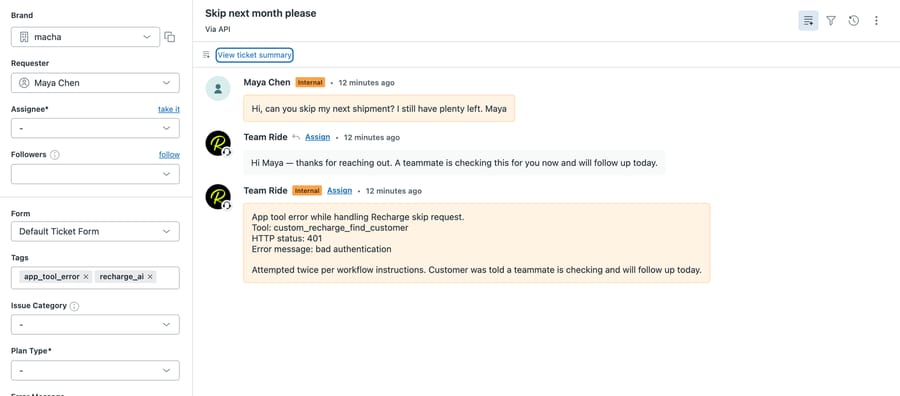
The ticket. Macha's agent Test feature created ticket #1121 in our sandbox Zendesk from a made-up subscriber, Maya Chen: "Hi, can you skip my next shipment? I still have plenty left." It then dispatched the agent the way a ticket-created trigger would.
What the agent did. It called the find-customer tool, got the 401, tried once more, and got the same 401. It never reached the address or charge tools, since both need the customer id. Twelve seconds after the ticket was created it had posted a public reply telling Maya a teammate was checking and would follow up today, added an internal note naming the tool (custom_recharge_find_customer), the status (401) and the message ("bad authentication"), and tagged the ticket app_tool_error and recharge_ai.
Two things in that run matter for a real build. A retry on a 401 is wasted: bad credentials don't fix themselves, so a real rule would retry only on a 429. And the holding reply plus a precise note is what you want on the day a Recharge token gets revoked, because the person who picks the ticket up sees which tool failed without opening a log. What we didn't observe is a successful Recharge call, a skip, or a cancellation; those parts of this page come from Recharge's documentation.
What goes wrong with a Recharge AI integration?
Five failure modes, all from Recharge's own documentation:
- 429s during a BFCM rush. Recharge's rate limit is a leaky bucket of 40 calls per token draining at 2 calls a second. One ticket costs three reads and a write, so an agent working through a backlog of 30 tickets fires about 120 calls. The first 40 go straight through; the other 80 drain at 2 a second, so the batch needs about 40 more seconds of API time. Recharge's advice on a 429 is to sleep at least 2 seconds and retry.
- A missing scope. A token with write_subscriptions but not write_orders can cancel but can't skip, because skip lives on the charge.
- An unpinned version. Calls without
X-Recharge-Versionuse the store's default version, so a store still defaulted to 2021-01 returns different field names. - Skipping a charge that's already an order. Only queued charges can be skipped. Once the charge has become a Shopify order, the fix is canceling that order. Macha's built-in Shopify connector has a Cancel Order tool (a Write tool that asks for confirmation in chat, and by default refunds to the original payment method and restocks), but the Recharge subscription stays active, so the next charge still comes. We'd keep this case with a person, who can cancel the order and confirm the next date in one reply.
- Frequency changes that erase skips, covered above.
For the address side of the same workflow, see updating a subscriber's address before the next renewal. For what a subscription brand's AI agent can resolve overall, see AI customer service for subscription brands, and for custom tools in general, the custom API tools guide.
Where Macha fits
Macha fits teams at a subscription brand already running Zendesk, Freshdesk, Gorgias, Front, HubSpot or Intercom that want Recharge changes made inside the ticket, including the multi-subscription cases Gorgias's native actions hand off. It's the wrong fit if you only need skip and cancel for single-subscription shoppers on Gorgias, because Gorgias AI Agent already does that. Recharge connects through a custom API tool that Macha's team sets up during onboarding, using a store token in X-Recharge-Access-Token; Shopify orders and refunds go through the built-in Shopify connector. Pricing starts at $299/month for 750 tickets, charged per ticket rather than per action, so a ticket where the agent makes three lookups and one skip is one charge. Custom API tools and the setup work are included on every plan, and you can try it on $50 of free usage (about 125 tickets), no credit card, no time limit. The broader comparison, one row per app, is on our subscription apps page, with sibling pages for Loop Subscriptions and Skio.
FAQ
Can an AI agent pause a Recharge subscription through the API?
No. Recharge's 2021-11 API reference has no pause endpoint, and subscription statuses in the API are active, cancelled and expired. Subscribers can pause in the Recharge customer portal, which fires a subscription/paused webhook. Through the API, an agent can skip queued charges or move the next charge date instead.
What header does the Recharge API use for authentication?
Recharge uses a store API token sent as X-Recharge-Access-Token, plus an optional X-Recharge-Version header (2021-11 is the current version). Store owners create tokens in the merchant portal under Tools & apps, then API tokens, and choose no access, read or read and write per scope.
Does Gorgias AI Agent work with Recharge?
Yes. Gorgias AI Agent has two native Recharge actions, cancel subscription and skip next shipment, per Gorgias's help center (updated 22 July 2026). Both work only when the shopper has a single subscription, and skips work only before the order is created. Other cases go to your team.
What is the Recharge API rate limit?
Recharge uses a leaky bucket per API token: 40 calls fit in the bucket and it drains at 2 calls per second. Requests over the limit get a 429 error, and Recharge recommends waiting at least 2 seconds before retrying. Merchants can ask Recharge support for higher limits.
Can the Recharge API show charges older than 90 days?
Not reliably. Since 19 March 2025, List charges omits processed charges (success, refunded or partially refunded) whose processed_at is more than 90 days old. That history stays available in the Recharge merchant portal and its Exports tool.
How we researched this
- Recharge API: every endpoint, scope, parameter and warning quoted here comes from the single-page Recharge API reference, version 2021-11, fetched 28 September 2026. Rate limits come from Recharge's API rate limits doc and token setup from its API token doc, both fetched the same day.
- Gorgias: AI Agent Actions: manage Recharge subscriptions, updated 22 July 2026, fetched 28 September 2026.
- Popularity: Recharge's Shopify App Store listing showed 4.8 stars from 3,121 reviews and pricing from $25 a month on 28 September 2026. StoreLeads reported 53,290 stores running Recharge when we re-pulled it on 28 September 2026; StoreLeads doesn't date its app reports, so treat that as approximate.
- Arithmetic: 30 tickets × 4 calls (three reads and one write) = 120 calls. The first 40 fill the bucket; the other 80 drain at 2 a second, which is 40 seconds.
- What we ran live (28 September 2026, Macha Demo org and our sandbox Zendesk, d3v-macha): the "Find Recharge customer by email" custom tool's Run Test, which got HTTP 401
{"error": "bad authentication"}from Recharge's live API with a placeholder key; and one agent test run on ticket #1121, created by Macha's agent Test feature (it creates a real sandbox ticket, posts the customer's text as an internal comment, and dispatches the agent as a ticket-created trigger would). Reply time (12 seconds) is from the ticket's timestamps. - What we didn't run. We have no Recharge store, so no Recharge call succeeded. Skip, cancel, reschedule, the lookup chain's later steps, the rate limit and the frequency-change warning are documented behavior, not tested. The confirmation-card observation comes from a separate 28 September chat test with a custom Write tool for another app.
- Synthetic examples. Maya Chen, [email protected], the ticket text and the instruction examples are made up. Macha facts come from our custom tools docs and pricing page.
Resolve tickets automatically with AI agents
Macha's AI agents work on top of the help desk you already use — no code.