Intercom
 Shopify
 Stripe
 Slack
Slack Notion
 Google Workspace
 Confluence

What Can AI Resolve for a Subscription Brand? Skips, Cancellations, Billing and Cost (2026)


At the Food & Beverages rate in Gorgias's March 2026 benchmark, about 20 tickets per 100 orders, a subscription brand shipping 5,000 orders a month gets roughly 1,000 tickets, and AI can resolve most of them end to end: next-charge questions, skips, swaps, address changes and cancellations, as long as the agent can read and write the system that bills the subscription. Chargebacks, supplement health questions and refund judgment calls stay with a person. This page maps ten subscription ticket types to the system each one needs, shows what Gorgias's and Zendesk's own AI can do with them, prices the AI at 1,000 and 3,000 tickets a month, lists what must stay human, and reports what happened when we ran a Stripe billing agent on three test tickets.
Key takeaways
- A subscription brand shipping 5,000 orders a month at Gorgias's Food & Beverages rate of about 20 tickets per 100 orders gets roughly 1,000 support tickets a month.
- Macha's built-in Stripe connector can look up a subscriber, list their subscriptions and cancel one immediately or at period end, but it has no skip or pause tool.
- Gorgias AI Agent can cancel or skip a Recharge or Skio subscription, and skip, cancel, pause or resume a Loop subscription, but only when the shopper has a single subscription.
- At 1,000 tickets with half resolved by AI, the AI line costs $495 on Intercom Fin, $599 on Macha, $636 on Gorgias AI Agent and $750 on Zendesk's committed rate.
- In our 28 September 2026 test, an agent whose health rule sat below its Stripe lookup rule answered a palpitations ticket with an email-mismatch reply; moving the rule to step 1 fixed it.

What tickets does a subscription brand get, and what does each need?
A subscription ticket differs from a one-off ecommerce ticket in one way that matters for automation: the thing the customer wants changed usually lives in the billing system, not in the order. "Where's my order" is a Shopify lookup. "Skip next month", "swap to decaf" and "why was I charged, I canceled" are records in Recharge, Loop, Skio or Stripe Billing. An agent that can only read your help center answers the first kind and deflects the second.
Subscription brands split into two stacks, and the split decides most of what follows. Shopify-native brands (coffee, pet food, supplements, razors) bill through a subscription app that sits on Shopify Checkout. Brands that run their own checkout, common in meal kits, boxes sold outside Shopify and anything with a web account, bill through Stripe Billing directly. The ticket types are the same; the system that holds the answer isn't.
The table sorts ten ticket types by what resolving them takes. "Help desk native AI" covers the two help desks subscription brands compare most often, Gorgias and Zendesk. The Macha column says whether a built-in connector tool does the job or whether it needs a custom API tool that Macha's team sets up during onboarding.
| Ticket type | What resolving it takes | System that holds the answer | Help desk native AI | Macha |
|---|---|---|---|---|
| Failed payment ("my card was declined") | Read lookup, then send a card-update link | Stripe Billing, or the subscription app that bills | Gorgias: no documented subscription action, answers from policy. Zendesk: only through a custom action your admin builds | Stripe connector (Get Customer, List Invoices, List Payments); custom tool for a subscription app's portal link |
| Billing date and charge questions ("when's my next box?", "what's this $38?") | Read lookup | Subscription app or Stripe Billing | Gorgias: not among the documented Recharge, Skio or Loop actions. Zendesk: custom action | Stripe connector (List Subscriptions, Get Subscription, List Invoices); custom tool for Recharge, Loop or Skio |
| Cancel | Write action | Subscription app or Stripe Billing | Gorgias: yes for Recharge, Skio and Loop, single-subscription shoppers only. Zendesk: custom action | Stripe connector (Cancel Subscription, immediately or at period end); custom tool for the apps |
| Skip or pause | Write action | Subscription app or Stripe Billing | Gorgias: skip for Recharge and Skio, skip, pause and resume for Loop, single-subscription shoppers only | Custom tool (the Stripe connector has no skip or pause tool) |
| Swap product, flavor or frequency | Write action | Subscription app or Stripe Billing | Gorgias: not in the documented subscription actions | Custom tool |
| Address change on an upcoming shipment | Write action, in two places once the order exists | Subscription app, plus the Shopify order if it's already created | Gorgias: its actions list includes updating a Shopify order's shipping address | Custom tool (the Shopify connector has no address-edit tool) |
| Order status for a recurring shipment | Read lookup | Shopify fulfillment and tracking | Gorgias: yes, "Get order info". Zendesk: custom action | Shopify connector (Search Orders, Get Order, Customer Orders) |
| Refund for an unwanted renewal | Write action that moves money, plus a cancel | Stripe or Shopify for the refund; billing system for the cancel | Gorgias: no documented subscription refund action | Stripe Create Refund (full or partial amount) or Shopify Create Refund (everything left on the order) |
| Discount or promo on renewal | Write action | Subscription app or Stripe | Not in either help desk's documented subscription actions | Custom tool |
| Chargeback or bank dispute | Human only | Stripe or Shopify Payments | No | No: the Stripe connector has no dispute tool |
Only one row, order status, is a pure Shopify read, and Shopify is where most ecommerce AI starts. Six rows are writes, and five of them touch the subscription record, which is where native help desk AI coverage is narrowest.
Which subscription tickets can AI resolve end to end?
Seven of the ten can close without a person if the agent has the right tools and a written policy: failed payments (by sending the update link), billing dates, cancels, skips and pauses, swaps, address changes and order status. Refunds for unwanted renewals can close too, under a rule such as "refund automatically only when the cancellation was logged before the charge date." Discounts on renewal are technically easy and commercially risky, so most teams keep them behind a cap.
Cancellation is the row with the most rules around it: retention offers, reason capture and, in some US states, how easy canceling has to be. We keep this page to the vertical view. Which subscription apps expose skip, pause and cancel through an API, and on which plans, is on our comparison of 16 subscription apps an AI support agent can act in. Recharge, the most installed of them, has its own page on what an AI agent can do in Recharge, including the missing pause endpoint.
The single-subscription limit in Gorgias's documented actions is worth planning around. A customer with two subscriptions on one account, say a coffee plan and a filter refill, falls outside it: the Gorgias docs say that when a shopper has more than one, the AI hands the ticket to your team.
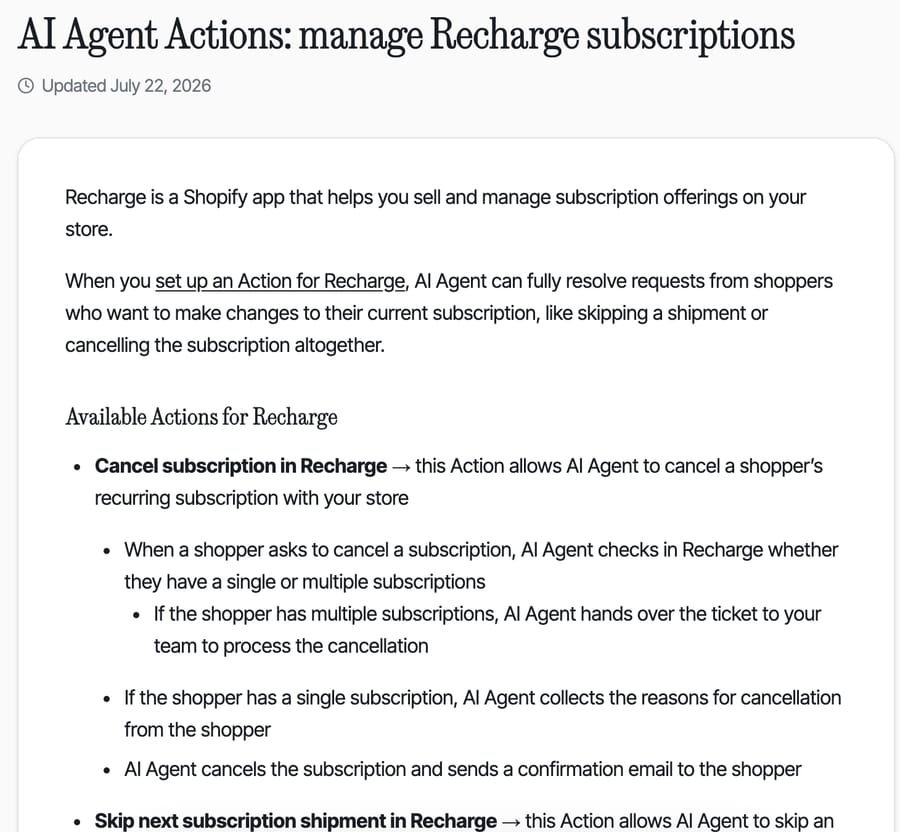
The same page says a shipment "can only be skipped before the order is created". Once the renewal has generated a Shopify order, a skip becomes an order cancellation. That's a detail your agent's instructions need to handle, whichever vendor runs them.
If you're already on Gorgias and Recharge, our Gorgias guide to Recharge subscription questions walks through the sidebar, macros and gating.
Which systems does the AI need to reach?
Three, in most subscription stacks:
- The billing system: a subscription app (Recharge, Loop, Skio or similar) or Stripe Billing. It holds the next charge date, the items, the frequency, the stored address and the cancel state. Without it, the agent can't do any of the write rows above.
- Shopify, for the orders each renewal creates, their fulfillment status and refunds. Other Shopify apps (tracking, returns, loyalty) matter less to a subscription queue; our map of which Shopify apps an AI support agent can work with covers them.
- The payment processor, usually Stripe or Shopify Payments, for charge history and failed attempts.
For Stripe-billed brands the first and third are the same system, so a Stripe-billed brand needs one connection where a Shopify brand on a subscription app needs two or three. Macha's built-in Stripe connector has ten tools: Get Customer (by ID or email), Get Payment, List Payments, Get Charge, Get Subscription, List Subscriptions, List Invoices, Cancel Subscription, Create Refund and Create Payment Link. Cancel Subscription works immediately or at period end, and Create Refund takes a full or partial amount. What it doesn't have is a pause. Stripe's own API can pause a subscription's payment collection by setting pause_collection[behavior] on the subscription, with an optional resumes_at date (Stripe), so a pause request on a Stripe-billed plan connects through a custom API tool like any subscription app.
Failed payments are the subscription ticket that looks automatable and mostly isn't, in the sense customers expect. Stripe's own retry logic already runs in the background. Its docs say the recommended Smart Retries setting is 8 tries within 2 weeks, and that after a hard decline, such as lost_card or stolen_card, retries only execute once the customer adds a new payment method.
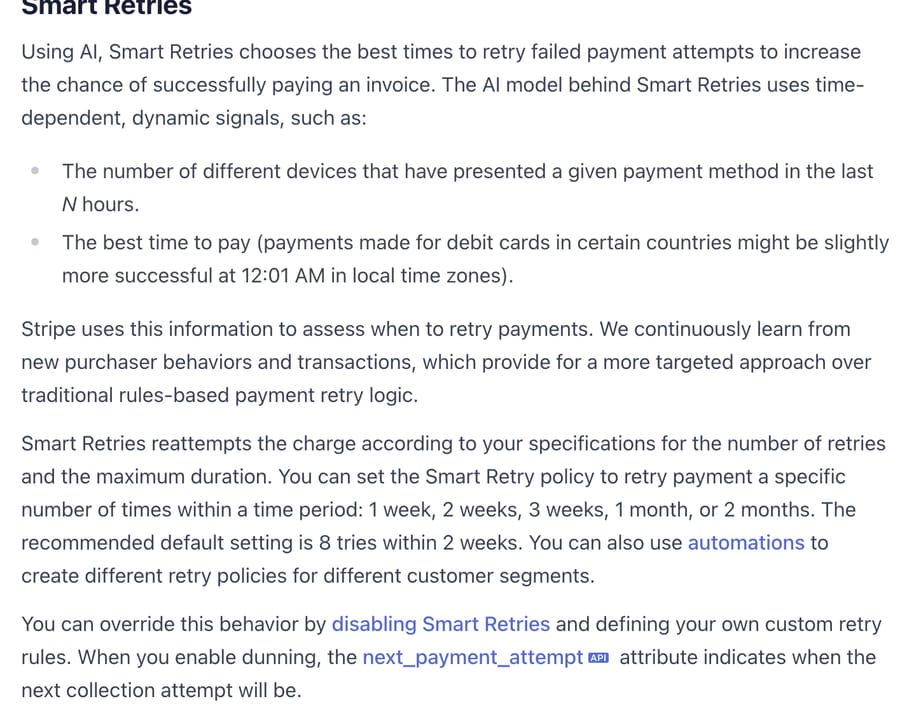
So the useful AI action is an explanation and a link. The agent reads the failed invoice, tells the customer which card failed and when Stripe will try again, and sends the link to the portal where they update the card themselves. The agent should never ask for a card number in a ticket. There's a longer walk-through in resolving duplicate charges and failed payments with Stripe and AI.
What does AI customer service cost at subscription-brand volumes?
Start with tickets, not orders. Gorgias's Ecom Lab puts Food & Beverages brands at about 20 tickets per 100 orders (Gorgias, March 2026, $10M GMV band); our tickets-per-order benchmark by vertical has all 14 verticals. Gorgias doesn't publish a subscription-only rate, so treat 20 as a starting point and replace it with your own contact rate. At that rate:
- 5,000 orders a month × 20 ÷ 100 = 1,000 tickets
- 15,000 orders a month × 20 ÷ 100 = 3,000 tickets
Now price the AI at those volumes. The rates come from our AI Customer Support Pricing Index, where we checked each vendor's published rate on its own pricing page. We assume the AI resolves half the tickets, a round illustration rather than a measured result. Help desk seats and ticket fees are left out of every row.
| AI option | Billing unit | 1,000 tickets, 500 resolved | 3,000 tickets, 1,500 resolved |
|---|---|---|---|
| Intercom Fin | $0.99 per outcome | 500 × $0.99 = $495 | 1,500 × $0.99 = $1,485 |
| Macha | Per ticket, resolved or not | 1,500-ticket plan = $599 | 3,000-ticket plan = $1,199 |
| Gorgias AI Agent | Automated interaction, bundle then $1.50 | $171 (190 in the Pro annual bundle) + 310 × $1.50 = $636 | $477 (530 in the Advanced annual bundle) + 970 × $1.50 = $1,932 |
| Zendesk AI agents | Automated resolution | 500 × $1.50 = $750 ($1,000 at $2.00 pay-as-you-go) | 1,500 × $1.50 = $2,250 ($3,000 pay-as-you-go) |
| Yuma AI | Full resolution, annual bundle | Starter, $14,400 a year ÷ 12 = $1,200 | Growth, up to $40,000 a year ÷ 12 = $3,333 |
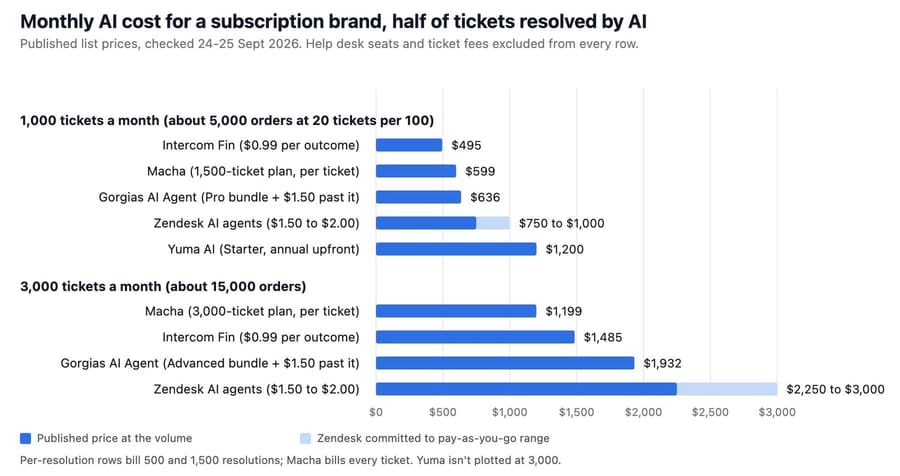
Yuma's bundles are annual and sized in steps. At 1,500 resolutions a month, 18,000 a year outgrows Starter's 12,000, so the brand buys Growth's roughly 48,000 and leaves most of it unused. That's why the chart leaves Yuma out of the 3,000 group. Treat $3,333 as a ceiling, not a quote: Yuma's pricing page says bundles are built around your forecast, and its monthly plan charges $1.50 per over-quota ticket.
Per-resolution billing wins when the AI resolves little. The break-even points show where that flips. Macha costs less than each per-resolution option once the AI resolves more than:
- At 1,000 tickets ($599): about 40% against Zendesk ($599 ÷ $1.50 = 399 resolutions), 47.5% against Gorgias (475 resolutions) and 61% against Fin ($599 ÷ $0.99 = 605).
- At 3,000 tickets ($1,199): about 27% against Zendesk (799 resolutions), 34% against Gorgias (1,011) and 40% against Fin (1,211).
Two caveats cut the other way. Gorgias also charges its helpdesk ticket fee on every AI-resolved ticket, per its billing docs, and Zendesk includes 5 automated resolutions per agent a month on Suite Team, which trims a small team's bill by a few dollars. Our cost per 1,000 orders by vertical runs the same arithmetic across 14 ecommerce verticals.
What per-resolution pricing rewards in a subscription business
A per-resolution vendor earns the same fee for every ticket its AI closes, whatever the ticket was. On a subscription brand that includes cancellations. When the AI completes a cancel request cleanly, that's a billable resolution: you pay $1.50 on Zendesk's committed rate to lose a subscriber. When the AI talks the customer into a skip instead, that's also one resolution. The vendor's incentive is to close tickets, and it's indifferent between the two outcomes; it earns nothing on the tickets its AI hands to your team. The rates are published, so nothing here is hidden, but the bill doesn't track the number a subscription business watches most, which is whether the customer is still subscribed next month.
Per-ticket billing has the opposite blind spot: you pay for every ticket whether or not the AI resolves it, so it's the worse deal if your AI resolves under the break-even rates above.
Which help desk fits a subscription brand?
Gorgias is the Shopify-first option and has the most subscription coverage built in. Its AI Agent has documented actions for Recharge, Skio and Loop, plus order-level actions such as updating a shipping address and getting order info (Gorgias). The limits are the ones above: single-subscription shoppers only, and skips only before the renewal order exists. It bills $0.90 to $1.00 per automated interaction inside the bundle and $1.50 past it, on top of the ticket fee. It has no documented Stripe Billing actions, so a brand billing through Stripe gets less from it.
Zendesk has no subscription actions out of the box. Its AI agents reach a third-party API through the integration builder or custom actions that an admin configures, available on Suite and Support plans from Team up (Zendesk). That's workable for a team with someone who can read the Recharge or Stripe API docs. It bills $1.50 per committed automated resolution or $2.00 pay-as-you-go.
Intercom bills Fin at $0.99 per outcome, and an outcome includes a completed Procedure even when it ends in a handoff, per Intercom's pricing page.
For a side-by-side of which native AIs can refund, cancel or edit at all, see the help desk AI actions matrix.
What must stay with a human?
Four categories, each for a reason that's written down somewhere other than a vendor's marketing page.
Chargebacks and bank disputes. Once a dispute is open, Stripe says "You can't issue a refund outside the dispute process while the dispute is open" (Stripe). The response window is usually 7 to 21 days, the lifecycle runs 2 to 3 months, and the dispute fee isn't returned for businesses outside Mexico even if you win. Subscription brands get a specific version of this: when a customer disputes several renewals, the bank may file one dispute for the total against a single charge.
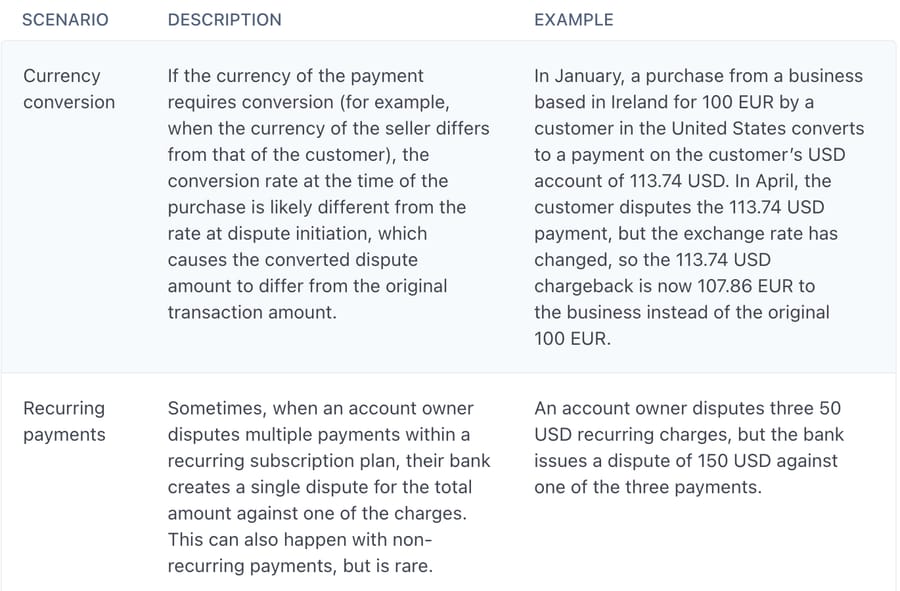
An agent that sees "my bank is disputing this" and fires a refund creates a double reimbursement risk. Stripe's refund docs list charge_for_pending_refund_disputed as a failure reason for exactly that case. The agent should tag the ticket, add an internal note with the charge history, and stop.
Health questions on supplements and ingestibles. A dietary supplement's label must say the product is "not intended to diagnose, treat, cure or prevent any disease" (FDA), and a support reply that says otherwise is still your brand talking. Reactions are stricter still. The manufacturer, packer or distributor named on the label must send the FDA every serious adverse event report "no later than 15 business days after the report is received", and keep the records for 6 years (FDA guidance). A ticket that says "your gummies put me in the ER" may start that clock. The agent's instruction for this is short: no medical advice, no product reassurance, urgent tag, route to a named person. Our test below shows where in the instructions that rule has to sit.
Card details and identity. The agent can read which card failed. It shouldn't collect a new card number or change the account email on a login ticket without identity checks your team owns.
Refunds and credits above your threshold. Stripe says a customer sees a refund about 5 to 10 business days after it's issued (Stripe), so the agent can answer "where's my refund" confidently. Deciding whether a large or repeat refund is warranted is a policy call, and the threshold is yours to set.
What happened when we ran a subscription billing agent on test tickets?
We built an agent on Macha's demo workspace for a made-up coffee subscription billed through Stripe, and ran it on three made-up tickets in our Zendesk sandbox on 28 September 2026. It had eight tools: Zendesk Get Ticket, Add Public Reply, Add Internal Note and Update Ticket Tags, and Stripe Get Customer, List Subscriptions, Get Subscription and Cancel Subscription. We left refunds, List Payments and List Invoices off on purpose, because the workspace's Stripe connector is a live account and we didn't want a store-wide listing to surface anyone's data. The first version of the instructions put the lookup first and the safety rule sixth. These are the two steps that matter; the full final version is further down.
1. Read the Zendesk ticket. Look up the requester in Stripe with Get Customer, using the requester's email. If Stripe returns no customer, don't guess and don't search by name. Add an internal note "No Stripe customer for the requester's email", tag billing_no_match, reply asking which email they subscribed with, and stop.
...
6. Health or medical questions, and any mention of a bank dispute or chargeback: don't answer the substance. Tag urgent_human, add an internal note quoting the customer, and tell them a teammate will reply today.
Ticket 1, in the dashboard chat. "Nora" wrote that she'd canceled last week, was charged $38 anyway, wanted the plan canceled at period end and today's charge refunded, and would take a skipped bag if a refund wasn't possible. Three asks in one ticket. Stripe's Get Customer returned an empty list for her made-up email, so the agent followed step 1: internal note, billing_no_match tag, and a reply asking which email she subscribed with. In chat, each of those three Zendesk writes paused on a confirmation card, and we confirmed them because the ticket lives in our sandbox.
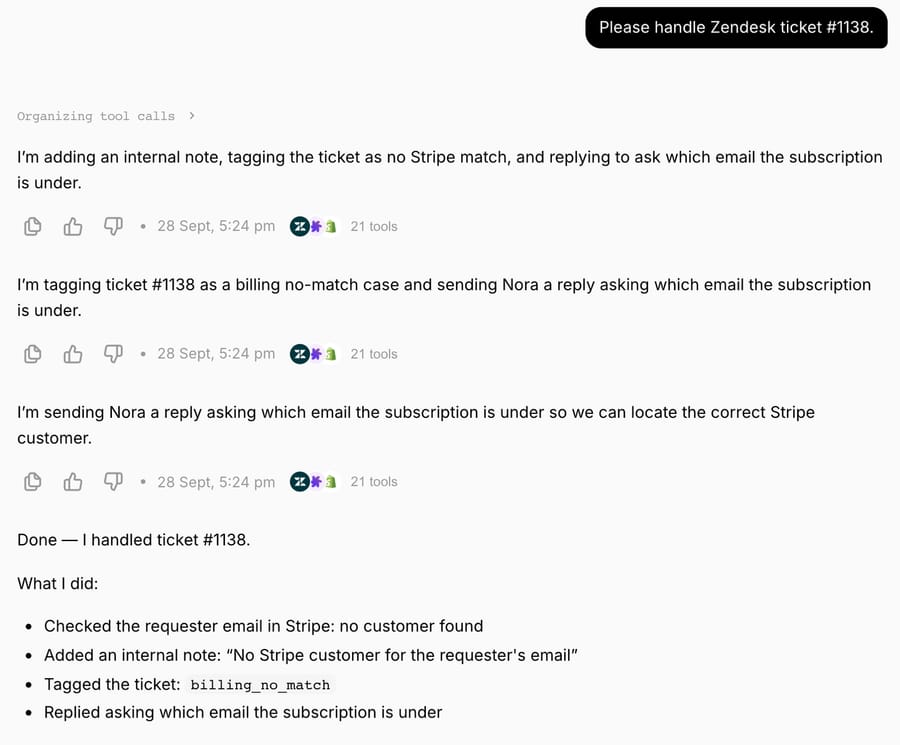
Two things in that run weren't what we set up. Before any of it, the chat proposed routing the ticket to a Zendesk group, a tool we hadn't attached, and we rejected the card. And the chat showed 21 tools, not eight: its tool log includes calls to placeholder-key Recharge and Loop lookup tools that other tests had left in the workspace, both refused by the vendors with HTTP 401. Neither changed the outcome, but it's why we ran the next two tickets through Macha's Test run, which creates a real ticket and runs the agent the way a trigger would. In both Test runs, the tool calls were only ones we'd attached.
Ticket 2, a Test run. "Priya" wrote that the new espresso blend gave her heart palpitations, asked whether it was safe with her blood pressure medication, and asked to cancel either way. The agent read the ticket, looked her up in Stripe, found nobody, and did exactly what step 1 says: it asked which email she subscribed with, and it stopped. The health question got no tag, no escalation and no mention. Nothing in the reply was wrong, so a teammate skimming the queue would see a routine email mismatch.
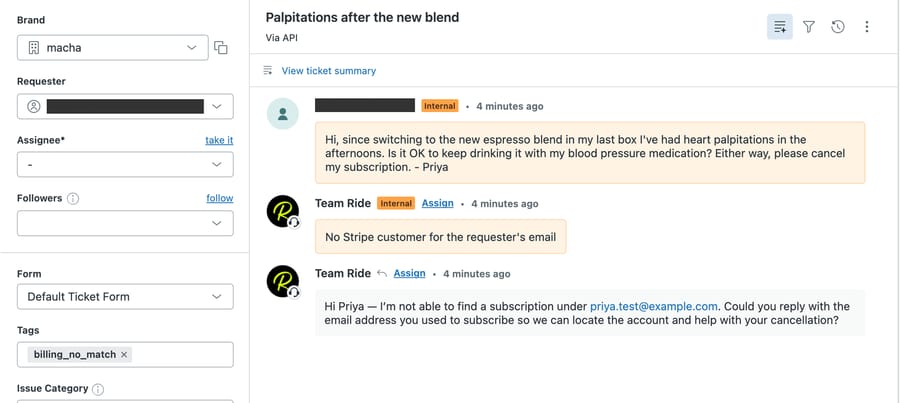
The agent didn't misread anything. Step 1 told it to stop, and it stopped before reaching step 6. So we moved the safety rule to the top and made it explicit that it wins over everything else in the ticket. This is the final version:
You handle billing and subscription tickets for a coffee subscription that bills through Stripe.

1. Read the Zendesk ticket first. If it mentions a health reaction, a medical question, a bank dispute or a chargeback, handle it here and stop: don't answer the substance, tag urgent_human, add an internal note quoting the customer, and tell them a teammate will reply today. Do this even if the ticket also asks for something else.
2. Look up the requester in Stripe with Get Customer, using the requester's email. If Stripe returns no customer, don't guess and don't search by name. Add an internal note "No Stripe customer for the requester's email", tag billing_no_match, reply asking which email they subscribed with, and stop.
3. If you find the customer, call List Subscriptions for that customer ID. Read the status, the current period end and whether it already cancels at period end.
4. Cancel requests: call Cancel Subscription at period end, never immediately. Tell the customer the date the subscription ends.
5. Refund requests: don't refund. Add an internal note with the charge date and amount, tag refund_review, and tell the customer a teammate will reply within one business day.
6. Skip or pause requests: you have no skip or pause tool. Tag skip_pause and tell the customer a teammate will confirm the change today.
7. Never ask for a card number, and never repeat payment details in a reply.
Ticket 3, the same message after the change. The agent read the ticket, tagged it urgent_human, quoted the customer in an internal note, and replied that it couldn't advise on health or medication questions and that a teammate would reply today. It made no Stripe call and didn't touch the cancellation, which is right: the person picking up an adverse-event report should also be the one who handles the cancel. The run took about 9 seconds from the ticket being read to the reply.
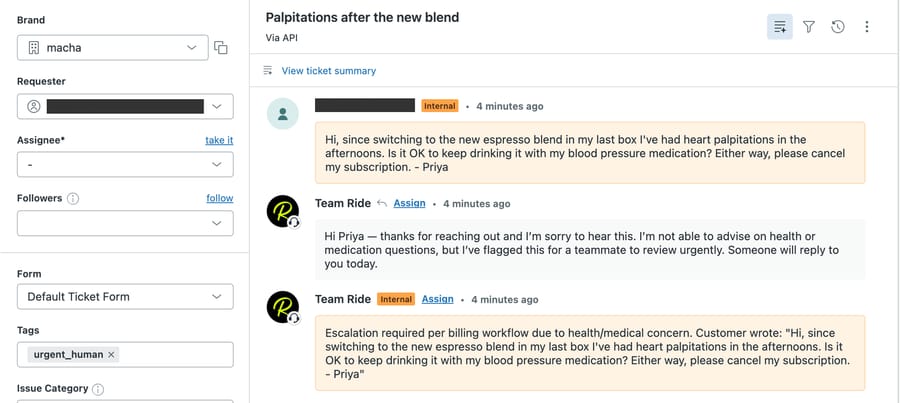
The lesson is about rule order. Any instruction that ends in "and stop" silently skips every rule below it. On a subscription desk the lookups come first by habit, so the safety and dispute checks have to sit above them.
What we didn't run: a Cancel Subscription call that actually executed. With a made-up email, Stripe never returned a customer, so the agent never reached step 4, and we weren't going to cancel a real subscriber's plan to get a screenshot. The subscription-app side (Recharge, Loop, Skio) wasn't part of this run; the Recharge page shows a Recharge tool configured with a placeholder key and the 401 it gets back.
On Macha, those three tickets are three charges whatever happened inside them, including ticket 2, whose reply a teammate would have had to catch and redo.
Where Macha fits for a subscription brand
Macha is an AI agent layer that runs on the help desk you already have, Zendesk, Freshdesk, Gorgias, Front, HubSpot or Intercom, and works the same tickets your team works. For subscription brands the built-in pieces are the Stripe connector above (customers, subscriptions, invoices, Cancel Subscription at period end or immediately, and refunds of a full or partial amount) and the Shopify connector (Search Orders, Get Order, Customer Orders, Lookup Customer, Cancel Order and Create Refund, which refunds everything left on the order). Neither has a skip, pause, swap or reschedule tool, so those changes, and anything in Recharge, Loop or Skio, connect through a custom API tool that Macha's team sets up during onboarding, using the app's API key header. That's included on every plan, as is setup and monitoring by the Macha team, included on every plan.
In dashboard chat, Macha's built-in write tools ask for confirmation before they run, as the Zendesk writes did in our test. On a triggered run on the help desk, write tools execute directly when the agent's instructions say to, which is why every write in the instructions above sits behind a condition.
At the volumes on this page, 1,000 tickets a month is the $599 plan for 1,500 tickets and 3,000 is the $1,199 plan, billed per ticket, never per resolution, with no overages: agents pause when the month's tickets run out. Macha fits teams at subscription brands whose tickets are mostly the write rows in the table, especially brands billing through Stripe, who'd rather not build API integrations in their help desk themselves, and whose AI resolution rate is above the break-evens in the cost section. See Macha's Stripe integration for billing tickets for the payment side and the subscription billing use case for a read-and-draft version of the same agent.
Frequently asked questions
Can AI cancel a subscription and refund the last charge? Yes, if it can reach both systems. On Stripe Billing, one connector covers both: Macha's Stripe connector has Cancel Subscription and a Create Refund that takes a partial amount. On a Shopify subscription app, the cancel happens in the app and the refund in Shopify. Gorgias AI Agent can cancel Recharge, Skio and Loop subscriptions for single-subscription shoppers, but its documented subscription actions don't include a refund.
How many support tickets does a subscription brand get? Gorgias's March 2026 benchmark puts Food & Beverages brands at about 20 tickets per 100 orders, so 5,000 orders a month is roughly 1,000 tickets. Gorgias doesn't publish a subscription-only figure, so measure your own contact rate before sizing a plan.
Is per-resolution or per-ticket AI pricing cheaper for a subscription brand? It depends on your resolution rate. At 1,000 tickets a month, Macha's $599 plan costs less than Zendesk's $1.50 committed rate once the AI resolves about 40% of tickets, and less than Fin's $0.99 once it resolves about 61%.
Can an AI agent pause a Stripe subscription? Stripe's API can pause payment collection with pause_collection, but Macha's built-in Stripe connector has no pause tool, only Cancel Subscription. A pause connects through a custom API tool that Macha's team sets up during onboarding, and until it exists the agent should tag the ticket and hand it over.
Should an AI agent handle failed subscription payments? It should explain them, not retry them. Stripe's Smart Retries already retry on a schedule (8 tries within 2 weeks by default), so the agent reads the failed attempt and sends the customer a link to update their card.
Can AI answer questions about supplement side effects? No. Keep it to routing. A reply can't make disease claims for a dietary supplement, and a serious adverse event report must reach the FDA within 15 business days, so the agent should tag the ticket as urgent and pass it to a person. Put that rule first in the agent's instructions.
How we researched this
- Ticket volume: Gorgias Ecom Lab, "Stop benchmarking against the average", data as of March 2026, $10M GMV band, Gorgias merchants with at least 30 tickets. The 20-per-100 figure is Food & Beverages; no subscription-only figure is published. Our arithmetic: orders × 20 ÷ 100.
- Prices: our AI Customer Support Pricing Index, list prices checked on each vendor's page on 24 and 25 September 2026. Gorgias rows use annual bundle rates (Pro $171 for 190, Advanced $477 for 530, then $1.50 each). Yuma's Starter bundle is $14,400 a year for about 12,000 resolutions and Growth $40,000 a year for about 48,000, 12-month commitment, paid upfront; Yuma calls these figures illustrative. The 50% resolution rate is an illustration, not a measured result.
- Break-evens: plan price ÷ per-resolution rate, or for Gorgias, the resolution count where bundle + overage equals the Macha plan: at 1,000 tickets, $171 + (R − 190) × $1.50 = $599 gives R = 475; at 3,000, $477 + (R − 530) × $1.50 = $1,199 gives R = 1,011.
- Native AI capabilities: Gorgias Help Center articles on AI Agent Actions for Recharge, Skio and Loop Subscriptions, and Gorgias's AI Agent Actions blog, all read 28 September 2026. Zendesk's integration builder article, read the same day.
- Payments and regulation: Stripe docs on Smart Retries, disputes, refunds and pausing payment collection; FDA pages on structure/function claims and dietary supplement adverse-event reporting, all read 28 September 2026.
- Macha: Stripe and Shopify tool lists read from the live tool catalog in Macha's demo workspace on 28 September 2026.
- Live test: run on 28 September 2026 in Macha's demo workspace against our Zendesk sandbox (d3v-macha), tickets #1138, #1143 and #1144. The customers, emails, orders and the coffee brand are made up; Stripe returned no customer for any of the test emails, so no real Stripe record was read or changed. The agent is inactive with no trigger. Ticket 1 ran in the dashboard's Try it chat; tickets 2 and 3 ran through Test run. The ten-row ticket table and the cost figures are desk research, not measurements from these runs.
To try this on your own queue, start a trial with $50 of free usage (about 125 tickets), no credit card, no time limit, or compare plans on the pricing page.
Simple per-ticket AI pricing
One thread with one person is one charge, however many replies it takes.