





 Shopify
 Stripe
 Slack
Slack Notion
 Google Workspace
 Confluence

How Do You Resolve Duplicate Charges and Failed Payments Automatically with Stripe and AI?


Duplicate-charge complaints and failed payments both follow a fixed script: look the customer up in Stripe, read their payments, act, and tell someone. An AI agent connected to Stripe can refund confirmed duplicates on the ticket and flag failed payments to your team in Slack.
Key takeaways
- A duplicate-charge agent looks up the customer in Stripe, confirms two settled charges of the same amount rather than a pending pre-authorization hold, refunds the extra one and solves the ticket.
- A bank's temporary pre-authorization hold typically drops off on its own within 3 to 5 business days, so the agent must confirm two settled charges before refunding anything.
- Stripe's refund docs say customers see a refund as a credit about 5 to 10 business days later, so the agent's reply should quote that range.
- Stripe's recommended Smart Retries setting is 8 tries within 2 weeks, so a failed-payment reply should give the invoice's next retry date and one link to update the card.
- Churnkey's State of Retention 2025 report says involuntary churn can make up 40% of churn and puts the average dunning-campaign recovery rate at 42%.

To resolve duplicate charges automatically, connect Stripe to an AI agent that looks the customer up, confirms two settled charges of the same amount, refunds the extra one with Stripe's Create Refund action and replies on the ticket; Stripe's refund docs put the credit at 5 to 10 business days. Failed payments need a second agent that runs on an hourly scheduled trigger, finds new failed payments in Stripe and posts the customer, amount and decline reason to Slack so a person can act. When the customer writes in about a failed payment or a dunning email, the agent answers from the invoice's retry date and the decline code, and the dunning-ticket section has the decision path.
| Duplicate-charge agent | Failed-payment agent | |
|---|---|---|
| Starts from | Help desk ticket created | A scheduled trigger, at most hourly |
| Stripe actions | Get Customer, List Payments, Create Refund | List Invoices or List Payments for new failures, then Get Customer, Get Payment |
| What it does | Confirms two settled matching charges, refunds one, replies, solves the ticket | Posts a structured alert to Slack |
| Acts on money? | Yes, inside limits you set | No, a person chooses the recovery step |
| Send to a human when | Only a pending hold, a dispute, a large sum, or no matching customer | Always; the alert is the handoff |
Macha is not a payment processor and not a helpdesk. It is an AI agent layer that sits on top of the helpdesk you already run (Zendesk, Freshdesk, Gorgias, Front, HubSpot or Intercom) and connects to the systems where the truth lives, like Stripe. When a duplicate-charge ticket lands, a Macha agent can read it, query Stripe, issue the refund, and close the ticket with a clear explanation. When a charge fails upstream, a different agent can find it on its next scheduled run and alert your team in Slack before the customer churns. Below are both workflows, plus the cases where you should not let the agent act alone.
How is a duplicate charge different from a failed payment?
Duplicate charges and failed payments feel like a single "billing mess," but they sit at opposite ends of the lifecycle and need opposite reflexes.
A duplicate charge is usually a reactive problem: the customer already noticed, already opened a ticket, and wants their money back fast. Worth knowing before you automate anything: a lot of "double charges" aren't real. Banks frequently place a temporary pre-authorization hold alongside the real charge, and that hold typically drops off on its own within 3 to 5 business days (this is the standard explanation merchant help centers like Let's Do This and Toast give). So step one is never "refund." It is "check Stripe and confirm there are genuinely two settled charges."
A failed payment is a proactive problem. The customer hasn't complained because they often don't know yet. Their card was declined on a renewal, and if nobody intervenes you lose them not because they wanted to leave but because a card expired. This is involuntary churn, and it is larger than most teams assume. Churnkey's State of Retention 2025 report says involuntary churn "can easily comprise 40% of your churn, if not more," and puts the average recovery rate of dunning campaigns at 42%. Treat those as one vendor's figures, but the direction is well established: the sooner someone acts, the more you recover.
So one job is "undo a charge cleanly and reassure the customer." The other is "notice a failure no one has reported yet and put a human on it." Macha handles them as two separate agents with two separate triggers.
How does an AI agent refund a duplicate Stripe charge?
Start here: it's the simplest of the two agents. The workflow Macha runs maps directly to Stripe's connector actions:
- Trigger: a Zendesk ticket is created and the agent classifies it as a duplicate-charge complaint.
- Get Customer: find the Stripe customer by email.
- List Payments: pull their recent payments and check for two matching charges (same amount, same/near timestamp).
- Create Refund: if and only if a genuine duplicate is confirmed, refund the extra charge.
- Add Public Reply + Update Ticket Status: reply with a plain-language explanation and set the ticket to Solved with a tag.
Here is the conversation that workflow produces, adapted from Macha's resolve-duplicate-charge-complaints use case:
Customer: I was charged twice for the same order! I see two $65.00 charges on my card from yesterday. Macha (checks Stripe → finds 2 charges of $65.00 on March 4, confirmed duplicate → refunds the extra one): Macha: You're right, I can see two charges of $65.00 from yesterday. I've refunded the duplicate charge. The $65.00 refund should appear on your statement within 5 to 10 business days. So sorry about that! Ticket → Solved · tagged duplicate-charge-refunded
IrisAgent, which sells this automation, says work that took a support agent 8 to 12 minutes now closes in under 60 seconds. The bigger win is consistency: the agent always checks Stripe before refunding, always confirms the amount and date match, and never refunds a pre-auth hold that was going to clear on its own.
One detail to fix in your own instruction: Stripe's refund docs say customers see a refund as a credit about 5 to 10 business days later, depending on the bank. A refund issued shortly after the original charge can instead go through as a reversal, where the original charge simply drops off the statement. Have the agent quote the 5 to 10 day range rather than promise a shorter one.
The closely related refund-request agent uses the same building blocks (Get Customer → List Payments → Create Refund) for straightforward "I'd like a refund" tickets. The difference is the refund policy in the instructions. More on where to draw that line below.
How does an AI agent catch failed Stripe payments?
This agent starts from a schedule, not a ticket.
Macha's Stripe connector has no event triggers, so this agent runs on a scheduled trigger: a CRON expression, with at most one run an hour. On each run it looks for payments that failed since the last run, gathers context, and routes each one to a human while the recovery window is still open. From Macha's detect-and-flag-failed-payments use case:
- Trigger: the hourly schedule runs.
- Find new failures: List Invoices (open invoices with a failed attempt) or List Payments by creation date, keeping the ones whose status shows a failure. Both take optional filters in the picker; if your account needs a cross-customer filter the built-in tool doesn't take, Macha's team adds a custom read tool during onboarding.
- Get Customer / Get Payment: pull who it was, how much, why it failed, and their history.
- Send Message (Slack): post a structured alert to the team channel.
The Slack message looks like this:
⚠️ Payment Failed • Customer: Maria Chen ([email protected]) • Amount: $99.00 — Pro Monthly • Reason: Card declined (insufficient funds) • Previous failures: 2 in last 30 days This is a high-value customer (8 months active). Consider reaching out directly.
Some declines are soft, such as insufficient funds, and often succeed when the payment is retried a few days later. Others come from an expired or lost card or an issuer's risk check, and those need the customer to act. An agent that surfaces the reason and the customer's tenure lets a human decide in seconds whether to wait for the retry, send a friendly "update your card" nudge, or pick up the phone for an 8-month Pro customer. Because dunning works best as a helpful message rather than a collections notice, a person who knows the context writes a far better one than a generic automated dunning email.
You can layer this further: a weekly refund report to Slack on a scheduled trigger, or an agent that drafts the outreach for the human to approve. Start with the alert; expand once you trust it.
How should an AI agent answer failed-payment and dunning-email tickets?
When a renewal fails, Stripe can email the customer after every failed subscription payment, with a link to a page where they update their card, and it keeps retrying on a schedule: the recommended Smart Retries setting is 8 tries within 2 weeks. So the customer who writes in is usually holding an automated email, and they want to know what happened, whether they'll be charged again, and whether they're about to lose their subscription. An AI agent can answer all three from Stripe, as long as it reads the invoice as well as the payment.
This section is written for subscription ecommerce brands and SaaS companies billing through Stripe Billing, with a note for Shopify brands on Recharge at the end. The setup suits teams whose failed-payment tickets repeat the same few questions every renewal cycle; it's the wrong fit if you get a handful a month, because Stripe's own failed-payment emails already answer most of them.
What do customers write after a failed payment or a dunning email?
- "Why was my card declined?" They've seen the failure email and their card works everywhere else.
- "Will you try again, and when?" They'd rather wait for payday than update anything.
- "I've updated my card. Am I sorted?" Often they updated it in the wrong place, which matters because of how Stripe picks the card to retry.
- "Why was my subscription canceled?" The retry window ran out and the account moved to whatever end state the business chose.
- "You charged me twice." A retry succeeded after they'd also paid by hand, which turns a dunning ticket into a duplicate-charge ticket.
- "Just cancel it." The failure was the prompt they needed to leave.
- "Is this email real?" A payment-failed email with a link in it looks a lot like phishing.
What is the decision path for a failed-payment ticket?
| Customer input | Lookup in Stripe | Rule | Action | Confirmation step | Hand off when |
|---|---|---|---|---|---|
| "Why was my card declined?" | The latest failed payment (List Payments, Get Payment) and its decline code, last_payment_error.decline_code on the PaymentIntent | Explain by Stripe's next step for that code. For lost_card, stolen_card, fraudulent and merchant_blacklist, Stripe says to present it as a generic decline | Reply: insufficient_funds means use another payment method, expired_card means use another card, do_not_honor and generic_decline mean contact the card issuer | None; read-only | The customer says the charge is fraud or mentions their bank disputing it |
| "Will you try again?" | The open invoice: status, attempt_count, next_payment_attempt | If next_payment_attempt has a date, quote it. After a hard decline (such as incorrect_number or lost_card), retries stay scheduled but only run once there's a new payment method | Reply with the date, or with "we can't retry this card" and the update-card link | None; read-only | The invoice is open with no next attempt set |
| "I've updated my card" | The subscription's default_payment_method and the customer's invoice-settings default | When the subscription has its own default payment method, Stripe retries on that first, so updating only the customer's invoice-settings default leaves the retry on the old card (Stripe: "update the field where the previous payment failed") | Tell the customer when the next retry runs, or send the hosted invoice link (hosted_invoice_url) so they can pay now | Charging the new card now is a write, so the agent sends the link rather than charging | The card sits on the wrong field and needs moving |
| "Why was I canceled?" | The subscription's status: canceled, unpaid or past_due | The status shows which end-of-retry setting applied | Explain what happened and on which date; point to how to restart | None for the explanation | Any reactivation, back-dating or price exception |
| "You charged me twice" | List Payments: two succeeded payments for the same billing period | Same rule as a duplicate charge: two settled charges of the same amount | Create Refund on the extra charge | In chat, Macha shows a confirmation card; on a trigger, it refunds only inside the amount cap your instruction sets | Above the cap, or one of the charges is still pending |
| "Just cancel it" | The subscription and its current period | Cancel only on an explicit request, and say whether access runs to the period end | Send the customer portal link, or run Cancel Subscription at period end | The customer confirms before anything is canceled | They also want a refund for the current period |
| "Is this email real?" | Whether the customer has an open invoice at all | No open invoice and no recent failure means it probably didn't come from your Stripe billing (check any other billing system you use first) | Tell them not to enter card details from that email and to sign in to their account directly | None | Suspected phishing: route to whoever owns security |
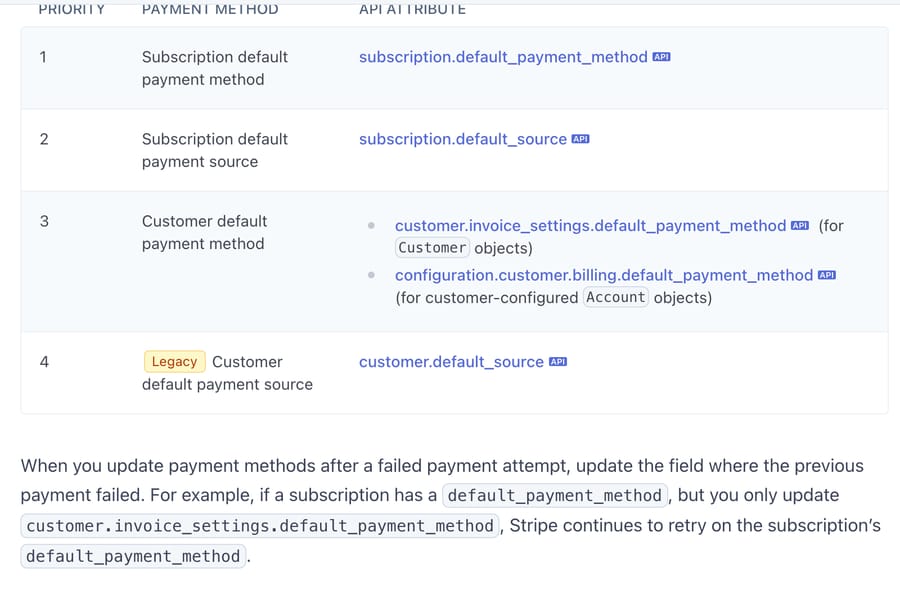
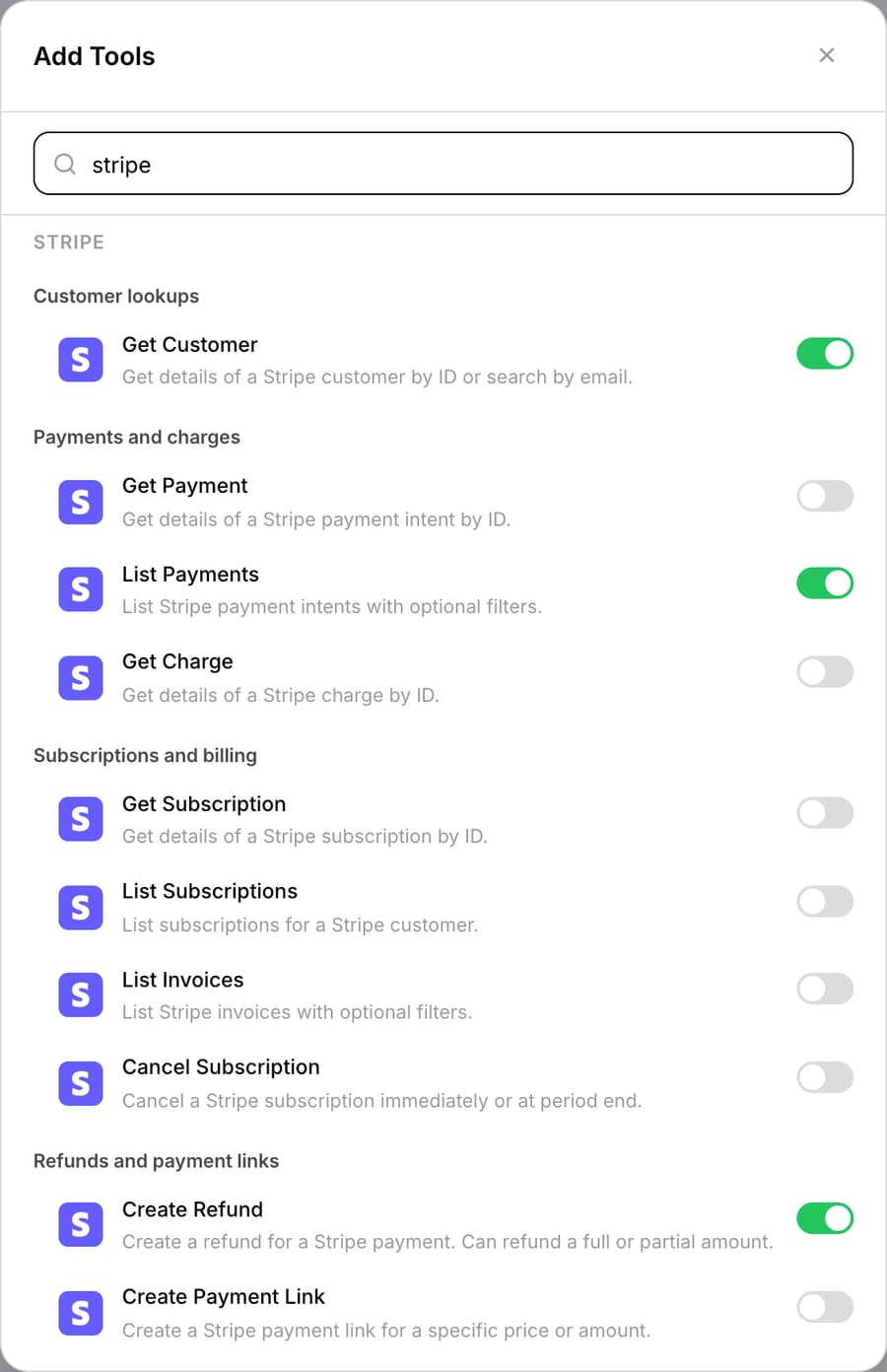
Macha's built-in Stripe connector covers most of these lookups. Get Payment reads a PaymentIntent, List Invoices finds the open invoice, Get Subscription and List Subscriptions read the subscription status, and Cancel Subscription cancels immediately or at period end. The full Stripe group in the Add Tools picker on September 28, 2026 was Get Customer, Get Payment, List Payments, Get Charge, Get Subscription, List Subscriptions, List Invoices, Cancel Subscription, Create Refund and Create Payment Link. A card update isn't a connector tool, and neither is pausing; if you want the agent to pause, Macha's team sets that up as a custom API tool during onboarding, authenticated with a Stripe secret or restricted key sent as a Bearer token. Run one test to check that Get Payment's output includes the decline code before you write replies around it. Updating the card itself should stay with the customer. Stripe's customer portal lets customers update payment methods, cancel subscriptions and pay current and past invoices, so for most brands the right action is to send the portal link.
What does a good failed-payment reply contain?
- The amount and date of the failed attempt, so the customer knows which charge you mean.
- The reason in plain words, taken from the decline code, without the lost, stolen or fraud detail.
- The date of the next retry from
next_payment_attempt, or a clear statement that this card won't be retried. - One action: the link to update the card or pay the invoice. Not a list of options.
- What happens if nothing changes, in your terms: the subscription is canceled, marked unpaid or left past due at the end of the retry window, whichever your Stripe settings say.
- No collections tone. The customer didn't choose to fail a payment.
Keep the incentives straight when you write the instruction. Stripe's retry schedule and its emails are optimized for collecting the invoice, which is what you want from them. The support reply has a different job: keep the customer the retry was meant to keep. A reply that reads like a payment demand gets the card updated and the subscription canceled at the next renewal.
What must the AI agent not do on a dunning ticket?
- Don't create a charge or a payment link to "retry". Leave Create Payment Link off this agent unless your team uses it, and rule out any charge in the instruction. Stripe's retry schedule and the customer's own payment do the collecting.
- Don't take card numbers in the ticket. If a customer pastes one, the agent replies with the portal link and hands the ticket to a person to redact.
- Don't reveal a lost, stolen or fraud decline. Stripe's decline-code docs say to present those as a generic decline.
- Don't promise the retry will work. Say when it runs, not that it will succeed.
- Don't cancel, pause or extend without an explicit request and a rule that allows it.
- Don't refund a successful retry unless it duplicates a payment the customer also made by hand.
What does an agent instruction for dunning tickets look like?
These are steps the agent follows on each ticket. Adjust the amounts, tags and portal URL to yours.
When a ticket mentions a failed payment, a declined card, a payment-failed email or a canceled subscription:
1. Find the Stripe customer by the requester's email with Get Customer. If there's no match, ask which email they use for billing and stop.
2. Use List Payments to find the most recent failed payment. Read the open invoice with List Invoices: note attempt_count and next_payment_attempt. Read the subscription status with Get Subscription.
3. Reply with the amount and date of the failed payment and the reason. Map decline codes: insufficient_funds means "try another payment method"; expired_card means "use a different card"; do_not_honor, generic_decline, lost_card, stolen_card, fraudulent and merchant_blacklist all mean "your bank declined it; please contact your card issuer or use another card". Never mention lost, stolen or fraud.
4. If next_payment_attempt has a date, give it. If the decline code is incorrect_number, lost_card, pickup_card, stolen_card, revocation_of_authorization, revocation_of_all_authorizations, authentication_required, highest_risk_level or transaction_not_allowed, say this card won't be retried. Always include the update-card link: https://billing.example.com/portal.
5. If two succeeded payments cover the same billing period and each is under $100, refund the later one with Create Refund and say the credit takes 5 to 10 business days. Otherwise tag billing-review and hand off.
6. Never charge the customer or create a payment link. Never cancel or pause unless the customer asked in this ticket. If they did, confirm the cancellation date with them before running Cancel Subscription at period end.
7. Hand off with the tag billing-review if the customer mentions a dispute, chargeback or fraud, pastes card details, or asks for a refund of a period they've used.
What changes for Shopify subscription brands on Recharge?
If your subscriptions run on Recharge rather than Stripe Billing, the dunning logic lives in Recharge. Its Failed Payment Recovery strategy retries failed charges on a timing Recharge optimizes itself, so there are no intervals to configure, and its help center says that if all retry attempts fail, the associated subscriptions are canceled with the reason "Failed Payment flow max retries". Charges that fail with a hard decline don't enter the strategy at all; Recharge points merchants to a separate Card Declined email for those. The recovery emails link to a payment-methods landing page or the customer portal.
For an AI agent, Recharge's charge object carries what the reply needs: a status of error, an error_type such as CUSTOMER_NEEDS_TO_UPDATE_CARD, a retry_date and a charge_attempts count. Recharge isn't a built-in Macha connector, so these reads connect through a custom API tool that Macha's team sets up during onboarding, sending the store token as X-Recharge-Access-Token. If you're on Gorgias, its AI Agent already has native Recharge actions for skipping and canceling subscriptions; our Recharge-in-Gorgias walkthrough covers that route.
Can you stop duplicate charges before they happen?
Yes, and it changes where you spend effort: the cheapest duplicate charge is the one your checkout never creates. Stripe supports idempotency keys: a unique Idempotency-Key header of up to 255 characters, with V4 UUIDs suggested, that Stripe may prune once it is at least 24 hours old. A retried checkout request with the same key returns the original result instead of charging twice. If your double charges are coming from your own checkout retrying on a flaky network, fix it in your checkout code.
Macha's role is on the support side of that line: the duplicates that still slip through, the bank-hold confusion that isn't really a duplicate at all, and the refunds customers ask for regardless. Do both.
How do you set up the agents in Macha?
You don't write code for any of this. A Macha agent is an instruction plus a set of connector tools plus a trigger.
1. Attach the Stripe tools. In the agent's tool picker, add the Stripe actions the workflow needs. For the duplicate-charge agent that's Get Customer, List Payments, and Create Refund; for the failed-payment agent, List Invoices or List Payments to find new failures, then Get Customer and Get Payment. The Stripe connector authenticates with an API key and ships these as first-class actions, so you're choosing capabilities from a list, not wiring webhooks.
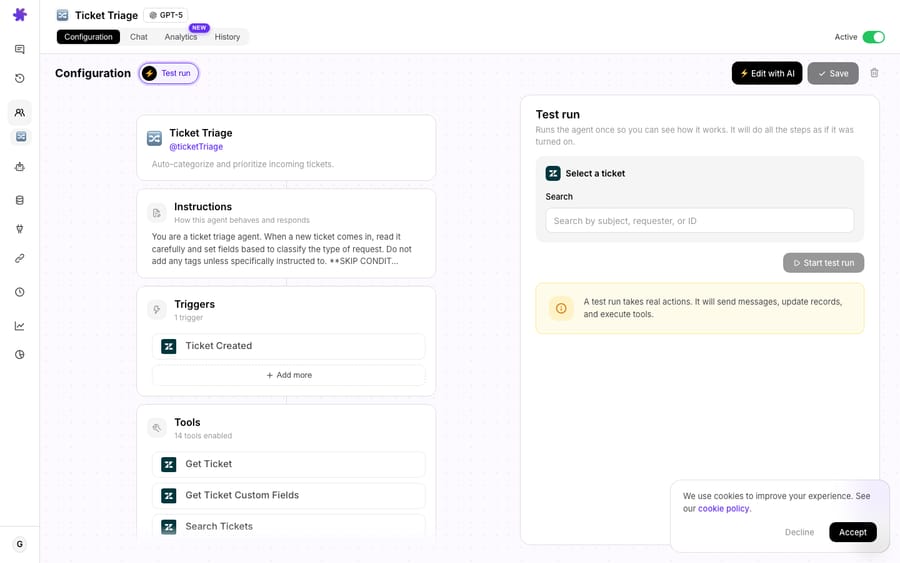
To check this step, we created a test agent called T4E-Duplicate charge refunds in our Macha Demo workspace on 28 September 2026, searched the tool picker for Stripe and switched on those three tools.
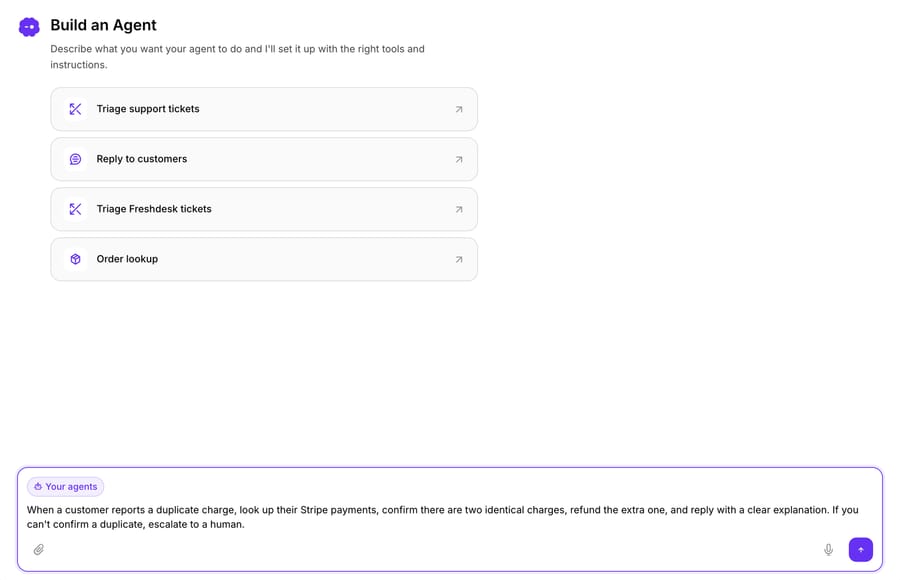
2. Describe the agent in plain language. Macha lets you build an agent from a natural-language instruction, something like "When a customer reports a duplicate charge, look up their Stripe payments, confirm there are two identical charges, refund the extra one, and reply with a clear explanation. If you can't confirm a duplicate, escalate to a human." The builder turns that into a configured agent you can refine.
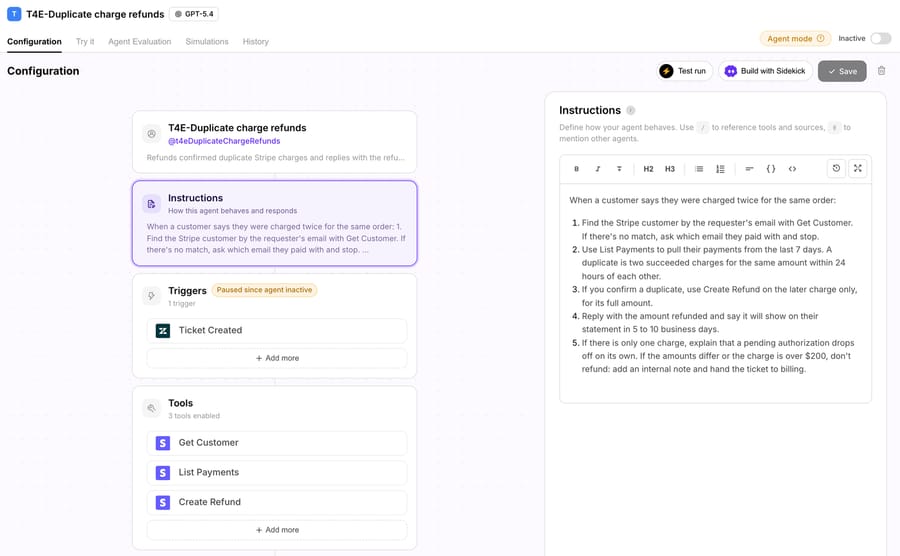
3. Set the trigger. Point the duplicate-charge agent at Zendesk → Ticket Created (it'll classify which tickets apply) and give the failed-payment agent a scheduled trigger with an hourly CRON expression, the shortest interval Macha allows.
Here is the test agent after steps 1 to 3: the instruction as numbered steps, the three Stripe tools, and the Zendesk trigger, which the trigger picker lists as First Customer Ticket Message and the agent card shows as Ticket Created.
4. Test before you go live. This is the step you don't skip when money moves. A test run executes for real (the panel warns it will "send messages, update records, and execute tools"), so run the first tests with Create Refund removed, or with the instruction set to post the refund it would make as an internal note. Check which Stripe lookups it made and which charge it picked, then add Create Refund back.
When should the agent not act alone?
Automating money movement deserves more caution than automating a "where is my order" reply. A few honest limits:
- Confirm, never assume. The agent should only refund when Stripe shows two genuinely settled, matching charges. A single charge plus a pending pre-authorization hold is not a duplicate. Refunding it gives money away for a charge that was going to clear anyway. Bake "confirm two settled charges of the same amount" into the instruction.
- Cap auto-refund amounts. A sensible pattern is to let the agent auto-resolve small, clear-cut duplicates and escalate anything above a threshold or anything ambiguous to a human. High-value or partial refunds are a judgment call.
- Disputes and chargebacks are different. Once a customer has filed a chargeback with their bank, refunding in Stripe can reimburse them twice. Stripe's refund docs recommend accepting or challenging the dispute instead of refunding. Route any ticket that mentions a dispute, chargeback, or fraud to a human; don't auto-refund it.
- Failed payments: flag, don't "fix" silently. Resist the urge to auto-retry or auto-charge a different card. The failed-payment agent's job is to surface context fast so a human chooses the recovery action. Soft declines often resolve on Stripe's own retry schedule; let them.
- You still need the source of truth right. Macha acts on what Stripe returns. If a customer pays under one email and writes in from another, the lookup can miss, so keep an escalation path for "no matching customer found."
How much does it cost to run this with Macha?
Macha bills per ticket: one conversation, charged once, however many steps the agent takes to finish it. There is no charge per action or per resolution. A duplicate-charge complaint runs through several steps (classify, get customer, list payments, create refund, reply) and still counts as one ticket, about $0.40. Pricing starts at $299 a month for 750 tickets. That keeps the math simple: you pay for each conversation handled.
You can stand the whole thing up on a free trial ($50 of usage, no credit card required), connect Stripe and your helpdesk, and test with Create Refund switched off before any live refund. Every tier includes every integration, scheduled triggers, unlimited agents, and setup and monitoring by the Macha team; see pricing for the ticket tiers, and the Stripe integration page for the full action list.
How did we research this?
We checked every Stripe field name and decline code in this post against Stripe's own documentation, read on September 28, 2026: Automate payment retries (Smart Retries, the 8-tries-in-2-weeks default, hard decline codes, the payment-method order and the end-of-retry settings), decline codes (next steps per code, and which codes to present as a generic decline), customer emails (failed-payment emails and the update-card link), the invoice object (attempt_count, next_payment_attempt, hosted_invoice_url) and the customer portal. Refund timing is from Stripe's refund docs. Recharge's dunning behavior is from its help-center article How to create a Failed Payment Recovery strategy (updated September 2, 2026) and its API reference for the charge object. Macha's Stripe tools are from the live Add Tools picker on Macha's demo workspace (September 28, 2026), which lists more tools than the Stripe integration page, and the scheduled-trigger limits from Macha's product documentation. The tickets, customer, amounts and portal URL in the examples are made up; no customer data was used. The Churnkey and IrisAgent figures are those vendors' own claims.
FAQ
Does Macha replace Stripe or my helpdesk? No. Macha is an AI agent layer on top of your existing helpdesk (Zendesk, Freshdesk, Gorgias, Front, HubSpot or Intercom) that connects to Stripe. Stripe still processes payments and refunds; Macha decides and acts through Stripe's API on your behalf.
Can the agent issue refunds on its own? Yes, using Stripe's Create Refund action, and you control the guardrails. Most teams let it auto-resolve small, confirmed duplicates and escalate larger or ambiguous cases. You can also have it draft the refund for a human to approve instead of acting directly.
How does it tell a real duplicate from a pre-authorization hold? By reading the actual payments via List Payments before acting. A genuine duplicate is two settled charges of the same amount; a pending hold is not. You instruct the agent to confirm two settled charges before refunding, which is exactly what stops accidental refunds.
What happens when a payment fails? On its next scheduled run, at most an hour later, the agent finds the failed payment in Stripe, gathers the customer, amount, decline reason, and history, and posts a structured alert to Slack so a human can act inside the recovery window. It flags; it doesn't silently retry or re-charge.
Do I need engineering to set this up? No. You attach Stripe actions in the tool picker, describe the agent in plain language, set a trigger, and test (any custom tool is built by Macha's team). The only place engineering helps is preventing duplicates upstream with Stripe idempotency keys, a separate, complementary fix.
How is this priced? Per ticket (one conversation, charged once however many steps it takes), from $299 a month for 750 tickets, about $0.40 each, and never per resolution. Start with a free trial ($50 of usage, no credit card required) and see pricing.
How should customer service handle a failed payment ticket? Look up the customer's latest failed payment and open invoice in Stripe, then reply with the amount, the reason in plain words, the date of the next retry from next_payment_attempt, and one link to update the card. For lost, stolen or fraud declines, Stripe's docs say to present the reason as a generic decline. Hand off anything that mentions a dispute or fraud.
What should a reply to a dunning-email ticket say? Confirm the email is genuine by finding the open invoice, say which charge failed and why, say when Stripe will retry (the recommended Smart Retries setting is 8 tries within 2 weeks) and what happens if every retry fails, then give the update-card link. Keep it to one action and leave out collections language.
Can an AI agent update a customer's card or cancel their subscription? Macha's built-in Stripe connector can cancel a subscription (Cancel Subscription, immediately or at period end) but doesn't update cards or pause. Stripe's customer portal lets customers update payment methods and cancel subscriptions themselves, so the usual action is to send the portal link. If you want the agent to cancel, give it Cancel Subscription and an instruction to confirm the date with the customer first; pausing needs a custom API tool that Macha's team sets up during onboarding.
Want to see the workflow on your own queue? Read the resolve duplicate charge complaints use case, browse the Stripe integration, or start a free trial ($50 of usage, no credit card required).






