





 Shopify
 Stripe
 Slack
Slack Notion
 Google Workspace
 Confluence

How to Automate Recharge Subscription Cancellations in Gorgias (2026): Native Options vs AI Agents


Gorgias can already cancel, pause and skip Recharge subscriptions. Its Recharge app puts skip, cancel and reactivate buttons in the ticket sidebar, and Gorgias AI Agent has 10 Recharge actions that run with no click, at $1.00 per automated interaction on monthly plans and $1.50 past the plan's bundle (prices checked October 8, 2026). The catch is that most of those actions only run when the shopper has one active subscription. For a small team with single-box subscribers, that's enough. For multi-box shoppers and reason-based retention offers, the alternatives are eesel AI, Siena, Yuma and Macha, which starts at $299/month for 750 tickets with setup done for you. We also ran a subscription agent on our own Gorgias trial.
Key takeaways
- Gorgias AI Agent has 10 Recharge actions, but most hand the ticket to your team when a shopper has more than one active subscription.
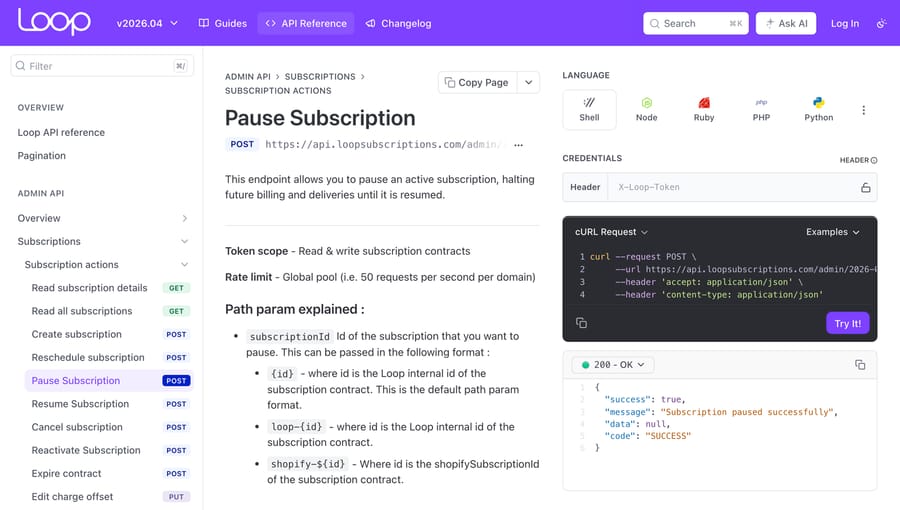
- Recharge's API has no pause endpoint, so a Recharge pause is a moved charge date, while Loop's Admin API has real pause and resume calls.
- At 2,000 tickets a month with 800 automated, Gorgias Pro plus AI Agent costs $1,465 a month, against $959 for the same help desk plus Macha's 1,500-ticket tier.
- In our live run on a Gorgias trial, a Macha agent checked two made-up shoppers in Shopify and left a retention draft and a Recharge to-do as internal notes.
- Macha starts at $299/month for 750 tickets, and done-for-you setup plus a dedicated success manager come on the trial and every plan.

Can Gorgias automate Recharge subscription cancellations on its own?
Partly. Gorgias has three native layers for subscription tickets: the Recharge sidebar for agents, macros and Rules for faster manual handling, and Gorgias AI Agent, which can cancel, pause and skip without a person. The limit sits in that last layer: most AI Agent Recharge Actions stop when the shopper has more than one active subscription. Here is every option we found, native ones first.
| Option | Native or add-on | Who cancels, pauses or skips | Setup | Price (checked Oct 8, 2026) | Where it falls short |
|---|---|---|---|---|---|
| Recharge's own cancellation flow | In Recharge, before a ticket exists | The shopper, in the customer portal | Self-serve in Recharge | Part of your Recharge plan | Only catches shoppers who use the portal; emails still reach Gorgias |
| Recharge app in the Gorgias sidebar | Native app (built by Gorgias) | The agent, one click per ticket | Self-serve, minutes | Included in every Gorgias plan (from $10/month); Recharge lists "1% + 10¢ per transaction" | A person reads and clicks every ticket |
| Macros with Recharge actions, plus Rules | Native | The agent, when they send the macro | Self-serve | Included | Macro actions act on the "last" subscription; Rules can tag and route but don't decide |
| Gorgias AI Agent Recharge and Loop Actions | Native add-on | AI Agent, no click | Self-serve: add Actions to a skill | $1.00 per automated interaction on monthly plans ($0.90 annual), $1.50 past the plan's bundle | Most Actions hand over when the shopper has 2+ subscriptions |
| eesel AI | Third-party AI agent | The AI agent, or a person approving a draft | Self-serve | $299/month for 500 credits | Its Recharge actions skip and cancel but can't pause or move dates |
| Siena AI | Third-party AI agent | The AI agent | Sales-led | $750/month platform fee plus $0.90 per automated ticket | Platform fee before the first ticket |
| Yuma AI | Third-party AI agent | The AI agent | Sales-led | Not published (charges per resolved ticket) | No public price or action list to check |
| Macha | AI agent layer on your help desk | The AI agent, through Recharge or Loop tools the Macha team builds | Done for you by the Macha team, with a dedicated success manager, included | $299/month for 750 tickets (about $0.40 per ticket) | No prebuilt Recharge connector: the subscription calls are custom tools built during setup |
How do you set up the Recharge integration in Gorgias?
Start with the integration, because every other option on this list either uses it or replaces part of it. In our Gorgias trial account the App Store's Subscriptions category listed 13 apps, Recharge first, alongside Skio, Stay AI, Smartrr and Subscriptions by Loop.
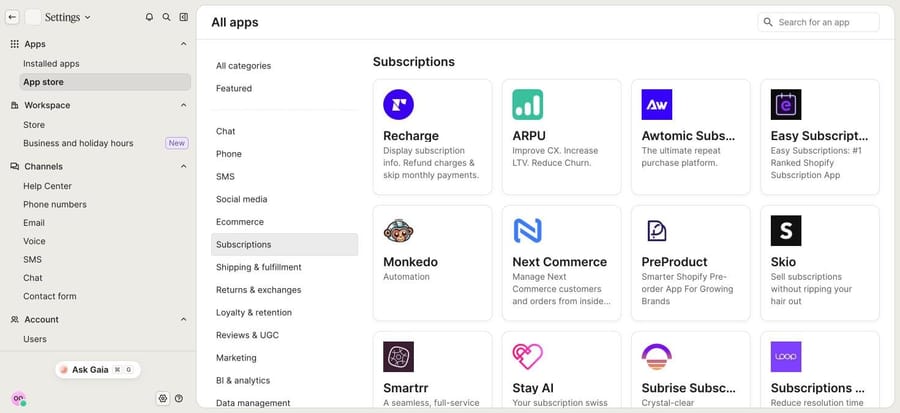
Setup, from Gorgias's Recharge article:
- Go to Settings > App Store > All apps and search for Recharge.
- Click Connect App (the button reads "Connect recharge" on the app page).
- Pick your Shopify store and log in to Shopify to finish the connection.
- Build two or three macros with Recharge variables (next charge date, subscription price) for the questions you answer most.
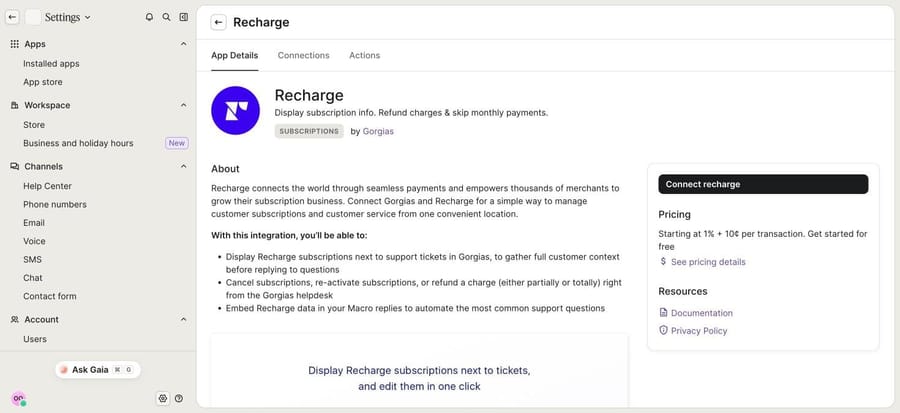
Once it's connected, the customer's Recharge subscriptions, orders and next charge date sit in the ticket sidebar, and an agent can skip the upcoming order, cancel or reactivate a subscription, update the address and refund a charge in full or in part. One limit matters before you automate anything near money. Gorgias says refunds work "if the order was initially processed through the Recharge checkout, but fulfilled orders (fulfilled at checkout) must be canceled via Shopify." The deeper sidebar tour is in the Gorgias customer sidebar explained, and our Recharge and Gorgias integration guide covers the connection itself.
When this is enough: a few dozen subscription tickets a week, read by an agent who would open the sidebar anyway.
Where it stops: a person still reads every ticket, decides whether to offer a pause first, and clicks.
Can macros and Rules handle subscription tickets without an agent?
They take the typing out of it, and they can sort the queue, but they don't decide anything. Gorgias's macro actions article lists four Recharge actions a macro can carry: Cancel last subscription, Activate last subscription, Refund last charge and Refund last order. The actions run when the agent sends the reply, and they're logged in the ticket events. Note the word "last": for a shopper with two boxes, the agent still has to check which one the macro will touch.
Rules do the sorting. Gorgias detects an intent on each incoming message, and two of those intents are subscription/cancel and subscription/change. The default "[Auto Tag] Identify intents and sentiments" rule in our trial already used them, but its code, which we read through the API, lumped both into one ORDER-CHANGE/CANCEL tag together with order cancellations and shipping changes.
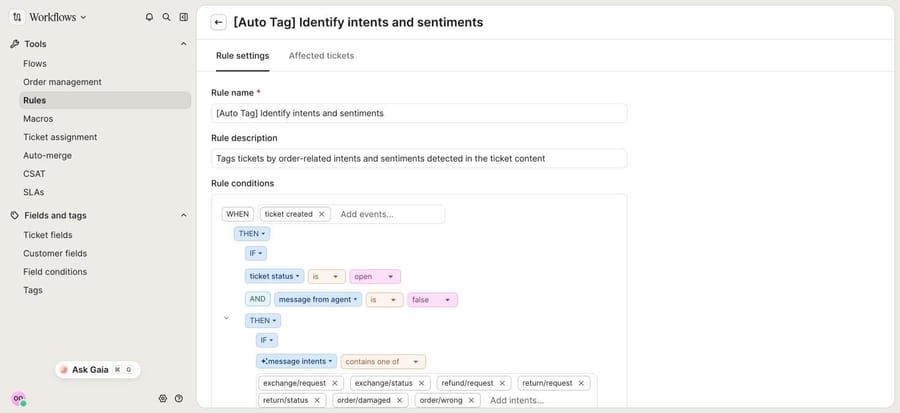
So we added our own rule through Gorgias's Rules API, which takes the same code the visual editor writes. It runs when a ticket is created and splits subscription requests into their own tags:
if (eq(ticket.status, 'open') && eq(message.from_agent, false)) {
    if (containsAny(message.intents.name, ['subscription/cancel'])) {
        Action('addTags', { tags: 'subscription-cancel' })
    }
    if (containsAny(message.intents.name, ['subscription/change'])) {
        Action('addTags', { tags: 'subscription-change' })
    }
}
It worked on both test tickets we sent later: "I want to cancel my subscription" came back tagged subscription-cancel, and "Can you skip my next subscription delivery" came back tagged subscription-change. A tag gives you a view per request type, and a filter for an AI agent's trigger later. What a rule can't do is weigh a retention offer against the reason the shopper gave.
What can Gorgias AI Agent do with Recharge and Loop?
This is the native option that takes the action with no click. With Recharge connected, the app's Actions tab in our trial listed 10 AI Agent actions:
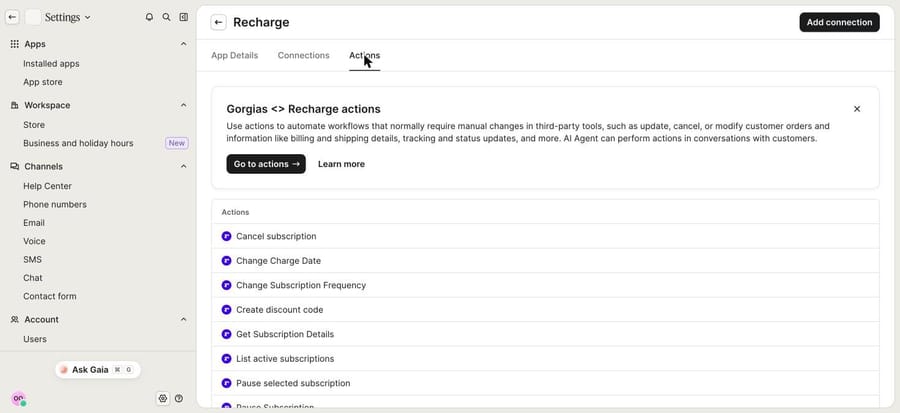
- Cancel and pause: Cancel subscription, Pause Subscription, Pause selected subscription.
- Billing and shipments: Skip next subscription shipment, Change Subscription Frequency, Change Charge Date.
- Lookup and update: Get Subscription Details, List active subscriptions, Update Subscription Shipping Address.
- Discounts: Create discount code, which issues a code from values you set.
Gorgias's Recharge Actions article (updated September 10, 2026) sets the rules that decide how much of your queue this covers:
- One subscription only, mostly. "If a shopper has more than one, AI Agent hands over the ticket for your team to complete manually." The exceptions are List active subscriptions and Pause selected subscription, which can pause one of several once the right one has been identified earlier in the conversation.
- A pause is a moved date. Recharge has no pause state in its API, so Pause Subscription pushes the next charge to the resume date the shopper picks. Gorgias describes it as "often offered as a retention alternative."
- Skips are time-bound. Skip next shipment works only before the order is created.
- Some changes ask first. AI Agent asks the shopper to confirm a new address or charge date before writing to Recharge, and it collects a cancellation reason.
To switch them on, open AI Agent settings, go to the Actions library, filter by the Recharge app and add the actions to a skill that handles subscriptions. Loop Subscriptions gets four actions (skip next shipment, cancel, pause, resume) under a stricter rule: per Gorgias's Loop article, "if the shopper has multiple subscriptions with your store, AI Agent hands over the ticket." Skio is covered in what an AI agent can do in Skio.
What it costs. On the Gorgias pricing page, checked October 8, 2026, AI Agent is $1.00 per automated interaction on monthly billing and $0.90 on annual, with a bundle on each plan: 30 interactions on Starter and Basic, 190 on Pro, 530 on Advanced. Past the bundle, it's $1.50 per interaction. Gorgias counts an interaction as automated when it's "fully resolved without a human agent," and its billing article (read September 24, 2026) says a fully automated ticket carries "both a ticket fee + automation fee." The incentive is plain: per-resolution pricing pays Gorgias more as automation rises, so a good month for your deflection rate is also a bigger invoice.
We didn't run these actions ourselves. Recharge isn't connected to our Gorgias trial (the Actions tab lists them before you connect), so the Actions above are what the app shows and the docs describe, not something we executed.
Which skip, pause and cancel calls do Recharge and Loop support?
Any layer that isn't Gorgias's own AI Agent reaches the subscription through the app's API, and the two apps shape the same jobs differently. We checked both API references on September 28, 2026 (more apps compared in 16 subscription apps and their APIs). Loop issues Admin API tokens only on its PRO plan.
| Job | Recharge API (version 2021-11) | Loop Subscriptions Admin API (version 2026-04) |
|---|---|---|
| Find subscriptions from the ticket email | Two calls: list customers by email, then list subscriptions by customer id | One call: GET /customer/{email}/subscription |
| Skip the next order | Skip on the charge, not the subscription | POST /subscription/{id}/skipNext |
| Pause | No pause endpoint; set the next charge date later | POST /subscription/{id}/pause with a pauseDuration |
| Cancel | Cancel with a cancellation reason | POST /subscription/{id}/cancel; notifyCustomer defaults to true |
| Auth headers | X-Recharge-Access-Token plus X-Recharge-Version | X-Loop-Token (PRO plan); 50 requests a second per store |
Two differences change what the reply should say. On Recharge, "pause for two months" is date arithmetic: read the next charge date, add the interval, set it, and the subscription still shows as active. On Loop it's a real state with its own resume call. And because Loop's cancel emails the customer by default, the agent's reply shouldn't promise a second confirmation email. More in what an AI agent can do in Recharge and in Loop Subscriptions.
Which AI agents can cancel Recharge subscriptions in Gorgias?
Three third-party agents say they work in Gorgias and act on Recharge. We checked each one's own pages on October 8, 2026; we didn't run any of them.
- eesel AI. Its Recharge docs list a subscriber lookup by email, skip one upcoming charge, cancel (recording the reason), create a subscription and update the shipping address, connected with a Recharge API token through Pipedream. The docs are plain about the gap: it can't pause or change dates. In Gorgias it drafts or sends replies, leaves internal notes, tags and closes tickets. Pricing is $299/month for 500 credits, self-serve, so you build and tune it. For comparison, $299 gets you 750 tickets on Macha and 500 on eesel, with setup done for you included on Macha.
- Siena AI. Its integrations page lists Recharge ("Skip shipments, update addresses, and modify frequency automatically"), Skio and Gorgias. Pricing is a $750/month platform fee plus $0.90 per automated ticket, sold through a sales process.
- Yuma AI. Its site lists Recharge and Loop among its integrations, names "subscription changes" as work it automates and says it runs inside Gorgias. It doesn't publish prices or an action list; brands "only pay for tickets fully resolved by AI."
For the wider view across help desks and apps, our guide to skip, pause and cancel requests walks through each flow step by step.
What happened when we ran a subscription agent on our own Gorgias?
We ran the part we could run for real and documented the rest. Our Macha Demo org is connected to a Gorgias trial account and a Shopify test store with made-up customers. Recharge isn't connected to Gorgias or to Macha Demo in this setup, so the agent had no subscription calls to make. What did run was everything around the cancel: reading the ticket, checking the shopper in Shopify, writing the retention reply and handing the Recharge action to a teammate in an internal note.
The agent. We named it "P10-09 Gorgias subscriptions", left it inactive with no trigger, and attached five built-in tools: Get Ticket, Add Internal Note and Update Tags from Macha's Gorgias connector, and Lookup Customer and Customer Orders from the Shopify connector. There's no public reply tool attached, so it runs in safe mode: everything a customer would read lands as a note first. This is the instruction, word for word:
You handle subscription tickets in Gorgias for our Shopify store: cancel, pause, skip and "when is my next box" requests. You work in safe mode: you never reply to the customer. You write the draft reply in an internal note, and a teammate sends it and makes any subscription change.

1. Read the ticket with Get Ticket. Note the customer's email and what they are asking for: cancel, pause, skip the next delivery, change frequency, or a question.

2. Look the customer up in Shopify with Lookup Customer, using the ticket's email. Then use Customer Orders to see their recent orders. If no customer matches the email, share no account details: draft a reply asking for the email they subscribed with, add the tag sub_not_verified, and stop.

3. Check the latest order. If it is paid and not yet fulfilled, say so in the note: that box is already being prepared, and the request applies from the next one.

4. Cancellation requests: if the customer gave a reason, record it. If they didn't, the draft reply asks for one in a single sentence. Offer one alternative, once: a pause of up to 3 months, or skipping the next delivery if they mention having too much at home. Don't offer anything if the customer is moving abroad, mentions money trouble, or has already said no to a pause. Never invent a discount.

5. Skip and pause requests: draft a reply confirming what the team will do. Pauses longer than 3 months go to a person with the tag needs_human.

6. Never tell the customer that a subscription has been cancelled, paused or skipped. The teammate does that in the Recharge sidebar and then sends the reply.

7. Post one internal note with Add Internal Note, in this order: "Request:" (what they asked for and their reason), "Shopify:" (customer found, number of orders, latest order number and status), "Subscription action for the team:" (the exact Recharge action to take; if you offered an alternative, write "none until the customer replies", then what to do for each answer), then "Draft reply:" and the reply.

8. After the note is saved, update the tags as a separate step: keep the ticket's existing tags and add ai_draft plus one of sub_cancel, sub_pause, sub_skip or sub_question.
Step 6 is the safety line: without a Recharge tool, the agent must never say a change is made.
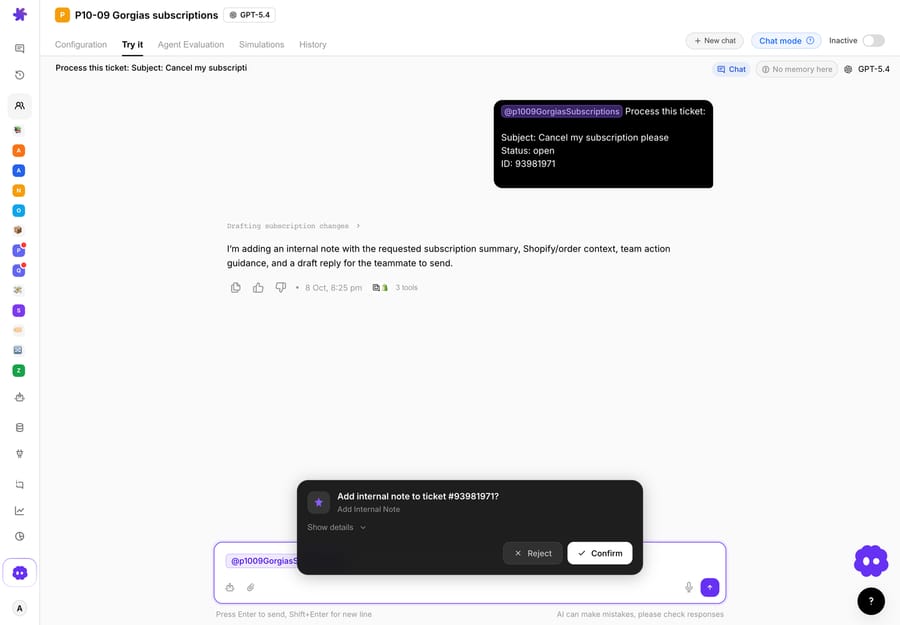
Run 1: a cancellation with a retention offer. We created a Gorgias ticket over the API from a made-up Priya ([email protected]): "I want to cancel my subscription. I have too much at home right now and the boxes keep piling up. Is my last order already on its way?" Our rule tagged it subscription-cancel on arrival. We then opened it from the agent's Try it tab with Test run, in the "Pick an existing ticket and chat about it" mode. The agent read the ticket, found Priya in Shopify with one order, #1099, paid and not yet fulfilled, and called Add Internal Note. In chat, a built-in write stops at a confirmation card; we confirmed it.
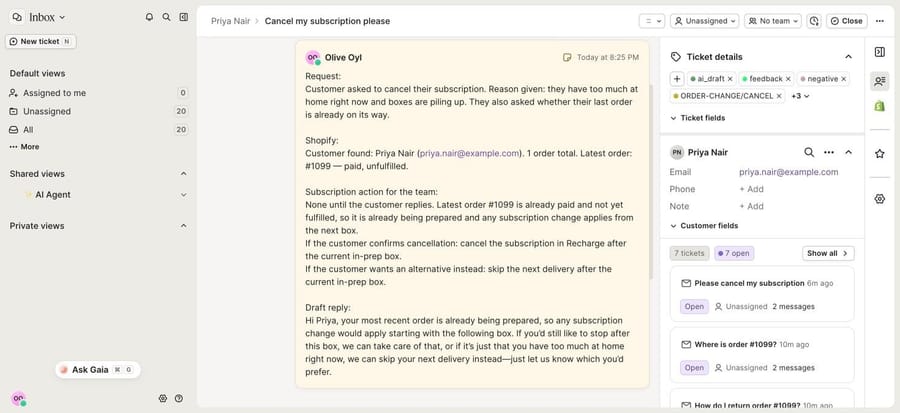
The note on the Gorgias ticket followed the four headings in step 7. Because Priya's reason was "too much at home," the draft offered a skip instead of a cancel, once, and the team action read "None until the customer replies," with what to do for each answer. It also answered her side question: #1099 is already being prepared, so any change applies from the next box. The agent then added ai_draft and sub_cancel and kept the tags already on the ticket.
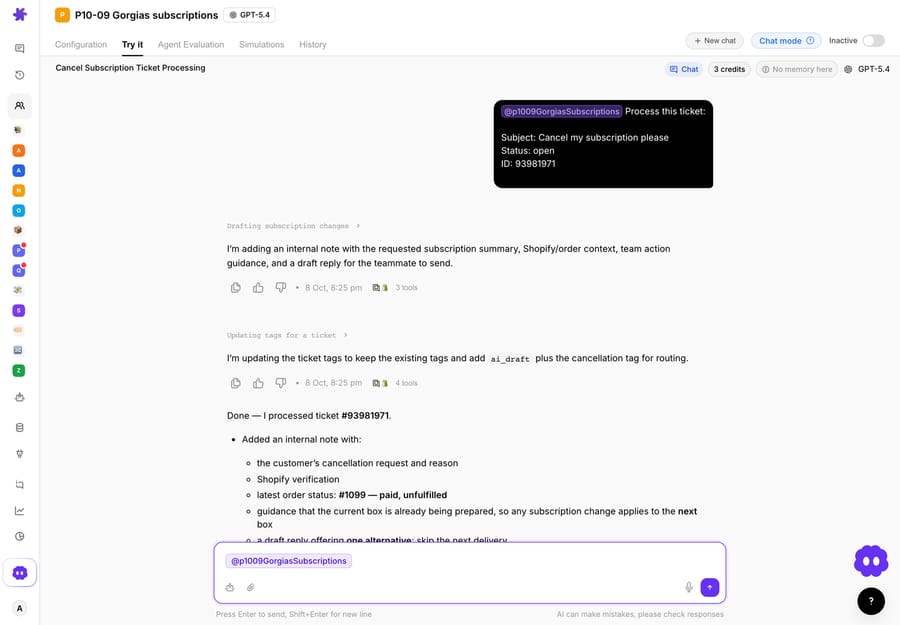
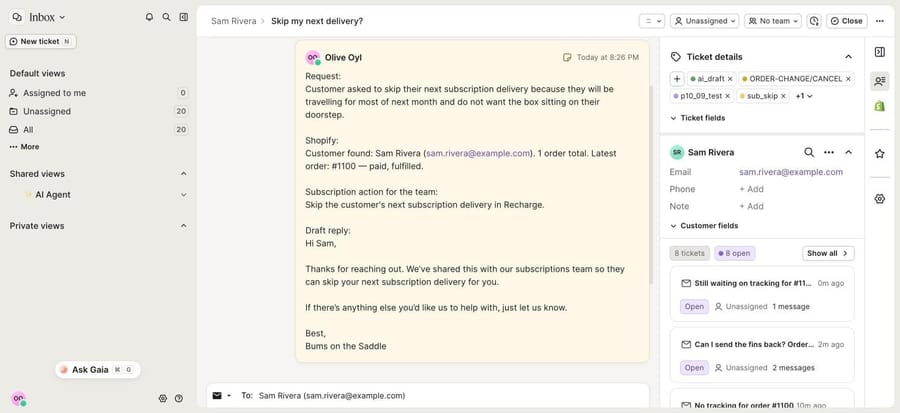
Run 2: a skip request. Sam, also made up, asked to skip his next delivery while traveling. The agent found his one order, #1100, already fulfilled, wrote "Skip the customer's next subscription delivery in Recharge" as the team action, and drafted a reply that says the team will do it, not that it's done. Tags: ai_draft and sub_skip.
What we didn't run: the Recharge tools. On a live account, the Macha team adds the subscription calls as custom API tools during setup, each one endpoint from the table above with your Recharge token in its headers: a GET that finds the Recharge customer by the ticket email, a GET that lists the shopper's subscriptions by customer id, a GET that lists upcoming charges (a skip acts on a charge id), a POST that skips a charge, a POST that sets a later charge date for a pause, and a POST that cancels with a reason. With those attached, step 6 changes from "the teammate does it" to "do it, then say so," gated by the same policy. In a chat test, built-in writes like the note above stop at a confirmation card; on a live ticket trigger, writes run when the instruction says to, so the written policy is the gate.
Where Macha fits
Macha is the done-for-you option: the Macha team analyzes your past tickets, builds the knowledge base and the agent on the Gorgias you already use, writes the Recharge or Loop tools, and runs it in safe mode until the drafts are right. That's included on the trial and every plan, at about $0.40 a ticket, which includes setup and a dedicated success manager who handles your changes, such as a new retention offer or a second subscription app.
It fits teams on Zendesk, Freshdesk, Gorgias, Front, HubSpot or Intercom with subscribers who often hold more than one box, a retention policy that depends on the reason given, or a subscription app with no prebuilt Gorgias AI Agent actions. Those are the tickets Gorgias's own Actions hand back. If your subscribers almost all hold one box and you want a cancel with no click, switch on Gorgias AI Agent's Actions first.
What does it cost to automate subscription tickets at 2,000 tickets a month?
Take a subscription brand on Gorgias Pro with 2,000 tickets a month, 800 of them subscription requests an AI could finish. On Gorgias's monthly prices, Pro is $360 for the help desk plus $190 for 190 automated interactions. The other 610 resolutions are overage at $1.50: $915 more, for $1,465 a month. That assumes all 800 qualify for an Action, which the single-subscription rule makes unlikely.
With Macha on the same help desk, Gorgias stays at $360 and the 800 tickets fit Macha's 1,500-ticket tier at $599, for $959 a month, with room for 700 more tickets of any kind. The models differ: Gorgias bills only when the AI finishes without a human, so a month where half the attempts hand over costs less there, while Macha counts every ticket it works on, resolved or not. See pricing for the tiers.
Choosing between them
- Under a few subscription tickets a day: the Recharge sidebar and two good macros. Nothing else pays for its setup time.
- Mostly single-box subscribers, and you want no click: Gorgias AI Agent's Recharge or Loop Actions. They're already wired to the app.
- Multi-box subscribers, reason-based retention offers, or Skio, Smartrr or Stay AI: an AI agent layer that calls the subscription API directly. eesel if you want to build it yourself; Macha if you want it built and run for you.
- Above 1,500 tickets a month: compare on fit and on who does the setup work, not on the per-ticket line alone.
Rolling out subscription automation safely
- Split reads from writes. "When's my next charge?" can be answered on its own. A skip or pause changes when money moves, so it runs under a written rule. A refund always goes to a person, partly because of the Recharge-checkout refund limit above.
- Start in safe mode. Drafts as internal notes, exactly like the run above, until a week of them reads right. Then let skips and pauses go live, and cancels last.
- Write the retention offer down. One offer, once, and the cases where you offer nothing. An agent that improvises discounts is a pricing decision nobody made.
- Never confirm what didn't happen. The reply says "cancelled" only after the cancel call succeeds.
- Tag every outcome, so a Gorgias view gives you a weekly count to compare with Recharge's cancellation report.
The same safe-mode pattern runs in our other Gorgias guides: where-is-my-order tickets, drafting replies and triage and tagging, all collected in the best Gorgias automations with AI.
Frequently asked questions
Can Gorgias cancel a Recharge subscription automatically? Yes, with Gorgias AI Agent's Cancel subscription action, for shoppers with one active subscription. With two or more, AI Agent hands the ticket to your team. Without AI Agent, an agent cancels from the Recharge sidebar or with a macro that cancels the last subscription.
Can Gorgias AI Agent pause a Recharge subscription? Yes. Recharge's API has no pause state, so the action pushes the next charge to the resume date the shopper picks. Pause selected subscription can pause one of several once List active subscriptions has identified it. Loop has a real pause and resume, under the same single-subscription rule.
Does the Recharge integration cost extra in Gorgias? The app is included in every Gorgias plan. Recharge charges its own fees, which the Gorgias listing shows as starting at 1% + 10¢ per transaction. AI Agent is the paid part: $1.00 per automated interaction on monthly billing, $1.50 past the bundle.
Should an AI agent offer a discount before canceling? Only if your policy says so, and only the offer it names. Gorgias AI Agent can create a Recharge discount code from values you set. In our run the agent offered a skip because the shopper said she had too much at home, and offered nothing else.
Does Macha have a Recharge integration? Not a prebuilt one. Recharge and Loop are custom API tools the Macha team builds and tests during setup, using your API token. Shopify and Gorgias are built-in connectors.
Which option is best for a small team? The Recharge sidebar and macros, until subscription tickets pile up faster than one person reads them. Then Gorgias AI Agent if your shoppers hold one box each, or Macha if they don't and you'd rather not build it; the trial is $50 of free usage (about 125 tickets), no credit card, no time limit.
How we researched this
- Read on October 8, 2026: gorgias.com/pricing; Gorgias's articles on Recharge, Recharge AI Agent Actions (updated September 10, 2026), Loop Subscriptions AI Agent Actions and adding actions to macros; eesel's Recharge and Gorgias docs and pricing; Siena's integrations and pricing pages; Yuma's homepage; Recharge's churn prevention page. Gorgias's billing article was read September 24, 2026, and the Recharge and Loop API references on September 28, 2026.
- Captured on October 8, 2026 in our Gorgias trial: the App Store's Subscriptions category, the Recharge app page and its Actions tab, and the default auto-tag rule. We also created and tested a rule through the Rules API (code shown above). We didn't connect Recharge, so the sidebar, macro actions and AI Agent actions are documented, not run.
- Run live on October 8, 2026: an inactive test agent on our Macha Demo org, with no trigger, against made-up Gorgias tickets #93981971 and #93981036 and our Shopify test store. It wrote internal notes and tags only. Customers, emails and orders are made up.
- Not run: Gorgias AI Agent's Recharge actions, eesel, Siena, Yuma and any Recharge or Loop API call.
- Arithmetic: 800 − 190 = 610 overage interactions; 610 × $1.50 = $915; $360 + $190 + $915 = $1,465. $360 + $599 = $959. $299 ÷ 750 = about $0.40 a ticket.
If you want subscription tickets handled on your own Gorgias, start a Macha trial and the team will build the agent with you, or see how Macha works on Gorgias.






