





 Shopify
 Stripe
 Slack
Slack Notion
 Google Workspace
 Confluence

How Do You Draft Gorgias Replies with AI From Your Help Center? (2026)


Gorgias AI Agent drafts replies from your Help Center, Guidance, Skills and Shopify data, but it never reuses the Macros your team already trusts. Here is how to set up grounded drafts in Gorgias, what AI Agent costs per resolution, and when an agent layer that searches your macros fits better.
Key takeaways
- Grounding Gorgias AI replies means connecting your Help Center and Shopify data, writing Guidance for nuance, and adding a Skill with instructions for each intent you want handled.
- Gorgias AI Agent generates its own responses from Skills and knowledge, not from Macros, so Macros and Quick Responses stay a tool for human agents only.
- Gorgias bills AI Agent at $0.90 per resolved interaction on most plans and $1.00 on Starter, with $1.50 overages on Support plus Shopping Assistant plans.
- Macha's Gorgias connector includes a Search Macros action, so a Macha agent can find the macro your team already uses and draft the reply from it.
- Macha bills per ticket rather than per resolution, starting at $299 a month for up to 750 tickets, with setup by the Macha team and a dedicated success manager included.

To draft Gorgias replies with AI that stay grounded in your Help Center, connect your Help Center and Shopify store to Gorgias AI Agent, write Guidance for the nuance your articles miss, and add Skills for each intent you want handled. Gorgias bills AI Agent at $0.90 per resolved conversation on most plans ($1.00 on Starter; $1.00 monthly and $0.90 annual, per its pricing FAQ in October 2026), and it writes its own text: Gorgias's docs say it "generates its own responses from your skills and knowledge, not from macros."
Here is where each part of the setup lives and what it does:
| Piece | What it does | Uses your Macros? |
|---|---|---|
| Help Center, website, documents | Retrievable knowledge for FAQ-style answers | No |
| Guidance | Reference knowledge you write for the agent | No |
| Skills | Step-by-step instructions for one or more intents | No |
| Actions | Opt-in tasks such as canceling an order or processing a return | No |
| Macros and Quick Responses | Canned replies your human agents apply | Human-only |
| Macha (agent layer on Gorgias) | Drafts from your Help Center, tools and macro library | Yes, via its Search Macros action |
What does "drafting with AI" mean in Gorgias?
AI Agent is Gorgias's autonomous AI. It reads an incoming conversation and, within limits you set, resolves it end to end across email, chat, SMS and social channels including Instagram DMs, Facebook Messenger and WhatsApp, per Gorgias's AI Agent documentation. It draws on your Help Center articles, website content, documents, Guidance and Shopify data.
The important nuance, also covered in eesel's teardown of Gorgias AI Agent actions, is that AI Agent doesn't use your Macros at all. Macros and Quick Responses stay a human-only tool. So if your team has spent a year perfecting a macro library for returns, exchanges and shipping delays, the native AI Agent won't reuse a word of it. It composes fresh text, and you steer it through Skills and Guidance instead.
How do you ground Gorgias AI replies in your Help Center?
The most important move is making sure the AI has your real knowledge to draw on. In Gorgias, that means:
- Connect your Help Center so published articles become retrievable knowledge. FAQ-style answers (return window, shipping zones, sizing) are handled by knowledge retrieval rather than a scripted action.
- Add Guidance: reference documents you write for the agent to cover what an article doesn't, like how to phrase a goodwill exception or which tone to use with an angry WISMO customer.
- Connect your store data (Shopify) so order status, tracking and customer history are available to the reply, not just static text.
The payoff is that a shopper asking "can I return these boots, they're the wrong size?" gets a reply built from your actual returns policy (window, condition rules, prepaid-label logic) instead of a plausible-sounding guess.
How do Skills shape tone and behavior?
Because AI Agent ignores Macros, behavior lives in Skills. Gorgias defines a skill as "a set of instructions for one or more intents": when AI Agent detects a matching conversation, it follows those instructions. Each skill has at least one intent, the instructions, and an optional knowledge toggle. Gorgias draws the line plainly: "A step-by-step procedure for a specific request, like processing a return or canceling an order, belongs in a skill, not guidance."
A return skill might read: when the intent is "return request," if the order is inside the 30-day window, explain the process and offer a prepaid label; if outside the window, apologize and offer store credit as a goodwill gesture. You're rebuilding the judgment that used to live in your macro library and your team's heads, as explicit instructions the agent follows.
That works well for repeatable, high-volume intents. It's also where the work is: every branch of behavior you care about has to be written, tested and maintained, and there's a real risk of changing live customer data while you test against production.
Should AI replies be drafts for review or sent automatically?
Not every reply should ship on its own. A sensible rollout for an ecommerce team looks like a ladder:
- Drafts only for the first few weeks: the AI writes, a human reads, edits and sends. This is where you learn whether the grounding is right before anything reaches a customer.
- Auto-send the safe intents (order status, "where's my package," basic return eligibility) once you trust the drafts.
- Keep judgment calls human: refund disputes, damaged-item claims, anything with a goodwill decision, routed to an agent with a strong draft waiting.
Where do Gorgias's native AI tools stop?
Gorgias AI Agent is good at what it's built for. It can fully resolve routine, well-defined intents, and its knowledge retrieval genuinely pulls from your Help Center. If you're on Shopify and your volume is dominated by a handful of repeatable intents, the native tools may take you a long way.
But there are seams worth being clear-eyed about:
- It doesn't reuse your Macros or Quick Responses. The library your team trusts is invisible to AI Agent; you re-author that behavior as Skills.
- It's Shopify-centric. Store data comes from Shopify, which suits Shopify brands and fits less well elsewhere.
- Deflection isn't the same as resolution. An answer that closes an FAQ is not the same as looking up an order, checking a subscription and taking the right action, and the native billing model charges on the resolution outcome.
That billing model is the part most teams underestimate. Gorgias's pricing page says AI Agent is on every plan and you "pay only when it resolves a conversation." Per Gorgias's AI Agent pricing article (updated 28 May 2026), a billable interaction is one the AI resolves entirely on its own, at $0.90 per resolved interaction on most plans and $1.00 on Starter. Overages run $1.50 per interaction on Support + Shopping Assistant plans, and $1.00 to $2.00 monthly ($0.83 to $1.67 annual) on support-only plans. Human-resolved conversations, spam and unanswered emails aren't charged, and on handoff the ticket moves to your Helpdesk plan rather than being billed twice. Our Gorgias pricing explained breakdown has the plan-by-plan detail.
Here's why the unit matters. Per-resolution pricing is clean when the AI truly closes a conversation, but it ties your cost to an outcome definition the vendor controls, and it doesn't distinguish a one-line FAQ deflection from a multi-step fix. The vendor earns more the more conversations it counts as resolved. A dedicated agent layer can price differently:
| Native Gorgias AI Agent | Macha (agent layer) | |
|---|---|---|
| Unit of billing | Per automated resolution, $0.90 on most plans ($1.00 on monthly billing) | Per ticket, from $299/mo for up to 750 |
| Reuses your Macros/Quick Responses | No, writes its own | Yes, can look up your macros with Search Macros and draft from them |
| Knowledge source | Help Center, website, documents, Guidance, Shopify | Your Help Center, docs and live tools |
| Cost coupling | Tied to the resolution outcome | Tied to the conversation: one ticket, charged once |
| Runs where | Inside Gorgias, Shopify-centric | On top of the Gorgias you already use |
How does an agent layer like Macha draft Gorgias replies?
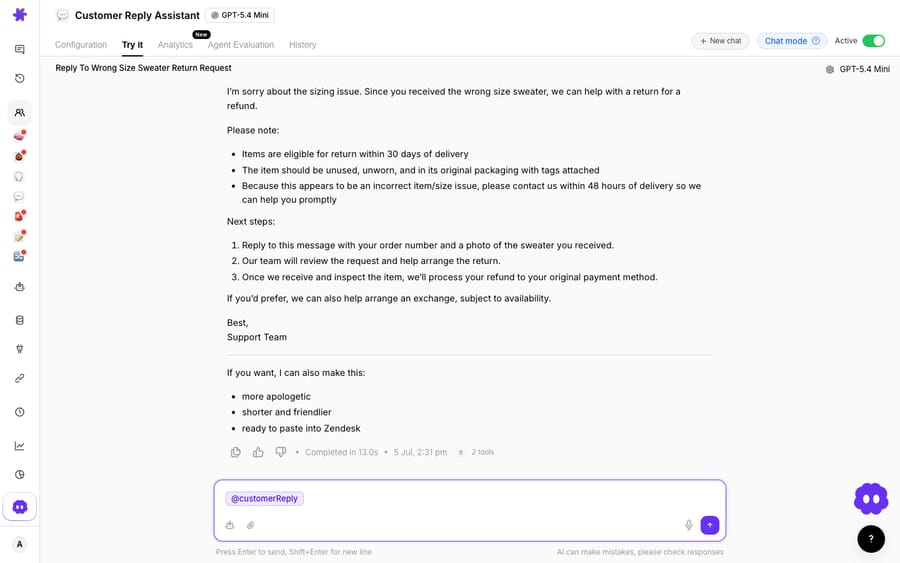
Macha runs on top of the Gorgias you already use through a live connector. It does not replace your help desk. The connector fires on Ticket Created, Ticket Updated or New Message Added, and gives the agent actions such as Get Ticket, Search Macros, Add Internal Note and Add Public Reply. So the Customer Reply Assistant can read the thread, find the macro your team already uses for that question, ground the answer in your Help Center, and leave the draft as an internal note for a human to send, or post it directly once you trust it.
Macha bills per ticket: one conversation, charged once however many drafts, lookups and sends it takes. Pricing starts at $299 a month for up to 750 tickets, about $0.40 each, and setup is done for you on the trial and every plan: the Macha team connects your Help Center and Shopify, builds the agent and its macro lookups on your Gorgias, tests it on a sample of your past tickets, and runs it in safe mode, with drafts as internal notes, until the drafts are right. The price also includes a dedicated success manager who handles your changes afterwards, such as new intents, instruction changes or new tools. See the pricing page for the tiers.
The lookups come from custom tools: a return-eligibility check or an order-status call becomes something the agent can invoke mid-draft, which is what the screenshot above shows, with two tools feeding one KB-grounded return reply. For the full setup, our guide on connecting Gorgias to Macha to automate ticket replies walks through it end to end, and the best AI agents for Gorgias compares the options if you're still evaluating.
The division of labor: let Gorgias stay the system of record for tickets and let its native AI handle the intents it's tuned for, then add an agent for KB-grounded drafting that reuses your macros, calls your live tools, and bills for the conversation rather than the outcome. Macha fits teams already on Zendesk, Freshdesk, Gorgias, Front, HubSpot or Intercom who want drafts inside the ticket rather than a separate chat widget.
FAQ
Does Gorgias AI use my Macros and Quick Responses to draft replies? No. Gorgias's docs say AI Agent "generates its own responses from your skills and knowledge, not from macros." Your team can still apply Macros manually. If reusing your existing templates matters, an agent layer like Macha can search your Gorgias macros and draft from them.
How does Gorgias draft replies from my Help Center? Connect your Help Center so published articles become retrievable knowledge, then add Guidance for nuance and Skills for step-by-step procedures. FAQ-style questions (return windows, shipping zones) are answered by knowledge retrieval; Shopify supplies order and tracking details.
How is Gorgias AI Agent billed? Per resolved interaction: a conversation the AI resolves entirely on its own. Gorgias's pricing article puts this at $0.90 per resolved interaction on most plans and $1.00 on Starter (its pricing FAQ, as of October 2026: $1.00 on monthly plans, $0.90 on annual), with overages of $1.50 per interaction on Support + Shopping Assistant plans. Human-resolved, spam and unanswered messages aren't charged. Confirm current numbers on Gorgias's pricing page.
What's the difference between deflection and resolution? Deflection means a customer's question is answered so they don't need an agent (often a one-line FAQ). Resolution means the whole conversation is closed, sometimes after a lookup or action. It matters because native Gorgias bills per resolution, while Macha bills per ticket: one conversation, charged once however many messages it takes.
Can I add AI drafting to Gorgias without replacing Gorgias? Yes. Macha connects to Gorgias as a live connector and runs on top of your existing help desk. It drafts KB-grounded replies you can review and send, reusing your macros and tone, while Gorgias stays the system of record.
Which channels can Gorgias AI Agent answer on? Email, chat, SMS and social channels including Instagram DMs, Facebook Messenger and WhatsApp, according to Gorgias's AI Agent documentation. It adapts message length to each channel.
Ready to draft grounded Gorgias replies your agents can actually send? Start a free trial of Macha ($50 of usage, no credit card) and connect it to your Gorgias in minutes.






