Shopify
 Stripe
 Slack
Slack Notion
 Google Workspace
 Confluence

How Do You Connect Gorgias to Macha and Automate Ticket Replies?


Gorgias ships its own AI Agent, but it bills per resolution and stays inside Gorgias. Connecting Gorgias to Macha adds an agent that drafts and sends replies from your knowledge base and pulls order and payment data from the other tools you run.
Key takeaways
- Connecting Gorgias to Macha takes about ten minutes: copy the REST API key from Settings, Account, REST API in Gorgias, paste it into Macha, then add a trigger and reply agent.
- Macha's Gorgias connector shipped on June 23, 2026 and gives agents 15 native tools, including Get Ticket, Add Public Reply, Update Status and Assign Ticket.
- Gorgias HTTP integrations have a 5-second timeout and retry up to 3 times at 10, 20 and 40 seconds, but only when the endpoint is unreachable or times out.
- Gorgias' native AI Agent charges per automated interaction, for example $1.50 each past the 30 included in the $30 Starter add-on.
- Macha bills per ticket rather than per resolution, starting at $299 a month for 750 tickets, about $0.40 each, with setup by the Macha team and a dedicated success manager included.

To connect Gorgias to Macha, copy your domain, username and API key from Gorgias under Settings → Account → REST API, paste them into Macha under Connectors → Support → Gorgias, then add a Ticket Created trigger and a reply agent. The whole setup takes about ten minutes, and the agent gets 15 native Gorgias tools to read, reply, tag and route.
Macha is not a Gorgias replacement. It sits on top of Gorgias, as it does on Zendesk, Freshdesk, Gorgias, Front, HubSpot or Intercom, reads the ticket, decides what to do, and takes real actions back inside Gorgias. Macha's Gorgias connector shipped on June 23, 2026.
| Step | Where | What you do |
|---|---|---|
| 1. Get credentials | Gorgias: Settings → Account → REST API | Copy domain, username (account email) and API key |
| 2. Connect | Macha: Connectors → Support → Gorgias | Paste the three values and save |
| 3. Trigger | Macha agent: Triggers | Ticket Created, Ticket Updated, New Message Added or Custom Webhook |
| 4. Agent | Macha agent builder | Instructions, knowledge sources, Gorgias tools, reply mode |
What will the finished agent do?
By the end you'll have an AI agent that:
- Wakes up the moment a ticket is created in Gorgias (or a customer sends a new message).
- Reads the full ticket thread, the customer record, and your knowledge sources.
- Drafts a reply grounded in your help docs, and either posts it as a public reply, leaves it as an internal note for an agent to approve, or applies a macro.
- Updates the ticket: sets status, priority or tags, or routes it to the right team.
You decide how far it goes. A cautious rollout drafts internal notes for human approval; a confident one sends public replies on the question types you trust.

Step 1: How do you connect Gorgias with an API key?
In Macha, go to Connectors → Support and pick Gorgias. Authentication is by API key, so you'll create one in Gorgias first.
Get your Gorgias API key
- In Gorgias, click the Settings icon in the bottom-left corner, then Account → REST API (Gorgias docs). Only the account owner and admins can see this page and create keys.
- Note your domain (
yourstore.gorgias.com), your username (the email of the account the key belongs to), and generate an API key. - Copy the key somewhere secure. If it leaks, resetting it in the same screen invalidates the old one immediately. There's a longer walkthrough in how to find your Gorgias API key.
A note on the account you generate the key from: the agent's replies and notes are attributed to that user. Most teams create a dedicated "Macha" or "AI Agent" user in Gorgias so the automation is clearly labeled in the ticket history and easy to audit later.
Paste it into Macha
Back in the Macha connector screen, enter your Gorgias domain, username and API key, then save. Macha validates the credentials and the connector goes live.
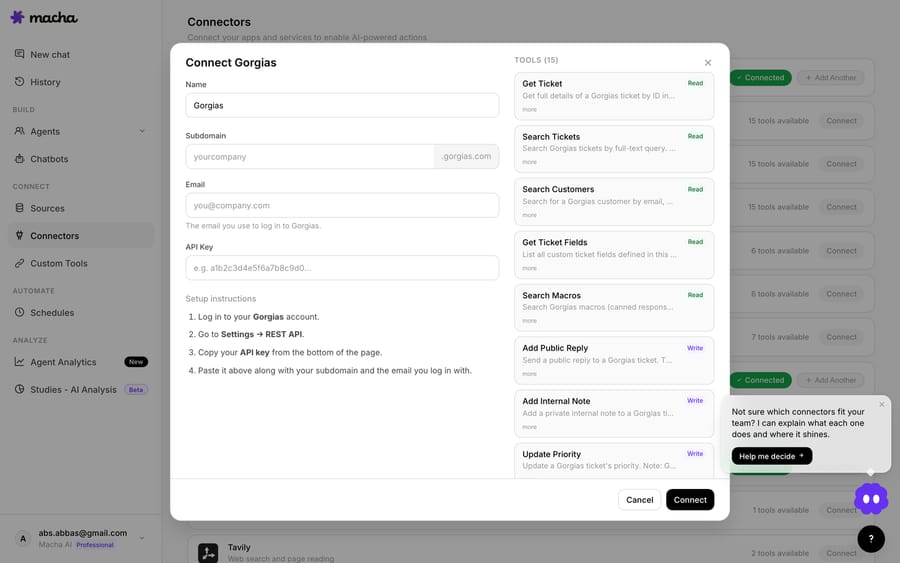
Once connected, your agents can use all 15 Gorgias tools:
| Read | Act on the ticket | Route & manage |
|---|---|---|
| Get Ticket (full thread) | Add Public Reply | Update Status |
| Search Tickets | Add Internal Note | Update Priority |
| Search Customers | Update Tags | Assign Ticket |
| Search Macros | Update Fields | List Agents |
| Get Ticket Fields | Read Attachment | List Teams |
That spread is the point: replying is one action among many. The same agent that drafts a response can read a PDF attachment, find the right macro, set the priority to urgent, and assign the ticket to your returns team in a single run.
Step 2: Which trigger should start the agent?
A connector lets the agent act in Gorgias. A trigger is what starts it. Macha's Gorgias connector gives you four:
- Ticket Created: fires when a new ticket lands. The most common choice for reply automation.
- Ticket Updated: fires on status, priority, assignment or tag changes.
- New Message Added: fires when a customer replies (or any new message hits the ticket).
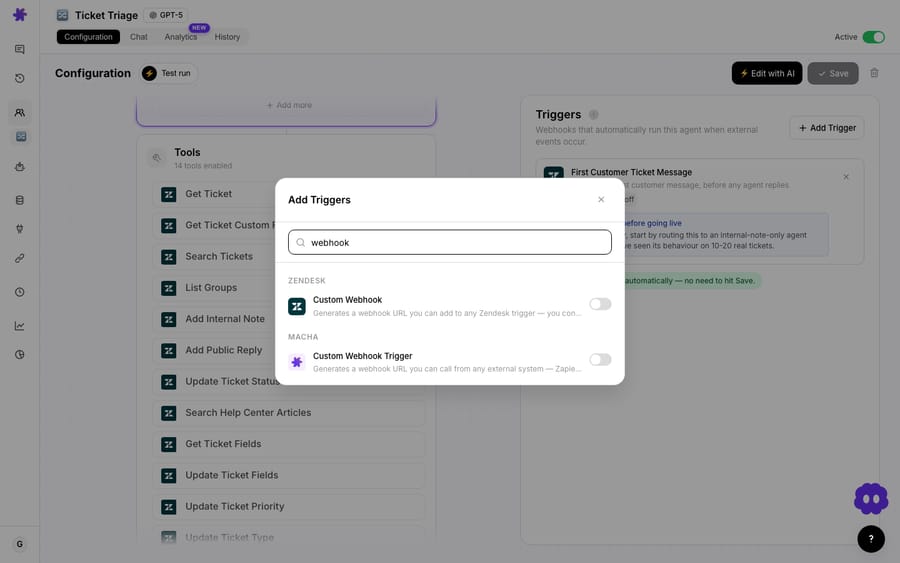
- Custom Webhook: Macha generates a webhook URL that you attach to a Gorgias HTTP integration, so you control exactly which tickets fire the agent.
The first three are managed events: pick one and Macha listens. The Custom Webhook is for teams who want precise control over which tickets reach the agent, and it's worth understanding because it gives you the most options.
How do you wire the Custom Webhook?
If you only want the agent to run on, say, tickets tagged vip or coming through a specific channel, the webhook route lets Gorgias' own Rules decide. The flow:
- In Macha, add a Custom Webhook trigger to your agent. Copy the generated webhook URL (and signing secret).
- In Gorgias, click the Settings icon in the bottom-left corner, then Account → HTTP integration, and add a new integration (Gorgias docs).
- Set the method to POST and paste Macha's URL. Under Triggers, choose the ticket events you want. Gorgias offers Ticket created, Ticket updated, Ticket self unsnoozed, Ticket message created and Ticket message failed.
- Add the auth header Macha gives you (Gorgias supports header auth like
Authorization: Bearer <key>), and pass ticket context in the body using Gorgias template variables such as{{ticket.id}}and{{ticket.customer.email}}. - Save. Now only the tickets that match the rule conditions you set in Gorgias will reach your agent.
A couple of Gorgias-side realities worth knowing, straight from their docs: HTTP integrations have a 5-second timeout per request and retry up to 3 times with exponential backoff (10s, 20s, 40s) when the endpoint is unreachable or times out. Gorgias doesn't retry on error status codes, so a 4xx or 5xx response is simply lost. Gorgias also enforces plan-tier rate limits: fire a poorly scoped rule at thousands of tickets and you'll hit HTTP 429. Scope your trigger conditions tightly; don't point the agent at your entire backlog at once.
Step 3: How do you build the agent that writes the reply?
With the connector and trigger in place, the agent is the brain. Start from a built-in Gorgias agent template under Connectors (the June 23 changelog notes that both new helpdesk connectors ship with templates), or build from scratch.
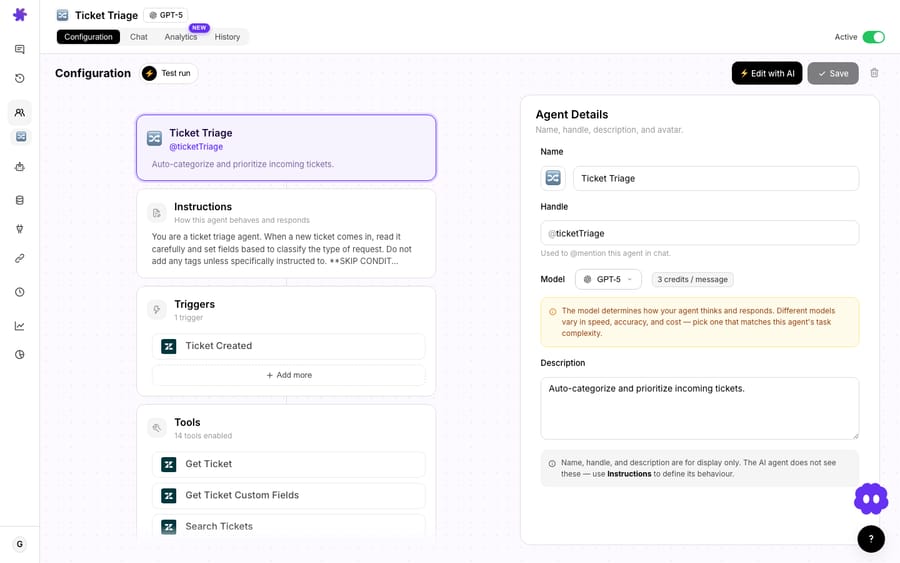
Four things make a reply agent good:
1. Instructions. Tell it plainly what it owns and where its limits are. For example: "You handle order-status, shipping, and returns-policy questions. Read the ticket and the customer record. If the question is answered in the knowledge base, draft a reply in our voice. If it involves a refund over $100, a damaged item, or anything you're unsure about, post an internal note summarizing the issue and assign to the Returns team instead of replying."
2. Knowledge sources. Connect your help-center articles, returns policy and shipping FAQs as a knowledge source. This is the difference between Macha and a generic LLM: replies are grounded in your documented answers, not invented ones. (Note: the Gorgias connector itself doesn't index Gorgias content as knowledge; you attach your docs separately as knowledge sources.)
3. Tools. Give the agent the Gorgias tools it needs: at minimum Get Ticket, Add Public Reply (or Add Internal Note), and Update Status. For Shopify-native stores, connect Shopify and Stripe too, so the same agent can look up the actual order and payment before it answers "where is my order?"
4. The reply mode. Decide whether the agent sends public replies or drafts internal notes. Start with internal notes on a narrow question type, read what it produces for a week, then promote the categories you trust to auto-send. This is the most important rollout decision, and the cheapest insurance against a bad day.
When shouldn't the agent auto-send?
- Don't auto-send on day one. Run in internal-note (draft) mode first. You'll catch tone issues, edge cases and knowledge gaps before a customer ever sees them.
- Keep the scope narrow. An agent that "handles everything" handles nothing well. Constrain it to a few well-documented question types and let humans keep the rest.
- Mind the rate limits. Gorgias throttles by plan tier. Scope triggers to the tickets that actually need the agent, not the whole firehose, and never backfill your archive through a live trigger.
- Attribute it clearly. Use a dedicated Gorgias user for the key so every AI action is labeled in ticket history. Your human agents, and your audits, will thank you.
- It's an addition, not a rip-and-replace. If Gorgias' native AI Agent already deflects your simplest FAQs, Macha is the layer for the workflows it can't reach: cross-tool actions (Shopify, Stripe, Slack), your own agent logic and your own knowledge, all billed per ticket, not per resolution, and set up for you by the Macha team. See how the pricing works before you scale.
How much does a Macha reply agent on Gorgias cost?
Macha bills per ticket (one conversation, charged once however many messages, lookups and replies it takes), not per deflection or per resolution. The model you pick doesn't change that: a reply agent that reads a ticket and posts one response costs the same as one that checks three systems first, about $0.40, with pricing starting at $299 a month for 750 tickets. Setup is done for you on the trial and every plan: the Macha team analyzes your past tickets, builds the knowledge base and the reply agent on Gorgias, and runs it in safe mode, with drafts as internal notes, until the drafts are right. The price also covers a dedicated success manager who handles your changes afterwards: new categories, instruction changes, new tools. Start with a free trial ($50 of usage, no credit card required) and see the pricing page for the tiers.
That's a different model from Gorgias' native AI Agent, which Gorgias sells as "pay only when it resolves a conversation." On the Starter plan, for example, the AI Agent add-on is $30 a month with 30 automated interactions included, then $1.50 per automated interaction (Gorgias pricing, checked 24 September 2026). Per-resolution pricing means the vendor earns more as the AI closes more tickets, and your bill moves with a resolution definition the vendor controls. Neither model is automatically cheaper; it depends on your volume and how many tickets the native agent would resolve outright. The point of Macha is what the agent can do across your stack, billed the same whether a ticket takes one step or ten.
FAQ
How does Macha authenticate with Gorgias? By API key. You generate a REST API key in Gorgias (Settings → Account → REST API), then enter your domain, username and key in Macha's Gorgias connector. No OAuth app required.
Can Macha send a public reply automatically, or only draft one? Both. The agent can Add Public Reply (customer-facing) or Add Internal Note (agents only). Most teams start in internal-note mode for review, then promote trusted question types to auto-send.
What can the Gorgias agent actually do besides reply? Fifteen tools: read the full ticket and customer, search tickets, customers and macros, reply or note, update status, priority, tags and custom fields, assign to a user or team, list agents and teams, and read text from attachments (PDF, DOCX, XLSX, CSV, TXT).
Do I need a webhook, or will the built-in triggers do? For most setups, the managed Ticket Created or New Message Added trigger is enough. Use the Custom Webhook only when you want Gorgias' own Rules to decide exactly which tickets reach the agent.
Will this conflict with Gorgias' native AI Agent? No. Macha runs as a layer on top. Scope each to different ticket types if you run both, and attribute Macha's actions to a dedicated Gorgias user so the two are easy to tell apart in ticket history.
Which other tools can the same agent use? Anything you connect: Shopify, Stripe, Slack, Notion, and more. That's the value of the layer: one agent reads the Gorgias ticket and acts across your whole stack.
Who in Gorgias can create the API key? The account owner and admins. Other roles can't see the REST API page, so ask an admin to generate the key for a dedicated Macha user.
How do you get started?
Connecting Gorgias to Macha is an API key, a trigger and an agent: about ten minutes of setup for replies that draw on your real knowledge and act across your real tools. Start a free trial ($50 of usage, no credit card required), open Connectors → Support, and pick Gorgias. If you'd rather not build the agent yourself, the Macha team does it for you, included on the trial and every plan. The full walkthrough lives in the Macha docs, and you can see every Gorgias tool and trigger on the Gorgias integration page.
Written by Abbas (Customer Support & AI, Macha) · Reviewed by Ankeet Guha (Co-founder & CTO) · Published 2026-06-24 · Last updated 2026-09-24.