





 Shopify
 Stripe
 Slack
Slack Notion
 Google Workspace
 Confluence

How Do You Auto-Resolve WISMO Tickets in Gorgias? Native Options vs AI Agents (2026)


Gorgias can answer "where is my order?" four ways once Shopify is connected: rules and macros, Track order self-service, Gorgias AI Agent, or a third-party AI agent. This guide covers each one with prices checked on October 8, 2026, the native setup as we built it in our own Gorgias account, the case where the native rule gave the wrong answer, and a live Macha run on five test tickets.
Key takeaways
- Gorgias's Shopify macros fill in the customer's last order, so a rule plus a macro only answers order status correctly when the question is about the most recent order.
- In our Gorgias account, the shipping-status rule tagged a fulfilled order with no tracking number as not-shipped, and the suggested macro told the shopper it was still processing.
- Gorgias AI Agent costs $0.90 per automated interaction on annual plans or $1.00 on monthly plans, and Track order resolutions count as automated interactions too.
- Our Macha test agent read five Gorgias tickets, looked up the Shopify orders, posted draft replies as internal notes, and shared nothing when the order's email didn't match.
- Macha starts at $299 a month for 750 tickets, about $0.40 a ticket, with done-for-you setup and a dedicated success manager on the trial and every plan.

To auto-resolve WISMO in Gorgias, connect your Shopify store first: that puts each shopper's orders, fulfillment status and tracking number in the ticket sidebar. From there you have four ways to answer without a person. Rules plus Shopify-variable macros reply on their own but only know the customer's last order. Order Management's Track order button lets shoppers look up orders themselves in chat or the help center. Gorgias AI Agent writes the reply from live order data at $0.90 per automated interaction on annual plans ($1.00 monthly). Or a third-party agent layer does it: eesel AI, My AskAI, Yuma, Siena, or Macha, which starts at $299 a month for 750 tickets (about $0.40 a ticket) with setup done for you.
Below is each option with its price as checked on October 8, 2026, the native setup as we built it in our own Gorgias account, the trap we hit with the native rule, and a live run of a Macha agent on five test tickets.
What are the options for automating WISMO in Gorgias?
We compared what each option does on one "where is my order?" ticket: does it only show the order to your team, does it point the shopper at a self-service page, or does it write the answer? Native options first.
| Option | Type | What it does on a WISMO ticket | Shopify writes | Setup | Price (checked Oct 8, 2026) | Where it falls short |
|---|---|---|---|---|---|---|
| Shopify integration (ticket sidebar) | Native | Shows the shopper's orders, fulfillment status, tracking URL and number to the agent; a person writes the reply | Refund, cancel, duplicate, edit, create order, by hand | Self-serve, minutes | Included on every helpdesk plan (Starter $10 a month for 50 tickets) | Answers nothing on its own |
| Rules plus macros with Shopify variables | Native | Detects the order-status intent and sends or suggests a macro filled with the last order's number and status link | Macro actions can include Shopify actions | Self-serve, an afternoon | Included; each ticket a rule replies to is a billable helpdesk ticket | Variables read the last order only; a fulfilled order with no tracking looks unshipped |
| Order Management: Track order | Native self-service | Shopper signs in with a one-time code and sees the order timeline in chat, help center or contact form | Return and cancel buttons submit requests | Self-serve; needs Chat or Help Center | Needs an active AI Agent subscription; resolutions count as automated interactions | Deflection: the shopper does the looking |
| Gorgias AI Agent | Native AI agent | Reads the question, uses the shopper's Shopify data and writes the reply on email, chat, SMS and social | Cancel, edit address, remove or replace item, reship, add order note | Guided setup in four steps | $0.90 per automated interaction (annual) or $1.00 (monthly); $1.50 over the plan allowance | Billed per resolution on top of the helpdesk ticket |
| eesel AI | Third-party AI agent | Replies or adds internal notes on Gorgias tickets with live Shopify order and tracking data | Cancellations, returns, discount codes | Self-serve | $299 a month for 500 credits | You build and tune it yourself |
| My AskAI | Third-party AI agent | AI agent inside Gorgias across email, chat and social; has a Shopify integration | Not described on its Gorgias page | Self-serve; 30-day trial | $199 a month for 1,000 tickets | Order lookup details not published |
| Yuma AI | Third-party AI agent | WISMO automation with a live tracking lookup inside Gorgias | Exchanges and order edits | Live support from Yuma's team | Not published | No public price to model |
| Siena AI | Third-party AI agent | Automates responses across Gorgias channels and handles Shopify orders | Per Siena's Shopify page | Expert onboarding included | $750 a month platform fee plus $0.90 per automated ticket | High fixed fee for a small store |
| Macha | AI agent layer on your help desk | Reads the Gorgias ticket, looks up the Shopify order, checks it belongs to the requester, posts a draft as an internal note, then replies once you approve the drafts | Full refund and order cancellation, under rules you set | Done for you by the Macha team, with a dedicated success manager, included | $299 a month for 750 tickets (about $0.40 a ticket) | Carrier last-mile status needs a tracking-app custom tool |
What does Gorgias's Shopify integration show on a ticket?
Everything else on this page depends on it, and on its own it's enough for a small team. Per Gorgias's Shopify connection guide, you connect from the settings icon at the bottom left: Workspace, Store, Add new store, Shopify, Connect Shopify. Gorgias sends you to the Shopify App Store to approve the permissions and back again. You need to be the store owner or an admin in Shopify, and it works on every helpdesk plan.
Once connected, the ticket sidebar shows the shopper's Shopify profile, a purchase summary and each order. On our test store's order #1100 that meant the order total ($433.00), "Paid" and "Fulfilled" badges, the order tags, and a Fulfillments block with the tracking URL and tracking number. From the same card an agent can edit, duplicate or refund the order, and create a new one, without opening Shopify admin.
That's the whole job for a team that reads every ticket anyway: the agent sees the status and pastes the tracking link. What the sidebar doesn't do is answer. Each of the options below is a different way of turning that sidebar data into a reply.
Can Rules and macros answer order status automatically?
Yes, within limits you should know before you switch it on. Two native pieces do the work: a macro whose text pulls Shopify fields, and a rule that applies it.
The macros. The minute we connected our test store, our Gorgias account had 10 new ecommerce macros, three of them for order status: "Order Status: Shipped", "Order Status: Not shipped - still in processing window" and "Order Status: No order found". Open "Order Status: Shipped" and the Shopify fields show up as green variables: Number of last order and Status URL of last order. Under the hood they are ticket.customer.integrations.shopify.orders[0].name and orders[0].order_status_url, with orders[0] being the customer's most recent order.
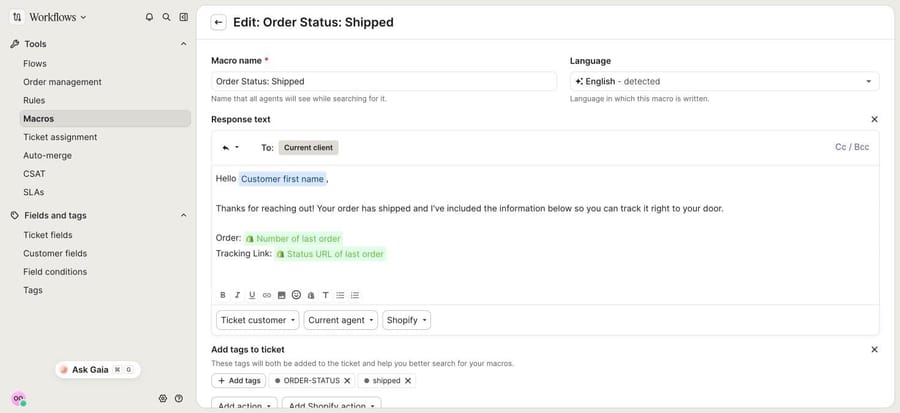
The variable is the catch. A macro built on the last order answers the right question only when the shopper is asking about their most recent order. A repeat customer asking about the order before that gets the newest one's status. Order status page links also show Shopify's status page rather than the carrier's scan events.
The rule. Gorgias's rule library includes "Tag requests by shipping status". We installed it in our account to see its logic. When a customer message arrives on an open ticket and Gorgias's AI intent detection labels it shipping/status, the rule checks the last order tracking number. If there is one and the order is under 30 days old, it tags the ticket shipped. If the tracking number is empty, it tags it not-shipped.
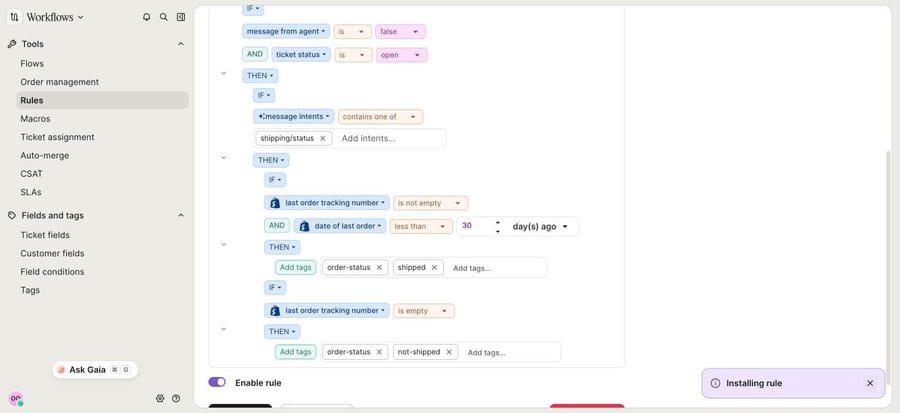
To auto-reply rather than just tag, you'd extend the rule with an action that applies the matching macro, which is the pattern Gorgias describes on its Rules page for WISMO.
What happened when we tested it. We sent a new ticket from Sam Rivera, whose order #1100 is fulfilled but has no tracking number attached. Gorgias tagged it ORDER-STATUS and not-shipped, and the macro it suggested on the ticket was "Order Status: Not shipped - still in processing window". Applied, that macro tells Sam his order "has been received and we are working on getting it shipped out", which is wrong: Shopify says it shipped. The rule did what it was built to do. It equates "no tracking number" with "not shipped", and a fulfilled order without tracking breaks that assumption.
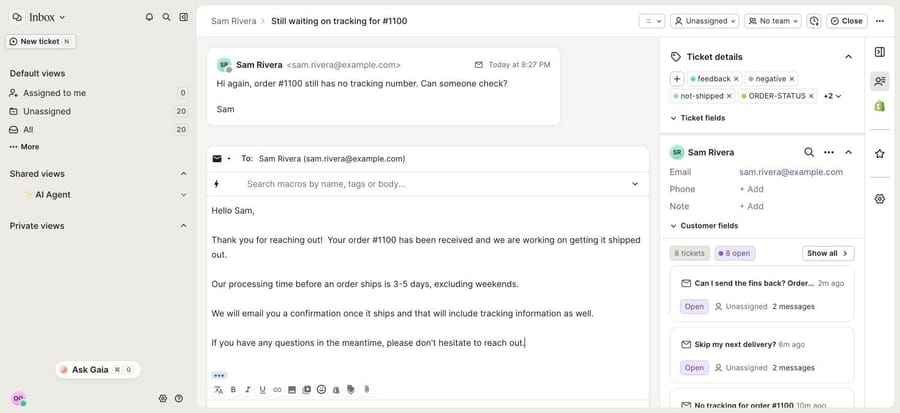
Rules and macros still suit stores where tracking numbers reliably land on the order at fulfillment and most WISMO questions are about the latest order. If that's you, add a third rule branch for "fulfilled with no tracking" that tags the ticket for a person instead of replying. We deactivated the rule after the test.
How does Track order self-service work?
Order Management is Gorgias's self-service portal, and its Track order button is the WISMO piece. Per Gorgias's Order Management guide, a shopper signs in with a 6-digit one-time code sent by email or SMS, then sees their orders with status, tracking number and shipping information, without starting a conversation. Per the Track order guide (updated May 5, 2026), the tracking view shows the order's journey with time stamps for when it was placed, confirmed and shipped, pulled from Shopify in real time. Gorgias's detailed tracking update adds carrier events and an estimated arrival through its AfterShip connection once a tracking number exists.
Setup lives under Workflows, Order management. In our account it listed four buttons, all switched on: Track order, Return order, Cancel order and Report issue. Track order has one setting, a response for unfulfilled orders, which is where your shipping timeframe goes. The preview pane told us to connect a Chat or Help Center first, because that's where the button lives.
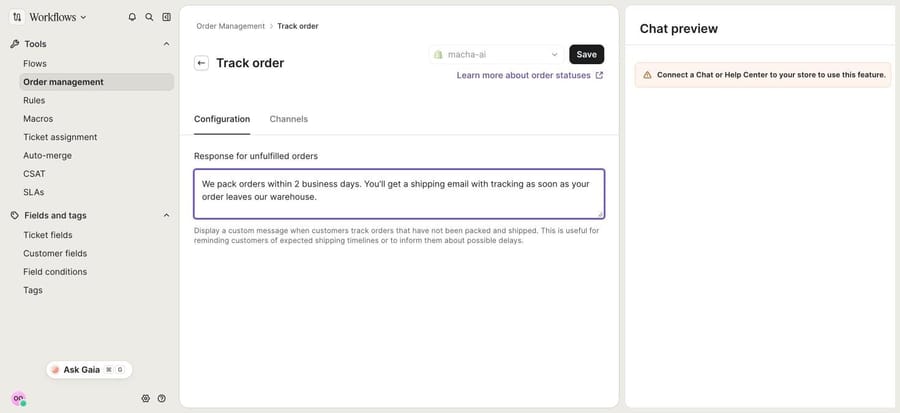
Two conditions sit on it. Order Management works with Shopify stores only, and Gorgias's docs say it needs an active AI Agent subscription. And under current pricing, a request resolved by Order Management, Flows or Quick Responses counts as an automated interaction, the same unit AI Agent is billed in. Gorgias earns on every lookup a shopper does for themselves, so when you model cost, count the Track order clicks too.
If you'd rather guide shoppers step by step, Flows builds click-through paths for chat, help center and contact form, with branching on the shopper's answers. Our guide to building a self-service flow in Gorgias walks through a WISMO flow.
Can Gorgias AI Agent answer where-is-my-order on its own?
Yes. Gorgias describes AI Agent's support role as resolving post-purchase conversations "like returns, order tracking, cancellations, and missing items", over email, chat, SMS and social channels (AI Agent explained, updated September 8, 2026). It needs the Shopify connection, and it hands over to your team when it can't respond confidently or a topic is sensitive.
For order changes, its Shopify actions are cancel order, edit shipping address, remove order item, replace order item, reship order for free and add to order note. The reship action reads the shipping information in Shopify to judge whether an order has been in transit too long to count as lost, which covers the "it's been stuck for a week" ticket that a status lookup can't settle.
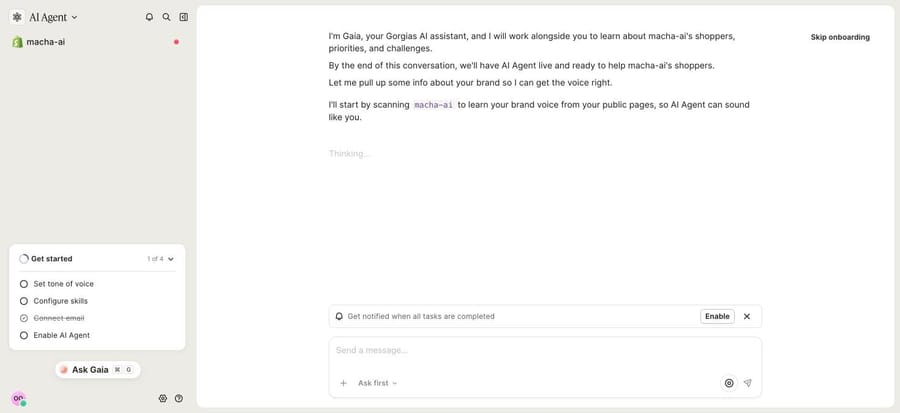
In our account, AI Agent opened as a guided setup with Gaia, Gorgias's AI assistant, in four steps: set tone of voice, configure skills, connect email and enable AI Agent. It starts by scanning the store's public pages to learn the brand voice. We stopped there. Enabling it would have put it on the same inbox our other tests share, so we didn't run it on our tickets.
What it costs. From gorgias.com/pricing on October 8, 2026:
| Item | Price |
|---|---|
| Helpdesk plans (monthly billing) | Starter $10 for 50 tickets, Basic $60 for 300, Pro $360 for 2,000, Advanced $900 for 5,000 (Basic $50, Pro $300, Advanced $750 on annual billing) |
| AI Agent, per automated interaction | $0.90 on annual plans, $1.00 on monthly plans |
| Automated interactions included | 30 on Starter and Basic, 190 on Pro, 530 on Advanced |
| Above the plan's allowance | $1.50 per automated interaction |
| A teammate replies within 72 hours of an AI resolution | Charged as a helpdesk ticket instead |
An automated interaction is "a customer request that's fully resolved without a human agent", by AI Agent or by Flows, Quick Responses or Order Management. At $1.00, 500 order-status answers a month is $500 before the plan's included interactions are counted. Per-resolution billing ties the bill to the outcome, which is fair, and it also means Gorgias earns more the more of your queue it closes, so read the definition before you compare it with a per-ticket price. Our Gorgias pricing walkthrough has the full plan arithmetic, and Gorgias AI Agent explained covers how the agent reasons.
Which third-party AI agents handle WISMO in Gorgias?
These run on top of Gorgias and connect to Shopify. We didn't run them; what follows comes from their own pages on October 8, 2026.
eesel AI
eesel's Gorgias integration page says it reads Gorgias tickets, drafts and sends replies, adds internal notes, updates tags and status, and pulls live order details, tracking status and shipping timeline from Shopify, with replies that reference real order numbers. It can also process cancellations and returns and issue discount codes. Pricing: free with 100 credits, then $299 a month for 500 credits, $499 for 1,000 and $1,749 for 5,000, where one ticket is one credit however long, and overage is $0.80 a credit. Setup is self-serve; a dedicated person comes with Enterprise. Watch-out: you configure and tune it yourself.
My AskAI
My AskAI's Gorgias page adds its agent to a Gorgias account across email, live chat and social, and it has a Shopify integration, but the page doesn't describe how it looks up orders or what it writes back to the ticket. Pricing: Pro is $199 a month for 1,000 tickets and Scale $499 for 2,000, with a 30-day free trial. Watch-out: confirm the order lookup on your own data during the trial.
Yuma AI
Yuma's Gorgias page describes WISMO automation "with a live tracking lookup" and order edits and exchanges from inside the help desk, with live support from Yuma's team while you roll it out. Pricing isn't published; there's an ROI calculator against Gorgias AI. Watch-out: you can't model cost per ticket before a sales call.
Siena AI
Siena's integrations page lists Gorgias ("automates responses across every Gorgias channel") and Shopify. Its pricing is a $750 a month platform fee plus $0.90 per automated ticket, with expert onboarding included. Watch-out: the platform fee alone is more than Gorgias's Pro helpdesk plan, so it suits stores with high volume.
What did a Macha agent do on our Gorgias tickets?
We built the agent on our Macha test org, which is connected through Macha's built-in Gorgias connector to our Gorgias trial account and through the Shopify connector to a Shopify test store. Every customer and email below is made up (@example.com), and the orders are test orders.
The tickets. We created tickets in Gorgias through its API, each from a made-up customer. When we ran the first four, orders #1100 and #1101 had no tracking number in Shopify:
- Priya Nair asks where order #1099 is. It's paid and not yet fulfilled.
- Sam Rivera says order #1100 shows as fulfilled but he never got a tracking number. It's fulfilled with no tracking attached.
- Alex Chen asks whether his order has shipped and has no order number to hand. His one order, #1101, is fulfilled with no tracking.
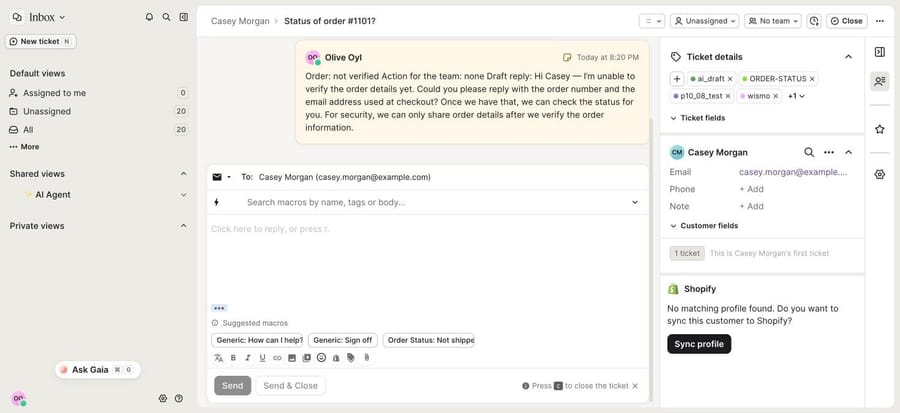
- Casey Morgan asks for the status of order #1101 and the address it's going to. That order belongs to Alex.
The agent. We named it "P10-08 Gorgias order status" and gave it six built-in tools: Get Ticket, Add Internal Note, Update Priority and Update Tags from Gorgias, and Get Order and Customer Orders from Shopify. No public-reply tool, so this is safe mode: the agent writes a note with a draft reply and a person sends it. The instruction, verbatim:
You handle "where is my order?" tickets in Gorgias for our Shopify store. You work in safe mode: you never reply to the customer. You write the draft reply in an internal note, and a teammate sends it.

1. Read the ticket with Get Ticket. Note the customer's email and any order number in the subject or message.

2. Find the order in Shopify. If the ticket has an order number, use Get Order. If it doesn't, use Customer Orders with the customer's email. If that returns exactly one order, use it. If it returns several, list their numbers and statuses in the note and draft a reply asking which order they mean.

3. Only use an order whose email matches the ticket's customer email. If it doesn't match, or no order is found, share no order details at all: draft a reply asking for the order number and the email used at checkout, add the tag wismo_not_verified, and stop.

4. Draft the reply from what Shopify says, in plain words:
- Paid and unfulfilled: it hasn't shipped yet. We pack orders within 2 business days, and a shipping email with tracking follows when it leaves.
- Fulfilled with a tracking number: give the carrier, the tracking number and the tracking link.
- Fulfilled with no tracking number: say it has shipped and a teammate will send tracking today. Don't invent a tracking number and don't promise a delivery date. Set the ticket priority to high and add the tag wismo_no_tracking.
- Canceled or refunded: say so, with the date, and that refunds go back to the original payment method.

5. Never put a shipping address, payment details or another customer's order in a reply, even if the customer asks.

6. Post one internal note with Add Internal Note: "Order:" (number and Shopify status, or "not verified"), "Action for the team:" (or "none"), then "Draft reply:" and the reply. Then update the tags: keep the ticket's existing tags and add wismo and ai_draft. Make these changes one at a time: the note first, then the priority if step 4 asks for it, then the tags.

7. Anything else (returns, address changes, damaged items, refund requests): don't draft a reply. Summarize the request and the order status in the note and add the tag needs_human.
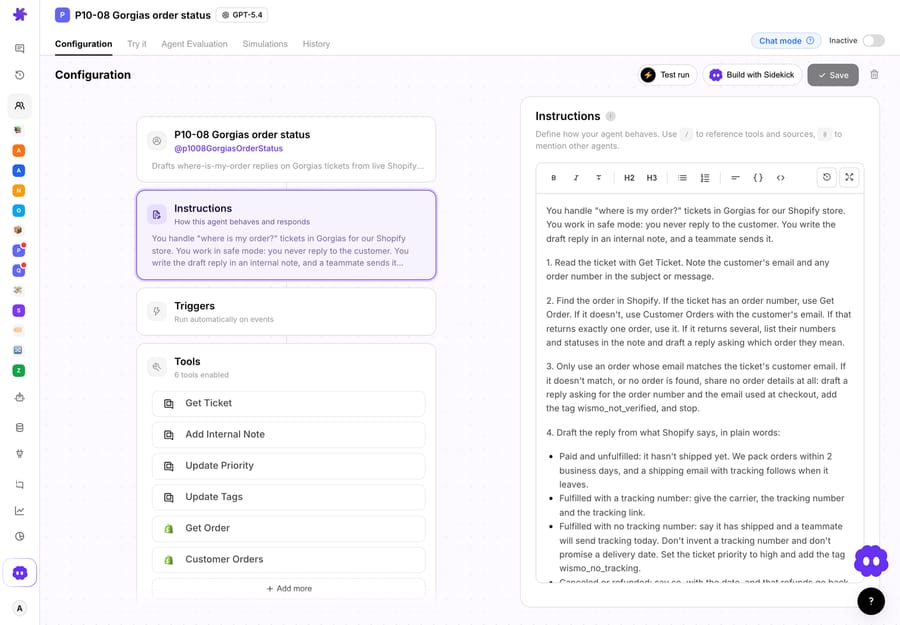
We ran it with the Test run option "Pick an existing ticket and chat about it", which hands the agent a real Gorgias ticket in the dashboard chat and runs its attached tools against it. In chat, each Gorgias write pauses for a confirmation card; we confirmed them, because this is our own sandbox.
Run 1: paid, not shipped. On Priya's ticket the agent read the ticket, looked up #1099, confirmed the order email matched hers and posted a note giving the order as paid and unfulfilled, with no action for the team. The draft told her the order hadn't shipped yet, that we pack orders within 2 business days and that a shipping email with tracking would follow. It added the wismo and ai_draft tags and kept the ORDER-STATUS tag Gorgias had already set.
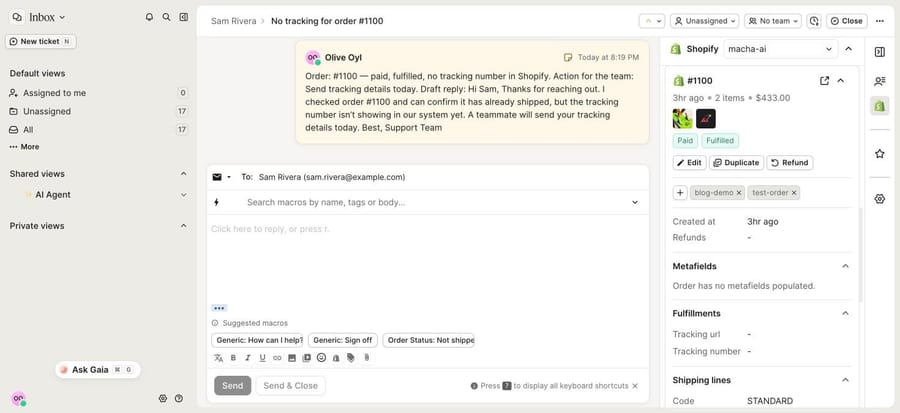
Run 2: shipped, no tracking. This is the ticket the native rule got wrong. The agent found #1100 fulfilled with no tracking number, so its note said "Action for the team: Send tracking details today", its draft told Sam the order had shipped and a teammate would send tracking today, and it raised the ticket's priority to high and added wismo_no_tracking. It didn't invent a tracking number or a delivery date.
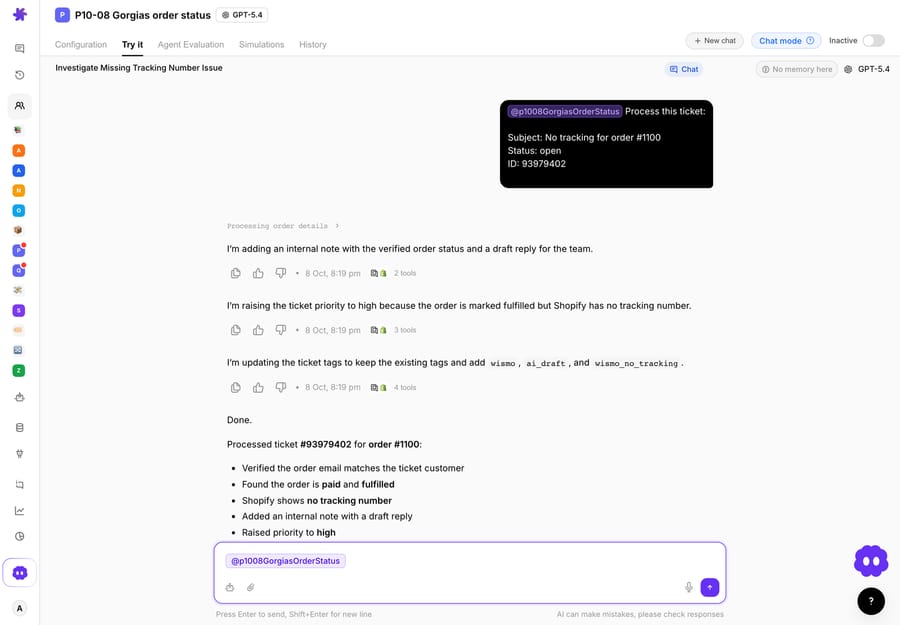
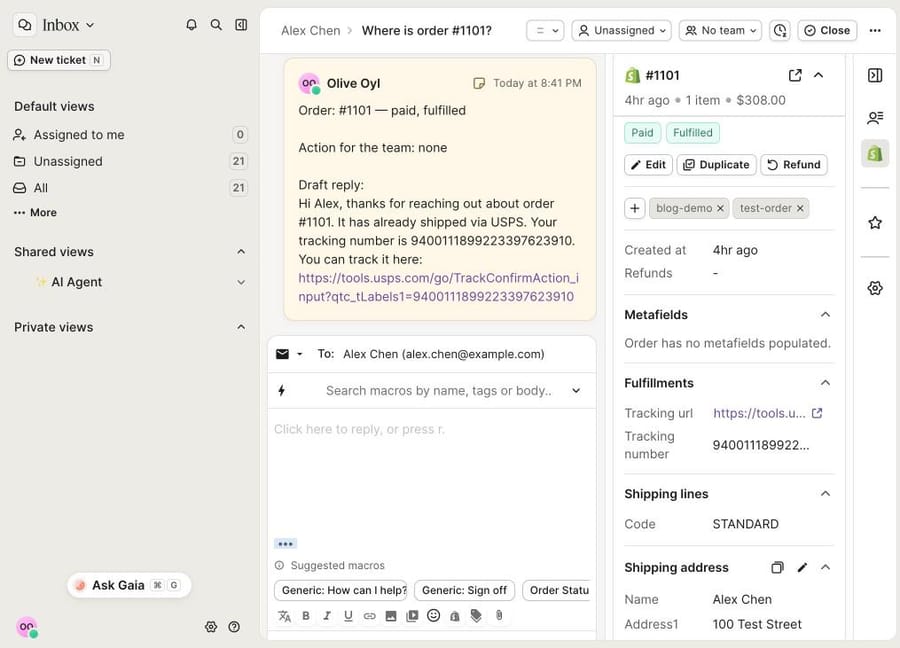
In Gorgias, the note sits on the ticket above the reply box, next to the same Shopify order in the sidebar. The sidebar's Fulfillments block shows an empty tracking URL and number, which is what the agent read.
Run 3: no order number. Alex didn't give one, so the agent used Customer Orders with his email, found exactly one order, #1101, fulfilled with no tracking, and handled it the same way as Sam's: note, high priority, wismo_no_tracking. A macro would have picked the same order here, because it's his only one; the agent got there by looking it up rather than assuming.
Run 4: the wrong person asks. Casey asked for #1101 and its delivery address. The agent looked the order up, saw that the email on it wasn't Casey's, and posted "Order: not verified" with a draft asking for the order number and the email used at checkout. It shared no status, no items and no address, and tagged the ticket wismo_not_verified. Gorgias's own sidebar shows "No matching profile found" for Casey, because no Shopify customer has that email; the agent made the same check against the order itself.
Run 5: shipped, with tracking. Later the same day we added a made-up USPS tracking number to order #1101's fulfillment in the test store and sent a new ticket from Alex asking where #1101 is. This time the agent's note said no action was needed, and the draft told Alex the order had shipped via USPS, with the tracking number and the USPS tracking link. It tagged the ticket wismo and ai_draft and left the priority at normal. That's the answer a "Shipped" macro gives, except the agent checked the order he asked about instead of his latest one.
What we didn't run. These were chat runs on existing tickets with no trigger attached and no public replies. In production the agent runs on Gorgias's ticket-created trigger, and on a trigger run the writes happen directly, under the instruction's rules; the confirmation cards are a chat feature. Once the drafts have been right for a while, you add the Add Public Reply tool and the agent answers the shopper itself. Shopify's order data stops at the tracking number and link. For carrier scan events ("stuck in Memphis for four days"), Macha uses a tracking app's API through a custom API tool that Macha's team sets up during onboarding; our order-tracking apps guide covers which apps expose that data. The same agent pattern on other help desks is in our Zendesk WISMO guide and our HubSpot Shopify order status guide.
Where Macha fits
Macha fits teams already running Zendesk, Freshdesk, Gorgias, Front, HubSpot or Intercom who get a steady stream of order-status tickets and want each one answered inside the ticket, with the Shopify lookup and the ownership check done before anyone opens it. On Gorgias it reads tickets, posts internal notes and public replies, and updates status, priority, tags, custom fields and assignment. See how Macha works on Gorgias.
Macha is the done-for-you option: the Macha team analyzes your past tickets, builds the knowledge base and the order-status agent on your existing Gorgias, and runs it in safe mode, drafting internal notes, until the drafts are right. You connect Gorgias and Shopify once, in about 15 minutes. Plans run at about $0.40 a ticket (pricing), which includes setup and a dedicated success manager who handles your changes, such as a new carrier, a new shipping window or a new ticket category. A WISMO ticket is billed once however many lookups it takes.
On price: $299 gets you 750 tickets on Macha and 500 on eesel, $0.40 a ticket against $0.60, with setup done for you included. Against Gorgias AI Agent the comparison depends on your resolution rate and how many order lookups shoppers already do in Track order. At $1.00 an automated interaction, a resolved WISMO ticket costs $1.00 against Macha's $0.40; both sit on top of Gorgias's helpdesk ticket, and each plan includes 30 to 530 interactions first. But if most of your order questions come through chat and Track order already deflects them, the native stack may be the cheaper whole.
Macha isn't the pick if you want one agent across Gorgias chat, SMS and social with nothing else to connect; AI Agent covers those channels natively. It's also not needed if your queue is small and the sidebar plus a couple of macros keeps up.
How to choose
- A few order questions a day, tracking always added at fulfillment: the Shopify sidebar plus the default order-status macros, applied by hand. No add-on cost on any plan.
- Most questions about the latest order and you want zero-touch replies: a rule plus macro, with an extra branch that sends "fulfilled, no tracking" tickets to a person.
- Most WISMO arrives in chat: Track order in the chat widget and help center, with your shipping window as the unfulfilled message. Remember each resolution counts as an automated interaction.
- You want written answers on every channel and you're happy paying per resolution: Gorgias AI Agent.
- You want written answers and will build and tune it yourself: eesel AI or My AskAI.
- You want it built and run for you: Macha (done for you, per ticket, from $299 a month for 750 tickets), or Siena or Yuma if you're large enough for their onboarding and pricing.
How do you roll out WISMO automation safely?
- Start with drafts. Internal notes first, public replies once the drafts have been right for a few weeks. Our guide to AI drafts for agent approval covers how to judge when to switch.
- Test the fulfilled-without-tracking case first. It's the order that breaks the native rule and the one a template answers wrongly. Write a branch for it, whichever tool you use.
- Check who's asking. Match the order's email to the requester before sharing anything. Track order does this with a one-time code; an agent needs it as a rule.
- Keep addresses out of replies. Order data includes the shipping address. Say which fields may appear in a reply.
- Watch the billing unit. On Gorgias, a teammate's reply within 72 hours turns an automated interaction back into a helpdesk ticket. Count both when you measure savings.
- Plan for the last mile. Shopify knows the tracking number, not the scan history. For delay tickets, add a tracking app or send them to a person; our proactive shipping updates guide covers telling shoppers before they ask.
For the rest of what's worth automating on Gorgias, see our best Gorgias automations with AI.
Frequently asked questions
Can Gorgias answer "where is my order?" without AI Agent? Partly. A rule can detect the order-status intent and apply a macro filled with the customer's last order number and status link, with no add-on cost on any plan. It reads the last order only, and the default shipping-status rule treats a fulfilled order with no tracking number as not shipped.
Does Track order need AI Agent? Gorgias's Order Management docs say the self-service portal needs an active AI Agent subscription and works with Shopify stores only. Resolutions through Order Management count as automated interactions on current pricing.
How much does Gorgias AI Agent cost per WISMO ticket? $0.90 per automated interaction on annual plans or $1.00 on monthly plans, with 30 to 530 included depending on the plan and $1.50 each above the allowance, on top of the helpdesk ticket. If a teammate replies within 72 hours, it's billed as a helpdesk ticket instead.
Can AI change a Shopify order from Gorgias? Gorgias AI Agent's Shopify actions cancel orders, edit shipping addresses, remove or replace items, reship for free and add order notes. Macha's built-in Shopify tools cancel orders and issue full refunds, under the rules in its instruction. Our guide to automating refunds in Gorgias covers that side.
Do I need to replace Gorgias to use another AI agent? No. eesel, My AskAI, Yuma, Siena and Macha all run on top of Gorgias and read and write the same tickets. Gorgias stays the help desk.
Which option is best for a small Shopify store on Gorgias? The Shopify sidebar and the default macros, applied by a person, until volume makes that slow. If you'd rather have the tickets answered without building anything, Macha's team sets it up on the trial: $50 of free usage (about 125 tickets), no credit card, no time limit.
How we researched this
- Read on October 8, 2026: gorgias.com/pricing; Gorgias's guides to connecting Shopify, Order Management, Track order (updated May 5, 2026), AI Agent explained (updated September 8, 2026) and AI Agent Shopify actions; the Rules product page and the detailed order tracking update; eesel's pricing and Gorgias page; My AskAI's pricing and Gorgias page; Yuma's Gorgias page; Siena's pricing and integrations pages. Prices are in US dollars as listed that day.
- Captured on October 8, 2026, in our own Gorgias trial account connected to our Shopify test store: the default order-status macro, the shipping-status rule template (installed, tested on one ticket, then deactivated), the Track order setting (typed, not saved), the AI Agent setup screen, and the Macha notes on our test tickets.
- Run live on October 8, 2026: a test agent on our Macha test org with four Gorgias tools and two Shopify read tools, on five Gorgias tickets we created through the API and Shopify test orders #1099, #1100 and #1101 (a made-up USPS tracking number was added to #1101 before Run 5), using the dashboard Test run in chat. We confirmed each Gorgias write in chat. The agent is inactive with no trigger. All customers and emails are made up.
- Not run: Gorgias AI Agent, Track order in a live chat widget, a rule that auto-sends a macro, eesel, My AskAI, Yuma and Siena. Their capabilities come from their own pages.
- Arithmetic: $299 ÷ 750 = $0.40 a ticket on Macha; $299 ÷ 500 = $0.60 on eesel. 500 automated interactions × $1.00 = $500. $1.00 is 2.5 times $0.40.
To have WISMO tickets answered on your own Gorgias, start a Macha trial and the team will connect Gorgias and Shopify and build the order-status agent with you, or read how to connect Gorgias to Macha first.






