





 Shopify
 Stripe
 Slack
Slack Notion
 Google Workspace
 Confluence

What Are the Best AI Automations to Set Up in Gorgias? (2026)


Most ecommerce support queues are a handful of questions asked a thousand times: where is my order, can I return this, change my address, cancel my order, pause my subscription. Those five are the Gorgias automations to set up first, ranked by your own ticket volume.
Key takeaways
- The five Gorgias automations to set up first are WISMO order tracking, returns and exchanges, address or order changes, order cancellations, and subscription management, ranked by ticket volume.
- Gorgias AI Agent charges $0.90 per resolved interaction on most plans and $1.00 on Starter, with 90 to 2,500+ included automated interactions a month.
- Gorgias overages are $1.50 per interaction on Support + Shopping Assistant plans and $0.83 to $2.00 on support-only plans, depending on tier and billing.
- Gorgias only counts an interaction as automated once 72 hours pass without a human handover, which slows how quickly admins can iterate on automation rules.
- Macha bills per ticket, from $299 a month for 750 tickets, about $0.40 each, with no per-resolution charges, and runs on top of Gorgias through a live connector.

The five AI automations to set up first in Gorgias are WISMO order tracking, returns and exchanges, address or order changes, order cancellations, and subscription management, in that order for most Shopify brands because they are the five biggest ecommerce ticket tags. Gorgias AI Agent bills about $0.90 per resolved interaction on most plans ($1.00 on Starter; $1.00 on monthly and $0.90 on annual billing, per its pricing FAQ in October 2026), so rank by volume before you switch anything on.
Which ticket types should you automate first?
The mistake teams make is shopping for features before they've counted their tickets. Open your Gorgias views, sort by tag or intent for the last 30 days, and you'll almost always find the same top five: WISMO (where is my order), returns and exchanges, address or order changes, cancellations, and subscription management. Rank them by volume, then automate top-down. The automation with the most leverage isn't the fanciest one; it's the one that sits on top of your biggest tag.
| Automation | Maps to ticket type | Needs | The catch |
|---|---|---|---|
| WISMO / order tracking | "Where is my order?", "tracking hasn't updated" | Live order + fulfillment lookup, identity check | Needs real-time carrier/order data, not a canned reply |
| Returns & exchanges | "I want to return this", "wrong size" | Return eligibility rules, policy, return-label generation | Eligibility windows and final-sale rules must be enforced |
| Address / order change | "Change my shipping address", "add an item" | Write access to the order before fulfillment | Only safe pre-fulfillment; timing is everything |
| Cancel order | "Cancel my order", "I ordered by mistake" | Order status check, cancel/refund action | Must check whether it's already shipped |
| Subscription management | "Skip next box", "pause", "swap product" | Subscription-app read/write (e.g. Recharge) | Requires a connected subscription tool, not just Shopify |
Gorgias groups its automation under Automate, which spans deterministic Rules and Flows (if-this-then-that logic and guided decision trees) and the generative AI Agent that reads a ticket, reasons about intent, and can take real actions in your store. Rules are good for tagging and routing; the AI Agent is where the resolution happens. For a full tour of how those pieces fit, our complete guide to Gorgias Automate and AI and the deeper Gorgias AI Agent explained walk through the setup end to end.
How should each of the five automations work?
Here's the playbook, ordered roughly by how much queue each one clears for a typical Shopify brand, with the ticket type, the data or action it needs, and the catch.
1. WISMO / order tracking. This is almost always the biggest tag, and the best first automation. Per Gorgias, the AI Agent can "automate WISMO tickets with real-time order tracking," pulling the current status and returning it in the conversation (Gorgias AI Agent support skills). The bar for doing it well is a live lookup keyed to the customer's order and email. A static "orders usually ship in 3–5 days" macro doesn't count as resolution.
2. Returns & exchanges. Gorgias can "make exchanges and returns easy with personalized links," generating the right return flow inside the ticket. The work here is less about the reply and more about the rules: the automation has to check the purchase date against your return window, respect final-sale items, and route exchanges correctly. Get the eligibility logic right and this clears a second big tag.
3. Address and order changes. "Modify orders in real-time, catching urgent edit requests" is exactly the kind of task where minutes matter: an address fix is only useful before the order is picked and packed. Gorgias lists "update shipping address" as a built-in AI Agent action. It demands write access and a hard guardrail: never edit a fulfilled order.
4. Cancel order. A good automation because the logic is crisp: check status, and if it hasn't shipped, cancel and refund; if it has, pivot to a return. It's a decision tree with a real action at the end, and "cancel order" is another of Gorgias' listed AI Agent actions.
5. Subscription management. Skips, pauses, resumes and cancellations are pure retention work. Gorgias' AI Agent actions cover cancel subscription, skip or pause a shipment, and resume, through connected subscription apps: Gorgias names Recharge, Stay AI, Skio, Loop and Wonderment (Gorgias AI Agent actions). Confirm your subscription app is on that list before you promise it.
What does native Gorgias Automate do well?
Credit where it's due. Gorgias built Automate for ecommerce, and it shows. The Rules and Flows engine is fast, deterministic, and transparent: ideal for auto-tagging by intent, routing VIPs, deflecting with a help-center article, and running structured self-service flows for the five patterns above. The AI Agent is capable on Shopify: Gorgias says its actions "work natively with Shopify and leading fulfillment, subscription, and returns apps", and it can get order info, update a shipping address, cancel an order, reship an order and send return shipping status from inside the conversation. If your stack is Shopify-centric and your top tickets are the classic five, native Automate will move real volume out of your queue on day one.
Two constraints are worth naming. First, the AI Agent's order actions are Shopify-first. Gorgias documents them around Shopify, and third-party analyses note they aren't supported the same way on BigCommerce, Magento, or WooCommerce (myAskAI's Gorgias Automate guide). Second, Gorgias' own docs say an interaction is only billed as automated once 72 hours have passed without a human handover, so the most recent 3 days aren't reflected in the automation metric (Gorgias: how AI metrics are calculated). That lag slows how fast you can iterate on your rules.
How does Gorgias charge for AI automations?
Plan this deliberately, because the automation math and the billing math are two different things. Gorgias charges for AI on a resolution basis: $0.90 per resolved interaction on most plans and $1.00 on Starter, with included allowances from 90 to 2,500+ automated interactions a month. Overages are $1.50 per interaction on Support + Shopping Assistant plans; on support-only plans they run $1.00 to $2.00 monthly or $0.83 to $1.67 on annual billing, depending on tier (Gorgias AI Agent pricing, updated 28 May 2026). A "resolution" is a conversation the AI closes entirely on its own.
The nuance that trips teams up is how a resolution interacts with the helpdesk ticket. Gorgias' pricing explainer states that when the AI can't finish and hands off, you're "not charged for both" the ticket and the resolution. Independent breakdowns push back, reporting that in practice an AI resolution also counts as a helpdesk ticket, so two fees can stack on one conversation (myAskAI's pricing analysis). Whichever way it nets out on your invoice, the structural point holds: resolution-based pricing ties your bill to outcomes, and outcomes are the part you control the least. A WISMO ticket that needed three tool calls and one that needed one both bill the same flat resolution. You're paying for the finish line, not the work.
Where does an AI agent layer have the edge over native Automate?
An AI agent layer sits on top of your help desk rather than replacing it. The category of AI agents for customer service exists to do the reasoning-and-action work that rules alone can't. Macha is one such layer, and its connector to Gorgias is live: you connect it to the Gorgias you already run with an API key, and it reads and writes the same tickets your team works today (replies, internal notes, status, tags, team assignment). It does not replace Gorgias or its Rules and Flows. The step-by-step Gorgias + Macha setup covers the connection.
Two things change with a dedicated layer. The first is breadth of action. Macha has its own Shopify connector, and agents also call whatever you wire up through a custom tool: your OMS, your 3PL's tracking API, your subscription app, your ERP. A WISMO lookup or an address change isn't limited to what one platform ships out of the box. The Macha Agents list below shows the shape of it: purpose-built automations, each with its own tools, triggers, sub-agents, and mode.
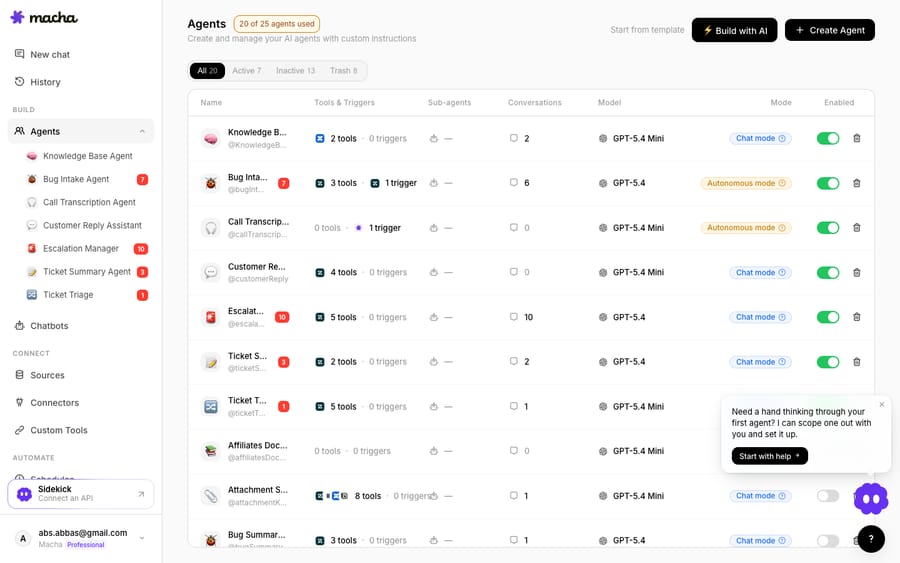
The second is the cost model. Macha bills per ticket: one conversation, charged once however many messages, lookups or tool calls it takes, rather than a fee per resolution. You pay once for the conversation your agents handled, whether or not it ends in a tidy "resolved." For work where outcomes vary (a WISMO that needs three lookups, a return that needs an eligibility check plus a label), one flat charge per conversation is easier to predict than a fee tied to an outcome definition you don't control. The pricing page lists one plan priced by volume: from $299 a month for 750 tickets, about $0.40 each, up to $3,999 for 10,000, with setup and monitoring by the Macha team included.
The clean division of labour: keep Gorgias as your help desk and let its Rules and Flows do the deterministic tagging and routing, then layer AI agents on top for the reasoning-heavy, multi-system automations: WISMO across your real fulfillment stack, returns with your true eligibility rules, subscription changes in your actual subscription app.
FAQ
What are the best automations to set up first in Gorgias? Start with your highest-volume tags. For most ecommerce brands that's WISMO (order tracking), returns and exchanges, address/order changes, cancellations, and subscription management. Automate top-down by volume so your effort lands on the biggest tickets first.
Does Gorgias Automate work outside Shopify? Gorgias' AI Agent order actions are documented around Shopify. Third-party analyses report they aren't supported the same way on BigCommerce, Magento, or WooCommerce, so confirm your platform before relying on native order actions.
How does Gorgias charge for AI automations? On a resolution basis: $0.90 per resolved interaction on most plans and $1.00 on Starter (its pricing FAQ, as of October 2026: $1.00 on monthly plans, $0.90 on annual), with 90 to 2,500+ included automated interactions a month. Overages are $1.50 on Support + Shopping Assistant plans and $0.83 to $2.00 on support-only plans, depending on tier and billing.
Why don't my Gorgias automation numbers update right away? Gorgias only counts an interaction as automated once 72 hours pass without a human handover, so the last 3 days of AI Agent results are missing from the metric.
How is Macha's pricing different? Macha charges per ticket (one conversation, charged once however many messages, lookups or tool calls it takes) rather than a fee per resolution. Because ecommerce outcomes vary, one flat charge per conversation tends to be more predictable than paying per resolution. See the pricing page for details.
Do I have to replace Gorgias to add Macha? No. Macha is an AI agent layer that runs on top of the Gorgias you already use through a live connector. It reads and writes your existing tickets and works alongside Gorgias' Rules and Flows. Macha also runs on Zendesk, Freshdesk, Gorgias, Front, HubSpot or Intercom.
Ready to automate by ticket type instead of by default flow? Start a free trial of Macha and connect it to your Gorgias in minutes.






