





 Shopify
 Stripe
 Slack
Slack Notion
 Google Workspace
 Confluence

How Do You Build a Self-Service Flow in Gorgias? WISMO and Returns Steps (2026)


A Gorgias self-service Flow uses AI Agent to answer where-is-my-order and returns questions from live Shopify data and to take actions like cancelling an order or starting a return. You build it in six steps, and Gorgias' setup docs require a connected Shopify store.
Key takeaways
- Building a self-service Flow in Gorgias takes six steps inside AI Agent: Knowledge, Skills, Actions, a Playground test, handoff settings, and Deploy to a channel.
- Gorgias' setup docs require a connected Shopify store, Lead, Admin or Account Owner permissions, and at least one knowledge source before AI Agent can be enabled.
- Gorgias charges AI Agent $0.90 per resolved interaction on most plans and from $1 on Starter, with overage interactions at $1.50 on Support + Shopping Assistant plans.
- Gorgias says a conversation its AI Agent hands to a human is billed as a normal Helpdesk ticket, so the same conversation is not charged twice.
- Macha, an AI agent layer that connects to Gorgias as a live connector, bills per ticket rather than per resolution, so a WISMO conversation is charged once however many lookups it takes.

To build a self-service Flow in Gorgias, you open AI Agent, add at least one knowledge source, create Order status and Returns skills, switch on the order Actions you allow, test in the Playground, then deploy to chat or email. Gorgias' setup docs require a connected Shopify store and Lead, Admin or Account Owner permissions, and AI Agent costs $0.90 per resolved interaction on most plans ($1.00 on monthly billing, per Gorgias's pricing FAQ in October 2026).
| Step | Where in Gorgias | What you set |
|---|---|---|
| 1. Knowledge | AI Agent → Knowledge | Shipping times, returns window, refund policy |
| 2. Skills | AI Agent → Skills | Order status (WISMO) and Returns templates |
| 3. Actions | AI Agent → Actions | Cancel, return, address edit, with conditions |
| 4. Test | AI Agent → Playground | Real WISMO and returns scripts |
| 5. Handoff | AI Agent → Settings, plus Rules | When the agent hands over to a human |
| 6. Go live | AI Agent → Deploy | Chat, Email, SMS, Instagram/Facebook, WhatsApp |
What is a self-service Flow in Gorgias?
It helps to separate two things that get blended together. Gorgias has lightweight Flows and Order Management automations, and it has the AI Agent. Per Gorgias' AI Agent explained documentation, the simpler automations "run alongside AI Agent on your tickets — often handling the first part of a conversation before AI Agent steps in if more help is needed." So a self-service Flow, in practice, is the combination: a deterministic first touch (collect an order number, offer a menu of intents) plus an AI Agent that can reason over live Shopify data and, when you allow it, take an action — cancel the order, start a return, update the shipping address.
If you want the pure rules-based version of Flows on its own, we cover that in Gorgias Flows explained; the steps below cover the self-service experience customers actually feel, which leans on the AI Agent. For a primer on the AI Agent itself, see Gorgias AI Agent explained, and if you're newer to the platform, what is Gorgias sets the scene.
What do you need before you start?
Be clear-eyed about this before you invest an afternoon. To build and enable these self-service Flows you need an active AI Agent subscription and, per Gorgias' Set up and go live with AI Agent docs, a Shopify store connected to Gorgias. The docs list "You must have a Shopify store connected to Gorgias" as a requirement, and the AI Agent screen asks you to connect your store before it will start. Gorgias' help desk also integrates with BigCommerce, Magento and WooCommerce, but if your orders live there or on a headless stack, the AI Agent order-action Flows in these steps aren't open to you natively. You'll also need Lead, Admin, or Account Owner access to configure it.
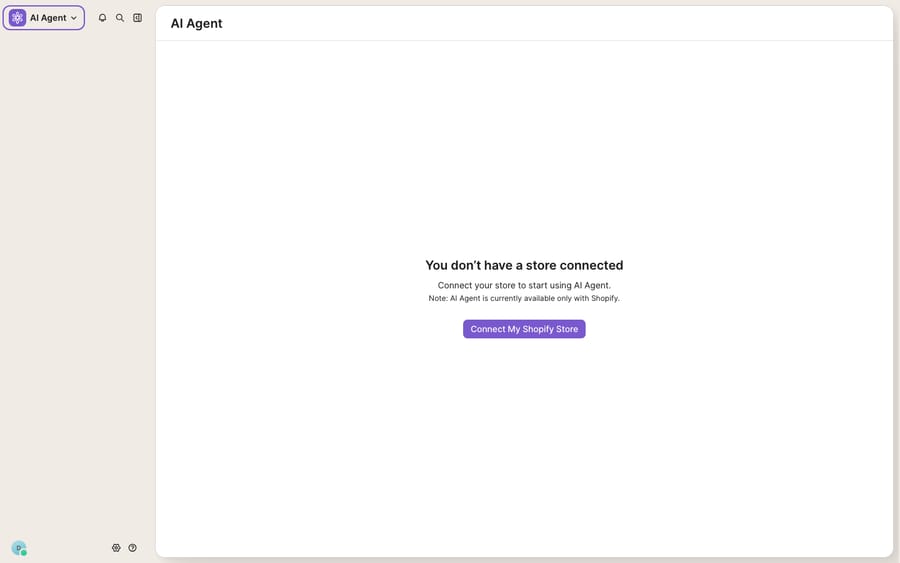
Everything below lives under the same place: open the dropdown menu in the top-left corner and select AI Agent.
Step 1: Give the Flow something to know
AI Agent won't turn on until it has knowledge. The docs are explicit that "AI Agent needs at least one source of knowledge before you can enable it."
- Go to AI Agent → Knowledge.
- Start with Guidance using a pre-built template, then add your store info, help-center articles, or custom content.
- For a WISMO/returns Flow specifically, make sure your shipping timelines, returns window, and refund policy are all represented — the AI Agent quotes these when a live action isn't the answer (e.g. "your order shipped yesterday and is 3–5 business days out").
Knowledge is the difference between an agent that sounds confident and one that's actually right. Skimp here and every downstream step inherits the gap.
Step 2: Build the WISMO and returns Skills
Skills define how the AI Agent handles a specific conversation type. This is where your two high-volume intents get built.
- Go to AI Agent → Skills.
- Choose From template — Gorgias ships templates for common ecommerce scenarios including returns, order status, and cancellations. Start with Order status for WISMO and Returns for the returns path.
- Or pick From scratch if your logic is unusual (e.g. a returns policy that varies by product category or by whether the item was on sale).
- For the Order status skill, the AI Agent reads live Shopify order and fulfillment data and answers the tracking question directly — no agent touch.
- For the Returns skill, layer in the eligibility rules from your Knowledge (window, condition, final-sale exclusions) so the agent can tell an in-window customer "yes" and an out-of-window one "no" with the reason.
Step 3: Turn on order actions (the part that makes it self-service)
Answering "where is my order?" is deflection. Doing something about it — cancelling, starting the return, fixing the address — is true self-service, and that's what order actions unlock.
- Go to AI Agent → Actions.
- Per the docs, "Actions let AI Agent complete tasks in your connected apps on behalf of shoppers." Add actions via template or custom build.
- For this Flow, enable the ones that map to your intents: cancel an order, process/initiate a return, edit shipping address, and subscription edits if you run subscriptions.
- Crucially, actions are opt-in and configurable — you choose which ones the agent can take and, per Gorgias, "the conditions under which it takes them." Set guardrails: only cancel before fulfillment, only auto-approve returns inside the window, only refund below a dollar threshold. Everything above the line becomes a handoff (Step 5).
This is the step people rush and regret. An action without a condition is how an AI ends up refunding a final-sale item. Spend your time here.
Step 4: Test the Flow without touching billing or metrics
Before a single customer sees it, rehearse it.
- Go to the AI Agent Playground, where you can test responses before deployment.
- Gorgias notes test conversations "help you identify and address gaps" without billing or affecting your metrics — so you can hammer it freely.
- Run the real scripts: "Where's order #1043?", "I want to return the blue hoodie", "Cancel my order", "Change my address". Confirm each takes the right action and that your guardrails correctly refuse the ones they should.
Step 5: Set the handoff rules
A self-service Flow that never lets go is worse than no Flow. Gorgias hands over to your team automatically when the AI Agent "can't confidently respond, encounters a sensitive topic, or detects frustration from the shopper," and you configure handover behavior yourself in AI Agent → Settings, alongside tone. Start conservative — the docs suggest handing over "only when AI Agent genuinely can't resolve it" — then tighten as you build trust. If you route escalations with conditions, that logic lives in Gorgias' Rules engine, which pairs naturally with a self-service Flow.
Step 6: Go live on a channel
- Go to AI Agent → Deploy and connect the channel you want: Chat (your website, Help Center, or checkout widget), Email, SMS, Instagram/Facebook, or WhatsApp. SMS pricing sits in Gorgias' separate Voice and SMS add-ons.
- Enable AI Agent on that channel.
- Monitor from the AI Agent Views in your Inbox, which show processing, closed, and handoff tickets. Gorgias suggests reviewing at least 10 tickets in your first week and leaving feedback to refine coverage.
What should each WISMO and returns intent do?
Here's how a mid-sized Shopify brand might wire the two flows. The pattern to copy is the shape — deflect the read-only questions, auto-act on the safe writes, hand off the rest.
| Customer intent | Flow reads | Action taken | When it hands off |
|---|---|---|---|
| "Where's my order?" (WISMO) | Live Shopify order + fulfillment | None — quotes tracking + ETA | Order lost / stuck > X days |
| "I want to return this" (in window) | Returns policy + order date | Initiates return, sends label | Item marked final sale |
| "Cancel my order" | Fulfillment status | Cancels if unfulfilled | Already shipped |
| "Change my shipping address" | Fulfillment status | Edits address if unfulfilled | Already in transit |
| "Where's my refund?" | Refund status in Shopify | Quotes status + timeline | Amount above threshold |
Where do Gorgias self-service Flows stop?
Gorgias' self-service Flows are genuinely strong for a Shopify store: live order data, real actions, sensible handoff. But be honest about the edges.
The first is the Shopify requirement covered above. The AI Agent — and therefore every order action in this guide — is currently Shopify-only. If your order truth lives in a different commerce platform, a 3PL, or a custom subscription tool, the native Flow can't reach it.
The second is billing shape. Gorgias charges the AI Agent per resolved interaction. Its AI Agent pricing explainer (updated 28 May 2026) says most plans pay $0.90 per resolved interaction and Starter plans begin at $1. Overage interactions cost more: $1.50 on Support + Shopping Assistant plans, and $1.00 to $2.00 on monthly Support-only plans depending on tier. A conversation the AI hands to a human becomes a normal ticket on your Helpdesk plan instead, and Gorgias says you are not charged for both. That's a defensible model, but it's an outcome-priced one, and what counts as a resolution on a self-service Flow is Gorgias' call. (For the full picture, our Gorgias AI Agent explained piece goes deeper.)
This is the seam where an AI agent layer fits — and the broader category of AI agents for customer service exists precisely to widen what a self-service Flow can reach. Macha is one such layer: it runs on top of the Gorgias you already use as a live connector — it does not replace Gorgias, its Flows, or its inbox. Because Macha reaches any REST API through a custom tool, a WISMO or returns Flow it runs can query your 3PL, your WMS, or a non-Shopify order system — not just Shopify. And Macha bills per ticket, not per resolution — one conversation, charged once however many lookups it takes — so the bill never hangs on an outcome definition you don't control. See the pricing breakdown for how that works.
The clean division of labour: keep Gorgias' Flows and inbox as your system of record and your customer-facing channel, and layer an agent on top for the reach and the actions the native, Shopify-bound Flow can't cover.
FAQ
Where do I build a self-service Flow in Gorgias? Inside AI Agent. Open the dropdown menu in the top-left corner, select AI Agent, then work through Knowledge, Skills, and Actions, test in the Playground, and go live from Deploy. Simpler Flows and Order Management automations run alongside AI Agent and often handle the first part of a conversation before the AI Agent steps in.
Do I need Shopify to build a self-service Flow? For the AI Agent version with live order data and order actions, yes. Gorgias' setup docs say "You must have a Shopify store connected to Gorgias." If your commerce runs elsewhere, the native order-action Flows aren't open to you.
What order actions can a Gorgias Flow take? With Actions enabled, the AI Agent can complete tasks on behalf of shoppers — including cancelling an order, processing a return, editing a shipping address, and subscription edits. Actions are opt-in and each one is conditioned on rules you set, so you control exactly when it fires.
How does Gorgias handle handoff to a human? The AI Agent hands over when it can't confidently respond, hits a sensitive topic, or detects customer frustration — and you configure handover behavior in AI Agent Settings. Start conservative and tighten as you build trust; conditional routing lives in the Rules engine.
Can I add AI self-service to Gorgias without replacing it? Yes. An AI agent layer like Macha connects to Gorgias as a live connector and runs on top of your existing inbox and Flows — it doesn't replace them. It can extend a self-service Flow to non-Shopify systems through custom tools, and it bills per ticket — one conversation, charged once — rather than per resolution.
How much does a Gorgias self-service Flow cost? The AI Agent charges per resolved interaction: $0.90 on most plans and from $1 on Starter ($1.00 monthly and $0.90 annual, per Gorgias's pricing FAQ in October 2026), with overage interactions up to $2.00 depending on plan. Conversations handed to a human count on your Helpdesk plan instead, not both.
Ready to build self-service Flows that reach beyond Shopify? Start a free trial of Macha with $50 of free usage and connect it to your Gorgias.






