





 Shopify
 Stripe
 Slack
Slack Notion
 Google Workspace
 Confluence

How Do You Auto-Triage and Tag Gorgias Tickets with AI?


Gorgias auto-triage runs on two native layers: keyword Rules that tag and route obvious phrases, and AI Agent tagging that reads the conversation but only fills tags on tickets AI Agent handles itself. Intent-based priority and routing across the whole inbox needs an AI agent layer on top.
Key takeaways
- Gorgias auto-triage combines keyword Rules, included on every Helpdesk plan, with AI Agent tagging that fills tags and ticket fields from the descriptions you write.
- Gorgias AI Agent only autofills tags and ticket fields on tickets it directly handles, and the setting needs an active AI Agent subscription.
- Gorgias sells AI Agent as prepaid bundles of 30, 30, 190 and 530 interactions by plan, with $1.50 charged for each interaction past the bundle.
- Each Gorgias AI Agent interaction also counts as a helpdesk ticket, so tagging and routing through AI Agent is billed on two meters.
- Macha runs a triage agent on top of Gorgias that sets priority, adds tags and routes by intent, billed per ticket from $299/mo for 750 tickets, with setup by the Macha team and a dedicated success manager included.

To auto-triage Gorgias tickets, stack two layers: keyword Rules (included on every Helpdesk plan) tag and route the obvious phrases, and AI Agent's "AI ticket tagging" setting fills tags and ticket fields by reading the conversation, but only on tickets AI Agent handles itself. For intent-based priority and routing across the whole inbox, an AI agent layer on top of Gorgias covers what neither native tool reaches. Details below were checked against Gorgias' docs and pricing page on 24 September 2026.
| Layer | What it does | Coverage | Cost |
|---|---|---|---|
| Gorgias Rules | Keyword and condition matching: tag, assign, auto-reply, close spam | Every ticket that matches | Included on all Helpdesk plans |
| AI Agent tagging | Reads the conversation, fills tags and ticket fields from your descriptions | Only tickets AI Agent handles directly | Needs an AI Agent subscription, billed per automated interaction |
| AI agent layer (Macha) | Reads intent, sets priority, adds tags, routes, looks up order data | Every ticket you point it at | Per ticket, from $299/mo for 750, setup and a dedicated success manager included |
What does "triage" actually mean in Gorgias?
Triage is three decisions made the moment a ticket arrives. Categorize it (what is this about: WISMO, return, subscription, wholesale, complaint?). Prioritize it (how urgent: an outage-level VIP escalation or a routine tracking question?). And route it (who should own it: the returns team, a subscriptions specialist, a senior agent?). Tags are the connective tissue that makes all three work: once a ticket carries a returns tag or a vip tag, you can build views, trigger rules, and report on volume by topic.
Gorgias gives you two engines to do this. The older, deterministic one is Rules. The newer one is the AI layer inside AI Agent (formerly Automate). They're good at different things, and the best setups use both, plus a dedicated AI agent layer on top for the reasoning-heavy cases. Here's how to build it up in that order.
How do you auto-tag Gorgias tickets with Rules?
Start with what's cheap and deterministic. A Gorgias Rule is an "if this, then that" automation. Per Gorgias' Rules product page, a rule combines a trigger (almost always "when a ticket is created"), conditions (message body text, sentiment, purchase amount, order history, and more), and actions (auto-reply, auto-tag, auto-assign to an agent, auto-close spam).
To auto-tag by keyword:
- Open the dropdown menu at the top left, then Workflows → Tools → Rules, and create a new rule.
- Set the trigger to Ticket created.
- Add a condition, for example Message body contains "refund" OR "return" OR "exchange".
- Add the action Add tags →
returns. - Optionally chain a second action: Assign to → Returns team.
- Save and order it. We go deeper on ordering and conditions in Gorgias Rules explained.
This is genuinely useful and you should do it. Rules are fast, included in every Helpdesk plan with no extra AI charge, and perfectly predictable. For high-volume, unambiguous phrases ("cancel my subscription," "where is my order") a keyword rule tags correctly nearly every time.
How do you add AI tagging for the tickets keywords miss?
Keyword rules break the moment a customer doesn't use your keyword. "I've been waiting two weeks and nothing's shown up" is a WISMO ticket with zero WISMO keywords. This is where Gorgias' native AI earns its place.
According to Gorgias' documentation on letting AI Agent autofill tags and ticket fields, the AI Agent "reads the context of the ticket conversation and uses your ticket field or tag description to decide the most relevant values to add," and it does this "across both email and chat channels." You need an active AI Agent subscription and Lead, Admin or Account Owner permissions. Setup:
- Open the dropdown menu and select AI Agent, then Settings.
- Under AI ticket tagging, choose Tags or Ticket Fields.
- Click Add and pick which tags/fields to enable.
- Write a clear description for each. This is the instruction the AI uses to decide when to apply it.
- Save changes.
The description is the whole game here: a tag called damaged-item with the description "customer reports the product arrived broken, cracked, or otherwise physically damaged" will catch phrasings a keyword list never would.
There's one important limitation to plan around, straight from the docs: AI Agent only autofills these properties on tickets that it directly handles itself. So the native tagging is tied to the tickets AI Agent is already working. It isn't a blanket, intent-based triage pass over every ticket in your inbox regardless of who handles it.
How do you turn tags into routing?
Tags are inert until you route on them. Once triage has reliably tagged tickets, build Views and routing Rules on top:
| Tag / signal | Priority | Route to |
|---|---|---|
vip + negative sentiment | Urgent | Senior / escalations |
returns, exchange | Normal | Returns team |
subscription, billing | High | Subscriptions specialist |
wismo | Low | Automation / self-serve first |
wholesale, b2b | Normal | B2B team |
The point isn't the exact rows. It's the shape: a small, stable tag vocabulary drives priority and ownership, so agents open a queue that's already sorted instead of a firehose.
Where does native Gorgias triage stop, and how is its AI billed?
Native Gorgias triage is good, and you should use it. But be clear-eyed about two seams.
First, keyword Rules read words, not intent. They can't tell an urgent "my order never arrived and my event is tomorrow" from a calm "just checking on shipping." They apply the tag you defined for the phrase you guessed, not the priority the ticket actually deserves. The native AI tagging closes part of this gap, but it's scoped to tickets AI Agent already handles.
Second, watch how the AI itself is billed. Gorgias sells AI Agent as a prepaid bundle of automated interactions on every plan. Per the Gorgias pricing page (24 September 2026), the bundles hold 30, 30, 190 and 530 interactions on Starter, Basic, Pro and Advanced, at $1.00 each on Starter, $0.90 on Basic and Pro and $0.85 on Advanced, and every interaction past the bundle costs $1.50. Gorgias' AI Agent pricing article explains the model. Per the same pricing FAQ, each AI Agent interaction also counts as a helpdesk ticket, so the same conversation can show up in two meters. That's a fine model for full deflection, but it makes the economics of using AI purely to tag and route (an action, not a resolution) awkward: you're paying resolution-shaped prices for triage-shaped work. The incentive is plain: a vendor paid per automated conversation earns more the more conversations it claims, not the more tickets it sorts correctly for your humans.
It helps to separate three things that get lumped together as "AI support":
| Concept | What it means | Billed how |
|---|---|---|
| Deflection | Customer self-serves; no agent touch | Often per resolution/interaction |
| Resolution | The ticket is actually closed out | Per automated interaction (Gorgias AI Agent) |
| Automation | Discrete actions: tag, set priority, route, look up an order | Per ticket (from $299/mo for 750) |
Triage is automation. It's a sequence of small actions (read intent, set priority, add tags, route) and it's most cost-predictable when the whole ticket is charged once rather than when a vendor decides it counts as a resolution. This is the seam an AI agent layer fits into, and it's worth understanding the wider category of AI agents for customer service before you pick one.
How does an AI triage agent work on top of Gorgias?
Macha is an AI agent layer that runs on top of the help desk you already use. It works on Zendesk, Freshdesk, Gorgias, Front, HubSpot or Intercom, and on Gorgias it reads and writes the same tickets your Rules and Views already work with. It doesn't replace Gorgias; it does the reasoning-heavy triage that keyword Rules can't.
The screenshot below is Macha's Ticket Triage agent from our demo org. Notice what it's configured to do: read the ticket, set priority (urgent / high / normal / low), and add relevant tags, wired to concrete tools like Update Ticket Priority and Update Ticket Tags. That's intent detection driving automatic tagging, prioritization, and routing, rather than a keyword match.
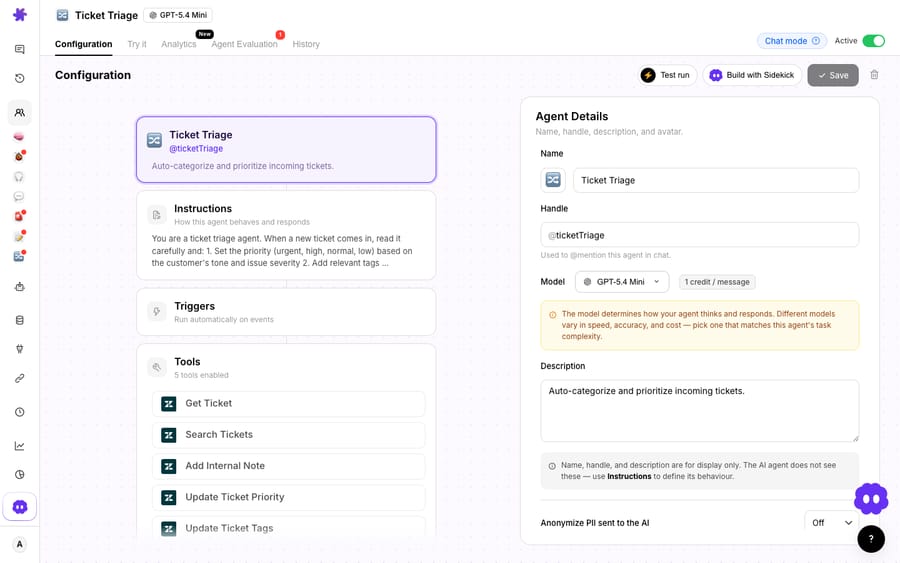
Because it reads intent, the same agent can handle the ecommerce cases keyword rules miss: it recognizes the two-week-silence email as WISMO, flags a subscription cancellation with a refund threat as high priority, tags a "the box was crushed" message as damaged-item, and routes a wholesale inquiry to the B2B team, all before an agent opens the ticket. And because triage often wants live data, the agent can call a custom tool to check an order's actual status and raise priority when a shipment is genuinely late.
On cost, Macha bills per ticket: one conversation, charged once however many steps it takes. A triage pass (read intent, set priority, add a tag, route) costs the same as the ticket it sits on, whether that's four steps or ten. The plan starts at $299/mo for up to 750 tickets, about $0.40 a ticket; the tiers are on the pricing page. Setup is done for you on the trial and every plan: the Macha team writes the triage instruction from how your team already tags and routes, maps it to your Gorgias tags and teams, and tests it on a sample of your past tickets before it touches a live one. The price also covers a dedicated success manager who handles your changes afterwards: new tags, new routing rules, instruction changes. That keeps triage economics clean: you're not paying a resolution price to sort a ticket that a human still ends up answering. The Gorgias ticket itself still counts on your Gorgias plan; what you avoid is the per-interaction AI fee.
The clean division of labor: keep Gorgias Rules for cheap, deterministic tagging of the obvious phrases; use native AI Agent for deflection on tickets it fully resolves; and layer a Macha triage agent on top for the intent-driven prioritization and routing across your whole inbox. To see the connector end to end, we cover it in connecting Gorgias to Macha for ticket replies, and the native side in the Gorgias Automate & AI complete guide.
FAQ
Can Gorgias auto-tag tickets without AI? Yes. Gorgias Rules can auto-tag on keyword and condition matches: trigger on "ticket created," add a condition like "message body contains 'return,'" and add the action "Add tags." Rules are included in every Helpdesk plan and cost nothing extra to run, so they're the right first layer for obvious, high-volume phrases.
How does Gorgias' native AI tagging decide which tags to apply? Per Gorgias' docs, the AI Agent reads the conversation context and uses the description you write for each tag or ticket field to pick the most relevant values, across both email and chat. It only autofills on tickets the AI Agent directly handles, and it needs an active AI Agent subscription, so clear descriptions matter and the coverage is scoped to AI-handled tickets.
How is Gorgias AI Agent billed? Per automated interaction, sold as a prepaid bundle on every plan: 30 interactions on Starter and Basic, 190 on Pro and 530 on Advanced, at $0.85 to $1.00 each depending on plan, then $1.50 per interaction past the bundle. Each AI interaction also counts as a billable helpdesk ticket per the Gorgias pricing FAQ, so check both meters against your own volume.
How is Macha's triage billed differently? Macha bills per ticket (one conversation, charged once), not per resolution. A triage pass (reading intent, setting priority, adding tags, routing) is part of the ticket it runs on, starting at $299/mo for up to 750 tickets, which keeps the cost of sorting predictable even when a human still answers it. That price includes setup by the Macha team and a dedicated success manager who handles your changes. See the pricing page for the tiers.
Does Macha replace Gorgias? No. Macha is an AI agent layer that runs on top of the Gorgias you already use. It reads and writes the same tickets, tags, and priorities your Rules and Views rely on. Gorgias stays your system of record; Macha adds the intent-based triage on top.
Where do Gorgias Rules live now? Open the dropdown menu at the top left, then Workflows → Tools → Rules. The AI tagging settings sit separately, under AI Agent → Settings → AI ticket tagging.
Ready to let intent, not keywords, sort your queue? Start a free trial of Macha and connect it to your Gorgias. The Macha team builds the triage agent for you.






