





 Shopify
 Stripe
 Slack
Slack Notion
 Google Workspace
 Confluence

How Do You Integrate Recharge with Gorgias? Setup, Sidebar Actions and AI Agent (2026)


You connect Recharge to Gorgias from Settings, App Store, All Apps, with a Shopify store already connected, and a subscription widget then appears in the ticket sidebar. Gorgias AI Agent can also run ten Recharge actions, though most only work when the shopper has a single active subscription.
Key takeaways
- The Recharge integration for Gorgias installs from Settings, App Store, All Apps, and needs a connected Shopify store because the connect flow authenticates through Shopify login.
- From the Recharge widget in a Gorgias ticket, agents can skip the next order, cancel with a reason, reactivate a subscription, and refund a charge.
- The Recharge refund button in Gorgias only appears on orders processed through Recharge checkout, and Recharge orders must be canceled with the Recharge cancel button.
- Gorgias AI Agent has ten Recharge actions, including pause, change charge date, change frequency, update shipping address and create discount code.
- Most Gorgias AI Agent Recharge actions only run when the shopper has a single active subscription; List active subscriptions and Pause selected subscription are the exceptions.

To integrate Recharge with Gorgias, go to Settings → App Store → All Apps in Gorgias, search for Recharge, click Connect App, pick your Shopify store and log in to Shopify; a connected Shopify store is required. Once connected, a Recharge widget shows each customer's subscriptions in the ticket sidebar, and Gorgias AI Agent gains ten Recharge actions, from cancel and skip to change charge date, most of which only run when the shopper has a single active subscription.
| Task | Sidebar widget (human agent) | Gorgias AI Agent action |
|---|---|---|
| View subscriptions and next charge | Yes | Yes (Get subscription details, List active subscriptions) |
| Skip next order | Yes, once the charge object is added to the widget | Yes, before the order is created |
| Cancel / reactivate | Yes (cancel with reason via macro) | Cancel, single subscription only |
| Pause, change frequency or charge date | Not listed in the widget docs | Yes |
| Update shipping address | Not listed in the widget docs | Yes, future shipments only |
| Refund a charge | Yes, orders through Recharge checkout only | No |
| Create a discount code | No | Yes |
What does the Recharge integration for Gorgias do?
Recharge is a recurring-billing app for Shopify subscription brands, and Gorgias is where those brands answer email, chat, and social tickets. Connecting the two renders a Recharge widget in the Gorgias ticket sidebar, next to the Shopify customer card, so whoever answers the ticket can see the subscriber's state and change some of it in place.
Per the Gorgias Recharge documentation, the widget displays a customer's Recharge subscriptions next to the ticket and lets agents cancel or reactivate subscriptions and refund a charge, partially or in full. It also exposes macro variables, so a saved reply can drop in the price of the customer's last subscription order or their next scheduled charge date instead of a placeholder. If you're new to how that side panel is assembled from connected apps, the Gorgias customer sidebar explained is a good primer.
What do you need before connecting Recharge?
An active Shopify store connection. Recharge sits on top of Shopify, and Gorgias authenticates the Recharge widget by first selecting the Shopify store the subscriptions belong to. If your Gorgias account isn't already connected to Shopify, set up the Gorgias-Shopify integration first; the Recharge connect flow asks you to pick that store partway through. The Gorgias docs don't name a plan tier for the integration.
How do you connect Recharge from the Gorgias App Store?
The integration installs from inside Gorgias; you don't start in Recharge. The steps in the Gorgias docs:
- In Gorgias, go to Settings → App Store → All Apps.
- Search for "Recharge" and select it.
- On the app page, click Connect App.
- Select your Shopify store, the same store your subscriptions run on.
- Log in to Shopify to finish the connection.
That last handshake links Gorgias to the right Recharge account through Shopify. When it finishes, the Recharge widget appears in the sidebar for any ticket where Gorgias can match the customer.
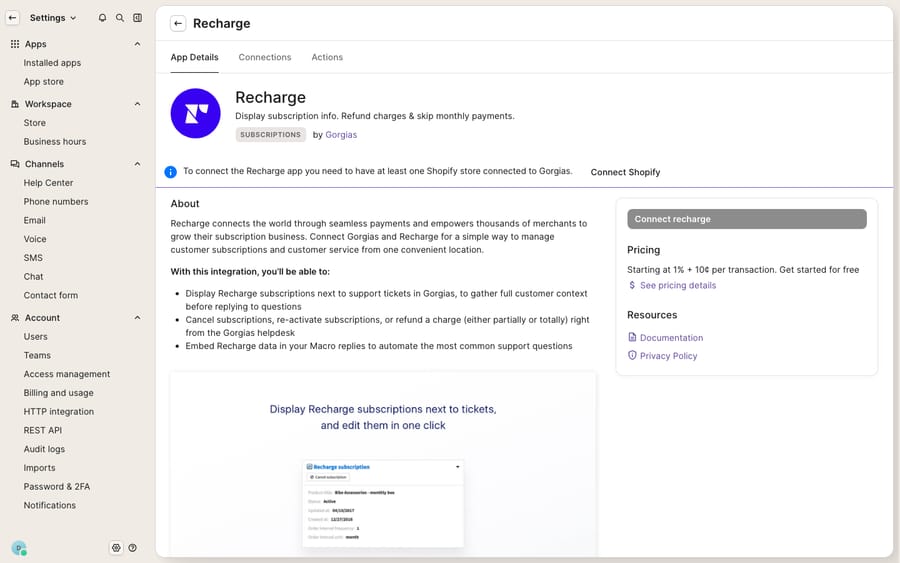
The screen above is the connect page (the App Store entry with the Connect button), not a ticket with live subscription data. The populated widget only renders once the Shopify handshake completes and a real subscriber's ticket is open, which needs a connected store our walkthrough environment doesn't have. What follows describes the widget from the Gorgias documentation.
How do you set up the sidebar widget, including the Skip button?
You tune the widget rather than accept the default. In the ticket view, click the cog icon at the top-right of the sidebar to edit it. The Skip button is the one people miss: per the Gorgias FAQ, you find the charge object, drag it into the Recharge widget, keep the Subscriptions section, and click Save. A Subscription section with a Skip button then appears at the bottom of that charge. While you're in there, put the two or three fields an agent needs for the most common request (next charge date, product, status) near the top so nobody scrolls to answer a skip request.
What can agents do with Recharge from a Gorgias ticket?
From the widget, the documented actions are:
- Skip the next order: the most common subscription request, once the charge object is in the widget.
- Cancel a subscription: under Subscriptions, click Cancel, then Confirm. Gorgias suggests a cancellation macro to capture the reason, which then shows in Recharge.
- Reactivate a canceled subscription.
- Refund a charge, partial or full.
Earlier versions of this guide also listed product swaps, charge-date changes and address updates as widget actions. The current Gorgias widget docs don't list them, so we've moved them to the AI Agent section below, where Gorgias does document them.
Two rules from the Gorgias Recharge docs will save you a support headache. First, the refund button appears on orders, not subscriptions, and only works if the order was processed through the Recharge checkout; orders fulfilled at checkout must be canceled via Shopify. Second, an order that passed through Recharge must be canceled with the Cancel button on the Recharge order, not the Shopify one, or the cancellation won't take. Train agents on both and you avoid the classic "I clicked cancel and it didn't stick" ticket.
How do you use Recharge data in Gorgias macros?
Because the integration exposes macro variables, saved replies can pull live subscription context. Gorgias's own examples are the price paid for the last subscription order and the date of the next charge. A "your next box is on the way" macro can insert the real next charge date; a churn-save macro can reference the product and price the customer is on. That's the difference between a template that reads like a form letter and one that reads like the agent already looked.
Can Gorgias AI Agent manage Recharge subscriptions automatically?
Yes, and the list is longer than it used to be. Per the Gorgias AI Agent Actions docs for Recharge (updated September 2026), AI Agent has ten Recharge actions, counting both pause versions:
- Cancel subscription, with the cancellation reason collected from the shopper.
- Pause subscription and the newer Pause selected subscription. Recharge has no true pause state, so AI Agent pushes the next charge out to a resume date the shopper picks.
- Skip next subscription shipment, which only works before the order is created.
- Change subscription frequency and Change charge date.
- Get subscription details and List active subscriptions (both read-only).
- Update subscription shipping address, which changes future shipments only.
- Create discount code, using values you set in advance.
There's no extra setup beyond the connection you already made. In Gorgias, open AI Agent → Actions, filter by App / Recharge, and use the Add in → Skills dropdown to attach each action to the skill that handles subscription tickets. For what an AI agent can do through Recharge's own API, see the Recharge AI support agent guide.
The ceiling hasn't gone away: most Recharge actions only run if the shopper has a single active subscription. With more than one, AI Agent hands the ticket to your team. The two exceptions are List active subscriptions and Pause selected subscription, which can pause any subscription once the right one has been identified earlier in the conversation. For a coffee brand where everyone's on one plan that's fine; for a supplement brand where regulars stack three or four subscriptions, a large slice of exactly the tickets you hoped to automate will still fall back to your agents.
Where does the native integration stop, and what can an AI layer add?
Give the native integration its due: it's built and maintained by Gorgias and Recharge, and having subscription data plus real actions in the sidebar cuts handle time. It belongs on any shortlist of the best Gorgias integrations for subscription brands. But notice the seams.
The widget shows and executes: an agent still has to read the ticket, decide it's a skip request, find the right subscription, and click. On the automation side, AI Agent's actions are well defined but mostly stop at a single subscription, and they don't reach the trickier conversations: the "why was I charged twice," the swap that depends on inventory, the WISMO on a subscription order, the retention reply that needs a real reason rather than a dropdown. Those still land on a person.
That's the seam where an AI agent layer on top of Gorgias fits. The broader category of AI agents for customer service exists to do the reasoning a sidebar widget can't. Macha is one such layer: it connects to the Gorgias you already use as a native connector and works on the same tickets. It doesn't replace Gorgias, Recharge, or the native widget. Macha doesn't have a built-in Recharge connector; instead, a custom tool turns the Recharge or Shopify API into something the agent can call, so it can read a subscriber's subscriptions, work out intent (skip vs swap vs cancel vs "where's my order"), and draft or send a grounded reply, including for customers with several subscriptions. Macha bills per ticket, one conversation charged once however many messages it takes, starting at $299/mo for up to 750 tickets; see the pricing page for the tiers.
The clean division of labor: keep Recharge as the system of record for subscriptions and Gorgias as the place tickets live, and put an agent on top for the reasoning-and-writing work the widget leaves to humans. If you're still deciding whether Gorgias is the right desk underneath all this, what is Gorgias covers the platform end to end.
FAQ
How do I connect Recharge to Gorgias? In Gorgias, go to Settings → App Store → All Apps, search for Recharge, click Connect App, select your Shopify store, and log in to Shopify. The Recharge widget then appears in the ticket sidebar.
Do I need Shopify connected first? Yes. The connect flow asks you to select your Shopify store as part of authentication, because Recharge runs on top of Shopify.
What can agents do with Recharge from a Gorgias ticket? View subscriptions, skip the next order (after adding the charge object to the widget), cancel with a reason and reactivate subscriptions, and refund charges. Refunds only apply to orders processed through the Recharge checkout, and Recharge orders must be canceled with the Recharge cancel button, not Shopify's.
Can Gorgias AI automatically cancel or skip a Recharge subscription? Yes. AI Agent has ten Recharge actions, including Cancel subscription, Skip next subscription shipment, Pause, Change charge date and Update shipping address, attached to skills from AI Agent → Actions. Most of them only run when the shopper has a single active subscription; otherwise the ticket goes to a human.
Why can't I see the Refund button? The Refund button only shows on orders, not subscriptions. If the customer has active Recharge orders and it's still missing, Gorgias asks you to contact its support team.
Can I add AI to Gorgias-plus-Recharge without replacing either? Yes. An AI agent layer like Macha connects to Gorgias as a native connector and runs on top of your existing help desk and the Recharge widget. With a custom tool on the Recharge API it reads subscription context, handles intent-based replies (including multi-subscription cases), and leaves Gorgias and Recharge as the systems of record.
Ready to let your team resolve subscription tickets instead of just clicking through them? Start a free trial of Macha and connect it to your Gorgias in minutes.






