





 Shopify
 Stripe
 Slack
Slack Notion
 Google Workspace
 Confluence

How to Cancel an Order Before It Ships: AI for Order Cancellation Requests (2026)


An AI agent can handle a request to cancel an order before it ships if it checks fulfillment status first and leaves the cancel to a person or a documented tool. Shopify, Gorgias AI Agent, Zendesk's Shopify app and 3PL APIs each stop the order at a different point.
Key takeaways
- An AI agent handling order cancellation requests must check fulfillment status first, because Shopify can't cancel an order after it is partially fulfilled or shipped.
- Macha's Shopify connector has Cancel Order and Create Refund tools, but a first cancellation agent should leave both off and post a drafted internal note so a person cancels in Shopify.
- Gorgias AI Agent's Cancel order Action checks that a Shopify order is unfulfilled and cancels it, and Zendesk's Shopify integration lets human agents cancel unfulfilled orders.
- Shopify's orderCancel mutation needs the write_orders scope and runs asynchronously, so an AI agent should re-read the order with Get Order before any reply says it's canceled.
- Macha bills per ticket, from $299 a month for 750 tickets, so a cancellation that takes several lookups still costs about $0.40.

An AI agent can handle a customer service request to cancel an order before it ships if it checks fulfillment status first and acts only while the order is still unfulfilled. The safe build gives the agent three tools (Shopify Get Order, Stripe Get Payment and a help-desk Add Internal Note), has it confirm the order state and the charge, and posts a drafted reply for a human to approve. The human performs the cancellation in Shopify. The agent does the cross-app lookups (in our estimate five to ten minutes of an agent's time) that used to sit in front of that decision, and at Black Friday volume a queue of those lookups can outlast the time before the order ships.
| Order state when the agent checks | What Shopify allows | What the agent does |
|---|---|---|
| Unfulfilled, payment authorized but not captured | Cancel; Shopify voids the authorization, so no refund is needed | Drafts a reply saying the pending charge will drop off, and flags the order for cancellation now |
| Paid, unfulfilled, not yet with the 3PL | Cancel, refunding to the original payment method or as store credit, with restock | Confirms amount and card, drafts the reply, hands the cancel to a person |
| Unfulfilled in Shopify, but already picked or packed by a 3PL | Shopify says to cancel in the fulfillment service's system first | Checks the 3PL status, asks for a hold or cancel there, escalates as urgent |
| Partially fulfilled | No cancel: "After an order is partially fulfilled, you can't cancel it" | Offers a partial refund of the unshipped items and a return for the rest; a person decides |
| Fulfilled or in transit | No cancel | Drafts a return reply, flagged for a person |
| Subscription or high-risk order | Depends on the app and the fraud decision | Routes to a separate queue |
Alhena AI puts order cancellations and address corrections at roughly 15% of all ecommerce support tickets, climbing toward a quarter of volume once you fold in broader order modifications (Alhena AI; the post cites no named study, so treat it as directional).
The build below keeps a human in control of moving someone's money, and shows where the cancel itself can happen: in Shopify, in your help desk's Shopify app, in Gorgias AI Agent, or through Macha's own Cancel Order tool once you trust the agent. There's a live version of this workflow on our use-cases page.
Should an AI agent cancel orders on its own?
Usually not at first. "Automate cancellations" can mean two very different things.
The tempting version is full autonomy: the agent reads the request, cancels the order, fires the refund, and emails the customer, with no human in the loop. Vendors quote big numbers for this. Fini, for example, says it resolves 90% of incoming support requests autonomously at 99% accuracy, and the same post warns that some vendors count a deflected session as a resolution. For some teams full autonomy is the right call.
But cancellations sit on top of two facts that make full autonomy risky out of the box:
- They're irreversible and financial. A wrongly issued refund can't be edited back.
- Eligibility depends on timing. A paid-but-unshipped order can usually be canceled cleanly; an order that's already shipped needs a return/RMA flow instead (Omnisend). Get that distinction wrong and you've refunded something that's about to arrive on a doorstep.
So the design we'll build keeps the AI doing the research and drafting and a human approving the action. The person who acts reads one note instead of opening Shopify and Stripe. That's the version most ecommerce teams should start with. Macha lets you allow cancels and refunds without a person later, per scenario, by switching on the Shopify connector's Cancel Order and Create Refund tools for the cases you trust.
Macha is an AI agent layer on top of the help desk you already run, adding agents that read tickets and take real actions in connected tools like Shopify and Stripe. The cancellation ticket still lives in your help desk, and Macha does the lookups. Macha fits teams that run Zendesk, Freshdesk, Gorgias, Front, HubSpot or Intercom, sell on Shopify, and want order checks done inside the ticket before a person acts.
Which integrations does a cancellation agent need?
The whole workflow rests on three integrations, each doing one job:
| Tool | Role in the workflow | Actions used |
|---|---|---|
| Zendesk (or whichever you run of Zendesk, Freshdesk, Gorgias, Front, HubSpot or Intercom) | Where the ticket lives and the reply lands | Get Ticket, Get Ticket Custom Fields, Add Internal Note |
| Shopify | Source of truth for order status & fulfillment | Get Order, Search Orders, Lookup Customer, (left off here) Cancel Order and Create Refund |
| Stripe | Source of truth for the payment & refund eligibility | Get Payment, List Payments, (optional) Create Refund |
Connect these once under Connectors and they become tools your agents can call.
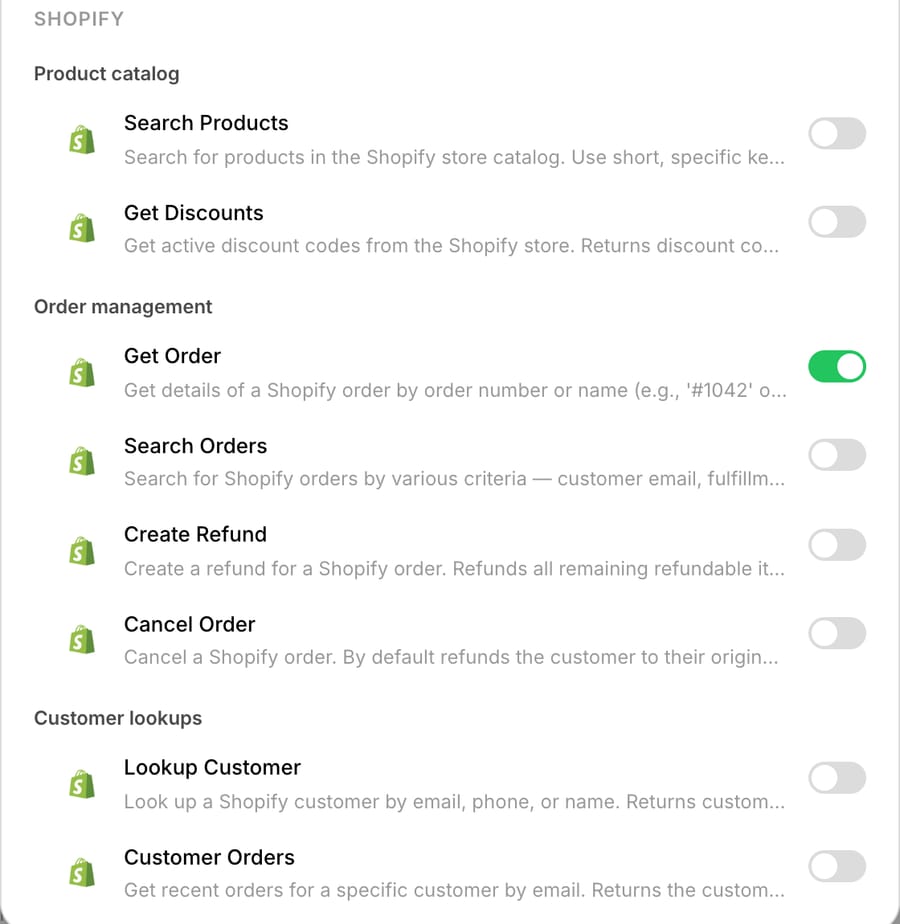
Macha's Shopify connector can cancel an order as well as refund one. When we built this agent on 28 September 2026, the tool picker listed two Shopify write tools. Cancel Order cancels the order and, by default, refunds the customer to the original payment method and restocks the items. Create Refund refunds the order's remaining refundable items and shipping and keeps the order open. Stripe's connector also has a Create Refund tool. Write tools behave differently by where the agent runs: in Macha's chat, each shows a confirmation card before it runs; on an autonomous trigger run there's no card, and it executes directly when the agent's instructions tell it to. So this build doesn't give the agent any of the three, and its instructions say never to cancel or refund. The agent reads order state to inform the draft, and a person cancels. If your store takes payment through Shopify Payments rather than Stripe directly, the refund belongs in Shopify, and the Stripe lookup drops out. (Shopify and Stripe connector details.)
How do you build the cancellation agent?
1. The trigger: catch the request, not every ticket
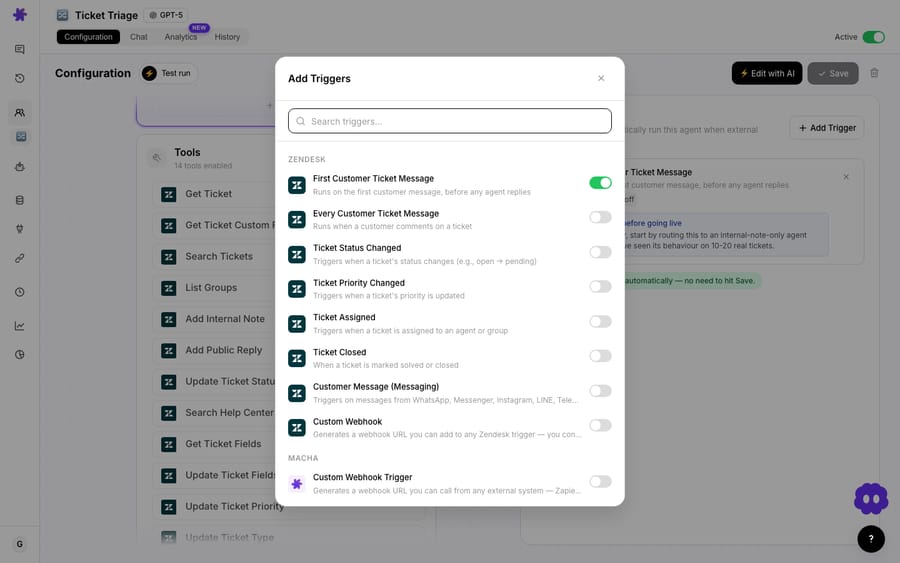
The agent fires on the Zendesk trigger that Macha's picker labels First Customer Ticket Message (listed as New Ticket on our integrations page). It runs on a ticket's first customer message, before any agent replies, and you narrow it to one condition: the customer is requesting a cancellation. You don't want this agent waking up on a shipping question or a product review. Scope it tightly: keyword/intent matching on "cancel," "cancellation," or "don't want," plus the presence of an order reference.
2. The tools: give it exactly three, no more
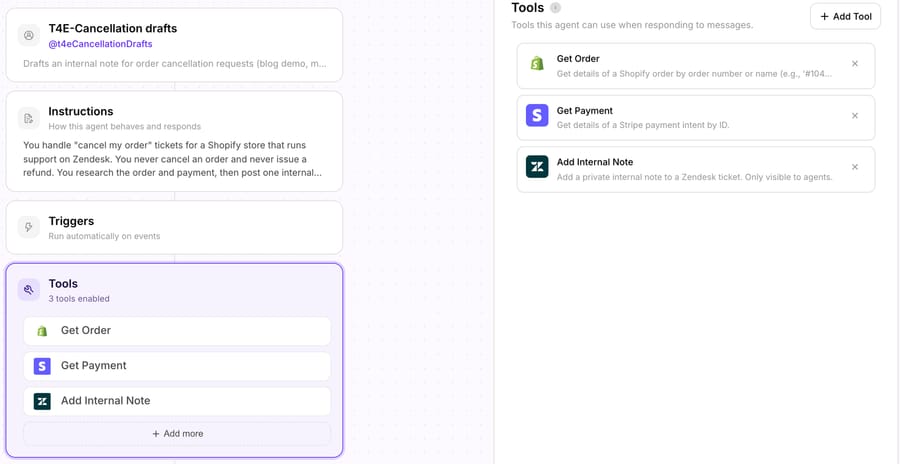
Under the agent's tools, add Shopify → Get Order, Stripe → Get Payment, and Zendesk → Add Internal Note. Resist the urge to hand it the whole toolbox, and leave Cancel Order and both Create Refund tools off for now. Fewer tools means fewer wrong turns and a faster run.
3. The instructions: encode the eligibility rule
The agent's runbook should spell out, in plain language, the timing logic that a good human agent already knows:
- Extract the order number from the ticket. If there isn't one, post a note asking a teammate to request it, and stop.
- Call Get Order. If
fulfillment_statusis unfulfilled / not shipped, the order is cancelable; proceed. - If the order has already shipped, do not offer a cancellation. Draft a return/RMA reply instead and flag for a human.
- If Stripe took the payment, call Get Payment to confirm the charge succeeded and capture the exact amount and last-4 of the card.
- Draft a reply that states the order number, confirms eligibility, names the refund amount and method, never says the order is already canceled, and sets a 5 to 10 business day expectation, which is the window Stripe gives for a card refund to appear (Stripe docs).
- Never send and never refund. Post the draft as an internal note for a person to approve. On a trigger run this line is the gate.
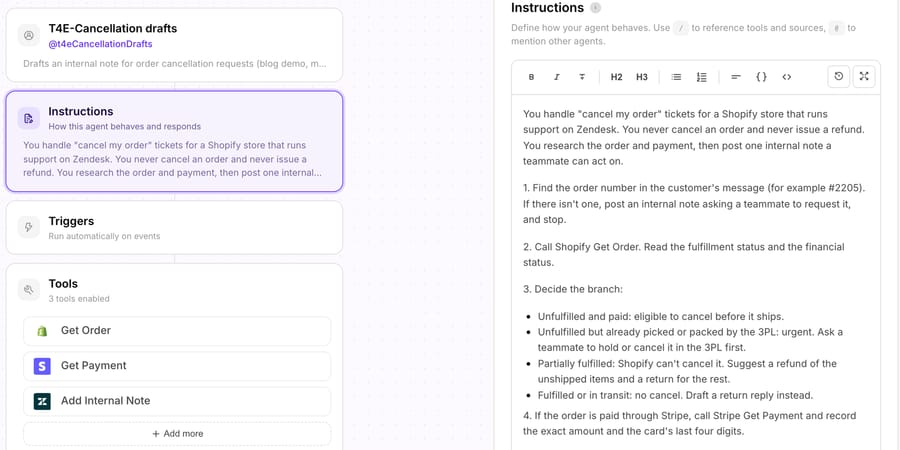
The shipped branch stops the agent from drafting a refund for a parcel already in transit.
4. The output: a drafted internal note
When a real ticket comes in, here's what the agent produces. Take order #2205, wrong size, not yet shipped:
- Get Order → Order #2205, status: Unfulfilled, not yet shipped.
- Get Payment → $89.00 via Visa ending 4242, eligible for full refund.
- Draft reply →
"Hi! Thanks, we've received your request to cancel order #2205. It hasn't shipped yet, so once a teammate cancels it you'll get a full refund of $89.00 to your Visa ending 4242, usually within 5 to 10 business days."
- Then it posts the draft and both lookups as an internal note for the person who cancels.
For the other states, the instructions carry a draft of their own:
- Already shipped: "Thanks for letting us know. Order #2205 has already shipped, so we can't cancel it, but you can return it when it arrives and we'll refund you under our return policy."
- Partially fulfilled: "Part of order #2205 has already shipped, so we can't cancel the whole order. A teammate will refund the items that haven't shipped, and you can return the rest when it arrives."
- Picked or packed by the 3PL: "Thanks, we've received your request to cancel order #2205. It's already being packed at our warehouse, so we've asked them to stop it, and a teammate will confirm whether we caught it in time."
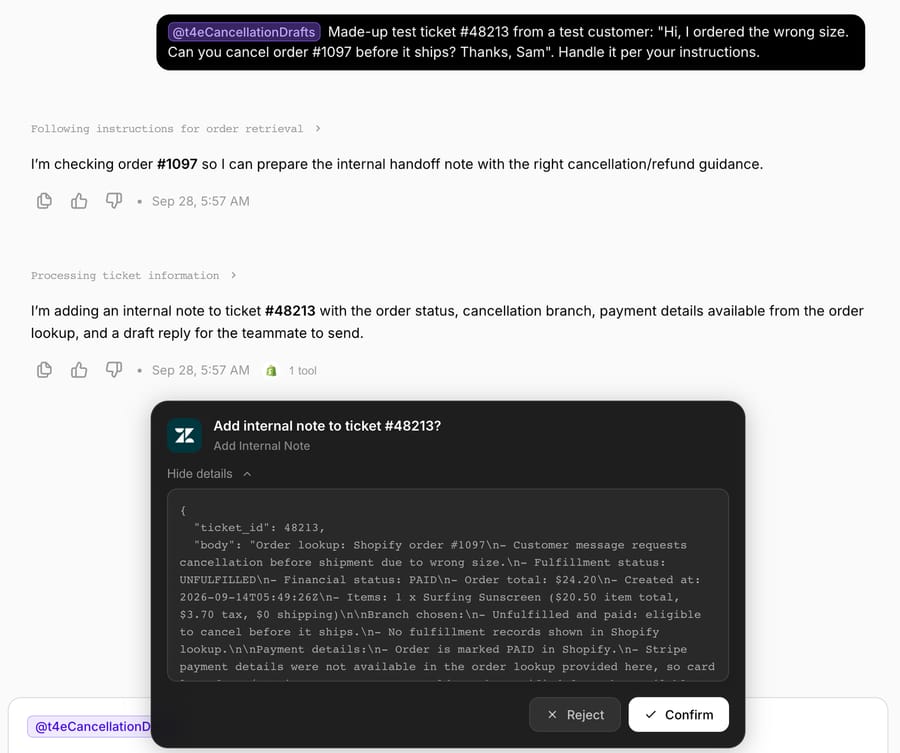
That card appears only in Macha's chat; a trigger run has none. Stripe often processes a refund issued shortly after the charge as a reversal, so the original charge drops off the statement and no separate credit line appears. Customers who cancel within minutes sometimes write back saying they can't see a refund; the reply can pre-empt that, and our guide to "where is my refund" tickets covers the follow-up.
The order stays open and the refund unissued until a person acts on the note.
Why is the cancellation window shorter at Black Friday?
Shopify marks an order fulfilled when a fulfillment is created, and at peak that happens faster: same-day dispatch and 3PL pick batches can shrink the window between "order placed" and "can't cancel" to a morning. Cancellations also compete with the peak-season "where is my order" wave. Three rules for the agent's instructions:
- Check status at the moment of action. Call Get Order when the ticket arrives, and have the person who cancels re-read it, because an order that was unfulfilled at 9:00 can be fulfilled by 9:20.
- Treat "unfulfilled" as a first check only. If a 3PL fulfills the order, Shopify can still say unfulfilled while the parcel is packed. Shopify's help center says an order with a third-party fulfillment service may need canceling "through that service's system before canceling in Shopify."
- Never promise the cancel in the reply. Say the request is in and when they'll hear back; "your order is canceled" sent before anyone canceled it becomes a dispute when the parcel arrives.
Who actually cancels the order, and with which tool?
Several tools already do the cancel itself, and a Macha agent should hand off to them. We checked each vendor's docs on 28 September 2026.
- Shopify admin. Per Shopify's help center article "Canceling orders," canceling lets you refund to the original payment method, as store credit, or later, restock inventory, notify the customer, pick a reason and add a staff note. Partially fulfilled orders can't be canceled.
- Gorgias. Agents can cancel a Shopify order from the ticket, setting refund amounts, reason, restock and customer notification. Gorgias AI Agent has a Cancel order Action that checks whether the order is unfulfilled and cancels it if so. On Gorgias, that Action is the most direct way to automate this ticket end to end, and Gorgias has an incentive to build it: each ticket AI Agent resolves is billed as an automated interaction on top of the ticket fee.
- Zendesk. The Shopify integration lets agents cancel unfulfilled orders from the ticket and tags the ticket; Zendesk lists it for Team, Professional and Enterprise plans, with Chat required. Our guide to automating Shopify order cancellations in Zendesk covers the setting that hides the cancel button, auto assist, action flows and a live cancellation test.
With Macha, there are two routes. The recommended one is the build above: the agent reads the order through the built-in Shopify connector (see AI agent integrations for Shopify brands), posts the internal note, and a person cancels in Shopify or in the help desk's Shopify app. Where the order can't be canceled (partially fulfilled), a person refunds the unshipped items; so a person issues the partial refund in the Shopify admin (if Stripe processed the payment outside Shopify, Stripe's Create Refund takes an amount, but the Shopify order won't show the refund) (how to automate Shopify refunds safely).
The second route is to switch on the connector's Cancel Order tool for the cases you trust, for example unfulfilled, single-payment orders under a set amount, and name those cases in the instructions. On a trigger run it then cancels with no card, so the instructions are the whole gate. Shopify's own API cancel, the Admin GraphQL orderCancel mutation, takes the order ID, a reason, restock, notifyCustomer, a refundMethod (original payment method or store credit) and a staffNote of up to 255 characters, needs the write_orders scope, and runs asynchronously: it returns a job. Whichever tool does the cancel, have the agent re-read the order with Get Order before any reply says it's done. Apps without a built-in connector, such as the 3PLs below, connect through custom API tools.
Can the 3PL hold the order before it ships?
It's often the faster stop. Gorgias AI Agent has prebuilt Actions here too: for ShipStation it can update the address or cancel an order that isn't shipped or canceled, and for ShipBob it can cancel an upcoming order, though Gorgias notes the refund still needs a separate Shopify cancellation. For Macha, both connect through a custom API tool that Macha's team sets up during onboarding (details for ShipStation in our ShipStation AI support agent guide):
| 3PL | Documented endpoint | Auth | What it buys you |
|---|---|---|---|
| ShipStation | API v1 "Hold Order Until" (POST /orders/holduntil): sets the order On Hold until a date, then back to Awaiting Shipment | API key and secret (Basic); plan availability not re-verified | Time for a person to cancel in Shopify before a label prints |
| ShipBob | Cancel order: cancels the order and all its shipments if it's still in a cancelable state | Bearer personal access token or OAuth | A real stop at the warehouse; the Shopify cancel and refund still follow |
Both are write tools, with the same card-in-chat, instructions-on-triggers behavior. A hold is the safer one to automate: it's reversible, and a person still makes the cancel decision. Our guide to shipping and fulfillment apps for AI agents covers other 3PLs.
What does it cost to run a cancellation agent?
Macha bills per ticket (one conversation, charged once however many steps the agent takes to finish it), not per "resolution." Pricing starts at $299 a month for 750 tickets, about $0.40 a ticket. (See full pricing.)
A clean cancellation takes several steps (read the ticket, call Get Order, call Get Payment, draft the reply) and is still one ticket, about $0.40. Start a free trial ($50 of usage, no credit card required) to meter your own numbers. Setup and monitoring by the Macha team are included on every tier.
When shouldn't you automate cancellations?
Keep these branches with a person:
- Partially-fulfilled and split-shipment orders. If one of three line items has shipped, a blanket "full refund" is wrong. Keep these with a person until the instructions handle line items.
- Gift cards, store credit or split tender. Get Payment sees only the Stripe charge, so the draft mustn't promise a single clean refund.
- Subscriptions and recurring orders. "Cancel my order" sometimes means "cancel my subscription," which is a different action with retention implications. Route these separately.
- Fraud and chargeback signals. A cancellation request on a high-risk order shouldn't be auto-drafted with a cheerful refund promise. Layer in a check, or keep flagged orders human-only.
- Tiny teams with low volume. At three cancellations a week, the build-and-tune time may not pay back.
For these branches, keep the human-approval gate on longer, and move only the clean, unshipped, single-payment cases to Cancel Order once you've watched the agent get them right.
How does this compare to macros and standalone AI agents?
Most "automate cancellations" options fall into three buckets. Help desk macros and rules are fast to set up, but they only template a reply and can't check the live order first. Help-desk AI agents go further where they have prebuilt actions: Gorgias AI Agent cancels unfulfilled Shopify orders itself. Third-party AI agents (Fini, Alhena and others) run alongside your help desk and some ship prebuilt cancel actions; check which order writes each one documents. Fini includes implementation on every plan, but customer success is shared on its Growth plan, a dedicated AI engineer starts at Scale, and Fini quotes about 14 days to go live. Macha is a layer on the help desk you already run: the ticket never leaves your desk, the agent reads live commerce data through real tool calls, and you choose per-scenario how much it's allowed to do on its own. The Macha team sets it up and runs it for you on the trial and every plan, with a dedicated success manager, and it goes live in under a week.
FAQ
Does the agent actually cancel the order in Shopify? Not in this build. Macha's Shopify connector has a Cancel Order tool, but this agent doesn't get it: it reads status with Get Order and a person cancels. You can add Cancel Order and Shopify's or Stripe's Create Refund later; in chat they show a confirmation card, and on trigger runs they execute when the instructions say so.
How long will the customer wait for the refund? Stripe says a card refund shows as a credit about 5 to 10 business days after you issue it, depending on the bank. Refunds issued soon after the charge may appear as a reversal instead, with the original charge simply disappearing.
How does it know if an order is eligible to cancel? The instructions encode the rule: it calls Get Order, checks fulfillment status, and treats unshipped orders as eligible. Shipped orders get a return reply and a flag for a person.
Which help desks does this work with? Macha sits on top of Zendesk, Freshdesk, Gorgias, Front, HubSpot or Intercom. The example uses Zendesk's First Customer Ticket Message trigger (New Ticket) and the Add Internal Note tool; the other connectors have equivalents.
What does it cost per cancellation ticket? You're billed per ticket (one conversation, charged once however many lookups and drafts it takes), not per outcome. Pricing starts at $299 a month for 750 tickets, about $0.40 each. See the pricing page for the tiers.
Can I let it run fully autonomously later? Yes. Once you've watched it draft correct replies and trust a specific branch, say unshipped single-payment orders under a dollar threshold, you can add Shopify's Cancel Order tool and tell the agent in its instructions to use it for just that case. On trigger runs that instruction is what lets it run.
Can an AI agent cancel a Shopify order through the API? Yes. Shopify's orderCancel mutation does it with the write_orders scope, and Macha's Shopify connector has a Cancel Order tool that by default refunds to the original payment method and restocks. On Gorgias, AI Agent's Cancel order Action is the built route.
What if the order is already with the 3PL? Stop it at the warehouse first, then cancel in Shopify. ShipStation's API can put an order on hold and ShipBob's can cancel it, both through a custom API tool.
How do you get started?
Start a free trial ($50 of usage, no credit card required), connect Shopify, Stripe, and your help desk, and build the agent above; the use-case walkthrough and the docs cover the rest.
Written by Abbas (Customer Support & AI, Macha) · Reviewed by Ankeet Guha (Co-founder & CTO) · Published 2026-06-24 · Last updated 2026-09-28.






