Intercom
 Shopify
 Stripe
 Slack
Slack Notion
 Google Workspace
 Confluence

What Can an AI Support Agent Do With AfterShip? Tracking, Delivery Estimates and Returns via the API (2026)


AfterShip's Tracking API, version 2026-07, lets an AI support agent find a shipment by tracking number or search for it by the customer's email or order ID, then read its status, checkpoints and up to three estimated delivery dates, using an API key sent in a header named as-api-key. AfterShip's pricing page lists "API & webhooks" from its Premium plan at $59 a month, not on Essentials at $29. Its Returns API uses the same header and adds return status by order name or email plus a prefilled returns link. We read both references on 28 September 2026, built the tools in our own test setup and ran one on a made-up ticket, where AfterShip refused a placeholder key with HTTP 401 and the agent handed off. This page covers what the two APIs expose, what Gorgias and AfterShip's own apps already do with them, and the instruction an agent needs.
Key takeaways
- AfterShip's Tracking API version 2026-07 lets an AI agent find shipments by tracking number, customer email or order ID with an as-api-key header, and AfterShip lists API access from its Premium plan at $59 a month.
- AfterShip's Get trackings endpoint searches customer email, name, phone, order ID and tracking number through one keyword filter, but AfterShip only stores tracking data for 120 days.
- AfterShip's Returns API lists returns by customer_email or order_name and builds a prefilled returns-page link, and AfterShip lists Returns API access from its Premium plan at $99 a month.
- Gorgias AI Agent already reads AfterShip tracking and offers two AfterShip Returns actions, Send return shipping status and Send return portal link, the second limited by default to orders under 30 days old.
- In our 28 September 2026 test on ticket #1120, AfterShip rejected a placeholder key with HTTP 401 and the agent posted a holding reply after 8 seconds and tagged the ticket app_tool_error.

What can an AI support agent do with AfterShip today?
Six jobs cover most AfterShip-related tickets. The table shows the endpoint AfterShip documents for each and who can do the job now. "Macha custom tool" means a tool Macha's team configures during onboarding; that column is documented by AfterShip, and only the 401 tests described below were run live.
| Support job | AfterShip endpoint (2026-07) | Read or write | Who can do it today |
|---|---|---|---|
| "Where is my order?" with a tracking number | GET /tracking/2026-07/trackings?tracking_numbers= (up to 50 numbers) | Read | Gorgias AI Agent; AfterShip's Gorgias and Zendesk sidebar apps (a human reads them); Macha custom tool |
| "Where is my order?" with only an email | GET /trackings?keyword= (searches customers[x].email and five other fields) | Read | Gorgias sidebar app (matches by email); Macha custom tool |
| "When will it arrive?" | Same tracking record: courier_estimated_delivery_date, aftership_estimated_delivery_date, custom_estimated_delivery_date | Read | Gorgias AI Agent; Macha custom tool |
| "Tracking stopped updating" | POST /trackings/{id}/retrack (expired trackings only, max 3 times) | Write | AfterShip admin; a human |
| "Where is my return?" | Returns API GET /returns/2026-07/returns?order_name= or ?customer_email= | Read | Gorgias AI Agent action "Send return shipping status"; Macha custom tool |
| "How do I start a return?" | Returns API POST /returns/link (order number required) | Creates a link, changes no return | Gorgias AI Agent action "Send return portal link"; Macha custom tool |
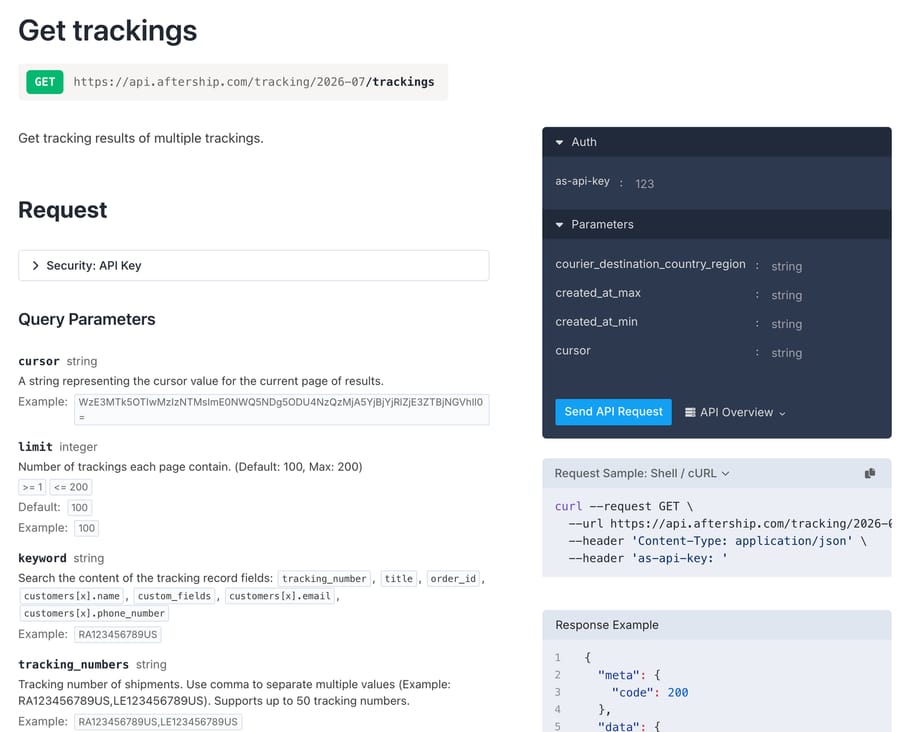
The Tracking API has 16 endpoints in the 2026-07 reference: seven for trackings, two for couriers, five for courier connections and two for delivery-date predictions. Only three of them matter on a support ticket: Get trackings, Get a tracking by ID, and Detect courier when a customer pastes a number with no carrier. The rest are for creating and maintaining the shipments your store syncs in.
AfterShip is widely installed. Its Shopify app "AfterShip Order Tracking" showed 4.6 stars from 1,505 reviews on 28 September 2026, and "AfterShip Returns & Exchanges" showed 4.7 from 1,542 (Shopify App Store; Returns listing). AfterShip's own site claims 20K+ customers and 2,000+ carriers (vendor-stated).
How does the lookup work, from a customer's email to an AfterShip tracking?
Customers write in with an email address and, if you're lucky, an order number. AfterShip's API gives an agent three ways in, and each has a catch.
- Tracking number.
GET /trackings?tracking_numbers=takes up to 50 numbers, comma separated, and returns the full tracking record. This is the reliable route. On Shopify, the number sits on the order's fulfillment, so an agent reads the order first. Macha's built-in Shopify connector returns it on Get Order. - Keyword.
GET /trackings?keyword=searches "the content of the tracking record fields":tracking_number,title,order_id,customers[x].name,custom_fields,customers[x].emailandcustomers[x].phone_number(Get trackings). Passing the requester's email finds their shipments without a Shopify lookup, provided your store sync writes the customer's email onto the tracking. AfterShip calls it a content search, so an agent should check thatcustomers[].emailmatches the requester exactly before quoting a result. - Order ID.
GET /trackings?order_id=filters on the tracking'sorder_id, which AfterShip defines as "a globally-unique identifier for the order". The tracking model keeps the human-readable number in a separateorder_numberfield, and neither the keyword search nor the filters listorder_number. So "#1097" typed by a customer won't match throughorder_idunless your integration stores that exact string there. Check one real tracking from your account before relying on this route.
Two limits shape every lookup. Get trackings defaults to the last 120 days, and its reference says "AfterShip only stores data of 120 days", so an order from March won't come back in August. And the response is capped at 200 trackings a page (default 100), which only matters for a keyword that's too broad.
Once the agent has the tracking, the fields that answer the ticket are tag (one of nine statuses), subtag (the detail), checkpoints (the carrier's scan history) and the delivery estimates. AfterShip keeps three estimates apart (Tracking model): the carrier's own date, AfterShip's AI prediction, and a date from your custom estimate settings, plus first_estimated_delivery and latest_estimated_delivery so you can see whether it slipped. AfterShip says its AI estimate predicts delivery "with up to 95% accuracy, trained on 11B shipments" (aftership.com/ai, vendor claim). Your instruction should name which estimate the agent quotes, ideally whichever one your tracking page already shows the customer, so the agent never contradicts it.
What should the agent say for each AfterShip status?
AfterShip tags every checkpoint with one of nine statuses and a sub-status code (Delivery Statuses; Sub-statuses). The sub-status is what turns a vague "Exception" into something an agent can act on. Here's a mapping we'd start from:
| AfterShip tag (sub-status examples) | What it means | What the agent should do |
|---|---|---|
Pending, InfoReceived | Label created, or no carrier scan yet | Say the carrier hasn't scanned it; hand off if the label is older than your stated processing window |
InTransit (InTransit_004 arrived in destination country, _006 customs clearance started) | Moving | Quote the last checkpoint and the estimate your tracking page shows |
OutForDelivery | Out for delivery or ready for pickup | Tell them it's arriving today |
AttemptFail (_002 addressee not available, _003 business closed) | Carrier tried and failed | Explain the retry or pickup notice; don't promise a redelivery date the carrier hasn't given |
AvailableForPickup | At a pickup point | Give the location from the checkpoint |
Delivered (Delivered_005 delivered to neighbor) | Delivered | Share the checkpoint location; a "not received" reply goes to a person |
Exception (_007 incorrect address, _010 returning to sender, _013 shipment lost, _012 damaged) | Something went wrong | Hand off with the sub-status in the note; reships and refunds are a person's call |
Expired | No tracking information for 30 days since the tracking was added | Hand off; a person can retrack it, at most 3 times |
Every Exception sub-status and a Delivered that the customer disputes lead to a decision about money: reship, refund or file a carrier claim. That's where an agent should stop and write a note, and it's where AfterShip is pitching its own AI.
What do Gorgias and AfterShip's own apps already do?
Start with what you may already own. If you run Gorgias, most of this page is built in.
Gorgias, tracking. Gorgias's AfterShip Tracking app shows tracking beside the ticket and matches on the customer's email. Gorgias's docs say the widget only appears when the customer has "an active shipped order", and that the app is built by an external partner (Gorgias docs). On 18 August 2025 AfterShip and Gorgias announced that Gorgias AI Agent reads AfterShip tracking to answer WISMO questions, alongside return (RMA) status and "customer order details retrievable by email" (press release).
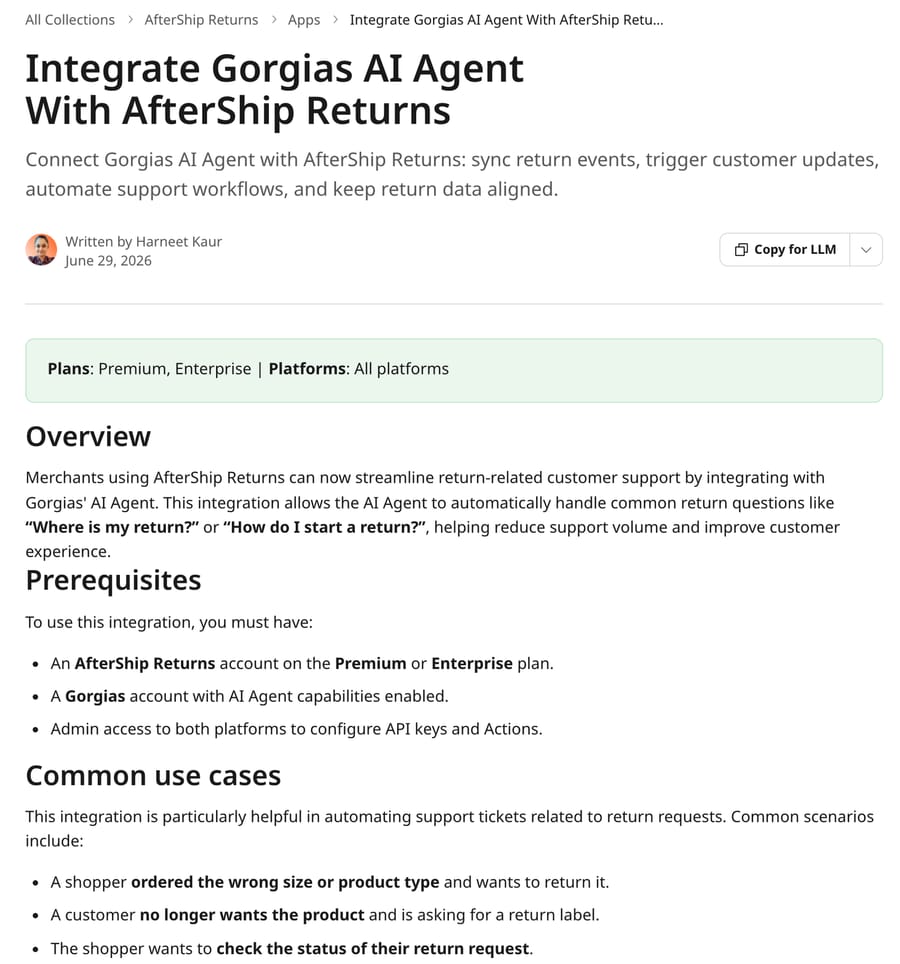
Gorgias, returns. AfterShip's help center documents two ready-made Gorgias AI Agent actions for AfterShip Returns (AfterShip help, 29 June 2026):
- Send return shipping status, which "retrieves the return shipping status and sends it to the customer", with no conditions by default.
- Send return portal link, which sends the customer a link to the return portal, with a default condition of "Order date is less than 30 days ago".
Both need an AfterShip Returns account on Premium or Enterprise and an API key with Returns read access. AfterShip's troubleshooting section adds that on a lower plan the API key option isn't there at all.
Zendesk. AfterShip's Zendesk app puts tracking updates inside the ticket, syncing "tracking numbers associated with the customer's email address" so a human agent sees delivery status without switching tabs (AfterShip: Zendesk). It displays data for a person; it doesn't reply.
AfterShip Agent. AfterShip now sells its own AI on the merchant side. Its site says AfterShip Agent "pulls the full context of a shipment exception" and "drafts a fix for approval", reviews returns against "100+ risk indicators", and that AfterShip runs MCP servers plus connectors for Claude, ChatGPT and Shopify Sidekick (aftership.com/ai). AfterShip quotes 25% fewer WISMO tickets and 58% faster exception resolution from its customers; those are vendor figures with no published method.
AfterShip bills by shipments tracked and returns processed, so every feature that keeps a merchant inside AfterShip (the branded tracking page, the AI estimate, now an agent that drafts exception fixes) protects that meter. Gorgias bills per automated resolution, so it earns more the more WISMO its AI Agent closes. Both integrations are good at the job they were built for. Neither is built to follow a ticket from the tracking record into your Shopify refund and your help desk's handoff rules on a desk that isn't theirs, which is where an agent on your own help desk fits.
How is AfterShip set up as a Macha tool, and what goes wrong?
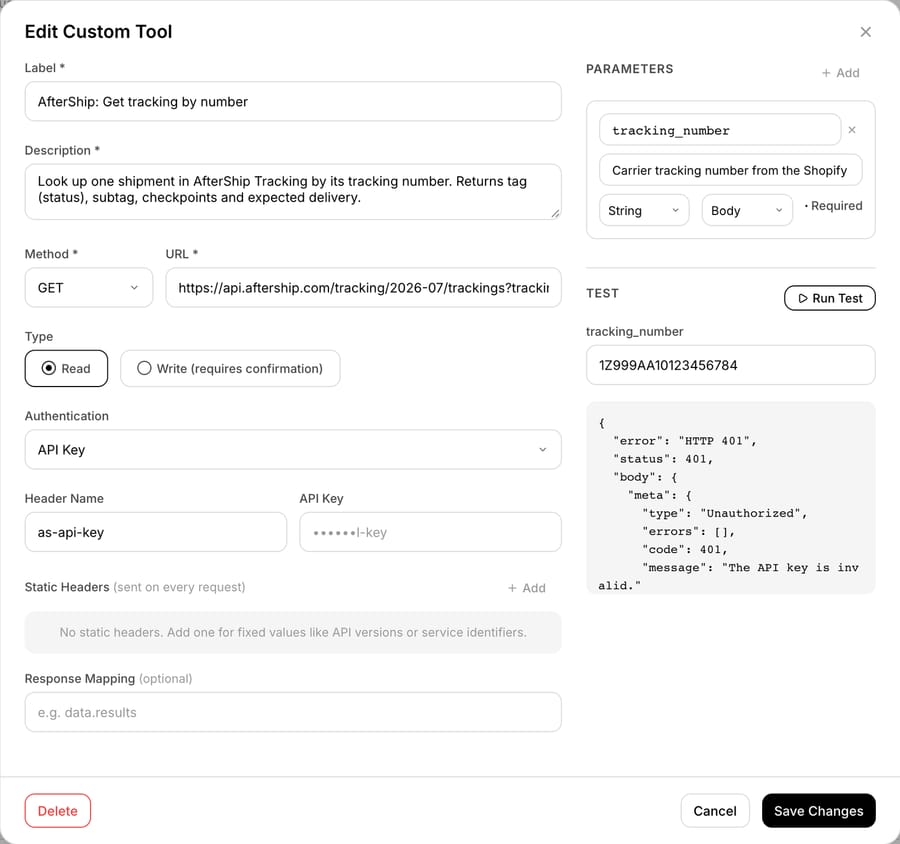
AfterShip has no built-in Macha connector. It connects through a custom API tool that Macha's team sets up during onboarding, and custom tools are included on every plan. The merchant creates an API key in AfterShip's admin under API keys (quick start), and the tool sends it with API Key authentication in a header named as-api-key. Macha's custom tools let you name the header, so nothing else is needed.
For a support agent we'd build three read tools:
- Get tracking by number:
GET https://api.aftership.com/tracking/2026-07/trackings?tracking_numbers=TRACKING_NUMBER - Find trackings by email:
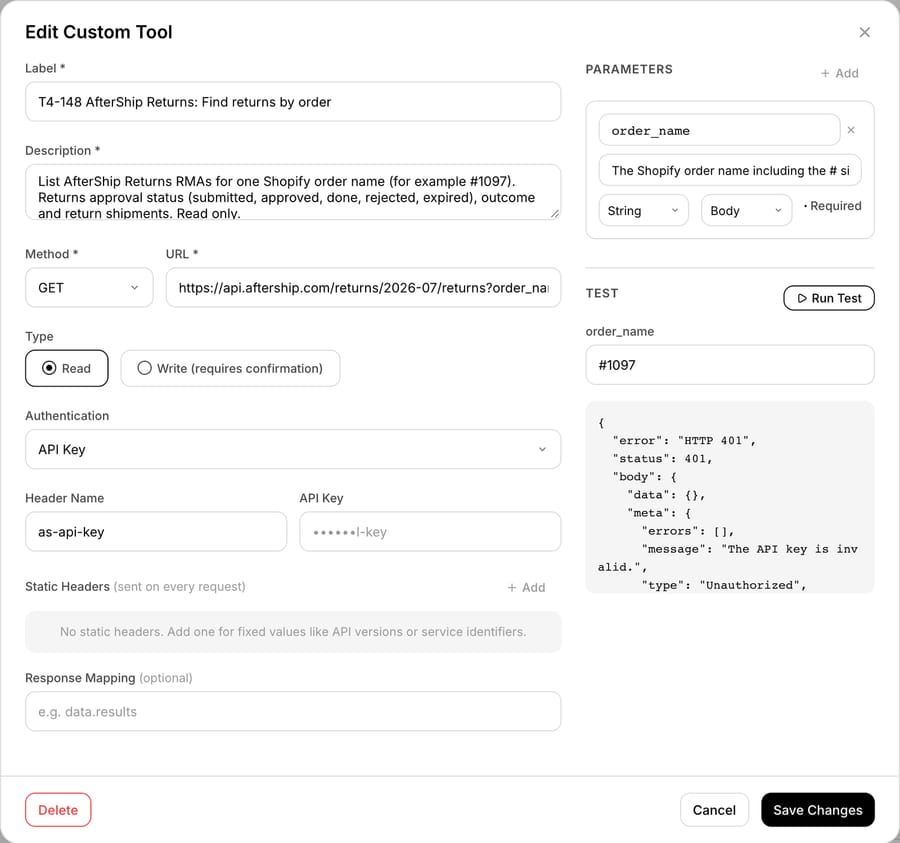
GET .../trackings?keyword=EMAIL&limit=10 - Find returns by order:
GET https://api.aftership.com/returns/2026-07/returns?order_name=ORDER_NAME
We built all three on our Macha Demo test org on 28 September 2026 with a placeholder key and pressed Run Test on each. AfterShip answered all three with HTTP 401 and "message": "The API key is invalid.". That's the expected result of a fake key. It shows the requests reached AfterShip's live API with the right header, and that the Returns API shares the Tracking API's key and error envelope. It doesn't show a successful response, because we have no AfterShip Premium account.
What goes wrong, in the order we'd expect to hit it:
- The plan. API keys come with Tracking Premium ($59 a month for 6,000 shipments a year on monthly billing) and Returns Premium (from $99 a month for 1,200 returns a year), per AfterShip's Tracking and Returns pricing pages. On Essentials there is no key to paste.
- Rate limits. Since version 2024-07, AfterShip limits each Tracking endpoint separately: Get trackings allows 6 requests a second, Get a tracking by ID 5, Create a tracking 20 and Detect courier 3, with a 429 and
X-RateLimit-Resetwhen you go over (rate limit). At 6 a second, that's 360 searches a minute, or about 180 tickets a minute if each ticket needs an email search and a follow-up read. A support agent won't hit that. A tracking-page script or data sync sharing the account might; the page doesn't say whether limits are counted per key or per account. The Returns API still uses the older limit of 10 requests a second per organization (Returns rate limit). - The version in the path. Both APIs put the version in the URL (
/tracking/2026-07,/returns/2026-07). AfterShip's docs site lists five Tracking versions back to 2025-01, so pin one and schedule a check when AfterShip publishes the next. - The
#in an order name. Returns filters byorder_name, such as#1097. In a URL, an unencoded#starts a fragment and the server never sees the rest. Our Run Test got a 401 before the parameter mattered, so we couldn't confirm how the tool encoded it; test this on a real key, and send%231097if needed. - The 120-day window. Old orders simply return nothing. The instruction below tells the agent to treat "no tracking found" as a handoff, never as "we have no record of your order".
- Returns' 365-day window. Get returns only answers for the past 365 days and pages at 50 returns.
Which AfterShip actions should stay with a person?
The Returns API documents plenty of writes: Create Return, Approve, Resolve and Reject a return (by RMA number or return ID), Receive items, Attach shipments, Remove or Update return items, and Record dropped-off items (Returns API reference). On the tracking side there's Update, Delete, Retrack and Mark as completed. None of those belongs in a customer-facing agent by default:
- Approving, rejecting or resolving a return moves money or stock. AfterShip's own AI routes high-risk returns "to you for the final call"; an outside agent shouldn't be looser than the vendor.
- Retracking is safe in itself, but it's capped at 3 times per tracking, and an expired tracking usually means the carrier stopped scanning. A person should look before the retries are spent.
- Editing or deleting a tracking changes what the branded tracking page shows every future customer.
Two actions are safe to automate. Reads are harmless. And the returns deep link, POST /returns/link with a required order_number plus optional customer_email and postal_code, builds a prefilled link to your returns page and changes no return (Create Returns Page Deep Link). That's the same job as Gorgias's "Send return portal link" action. If you add it, copy Gorgias's default condition into the instruction: only for orders under 30 days old, or whatever your policy says.
Here's an agent instruction for AfterShip tracking and return-status tickets, written for acting:
When a customer asks where their order or return is: get the ticket and the requester's email. If they gave a tracking number, call "AfterShip: Get tracking by number". Otherwise search Shopify orders by the requester's email, use an order only if its email matches the requester's, and take the tracking number from its fulfillment; if the order is unfulfilled, tell them it hasn't shipped yet and stop. If Shopify has no match, call "AfterShip: Find trackings by email" with the requester's email and use a result only if customers[].email equals it exactly. Answer from the tracking's tag: Pending or InfoReceived, say the carrier hasn't scanned it yet; InTransit, give the last checkpoint's city and date and the aftership_estimated_delivery_date if present; OutForDelivery, say it's arriving today; AvailableForPickup, give the pickup location; AttemptFail, explain the carrier will retry or left a notice. For Delivered that the customer says never arrived, any Exception, or Expired, don't promise a refund, reship or date: add an internal note with the tracking number, tag, subtag and last checkpoint, tag the ticket wismo_handoff, and reply that a teammate will follow up today. For returns, call "AfterShip Returns: Find returns by order" with the order name and report the approval status in plain words (submitted, approved, done, rejected or expired); never approve, reject or resolve a return. If any AfterShip tool returns an error or nothing, don't tell the customer what failed inside our systems: reply that a teammate is checking and will follow up today, add an internal note with the tool name, HTTP status and error message, and tag app_tool_error.
What happened when we ran an AfterShip agent on a test ticket?
On 28 September 2026 we ran an agent called "AfterShip tracking lookup" on our Macha Demo test org with one app tool, "AfterShip: Get tracking by number", holding a placeholder key. Its instruction included the tool-error rule that closes the instruction above. We used Macha's agent Test feature, which creates a real ticket in our d3v-macha Zendesk sandbox and dispatches the agent the way a ticket-created trigger would. Two artifacts of that feature show in the screenshot: the customer's message appears as an internal comment, and the ticket says "Via API". The agent posts as "Team Ride", the sandbox's admin user (Ride is our made-up demo brand).
Ticket #1120, "Parcel stuck?", came from a made-up customer, Ines Moreau: "My tracking number is 1Z999AA10123456784 and it has said in transit for a week. Can you check what's going on?" Here's what the agent did:
- It called the AfterShip tool with the number from the message. AfterShip's live API returned HTTP 401, "The API key is invalid."
- It replied publicly 8 seconds after the ticket was created: "A teammate is checking this for you and will follow up today." No guessed status, no delivery date, and no mention of an API error.
- It added an internal note: "App tool error during tracking lookup", the tool name, "HTTP status: 401", the error message and the tracking number.
- It tagged the ticket
app_tool_errorandwismo_ai.
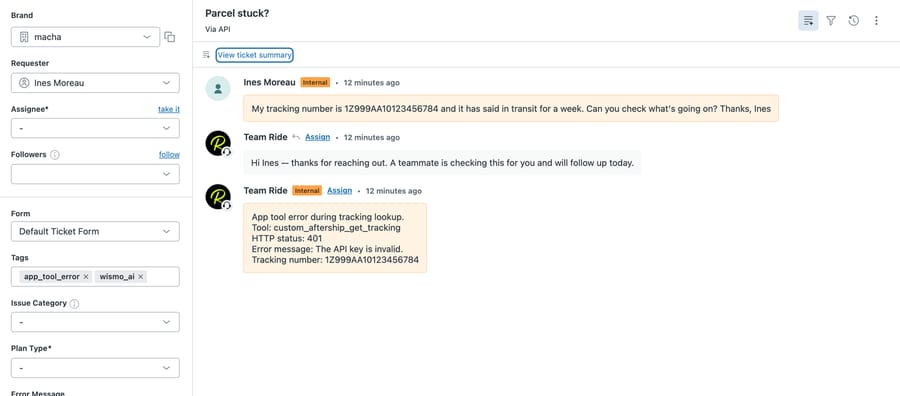
That's the behavior we wanted from a broken tool, and it's the most common way this setup fails in real life: a key someone deleted, or an account moved below Premium, where AfterShip says API access isn't available. In an earlier run on a different app, before we added it, an agent told a customer "I'm unable to access our subscription system", which is true and unhelpful.
The run doesn't prove the happy path. We never saw AfterShip return a tracking, so the status-to-reply mapping above is documented behavior, not observed behavior. The run also shows a gap worth fixing. The customer's "1Z" number is a UPS-format number, and the agent had nothing to fall back on when AfterShip failed. If your Shopify fulfillments carry the carrier's tracking URL, add a line telling the agent to share that link in the holding reply, so the customer gets something useful even while AfterShip is down.
Where Macha fits with AfterShip
Macha fits teams on Zendesk, Freshdesk, Gorgias, Front, HubSpot or Intercom whose AfterShip questions arrive in the help desk and need an answer that also checks the Shopify order, applies your handoff rules and leaves a note a teammate can act on. Macha's built-in Shopify connector reads the order and its fulfillment's tracking number. AfterShip's Tracking and Returns APIs connect through custom API tools that Macha's team sets up during onboarding with your as-api-key, and custom tools are included on every plan. The agent answers, tags and writes internal notes on the ticket through the help desk connector, and it leaves approvals, reships and refunds to your team. If you're on Gorgias and its AI Agent already answers your tracking tickets, keep it for those; see WISMO on Gorgias and WISMO on Zendesk for how each desk handles it, and Macha on Zendesk for how the agent sits on a help desk. Macha costs $299/month for 750 tickets, about $0.40 per ticket, with setup and monitoring by the Macha team included.
For how AfterShip compares with 17TRACK, CWILL and four other tracking apps on lookup keys and plan gates, see our order-tracking apps hub. For November volume planning, see holiday-peak WISMO tickets, and for the rest of the Shopify app map, which Shopify apps an AI support agent can work with.
Frequently asked questions
Does the AfterShip API need a paid plan? Yes. AfterShip's Tracking pricing page lists "API & webhooks" from the Premium plan, $59 a month for 6,000 shipments a year, and not on Essentials at $29. Returns API access starts at Returns Premium, from $99 a month for 1,200 returns a year. Enterprise plans include both.
How do you authenticate with the AfterShip API? Create an API key in the AfterShip admin and send it in a request header named as-api-key. Both the Tracking API (api.aftership.com/tracking/2026-07) and the Returns API (api.aftership.com/returns/2026-07) use the same header, and an invalid key returns HTTP 401 with "The API key is invalid."
Can the AfterShip API find a shipment by customer email or order number? By email, yes: the keyword parameter on GET /trackings searches customer email, name and phone as well as tracking number, title and order_id. By order, GET /trackings filters on order_id, a unique order identifier, which may differ from the "#1001" number a customer quotes. The Returns API filters directly by order_name and customer_email.
What are AfterShip's API rate limits? The Tracking API sets limits per endpoint: 6 requests a second for Get trackings, 5 for a single tracking, 20 for creating trackings and 3 for courier detection, returning 429 when exceeded. The Returns API allows 10 requests a second per organization.
Does Gorgias AI Agent work with AfterShip? Yes. Gorgias AI Agent reads AfterShip tracking to answer order-status questions, and AfterShip documents two Gorgias AI Agent actions for AfterShip Returns: Send return shipping status and Send return portal link. The Returns actions need an AfterShip Returns Premium or Enterprise plan.
How long does AfterShip keep tracking data? AfterShip's Get trackings reference says it only stores data for 120 days, and searches default to trackings created in the last 120 days. A tracking with no carrier information for 30 days after it was added is marked Expired and can be retracked up to 3 times.
How we researched this
- AfterShip API references, read 28 September 2026 in headless Chrome (the docs block plain HTTP clients): Tracking API 2026-07 quick start, Get trackings, Retrack, Tracking model, Delivery Statuses, Sub-statuses and rate limit; Returns API 2026-07 quick start, Get returns, deep link and rate limit. The count of 16 Tracking endpoints is every endpoint in the 2026-07 reference sidebar: 7 tracking, 2 courier, 5 courier connection, 2 estimated delivery date.
- Pricing, read 28 September 2026 on monthly billing: Tracking (Essentials $29, Premium $59 with "API & webhooks", at 6,000 shipments a year) and Returns (Essentials from $16 for 240 returns a year; Premium from $99 for 1,200 returns a year with "Returns webhooks & API"). Our earlier planning data had Returns API on Enterprise only; both the pricing page and AfterShip's 29 June 2026 help article now say Premium and Enterprise.
- Integrations, read 28 September 2026: AfterShip help article on Gorgias AI Agent and AfterShip Returns; Gorgias docs on the AfterShip app; AfterShip's Gorgias and Zendesk integration pages; the AfterShip/Gorgias press release of 18 August 2025; aftership.com/ai. The 95% accuracy, 25% and 58% figures and "20K+ customers" are AfterShip's own claims.
- Popularity: Shopify App Store listings read on 28 September 2026 (AfterShip Order Tracking 4.6 from 1,505 reviews; AfterShip Returns & Exchanges 4.7 from 1,542).
- Arithmetic: 6 requests a second × 60 = 360 Get trackings calls a minute; at two AfterShip calls per ticket, 360 ÷ 2 = 180 tickets a minute.
- What we ran live, and what we didn't: on 28 September 2026 we ran the "AfterShip tracking lookup" agent on our Macha Demo test org through Macha's Test feature, which created ticket #1120 in our d3v-macha Zendesk sandbox. We also built three AfterShip custom tools with a placeholder key and pressed Run Test on each; all three got HTTP 401. We have no AfterShip account, so we never saw a successful response, and the status mapping and instruction are built from AfterShip's documentation. Gorgias AI Agent's AfterShip actions are described from AfterShip's and Gorgias's documentation; we didn't run them. Ines Moreau, the tracking number and the ticket are synthetic.
AfterShip merchants can start a trial with $50 of free usage (about 125 tickets), no credit card, no time limit, and Macha's team will set up the AfterShip tools during onboarding. Tiers are on the pricing page.
Resolve tickets automatically with AI agents
Macha's AI agents work on top of the help desk you already use — no code.