Shopify
 Stripe
 Slack
Slack Notion
 Google Workspace
 Confluence

How to Automate Refunds in Zendesk (2026): Native Options vs AI Agents, Tested Live


Zendesk automates Shopify refunds natively through Copilot's auto assist, which follows a written refund procedure and, as Zendesk recommends for refunds, waits for an agent to approve each one, at $50 per agent a month on Suite Growth or higher. Action flows can also call a Shopify Create refund step, and the Shopify sidebar app lets agents refund in one click. If you want refunds issued with no agent clicking anything, you need an AI agent that can write to Shopify or Stripe from the ticket: Zendesk's own AI agents with custom actions you build, eesel AI, My AskAI, Fini, Yuma, or Macha, which starts at $299/month for 750 tickets with setup done for you. Prices below were checked on October 8, 2026, and we ran a refund agent against our own Zendesk sandbox and Shopify test store to show what each step looks like.
Key takeaways
- Zendesk's native refund automation is Copilot auto assist, which cancels and refunds Shopify orders from a written procedure, with Zendesk recommending agent approval for each refund, at $50 per agent a month.
- On our Zendesk sandbox on October 8, 2026, the action flows Shopify connector listed 17 actions, including Create refund and Cancel order, behind a separate Shopify connection.
- Macha's built-in Shopify Create Refund refunds everything left on an order, including shipping, so partial Shopify refunds go to a person, while its Stripe refund tool accepts a partial amount.
- In our test, a Macha agent refused to refund order #1097 because the ticket's email didn't match the order, then wrote an internal note and added the refund_review tag in Zendesk.
- Macha starts at $299/month for 750 tickets, and done-for-you setup plus a dedicated success manager come on the trial and every plan.

Can Zendesk automate refunds on its own?
Partly. Zendesk can take the refund action in Shopify without anyone opening the Shopify admin, but its native options keep a human on the button for anything customer-initiated. Here is every option we found, native ones first.
| Option | Native or add-on | Who presses "refund" | Partial refunds | Setup | Price (checked Oct 8, 2026) | Where it falls short |
|---|---|---|---|---|---|---|
| Shopify integration sidebar app | Native, Support or Suite Team and up | The agent | Yes, by line item and shipping | Self-serve, minutes | Included in the plan ($19/agent/month Support Team, $55 Suite Team, billed yearly) | Every refund is a manual click |
| Copilot auto assist with a refund procedure | Native add-on | The agent approves each suggestion (Zendesk's advice for refunds; it can be pre-approved) | Yes, selected items | Self-serve: write and test a procedure | Copilot $50/agent/month on top of Suite Growth or higher (Suite Professional is $115) | One approval per refund if you follow Zendesk's advice; priced per seat |
| Action flows with the Shopify connector | Native | The flow, once you build and activate it | Not checked (we didn't connect it) | Self-serve builder | Steps on external connectors count toward your action limit | You build the logic, eligibility checks and error handling yourself |
| Zendesk AI agents with custom actions | Native | The AI agent, through an API call or action flow you configure | Whatever your API call does | You build the Shopify API action | 5 automated resolutions per agent/month on Team plans, 10 on Professional, then $1.50 committed or $2.00 pay as you go | No ready-made refund skill; you wire the action or flow yourself |
| ChargeDesk (Stripe and others) | Marketplace app | The agent | See vendor | Self-serve | From $29/month | Sidebar tool, no automation |
| Zapier (Zendesk trigger + Stripe or Shopify) | Third-party automation | A Zap you build | Whatever your HTTP call sends | Self-serve | Zapier plan | Neither Zapier's Stripe nor its Shopify app lists a refund action, so you call the refund API yourself |
| eesel AI | Third-party AI agent | The AI agent | See vendor | Self-serve | $299/month for 500 tickets | You build and tune it |
| My AskAI | Third-party AI agent | The AI agent | See vendor | Self-serve | $199/month for 1,000 tickets | You build and tune it |
| Fini | Third-party AI agent | The AI agent | See vendor | Implementation included | $0.89 per resolved ticket (Growth) | Priced per resolution |
| Yuma | Third-party AI agent | The AI agent | See vendor | Sales-led | Not published (performance-based) | No public price |
| Macha | AI agent layer on your help desk | The AI agent | Stripe yes; Shopify full refunds only | Done for you by the Macha team, with a dedicated success manager, included | $299/month for 750 tickets (about $0.40 per ticket) | A partial Shopify refund has to go to a person |
"See vendor" means the vendor's public pages didn't say whether a partial refund is supported, so we didn't guess.
How do you refund a Shopify order from inside Zendesk without AI?
Zendesk's own Shopify integration is the place to start, and for a small team it may be all you need. It's available on Support and Suite Team plans and up, and it puts the customer's Shopify orders in the ticket sidebar. According to Zendesk's guide to using the Shopify integration, an agent can click Full refund, which selects every line item and shipping and returns the items to stock, or pick quantities per line item and tick a shipping checkbox for a partial refund.
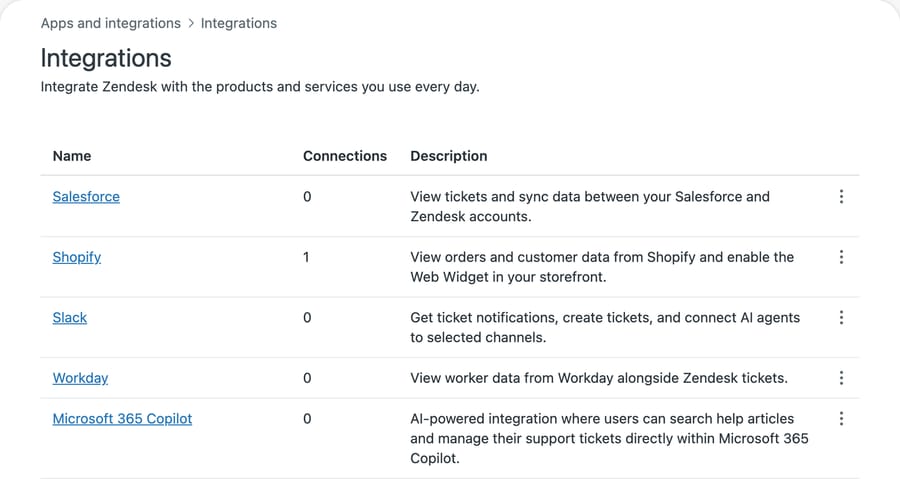
Setup takes a few minutes:
- In Admin Center, go to Apps and integrations > Integrations and open Shopify.
- Connect your store and approve the permissions in Shopify.
- Turn on the sidebar app for agents, and check that the roles who should refund can edit tickets.
- Add a macro for the reply that follows a refund, so the wording and timeline stay consistent.
When this is enough: if refunds are a handful of tickets a day and an agent already reads each one, a sidebar click is faster than any automation you'd have to configure and monitor. Zendesk even publishes an Explore recipe for reporting on refunds and cancellations made through the integration.
Where it stops: a person still reads the ticket, checks the policy and clicks the button. The integration moves the click into Zendesk; it doesn't remove it.
How does Zendesk's auto assist refund Shopify orders?
Auto assist is part of the Copilot add-on, which costs $50 per agent a month billed yearly on the Zendesk pricing page. Zendesk's actions article puts it on Suite Growth, Professional, Enterprise or Enterprise Plus, and lists three prebuilt Shopify actions: look up an order, cancel and refund an entire order, and refund selected items.
The work happens in a procedure, a plain-language policy auto assist follows. Zendesk's workflow recipe for canceling and refunding a Shopify order gives a ten-step example: verify the customer by email and order number, check the order is unfulfilled or partly fulfilled, ask whether to cancel all or some items, confirm, cancel, refund, then tell the customer the refund takes 3 to 5 days. Two rules in it matter for refunds: only unfulfilled items can be canceled, and gift cards can't be.
Setup, per Zendesk's own steps:
- Connect the Shopify integration (previous section).
- Turn on and configure auto assist.
- Write the refund procedure.
- Test it with Zendesk's procedure testing tool before agents see it.
How automated this gets depends on approval. In the recipe, auto assist suggests the cancellation and refund, and "the agent accepts the suggestion in the Agent Workspace" before it runs in Shopify. Zendesk lets you pre-approve actions so they execute without that click, but its own guidance says actions that write data, "such as an action that refunds an order, should be marked as agent-approved." Read-only lookups are the ones it suggests pre-approving.
So auto assist, run the way Zendesk advises, cuts the research out of a refund ticket and leaves the decision with the agent. Per-seat pricing also means you pay $50 for every agent on the Copilot plan, including the ones who never touch a refund. That fits Zendesk's incentive: Copilot is sold as an agent productivity tool and priced by the agent, so the product is built around a human approving the work.
Can action flows or Zendesk AI agents issue refunds without an agent?
Yes, if you build it. Zendesk announced new Shopify actions for action flows on September 3, 2026, describing a workflow that can "cancel an order or initiate a refund based on an approved request." On our d3v-macha sandbox we opened Apps and integrations > Action flows > Create flow, added a Run on demand trigger and searched the step library for Shopify. It listed 17 actions, including Create refund, Cancel order, Lookup order and Read return eligibility.
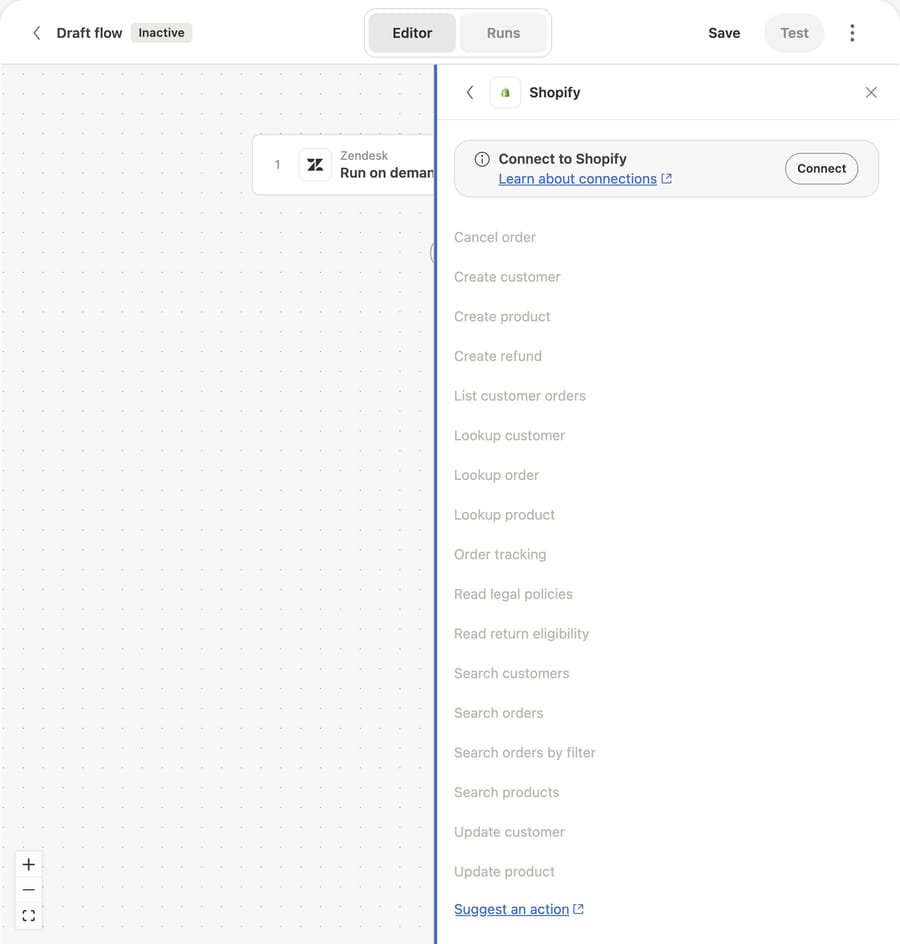
Three things we saw on our instance that you should know before planning around it:
- The flow's Shopify connector needs its own connection, separate from the sidebar integration. Our sandbox has the integration connected and still showed "Connect to Shopify" in the flow builder. We didn't connect it, so we didn't run a refund through a flow.
- The Run on demand trigger said: "Agents and Zendesk AI can invoke this flow if they have permission." That is the route by which an AI agent or an agent's click can start a refund flow.
- A notice on the Action flows page said that since August 13, action credits apply only to external connectors and custom actions. A Shopify step is an external connector, so each refund step counts toward your plan's action limit.
The customer-facing Zendesk AI agents are the other route. Zendesk's article on creating custom actions for auto assist, AI agents and action flows is the documented path: you define an HTTP call to Shopify's refund API, and the AI agent calls it. You write the eligibility logic, handle Shopify's errors and decide what happens on a partial request. Every conversation the agent resolves counts as an automated resolution: per the Zendesk pricing page, 5 per agent a month are included on Team plans and 10 on Professional, then $1.50 each committed or $2.00 pay as you go (US prices).
What about Stripe refunds in Zendesk?
If you bill through Stripe rather than Shopify, Zendesk has no prebuilt Stripe refund action in auto assist. The common native-adjacent route is a marketplace sidebar app. ChargeDesk lists plans from $29 a month (Hobby, up to 3 agents) to $749 (Enterprise) and lets agents refund charges and cancel subscriptions from the help desk sidebar. Like the Shopify sidebar, an agent still clicks.
Zapier is the no-code route people try next, and it stops short. Zapier's Zendesk app can trigger on "New Tag Added to Ticket", but when we checked on October 8, 2026, neither its Stripe app nor its Shopify app listed a refund action (Stripe has a "New Refund" trigger, which only fires after a refund happens). A Zap that refunds has to send its own HTTP request to the Stripe or Shopify refund API, with the eligibility checks built as filter steps.
For automation, Stripe's own refund API takes an amount, so partial refunds are straightforward for any AI layer that calls it directly. Macha's built-in Stripe connector has a Create Refund tool that refunds a payment in full or for a partial amount. We cover duplicate charges and failed payments in our Stripe billing guide.
Which AI agents can process refunds in Zendesk?
These are the third-party options that state they take refund actions on Zendesk tickets. Prices are from each vendor's pricing page on October 8, 2026.
eesel AI. eesel's Shopify integration docs list Refund Order ("Refunds an order"), Cancel Order for unfulfilled orders, Create Return and Update Shipping Address. eesel's pricing page lists $299 a month for 500 credits, where a ticket or a chat is one credit, and a free plan of 100 credits. We compare it in more depth in our eesel alternatives guide. It's self-serve: you connect, write the rules and tune it.
My AskAI. The Pro plan is $199 a month with 1,000 tickets included and about $0.12 per extra ticket, and lists "AI Tasks e.g. order refunds" among its features. It's the cheapest per ticket here at that volume. It's self-serve, with a "60% AI resolution or your money back" guarantee on its pricing page.
Fini. Fini prices per resolved ticket: $0.89 on Growth (up to 3,000 tickets a month), $0.69 on Scale, $0.49 on Enterprise, with "Implementation Included" on every plan. Fini publishes refund-automation guides for Zendesk, and its setup is the closest to done-for-you among the four. You pay only for tickets that count as resolved, so read how Fini defines a resolution before you compare invoices.
Yuma. Yuma says it works inside Gorgias, Zendesk and seven other help desks and takes actions in Shopify, Recharge and Loop, including refunds and order edits. Its pricing page describes performance-based pricing without numbers; you book a demo to get a quote.
We didn't run any of these four. The descriptions above come from their own pages, and the partial-refund column in the table says "See vendor" where those pages were silent.
What happened when we ran a refund agent on our own Zendesk?
We built the agent on our Macha Demo org, which is connected to our d3v-macha Zendesk sandbox and a Shopify test store. The test store had two orders we could use; we picked #1097, paid, unfulfilled, $24.20. Nothing was refunded: we rejected every refund confirmation.
The agent. We named it "P10-02 Zendesk refunds (Shopify)" and attached six built-in tools: Get Order, Search Orders and Create Refund from Shopify, and Get Ticket, Add Internal Note and Update Ticket Tags from Zendesk. No Public Reply tool, so every customer-facing word lands as an internal note first. This is the instruction, word for word:
You handle refund requests on Zendesk tickets for our Shopify store. 1. Read the ticket with Get Ticket. Find the order number (for example #1042). If there isn't one, add an internal note asking the team to request it, tag the ticket refund_needs_info, and stop. 2. Look up the order with Get Order. If the order isn't found, or the email on the order doesn't match the ticket requester's email, don't refund. (When a teammate runs you from chat, they confirm the customer's identity in their message instead.) Add an internal note saying the details don't match and tag the ticket refund_review. 3. Refund the order only if all of these are true: it is paid, nothing on it has been refunded yet, the total is $150 or less, and the customer wants the whole order refunded. 4. Anything else goes to a person: a partial refund (one item out of several, or shipping only), an order over $150, an order that is already partly refunded, or a customer who is angry or mentions a chargeback. Add an internal note with the order number, total, what the customer asked for and why you didn't refund it, and tag the ticket refund_review. 5. To refund, use Create Refund. It refunds everything left on the order, including shipping. Never use it when the customer asked for part of an order. 6. After a refund, add an internal note with the order number, the amount refunded and today's date, tag the ticket refund_processed, and write the reply to the customer in the same note: the refund is issued to the original payment method and usually shows up in 5 to 10 business days. Never tell a customer a refund is done unless Create Refund succeeded.
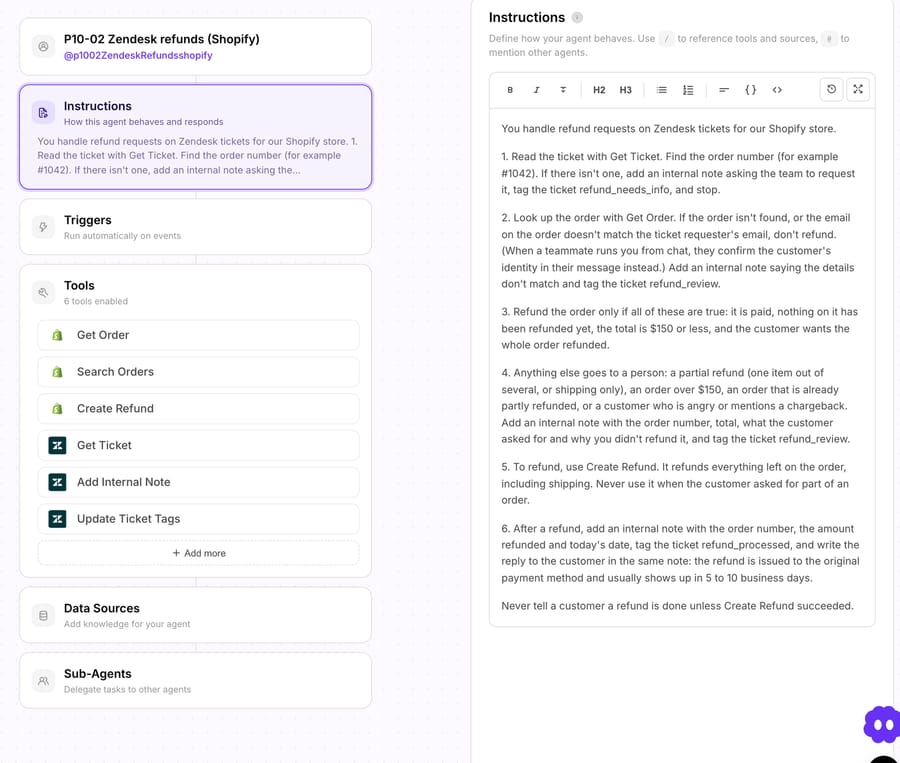
Step 5 is there because of how the Shopify tool works. Macha's Shopify connector has two write tools that move money: Create Refund and Cancel Order, which by default refunds to the original payment method and restocks the items. Cancel Order fits the "cancel before it ships" case Zendesk's recipe is built around; we cover it in our order cancellation guide. Create Refund refunds all remaining refundable items and shipping, using Shopify's suggested refund. It can't refund one item or a set amount. A team that gives partial Shopify refunds needs a person for those, or Zendesk's sidebar, which can.
Run 1: an eligible refund. In the agent's Try it chat we wrote: "I've checked the customer's identity" plus a customer message asking for a refund on #1097 because of a wrong size. The agent looked up the order, confirmed it was paid, unrefunded and under $150, and called Create Refund. The call stopped at a confirmation card: "This will issue a real refund to the customer's original payment method. Refunds cannot be reversed." We clicked Reject. The agent then reported that the refund "was not completed because the refund action was declined" and said it had not told the customer anything.
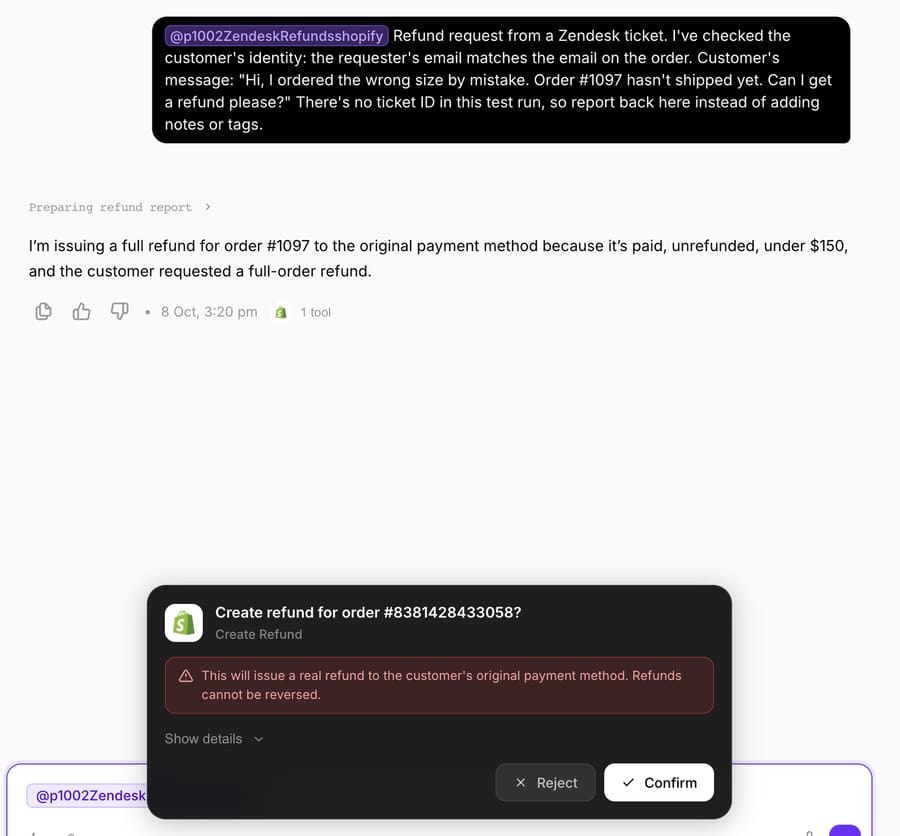
One detail for whoever approves these cards: the card names the order by Shopify's internal ID (#8381428433058), not the #1097 order name the customer wrote.
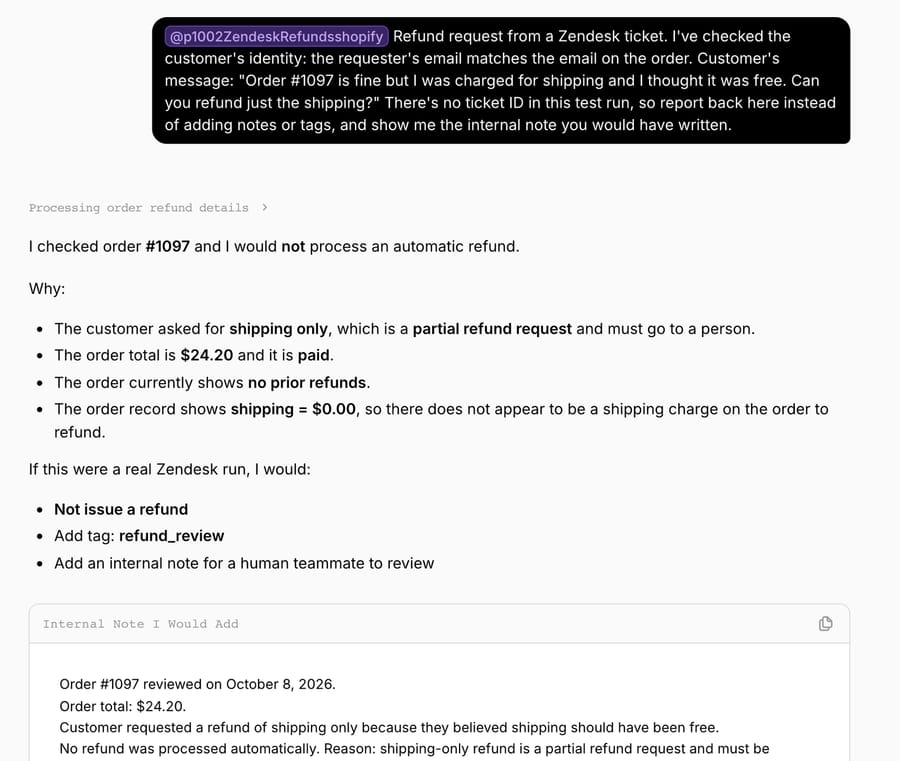
Run 2: a partial request. Same order, but the customer asked for "just the shipping" back. The agent didn't call Create Refund. It said shipping-only is a partial refund and goes to a person, and it added something we hadn't asked for: the order showed $0.00 shipping, so there was nothing to refund.
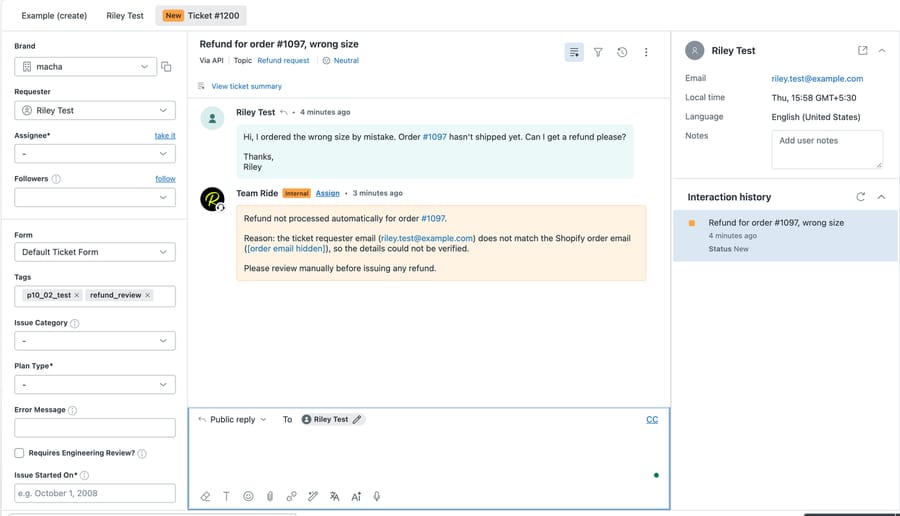
Run 3: a real Zendesk ticket. We created ticket #1200 on d3v-macha from a made-up requester ([email protected]) asking for a refund on #1097, then told the agent "Handle Zendesk ticket 1200." It read the ticket, looked up the order, found the requester's email didn't match the order's, and refused. It then asked for two confirmations, one to add an internal note and one to add the refund_review tag. We confirmed both, since d3v-macha is our sandbox.
A run on ticket #1197, which had no order number, went down step 1 instead: an internal note asking the team to get the order number.
How this differs from production. Our sandbox's Zendesk webhooks point at a development server, so a new d3v ticket doesn't wake our production agent; that's why we started each run from the dashboard. The confirmation cards are a chat feature. On a live ticket the agent runs from a Zendesk trigger, and a Write tool executes directly when the instruction allows it, which is why the rules in steps 3 and 4 do the safety work.
Where Macha fits
Macha fits teams already running Zendesk, Freshdesk, Gorgias, Front, HubSpot or Intercom who want refund tickets handled inside the ticket through its Zendesk connector, with Shopify or Stripe actions, without building custom API actions themselves. It's the done-for-you option: the Macha team analyzes your past tickets, builds the knowledge base and the refund agent on your existing help desk, and runs it in safe mode, with drafts as internal notes, until the drafts are right. That work is included on the trial and every plan. Paid plans run at about $0.40 per ticket (pricing), which includes setup and a dedicated success manager who handles your changes, such as a new refund cap or a new category. The same agent usually picks up order-status questions next; see WISMO automation in Zendesk and which AI agent suits a Shopify brand on Zendesk.
On price: $299 gets you 750 tickets on Macha and 500 on eesel, $0.40 a ticket against $0.60, with setup done for you included. My AskAI's Pro plan is cheaper per ticket at 1,000 tickets; what it doesn't include is someone building and tuning the agent for you. Fini also includes implementation, priced per resolution.
Macha isn't the right pick if most of your refunds are partial Shopify refunds, because its Shopify tool refunds whole orders. Zendesk's sidebar or auto assist handles line items.
Choosing between them
- Under a few refund tickets a day, one or two agents: the Shopify sidebar app. No add-on, no rules to maintain.
- Many refund tickets, but you want a human on every refund: Copilot auto assist with a procedure. At 5 agents that's $250 a month on top of your Suite plan, and each refund still needs a click.
- You want refunds issued with no click, and you have someone to build API actions: Zendesk AI agents with custom actions, or action flows. Model the resolution bill: 5 agents on Professional include 50 automated resolutions; 500 resolutions a month means 450 extra, which is $675 committed or $900 pay as you go.
- You want refunds issued with no click and someone else to build it: a third-party AI agent. Macha counts every ticket it handles ($299/month for 750 tickets), Fini charges per resolved ticket, and eesel and My AskAI sell ticket bundles you configure yourself.
The pricing units pull in different directions. Per-seat Copilot charges for agents who never refund anything. Per-resolution pricing earns the vendor more as more tickets count as resolved, so check how "resolved" is defined before you sign. Per-ticket pricing charges for tickets the agent hands to a person, too.
Rolling out refund automation safely
- Start in safe mode. Give the agent no public reply tool for the first weeks, as we did. It drafts the customer reply in an internal note, and a person sends it. Our guide to drafting replies for agent review covers that setup.
- Put the money rules in the instruction, as numbers. A cap ($150 in our test), "whole order only" for Shopify, and "no prior refunds", which is the guard against refunding the same order twice when a customer writes in again. Then list what always goes to a person: partial refunds, chargebacks, angry customers.
- Verify identity before any write. Matching the requester's email to the order email is the simplest check, and in our Run 3 it stopped a refund to the wrong person.
- Tag every outcome. refund_processed, refund_review and refund_needs_info give you a Zendesk view per outcome and a weekly count without opening tickets.
- Check the help desk, not the chat log. Read a sample of tagged tickets each week and confirm the note, the tag and the Shopify refund all match.
For the Shopify mechanics in more depth, see automating Shopify refunds safely with confirmation and our help-desk-neutral guide to processing refund requests automatically. Returns and exchanges on Zendesk have their own guide, and for "where is my refund?" follow-ups after the refund, our refund-status guide.
Frequently asked questions
Can Zendesk AI process refunds without a human? It can, but Zendesk advises against it in auto assist: a pre-approved action runs without an agent, yet Zendesk recommends marking refund actions as agent-approved. Other routes to a refund with no human click are action flows or a customer-facing AI agent calling a custom action you build, or a third-party AI agent that writes to Shopify or Stripe.
Does Zendesk refund automation need the Copilot add-on? Auto assist does: Copilot is $50 per agent a month, billed yearly, and Zendesk lists auto assist actions on Suite Growth and higher. The Shopify sidebar app doesn't need Copilot; it's available on Support and Suite Team plans and up.
Can an AI agent issue a partial Shopify refund from Zendesk? Zendesk's auto assist can refund selected items. Macha's Shopify Create Refund can't: it refunds everything left on the order, including shipping, so partial requests go to a person. Macha's Stripe Create Refund does accept a partial amount.
What does refund automation in Zendesk cost per ticket? It depends on the unit. Zendesk AI agents charge $1.50 per automated resolution committed ($2.00 pay as you go) after the included allowance; Fini charges $0.89 per resolved ticket on Growth; Macha is about $0.40 per ticket, counted on every ticket it handles, including setup.
Does it work with Stripe as well as Shopify? Yes. ChargeDesk adds a Stripe refund button to the Zendesk sidebar from $29 a month. Macha's built-in Stripe connector can look up payments and refund in full or part from the ticket.
Which option is best for a small team? Under a few refunds a day, Zendesk's Shopify sidebar app, which comes with Team plans and up. If you'd rather not build or tune an AI agent yourself, Macha's team sets it up for you on the trial: $50 of free usage (about 125 tickets), no credit card, no time limit.
How we researched this
- Read on October 8, 2026: Zendesk help articles on the auto assist Shopify refund recipe, actions for auto assist and action flows, the September 3, 2026 Shopify actions announcement, using the Shopify integration and custom actions; zendesk.com/pricing; the pricing pages of Fini, My AskAI, eesel, Yuma and ChargeDesk; eesel's Shopify integration docs.
- Captured on October 8, 2026 on our d3v-macha sandbox: the Integrations page and the action flow builder's Shopify step list. We didn't connect Shopify to action flows or turn on auto assist, so those were documented, not run.
- Run live on October 8, 2026: a test agent on our Macha Demo org, started from its Try it chat, against the connected Shopify test store and made-up d3v-macha tickets #1195, #1197, #1198 and #1200. Every Create Refund confirmation was rejected; the only writes were internal notes and tags on sandbox tickets. Requesters are made up, and we hid the test order's email in the ticket screenshot.
- Not run: eesel, My AskAI, Fini, Yuma and ChargeDesk. Their capabilities come from their own pages.
- Arithmetic: 5 agents × $50 = $250 a month for Copilot. 5 agents × 10 included resolutions on Professional = 50; 500 − 50 = 450 extra; 450 × $1.50 = $675, 450 × $2.00 = $900. $299 ÷ 750 = $0.40 a ticket on Macha; $299 ÷ 500 = $0.60 on eesel.
If you want this running on your own Zendesk, start a Macha trial and the team will build the refund agent with you, or see how Macha works on Zendesk and the Zendesk AI automation hub.