Shopify
 Stripe
 Slack
Slack Notion
 Google Workspace
 Confluence

27 Refund Email Templates: Approve, Partial, No Refund, Store Credit, Warranty and Chargebacks (2026)


A card refund issued through Stripe reaches the customer's statement about 5 to 10 business days later, and most "where is my refund?" tickets start because the first refund email didn't say so. Below are 27 refund email templates for every answer a support team gives: approve, partial, no refund, store credit, return label, warranty, SaaS subscription and annual plan refunds, and what to write while a chargeback is open. In each one the policy sentence is in bold. Copy that sentence exactly and adapt everything around it.
Key takeaways
- This page has 27 refund email templates in 10 situations, each with a subject line or a reply-in-thread note, a tone note, and the policy sentence in bold so the rule stays fixed while the tone changes.
- Stripe says a card refund appears on the customer's statement about 5 to 10 business days after it's issued, and a trace reference can take up to 7 business days.
- While a card dispute is open, Stripe doesn't let you refund outside the dispute process, so the refund email has to explain the dispute instead of promising money.
- Canceling a Stripe subscription through the API with proration leaves the unused time as account credit; a $1,188 annual plan canceled with 270 days left works out to $878.79, returned as cash only if you issue a refund.
- In an October 13, 2026 test, a Macha agent given 4 of these templates found a duplicate $49 test charge in Stripe, drafted the matching email and stopped at a confirmation card before refunding.
Which refund email template should you use?
Find the answer you're giving, then jump to the number. Every template works as an email; the ones marked "email or chat" are short enough for a chat reply too.
| Situation | Template | Slice | Channel | Tone |
|---|---|---|---|---|
| Request just arrived, decision pending | #1 Refund request received | General | Email or chat | Calm, specific |
| You need one fact before deciding | #2 One detail before we refund | General | Email or chat | Brief |
| Refund approved in full | #3 Full refund issued | General | Plain, warm | |
| Customer was charged twice | #4 Duplicate charge refunded | SaaS | Accountable | |
| Refund approved once the item is back | #5 Approved, return first | Ecommerce | Clear | |
| Part of an order went wrong | #6 Partial refund for one item | Ecommerce | Factual | |
| Service was down or degraded | #7 Partial refund for downtime | SaaS | Accountable | |
| Outside policy, refunding anyway | #8 One-time goodwill refund | General | Generous, firm | |
| Past the refund window | #9 No refund: outside the window | General | Kind, firm | |
| Product was used or consumed | #10 No refund: used service | SaaS | Kind, firm | |
| Final sale item | #11 No refund: final sale | Ecommerce | Kind, firm | |
| Saying no but offering something | #12 No refund, here's what we can do | General | Helpful | |
| Credit instead of cash | #13 Store credit offer, #14 Account credit | Ecommerce, SaaS | Choice-led | |
| Return label needed | #15 Return label, #16 Return received | Ecommerce | Step by step | |
| Warranty claim | #17 to #19 | General | Factual | |
| Monthly plan refund | #20 Monthly plan, no partial month | SaaS | Plain | |
| Annual plan refund | #21 Annual plan, prorated | SaaS | Numbers first | |
| Surprise renewal charge | #22 Renewal refunded | SaaS | Apologetic | |
| Fewer seats mid-term | #23 Seat downgrade credit | B2B SaaS | Precise | |
| Customer threatens or opens a chargeback | #24 to #26 | General | Neutral | |
| Refund issued but not visible | #27 Where's my refund | General | Email or chat | Patient |
Shorter one-line versions of some of these live on our canned responses examples page. This page has the full emails, plus the situations those one-liners skip: warranty claims, prorated annual plans and open chargebacks. Every template here is written from the company's side; if you're asking a company for a refund yourself, the same rules apply in reverse. Give the order number, the date, the amount, the reason and the outcome you want, in one message.
How should a refund email be structured?
Every refund email has two layers, and most bad ones come from mixing them.
- The policy layer says what happens to the money: the amount, where it goes, when it arrives and, for a no, which rule applies. These sentences should read the same in every email your team sends, so the customer who compares notes with a friend gets the same answer. They're in bold in every template below.
- The tone layer is everything around it: the greeting, the acknowledgment of what went wrong, the alternative you offer. This is the part a person adapts to the customer.
When a rule and an apology share a sentence, the agent softens the rule to soften the apology. "We'd normally only refund within 30 days, but let me see what I can do" is a sentence that creates a second ticket and an exception nobody approved. The incentive runs one way: the person writing wants the customer to stop being upset, and the cheapest lever in the sentence is the rule. Fixing the policy wording takes that lever away and leaves them free to be as kind as they like everywhere else.
Here's the same denial in three tones. Only the bold line is identical.
| Tone | Opening | Policy line (fixed) | Close |
|---|---|---|---|
| Warm | "I'm sorry the [Product] didn't work out for you." | Our refund window is [Refund window] from delivery, and this order was delivered on [Delivery date], so it isn't eligible for a refund. | "I'd still like to help, so here's what I can do: [Alternative]." |
| Neutral | "Thanks for getting in touch about order [Order number]." | Same | "If you'd like [Alternative], reply and I'll set it up." |
| Chat | "Thanks, I've checked the order." | Same | "I can offer [Alternative] instead. Want me to do that?" |
Three more rules run through the templates:
- Name the amount, the method and the time. "Your refund is on its way" invites a follow-up. "[Amount] back to the card ending [Last 4], usually 5 to 10 business days" doesn't.
- Say no in the first two sentences. Burying a denial under three paragraphs of empathy reads as stalling.
- Give a no somewhere to go. A denial with an alternative (credit, repair, a canceled renewal) closes more often than a denial alone.
Acknowledgment emails for refund requests
1. Refund request received (general, email or chat)
Subject: (reply in thread)
Tone: Calm and specific. Tell them when they'll hear back, not that you "value their feedback".
Hi [First name],
Thanks for letting us know about [Order number or charge]. Refund requests are reviewed against our refund policy ([Policy link]) within [Number] business days, and you'll get the decision in this thread.
If you have photos or anything else that helps, reply with them now and I'll add them to the request.
[Agent name]
2. One detail before we refund (general, email or chat)
Subject: (reply in thread)
Tone: Brief. Ask for everything you need in one message.
Hi [First name],
I can look at this for you. To match the refund to the right payment, I need [Detail, e.g. the email used at checkout, or the last 4 digits of the card charged].
Once I have that, I'll check the charge and reply with a decision the same day.
[Agent name]
Refund approved emails
3. Full refund issued (general, email)
Subject: Your refund of [Amount] is on its way
Tone: Plain and warm. The numbers are the reassurance.
Hi [First name],
I've refunded your [Order number or plan name]. We've issued [Amount] back to the [Card brand] card ending [Last 4] on [Date]. Card refunds usually appear on your statement within 5 to 10 business days, depending on your bank.
Sorry this one didn't work out. If it hasn't appeared by [Date + 10 business days], reply here and I'll send you the bank reference for it.
[Agent name]
4. Duplicate charge refunded (SaaS, email)
Subject: We charged you twice: [Amount] refunded
Tone: Accountable. Say it was your mistake, once, without hedging.
Hi [First name],
You're right, and I'm sorry: you were charged [Amount] twice on [Date] for your [Plan name]. That was our error.
We've refunded the second charge of [Amount] to the card ending [Last 4]. It usually appears within 5 to 10 business days. Your subscription and its next billing date, [Next billing date], are unchanged.
[Agent name]
Our guide to resolving duplicate-charge complaints covers the trap in this one: an authorization hold looks like a second charge on a bank app, and refunding it refunds money you never captured.
5. Approved, return first (ecommerce, email)
Subject: Your refund for order [Order number] is approved
Tone: Clear. The customer's next step goes first.
Hi [First name],
Good news: your refund for [Product name] is approved.
We'll refund [Amount] to your original payment method within [Number] business days of receiving the item. Please send it back by [Return-by date] using the label below.
[Label link or attachment]
[Agent name]
Partial refund emails
A partial refund needs the arithmetic on the page. If the customer has to work out why they got $18.40 instead of $46, they'll write back to ask.
6. Partial refund for one item (ecommerce, email)
Subject: Partial refund for order [Order number]
Tone: Factual. Show the calculation.
Hi [First name],
Thanks for the photos of the [Product name]. I'm sorry it arrived [Problem].
We've refunded [Amount] to your original payment method: [Item price] for the [Product name] plus [Shipping share or "no shipping, since the rest of the order arrived fine"]. The rest of the order, [Total kept], isn't affected.
You don't need to send the damaged item back.
[Agent name]
7. Partial refund for downtime (SaaS, email)
Subject: Credit for the [Date] outage on your account
Tone: Accountable. Tie the amount to the hours.
Hi [First name],
On [Date], [Product] was unavailable for [Duration], and your team couldn't [Specific effect].
Under our [Service level agreement or credit policy] ([Policy link]), that outage qualifies for [Percentage] of your monthly fee. We've refunded [Amount] to the card ending [Last 4]; it usually appears within 5 to 10 business days.
What we've changed since: [One-sentence fix]. The incident report is here: [Link].
[Agent name]
8. One-time goodwill refund (general, email)
Subject: (reply in thread)
Tone: Generous and firm. Say it's an exception so it doesn't become the policy.
Hi [First name],
This [Order or charge] is outside our refund window, but given [Reason, e.g. you've been a customer for four years and this is the first time you've asked], I've made an exception.
We've refunded [Amount] to your original payment method. This is a one-time exception; our standard refund window of [Refund window] still applies to future purchases.
[Agent name]
No refund email templates
Say no early, cite the rule once, and offer the one thing you can do. Don't apologize three times; an apology repeated reads as a decision that might still change.
9. No refund: outside the window (general, email)
Subject: About your refund request for [Order number or plan]
Tone: Kind and firm.
Hi [First name],
I've checked your [Order or charge] against our refund policy.
Our refund window is [Refund window] from [Purchase, delivery or renewal date]. Your [Order or charge] was on [Date], so it isn't eligible for a refund.
What I can do is [Alternative, e.g. cancel the next renewal so you're not charged again, or offer store credit]. Reply and I'll set it up.
[Agent name]
10. No refund: used service (SaaS, email)
Subject: Your refund request for [Plan or charge]
Tone: Kind and firm. Explain what was used, without sounding like an accusation.
Hi [First name],
I've looked at your account. Since [Charge date], your team has [Usage fact, e.g. sent 1,240 messages and added 6 users].
Our terms refund unused plans within [Number] days of purchase, and because the plan has been used, this charge isn't refundable.
I've [Action, e.g. turned off auto-renewal], so you won't be charged again on [Next billing date]. If you'd like to keep using [Product] at a lower cost, [Cheaper plan] is [Price].
[Agent name]
11. No refund: final sale (ecommerce, email)
Subject: About your return request for [Product name]
Tone: Kind and firm. Point to where the customer saw the terms.
Hi [First name],
Thanks for getting in touch about the [Product name].
[Product name] was sold as a final sale item, marked on the product page and at checkout, so it can't be returned or refunded.
If it's faulty rather than unwanted, that's different: reply with a photo of the fault and I'll look at it under our warranty.
[Agent name]
12. No refund, here's what we can do (general, email)
Subject: (reply in thread)
Tone: Helpful. Lead with the no, spend the rest of the email on the yes.
Hi [First name],
I can't refund this [Order or charge]: [One-sentence reason tied to the policy].
Here's what I can do instead:
1. [Option 1, e.g. exchange it for a different size, free]
2. [Option 2, e.g. store credit for the full amount]
3. [Option 3, e.g. extend your access by a month at no charge]
Reply with 1, 2 or 3 and it's done.
[Agent name]
Store credit email templates
Store credit keeps the revenue, which is why stores offer it, and customers know that. Make the offer worth taking: say it never expires or give it a real validity, and for a refund you were going to refuse anyway, consider giving a little more than the cash value.
13. Store credit offer (ecommerce, email)
Subject: A store credit option for order [Order number]
Tone: Choice-led. Make the credit and the cash refund easy to compare.
Hi [First name],
You have two options for [Product name]:
1. A refund of [Amount] to your original payment method, within [Number] business days of us receiving the return.
2. Store credit of [Credit amount], available as soon as you reply, valid until [Expiry date or "it never expires"], and no need to send anything back.
Just reply with 1 or 2.
[Agent name]
14. Account credit (SaaS, email)
Subject: [Amount] credit added to your account
Tone: Precise. Say exactly which invoice it comes off.
Hi [First name],
We've added [Amount] of credit to your account. It comes off your next invoice on [Next invoice date], and anything left over carries to the invoice after that. Credit can't be paid out as cash.
You'll see it under [Billing page path] as "[Credit description]".
[Agent name]
Return email templates
Our sibling pages cover order emails generally; these two are the return steps that sit between a request and a refund.
15. Return label (ecommerce, email)
Subject: Your return label for order [Order number]
Tone: Step by step. Three steps, numbered.
Hi [First name],
Here's your prepaid return label: [Label link].
1. Pack [Product name] in [Packaging, e.g. its original box if you still have it].
2. Attach the label and drop it at any [Carrier] location by [Return-by date].
3. Keep the receipt from the drop-off until your refund arrives.
Once we receive the item, we'll refund [Amount] to your original payment method within [Number] business days. [Return shipping cost, e.g. The label is free / We'll deduct the label cost of Amount from your refund.]
[Agent name]
16. Return received, refund issued (ecommerce, email)
Subject: We've received your return: refund issued
Tone: Short and final.
Hi [First name],
Your return of [Product name] arrived at our warehouse on [Date].
We've refunded [Amount] to the [Payment method] you used for order [Order number]. Card refunds usually show within 5 to 10 business days.
[Agent name]
Warranty email templates
A warranty claim is not a refund request, even when the customer calls it one. The remedy is usually repair or replacement, and in the US the wording of your written warranty matters: under the Magnuson-Moss Warranty Act, a written warranty on a consumer product costing more than $10 has to be labeled "full" or "limited", and the FTC's guide for businesses explains what each label commits you to. Quote your warranty's own terms in the bold line rather than paraphrasing them. If you take claims through a form, our guide to warranty claims with Gorgias contact forms shows the fields worth requiring.
17. Warranty claim approved: replacement (general, email)
Subject: Your warranty claim for [Product name] is approved
Tone: Factual. Give the next step and the date.
Hi [First name],
Thanks for the details on your [Product name]. The fault you've described, [Fault], is covered by our [Full or limited] warranty for [Warranty period] from [Purchase date], so we'll send you a replacement at no cost.
It ships by [Ship date] with [Carrier], and you'll get tracking by email. [Return instruction, e.g. You don't need to return the faulty one / Please send the faulty one back with the enclosed label within 30 days.]
[Agent name]
18. Warranty claim needs proof (general, email)
Subject: Two things we need for your warranty claim
Tone: Brief. List exactly what counts as proof.
Hi [First name],
I've started your warranty claim for [Product name]. To approve it, our warranty terms require proof of purchase and [Evidence, e.g. a photo or short video showing the fault].
1. Proof of purchase: an order number, receipt or bank statement line
2. [Evidence]
Reply with both and I'll have a decision for you within [Number] business days.
[Agent name]
19. Warranty claim not covered (general, email)
Subject: About your warranty claim for [Product name]
Tone: Factual and fair. Quote the exclusion, offer the paid route.
Hi [First name],
Thanks for sending the photos. Our warranty covers [What it covers], and it excludes [Exclusion, e.g. damage from drops or water]. The damage in your photos is [What it shows], so this claim isn't covered.
We can still repair it for [Repair price], or offer [Discount] off a replacement. Reply if you'd like either.
[Agent name]
SaaS subscription refund email templates
Subscription refunds are where most templates on other pages stop at "we've refunded the unused portion". The useful version shows the arithmetic, says what happens to access, and matches what your billing system actually does. In Stripe, for example, a prorated cancellation through the API doesn't send money back by itself: the unused time goes to the customer's credit balance, and Stripe's docs say a cash refund has to be issued separately, with the balance adjusted back to zero afterwards. The Dashboard's cancel dialog is different: it asks whether to refund a prorated amount, refund the last payment in full or give no refund. If your email promises a refund and your billing tool only prorated the cancellation, the customer gets credit they can't use.
20. Monthly plan, no partial month (SaaS, email)
Subject: Your [Plan name] cancellation
Tone: Plain. Confirm the cancellation before explaining the no.
Hi [First name],
I've canceled your [Plan name] plan, so you won't be charged again.
Monthly plans aren't refunded for partial months, so you keep full access until the end of the period you've paid for, [Period end date].
Your data stays available until [Retention date] if you change your mind.
[Agent name]
21. Annual plan, prorated (SaaS, email)
Subject: Your prorated refund for the [Plan name] annual plan
Tone: Numbers first. Show the calculation so finance can check it.
Hi [First name],
I've canceled your annual [Plan name] plan as of [Cancellation date].
You paid [Annual price] on [Start date] for 365 days, and [Days remaining] days were unused. That's [Annual price] x [Days remaining] / 365 = [Refund amount], which we've refunded to the card ending [Last 4] today. It usually appears within 5 to 10 business days.
Your access ends today. If you need an export of your data first, [Export instructions].
[Agent name]
22. Renewal refunded (SaaS, email)
Subject: Your [Plan name] renewal has been refunded
Tone: Apologetic and quick. They didn't mean to renew.
Hi [First name],
Sorry for the surprise renewal on [Renewal date].
Because you asked within [Number] days of the renewal and haven't used [Product] since, we've refunded the full [Amount] and canceled the plan. It usually appears within 5 to 10 business days.
We send a reminder [Number] days before each annual renewal, to [Billing email]. If that address is out of date, reply with the right one.
[Agent name]
23. Seat downgrade credit (B2B SaaS, email)
Subject: Seat change on [Company]'s account
Tone: Precise. Finance teams forward this.
Hi [First name],
I've reduced [Company]'s plan from [Old seats] to [New seats] seats, effective [Date].
The [Removed seats] removed seats had [Days remaining] days left in your billing term, so we've added a prorated credit of [Credit amount] to your account. It comes off your next invoice on [Next invoice date]. Seat reductions are credited, not refunded to the card.
An updated quote is attached for your records.
[Agent name]
How do you calculate a prorated refund for an annual plan?
Divide the annual price by the days in the term, multiply by the unused days, and round to the cent. A customer who paid $1,188 for a year and cancels with 270 days left is owed $1,188 x 270 / 365 = $878.79.
Three choices change the number, and the email should say which you made:
- Days or months. Prorating by month (9 of 12 months = $891) is simpler to explain and slightly different from prorating by day. Pick one and put it in your terms.
- The discount. If the annual plan was cheaper than 12 monthly payments, some companies refund the unused time at the monthly rate instead, which pays back less. That's defensible only if your terms say so before purchase.
- Credit or cash. As covered above, a prorated cancellation through Stripe's API leaves credit unless you also issue a refund. Decide whether the customer gets credit or a refund, check which one your billing tool actually did, and write the email to match.
What should you say when a chargeback is already open?
A chargeback changes the refund conversation, because the customer's bank now holds the money. Stripe's docs say that while a dispute is open, you can't issue a refund outside the dispute process. You usually have 7 to 21 days to respond to the issuer, the issuer then has 60 to 75 days to decide, and the whole thing can take 2 to 3 months. Stripe also warns that if a customer disputes a charge while your refund is still pending, the refund can fail and the customer could otherwise be paid twice.
So the emails below never promise a refund once a dispute exists. They explain the process and tell the customer what to expect from their bank. Before a dispute exists, a quick refund is usually cheaper than a dispute: Stripe charges a dispute fee that, outside Mexico, it doesn't return even if you win.
24. Customer threatens a chargeback (general, email)
Subject: (reply in thread)
Tone: Neutral. Solve it before it becomes a dispute, without reacting to the threat.
Hi [First name],
Thanks for telling us before going to your bank. I'd much rather sort this out directly, and it's faster for you too.
[Decision, e.g. I've refunded the full Amount to the card ending Last 4 today; it usually appears within 5 to 10 business days.] If you've already contacted your bank, tell me, because a refund and a dispute on the same charge can conflict.
[Agent name]
25. Dispute already open (general, email)
Subject: About the dispute on your [Amount] payment
Tone: Neutral and informative. No blame, no pressure to withdraw.
Hi [First name],
We've been notified that you've disputed the [Amount] payment from [Date] with your bank.
While a dispute is open, we can't issue a refund ourselves. Your bank now decides the outcome, and that process usually takes up to 2 to 3 months.
If you raised it because you couldn't reach us, I'm sorry, and I'm here now. If the dispute was a mistake, you can contact your bank to withdraw it. Either way, reply if there's anything about the charge I can explain.
[Agent name]
26. Customer says they'll withdraw the dispute (general, email)
Subject: (reply in thread)
Tone: Appreciative and clear about who does what.
Hi [First name],
Thanks for letting me know you're withdrawing the dispute.
The withdrawal goes through your bank, not us, and we'll still submit our side of the case so it can close. Once it's closed, [Next step, e.g. we'll refund the Amount you asked about / your account will stay active as normal].
I'll update you here when we hear from the bank.
[Agent name]
Refund status email
27. Where's my refund (general, email or chat)
Subject: (reply in thread)
Tone: Patient. Give them something to take to their bank.
Hi [First name],
I've checked: we issued your refund of [Amount] on [Date] to the card ending [Last 4]. Banks usually show card refunds within 5 to 10 business days of that date. The bank reference for it is [ARN or reference number].
If it hasn't appeared by [Date], give that reference to your bank and they can trace it. If they can't find it, reply here and I'll check again with our payment provider.
[Agent name]
Stripe notes that the acquirer reference number can take up to 7 business days to become available, so an early "where is it" may get the date and the window without the reference. Refunds made shortly after a payment can also go through as a reversal, where the original charge disappears from the statement instead of a credit appearing; if a customer says they "never got the refund" but the charge is gone, that's usually why. Our post on answering "where is my refund?" tickets covers checking the status in Shopify and Stripe.
How do you turn these into help desk macros?
Save the ones you send weekly as macros and swap each [square bracket] for a placeholder your help desk fills in. In Zendesk, [First name] becomes {{ticket.requester.first_name}}; our Zendesk placeholders guide lists the rest, and our customer service email templates page has a table of what each help desk calls its saved replies. For refund lifecycle replies inside a longer ticket, the support ticket response templates page covers escalations and status updates.
What a macro can't fill is the money. The amount, the last 4 digits, the refund date and the bank reference live in Stripe or your store, not in the ticket. Most help desks price per agent seat (Gorgias, which bills by ticket volume, is the exception), so their macro tools are built to make each seat faster, and the agent still copies those values across by hand. That copy step is where wrong amounts come from.
What happened when an AI agent drafted a refund reply?
We gave 4 of the templates above to a test agent on our Macha Demo org on October 13, 2026: #4 Duplicate charge refunded, #9 No refund: outside the window (with a fixed 14-day window), #25 Dispute already open and #2 One detail before we refund. We shortened #4 for the test: its bold line said "to your original payment method" instead of the card digits, and "Your subscription is unchanged" without a next billing date, because our test customer has no active subscription. The agent had five tools from our Stripe connector, pointed at a Stripe test-mode account: Get Customer, List Payments, Get Payment, Get Charge and Create Refund. Its instructions said to look the customer up by email, list their payments, pick one template, copy it word for word, keep the bold policy sentence unchanged, and fill each bracket only from Stripe or from the instructions, including where [Plan name] comes from. Refunding was allowed in one case only: two identical charges on the same day, refund the later one, never both. And the refund call came last, after the draft was written.
We ran it in the agent's Try it chat on a made-up email from [email protected] saying their bank showed two $49 charges on October 8. In Stripe test mode, that customer has exactly that: two successful $49.00 charges described "Monthly plan, October", created two seconds apart. The agent found both, chose "Duplicate charge refunded", wrote the subject line and the email, added a note naming both payments and the one it would refund, and then asked to refund the later payment for $49. Because Create Refund writes to Stripe, the chat stopped at a confirmation card.
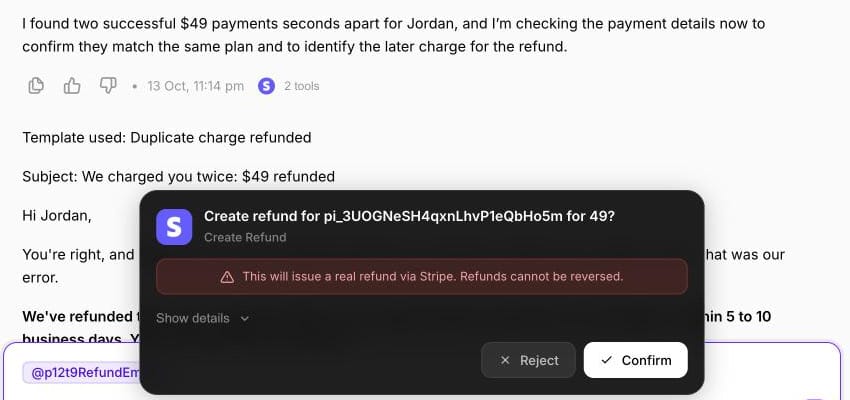
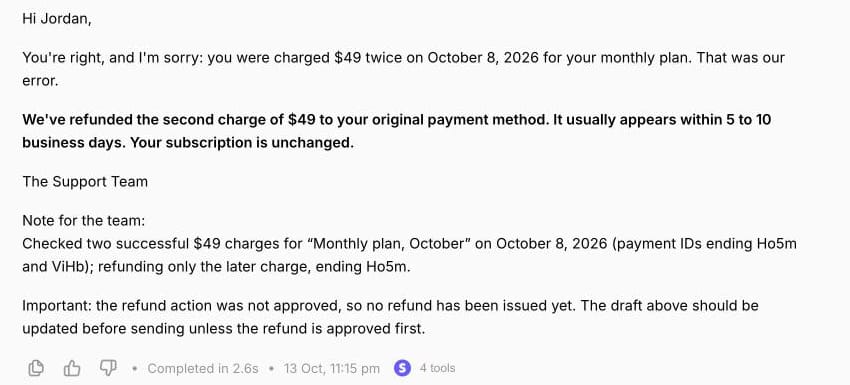
We pressed Reject. Nothing was refunded; both test charges still show $0 refunded in Stripe. The agent kept the draft and added a line for the reviewer: the refund was not approved, so the email shouldn't go out as written unless the refund is approved first.
Two design choices made this work, and both apply to any team turning refund templates into automation, with or without Macha.
- Put the money move last. With the refund call after the draft, the reviewer sees the email and the refund together and approves or rejects both at once. If the refund comes first and gets rejected, there's no honest "we've refunded" email to write.
- Treat the bold line as a promise about money. "We've refunded the second charge" is only true after the refund goes through, so the note for the team says what was and wasn't refunded, and the draft goes out only with an approved refund.
Our guide to writing agent instructions covers rules like these in more depth.
Where Macha fits
Macha suits teams on Zendesk, Freshdesk, Gorgias, Front, HubSpot or Intercom whose refund replies depend on a payment system: a duplicate charge needs the two charges from Stripe, a partial refund needs the order total from Shopify, a prorated refund needs the subscription dates. The agent reads the ticket, checks the charge or order, picks the template your policy calls for and drafts it with the real numbers. In safe mode, the draft lands as an internal note and any refund waits for a person to approve it. Our post on automating refunds in Zendesk walks through that approval step, and our post on what Macha's Stripe integration can do lists what the agent can read and change in Stripe.
You don't have to set it up yourself. With the done-for-you setup, the Macha team reads your past refund tickets, writes your policy lines into the agent's instructions, connects Stripe or your store, and keeps it in safe mode until the drafts are right. That's included on the trial ($50 of free usage (about 125 tickets), no credit card, no time limit) and on every plan at about $0.40 per ticket (pricing), along with a dedicated success manager who updates the instructions when your refund policy changes.
If your team handles a few refund requests a week, these templates as macros are enough.
Frequently asked questions
How do you write a no refund email?
Say no in the first two sentences, give the one policy reason in a sentence of its own, and offer an alternative such as store credit, an exchange or a canceled renewal. Templates #9 to #12 above follow that order.
How do you politely deny a refund request?
Thank the customer, state the rule and the date that puts their purchase outside it, then spend the rest of the email on what you can do. Avoid repeated apologies; they make the decision sound negotiable.
How long should a refund email say the refund takes?
For card refunds through Stripe, say 5 to 10 business days from the date you issued it, and say which card. Other processors and payment methods differ, so check your own provider's documentation and use its figure.
Should you offer store credit instead of a refund?
Offer it as a choice, not a substitute, unless your policy says refunds are credit-only. Store credit works best when it's available immediately, doesn't require a return and is worth at least as much as the cash refund.
Can you refund a customer who has filed a chargeback?
Not through Stripe while the dispute is open: Stripe doesn't allow a refund outside the dispute process. Explain that the bank now decides, and if the customer withdraws the dispute, it closes through their bank.
How we researched this
- Payment facts: Stripe's Refund and cancel payments (5 to 10 business days to appear, acquirer reference up to 7 business days, refunds only to the original payment method, reversals, failed refunds on disputed charges), How disputes work (no refund outside the dispute process while open, 7 to 21 days to respond, 60 to 75 days for the issuer, 2 to 3 months overall, non-refundable dispute fee) and Cancel subscriptions (prorations create credit; refunds are issued separately). Warranty labeling from the FTC's Businessperson's Guide to Federal Warranty Law. All read October 13, 2026.
- Arithmetic: $1,188 x 270 / 365 = $878.79 (by day); $1,188 x 9 / 12 = $891 (by month).
- Ranking pages read October 13, 2026: fyxer's 12 refund email templates (dated June 12, 2026, all with subject lines) and LiveAgent's refund request response templates (body text only, no subject lines). Neither has a template for an open chargeback, a warranty claim, a return label or a prorated annual plan.
- Run live on October 13, 2026: a test agent named "P12-T9 Refund emails" on our Macha Demo org, inactive with no triggers, connected only to a Stripe test-mode account with made-up customers. We ran it in its Try it chat on a made-up email about test customer Jordan Avery's two $49.00 test charges. It read Stripe and proposed one refund, which we rejected at the confirmation card; nothing was refunded, written to a help desk or sent. Template #4's bold line was shortened for the test, as described above.
- The templates are ours, written for this page, and every customer name, charge and order is synthetic. Bracketed values such as [Refund window] are for you to fill; none are recommendations about your policy or legal advice.
If you'd like an agent that checks the charge and drafts your refund replies, start a Macha trial and the team will build it with you.