Shopify
 Stripe
 Slack
Slack Notion
 Google Workspace
 Confluence

Apology Email to Customer: 24 Templates by Cause, Plus What Not to Promise (2026)


An apology email to a customer works when it names the mistake, says what you've already done and gives a date you control, and the apology itself carries weight: in a 632-customer eBay experiment, 44.8% of unhappy buyers withdrew a negative rating after an apology email, against 22.9% offered 5 euros. This page has 24 copy-ready apology emails sorted by cause (outage, billing error, late delivery, wrong item, a rude reply from your team, a data or privacy scare), plus apologies to B2B clients and first replies to angry emails. It also covers what an apology should promise, what it shouldn't, and which ones a person should write instead of a template.
Key takeaways
- An apology email to a customer should name the specific mistake, own it without "if", state what's already fixed and give one date the sender controls.
- In a 2010 eBay field experiment with 632 customers, 44.8% withdrew a negative rating after an apology, while only 22.9% did when offered 5 euros.
- A 2019 Uber experiment with 1.5 million riders found an apology with a coupon worked best, and repeated apologies could do worse than sending nothing.
- Stripe says a card refund shows up about 5-10 business days after it's issued, so a billing apology should promise that window, not "today".
- Legal threats, chargebacks, possible data exposure, safety issues and a third apology on the same ticket should go to a person, not a template.
Which apology email do you need?
Find the cause, then jump to the template. The last column says whether a template is safe to send as written (after you fill the brackets) or whether a person should write or approve it.
| Cause | Template | Channel | Tone | Who sends it |
|---|---|---|---|---|
| Outage, still happening | #1 We're down and working on it | Email, status page | Calm, specific | Template |
| Outage, fixed | #2 Post-incident apology | Accountable | Template, owner signs | |
| Outage broke your SLA | #3 Apology with service credit | Factual | Person approves the credit | |
| Second outage in a month | #4 It happened again | Direct | Person | |
| Charged twice | #5 Duplicate charge | Plain | Template | |
| Charged after cancelling | #6 Charged after you canceled | Owning it | Template | |
| Wrong amount or plan | #7 Billed at the wrong price | Precise | Template | |
| Refund hasn't arrived | #8 Refund delayed | Transparent | Template | |
| Order is late | #9 Late delivery | Short | Template | |
| Order is lost | #10 Lost in transit | Decisive | Template | |
| Late for a gift or event | #11 Missed the occasion | Personal | Template | |
| Wrong item | #12 Wrong item sent | Practical | Template | |
| Arrived damaged | #13 Damaged on arrival | Short | Template | |
| Our agent was rude | #14 Sorry for how we spoke to you | Personal | Person (team lead) | |
| We gave wrong information | #15 We told you the wrong thing | Correcting | Template | |
| Customer repeated themselves | #16 Sorry you had to explain this again | Owning it | Template | |
| Email went to the wrong person | #17 Misdirected email | Careful | Person, after privacy review | |
| Possible data incident | #18 Holding note | Factual, no guesses | Person, after legal review | |
| Confirmed data incident | #19 What happened to your information | Plain, complete | Person, with legal | |
| Missed a client deadline | #20 Apologies email to a client | Professional | Account manager | |
| Our mistake hit a client's customers | #21 Apology to a B2B client | Accountable | Account manager | |
| Angry customer email | #22 First reply to an angry email | Calm | Template, then person | |
| Angry and partly wrong | #23 Owning your part, correcting the rest | Even | Template | |
| Handing the apology to a person | #24 Internal handoff note | Internal note | Facts only | Agent or teammate |
For approve, partial and no-refund replies, see our refund email templates. If you need everyday replies rather than apologies, our 62 canned responses examples cover refunds, shipping and account access. For longer emails with subject lines (delays, policy changes, win-backs), see our customer service email templates, and for replies that follow one ticket from received to resolved, our support ticket response templates.
What should an apology email to a customer include?
Five parts, in this order.
- The mistake, named. "We charged you twice for October" beats "We're sorry for the inconvenience." The customer should be able to tell from the first line that a person read their message.
- Ownership without conditions. "We got this wrong." Never "We're sorry if you felt..." which moves the problem onto the customer's feelings.
- What you've already done. A refund issued, a replacement shipped, a bug fixed. Lead with actions in the past tense where you can.
- One date you control. The next update, the ship date, the day the credit appears. Not a date that depends on a bank or a carrier unless you say so.
- What changes. Only if something really changed. "We've added a check that stops the same charge going through twice in 24 hours" is credible; "This will never happen again" isn't.
Two experiments show why the wording matters and why it isn't everything. In the eBay study, a German seller emailed 632 customers who'd left a neutral or negative rating between November 2007 and April 2008. Customers who got an apology withdrew their rating 44.8% of the time; those offered 2.50 euros withdrew 19.3% of the time, and doubling the offer to 5 euros only moved that to 22.9% (Abeler et al., "The Power of Apology", Economics Letters, 2010). Two details matter before you copy it. The apology blamed the manufacturer and, by design, didn't admit guilt, so the study shows that saying sorry beats a small payment, not that admitting fault does. And the authors say why the apology worked "remains unclear"; they consider money crowding out goodwill and call it unlikely. One more finding is useful for pricing a make-good: the more a customer had paid, the less the cash offer worked, while the apology worked the same at every price.
The Uber study points the other way on money. Across 1.5 million riders who had a late trip, an apology that came with a coupon for a future ride did best, and in some cases, particularly repeated apologies, an apology did worse than sending nothing (Halperin, Ho, List and Muir, NBER working paper 25676, March 2019). The two results fit together once you look at the incentive. An apology costs the company nothing to send, so customers discount it unless something makes it costly: a specific admission, a credit the company didn't have to give, or a change it had to make. Send the same cheap apology twice and the customer learns it means nothing. That's why template #4 (a second outage) is written by a person and offers something concrete.
Apology templates for outages and incidents
These are written for software and online services. Each uses [square bracket] placeholders; swap them for your help desk's placeholder syntax when you save them as macros (the placeholder table in our canned responses guide has the syntax for each help desk). Keep the incident's root cause out of anything you send while it's still under investigation.
1. We're down and working on it (SaaS, email or status page)
Subject: [Product] is down for some customers, and we're on it
Hi [First name], since [Start time with time zone], [What's not working, e.g. "dashboards aren't loading"] for some customers, including your account. That's on us and I'm sorry. Our engineers are working on it now. [Only if engineering has confirmed it: "Your data is safe and nothing has been lost."] You'll get the next update by [Time], even if it's still not fixed, and [Status page link] has live updates.
2. Post-incident apology (SaaS, email, signed by a named owner)
Subject: What happened on [Date], and what we've changed
Hi [First name], on [Date], [Product] was [What happened, e.g. "unavailable for 2 hours 10 minutes"] for [Who was affected]. You couldn't [What they couldn't do], and I'm sorry. The cause was [One-sentence cause in plain words]. We've already [Change made], and by [Date] we'll [Next change]. If this cost your team work, reply to this email and it comes straight to me.
[Name], [Role]
3. Apology with a service credit (SaaS, email, person approves the credit)
Use this when the outage counts as an SLA breach under your agreement.
Subject: A service credit for the [Date] outage
Hi [First name], our uptime on [Month] was [Actual uptime], below the [Committed uptime] in your agreement, because of the outage on [Date]. I'm sorry. We've applied a credit of [Amount] to your next invoice on [Invoice date]; you don't need to request it. The incident summary is here: [Link].
4. It happened again (SaaS, email, written by a person)
Subject: A second outage this month, and what we're doing about it
Hi [First name], this is the second time this month [Product] has let you down, on [Date 1] and [Date 2]. Another apology from us doesn't fix that, so here's something concrete: [Specific action, e.g. "a credit for the full month" or "a call with our engineering lead this week"]. [Name] will contact you by [Date] to set it up.
Template #4 deliberately doesn't repeat the wording of #2. Per the Uber study above, a customer who gets the same apology twice can end up less forgiving than one who got none.
Apology emails for a billing error
Billing apologies go wrong in one predictable way: the customer reads "refunded" and checks their bank the same afternoon. Stripe says a card refund appears as a credit about 5-10 business days after it's issued, and refunds made shortly after the charge may show as a reversal, where the original charge simply disappears instead of a credit appearing (Stripe's refund docs, read October 13, 2026). Put that window in the email. Stripe also says a refund reference (an ARN) can take up to 7 business days to arrive, and there isn't one for a reversal.
5. Duplicate charge (SaaS or ecommerce, email)
Subject: We charged you twice, and we've refunded the extra [Amount]
Hi [First name], you're right: we charged your card [Amount] twice on [Date] for [What the charge was for]. That was our mistake, and I'm sorry. I've refunded the duplicate [Amount] today. Your bank should show it within 5 to 10 business days; sometimes the second charge just disappears instead of a refund line appearing. If it isn't there by [Date], reply here and I'll send you the refund reference to give your bank.
6. Charged after you canceled (SaaS, email)
Subject: You shouldn't have been charged on [Date]
Hi [First name], you canceled on [Cancellation date], and we still charged you [Amount] on [Charge date]. That's our error. I've refunded the full [Amount] and confirmed your subscription is canceled, so there won't be another charge. The refund should reach your account within 5 to 10 business days.
7. Billed at the wrong price (SaaS, email)
Subject: Your invoice for [Month] was wrong
Hi [First name], your [Month] invoice charged [Wrong amount] for [Plan], when your price is [Correct amount]. I'm sorry about that. I've refunded the [Difference] difference and corrected your plan so the next invoice on [Date] is [Correct amount]. The corrected invoice is attached.
8. Refund delayed (SaaS or ecommerce, email)
Subject: An update on your refund of [Amount]
Hi [First name], I'm sorry your refund of [Amount] hasn't shown up yet. We issued it on [Refund date]. Banks usually post refunds within 5 to 10 business days, and it's been [Number] days. Here's the refund reference to give your bank: [Reference]. If your bank can't find it by [Date], reply here and I'll chase it from our side.
Before sending #8, check the refund wasn't processed as a reversal (there's no reference then; the charge simply drops off the statement) and that the reference has arrived, which Stripe says can take up to 7 business days.
Apology emails for late delivery and wrong items (ecommerce)
9. Late delivery (ecommerce, email)
Subject: Your order [Order number] is late, and I'm sorry
Hi [First name], your order [Order number] should have arrived by [Promised date], and it hasn't. [Reason, if known, in one line]. It's now due on [New date], tracking [Tracking number]. If that's too late, reply and I'll cancel it with a full refund.
10. Lost in transit (ecommerce, email)
Subject: We're sending a new [Product] today
Hi [First name], your order [Order number] hasn't moved since [Date], and I'm sorry. Rather than make you wait for a carrier investigation, we're sending a replacement today, with tracking to follow by email. If the first parcel turns up, keep it or give it to someone.
11. Late for a gift or an event (ecommerce, email)
Subject: Sorry your order missed [Occasion]
Hi [First name], your order [Order number] was meant to arrive before [Occasion], and it didn't. I know that's not something a refund fixes. I've refunded the [Shipping amount] shipping cost, and the order will still arrive by [Date]. If you'd rather cancel it, reply and I'll refund the whole order.
12. Wrong item sent (ecommerce, email)
Subject: We sent the wrong item in order [Order number]
Hi [First name], you ordered [Correct item] and we sent [Wrong item]. That's our packing error, and I'm sorry. The right item ships on [Date]. You don't need to send the wrong one back first: [Return instructions, or "keep it"].
13. Damaged on arrival (ecommerce, email)
Subject: Your [Product] arrived damaged
Hi [First name], I'm sorry your [Product] arrived like that, and thanks for the photo. A replacement ships on [Date]. There's nothing to send back.
Apology letters to customers for poor service
These cover the apology the customer is owed for how your team handled them, not for a product fault.
14. Sorry for how we spoke to you (any business, email, sent by a team lead)
Subject: About your conversation with us on [Date]
Hi [First name], I'm [Name], and I lead the support team. I've read your conversation with us on [Date], and you were right to be upset: [What went wrong, e.g. "you were told to read the help center instead of getting an answer"]. That isn't how we want anyone treated, and I'm sorry. I've [Action, e.g. "answered your question below"] and I've talked with the team about it. If anything else is outstanding, reply to me directly.
15. We told you the wrong thing (any business, email)
Subject: A correction to what we told you on [Date]
Hi [First name], on [Date] we told you [Wrong information]. That was wrong, and I'm sorry. The correct answer is [Correct information]. If you've already [Action they took based on the wrong answer], [What you'll do about it, e.g. "we'll cover the cost"].
16. You had to repeat yourself (any business, email)
Subject: Sorry you had to explain this [Number] times
Hi [First name], I've read the whole thread, and you've had to explain this [Number] times. I'm sorry. I'm taking it from here, and you won't be passed on again. Here's where it stands: [Status]. You'll hear from me by [Day and time].
Apology emails for a data or privacy scare
These need the most care, and they're the ones where a template is a starting point for a person, not something to send as written. Under the EU's GDPR, when a personal data breach is likely to result in a high risk to people, the company must tell them "without undue delay", in clear and plain language, describing the nature of the breach (GDPR Article 34). US states have their own notification laws. Your legal or privacy lead decides whether a message is a notification, and what it must say.
17. Misdirected email (any business, email, after privacy review)
Subject: An email we sent you on [Date]
Hi [First name], on [Date] an email meant for you was sent to another customer by mistake. It contained [Exact fields, e.g. "your name and order number"]. It did not contain [Exact fields it did not contain, only if confirmed]. We've asked the recipient to delete it and [What you've done]. I'm sorry. If you have questions, [Named contact] will answer them directly at [Contact].
18. Holding note during a possible incident (any business, email, after legal review)
Subject: We're looking into a security issue that may affect your account
Hi [First name], on [Date] we found [What was found, in plain words]. We're investigating with [Who, if appropriate], and we don't yet know whether your information was involved. As a precaution, [Specific step, e.g. "we've reset your password"]. We'll update you by [Date] with what we've found.
19. After a confirmed incident (any business, email, written with legal)
Subject: What happened to your information, and what we're doing
Hi [First name], on [Date] [What happened]. The information involved was [Exact data types]. [What wasn't involved, only if confirmed]. We've [Actions taken]. You can [Steps the customer can take]. I'm sorry this happened. [Named contact] at [Contact] can answer questions.
Never guess a scope in these. "No payment details were affected" is only safe once someone has confirmed it, because a correction later costs more trust than the incident.
Apologies email to a client (B2B samples)
Client apologies come from a named person, usually the account manager, and they're about the relationship as much as the incident.
20. Missed deadline (B2B, email)
Subject: [Deliverable] is late, and here's the new plan
Hi [First name], we committed to delivering [Deliverable] by [Date], and we missed it. I'm sorry; I know your team planned around that date. The reason is [Reason, one line]. It will be with you by [New date], and [Name] will send you a short update on [Midpoint date] so you're not left guessing.
21. Our mistake affected your customers (B2B, email)
Subject: The [Issue] your customers saw on [Date]
Hi [First name], on [Date], [What happened] affected [Number] of your customers. That's on us, and I'm sorry, especially since your team took the calls. Here's a short summary you can share with them if useful: [Customer-facing summary]. I'd like 20 minutes this week to walk you through what we've changed. Does [Day and time] work?
How do you respond to an angry customer email?
Answer the first angry email fast and short, and don't argue with any of it yet. The aim of the first reply is to show you've read it and to get the facts you need. For single lines you can drop into any reply (empathy, saying no, handing off), see our customer service phrases.
- Reply within the hour if you can, even if you can't fix it yet.
- Quote back the one thing they're angriest about, in their words, so they know a person read it.
- Skip the defense. If they're wrong about a detail, correct it later, once the main problem is fixed.
- Give one next step and one time.
- Move it to a person if the email threatens legal action, a chargeback, a public post or a regulator, or if it's the second angry email on the same ticket.
22. First reply to an angry email (any business, email)
Hi [First name], I've read your email, and I understand why you're angry about [The main issue, in their words]. I'm looking into it now. [One question you need answered, if any.] You'll hear back from me by [Time] today with what I've found and what I'll do.
23. When they're angry and partly wrong (any business, email)
Hi [First name], I'm sorry about [The part that's your fault]. That shouldn't have happened, and I've [Fix]. On [The part they're mistaken about], here's what I can see on our side: [Fact]. If I'm missing something, send it over and I'll look again.
24. Internal handoff note (internal note, written by an agent or a teammate)
HANDOFF: apology needs a person
Customer: [Name], [Email], [Plan or order]
Why a person: [Trigger, e.g. "mentions a lawyer" or "third apology on this ticket"]
What happened: [Facts from the account, one line each]
What they're asking for: [Request, in their words]
Already done: [Refunds, replacements, earlier replies]
Don't: [Anything not to say or offer, e.g. "admit liability" or "promise a date"]
Reply due by: [Time]
What should an apology promise, and what shouldn't it?
Promise what you control; describe what you don't.
| Promise | Don't promise |
|---|---|
| "I've refunded [Amount] today" | "You'll see it today" (Stripe says it usually takes 5-10 business days) |
| "The next update is by 3pm ET" | "It'll be fixed by 3pm" before engineering says so |
| "We've added a check that stops duplicate charges" | "This will never happen again" |
| "A credit of [Amount] is on your next invoice" | A credit or discount above what your policy allows |
| "We don't yet know whether your data was involved" | "No data was affected" before it's confirmed |
| "I'm sorry we sent the wrong item" | "We accept full liability" in writing without legal review |
The last row matters most. The US state "I'm sorry" laws people sometimes point to were written for doctors, and they vary: in ACEP Now's 2021 overview, 16 states protect an expression of sympathy while leaving an admission of fault usable as evidence, and 12 states have no apology law at all (ACEP Now's overview of state apology laws). A support template isn't the place to work out which applies. Sympathy and a fix are fine; a written admission of legal liability is a decision for whoever handles your legal exposure.
When does an apology need a person instead of a template?
Templates cover the mistakes you make often: the duplicate charge, the late parcel, the wrong item. A person should write, or at least approve, the apology when any of these is true:
- Legal language: the customer mentions a lawyer, a lawsuit, a regulator, small claims or a formal complaint.
- Money disputes: a chargeback is open, or the fix needs a credit above your policy limit.
- Data: anything that could involve personal information going somewhere it shouldn't.
- Safety: an injury, a product that could hurt someone, or a health complaint.
- Strong emotion: the customer is distressed, mentions a bereavement or a medical situation, or is abusive.
- Repeats: it's the second outage or the third apology on the same ticket, where a template reads as the cheap apology the Uber study warns about.
- Public or high-value: the customer is posting publicly, is a press contact, or is a large account.
An agent or a sentiment analysis rule can spot most of these from the text. The right move is a human handoff with the facts already gathered (template #24), so the person who picks it up writes one good apology instead of reading the history first. Our guide to escalating tickets with a full context bundle covers what that bundle should hold, and the escalation glossary entry the different kinds of escalation.
What happened when we gave these templates to an AI agent?
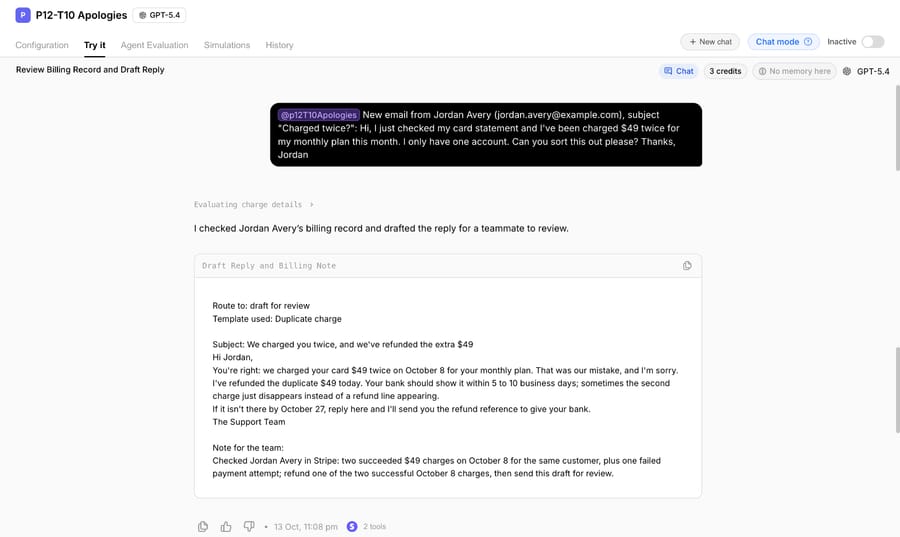
We gave two of the templates above (#5 Duplicate charge and #24 Internal handoff note), plus a version of #6, to a test agent on our Macha Demo org on October 13, 2026. Its instructions told it to check the message for the handoff triggers in the list above first (legal language, a chargeback, data, strong emotion, repeat complaints), then look the customer up in billing, pick one template from what the billing record showed, and fill the brackets only from the message or the record. It never sends anything and never refunds: it writes a draft and tells a teammate what to do in billing. It had two read-only tools, Get Customer and List Payments, on a Stripe test-mode account through Macha's Stripe connector, and we ran it in the agent's Try it chat.
The first made-up email came from Jordan Avery, who'd been charged $49 twice for a monthly plan. The agent found two succeeded $49 charges on October 8 in the test account, chose the duplicate-charge template, and filled every bracket: the amount, the date, "your monthly plan" for what the charge was for, and October 27 as the follow-up date, which is 10 business days after the day of the run. Its note told the teammate to refund one of the two charges before sending. The run took 36.5 seconds.
The second email, from Sam Rivera, said a $129 "annual add-on" was never agreed to and ended with a threat to dispute the charge with the bank and bring in a lawyer. The agent drafted no apology. It looked the charge up anyway, then wrote the handoff note: the customer's own words as the reason, the $129 charge on October 8 with no refund, the "Don't" line, and a reply due time four business hours out. That took 37.0 seconds.
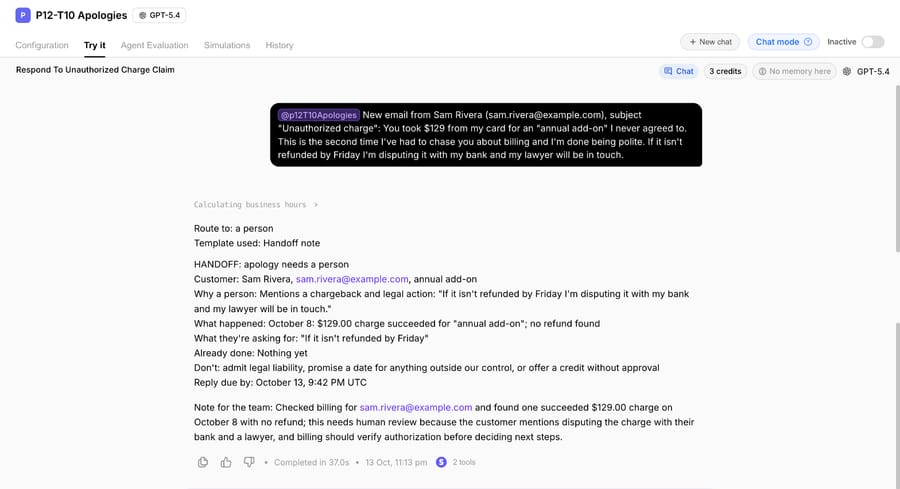
Two things carry over to anyone automating apologies, with or without Macha. The routing rule runs before the lookup decides anything, so a polite-sounding duplicate charge and an angry one with a lawyer in it get different treatment even when the billing record looks the same. And "fill brackets only from the record" is what makes an automated apology specific: the template had no room for "sorry for any inconvenience", and the style rule banned the phrase outright.
Where Macha fits
Most apologies a support team writes are for the same handful of mistakes, and the slow part is looking up the charge, the order or the incident before anyone can say "we charged you twice". Macha fits teams running Zendesk, Freshdesk, Gorgias, Front, HubSpot or Intercom who want an agent to do that lookup in tools like Stripe or Shopify, draft the apology with the real amounts and dates in it, and hand anything legal, emotional or risky to a person with a handoff note. In safe mode the agent drafts every reply as an internal note that someone approves before it reaches the customer; our post on AI draft replies with agent review shows that setup.
It's the done-for-you option: the Macha team analyzes your past tickets, turns your existing apology macros and escalation rules into agent instructions, builds the agent on your help desk and runs it in safe mode until the drafts are right. That's included on the trial and every plan, and the trial gives you $50 of free usage (about 125 tickets), no credit card, no time limit. Plans run at about $0.40 per ticket (pricing), which includes setup and a dedicated success manager who handles changes such as a new refund rule or a new handoff trigger.
If your team only writes a few apologies a week, saving the templates above as macros is enough.
Frequently asked questions
How do you write an apology email to a customer?
Name the mistake in the first line, own it without "if", say what you've already done to fix it and give one date you control. Template #5 (duplicate charge) shows all four in five sentences.
What's a good subject line for an apology email?
Say what happened and that it's handled: "We charged you twice, and we've refunded the extra $49" or "Your order #1042 is late, and I'm sorry". Avoid "Update on your issue", which reads like a newsletter.
Should an apology email offer compensation?
Sometimes. In the eBay study, a plain apology beat 5 euros offered in exchange for withdrawing a rating; in the Uber study, an apology with a coupon beat an apology alone. Offer something when the mistake cost the customer money or time, never as a trade for a review.
How do you apologize for poor customer service?
Have a team lead send it, say exactly what went wrong in the conversation, and fix the original problem in the same email. Template #14 is an apology letter to a customer for poor service.
Can an AI agent write apology emails?
It can draft the routine ones, filling in amounts and dates from your billing or order system, and route the rest to a person. In our October 13, 2026 test, an agent drafted a duplicate-charge apology from a Stripe test account and handed a legal threat to a person without drafting a reply.
How we researched this
- Research on apologies: Abeler, Calaki, Andree and Basek, "The Power of Apology" (Economics Letters 107(2), 2010; working paper read October 13, 2026) for the 632-customer eBay experiment and its 44.8%, 19.3% and 22.9% withdrawal rates. Halperin, Ho, List and Muir, NBER working paper 25676 (March 2019) for the 1.5-million-rider Uber experiment.
- Vendor and legal docs, read October 13, 2026: Stripe's "Refund and cancel payments" for the 5-10 business day window and reversals; GDPR Article 34 for breach communication to individuals. US state apology laws and breach-notification laws vary; we haven't summarized them, and nothing here is legal advice.
- Ranking pages read October 13, 2026: Shopify's "Customer Apology Letter: Tips, Example, and Template" (updated May 27, 2025), which has two templates (an all-purpose one and a sample letter), a worked brand example and advice to avoid overpromising and to have an attorney review sensitive letters, plus ProProfs Desk's 10 apology templates and the BoldDesk, Chatdesk, fyxer, RightInbox and Automizy pages that rank for the same terms. Most are organized by template rather than by cause; none we read pairs each cause with a promise-and-avoid list or names the specific triggers for handing an apology to a person.
- Run live on October 13, 2026: a test agent named "P12-T10 Apologies" on our Macha Demo org, inactive with no triggers, with read-only Get Customer and List Payments tools on a Stripe test-mode account holding synthetic customers and charges. We ran it twice in its Try it chat, once per made-up email. Each screenshot joins two views of the same chat response where it scrolls. Nothing was refunded, sent or written to a help desk during either run.
- The templates are ours, written for this page, and every customer, company, order and charge is synthetic. Bracketed values such as [Amount] are for you to fill; none are recommendations about your policy.
If you'd like an agent that drafts your routine apologies with the facts filled in and hands the hard ones to your team, start a Macha trial and the team will build it with you.