Shopify
 Stripe
 Slack
Slack Notion
 Google Workspace
 Confluence

34 Customer Service Email Templates With Subject Lines and Tone Notes (2026)


Email still carries most support work: the median ecommerce brand on Gorgias handles 85% of its support volume by email, and Freshworks' 2025 benchmark puts the median team's first response on a ticket at one hour. Below are 34 full customer service email templates for the situations that come up after the first reply: welcome, delays, out of stock, price changes, policy changes, follow-ups, satisfaction checks and winning a customer back after a bad experience. Each one has a subject line, a tone note and [square bracket] placeholders, and each is tagged SaaS, ecommerce or B2B and general support.
Key takeaways
- This page has 34 customer service email templates in 10 situations, each with a subject line, a tone note and a tag for SaaS, ecommerce or B2B and general support.
- Freshworks' 2025 benchmark puts the median team's first response on a ticket at 1 hour, against 3 minutes 10 seconds for the top 20% of teams.
- A price change email works when the new price, the date it starts and what the customer can do before then all appear in the first three sentences.
- A win-back email after a bad experience should name what went wrong, say what changed, and offer one concrete thing, without asking for a review in the same message.
- In an October 13, 2026 test, a Macha agent given 3 of these templates in its instructions picked the shipping delay template for a made-up email and filled it from a Shopify test order in 9.9 seconds.
Which customer service email template should you use?
Find the situation, then jump to the number. Every template is written for email; tone is the register it's written in.
| Situation | Template | Slice | Tone |
|---|---|---|---|
| New customer signed up | #1 Welcome, SaaS trial | SaaS | Warm, practical |
| New B2B account starts | #2 Kickoff for a new account | B2B | Organized |
| First reply, need details | #5 One question, all at once | General | Brief, specific |
| Order is late | #7 Shipping delay | Ecommerce | Apologetic, factual |
| Bug fix or feature is late | #8 Fix delayed | SaaS | Honest |
| Item is out of stock | #11 Backorder, choose what happens | Ecommerce | Clear, choice-led |
| Feature or plan is being retired | #13 Sunset notice | SaaS | Direct, early |
| Prices are going up | #14 Price increase notice | SaaS | Plain, numbers first |
| Terms or policy changed | #17 Terms of service update | General | Neutral |
| Customer stopped replying | #21 No reply, gentle nudge | General | Light |
| Fix shipped after a wait | #22 It's fixed | SaaS | Brief, glad |
| Ticket solved, check it stuck | #25 Did that fix it? | General | Short |
| Asking for a rating | #26 One-question CSAT | General | Low pressure |
| After an outage | #29 Outage follow-up | SaaS | Accountable |
| Ticket was mishandled | #30 We got this wrong | General | Accountable, personal |
| Customer is leaving after a bad experience | #31 Cancellation after a bad experience | General | Respectful |
| Saying no to a request | #33 Feature request, honest no | SaaS | Kind, firm |
Refunds and apologies by cause each get their own page in this series, so they appear here only as pointers in the FAQ.
What makes a customer service email work?
Four rules run through every template below. They're the difference between a reply that ends the thread and one that starts a second ticket.
- One ask per email. If you need an order number and a screenshot, ask for both in one message. A drip of single questions makes the customer tell the story in pieces, and repetition is what customers object to: Zendesk's CX Trends 2026 found 74% find it frustrating to tell their story over and over to different agents.
- A time, not "soon". Every template that promises something names a day or a number of business days. A vague promise invites the "any update?" email.
- Policy in its own sentence. When the rule and the sympathy share a sentence, agents soften the rule to soften the tone. Keep the policy line separate so it doesn't drift.
- Subject lines are for emails you start. On a reply inside an existing ticket, leave the subject alone so the thread stays intact. The subject lines below matter most on outbound emails: a delay notice, a price change, a win-back.
The speed side matters too. In Freshworks' 2025 benchmark, the top 20% of teams first-respond to a ticket in 3 minutes 10 seconds, the median team in 1 hour and the remaining group it calls Aspirants in 7 hours 4 minutes, and reopen rates run 1%, 5% and 14% across the same three groups. A good template shortens the first number and, if it asks the right question, the last one. For sentence-level wording inside these emails, such as empathy lines and ways to say no, see our customer service phrases and scripts.
Welcome and onboarding emails
A welcome email lands while the customer still wants the product to work. Use it to point at the one action that predicts whether they'll stay, and to tell them how to reach a person.
1. Welcome, SaaS trial (SaaS)
Subject: Your [Product] trial is ready: start here
Tone: Warm and practical. One next step, not a feature tour.
Hi [First name],
Welcome to [Product]. Your trial runs until [Trial end date], and everything is switched on.
The one thing worth doing today: [First key action, e.g. connect your calendar]. It takes about [Minutes] minutes, and it's what the rest of the product builds on.
If you get stuck, reply to this email. It goes to our support team, not a no-reply inbox, and we answer within [Response time].
[Agent name]
2. Kickoff for a new B2B account (B2B)
Subject: [Company] and [Your company]: next steps and who to contact
Tone: Organized. The reader forwards this to their team, so make it scannable.
Hi [First name],
Thanks for choosing [Your company]. Here's what happens next and who to talk to.
- Your account contact is [Account manager name], [Email]. - Support is at [Support email], [Support hours, with time zone]. Urgent issues: [Urgent route]. - Kickoff call: [Date and time]. We'll cover [Agenda item 1] and [Agenda item 2].
Before the call, it helps to have [What they should prepare]. If someone else on your team should be on this thread, add them and we'll include them from here on.
[Agent name]
3. Welcome after a first order (ecommerce)
Subject: Thanks for your first order, [First name]
Tone: Friendly and short. They want the order, not a newsletter.
Hi [First name],
Thanks for ordering from [Store name]. Order [Order number] usually ships within [Processing time], and you'll get tracking by email when it does.
If anything about the order needs changing, reply within [Change window] and we can usually update it before it ships.
[Agent name]
4. 30-day check-in for a new customer (SaaS or B2B)
Subject: One month in: is [Product] doing what you needed?
Tone: Curious, not salesy. Ask a real question.
Hi [First name],
You've been using [Product] for about a month. I looked at your account and noticed [Specific observation, e.g. you haven't set up the weekly report yet].
Is there anything that isn't working the way you expected? A one-line reply is plenty, and it comes straight to me.
[Agent name]
First response emails that ask for details
The auto-reply is covered elsewhere in this series, and the short canned acknowledgment is in our canned responses examples. These two are for a person's first written reply.
5. One question, all at once (general)
Subject: (reply in thread)
Tone: Brief and specific. Every question in one message.
Hi [First name],
Thanks for writing in. To sort this out in one go, could you send:
1. [Detail 1, e.g. the email on the account] 2. [Detail 2, e.g. a screenshot of the error] 3. [Detail 3, e.g. roughly when it started]
As soon as I have those I'll [Next step], and you'll hear back by [Day].
[Agent name]
6. Handing over to a specialist (B2B or SaaS)
Subject: (reply in thread)
Tone: Reassuring. They shouldn't have to repeat anything.
Hi [First name],
I've passed this to [Specialist name or team], who handles [Area]. They have the full thread, so there's no need to explain it again. Expect to hear from them by [Day].
[Agent name]
Delay emails
The best delay email arrives before the customer asks. Our guide to notifying customers about shipping delays covers sending these automatically; the text below works either way.
7. Shipping delay (ecommerce)
Subject: Your order [Order number] is running late
Tone: Apologetic and factual. A new date beats a long apology.
Hi [First name],
Your order [Order number] hasn't shipped yet, and I'm sorry for the wait. [Reason, e.g. one item arrived at our warehouse later than planned.]
It's now due to ship by [New ship date]. You'll get tracking by email when it leaves.
If that's too late, reply and I'll [Option, e.g. cancel it with a full refund or ship the items we have now]. Either is fine with us.
[Agent name]
8. Fix delayed (SaaS)
Subject: Update on [Issue]: the fix needs more time
Tone: Honest. Say why, say when you'll update again.
Hi [First name],
I promised an update on [Issue] by [Original date], and the fix isn't ready yet. [Reason in one sentence, e.g. it affects how invoices are calculated, so it needs more testing than we expected.]
In the meantime, [Workaround]. I'll write again by [Next update date] with either the fix or a firm date, whichever comes first.
[Agent name]
9. Implementation or project delay (B2B)
Subject: [Project name]: revised timeline
Tone: Organized and accountable. Lead with the new date.
Hi [First name],
[Project name] will go live on [New date] instead of [Original date].
What's causing it: [Cause]. What we're doing about it: [Action]. What we need from you: [Their action, or "nothing"].
If the new date affects plans on your side, let's talk. I can do [Two time options].
[Agent name]
10. Our reply took too long (general)
Subject: (reply in thread)
Tone: Ownership without excuses, then straight to the answer.
Hi [First name],
Sorry it took [Time] to get back to you. That's longer than it should have been.
Here's the answer: [Answer].
[Agent name]
Out of stock and unavailable emails
Out of stock is the one situation where a customer has three reasonable choices. Give them all three and a default, so a non-reply still resolves the ticket.
11. Backorder, choose what happens (ecommerce)
Subject: [Product name] in your order [Order number] is out of stock
Tone: Clear and choice-led. Make the default obvious.
Hi [First name],
[Product name] from your order [Order number] is out of stock. We expect more on [Restock date].
You can choose:
1. Wait for it and we'll ship everything together. 2. Ship the rest now and send [Product name] when it's back, at no extra shipping cost. 3. Cancel [Product name] and get [Amount] back to your original payment method.
Just reply with 1, 2 or 3. If we don't hear from you by [Date], we'll go with [Default option].
[Agent name]
12. Discontinued product (ecommerce)
Subject: About [Product name]
Tone: Straightforward. Offer the nearest replacement, not a sales pitch.
Hi [First name],
Thanks for asking about [Product name]. We've stopped making it, so it won't be back in stock.
The closest match we sell is [Replacement product], which [Key similarity and one difference]. If you'd like to try it, [Offer, e.g. here's a code for free shipping: CODE].
[Agent name]
13. Sunset notice for a feature or plan (SaaS)
Subject: [Feature or plan] is being retired on [Date]
Tone: Direct and early. Give at least [Notice period] of notice.
Hi [First name],
We're retiring [Feature or plan] on [Retirement date]. Your account uses it for [What they use it for].
What replaces it: [Replacement]. What you need to do: [Action], ideally before [Date]. If you do nothing, [What happens on the date].
I'm happy to help with the switch. Reply here and I'll [Specific help, e.g. move your saved reports across for you].
[Agent name]
Price change emails
A price change email has an incentive problem built in. The team writing it wants the increase to land quietly, so the number drifts to paragraph four, after the product updates. Customers notice that, and the email they reply to is the one that made them hunt for the number. Put the price in the first sentence.
14. Price increase notice (SaaS)
Subject: Your [Product] price is changing on [Date]
Tone: Plain, numbers first. No "exciting news".
Hi [First name],
On [Effective date], the price of your [Plan name] plan will go from [Old price] to [New price] a [Month or year]. Nothing changes before then.
Why: [One honest reason, e.g. we've added X and Y since your last price change in Year].
Your options before [Effective date]: [Option 1, e.g. switch to annual billing at the current price], [Option 2, e.g. move to the Plan name plan], or cancel any time from [Settings path].
If you have questions about what this means for your account, reply and I'll walk you through it.
[Agent name]
15. Renewal with a new price (B2B)
Subject: [Company] renewal on [Date]: updated pricing
Tone: Professional. Give the reader what their finance team will ask for.
Hi [First name],
Your contract renews on [Renewal date]. The new annual price is [New price], up from [Old price], for [Scope, e.g. the same seats and modules].
I've attached an updated quote. If you need it in a different format for procurement, or want to review the scope before renewal, I can do a call on [Two time options].
[Agent name]
16. "The price dropped after I bought it" (ecommerce)
Subject: (reply in thread)
Tone: Fair. State the policy in its own sentence.
Hi [First name],
Thanks for letting us know about the price on [Product name].
Our policy is to refund the difference if the price drops within [Number] days of purchase. Your order was placed on [Order date], so [It's covered / It falls outside that window].
[If covered: I've refunded [Amount] to your original payment method; it can take [Days] business days to appear.] [If not: I'm sorry I can't adjust this one.]
[Agent name]
Policy change emails
Policy emails get skimmed, so the one change that affects the reader goes at the top, and the link to the full document goes at the bottom.
17. Terms of service update (general)
Subject: We're updating our terms on [Date]
Tone: Neutral. Summarize the change in plain words.
Hi [First name],
We're updating our terms of service, effective [Effective date]. The main change: [Plain-language summary].
You don't need to do anything. If you keep using [Product] after [Effective date], the new terms apply. The full text is here: [Link].
Questions? Reply to this email.
[Agent name]
18. Return policy change (ecommerce)
Subject: Our return window is changing on [Date]
Tone: Clear. Say what happens to orders already placed.
Hi [First name],
From [Effective date], our return window changes from [Old window] to [New window]. Orders placed before [Effective date] keep the old window, so your recent order [Order number] can be returned until [Date].
The full return policy is here: [Link].
[Agent name]
19. Support hours or channel change (general)
Subject: Changes to how you reach our support team
Tone: Helpful. Lead with what's better, then what's gone.
Hi [First name],
From [Date], our support hours are [New hours, with time zone]. [Channel change, e.g. phone support ends on that date; email and chat stay the same.]
For anything urgent outside those hours, [Urgent route].
[Agent name]
20. Privacy policy update (general)
Subject: An update to our privacy policy
Tone: Precise. Say what data and why, nothing vague.
Hi [First name],
We've updated our privacy policy, effective [Effective date]. What changed: [Specific change, e.g. we now use a new provider, Provider name, to send support emails].
What this means for you: [Effect, or "nothing changes about the data we hold on you"]. You can read the full policy at [Link] or ask us anything about it by replying here.
[Agent name]
Follow-up emails
Most follow-ups are about one of two things: the customer went quiet, or you owe them news. Label which one in the first line.
21. No reply, gentle nudge (general)
Subject: (reply in thread)
Tone: Light. Make replying easy.
Hi [First name],
Just checking in on [Issue]. Are you still seeing it? If it's sorted, no need to reply and we'll close this on [Date]. If not, a one-line reply gets it straight back to me.
[Agent name]
22. It's fixed (SaaS)
Subject: (reply in thread) or Fixed: [Issue]
Tone: Brief, glad. Tell them what to do, if anything.
Hi [First name],
Good news: the fix for [Issue] went live on [Date]. You don't need to do anything, though [Optional step, e.g. a page refresh] will make sure you see it.
If anything still looks off, reply here and I'll pick it up.
[Agent name]
23. After a call (B2B)
Subject: Recap: [Topic] call on [Date]
Tone: Organized. Owners and dates on every action.
Hi [First name],
Thanks for the time today. What we agreed:
- [Action 1], [Owner], by [Date] - [Action 2], [Owner], by [Date]
If I've missed anything, reply and I'll update it. Next check-in: [Date].
[Agent name]
24. Last follow-up before closing (general)
Subject: (reply in thread)
Tone: Polite and final. Reopening must be easy.
Hi [First name],
I haven't heard back on [Issue], so I'm closing this ticket today. If you need anything else on it, reply to this email and it'll reopen with the full history.
[Agent name]
Satisfaction check emails
Ask once, after the problem is actually solved, and make the question answerable in one click. Our posts on how CSAT works in Zendesk cover the built-in survey; these templates are for when you write the ask yourself.
25. Did that fix it? (general)
Subject: (reply in thread)
Tone: Short. Check the fix before asking for a score.
Hi [First name],
Following up on [Issue] from [Day]. Did the fix hold up? If it's come back, reply and I'll take another look.
[Agent name]
26. One-question CSAT (general)
Subject: How did we do on [Issue]?
Tone: Low pressure. One question, one click.
Hi [First name],
We recently helped you with [Issue]. How did we do?
[Good] [Okay] [Bad]
If you pick "Bad", we read every one and someone will follow up.
[Agent name]
27. Quarterly check-in (B2B)
Subject: Quick check-in on [Product] at [Company]
Tone: Useful. Bring a number they'd want to see.
Hi [First name],
In the last [Period], your team [Usage fact, e.g. opened 42 tickets with us, median reply time 3 hours]. Two things I'd suggest: [Suggestion 1] and [Suggestion 2].
Is there anything we should be doing differently? A short reply is fine.
[Agent name]
28. Review request (ecommerce)
Subject: How's your [Product name]?
Tone: Friendly. Only send to customers whose order went smoothly.
Hi [First name],
Your [Product name] arrived on [Delivery date]. If you've had a chance to use it, a short review helps other customers choose: [Link].
If something isn't right with it, reply here instead and we'll sort it out.
[Agent name]
Win-back emails after a bad experience
These are the hardest emails on the page, and the most often sent by a person rather than a template. Every one does the same three things: names what went wrong, says what changed, and offers one concrete thing. None asks for a review or a rating in the same message.
29. Outage follow-up (SaaS)
Subject: What happened on [Date], and what we've changed
Tone: Accountable. Facts first, apology once.
Hi [First name],
On [Date], [Product] was unavailable for [Duration] between [Start time] and [End time]. Your account was affected: [Specific effect, e.g. scheduled reports didn't send].
The cause was [Cause in one sentence]. We've [Change], so the same failure can't take the service down again. The full incident report is here: [Link].
I'm sorry for the disruption. [Concrete offer, e.g. we've added a credit of Amount to your next invoice.]
[Agent name]
30. We got this wrong (general)
Subject: (reply in thread) or About your recent ticket
Tone: Accountable and personal. Signed by a lead, not the original agent.
Hi [First name],
I'm [Name], and I lead the support team. I read your ticket about [Issue] and we got it wrong: [What went wrong, specifically].
Here's what I've done: [Fix]. And here's what we've changed so it doesn't happen to someone else: [Change].
If there's anything still outstanding, reply to me directly at [Direct email].
[Name]
31. Cancellation after a bad experience (general)
Subject: Your cancellation, and one question
Tone: Respectful. Confirm first, ask second, no retention offer up front.
Hi [First name],
I've confirmed your cancellation. You'll have access until [End date] and won't be charged again.
I saw your account had [Bad experience, e.g. three tickets about the same sync failure]. If you're willing, I'd like to know what would have made you stay. Whatever you say goes to the people who can fix it.
[Agent name]
32. Second order after a problem (ecommerce)
Subject: Your replacement for order [Order number] is on its way
Tone: Warm. Make the second experience visibly better.
Hi [First name],
Your replacement [Product name] shipped today with [Carrier], tracking [Tracking number]. I've asked our warehouse to [Extra check, e.g. inspect it before packing], since the first one arrived [Problem].
I'll check the tracking on [Date] and write to you if anything looks off.
[Agent name]
Saying no emails
A clear no with a reason gets fewer replies than a vague "we'll consider it".
33. Feature request, honest no (SaaS)
Subject: (reply in thread)
Tone: Kind and firm. Give the reason and an alternative.
Hi [First name],
Thanks for suggesting [Feature]. We're not going to build it, and I'd rather tell you now than leave it open. [Reason, e.g. it would conflict with how permissions work for larger teams.]
What some customers do instead: [Alternative or workaround].
[Agent name]
34. Discount request (general)
Subject: (reply in thread)
Tone: Friendly. Explain what is available, not just what isn't.
Hi [First name],
Thanks for asking. We don't offer discounts on [Product or plan]. What we do have: [Real option, e.g. annual billing at two months free, or a nonprofit rate].
If one of those fits, I can set it up for you.
[Agent name]
How do you turn these templates into help desk macros?
Save the templates you send most as macros, or whatever your help desk calls them, and replace each [square bracket] with a placeholder so the help desk fills the name and ticket details itself.
| Help desk | What it calls saved replies | Setup guide |
|---|---|---|
| Zendesk | Macros | How Zendesk macros work |
| Freshdesk | Canned responses | Canned responses in Freshdesk |
| Gorgias | Macros | Gorgias macros |
| Front | Message templates | Front message templates |
| Intercom | Macros | Intercom's macros guide |
| HubSpot | Snippets and templates | HubSpot's snippets guide |
Placeholder syntax differs in every tool; our Zendesk placeholders guide covers Zendesk's in depth. Three habits keep a macro library useful:
- Name macros by situation. "Delay: order not shipped" is findable. "Template 14" isn't.
- Leave one bracket the agent must fill by hand, like [Reason] in #7. A template with nothing to fill gets pasted unread.
- Review the library when policy changes. A return window or a price that changed in #16 and #18 is the kind of edit nobody remembers to make in 40 macros.
A macro library only helps the person who already knows which macro to pick. Most help desks price per agent seat (Gorgias, which bills by ticket volume, is the exception among the six above), so their macro tools are built to make each seat faster; deciding which template fits a ticket, and filling it from the order or billing record, is still someone's job.
What happened when an AI agent used these templates?
We gave three of the templates above to a test agent on our Macha Demo org on October 13, 2026: #7 Shipping delay, #11 Backorder, choose what happens, and #5 One question, all at once, shortened to ask for the order number. Its instructions told it to look the order up in our Shopify test store, pick exactly one template, copy it word for word, and fill each bracket only from the order or from its own instructions. Those instructions fixed the policy values a template can't know: the new ship date is two business days out, the option to offer is a cancellation with a full refund, the sign-off is "The Support Team", and the [Reason] sentence is dropped when there's no known reason. Anything that didn't fit a template went to a person with a note.
We ran it in the agent's Try it chat on a made-up email from an example.com customer asking where test order #1099 was, a week after ordering. The agent made one Shopify call, found the order paid but unfulfilled, and picked "Shipping delay". It filled the subject line and the order number, set the ship date to October 15, 2026 (two business days after the Tuesday we ran it), dropped the [Reason] sentence because nothing in the order explained the delay, and wrote a one-line note for the team saying what it checked. The run took 9.9 seconds.
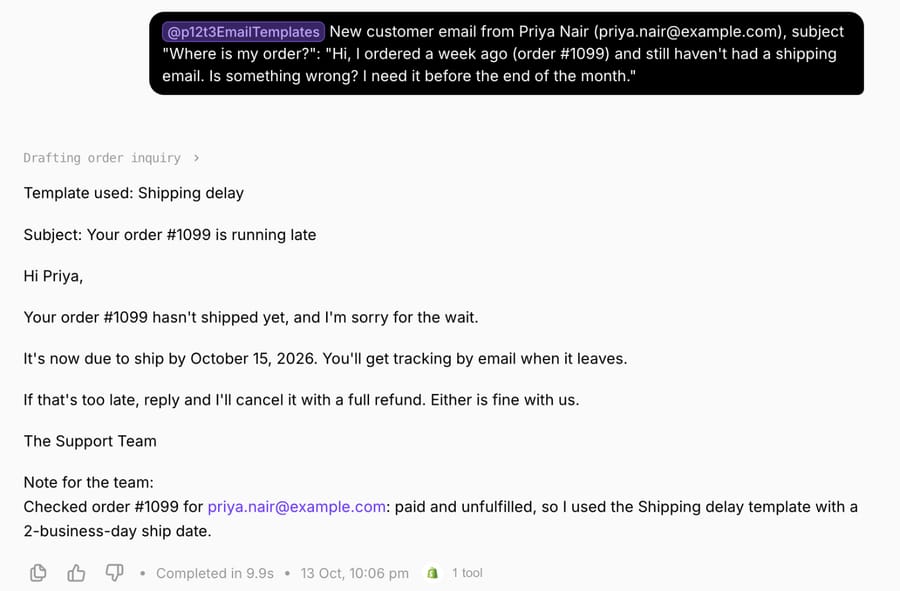
The [Reason] bracket did the most work in this run. A template written for people can carry a bracket like that, because a person fills it from what they know about the warehouse. An agent only knows what the order and its instructions say, so we told it in advance which bracket it could drop and that every other bracket had to come from data or the template wasn't used at all. If you hand your own templates to software, go through them bracket by bracket and decide which ones come from a system, which come from a policy you write down, and which can be left out. The ship date and the cancellation offer here were policy, which is why they sit in the instructions and not in the model's judgment. Our guide to writing agent instructions covers that structure.
Where Macha fits
Macha suits teams on Zendesk, Freshdesk, Gorgias, Front, HubSpot or Intercom whose emails depend on another system: a delay notice needs the order status from Shopify, a price change reply needs the plan from Stripe, a renewal email needs the account record. The agent reads the incoming email, chooses the template that fits, fills the brackets from those systems and leaves the draft as an internal note in safe mode, so a person approves it before the customer sees it. You can see the approval step in Zendesk in our post on AI draft replies with agent approval.
You don't have to build it yourself. With the done-for-you setup, the Macha team reads your past tickets, writes your best templates and the policy values behind them into the agent's instructions, and keeps it in safe mode until the drafts are right. That's included on the trial ($50 of free usage (about 125 tickets), no credit card, no time limit) and on every plan at about $0.40 per ticket (pricing), along with a dedicated success manager who updates the agent when a policy or price changes.
If your team sends a handful of these emails a week, a well-kept macro library is enough, and you don't need an agent.
Frequently asked questions
What is a good customer service email example?
A good one names the situation, gives a date or a next step, and asks for at most one thing. Template #7 above is typical: "Your order [Order number] hasn't shipped yet, and I'm sorry for the wait. It's now due to ship by [New ship date]," followed by the customer's options.
How do you write a professional customer service email?
Open with the answer or the status, keep the policy in its own sentence, name a time for anything you promise, and sign with a real name. Keep the subject line of an existing thread unchanged so the reply stays in the ticket.
What should a customer service email subject line say?
On an email you start, say the specific situation and, if there is one, the date: "Your order #1234 is running late" or "Your price is changing on March 1". On a reply to a customer's email, keep their subject.
Do you have refund and apology email templates?
Refund replies (approve, partial, deny, store credit) have their own page, refund email templates, and apologies by cause (outage, billing error, late delivery) have theirs in our apology email templates. On this page, #16 covers price adjustments and #29 to #32 cover win-backs after a bad experience.
Can AI write customer service emails from templates?
Yes. An AI agent can choose a saved template by situation and fill it from your systems, as in our October 13, 2026 test. Start with drafts that a person approves before they're sent, and keep the policy wording in the template rather than letting the agent write it.
How we researched this
- Benchmarks: the Freshworks Customer Service Benchmark Report 2025 (PDF, p.27, ticketing performance matrix: first response time 3m 10s / 1h / 7h 4m and reopen rate 1% / 5% / 14% for its top 20%, median and bottom groups); Gorgias Ecom Lab's "Email isn't dying, chat is doubling" (May 19, 2026), the source of the 85% email share for the median brand on its platform; and Zendesk's CX Trends 2026 for the 74% who find it frustrating to tell their story over and over to different agents. All read October 13, 2026. These are vendor-published figures from each vendor's own customers.
- Ranking pages read October 13, 2026: dragapp's 25 templates (updated August 26, 2026), Survicate's 16 (updated July 23, 2025) and SuperOffice's 7, which sit behind a download form. None of them cover price changes, policy changes or out-of-stock choices, and only dragapp gives a subject line for every template.
- Run live on October 13, 2026: a test agent named "P12-T3 Email templates" on our Macha Demo org, inactive with no triggers, with read access to our Shopify test store. We ran it once in its Try it chat on a made-up email from an example.com customer about test order #1099. It made one Shopify read; nothing was written to Shopify or to a help desk, and the draft was never sent.
- The templates are ours, written for this page, and every customer name, order and ticket is synthetic. Bracketed values such as [Processing time] are for you to fill; none are recommendations about your policy.
If you'd like an agent that picks and fills your own email templates, start a Macha trial and the team will build it with you.