





 Shopify
 Stripe
 Slack
Slack Notion
 Google Workspace
 Confluence

How Do You Write Effective AI Agent Instructions? A 7-Part Template (2026)


Good agent instructions are a short, specific brief: one job, clear tool rules, an escalation line, and an example or two. A vague instruction box gets you a vague agent, however good the model, tools and knowledge behind it.
Key takeaways
- Effective AI agent instructions run about 200 to 500 words and cover seven parts: role and scope, audience and tone, decision boundary, tool policy, escalation, output format, and examples.
- Agent instructions past about 1,000 words usually mean the job should be split into sub-agents, with a router handing work to focused specialists.
- Facts such as a return policy belong in a connected knowledge source, and the instructions should tell the agent to admit uncertainty rather than guess.
- Macha's AI Agent Builder, Sidekick, drafts instructions, suggested tools and a model from a plain-English description, and Agent Evaluation scores real conversations after launch.
- Macha bills per ticket whatever model the agent uses, from $299 a month for 750 tickets, about $0.40 each, after a free trial with $50 of usage.

Effective agent instructions are a short brief of roughly 200 to 500 words that covers seven things: role and scope, audience and tone, the decision the agent owns, tool-use policy, escalation rules, output format, and one or two examples. In Macha an agent is four things working together, instructions, a model, tools, and knowledge, and the instructions are the part you control in plain English. The advice below follows how Macha actually works and Anthropic's "Building Effective Agents", whose three principles are simplicity, transparency, and careful design of the agent's tool interface.
| Part | What it answers | Example line |
|---|---|---|
| 1. Role and scope | Which one job does the agent own? | "You handle order-status and tracking questions." |
| 2. Audience and tone | Who is it talking to, and how? | "Be warm, concise, and concrete." |
| 3. Decision boundary | What may it do, and what not? | "You may not issue refunds." |
| 4. Tool-use policy | When does it call which tool? | "Always call get_order first." |
| 5. Escalation | When does a human take over? | "Missing parcel marked delivered: escalate." |
| 6. Output format | How long, in what order? | "2 to 4 sentences, answer first." |
| 7. Examples | What does good look like? | One happy path, one edge case. |
What do agent instructions actually do?
In Macha, the instructions field is the agent's standing brief: its system prompt, policy manual, and job description in one box. It's the text the model reads on every single conversation before it sees the customer's message. Everything else hangs off it. The instructions decide when to reach for a tool, which knowledge matters, and how to talk.
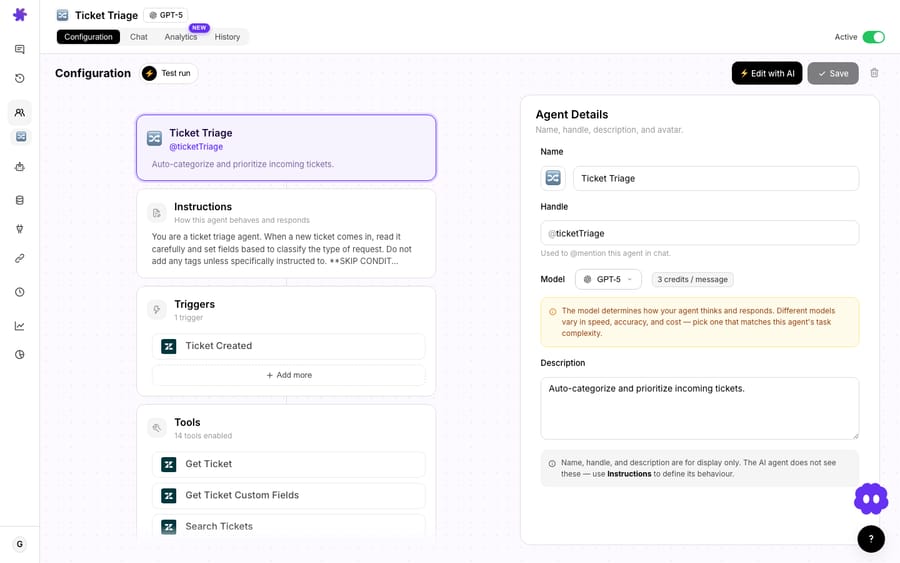
It helps to be clear about what instructions are not. They are not where facts live: your return policy, SKU list, or shipping timelines belong in a knowledge source, not pasted into the prompt where they'll go stale. They are not code; you describe intent and let the model reason. And they are not a place to cram five jobs into one agent. Hold those three ideas and you're already ahead of most first drafts.
What should a 7-part instruction template include?
Almost every strong instruction set we've seen covers the same seven things, and OpenAI's practical guide to building agents lands on a similar shape. Use this as a skeleton and delete what you don't need:
- Role & scope — who the agent is and the one job it owns. "You are a shipping-and-delivery support agent for an apparel store. You handle order-status, tracking, and delivery-exception questions."
- Audience & tone — who it's talking to and how. "Customers, often anxious about a late order. Be warm, concise, and concrete. No corporate filler."
- The decision it owns — and the line it won't cross. "You may look up orders and share tracking. You may not issue refunds or change addresses."
- Tool-use policy — when to call which tool, and which actions need confirmation. "Always call
get_orderbefore answering a status question. Never guess a tracking number." - Escalation / handoff rules — the exact conditions for handing to a human. "If the order shows delivered but the customer says it's missing, escalate to the human queue with a one-line summary."
- Output format — length, structure, and any contract the UI expects. "Reply in 2–4 sentences. Lead with the answer, then the detail."
- Examples — one or two short before/after exchanges that show the behavior you want.
You don't need a heading for each. A tidy paragraph per idea, in roughly this order, reads cleanly to the model and to the teammate who edits it next month.
How long should agent instructions be?
The single most common failure mode is an instruction set that tries to do everything. Our rule of thumb from building agents with customers: effective instructions run roughly 200 to 500 words, and if you're past about 1,000 words, you probably have several agents, not one. Anthropic's framing is blunter: "Success in the LLM space isn't about building the most sophisticated system. It's about building the right system for your needs." Start simple; add complexity only when you can measure that it helped.
When a single agent genuinely needs to span domains (billing and shipping and technical), don't write a 2,000-word mega-prompt. Split the work into sub-agents: a router agent with a tight brief that delegates to focused specialists, each with its own short instruction set.
This mirrors Anthropic's orchestrator-workers pattern, and it keeps each instruction set readable. A short prompt that does one thing well beats a sprawling one that does five things adequately. (More on the mechanics in the sub-agents docs.)
Should instructions say what to do or what to avoid?
Tell the agent what to do, not just what to avoid. "Always confirm the order number before looking it up" adheres far better than "Don't look things up without the order number." Negative-only rules leave the model guessing at the positive behavior you actually want.
Then hunt down ambiguity. If a phrase isn't crisp to you, it won't be crisp to the model. "Be helpful" means nothing; "answer the question first, then offer one relevant next step" means something. A good test from the prompt-engineering community: run the same input five times. If the answers vary wildly, your instructions are too loose. Tighten the language until the behavior stabilizes.
How do you tell an agent when to use its tools?
Tools are where a support agent stops being a chatbot and starts resolving things. In Macha you assign tools from connected systems: Shopify, Stripe, your help desk (Zendesk, Freshdesk, Gorgias, Front, HubSpot or Intercom), and others, plus any custom API tools you build.
Assigning a tool isn't enough; the instructions have to govern it. Anthropic makes the point that the agent-computer interface deserves the same care as a human one: "Think of this as writing a great docstring for a junior developer on your team." In practice that means three things in your prompt:
- When to call it. "For any 'where is my order' question, call
get_orderfirst. Don't answer from memory." - What not to do. "Never invent a tracking number. If the lookup fails, say so and offer to escalate."
- What needs confirmation. Write actions (refunds, address changes, cancellations) should ask before they fire. Macha surfaces tool calls and gates customer-facing writes behind confirmation, and your instructions should reinforce that: "Before issuing any refund, state the amount and ask the customer to confirm."
A small touch that pays off: give tools and their parameters clear, hard-to-misuse names. Anthropic calls this poka-yoke: designing the interface so mistakes are difficult in the first place.
Where should facts like your return policy go?
It's tempting to dump your return policy and FAQ straight into the instructions. Resist it. Facts change; instructions written around stale facts rot silently. Instead, connect the information as a data source (uploaded docs, a crawled help center, or a live Notion/Confluence/Google Docs connection) and let the agent retrieve it.
Your instructions then point at that knowledge rather than duplicating it: "Use the connected Help Center for policy questions. If the answer isn't in the knowledge, say you'll check with the team rather than guessing." That last clause matters. Telling the agent to admit uncertainty is one of the most useful lines you can write against hallucination.
Do examples in the instructions help?
Across every guide we reviewed, the same lever keeps coming up as the most effective single improvement: examples. One or two short before/after exchanges teach tone, structure, and edge-case handling faster than a paragraph of adjectives. Include:
- A happy-path example (the common question, answered well).
- An edge-case example (the lookup fails, or the request is out of scope) showing exactly how you want the agent to bow out or escalate.
Keep them short and realistic. The model pattern-matches on them, so a single crisp example of "I can't see that order on my side, so let me hand you to a teammate who can dig deeper" does more than three sentences telling the agent to "be graceful when things fail."
Can Macha write the first draft for you?
Yes. Sidekick, Macha's AI Agent Builder, turns a plain-English description into a working agent (instructions, suggested tools, and model) that you then refine. On a paid plan the Macha success team also builds, tests and monitors agents with you, so the first draft rarely starts from a blank box.

Describe the job the way you'd brief a new hire, and the builder drafts the configuration for you:

Treat the output as a first draft, not a final answer. It gets you most of the way (the role, the broad strokes, a sensible toolset), and then you apply the principles above: tighten the tool policy, add your escalation line, drop in an example or two. Editing a good draft is far faster than writing from scratch, and you still end up with instructions you understand and own.
How do you test instructions before and after launch?
Anthropic is emphatic that agents need testing in a safe environment, human checkpoints, and stopping conditions. Macha gives you two layers for this, and simulations can replay past tickets against the agent before it touches a live one.
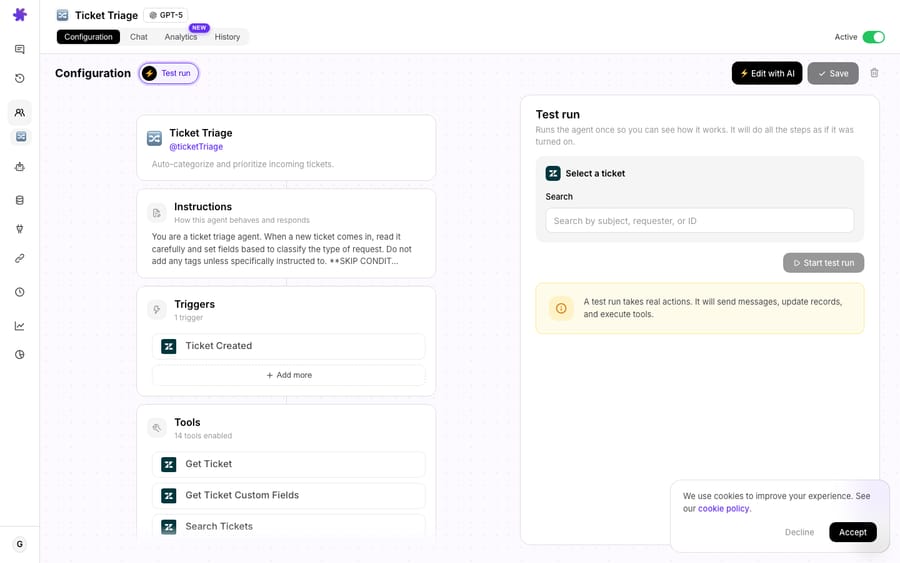
Before you ship, run the agent in the test panel. Watch the tool calls fire in real time, confirm it reaches for the right tool at the right moment, and throw the awkward cases at it: the missing order, the out-of-scope refund, the angry opener.
After it's live, use Agent Evaluation. An AI judge runs a checklist over your real chats, trigger runs, and sub-agent handoffs and returns a percentage-followed score with a one-line reason per conversation. That's your feedback loop: when the judge flags a recurring miss, you've found the exact instruction to sharpen. Update instructions when the agent repeatedly fails a task, or when your tools, knowledge, or workflow change, not on a hunch.
What does a finished instruction set look like?
Here's a compact instruction set for a "where is my order" agent, with the seven parts called out. Notice it's well under 300 words and never pastes a single shipping policy. It points at knowledge and tools instead.
You are a shipping & delivery agent for an apparel store. (role & scope) You handle order-status, tracking, and delivery-exception questions for customers — who are often worried about a late order, so be warm, concise, and concrete. (audience & tone) You may look up orders and share tracking details. You may not issue refunds or change shipping addresses — those go to a human. (the line it won't cross) For any order question, always call get_order first using the order number; if you don't have it, ask for it. Never invent a tracking number — if the lookup fails, say so plainly. (tool-use policy) For policy questions (delivery windows, lost-package handling), use the connected Help Center knowledge. If the answer isn't there, tell the customer you'll check with the team rather than guessing. (knowledge + anti-hallucination) If an order shows delivered but the customer says it never arrived, escalate to the human queue with a one-line summary. (escalation) Reply in 2–4 sentences: lead with the answer, then the detail. (output format) Example — Customer: "Where's my order?!" → "I've got it — order #1043 shipped Tuesday and is out for delivery today, arriving by 8pm. Here's your tracking: [link]. Anything else I can check?" (example)
That's the whole shape: short, positive, tool-aware, knowledge-backed, and honest about its limits.
What mistakes make agents misbehave?
A few honest failure modes worth naming:
- Over-instructing. A 1,500-word prompt doesn't make a smarter agent; it makes a confused one. If yours is ballooning, that's the signal to split into sub-agents.
- Hard-coding facts. Anything that changes (prices, policies, hours, inventory) belongs in knowledge, not the prompt. Pasted facts go stale and nobody notices until a customer does.
- Over-constraining. Pile on too many "never do X" rules and the agent gets timid, refusing reasonable requests. Frame positively and trust the model with the easy cases.
- Instructions can't fix a missing tool. No amount of prompting lets an agent look up an order it has no connector for. If the behavior needs an action, the fix is a tool or connector, not another sentence.
- Writing once and walking away. Instructions are living documents. The teams whose agents quietly degrade are the ones who never look at the evaluation scores.
FAQ
How long should agent instructions be? Aim for about 200 to 500 words. If you're pushing past 1,000, you almost certainly have multiple jobs that should be separate sub-agents, each with its own short brief.
Should I write instructions from scratch? No need. Use Macha's AI Agent Builder (Sidekick) to generate a first draft from a plain-English description, then refine the tool policy, escalation rules, and examples yourself.
Where do facts like my return policy go — in the instructions or knowledge? Knowledge. Connect them as a data source and have the instructions point at that knowledge. Facts in the prompt go stale silently.
How do I stop an agent from making things up? Two layers: connect real knowledge and tools so it has the facts, and write an explicit line telling it to admit uncertainty and escalate rather than guess.
How do I know my instructions are working? Test in the panel before launch (watch the tool calls), then use Agent Evaluation after launch: an AI judge scores real conversations and flags the recurring misses worth fixing.
Does running and testing agents cost anything? Testing in the free trial uses its $50 of usage (about 125 tickets). After that Macha bills per ticket, one conversation charged once however many steps the agent takes, and the model you pick doesn't change the price: from $299 a month for 750 tickets, about $0.40 each. See the pricing page for current plans.
Where should you start?
The fastest way to get good at this is to ship one focused agent and read its evaluation scores. Start a free trial ($50 of usage, no credit card required, no time limit), describe your first agent to the builder, then sharpen its instructions with the seven-part template above. If you're on Zendesk, the Macha on Zendesk page shows where these agents plug into your existing workflow, and the docs walk through every field in depth.
Written by Abbas (Customer Support & AI, Macha) · Reviewed by Ankeet Guha (Co-founder & CTO) · Published 2026-06-24 · Last updated 2026-06-24.






