





 Shopify
 Stripe
 Slack
Slack Notion
 Google Workspace
 Confluence

How Do You Notify Customers About Shipping Delays Automatically?


A delay you announce reads as an apology, while a delay the customer discovers turns into a ticket. Here is how to build an agent that spots late Shopify orders and tells the customer first.
Key takeaways
- A Macha shipping-delay agent searches Shopify for late orders on an hourly scheduled trigger or a Shopify Flow webhook, then posts the new delivery date on the help desk ticket.
- Gorgias data puts WISMO at 18% of incoming ecommerce support requests on average, which makes where-is-my-order the most common question in ecommerce support.
- Macha scheduled triggers run at most once an hour, cap at 24 runs per trigger per day, and auto-disable after 5 consecutive errors with an email alert.
- A scheduled delay sweep needs an idempotency rule, such as tagging the ticket before posting, or the agent will message the same delayed customer every hour.
- Macha bills per ticket, about $0.40 each from $299 a month, with setup and a dedicated success manager included, so a sweep that contacts ten late orders is billed as ten conversations.

To notify customers about shipping delays automatically, run a Macha agent on an hourly scheduled trigger (or a Shopify Flow webhook) that searches Shopify for late orders, posts a specific update with the new delivery date on the customer's help desk ticket, and flags your ops team in Slack. The customer hears about the delay from you, before they open a ticket asking where the order is.
| Step | Tool | What happens |
|---|---|---|
| 1. Detect | Shopify | Agent finds orders past their expected fulfillment/delivery date that haven't shipped or are stuck in transit |
| 2. Decide | Macha | For each late order, pull full details (line items, fulfillment status, new ETA) and draft a specific, empathetic update |
| 3. Notify customer | Zendesk | Post the update as a public reply on the order's ticket (creating one if needed) |
| 4. Alert the team | Slack | Drop a short note in #ops so a human can intervene on the worst cases |
The message itself is a solved problem. Every best-practice guide, from Jeff Toister to Square to Omnisend, says the same thing: reach out the moment a delay is confirmed, be specific about the new date, apologize, and tell them you're watching it. The hard part is noticing the delay across thousands of orders without someone babysitting a tracking dashboard.
Macha is the AI agent layer that sits on top of the help desk you already run (Zendesk, Freshdesk, Gorgias, Front, HubSpot or Intercom) and connects to the commerce tools you already use, like Shopify and Slack. The example below uses Zendesk. When an order falls behind, an agent detects it, posts a personalized update onto the ticket, and quietly flags your ops team in Slack. Nobody is in the loop until someone is actually needed.
Quick framing: Macha isn't a shipping app or a helpdesk replacement. It's the layer that reads your Shopify orders, decides what to do, and takes the action inside the tools your team already lives in.
Why tell customers about a delay before they ask?
"Where is my order?" (WISMO) is one of the largest, dullest, most automatable categories in ecommerce support. Gorgias data calls it the most common question in ecommerce, at 18% of incoming requests on average. A large slice of that is delay-driven: the order didn't arrive when the confirmation email promised, so the customer comes looking. Shopify's own guide to WISMO is built around cutting these inquiries before they're sent.
The lever is timing. Vendors who sell proactive delivery notifications report fewer WISMO tickets and higher CSAT on delayed shipments when customers are told first. Treat their magnitudes as directional, since they're selling the fix. You don't need the exact figure to act on it. A delay you announce reads as an apology; a delay they discover reads as a reason to complain.
So the job is to turn a delay you'd otherwise hear about from the customer into one you surface first. That's an automation problem, and it fits an agent well.
What does the automated delay message look like?
The workflow in the table above uses three tools: Shopify for order data, Zendesk for the customer-facing update, and Slack for the internal heads-up. A real customer-facing message from this flow reads like this:
Hi! We noticed your order #1523 is running a bit behind schedule. It's currently in transit and we now expect it to arrive by March 6. We're sorry for the delay and we're keeping an eye on it for you, so there's no need to do anything on your end.
Specific order number, honest status, a concrete new date, an apology, and a commitment to watch it. That's the whole best-practice checklist in four sentences, and the agent fills in the order number and ETA from live Shopify data, so it never reads like a generic "sorry for any inconvenience" blast.
If you send delay notices by hand, our customer service email templates include shipping, fix and project delay emails with subject lines.
How does Macha detect a delayed order?
This is where most "just automate it" articles wave their hands. Macha's Shopify connector exposes tools, not event triggers: Search Orders (by customer email, fulfillment status, financial status or date range), Get Order, Lookup Customer, Customer Orders and Search Products. There's no native "order updated" event firing into Macha. So you have two different ways to make this proactive, and the right one depends on how fast you need to react.
Option A: a scheduled trigger (the simple default)
Macha's scheduled triggers run an agent on a schedule you set as a cron expression. You point one at a "shipping-delay sweep" agent, and every hour (0 * * * *) or a few times a day (say 0 8,12,16 * * *) it uses Shopify's Search Orders tool to pull orders that are unfulfilled or in transit past their expected date, then posts the Zendesk update and the Slack alert for each one.

This is where I'd start, because it's stateless and self-healing: if one run fails, the next sweep picks up the same orders. The guardrails, per Macha's triggers docs:
- Minimum interval is 1 hour, with a cap of 24 runs per trigger per day and 3 simultaneous scheduled runs per organization. This is "checked hourly," not "instant."
- A trigger auto-disables after 5 consecutive errors and emails you, so a broken Shopify token can't fail silently forever.
- Scheduled triggers are included on every plan, so this sweep doesn't cost you a slot. The pricing page lists what's included.
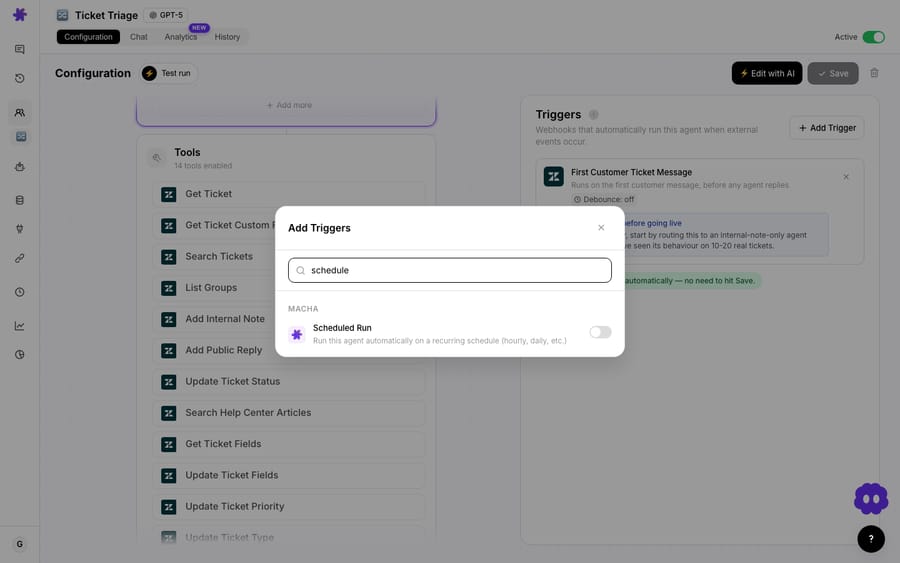
The one thing you must build in is idempotency: tell the agent not to re-notify an order it already messaged. The cleanest way is to have it tag the Zendesk ticket (or check for its own prior public reply) before posting, so a customer doesn't get the same "you're running behind" message every hour. Put that rule explicitly in the agent's instructions.
Option B: a custom webhook (closer to real time)
If "checked hourly" isn't tight enough, use Macha's universal webhook trigger. Macha generates a unique URL and a signing secret, with no connector required, and you point Shopify at it. With Shopify Flow (or a native Shopify orders/updated webhook), you call that URL the moment fulfillment status changes, and the agent runs per event. The payload reaches the agent as context, and you filter inside its instructions: act only when the order is genuinely late, ignore the rest.
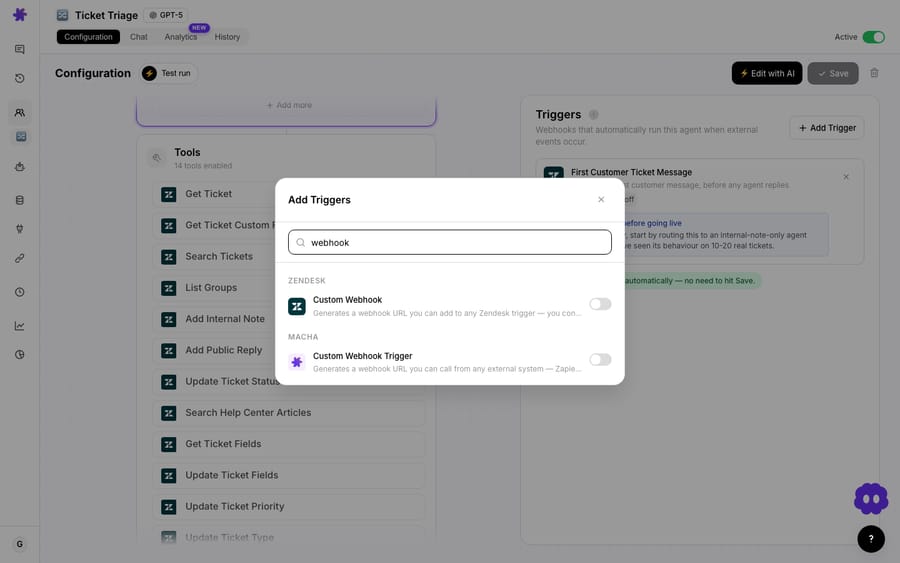
The trade-off is real. Option B reacts in seconds but needs Shopify Flow set up and is chattier: it fires on every order update, late or not, so your filtering has to be tight. Option A is slower but simple and needs nothing on the Shopify side beyond the existing connector. Most teams are well served by the hourly sweep; reach for the webhook only if your SLA genuinely demands sub-hour reaction.
| Scheduled trigger | Custom webhook | |
|---|---|---|
| Reaction time | Every 1 hour at best | Seconds after the order update |
| Shopify setup | Connector only | Shopify Flow or an orders/updated webhook |
| Main risk | Re-notifying the same order | Noise from on-time orders |
Which tools does the delay agent need?
However you trigger it, the agent is the same. In the agent builder you wire three actions:
- Shopify → Get Order / Search Orders: read the order and its fulfillment status.
- Zendesk → public reply or internal note: post the update, or leave it as a note for a person to approve.
- Slack → Send Message: drop the alert into
#ops.

Then the instructions do the reasoning: for each late order, write a short, specific, apologetic update that names the order number and the new expected date; post it as a public reply; if the delay is severe (say more than a week past ETA, or a high-value order), also post to #ops so someone can offer a discount or expedite. Because each message is generated from live data for that order, you don't maintain a pile of canned macros. The agent adapts the wording to what's actually happening.
If you'd rather not configure this by hand, describe the workflow to Sidekick, Macha's in-dashboard agent builder, and it constructs the agent for you to tune. On every plan the Macha team also sets up and monitors agents with you.
How much does a delay sweep cost to run?
Macha bills per ticket: one conversation with one person, charged once however many messages, lookups and drafts it takes. It isn't per seat and it isn't per vendor-defined "deflection." Pricing starts at $299 a month for up to 750 tickets, about $0.40 each, and every tier includes unlimited agents and seats. It also includes setup: the Macha team builds this agent on your store and help desk, tests it on a sample of past tickets and runs it in safe mode before it messages anyone, and a dedicated success manager handles your changes after go-live. So a sweep that reaches out about ten late orders is ten conversations, and the 990 orders that weren't late cost nothing. There are no overages: if the month's tickets run out, agents pause until you move up a tier or top up. See pricing for the tier that fits your volume, or start a free trial ($50 of usage, no credit card required) and measure it on your real store.
When shouldn't you automate delay notices?
Automation multiplies mistakes as readily as it multiplies good work, so be deliberate:
- Don't fully automate the public reply on day one. Start the agent in "internal note" mode: it drafts the delay message onto the ticket for a person to approve and send. Watch a week of its judgment (is it calling orders "late" that aren't? is the tone right?) before you let it post publicly without review.
- Get idempotency right or you'll spam people. A scheduled sweep with no "already notified" check will message the same customer every hour. This is the most common way this workflow goes wrong, so bake the dedupe into the instructions and tags before you turn it on.
- It's only as accurate as your fulfillment data. If your Shopify "expected delivery" dates are unreliable or your 3PL doesn't sync tracking back cleanly, the agent will call on-time orders late. Fix the data source first.
- Severe delays still need a person. A two-day slip is a polite heads-up. A lost shipment or a two-week delay on a high-value order is a judgment call about refunds, reships and goodwill, which is why the Slack alert exists. Don't try to automate the apology and the remedy.
- Channel matters. This workflow posts to the help desk ticket, which reaches customers who already have an open conversation. To reach every delayed customer (most never open a ticket), pair it with a proactive email or SMS flow in your ecommerce stack. The agent handles the support side, not your marketing broadcast.
This pairs naturally with Macha's other order-management agents. See the related use cases for auto-resolving "where is my order" inquiries and looking up order details mid-conversation, and the Shopify integration page for the full list of order tools.
FAQ
Does Macha have a native Shopify "order delayed" trigger? No. The Shopify connector provides tools (Search Orders, Get Order, Lookup Customer and product lookups), not event triggers. You make the workflow proactive with a scheduled trigger (an agent that sweeps for late orders on a recurring interval) or a custom webhook (Shopify Flow calls Macha's universal webhook URL on order updates).
How quickly will a customer be notified after a delay? With the scheduled approach, as fast as your interval, which is 1 hour at minimum. With the webhook approach, within seconds of Shopify firing the event. Pick based on your SLA; most teams find an hourly sweep is plenty.
Will it message the same customer repeatedly? Not if you set it up correctly. Instruct the agent to tag the ticket (or check for its own prior reply) before posting, so each delayed order is notified once. This dedupe step is essential for any scheduled sweep.
Can a human approve the message before it goes out? Yes. Post the update as an internal note so a person reviews and sends it, or as a public reply for full automation. Start with notes and move to public replies once you trust it.
What does it cost to run? Macha bills per ticket, one conversation charged once however many steps the agent takes, from $299 a month for up to 750 tickets, about $0.40 each, with setup and a dedicated success manager included. Notifying a handful of late orders is a handful of conversations, not a charge for every order the sweep looked at. See pricing.
Which helpdesks does this work with? This example uses Zendesk, but Macha runs on Zendesk, Freshdesk, Gorgias, Front, HubSpot or Intercom. Swap the Zendesk reply action for the equivalent on your help desk.
How do you get started?
If WISMO is eating your queue, the fix with the biggest payoff is to stop being the last to know. Start a free trial ($50 of usage, no credit card required), connect Shopify and your help desk, and the Macha team sets up the shipping-delay agent for you, so it tells customers what's happening before they open a ticket. Read the triggers and scheduling docs for the full setup, or browse the blog for more order-management automations.
Written by Abbas (Customer Support & AI, Macha) · Reviewed by Ankeet Guha (Co-founder & CTO) · Published 2026-06-24 · Last updated 2026-09-24.






