Shopify
 Stripe
 Slack
Slack Notion
 Google Workspace
 Confluence

62 Canned Responses Examples for Customer Service, Copy-Ready by Situation (2026)


A canned response is a saved reply an agent inserts into a ticket and edits before sending. Zendesk and Gorgias call them macros, Freshdesk calls them canned responses, Front calls them message templates and HubSpot calls them snippets. Below are 62 copy-ready examples grouped into 10 situations: acknowledgment, asking for information, refunds, billing, bugs, shipping, account access, feature requests, escalation and closing. Each one is tagged SaaS, ecommerce or general, uses [square bracket] placeholders, and the table further down shows what each bracket becomes in six help desks, checked on their own docs on October 13, 2026.
Key takeaways
- This page has 62 copy-ready canned responses in 10 situations, from the first acknowledgment to the closing message, each tagged SaaS, ecommerce or general.
- The customer's first name is a different placeholder in every help desk: Zendesk uses ticket.requester.first_name, Freshdesk ticket.requester.firstname and Gorgias ticket.customer.firstname, per their docs on October 13, 2026.
- Gorgias replaces a macro variable with a blank space when the data is missing, while Front and Intercom let you write a fallback such as "there" into the placeholder itself.
- HubSpot free accounts can save 3 snippets; Starter, Professional and Enterprise accounts can save up to 5,000, each capped at 2,500 characters.
- In an October 13, 2026 test, a Macha agent given 4 of these templates picked the right one for 2 made-up tickets and filled the order details from a Shopify test store.

Which canned response should you use?
Find the situation, then jump to the template. Tone is the register the template is written in; change it if your brand sounds different.
| Situation | Template to start from | Channel | Tone |
|---|---|---|---|
| A new ticket just arrived | #1 Ticket received, with response time | Neutral, specific | |
| Ticket arrived out of hours | #3 After hours | Email, chat | Neutral |
| You need an order number | #13 Need the order number | Brief | |
| You need steps to reproduce a bug | #9 Steps to reproduce | Precise | |
| Customer wants a refund you can approve | #14 Refund approved, full | Warm, plain | |
| Refund is outside the policy | #17 Refund declined, outside the window | Firm, kind | |
| Customer was charged twice | #21 Duplicate charge | Apologetic, factual | |
| Card payment failed | #22 Failed payment | Neutral | |
| You've confirmed a bug | #28 Bug confirmed, logged | Honest | |
| Order shipped, customer asks where it is | #35 Shipped, with tracking | Email, chat | Brief |
| Customer is locked out | #41 Password reset | Email, chat | Calm, secure |
| Customer asks for a feature | #47 Feature request logged | Appreciative, no promises | |
| Customer is angry | #54 Upset customer, first reply | Calm, accountable | |
| Ticket is solved | #57 Resolved, check before closing | Short |
If you want the definition first, our canned response glossary entry covers it. If you want the setup steps in a specific tool, see how Zendesk macros work, canned responses in Freshdesk, Gorgias macros or Front message templates.
What placeholder syntax does each help desk use?
Every template below writes its variables as [First name], [Ticket number] and [Agent name]. When you paste a template into your help desk, swap each bracket for that tool's placeholder so it fills itself. This is the part most canned-response lists skip, and it's where broken greetings like "Hi ," come from.
| Help desk | Where you save it | Customer first name | Ticket or conversation ID | Agent name | Missing-value fallback |
|---|---|---|---|---|---|
| Zendesk | Macros | {{ticket.requester.first_name}} | {{ticket.id}} | {{current_user.name}} | Liquid if/else; no built-in default |
| Freshdesk | Canned responses | {{ticket.requester.firstname}} | {{ticket.id}} | {{ticket.agent.name}} (assigned agent) | None documented |
| Gorgias | Macros | {{ticket.customer.firstname}} | {{ticket.id}} | {{current_user.firstname}} | None: blank space if missing |
| Front | Message templates | {{recipient.first_name}} | {{conversation.id}} | {{user.first_name}} | {{recipient.first_name | 'there'}} |
| Intercom | Macros | {{first_name}} or the #fn shorthand | Not in the name-variable doc | Not in the name-variable doc | {{first_name|fallback:"there"}} |
| HubSpot | Snippets and templates | First name token from the Personalize menu | Ticket property tokens | Sender (HubSpot user) tokens | Default value field when you insert the token |
Sources, all read October 13, 2026: Zendesk's placeholder reference, Freshdesk's placeholder guide, Gorgias's macro variables, Front's variables article, Intercom's name variables article and HubSpot's snippet token guide.
Five details from those docs change how you write templates:
- Gorgias leaves a gap. Its docs say a variable with no data "is replaced with a blank space." A template that opens "Hi [First name]," renders as "Hi ," for a customer with no name on file. Our Gorgias variables troubleshooting post covers the other causes.
- Front splits on the first space. Front's recipient.first_name is the contact name up to the first space, so "Mary Ann Lee" becomes "Mary". The fallback goes inside the braces in single quotes.
- Intercom has a shorthand. Typing #fn inserts the first name, and the long form takes a fallback in double quotes.
- Zendesk turns a hash into a link. Per its reference, a hash before ticket.id creates a clickable link, and the plain placeholder prints the number. Our Zendesk placeholders guide covers Liquid and dynamic content.
- HubSpot counts snippets. Free accounts can create 3 snippets and Starter, Professional and Enterprise accounts up to 5,000, each with a 2,500-character limit; you insert one by typing # and the snippet's shortcut (HubSpot's snippets guide, updated June 2, 2026). The Freshdesk equivalent is in our Freshdesk placeholders post.
Acknowledgment canned responses
Use these as the first reply when you can't solve the ticket in one message. The point of an acknowledgment is a specific expectation, so each one names a time.
1. Ticket received, with response time (general, email)
Hi [First name], thanks for getting in touch. We've got your message and your ticket number is [Ticket number]. Someone from the team will reply within [Response time]. If anything changes before then, just reply to this email and it'll land on the same ticket. [Agent name]
2. Received, we're looking into it (general, email)
Hi [First name], thanks for the detail, that helps. I'm looking into this now and will get back to you by [Day or time] with an answer or an update, whichever comes first. [Agent name]
3. After hours (general, email or chat)
Hi [First name], thanks for your message. Our team is offline right now; we're here [Support hours, with time zone]. We'll pick up your ticket first thing when we're back. If it's about [Urgent issue, e.g. a site outage], [Urgent route, e.g. our status page or phone line] is the fastest way to reach us.
4. High volume delay (general, email)
Hi [First name], thanks for your patience. We're handling more messages than usual this week, so replies are taking about [Current wait] instead of our usual [Normal wait]. Your ticket [Ticket number] is in the queue, so there's no need to send it again.
5. Live chat greeting (general, chat)
Hi [First name], I'm [Agent name]. I've got your chat open. What can I help with today?
6. Customer wrote again on the same issue (general, email)
Hi [First name], I can see this is the second time you've had to write about this, and I'm sorry for that. I've read the whole thread, so you don't need to repeat anything. Here's where it stands: [Current status]. Next step: [Next step], by [Date].
Asking for more information
A request for information should ask for everything in one message. A customer who gets three follow-up questions on three different days writes a fourth email, and it isn't about the bug.
7. Account email (SaaS, email)
Hi [First name], happy to help with this. I can't find an account under the email you wrote from. Could you send the email address you use to sign in to [Product], or your workspace name? Then I can look at your account directly.
8. Screenshot or screen recording (SaaS, email)
Hi [First name], thanks for flagging this. A screenshot of what you're seeing (or a short screen recording, if it moves) would help us find it much faster. Please include the browser address bar if you can, and let me know roughly when it happened.
9. Steps to reproduce (SaaS, email)
Hi [First name], thanks for reporting this. So our engineers can reproduce it, could you send: 1) the steps you took, in order, 2) what you expected to happen, 3) what happened instead, and 4) your browser and operating system? If it happens every time, that's useful to know too.
10. Which plan or workspace (SaaS or B2B, email)
Hi [First name], before I make any changes: you have access to [Number] workspaces. Which one is this about? Once you confirm, I'll [Requested change].
11. Photo of the damaged item (ecommerce, email)
Hi [First name], I'm sorry your order arrived damaged. Could you reply with a photo of the item and one of the outer packaging? As soon as we have them, we'll arrange a [Replacement or refund] for order [Order number].
12. No reply after 3 days (general, email)
Hi [First name], just checking in on this. I'm still waiting on [Missing information] to move it forward. If it's easier, reply with whatever you have and I'll take it from there. If I don't hear back by [Date], I'll close the ticket, and replying later will reopen it.
13. Need the order number (ecommerce, email)
Hi [First name], happy to look into this. I couldn't match an order to this email address. Could you reply with the order number (it starts with #) or the email you used at checkout? [Agent name]
Refund canned responses
Keep the policy and the tone in separate sentences. The policy sentence should be the same every time; the tone sentence is the one you adapt.
14. Refund approved, full (general, email)
Hi [First name], I've refunded [Amount] to your original payment method. Refunds usually show up within [Bank processing time], depending on your bank. You'll get a confirmation email from [Payment provider or store] shortly. Sorry this one didn't work out. [Agent name]
15. Refund approved, prorated subscription (SaaS, email)
Hi [First name], I've canceled your [Plan name] plan and refunded the unused part of your billing period: [Amount] for [Number] days. You'll keep access until [Date]. The refund goes back to the card ending [Last 4 digits] and usually appears within [Bank processing time].
16. Refund request received (general, email)
Hi [First name], thanks for letting us know, and sorry this one hasn't gone to plan. I've passed your refund request for order [Order number] to the team that handles refunds. They'll check it against our return policy and reply here within [Response time]. [Agent name]
17. Refund declined, outside the window (general, email)
Hi [First name], thanks for asking, and I understand why. Our policy allows refunds within [Refund window] of [Purchase or renewal date], and this [Order or charge] was on [Date], so I can't refund it. What I can do is [Alternative, e.g. cancel the renewal, offer credit, extend access]. Would that help?
18. Store credit instead of a refund (ecommerce, email)
Hi [First name], this order is past our refund window, but I can offer store credit for the full [Amount] instead. It's valid for [Validity period] and applies at checkout automatically. Reply "yes" and I'll add it to your account today.
19. Return label first (ecommerce, email)
Hi [First name], we'll refund order [Order number] as soon as the item is on its way back. Here's your prepaid return label: [Label link]. Once the carrier scans it, we'll issue the refund to your original payment method, usually within [Number] business days.
20. Where's my refund (general, email)
Hi [First name], I've checked, and your refund of [Amount] was issued on [Date]. Banks usually take [Bank processing time] to show it. If it hasn't appeared by [Date], send me a screenshot of your statement for that period and I'll trace it with [Payment provider].
Billing canned responses
Billing tickets are where a vague template costs the most, because the customer is already checking numbers. Name the amount and the date every time.
21. Duplicate charge (SaaS, email)
Hi [First name], you're right, you were charged twice for [Product] on [Date]: two charges of [Amount]. That's our error. I've refunded the second charge, and it should be back on your card within [Bank processing time]. Your subscription is unchanged.
22. Failed payment (SaaS, email)
Hi [First name], your last payment for [Plan name] didn't go through on [Date]. Usually it's an expired card or a bank's fraud check. You can update the card here: [Billing page link]. We'll retry automatically on [Retry date], and your account stays active until [Grace period end].
23. Invoice copy (B2B, email)
Hi [First name], here's the invoice for [Billing period]: [Invoice link]. All past invoices are under [Settings path]. If your finance team needs a different company name, address or tax ID on future invoices, send me the details and I'll update them.
24. Add a tax ID or change billing details (B2B, email)
Hi [First name], I've updated your billing details to [New details]. They'll appear on invoices from [Next invoice date]. We can't reissue invoices that are already paid, but I can send a statement listing them with the new details if that helps your accounts team.
25. Cancel subscription, confirmed (SaaS, email)
Hi [First name], your [Plan name] subscription is canceled. You won't be charged again, and you'll keep access until [End date]. Your data stays available until [Retention date] if you change your mind. If you have a minute, what made you cancel? One line helps us a lot.
26. Charged after the trial (SaaS, email)
Hi [First name], I'm sorry for the surprise. Your trial ended on [Date] and the plan renewed at [Amount]. Since you haven't used [Product] since the trial, I've refunded the charge and canceled the subscription. Nothing more will be billed.
27. Price change question (SaaS, email)
Hi [First name], fair question. Your plan moved from [Old price] to [New price] on [Date], as announced on [Notice date]. The change covers [What changed]. If the new price doesn't work for you, [Option, e.g. a smaller plan, annual billing, cancellation] is available, and I'm happy to set it up.
Bug and technical support canned responses
The honest version of a bug reply says what you know, what you don't, and when the customer hears from you next. Never promise a fix date engineering hasn't given you.
28. Bug confirmed, logged (SaaS, email)
Hi [First name], thanks for the clear report. We've reproduced it: [One-line description]. It's logged with our engineers as [Issue reference]. I don't have a fix date yet, and I'll update you here as soon as I do.
29. Known issue, workaround available (SaaS, email)
Hi [First name], this is a known issue that our engineers are working on. Until it's fixed, this workaround does the job: [Workaround steps]. I've added your ticket to the issue, so you'll hear from us when the fix ships.
30. Escalated to engineering (SaaS, email)
Hi [First name], I've passed this to our engineering team with your steps, screenshots and account details, so they won't need to ask you again. They usually respond within [Engineering response time]. I'll stay on this ticket and update you either way.
31. Fix shipped (SaaS, email)
Hi [First name], good news: the fix for [Issue] went live on [Date]. A browser refresh should pick it up. Could you check it's working for you? If anything's still off, reply here and I'll reopen it straight away.
32. Can't reproduce (SaaS, email)
Hi [First name], I tried to reproduce this on [Browser and setup] and couldn't trigger it yet. Could you try [Test step] and tell me what you see? If it still happens, a screen recording would show us what we're missing.
33. Outage or incident (SaaS, email or chat)
Hi [First name], we're having an incident affecting [Affected feature] since [Start time]. Our team is on it, and live updates are at [Status page link]. You don't need to do anything; I'll reply here once it's resolved.
34. Working as designed (SaaS, email)
Hi [First name], thanks for raising this. What you're seeing is how [Feature] works today: [Explanation]. I can see why you expected something different. If it helps, [Alternative or workaround]. I've also passed your feedback to the product team.
Shipping and order canned responses
These cover the most common ecommerce questions. Each assumes you can see the order; if you can't, use #13 first.
35. Shipped, with tracking (ecommerce, email or chat)
Hi [First name], thanks for checking in. Your order [Order number] shipped on [Ship date] with [Carrier], tracking number [Tracking number]. You can follow it on the [Carrier] website with that number. If the tracking hasn't updated in 3 business days, reply here and we'll open a trace with the carrier for you. [Agent name]
36. Not shipped yet (ecommerce, email)
Hi [First name], your order [Order number] is paid and in the queue, but it hasn't shipped yet. Orders usually leave our warehouse within [Processing time]. You'll get an email with tracking the moment it does. [Agent name]
37. Delivered but not received (ecommerce, email)
Hi [First name], I'm sorry it hasn't turned up. The carrier marked order [Order number] as delivered on [Date]. Could you check with neighbors and anywhere a parcel might be left? If it's still missing after [Number] days, reply here and we'll open a claim with [Carrier] and sort out a [Replacement or refund].
38. Wrong item received (ecommerce, email)
Hi [First name], sorry, that's our mistake. We'll send the right item, [Correct item], today, and you'll get tracking by email. Keep the wrong one or use this return label: [Label link]. Either way, you won't be charged.
39. Change shipping address (ecommerce, email)
Hi [First name], I've updated the address on order [Order number] to [New address]. It hasn't shipped yet, so it'll go to the new address. If you spot anything wrong in it, reply in the next [Cutoff time] before it's packed.
40. Address change after shipping (ecommerce, email)
Hi [First name], order [Order number] has already shipped, so we can't change the address from our side. You can ask [Carrier] to redirect it with tracking number [Tracking number] on their website. If it comes back to us, we'll reship it to the right address at no charge.
Account access canned responses
Access tickets are security tickets. The templates never confirm whether an email has an account, and never change anything from an unverified address.
41. Password reset (SaaS, email or chat)
Hi [First name], you can reset your password here: [Reset link]. The link expires in [Expiry time]. If the email doesn't arrive in a few minutes, check spam, then reply here and I'll take a look.
42. Locked out, two-factor lost (SaaS, email)
Hi [First name], I can help you get back in. For your security, we need to confirm it's you before we reset two-factor authentication. Please reply from the email on the account with [Verification items, e.g. the last 4 digits of the card on file and your workspace name]. We'll reset it within [Response time] of verifying.
43. Change login email (SaaS, email)
Hi [First name], to change the login email we need confirmation from both addresses. Please reply to this message from [Current email], and we'll send a confirmation link to [New email]. Once both are confirmed, the change takes effect immediately.
44. Single sign-on question (B2B, email)
Hi [First name], your workspace signs in through [SSO provider], so password resets happen there, not in [Product]. Your IT admin, [Admin name if known], can reset it or add you to the right group. Once that's done, the "Sign in with SSO" button will work.
45. Account owner left the company (B2B, email)
Hi [First name], we can transfer ownership of the workspace, but we need a request from an admin on the account or written confirmation from someone at [Company] with authority over it. Could you send [Required proof]? We'll make the change within [Response time] of receiving it.
46. Delete my account and data (general, email)
Hi [First name], we've received your request to delete your account and personal data. We'll complete it within [Deletion period] and confirm by email. Deletion is permanent, so if you need an export of your data first, reply with "export" before [Date].
Feature request canned responses
Thank the customer, record the request, and avoid dates. "On the roadmap" without a date reads as a promise anyway, so say only what's true.
47. Feature request logged (SaaS, email)
Hi [First name], thanks for the suggestion. I've logged it with our product team along with how you'd use it, which is what they look at when deciding what to build. I can't promise if or when it'll happen, but I'll let you know here if it ships.
48. Already planned (SaaS, email)
Hi [First name], good timing: [Feature] is already in progress. I don't have a release date to share yet. I've added you to the list of customers who asked for it, so you'll hear from us when it's out.
49. Not planned, with a workaround (SaaS, email)
Hi [First name], thanks for asking. [Feature] isn't something we're planning to build right now, mainly because [Honest reason]. In the meantime, [Workaround] gets you most of the way. I've still logged your request so the team sees the demand.
50. You asked, it shipped (SaaS, email)
Hi [First name], a while back you asked for [Feature]. It went live today: [Link to announcement or docs]. Thanks for the push; requests like yours are why it got built.
51. Beta invite (SaaS, email)
Hi [First name], since you asked about [Feature], would you like early access? It's in beta, so expect some rough edges, and we'd value your feedback. Reply "yes" and I'll turn it on for [Workspace].
Escalation and difficult-conversation canned responses
These are the templates to edit most before sending. Use them as structure, not as the final words.
52. Handing off to a specialist (general, email or chat)
Hi [First name], this needs someone from our [Team name] team, so I've passed it to [Specialist name or team] with everything you've told me. You won't need to repeat yourself. They'll reply here within [Response time].
53. Manager callback (general, email)
Hi [First name], I've asked [Manager name], who leads our [Team name] team, to call you. Could you reply with a number and a couple of times that work for you in the next two days?
54. Upset customer, first reply (general, email)
Hi [First name], I'm sorry. You [Specific problem, in their terms], and that shouldn't have happened. I've [Action already taken], and I'm now [Next action], which I'll finish by [Time]. I'll reply here myself as soon as it's done.
55. Out of scope (SaaS or B2B, email)
Hi [First name], thanks for asking. [Request] is outside what our support team can help with, because [Reason]. [Best alternative, e.g. a partner, a docs page, your IT team] is the right place for it. If it touches [Product] again, we're happy to help.
56. Setting a boundary on language (general, email or chat)
Hi [First name], I want to fix this for you, and I will keep working on it. I'll need us to keep the conversation respectful to do that. Here's where things stand: [Status]. Next, I'll [Next step].
Closing canned responses
Close by checking the fix worked, and make reopening easy.
57. Resolved, check before closing (general, email)
Hi [First name], I think this is sorted: [One-line summary of the fix]. Could you confirm it's working on your side? If you don't need anything else, there's no need to reply, and the ticket will close in [Number] days.
58. Closing after no reply (general, email)
Hi [First name], I haven't heard back, so I'm closing this ticket for now. If the issue comes back, reply to this email and we'll pick it up with the full history.
59. Satisfaction survey (general, email)
Hi [First name], glad we could help. If you have 10 seconds, how did we do? [Survey link]. We read every response, including the critical ones.
60. Anything else, chat (general, chat)
Is there anything else I can help with today, [First name]? If not, I'll close the chat; you can always start a new one from [Where to find chat].
61. Follow-up after a fix (SaaS, email)
Hi [First name], it's been a week since we fixed [Issue], and I wanted to check it's still behaving. If anything's come back, reply here and I'll pick it up straight away.
62. Holiday closure (general, email)
Hi [First name], thanks for your message. Our team is off from [Start date] to [End date], and we'll reply in order when we're back. For [Urgent issue], [Urgent route] is monitored during the break.
How do you write canned responses that don't sound canned?
A well-edited template reads like a hand-written reply. What customers notice is a reply that ignores what they said. Most "robotic" canned responses fail in one of four ways, and all four are fixable in the template itself.
- The first line doesn't touch their message. Leave one bracket that forces the agent to reference the ticket, like [Specific problem, in their terms] in #54. A template with zero brackets gets pasted unread.
- The promise has no time. "We'll get back to you soon" invites a follow-up ticket. Every acknowledgment above names a time, because a specific time is what stops the second email.
- Policy and tone are mixed. When the same sentence carries the rule and the apology, agents rewrite the rule to soften the apology. Keep them in separate sentences, as the refund templates do, so the policy line never drifts.
- The name field fails silently. If your tool leaves a blank when the name is missing (Gorgias does), write "Hi there" into templates customers see most, or use the tool's fallback syntax from the table above.
There's an incentive behind failure number one. Teams that measure handle time reward the agent who pastes the macro fastest, and most help desks sell seats, so their macro features are built to make each seat faster rather than to change what goes out. Neither pushes anyone to read the ticket first. That's worth knowing when a template library grows past a few hundred entries and nobody can find the right one, which is the point where teams start asking whether software could pick the template for them.
What happened when we gave these templates to an AI agent?
We gave four of the templates above (#35 Shipped, with tracking; #36 Not shipped yet; #13 Need the order number; and #16 Refund request received) to a test agent on our Macha Demo org on October 13, 2026. Its instructions told it to look the order up, pick exactly one template, copy it word for word, replace each bracket only with data from the order or from its own instructions (the sign-off "The Support Team" and a response time of 1 business day), and fall back to #13 if a bracket couldn't be filled. Refund or cancellation requests always get #16 plus a note for a person. It had read access to our Shopify test store, and we ran it in the agent's Try it chat on two made-up tickets.
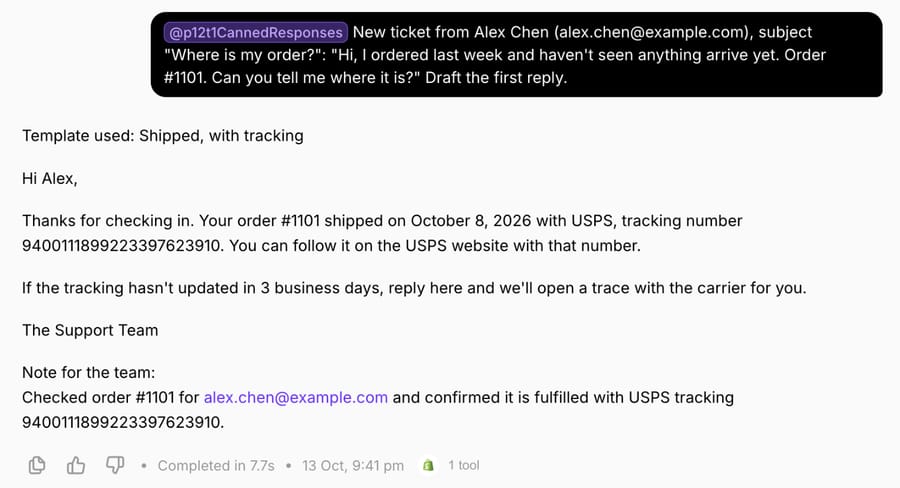
The first ticket came from Alex Chen asking where order #1101 was. The agent called Shopify once (the run took 7.7 seconds), picked "Shipped, with tracking", and filled the ship date (October 8, 2026), carrier (USPS) and tracking number from the order, then added a one-line note for the team.
The second came from Priya Nair asking to cancel order #1099 and get a refund. The order was paid and unfulfilled. The agent chose "Refund request received" rather than a shipping template, because the instructions route every refund or cancellation to a person, and its note told the team the order hadn't shipped.
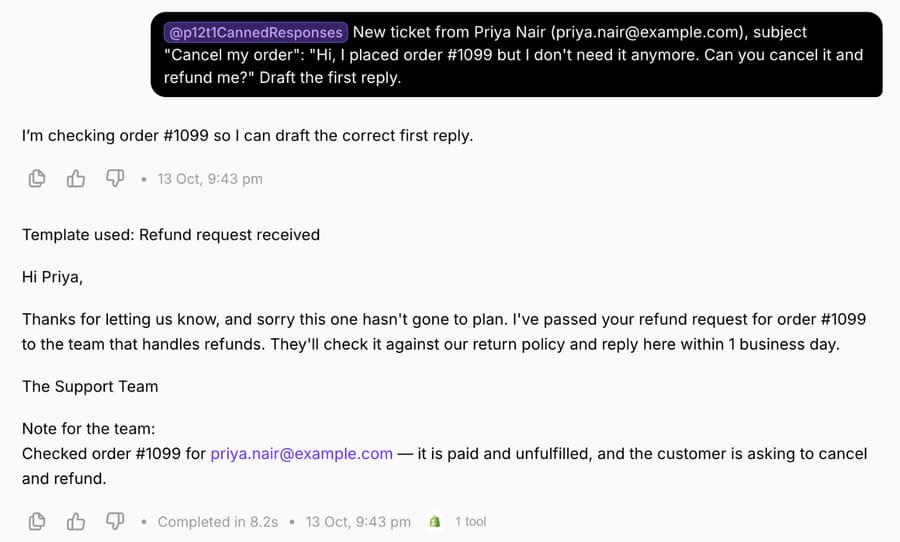
Two things in this run carry over to anyone building template-based automation, with or without Macha. First, the "never invent a value" rule mattered more than the templates: the agent only filled brackets from the order or its instructions. Second, the fallback templates (#13 and #16) are what make the rest safe, because every ticket that doesn't fit has somewhere predictable to go. Our guide to writing agent instructions covers how to structure that kind of rule.
Where Macha fits
Canned text is where automation starts. Macha fits teams already running Zendesk, Freshdesk, Gorgias, Front, HubSpot or Intercom who have a template library and more tickets than people to send it. The agent reads each ticket, picks the right template, fills it from the order or billing record (Shopify, Stripe or a tool the team connects), and drafts it as an internal note in safe mode, so a person approves it before anything reaches the customer. Our post on AI draft replies with agent approval shows that workflow in Zendesk.
It's the done-for-you option: the Macha team analyzes your past tickets, turns your existing macros into agent instructions, builds the agent on your help desk and runs it in safe mode until the drafts are right. That's included on the trial and every plan, and the trial gives you $50 of free usage (about 125 tickets), no credit card, no time limit. Plans run at about $0.40 per ticket (pricing), which includes setup and a dedicated success manager who handles your changes, such as a new template or the next ticket category.
Macha isn't worth it if your team answers a few dozen tickets a week. A good set of canned responses, kept current, is enough at that volume.
Frequently asked questions
What is an example of a canned response?
A common one is the acknowledgment: "Hi [First name], thanks for getting in touch. We've got your message and your ticket number is [Ticket number]. Someone from the team will reply within [Response time]." It's template #1 above, with 61 more for other situations.
Are canned responses the same as macros?
Mostly. A canned response is the saved text; a macro in Zendesk or Gorgias can also change ticket fields, add tags or, in Gorgias, run Shopify actions. Freshdesk keeps canned responses and scenario automations separate, and Front calls its saved replies message templates.
How many canned responses should a support team have?
Start with templates for your 10 to 20 most common ticket types and add more only when the same reply gets typed by hand three or more times. A library nobody can search is slower than typing, so name templates by situation, as above.
How do you personalize a canned response?
Use placeholders for the customer's name, ticket number and order details (the syntax table above shows each help desk's version), and leave one bracket that forces the agent to reference the customer's actual problem.
Can AI write or choose canned responses?
Yes. An AI agent can pick a saved template by situation and fill it from your systems, as in our October 13, 2026 test. The safe way to start is drafts as internal notes that a person approves before sending.
How we researched this
- Help desk docs, read October 13, 2026: Zendesk's placeholder reference for business rules, Freshdesk's dynamic content and placeholders guide, Gorgias's macro variables page, Front's article on variables in message templates, Intercom's name variables article, and HubSpot's articles on snippet tokens and on using snippets (updated June 2, 2026). Each row of the syntax table comes from those pages; "not in the doc" means the page didn't list it, not that the tool can't do it.
- Ranking pages read October 13, 2026: Zendesk's live chat canned responses guide (last updated October 20, 2025), which has 100+ chat replies but no refund, billing or account access sections, and Featurebase's 20-example post. Mailchimp's and UseResponse's pages are titled as 10 examples each.
- Run live on October 13, 2026: a test agent named "P12-T1 Canned responses" on our Macha Demo org, inactive with no triggers, with read access to our Shopify test store. We ran it twice in its Try it chat on made-up tickets from example.com customers (orders #1101 and #1099). Each run made one Shopify call; nothing was written to Shopify or to a help desk.
- The templates are ours, written for this page, and every customer name, order and ticket is synthetic. Bracketed values such as [Response time] are for you to fill; none are recommendations about your policy.
If you'd like an agent that picks and fills your own canned responses, start a Macha trial and the team will build it with you.