Shopify
 Stripe
 Slack
Slack Notion
 Google Workspace
 Confluence

25 Auto Reply Email Examples for Support Teams, With Where to Set Each One (2026)


An auto-reply is the message your help desk sends by itself the moment a customer writes in, before any person has read the ticket. A good one does three jobs: it confirms the message arrived, it says when a person will reply, and it gives the customer something useful to do in the meantime. Below are 25 auto reply email samples written for support inboxes, all copy-ready, grouped by situation: ticket received, after hours, weekend, holiday and peak, high volume, team out of office, no-reply mailboxes and chat away. Each has SaaS, ecommerce or general versions, and a table shows where to set each one in six help desks, checked on their own docs on October 13, 2026.
Key takeaways
- This page has 25 copy-ready support auto-replies in 8 situations, including holiday closures, team out of office, unmonitored mailboxes and chat away messages, each with a stated response time.
- Zendesk sends the standard trigger "Notify requester and CCs of received request" on every new ticket a customer submits, so most Zendesk teams edit or clone that trigger instead of building a new auto-reply.
- Gorgias counts a ticket as billable when a Rule sends an automatic reply, so an auto-reply that fires on every new ticket makes every new ticket billable.
- RFC 3834 says an automatic reply should carry an Auto-Submitted header and recommends sending the same away notice to one sender no more than once in 7 days.
- In an October 13, 2026 test, a Macha agent given template #7 answered a made-up after-hours order question with the UPS tracking number and sent the auto-reply only for an address change.
Which auto-reply should you use?
Find the situation, then jump to the template. Tone is the register each one is written in.
| Situation | Template to start from | Channel | Tone |
|---|---|---|---|
| Any new ticket, during business hours | #1 Standard acknowledgment with reply time | Neutral, specific | |
| New ticket on a SaaS product | #2 Ticket received, with status page and docs | Practical | |
| New order question in an online store | #3 Ticket received, ask for the order number | Brief | |
| Ticket from a customer with a support plan | #4 Ticket received, priority plan | Formal | |
| Ticket arrives after the team logs off | #5 After hours, back tomorrow | Calm | |
| Ticket arrives on Saturday or Sunday | #8 Weekend, back Monday | Calm | |
| Office closed for a public holiday | #10 Holiday closure, with dates | Warm | |
| Black Friday or launch week backlog | #11 or #12 Peak season | Honest | |
| Queue is longer than usual | #13 High volume, real wait time | Apologetic, factual | |
| An outage is driving the volume | #14 Known incident in progress | Direct | |
| Whole team away at an offsite or training | #15 Team out of office, one day | Plain | |
| Someone emails a no-reply address | #19 Unmonitored mailbox | Helpful | |
| Chat widget with nobody online | #22 Chat away, leave your email | Chat | Friendly |
If you need the replies your team sends after the auto-reply, our 62 canned responses examples cover acknowledgment, refunds, billing, bugs and closing messages.
What makes an auto-reply email useful?
What a customer looks for in an auto-reply is a time. "We'll get back to you as soon as possible" gives them nothing to plan around, so many of them write again, and the second email often lands as a second ticket or pushes the first one down the queue. Every template below names a time, a ticket number where the help desk can insert one, and one self-service route.
Four rules shape them:
- Promise a time you actually hit. If your median first reply is 9 business hours, write "within 1 business day", not "within a few hours". Our first response time benchmarks show what's typical by channel.
- One link, not five. A status page, an order tracking page or one help center article. A list of links reads like a brush-off.
- Tell them not to resend. Say that replying to this email adds to the same ticket. It cuts duplicates.
- Say what's urgent and where it goes. If an outage or a security problem has a faster route, the auto-reply is the place to say so.
Placeholders below use [Square brackets]. Swap them for your help desk's own placeholder, for example {{ticket.id}} in Zendesk or Freshdesk.
Ticket received auto reply email samples
The everyday auto-reply, and the one most auto response email examples online start with. It fires on every new ticket during business hours.
1. Standard acknowledgment with reply time (general, email)
Subject: We've got your message [Ticket number]
Hi [First name],
Thanks for writing in. Your request is ticket [Ticket number], and a member of our support team will reply within [Response time, e.g. 1 business day].
You don't need to send it again. If you have more details, reply to this email and they'll be added to the same ticket.
[Team name] Support
2. Ticket received, with status page and docs (SaaS, email)
Subject: Request received [Ticket number]
Hi [First name],
We've received your request and an engineer on our support team will reply within [Response time].
Two things that may help before then: - If something isn't loading, check [Status page URL] for live incidents. - Most setup questions are answered in [Docs URL].
If your whole team is blocked, reply with "blocked" in the first line and we'll look at it first.
[Team name] Support
3. Ticket received, ask for the order number (ecommerce, email)
Subject: Thanks, we're on it [Ticket number]
Hi [First name],
Thanks for getting in touch. We reply to every message within [Response time].
If this is about an order, reply with your order number (it starts with #) so we can look it up straight away. To see where a parcel is right now, use [Order tracking URL].
[Store name] Customer Care
4. Ticket received, priority plan (B2B, email)
Subject: Priority request received [Ticket number]
Hello [First name],
We've logged your request as ticket [Ticket number] under your [Plan name] support plan. Your first response target is [SLA target, e.g. 4 business hours], and [Account manager name] has been copied.
For a production outage, call [Support phone number] at any time and quote the ticket number.
[Company name] Customer Support
After hours auto-reply examples
These fire on tickets created outside your business hours. Keep the "ticket received" message for in-hours tickets, or customers get two auto-replies.
5. After hours, back tomorrow (general, email)
Subject: We're offline, back at [Opening time] [Ticket number]
Hi [First name],
Thanks for your message. Our support team works [Support hours, with time zone], so we're offline right now. Your ticket [Ticket number] is first in line when we're back, and you'll hear from us by [Time, e.g. noon tomorrow].
In the meantime, [Help center URL] answers most account and billing questions.
[Team name] Support
6. After hours, with an urgent route (SaaS, email)
Subject: Received outside support hours [Ticket number]
Hi [First name],
You've reached us outside our support hours ([Support hours, with time zone]). We'll reply by [Time] on the next business day.
If [Product name] is down for your whole team, check [Status page URL]. Customers on [Plan name] can page the on-call engineer at [Urgent route].
[Team name] Support
7. After hours, order questions (ecommerce, email)
Subject: Thanks for your message, we're back at [Opening time]
Hi [First name],
Our team is offline for the night and back at [Opening time, with time zone]. We'll reply then.
Want an answer sooner? You can track any order at [Order tracking URL] and start a return at [Returns URL]. If you need to change an address before your order ships, reply with the order number and the new address and we'll make it our first job in the morning.
[Store name] Customer Care
Weekend auto-reply examples
8. Weekend, back Monday (general, email)
Subject: Back on Monday [Ticket number]
Hi [First name],
Thanks for writing in. Our support team is off for the weekend and back on Monday at [Opening time, with time zone]. We answer weekend messages in the order they arrived, so you'll hear from us by [Time] on Monday.
[Team name] Support
9. Weekend, reduced coverage (SaaS or ecommerce, email)
Subject: Weekend support: replies may be slower [Ticket number]
Hi [First name],
A small team covers support at weekends, so replies take up to [Weekend response time] instead of our usual [Weekday response time]. Questions about [Priority topics, e.g. failed payments and login problems] are answered first.
Everything else gets a full reply on Monday.
[Team name] Support
Holiday and peak season auto-reply examples
10. Holiday closure, with dates (general, email)
Subject: We're closed for [Holiday name], back [Return date]
Hi [First name],
Our offices are closed from [Start date] to [End date] for [Holiday name]. Your ticket [Ticket number] is saved, and we'll reply in the order messages arrived from [Return date].
[Help center URL] stays open the whole time. Have a good break if you're taking one too.
[Team name] Support
11. Peak season, ecommerce (ecommerce, email)
Subject: Busy week, here's when we'll reply [Ticket number]
Hi [First name],
It's our busiest week of the year, so replies are taking about [Current wait] right now. We haven't forgotten you: your ticket [Ticket number] is in the queue.
Most questions this week are about delivery times. Orders placed by [Cutoff date] arrive by [Delivery date], and [Order tracking URL] shows exactly where yours is.
[Store name] Customer Care
12. Launch week or renewal season (SaaS, email)
Subject: Request received during [Launch or renewal period] [Ticket number]
Hi [First name],
We're answering more questions than usual this week because of [Event, e.g. our new pricing launch or annual renewals]. Replies are taking up to [Current wait].
If your question is about [Event topic], [Event FAQ URL] covers the most common ones. Billing changes made by [Date] are applied before your next invoice.
[Team name] Support
High-volume delay auto-reply examples
13. High volume, real wait time (general, email)
Subject: Replies are slower than usual [Ticket number]
Hi [First name],
We're sorry to say replies are slower than normal right now: about [Current wait] against our usual [Normal wait]. Your ticket [Ticket number] keeps its place in the queue.
Please don't open a new ticket for the same question. Replying to this email keeps everything together and doesn't move you back.
[Team name] Support
14. Known incident in progress (SaaS, email)
Subject: We're aware of the [Feature] issue [Ticket number]
Hi [First name],
If you're writing about [Short description of the incident], we know about it and our engineers are working on a fix. [Status page URL] is updated every [Update interval] and is the fastest way to see when it's resolved.
If your message is about something else, we'll reply within [Response time].
[Team name] Support
Out-of-office auto-replies for support teams
Most out-of-office examples online are for one person going on vacation. In a support team the inbox stays open, so the message has to say who is covering, what's paused and when normal service starts again. One rule applies to all three: send it from the shared support address, not from an agent's personal mailbox, or replies scatter.
15. Team out of office, one day (general, email)
Subject: Support is offline today, [Date] [Ticket number]
Hi [First name],
Our support team is away today, [Date], for [Reason, e.g. team training]. We're back tomorrow at [Opening time, with time zone] and will reply to every message from today by [Time].
For anything urgent, [Urgent route] is staffed all day.
[Team name] Support
16. Holiday closure with emergency cover (B2B, email)
Subject: Reduced support from [Start date] to [End date]
Hello [First name],
Our offices are closed from [Start date] to [End date]. During that time, an on-call engineer handles [Covered issues, e.g. production outages and security reports] at [Emergency route]. Everything else is answered from [Return date], oldest first.
Your ticket [Ticket number] is logged and your [SLA name] targets restart on [Return date].
[Company name] Customer Support
17. Coverage gap, one region offline (general, email)
Subject: Request received, reply from our [Region] team [Ticket number]
Hi [First name],
Our [Region] team is offline at the moment, so your ticket [Ticket number] has gone to our [Other region] team, who are online from [Hours, with time zone]. Expect a reply by [Time].
[Team name] Support
18. Account manager away, support covering (B2B, email)
Subject: [Account manager name] is away until [Return date]
Hello [First name],
[Account manager name] is out of the office until [Return date]. Your message has been passed to our support team as ticket [Ticket number], and [Cover name] will reply within [Response time].
For contract or renewal questions that can't wait, write to [Backup email].
[Company name]
No-reply and unmonitored mailbox message examples
Receipts, shipping notices and password resets often go out from an address nobody reads. Customers reply to them anyway. These templates catch those replies.
19. Unmonitored mailbox (general, email)
Subject: This mailbox isn't monitored
Hi,
Thanks for your email. This address only sends [Notifications, e.g. receipts and shipping updates] and isn't read by anyone, so your message hasn't reached our team.
To get help, write to [Support email] or use [Contact form URL]. Include [Reference, e.g. your order number] so we can find your account quickly.
[Company name]
20. Unmonitored billing address (SaaS, email)
Subject: Your email to [Billing address] hasn't been read
Hi,
This address only sends invoices and payment receipts, so nobody on our team has seen your message. For billing questions, write to [Support email] with the invoice number from the top of your receipt, or update your card and plan yourself at [Billing settings URL].
[Company name]
Pair templates 19 and 20 with one line in the footer of every notification email, so fewer people reply in the first place: "Replies to this address aren't read. For help, write to [Support email] or visit [Help center URL]."
21. Retired support address (general, email)
Subject: We've moved to a new support address
Hi,
We no longer use [Old address] for support, so your email hasn't been read. Please send it again to [New support email], or reply through [Help center URL]. We reply within [Response time].
[Company name]
Template 19 is the one to watch for loops. If the sender is itself an automated system, two auto-replies can answer each other indefinitely; the section below on loops covers the headers that stop it.
Chat away message examples
These are the auto reply message examples for live chat, where the customer is often still watching the widget. Keep away messages short, say how they'll hear back, and ask for an email address if the widget doesn't already have it.
22. Chat away, leave your email (general, chat)
We're offline right now and back at [Opening time, with time zone]. Leave your question and your email address, and we'll reply by email when we're back.
23. Chat away, everyone busy (general, chat)
Everyone on the team is helping other customers right now. The current wait is about [Current wait]. You can stay in this chat, or leave your email and we'll write back instead.
24. Chat away, after hours with self-service (SaaS, chat)
Our team is offline until [Opening time, with time zone]. In the meantime, try searching [Help center name] below. If you still need us, leave a message and it'll be the first thing we see tomorrow.
25. Chat away, order help (ecommerce, chat)
We're offline until [Opening time]. To see where an order is, use [Order tracking URL]. For anything else, leave your order number and email address and we'll reply by email.
Where do you set an auto-reply in Zendesk, Freshdesk, Gorgias, Front, Intercom and HubSpot?
We checked each help desk's own docs on October 13, 2026. Every one can send these, but the setting lives in a different place in each, and Zendesk and HubSpot ship a ready-made "ticket received" email while Freshdesk has a "New Ticket Created" notification with its own toggle. Check that first, or a new rule will send customers a second auto-reply.
| Help desk | Ticket received | After hours, weekend or holiday | Chat away |
|---|---|---|---|
| Zendesk | On in a new account: the standard trigger "Notify requester and CCs of received request" in Admin Center > Objects and rules > Business rules > Triggers | Clone the standard trigger twice, add Ticket > Within business hours? > Is > Yes to one and Is > No to the other, then deactivate the original | Messaging channel > Responses has separate "outside business hours" messages; adding an AI agent replaces them |
| Freshdesk | The requester notification "New Ticket Created" in Admin > Workflows > Email Notifications, with its own on/off toggle | A Ticket Creation automation rule with the condition on when the ticket was created in relation to business hours, and the action "Send email to group, agent, or requester" | Web chat Away Experience: away label, custom away message, ticket conversion |
| Gorgias | A Rule triggered on Ticket created with the action Reply to customer | Rule condition "emails received outside business hours"; for holidays, set holiday hours first and use "during holiday hours" | Gorgias advises against outside-hours replies on Facebook and Instagram comments |
| Front | A rule from the library ("Reply using message template"), set to Once or Always | Add the outside business hours condition to the same rule | Not in the doc we read |
| Intercom | Messenger shows your reply time (a few minutes, a few hours, a day, a custom time, or a dynamic median) | Office hours in Settings > Workspace > Office hours, with one-off and yearly holidays | Outside office hours, the Messenger shows when the team is back |
| HubSpot | The "Ticket received" automated email in the ticket pipeline's Automate tab (Service Hub Starter or above) | Not in the docs we read for email | Chat channel > Availability behavior > Away tab > "Show an away message" |
Sources, all read October 13, 2026: Zendesk's articles on editing the automatic response, messaging responses and business hours and the business hours condition in messaging workflows; Freshdesk's email notifications, automation rules and away experience articles; Gorgias's auto-reply Rule best practices; Front's auto-reply rules; Intercom's office hours; and HubSpot's ticket pipeline automation and help desk chat channel guides.
Details from those docs that change how you set things up:
- Zendesk's default text is one sentence. Out of the box the trigger says "Your request (
{{ticket.id}}) has been received and is being reviewed by our support staff." Zendesk's article says to edit the subject and body but leave the trigger's conditions alone, and that the auto-reply can't quote the customer's original message. That's why the table says to clone it: if you add an after-hours clone and leave the original running, out-of-hours customers get both emails. For hours and holidays, set up a schedule first; our guide to Zendesk business hours and schedules walks through it, and Zendesk notifications not sending covers what to check when the email never arrives. - Freshdesk needs two settings checked. When the "New Ticket Created" notification is on, it goes to the requester on every new ticket. If you add an after-hours automation, either turn that notification off with its toggle or make sure the two messages don't contradict each other. Holidays come from your business hours calendar; see setting up business hours in Freshdesk.
- Gorgias Rules are now the auto-responder. Our Gorgias auto-responders guide covers the templates, and the Gorgias auto-reply loop fix covers the cases where a Rule fires twice.
- Front's Once setting only fires on a new conversation. Per its doc, Once triggers on a single inbound message in a new conversation and Always fires every time the conditions match; to use Always without repeating yourself, have the rule add a tag and exclude that tag. Front skips messages it detects as automatic and messages from noreply@ addresses, and auto-replies don't show in Front analytics. More in our Front rules guide.
- Intercom's away message is mostly automatic. Outside office hours the Messenger shows "Back in" a time, and Intercom's doc says the estimate is rounded up. Office hours also feed SLA timers, which our Intercom SLA and office hours post explains.
- HubSpot's ticket emails are transactional. Per HubSpot, the default "Ticket received" and "Ticket closed" emails go to contacts who aren't marketing contacts, but editing them needs Service Hub Starter, Professional or Enterprise.
How do you stop an auto-reply from looping or spamming customers?
An auto-reply loop starts when your auto-reply reaches another automated mailbox, that mailbox answers, and your rule fires again. The email standard for this is RFC 3834. It says an automatic reply should carry the header Auto-Submitted: auto-replied, that a responder shouldn't answer any message whose Auto-Submitted value is anything other than "no", and that an away notice shouldn't go to the same sender more than once in several days, with 7 days as the recommended default.
Help desks build their own versions of those rules. Help Scout's inbox auto reply goes only to the first email in a conversation and only once to the same address within 24 hours, and it skips mail with headers such as Precedence: bulk. Front skips messages it detects as automatic. If yours doesn't document a limit, add one yourself: a tag on the first auto-reply, and a condition that skips tickets already carrying it.
There's also a billing reason to be careful. Gorgias's billable tickets doc says a ticket becomes billable when any message is sent from the help desk, and that includes an automatic reply from a Rule. An auto-reply on every new ticket therefore makes every new ticket billable, including the spam and the "thanks!" replies you would otherwise close without answering. That is the incentive built into per-ticket billing: an auto-reply sent to a spam message earns the vendor a billable ticket. Gorgias states the rule plainly in its docs; it's still easy to miss when you build the rule, so filter spam and system senders before the auto-reply rule runs.
What can't an auto-reply do?
An auto-reply answers nothing. It's the same text for the customer whose parcel is a day late and the customer whose account is locked, so its whole job is to set a time. That's fine when the first human reply is a few hours away. It's weaker when a ticket arrives at 7 p.m. on a Friday and the answer is a tracking link the customer could have had in a minute.
To see the difference on a real setup, we gave template #7 (after hours, order questions) to a test agent on our Macha Demo org on October 13, 2026. Its instructions were short: if a ticket asks where an order is, look the order up in our Shopify test store and answer with the ship date, carrier and tracking number; for anything else (refunds, cancellations, address changes, complaints), send template #7 with the opening time filled in and leave a one-line note for the team. In the agent's copy of #7 we replaced the two link placeholders with plain wording, because a test store has no tracking or returns page to link to. We ran it in the agent's Try it chat on two made-up tickets, written as if they'd arrived on a Friday night.
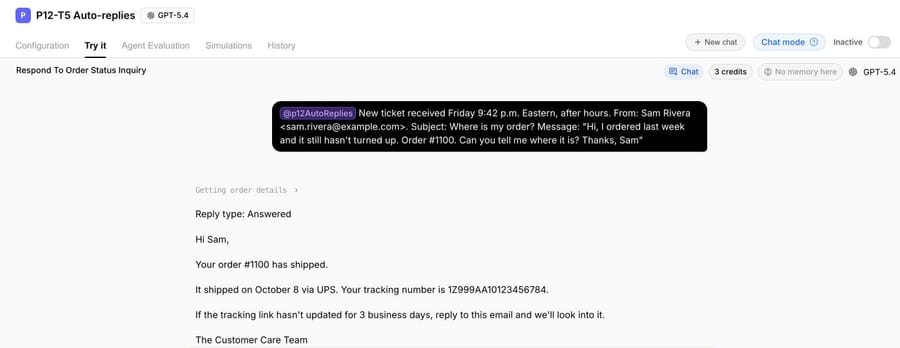
The first came from Sam Rivera at 9:42 p.m., asking where order #1100 was. An auto-reply would have told Sam to wait until Monday. The agent looked the order up once and answered: shipped October 8 with UPS, with the tracking number, and what to do if tracking doesn't move in 3 business days. The run took 13.1 seconds.
The second came from Priya Nair at 10:15 p.m., asking to send order #1099 to a new address. That's a change a person should make, so the agent sent its copy of template #7, filled the opening time as 9 a.m. Eastern on Monday because the ticket arrived on a Friday, and wrote a note for the team saying it was an address change.
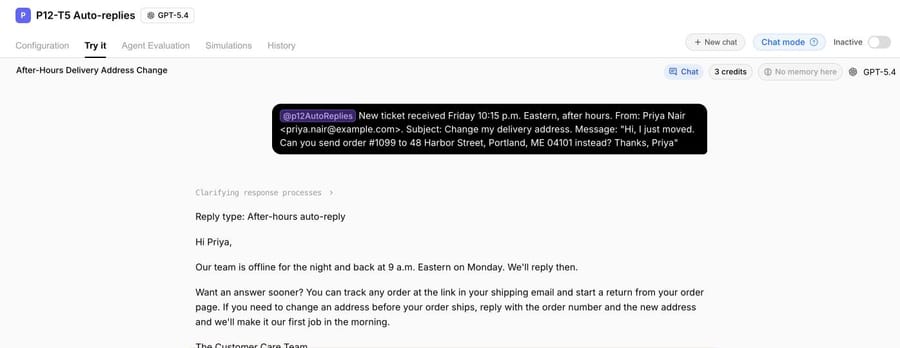
The split is the point. The order question got a complete answer at 9:42 p.m. instead of a promise for Monday, and the request that needed a person still got an honest time. A fixed auto-reply can only do the second half.
Where Macha fits
An auto-reply tells the customer the ticket arrived. Macha fits teams on Zendesk, Freshdesk, Gorgias, Front, HubSpot or Intercom whose overnight and weekend queue is mostly questions with a known answer: where an order is, how to reset a password, what a charge was for. The agent reads each new ticket, looks the answer up in the order, billing record or help center, and drafts the reply as an internal note in safe mode, so a person approves it before anything reaches the customer. When the drafts are right, those categories can go out as public replies before the first shift starts, and the auto-reply stays for everything else. Our post on AI draft replies with agent approval shows the approval step in Zendesk, and handling holiday order-status tickets with AI covers the peak-season version.
It's the done-for-you option: the Macha team analyzes your past tickets, builds the agent on your help desk and runs it in safe mode until the drafts are right. That's included on the trial and every plan, and the trial gives you $50 of free usage (about 125 tickets), no credit card, no time limit. Plans run at about $0.40 per ticket (pricing), which includes setup and a dedicated success manager who handles your changes, such as new holiday hours or the next ticket category.
If your team answers within an hour or two around the clock, you don't need this. A clear auto-reply with an honest time is enough.
Frequently asked questions
What is a good auto reply message for customer service?
One that confirms the message arrived, gives the ticket number, names a reply time and offers one self-service link. Template #1 above is the plain version: "Your request is ticket [Ticket number], and a member of our support team will reply within [Response time]."
What is an example of an automatic reply for after hours?
"Our support team works [Support hours, with time zone], so we're offline right now. Your ticket is first in line when we're back, and you'll hear from us by [Time]." That's template #5; #6 adds an urgent route for SaaS teams and #7 adds order tracking for stores.
What should an unmonitored mailbox message say?
That the address isn't read, where to write instead, and what to include so the team can find the account. Template #19 does all three. Template #20 is the SaaS billing version, and the one-line footer under it goes on the notification emails themselves so fewer people reply to them.
Should a support team use an out-of-office message?
Yes, from the shared support address, whenever normal response times won't hold: a team offsite, a holiday closure or a region going offline. Templates #15 to #18 say who's covering and when service resumes, which a personal out-of-office reply doesn't.
Can an auto-reply answer the customer's question?
No. A fixed auto-reply sends the same text to everyone. Some help desks add suggested help center articles, and an AI agent can read the ticket and answer it, but that's a different tool from an auto-reply.
How we researched this
- Help desk docs, read October 13, 2026: Zendesk's articles on editing the automatic response, messaging responses and business hours, and business hours in messaging workflows; Freshdesk's email notifications (updated June 30, 2026), automation rules (modified January 14, 2026) and away experience articles; Gorgias's auto-reply Rule best practices and billable tickets pages; Front's auto-reply rules article; Intercom's office hours article (updated July 7, 2026); HubSpot's ticket pipeline automation and help desk chat channel guides. "Not in the doc we read" in the table means the page we read didn't cover it, not that the tool can't do it.
- Loop and frequency rules: RFC 3834 (Recommendations for Automatic Responses to Electronic Mail) and Help Scout's inbox auto reply article, updated March 28, 2026.
- Ranking pages read October 13, 2026: Pylon's auto-response post (March 6, 2026), which has 6 examples and setup steps for Pylon only, and Missive's auto-reply templates (updated April 20, 2026), which has 7 templates, mostly personal out-of-office, and setup for Missive, Gmail and Outlook. Neither covers no-reply mailboxes, team coverage gaps or setup in the six help desks above.
- Run live on October 13, 2026: a test agent named "P12-T5 Auto-replies" on our Macha Demo org, inactive with no triggers, with read access to our Shopify test store. We ran it twice in its Try it chat on made-up tickets from example.com customers (orders #1100 and #1099). The first run made one Shopify lookup; nothing was written to Shopify or to a help desk, and no email was sent.
- The templates are ours, written for this page. Every name, address and value in brackets is a placeholder for you to fill; none is a recommendation about your hours or policy.
If you want the easy tickets answered overnight instead of acknowledged, start a Macha trial and the team will build the agent with you.