Shopify
 Stripe
 Slack
Slack Notion
 Google Workspace
 Confluence

Support Ticket Response Templates: 30 Replies for Every Stage of a Ticket (2026)


A support ticket response template is a saved reply for one stage of a ticket's life: the first acknowledgment, the request for details, the escalation, the wait, the fix and the follow-up if it breaks again. This page has 30 copy-ready templates in that order across 9 stages, starting with B2B SaaS (where tickets go to engineering and back), then general support and ecommerce. It also covers three things most template lists leave out. There's the internal escalation note engineering reads, a customer-facing "escalated" reply that matches it, and replies for a missed SLA and a reopened ticket.
Key takeaways
- This page has 30 copy-ready support ticket response templates across 9 lifecycle stages, from ticket received to SLA missed, with B2B SaaS, general and ecommerce versions.
- Zendesk uses Pending when an agent waits on the requester and On-hold when it waits on someone else, and closes solved tickets after four days by default.
- A useful internal escalation note has 12 fields, including the exact error text, the customer's plan and seat count, and the date of the next customer update.
- In an October 13, 2026 test, a Macha agent given 3 of these templates wrote a full escalation note, with 12 seats pulled from a Stripe test account, in 28.3 seconds.
Which ticket response template do you need?
Find the stage the ticket is in, then jump to the template. Templates #1 to #14 are written for B2B SaaS teams, #15 to #18 are internal, #19 to #24 are for general support and #25 to #30 are for ecommerce.
| Stage | Template | Channel | Tone |
|---|---|---|---|
| Ticket received | #1 Received, with your response time | Neutral, specific | |
| Urgent ticket received | #2 Received, urgent | Email, chat | Fast, calm |
| You need details to reproduce | #3 Need more information | Precise | |
| Customer went quiet | #4 Following up on a request for details | Light | |
| There's a workaround | #5 Workaround while we fix it | Practical | |
| You reproduced the bug | #6 Bug confirmed | Honest | |
| It's going to engineering | #7 Escalated to engineering | Reassuring, specific | |
| Engineering is still on it | #8 Still with engineering | Plain | |
| You're waiting on a vendor | #9 Waiting on a third party | Transparent | |
| The fix shipped | #10 Fixed, please confirm | Short | |
| Ticket was reopened | #12 Reopened, it's still happening | Accountable | |
| You missed the SLA | #13 We missed our response time | Apologetic, no excuses | |
| Escalating inside your team | #15 Internal escalation note | Internal note | Facts only |
| Escalating to a manager | #16 Internal escalation to a manager | Internal note | Short, decision-ready |
| Escalating to a vendor | #17 Escalation email template for a vendor | Firm, complete | |
| Many customers affected | #18 Incident summary for leadership | Internal email | Factual |
| Another team owns it | #21 Passed to a specialist team | Reassuring | |
| Wrong item shipped | #27 Escalated to the warehouse | Email plus internal note | Practical |
| Lost parcel | #28 Waiting on a carrier claim | Transparent |
If you only need single-situation replies (refunds, billing, shipping, password resets), our 62 canned responses examples cover those. For longer emails with subject lines (delays, policy changes, win-backs), see our customer service email templates. This page follows one ticket from start to finish.
What does a support ticket lifecycle look like?
Most tickets pass through some of these 9 stages, in roughly this order: received, need more information, workaround, bug confirmed, escalated, waiting on a third party, resolved, reopened and SLA missed. The last two aren't really stages. They're what happens when one of the first seven went wrong, and they need the most careful wording.
Your help desk tracks the same lifecycle with statuses. In Zendesk, the six default statuses are New, Open, Pending, On-hold, Solved and Closed. Pending means the agent is waiting on the requester; On-hold means the agent is waiting on someone else, such as engineering or a vendor. Solved tickets close automatically four days later by default, a reply to a solved ticket reopens it, and a reply to a closed ticket creates a new follow-up ticket (Zendesk's ticket lifecycle guide, read October 13, 2026).
| Stage | Typical Zendesk status | What the customer needs to hear |
|---|---|---|
| Received | New or Open | When they'll hear back |
| Need more information | Pending | Exactly what to send, in one list |
| Workaround | Open | How to get unblocked today |
| Bug confirmed | Open or On-hold | That it's real and logged |
| Escalated | On-hold | Who has it and when the next update is |
| Waiting on a third party | On-hold | Who you're waiting on and what you're doing meanwhile |
| Resolved | Solved | What changed and how to check |
| Reopened | Open | That you've read the history |
| SLA missed | Any | An apology and a new time |
There's an incentive problem in the Pending status worth knowing about. In Zendesk, requester wait time, agent work time and pausable update all pause while a ticket is Pending; first reply time doesn't (Zendesk's SLA policy guide, read October 13, 2026). So once the first reply is out, a team measured on those clocks is rewarded for sending a "need more information" reply quickly, whether or not it asks for the right thing. A vague request for details stops the clock, comes back with half the answer, and costs a second round trip. That's why template #3 asks for everything in one numbered list.
B2B SaaS ticket response templates
These assume a software product with an engineering team behind support. Each template uses [square bracket] placeholders. Swap them for your help desk's placeholder syntax when you save them as macros (our guide to how Zendesk macros work covers setup); the placeholder table in our canned responses guide has the syntax for each help desk we cover.
Stage 1: Ticket received
The first reply sets the expectation the rest of the ticket is judged against, so it names a time.
1. Received, with your response time (SaaS, email)
Hi [First name], thanks for reaching out. Your ticket number is [Ticket number]. On your [Plan name] plan, we reply within [Response time for that plan], so you'll hear from [Agent name or "one of us"] by [Day and time, with time zone]. If anything changes before then, reply to this email and it'll land on the same ticket.
2. Received, urgent (SaaS, email or chat)
Hi [First name], I've got this and I'm treating it as urgent because [Reason, e.g. "your team can't log in"]. I'm looking at it now and will update you within [30 minutes or your urgent window], even if all I can say is what I've ruled out. If you're on our status page, [Status page link] will show any wider incident first.
Stage 2: Need more information
Ask once, and number what you need. A customer can answer a numbered list in one reply.
3. Need more information (SaaS, email)
Hi [First name], thanks for reporting this. To get it to the right engineer, I need three things:
1. The steps you took just before it happened 2. The exact error message, or a screenshot of it 3. Your workspace name (or the email you sign in with)
Once I have those, I'll pass it on the same day. If it's easier, a short screen recording covers the first two.
4. Following up on a request for details (SaaS, email)
Hi [First name], just checking in on this one. I still need [The missing item, e.g. "the error message"] to move it forward. If it's stopped happening, let me know and I'll close the ticket; if I don't hear back by [Date], I'll close it for now and you can reopen it by replying here.
Stage 3: Workaround
A workaround reply has two jobs: unblock the customer today, and make clear the real fix is still coming.
5. Workaround while we fix it (SaaS, email)
Hi [First name], thanks for your patience. Our engineers are working on the fix. Until it ships, this gets you the same result:
[Numbered workaround steps]
It's not as quick as it should be, I know. Your ticket stays open and linked to the fix, so you'll hear from me when it's live, and you won't need to chase.
Stage 4: Bug confirmed
Confirming a bug tells the customer the problem isn't on their side. The only date in it should be your next update.
6. Bug confirmed (SaaS, email)
Hi [First name], thanks for the clear report. I can make it happen on our side too, which means it's a bug and not something in your setup. [One-line description in the customer's terms] is now tracked as [Issue reference]. Engineering hasn't given a fix date, so I won't guess one. Expect my next update by [Next update time].
Stage 5: Escalated to engineering
The customer-facing escalation reply should match the internal note (#15): same issue, same next-update time. If they don't match, the customer gets a promise engineering never saw.
7. Escalated to engineering (SaaS, email)
Hi [First name], thanks for the detail, it gave us everything we needed. I've passed this to our engineering team with your steps, the error text and your workspace name, so they won't need to ask you again.
Here's what happens next: an engineer will look at it and I'll update you by [Next update time], even if the update is that they're still working on it.
[Agent name]
8. Still with engineering (SaaS, email)
Hi [First name], a quick update as promised: this is still with engineering. Since my last message, [What changed, e.g. "they've traced it to the export service"]. They haven't given me a fix date yet. My next update will be by [Next update time]. If it gets worse or starts affecting more of your team, reply here and I'll raise the priority.
Stage 6: Waiting on a third party
Name who you're waiting on when you can (a payment processor, an integration partner, an email provider), and say what you're doing while you wait.
9. Waiting on a third party (SaaS, email)
Hi [First name], we've found the cause: [One-line cause], which sits with [Third party, e.g. "our payment processor"]. We've opened a case with them ([Their reference, if you can share it]) and asked for [What you asked for]. Their usual turnaround is [Their turnaround, if known]. I'll update you by [Next update time] whether or not they've replied, and in the meantime [Interim step, e.g. "we've paused the retries so you won't be charged twice"].
Stage 7: Resolved
Tell the customer what changed and ask them to check, rather than closing on your own say-so.
10. Fixed, please confirm (SaaS, email)
Hi [First name], [Issue] should be fixed for you now: the change was released on [Date]. When you have a minute, please try [The exact action that failed] once more and tell me what you see. The ticket stays open until [Date] in case it isn't right; after that I'll mark it solved.
11. Solved, closing note (SaaS, email)
Hi [First name], glad that's working. I've marked this ticket solved. If it comes back, reply to this email within [Days before your help desk closes it, e.g. "4 days"] and it'll reopen with the full history attached.
Stage 8: Reopened
A reopened ticket means the customer already trusted you once. The reply has to show you've read the history, so they don't explain it a third time. Track these against your reopen rate; our post on handling ticket reopens with context covers the routing side.
12. Reopened, it's still happening (SaaS, email)
Hi [First name], I'm sorry it's back. I've read the whole thread, including [The earlier fix or workaround], so you don't need to repeat anything. Here's what I'm doing now: [Next step, e.g. "sending it back to engineering with your new example, marked as a regression"]. I'll update you by [Next update time].
Stage 9: SLA missed
When you miss a response time, own it in the first sentence, skip the excuses, and give a new time you'll keep. Our glossary has the definition of an SLA breach if you need it for internal reporting.
13. We missed our response time (SaaS, email)
Hi [First name], you should have heard from us by [Promised time], and you didn't. I'm sorry. I've got your ticket now and I've read it. [Either the answer, or: "Here's where it stands: [Status]."] My next update will be by [New time], and I'll keep to it.
14. Escalated to an account manager (B2B, email)
Hi [First name], I've shared this with [Name], your account manager, because [Reason, e.g. "it's affecting your renewal decision" or "it's been open longer than it should be"]. I'm still handling the technical side. [Name] will contact you by [Date] to talk about [What they'll cover]. You don't need to send anything new; they have the full thread.
Internal escalation notes and escalation emails
An escalation note is read by someone who has never seen the ticket and has ten other things open. Write it for that reader. Template #15 is the one we gave the AI agent in the test further down. Our guide to escalating tickets with a full context bundle explains why each piece of context matters, and the escalation glossary entry covers functional versus hierarchical escalation.
15. Internal escalation note to engineering (internal note)
ESCALATION TO ENGINEERING
Summary: [One line: what is broken, for whom]
Customer: [Name], [Email], workspace [Workspace]
Plan: [Plan or price per seat], [Seats] seats, subscription [Status]
Impact: [Who is affected and what they can't do]
Started: [When it started]
Expected: [What should happen]
Actual: [What happens, with the exact error text]
Steps to reproduce: [Numbered steps]
Already tried: [What the customer and support tried]
Environment: [Browser, OS, integration or API version]
Ask for engineering: [The one question support needs answered]
Next customer update due: [Date and time]
16. Internal escalation to a manager (internal note or chat)
Escalating [Ticket link] for a decision.
Customer: [Name], [Company], [Plan and annual value].
What they want: [Request]. Why I can't do it myself: [Policy or permission limit].
Risk if we say no: [e.g. "they've mentioned cancelling at renewal on [Date]"].
My recommendation: [Option]. I need an answer by [Time] to meet the next update I promised.
17. Escalation email template for a vendor (email to a third party)
Subject: Escalation: [Short description], affecting [Number] of our customers since [Date]
Hi [Vendor contact], we're escalating case [Their case number], opened on [Date]. Since [Date], [What fails, with the exact error or response code]. It affects [Number] of our customers and blocks [What they can't do]. We've confirmed it isn't on our side by [What you checked]. Attached: [Logs, request IDs, timestamps in UTC]. We need [Specific ask, e.g. "a root cause and an ETA"] by [Date]. Please reply to this thread, which [Name] is watching.
18. Incident summary for leadership (internal email)
Subject: [Severity]: [Feature] issue, [Number] tickets so far
What's happening: [One line].
Started: [Time].
Customers affected: [Number of tickets, plus named accounts if any are large].
Status: [Investigating, fix in progress, monitoring].
Customer messaging: [Template used and the next update time we've promised].
Owner: [Name].
Next internal update: [Time].
General support ticket response templates
These fit any support team, including internal IT and B2B services where there's no engineering queue.
19. Received (general, email)
Hi [First name], this is to confirm your request reached us as ticket [Ticket number]. A member of the team will be with you by [Day and time]. If you think of anything to add, reply here rather than starting a new email, so it all stays together.
20. Need more information (general, email)
Hi [First name], happy to help. So I can sort this in one go, could you send:
1. [Item 1, e.g. "the account email"] 2. [Item 2, e.g. "the date it happened"] 3. [Item 3, e.g. "a screenshot, if you have one"]
I'll pick it up as soon as you reply.
21. Passed to a specialist team (general, email)
Hi [First name], this needs our [Team, e.g. "billing"] team, so I've passed it to them with everything you've sent. They'll reply on this same ticket by [Day and time]. I'm still copied in, so if anything is unclear you can reply here as usual.
22. Waiting on a third party (general, email)
Hi [First name], the next step sits with [Third party, e.g. "your bank" or "the carrier"]. We've sent them [What you sent] on [Date]. These usually take [Typical time]. I'll check in with them on [Date] and update you either way.
23. Resolved (general, email)
Hi [First name], this should now be sorted: [What you did]. If anything still looks wrong, reply here within [Days] and the ticket will reopen with the full history. Thanks for bearing with us.
24. Reopened (general, email)
Hi [First name], thanks for coming back to us, and sorry it isn't fixed. I've read what happened last time, so there's no need to explain it again. This time I'm going to [Different next step], and I'll update you by [Day and time].
Ecommerce ticket response templates
Ecommerce tickets run the same lifecycle with an order instead of a bug. The escalation usually goes to a warehouse or a carrier instead of engineering.
25. Order problem received (ecommerce, email)
Hi [First name], thanks for letting us know about order [Order number]. I'm looking into it now and will reply by [Day and time] with what we'll do.
26. Need a photo (ecommerce, email)
Hi [First name], sorry your order arrived like this. Could you reply with a photo of [The item and the damage, plus the shipping label if you still have the box]? As soon as I have it, I'll arrange [Replacement or refund, per your policy].
27. Escalated to the warehouse (ecommerce, email, with the internal note below)
Hi [First name], I've asked our warehouse team to check what was packed for order [Order number]. They'll confirm by [Day], and I'll reply then with either a replacement or a refund, whichever you prefer.
Internal note for the warehouse: Order [Order number], packed [Date]. Customer received [What arrived] instead of [What was ordered, with SKU]. Photo attached. Please check the pick record and stock of [SKU]. Customer prefers [Replacement or refund]. Reply needed by [Day].
28. Waiting on a carrier claim (ecommerce, email)
Hi [First name], we've opened a claim with [Carrier] for order [Order number] (claim [Claim number]). Their investigations take up to [Carrier's window]. You don't have to wait for it: [What you'll do now, e.g. "we're sending a replacement today"].
29. Replacement shipped (ecommerce, email)
Hi [First name], your replacement for order [Order number] shipped on [Date] with [Carrier], tracking [Tracking number]. There's nothing to send back. Let me know when it arrives safely.
30. Reopened, replacement also wrong (ecommerce, email)
Hi [First name], I'm really sorry, that's two wrong deliveries. I've read the whole thread. This time [Name] on our warehouse team is packing it personally and I'll send you a photo before it ships on [Date]. [Optional goodwill, per your policy].
How do you write an escalation note engineering will act on?
An engineer reading an escalation note wants to answer three questions fast: is it real, how bad is it, and what do I need to do. Each of the 12 fields in template #15 answers one of them.
- Exact error text, copied. "Export broken" sends an engineer searching. "Export failed: payload too large (413)" points them at a request-size limit in seconds.
- Plan and seats from the billing system, never from memory. Impact on a 12-seat team on a paid plan reads differently from a free trial. Look it up; don't guess.
- What changed before it started. "It started right after we added about 40 custom columns" is often the whole diagnosis.
- One question for engineering. A note without an ask gets read and parked. "Is there a size limit, and can support share a workaround?" gets an answer.
- The next customer update time. Engineering should know the clock support is on, because support promised it to a customer in template #7.
The incentive here runs against support. Engineering teams are usually measured on shipped work, not on support's response times, so an escalation competes with the roadmap. A complete note is the cheapest way to win that competition, because it removes the back-and-forth that makes support tickets slower to pick up than planned work. If your escalations go to Jira or a similar tracker, paste the same 12 fields into the issue description so support and engineering read one record.
What happened when we gave these templates to an AI agent?
We gave three of the templates above (#3 Need more information, #7 Escalated to engineering and #15 Internal escalation note) to a test agent on our Macha Demo org on October 13, 2026. Its instructions told it to look the customer up in billing, decide whether the ticket had enough detail to escalate, and then either ask for the missing details or write both the internal note and the customer reply. It copied the templates word for word and filled the brackets only from the ticket or the billing lookup. It had read-only access to Get Customer, List Subscriptions and Get Subscription on a Stripe test-mode account through Macha's Stripe connector, and we ran it in the agent's Try it chat.
The made-up ticket came from Alex Chen at a fictional company with the workspace halden-labs: a scheduled CSV export failing with a 413 error since that morning, right after the team added about 40 custom columns to the report, with three people blocked.
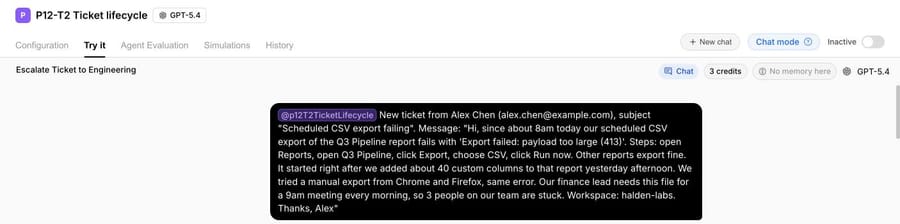
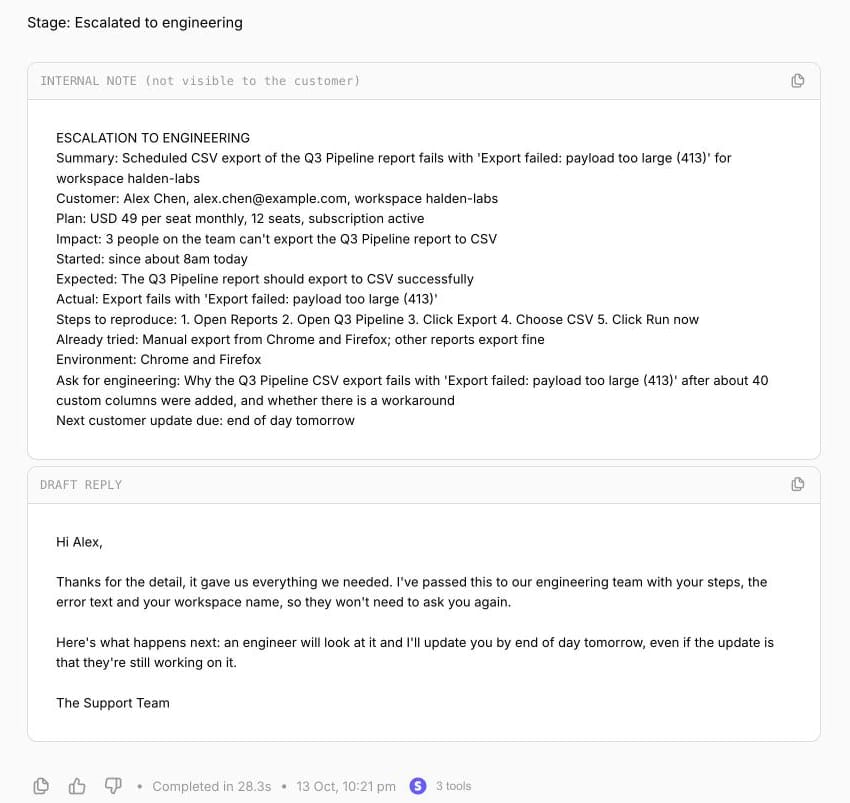
The agent made 3 Stripe calls, decided the ticket had steps, an error and a workspace, and wrote the escalation. The note carries the plan as $49 a seat monthly, 12 seats and an active subscription, all from the Stripe test account, plus the error text, the five reproduction steps and one question for engineering. The customer reply is template #7 with the next update time filled in. The run took 28.3 seconds.
Two things carry over to anyone automating ticket replies, with or without Macha. First, the stage decision matters more than the wording: the agent's main job was choosing between "need more information" and "escalate", and the rule for that was three named items (steps, error, workspace). Second, "write Unknown, never guess" kept the note honest. Our guide to writing agent instructions covers that kind of rule in more detail.
Where Macha fits
Most of a ticket's lifecycle is routine: the acknowledgment, the request for details, the "still with engineering" update, the "please confirm" after a fix. Macha fits teams running Zendesk, Freshdesk, Gorgias, Front, HubSpot or Intercom who want an agent to send those routine replies and write the escalation note with full context, so the person who picks it up starts with the facts. The agent reads the ticket, looks the customer up in tools like Stripe, can open the issue through Macha's Jira connector, and in safe mode drafts everything as an internal note that a person approves before it reaches the customer. Our post on AI draft replies with agent review shows that setup.
It's the done-for-you option: the Macha team analyzes your past tickets, turns your existing macros and escalation process into agent instructions, builds the agent on your help desk and runs it in safe mode until the drafts are right. That's included on the trial and every plan, and the trial gives you $50 of free usage (about 125 tickets), no credit card, no time limit. Plans run at about $0.40 per ticket (pricing), which includes setup and a dedicated success manager who handles your changes, such as a new escalation path or the next ticket category.
If your team handles a few dozen tickets a week, a well-kept set of macros built from the templates above is enough.
Frequently asked questions
What should a support ticket response include?
The customer's name, a specific answer or next step, and a time for the next update. Templates #1 and #7 show the pattern: say what happens next and by when, so the customer has no reason to write again.
How do you write an escalation email?
Lead with what's broken and since when, then the impact, the evidence you've attached and one specific ask with a deadline. Template #17 is an escalation email sample for a vendor, #16 is an internal escalation to a manager and #15 is the note for engineering.
What's the difference between Pending and On-hold in Zendesk?
Pending means the agent is waiting for the requester to reply. On-hold means the agent is waiting on someone else, such as engineering or a third party. Customers see On-hold tickets as open.
How do you tell a customer their ticket has been escalated?
Say who has it, confirm they won't need to repeat themselves, and give a time for the next update even if there's no news by then. Template #7 does that in three sentences.
Can an AI agent write escalation notes?
Yes. In our October 13, 2026 test, an agent given template #15 wrote a complete 12-field note from a made-up bug report and a Stripe test-mode lookup. Start with drafts that a person reviews before anything reaches engineering or the customer.
How we researched this
- Help desk docs, read October 13, 2026: Zendesk's "About the ticket lifecycle and ticket statuses" for the six default statuses, the Pending and On-hold definitions, the four-day solved-to-closed default and follow-up tickets, and Zendesk's "Defining SLA policies" for which SLA metrics pause while a ticket is Pending.
- Ranking pages read October 13, 2026: wrangle.io's 15 IT help desk templates (updated January 13, 2025), InvGate's 26 ticket templates (updated September 8, 2026) and Zendesk's 34 IT ticket templates (updated July 23, 2026). All three are written for internal IT service desks, and none has an internal escalation note. itsm.tools returned a server error that day.
- Run live on October 13, 2026: a test agent named "P12-T2 Ticket lifecycle" on our Macha Demo org, inactive with no triggers, with read-only Stripe tools on a test-mode account. We added a synthetic test subscription for the example customer (12 seats at $49 a month) before the run. The second screenshot joins two views of the same chat response where it scrolls. Nothing was written to a help desk, to Stripe or to Jira during the run.
- The templates are ours, written for this page, and every customer, company, ticket and order is synthetic. Bracketed values such as [Response time] are for you to fill; none are recommendations about your policy.
If you'd like an agent that sends your routine ticket replies and writes your escalation notes, start a Macha trial and the team will build it with you.