





 Shopify
 Stripe
 Slack
Slack Notion
 Google Workspace
 Confluence

How to Handle Reopened Tickets With Full Context, Automatically (2026)


When a customer reopens a solved ticket, the agent who picks it up rarely has the history, order status or refund state in front of them, so the reply asks the customer to explain again. A Macha agent can assemble that context from Zendesk, Shopify and Stripe the moment the ticket reopens and post it as an internal note.
Key takeaways
- A reopened Zendesk ticket can be handled with full context by triggering a Macha agent on Solved to Open and pulling Zendesk history, Shopify order status and Stripe payments.
- A 2022 Endsight survey of 260 companies found an average ticket reopen rate of 3.1%, and a SaaS benchmark guide puts the healthy range at 2-5%.
- Closed Zendesk tickets never reopen: a customer reply creates a follow-up ticket, and the default automation closes Solved tickets after 4 days.
- Macha bills per ticket regardless of how many steps an agent takes, so a full reopen run costs about $0.40 on the $299-a-month, 750-ticket tier, with setup by the Macha team and a dedicated success manager included.
- Stripe's Create Refund action in Macha can sit behind a one-click human approval, so no refund on a reopened ticket moves money unattended.

To handle a reopened ticket with full context, trigger an agent when a Solved ticket moves back to Open, have it pull the ticket history from Zendesk, the order status from Shopify and the payment record from Stripe, and post that summary as an internal note before anyone replies. Reopens are also a number your leadership watches. Ticket reopen rate (reopened tickets divided by solved tickets) is a standard support KPI, and the bar is low: a 2022 Endsight survey of 260 companies found an average reopen rate of just 3.1%, and a SaaS benchmark guide puts the healthy range at 2-5%. Every reopen that gets a context-free reply pushes that number the wrong way and drags CSAT with it.
Below is that automation step by step: the moment a solved ticket flips back to open, it pulls the full history (past conversations, order data, payment records) and posts a context summary so the next reply, whether a human writes it or Macha drafts it, starts fully informed. Macha is the AI agent layer that sits on top of the helpdesk you already run, Zendesk, Freshdesk, Gorgias, Front, HubSpot or Intercom, so none of this asks you to migrate anything.
Why do reopened tickets lose context?
Nothing about your helpdesk is broken; the context just isn't assembled. When a solved Zendesk ticket reopens (a customer reply moves it from Solved back to Open), three things are true at once, and no single screen shows all three:
- The original thread is buried. The agent has to scroll the whole conversation to remember what was promised (a replacement, a refund, a workaround) and when.
- The commerce reality has moved on. A replacement order may have shipped and delivered since the ticket closed. That status lives in Shopify, not the ticket.
- The money state is unclear. Was a refund actually issued? Is there an open charge? That's a Stripe question, and most agents won't go check.
A human can gather all of this. They just rarely do under queue pressure, so the reply goes out half-blind, the customer re-explains, and the ticket bounces again. That's how a single reopen becomes two or three.
How does the reopen workflow run in Macha?
Here's the shape of the automation in Macha. It uses three connectors (Zendesk, Shopify, and Stripe) and runs without anyone touching it.
| Step | Tool | What Macha does |
|---|---|---|
| Trigger | Zendesk | A Solved ticket changes status back to Open (a reopen) |
| Get history | Zendesk | Get Ticket + Search Tickets: pulls this ticket's full thread and any related past tickets from the same customer |
| Check the order | Shopify | Get Order: current fulfillment/delivery status of the relevant order |
| Check the money | Stripe | List Payments: original charge, and whether a refund was already issued |
| Post the summary | Zendesk | Add Internal Note: a clean context bundle, or a drafted reply ready to send |
The customer's message kicks it off, something like "I'm still having the same issue, the replacement item you sent is also defective." Instead of an agent starting from zero, Macha reconstructs the situation:
- Previous ticket: defective item reported Feb 20, replacement shipped Feb 22.
- Shopify: replacement order #3847 delivered Feb 25.
- Stripe: original payment $79.00, no refund issued yet.
Now the responder, human or agent, knows this is the second defective unit, that the replacement genuinely arrived, and that no money has been returned. That changes the right next move from "troubleshoot again" to "make this right."
Setting the trigger
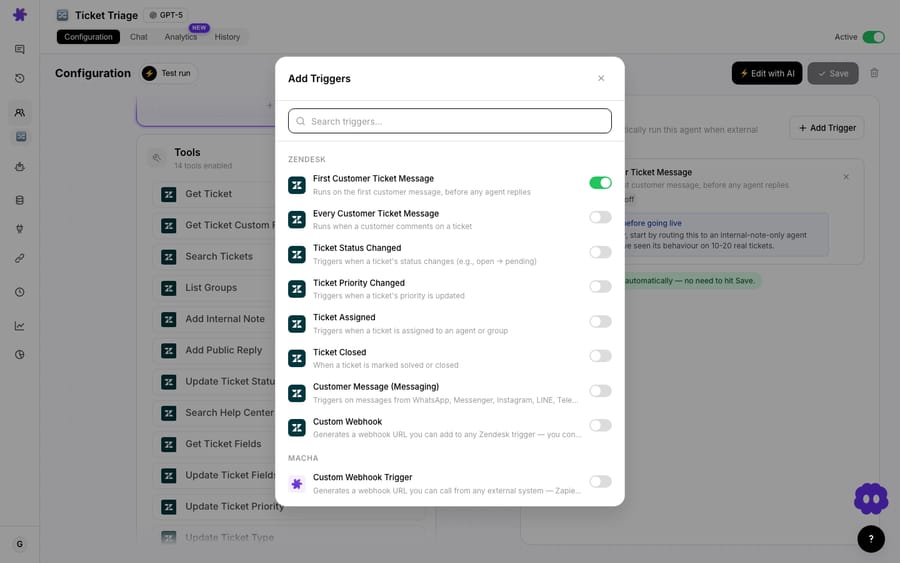
In Macha, a reopen is a Status Changed event on the Zendesk connector: the ticket moving from Solved back to Open. Closed tickets never reopen in Zendesk: per Zendesk's docs, a reply to a Closed ticket creates a follow-up ticket instead, and the default automation closes Solved tickets after 4 days. Catch those with a New Ticket trigger that checks for a follow-up. You pick that trigger when you build the agent and add a condition so it only fires on reopens, not on every status change.
Pulling the commerce context
The order and payment lookups are where the automation earns its keep: this is the context an agent almost never gathers by hand. Macha returns it as a structured card the agent can read at a glance, rather than as a wall of raw API output.
Posting the summary back to the ticket
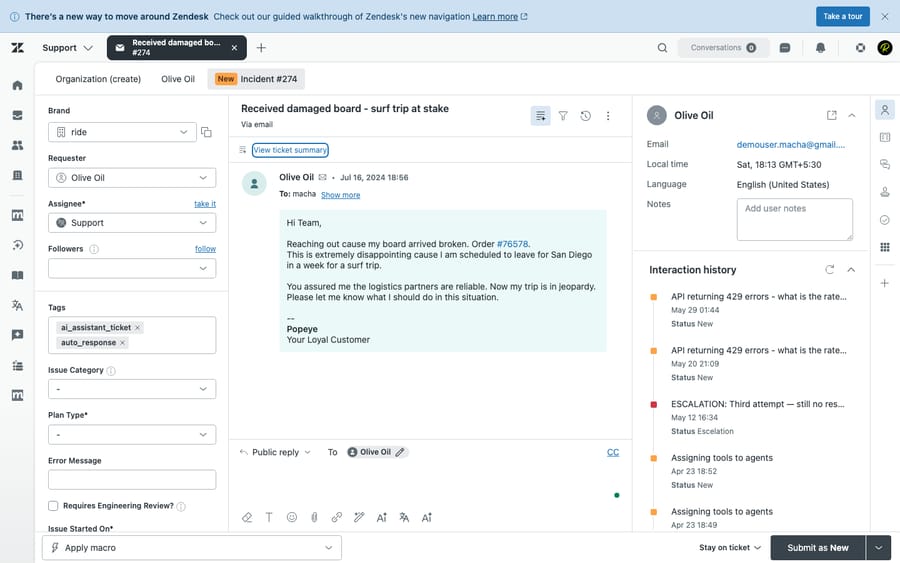
By default Macha writes the bundle as an internal note so a human stays in the loop. The note lands directly on the reopened Zendesk ticket, so whoever opens it next sees the assembled context first, not a cold thread.
Should the agent resolve the reopen or just brief a human?
Once the context is assembled, you choose how far the automation goes. Two honest settings:
Triage mode (context only). Macha posts the internal note and stops. A human writes the reply, but they write it informed, no re-asking, no scrolling. This is the safest place to start, and on its own it meaningfully cuts the back-and-forth that drives repeat reopens.
Resolve mode (drafted or sent reply). With the right tools attached, Macha can go further and propose the actual resolution. Given the example above (a second defective unit, delivered, never refunded), it can draft:
"I'm so sorry about this. I can see you received a replacement on Feb 25 and it's also not working. Given this is the second defective item, I'd like to offer you a full refund of $79.00 instead. I've started processing that now, and you should see it within 5–7 business days. Would you also like a return label for the defective items?"
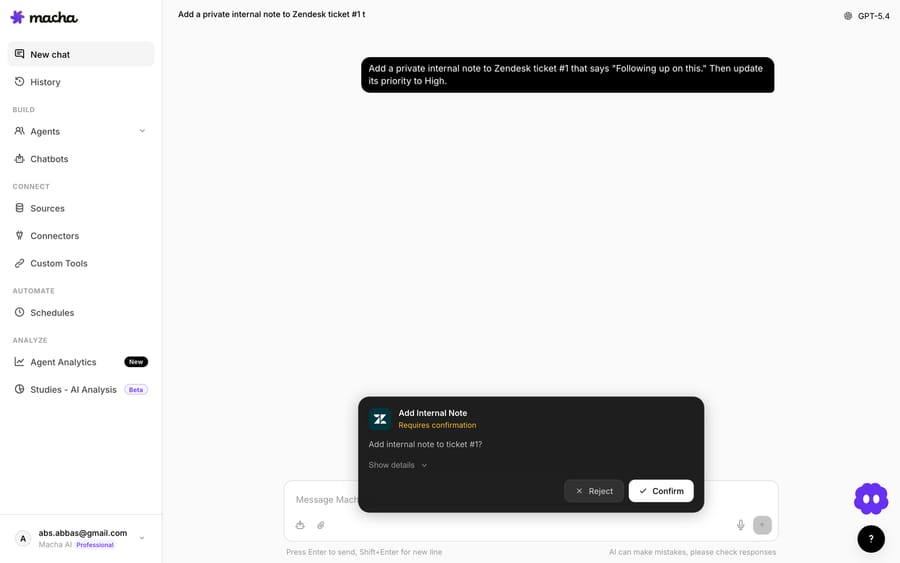
Because the Stripe connector also exposes a Create Refund action, a refund like this can be gated behind a confirmation step: Macha proposes it, a human approves with one click, and only then does it execute. You decide which actions need a human's "go."
This is the difference between deflection, resolution, and automation, and it's worth keeping them distinct. Posting context is automation. Drafting the refund offer is resolution-assistance. Whether the customer's issue is actually resolved depends on the offer being right, which is why most teams start in triage mode and graduate specific, well-understood reopen patterns (defective replacements, duplicate charges, shipping re-sends) to fuller resolution over time.
How does this lower your reopen rate?
The goal isn't only to handle reopens gracefully. It's to stop them recurring. Two mechanisms:
- Fewer second reopens. A context-free reply is itself a leading cause of a ticket bouncing again. Industry guidance is blunt about this: a SaaS benchmark guide says to aim for 2-5%, with complex services accepting up to 10%, and sloppy closes inflate it. Starting the reply informed is the cheapest way to close completely the first time.
- A clean record of the pattern. Because Macha writes structured notes, your reopens become analyzable. Pair this with Macha Studies to run an AI analysis across a batch of reopened tickets and find the systemic cause (a product defect, a confusing policy, a flaky integration) instead of treating each reopen as a one-off.
A quick sanity check on the math, since reopen rate is the KPI here: Ticket Reopen Rate = reopened tickets ÷ solved tickets over a period. If you solved 2,000 tickets last month and 80 reopened, that's 4.0%. The aim is to move that toward (and under) the ~3% benchmark, and a context summary on every reopen attacks both halves of the problem: it makes the current reopen go better, and it gives you the data to prevent the next batch.
When should you not fully automate reopens?
This workflow is genuinely useful, but it isn't a "turn it on and walk away" feature for every team. Be honest about the edges:
- Refunds need a gate. Do not let an agent issue refunds unattended on day one. Use the confirmation step (or keep Stripe's
Create Refundout of the toolset entirely) until you trust the pattern. Money actions are exactly where a human approval earns its cost. - Thin context is worse than no context. If a customer has no Shopify order or Stripe record (e.g., a pure account/access issue), the "context bundle" may be near-empty. Scope the agent so it only runs the commerce lookups when there's an order ID or email to match; otherwise the note is noise.
- Reopens aren't always re-failures. Some reopens are a customer saying "thanks, that worked." Add a condition or a quick classification so the agent doesn't over-respond to a one-word reply. A reopen trigger fires on any status change back to open, including these.
- The lookups don't each carry a price. Macha bills per ticket: one conversation, charged once, however many steps the agent takes. So a full reopen run (history + order + payment + summary) costs the same as a one-line reply: one ticket, about $0.40 on the $299-a-month, 750-ticket tier, and that price includes the Macha team's setup and a dedicated success manager who handles your changes. What a high-reopen queue should watch is ticket volume, not step count. See pricing for the tiers.
None of these are reasons to skip the automation. They're reasons to start in triage mode, scope it tightly, and expand deliberately.
How do you set up a reopen agent in Macha?
If you already run Zendesk with Shopify and Stripe, you don't have to build this yourself. On the trial and every plan, the Macha team analyzes your past tickets, builds the agent and its knowledge on your help desk, tests it on a sample of those tickets, and runs it in safe mode, with internal notes only, until the output is right. The build looks like this:
- Connect the tools. Add the Zendesk, Shopify, and Stripe connectors in Macha.
- Create the agent with a Status Changed → Open trigger, conditioned to tickets moving from Solved to Open.
- Attach the lookups: Zendesk
Get Ticket/Search Tickets, ShopifyGet Order, StripeList Payments, and a ZendeskAdd Internal Noteaction for the summary. - Start in triage mode. Let it post context notes for a week and read what it produces.
- Graduate to drafted replies for the reopen types you understand best, with a confirmation gate on any money-moving action.
Not on Zendesk? The same pattern works on any help desk Macha supports (Zendesk, Freshdesk, Gorgias, Front, HubSpot or Intercom): swap the connector, keep the workflow. The full use-case library has neighboring patterns worth pairing with this one, like escalate tickets with a full context bundle.
FAQ
What is a "reopened ticket"? A ticket that was previously marked Solved and then moved back to Open, usually because the customer replied saying the issue persists. Closed tickets can't reopen in Zendesk; a reply creates a follow-up ticket instead. Ticket reopen rate is the share of solved tickets that come back, a standard support quality KPI.
What's a good ticket reopen rate? A 2022 Endsight survey of 260 companies found a 3.1% average, and a SaaS benchmark guide puts the healthy range at 2-5%. Complex, technical queues tend to run higher than simple ones, so track your own trend rather than chasing a single number.
Does Macha replace my helpdesk? No. Macha is an AI agent layer that sits on top of Zendesk, Freshdesk, Gorgias, Front, HubSpot or Intercom. It reads and acts inside the helpdesk you already use. It doesn't replace it.
Can Macha issue the refund itself? It can, via Stripe's Create Refund action, but you control that. Most teams gate refunds behind a one-click human approval (the confirmation card) before any money moves.
How much does running this cost? Macha bills per ticket (one conversation, charged once however many lookups and replies it takes), so a full reopen run is one ticket, about $0.40 on the entry tier ($299 a month for 750), and that includes setup by the Macha team and a dedicated success manager who handles your changes after go-live. Start a free trial ($50 of usage, no credit card required) and see the exact usage on your own queue; the pricing page shows the tiers.
Reopens will always happen. What you control is whether the next reply starts blind or starts informed. Connect Zendesk, Shopify, and Stripe, point a Macha agent at your reopen trigger, and let it assemble the history, order, and payment context before anyone types a word. Start a free trial ($50 of usage, no credit card required), or read the docs for the full build.
Written by Abbas (Customer Support & AI, Macha) · Reviewed by Ankeet Guha (Co-founder & CTO) · Published 2026-06-24 · Last updated 2026-06-24.






