





 Shopify
 Stripe
 Slack
Slack Notion
 Google Workspace
 Confluence

How Do You Escalate a Support Ticket With Full Context Automatically?


Most escalations fail at the handoff: the senior agent gets one line of context and the customer is asked to explain the issue again. An AI agent can assemble the ticket history, orders and payments into an internal note, raise the priority, reassign the ticket and alert Slack before anyone opens it.
Key takeaways
- A Macha escalation agent wakes on a Zendesk Priority Changed, Ticket Assigned or Custom Webhook trigger, pulls Shopify orders and Stripe payments, and writes the bundle as an internal note.
- Freshworks reports 68% of consumers still prefer to talk to a human agent, and 63% say they would take their business elsewhere if human support were not available.
- In the worked example, ticket #4920 showed 3 interactions, 2 orders in 30 days with one partially fulfilled, and $198 in charges with one disputed.
- The escalation agent changes the ticket with Zendesk's Update Priority, Assign Ticket and Add Internal Note tools, then alerts the team through Slack's Send Message.
- Macha bills per ticket regardless of how many lookups the agent makes to build the brief, starting at $299 a month for 750 tickets, about $0.40 each, with setup by the Macha team and a dedicated success manager included.

To escalate a support ticket with a full context bundle automatically, trigger an AI agent on your escalation signal (a priority change, an assignment or a tagged Zendesk trigger), have it pull the ticket history plus Shopify orders and Stripe payments, write that brief into the ticket as an internal note, raise the priority, reassign it, and post the same summary to Slack. On Macha that is four connectors and one agent, billed once per ticket from $299 a month for 750 tickets, with setup done for you by the Macha team.
| Step | Macha tool | Connector |
|---|---|---|
| Wake on the escalation signal | Priority Changed, Ticket Assigned or Custom Webhook trigger | Zendesk |
| Read the thread | Get Ticket, Search Tickets | Zendesk |
| Pull orders | Search Orders, Get Order | Shopify |
| Pull charges | Get Customer, List Payments | Stripe |
| Escalate in the ticket | Update Priority, Assign Ticket, Add Internal Note | Zendesk |
| Alert the team | Send Message | Slack |
A cold handoff is one of the most damaging, and most avoidable, failure modes in support. Customers repeat themselves exactly when you should be earning their trust, and senior agents start cold. And the stakes on a handoff are high: Freshworks reports that 68% of consumers still prefer to talk to a human agent, and 63% say they'd take their business elsewhere if human support weren't available (Freshworks: AI-to-human handoff, citing its 2025 State of Customer Service and CX report). The escalation to a person is the moment customers care about most, so when it happens, they shouldn't have to start over. Hand off with unified context and the next agent picks up where the conversation left off instead of restarting it. That's the consistent handoff best practice support leaders recommend: carry over what's already been tried and the account details, and never make the customer repeat themselves (Zendesk: ticket escalation guide). The fix isn't "escalate less." It's escalating with everything the next person needs already in their hands.
This is a use case Macha automates end to end. Macha is an AI agent layer that sits on top of the helpdesk you already run (Zendesk, Freshdesk, Gorgias, Front, HubSpot or Intercom), so it can watch for the escalation, go pull the facts from your commerce and billing tools, write a clean brief into the ticket, bump the priority and owner, and drop an alert in the right Slack channel. The senior agent opens the ticket and the work of understanding the case is already done.
What is ticket escalation, and when should you escalate?
Ticket escalation is the act of moving a support ticket to someone better equipped to resolve it than the agent currently holding it. Helpdesk vendors generally describe three flavors, and most teams use all three:
- Hierarchical escalation: a Tier 1 agent passes the ticket up to a senior agent, team lead, or specialist who has the authority or expertise to act (issue a refund, override a policy, touch production).
- Functional escalation: the ticket moves sideways to a different team that owns the problem: billing, engineering, trust & safety.
- Priority (or automatic) escalation: an SLA breach, a VIP account, or a sentiment/keyword signal bumps the ticket's urgency and re-routes it without anyone asking.
A healthy escalation policy spells out when each of these fires. Sensible triggers include: the issue needs permissions the first agent doesn't have; the customer explicitly asks for a manager; an SLA is about to breach; the conversation sentiment has turned sharply negative; or the agent has exhausted the standard troubleshooting and is stuck. The goal isn't to escalate more (over-escalation buries your senior queue); it's to escalate the right tickets, with the right context, at the right moment.
That last clause is where most processes leak. The decision to escalate is usually fine; the handoff is what fails, because assembling the context by hand is the step everyone skips under SLA pressure. The rest of this guide is about closing that handoff gap automatically.
What goes into a full context bundle?
A good escalation brief isn't a paragraph of vibes. The best-practice handoff, the one Zendesk and other helpdesk vendors describe in their own escalation guides, captures the things the next agent would otherwise have to dig for: who the customer is and their history, what's already been tried, the account and order facts, and the specific blocker. The reason it rarely happens is mundane: the first agent is busy, the data lives in four different tabs, and writing it all up by hand is the chore everyone skips under pressure.
Macha closes that gap because gathering scattered facts is exactly what an AI agent with tools is good at. When a ticket is flagged for escalation, a Macha agent reads the ticket, then calls real actions across your connected systems and assembles a structured bundle:
- Ticket history: how many interactions, the sentiment trend, and the core dispute (from your helpdesk).
- Order context: recent orders, fulfillment status, anything anomalous (from Shopify).
- Billing context: total charges, refunds, and any disputed payments (from Stripe).
- The blocker: a one-line statement of why this needs senior hands.
It then writes that bundle into the ticket as an internal note, sets priority and assignee, and posts the same summary to Slack so the right people see it in seconds rather than on their next queue sweep. If you'd rather start from wording, our support ticket response templates include an internal escalation note and the customer reply that goes with it.
How does the escalation agent work, step by step?
Here's the exact shape of the escalation agent, mapped to a real billing-dispute example. Macha agents are configured as a trigger (when to wake up), a set of tools (what the agent can do), and instructions (how to behave). No scripting: you describe the job and pick the connectors.
1. The trigger: a ticket flagged for escalation
The workflow starts on a Zendesk event that your team uses to mean "this needs a senior." Macha's Zendesk connector offers Priority Changed, Status Changed and Ticket Assigned triggers, plus a Custom Webhook you attach to any Zendesk trigger, so you can fire on a specific escalation tag or form field. You can be as conservative as you like here; the agent only fires when your escalation rule says so, which keeps it from over-escalating.
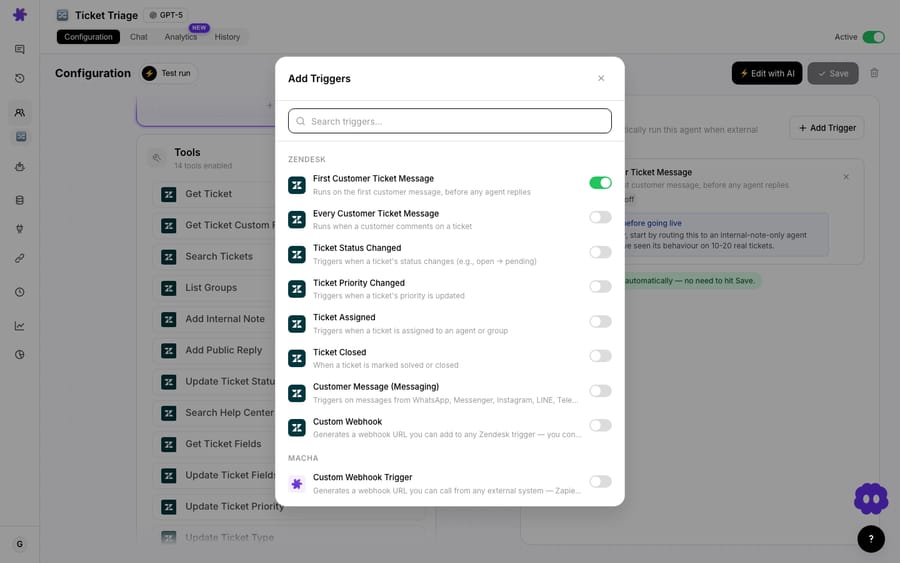
Worked example: Ticket #4920 gets tagged for escalation: a billing dispute, three interactions deep, customer clearly frustrated.
2. Gather context: read the ticket and pull the facts
Once awake, the agent uses its tools. It reads the full ticket thread, then reaches into the connected commerce and billing systems. These are real API actions (Get Ticket in Zendesk, Search Orders and Get Order in Shopify, Get Customer and List Payments in Stripe), not a static template.
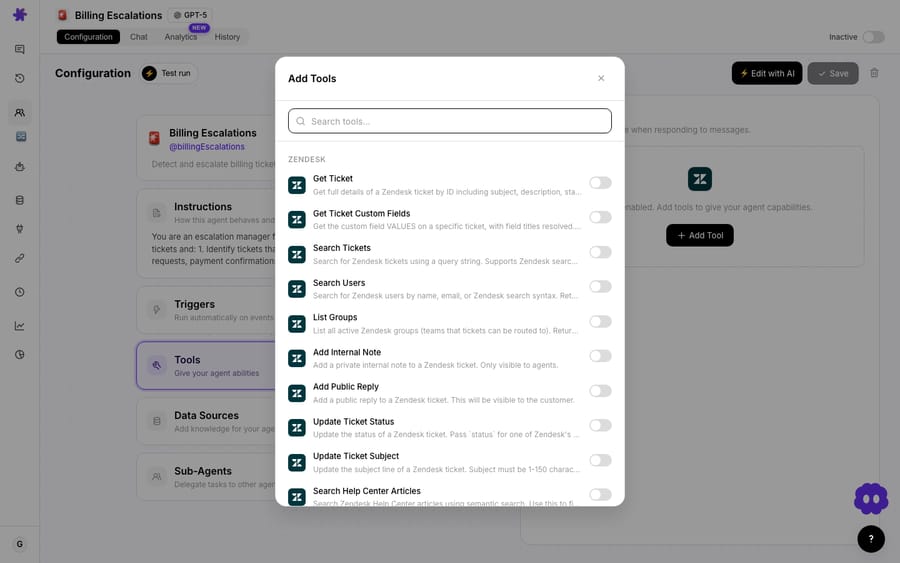
On ticket #4920, the agent assembles:
| Source | What Macha pulls | Result for #4920 |
|---|---|---|
| Zendesk | Ticket history + sentiment | 3 interactions, frustrated, billing dispute |
| Shopify | Recent orders + fulfillment | 2 orders in 30 days, one partially fulfilled |
| Stripe | Charges + disputes | $198 in charges, one disputed |
This only works because the connectors are in place. Macha treats each tool as a first-class connection with scoped permissions, so the agent can read orders and payments without anyone copy-pasting between tabs.
3. Escalate inside the helpdesk
Now the agent acts on the ticket itself. Using Update Priority, Assign Ticket and Add Internal Note, it raises the priority, reassigns to the right group, and writes the bundle as an internal note so the senior agent has the brief inline, never as a separate doc to chase.
On #4920: priority → Urgent, assigned to Senior Support, with an internal note summarizing the dispute, the order anomaly, and the disputed $198 charge.
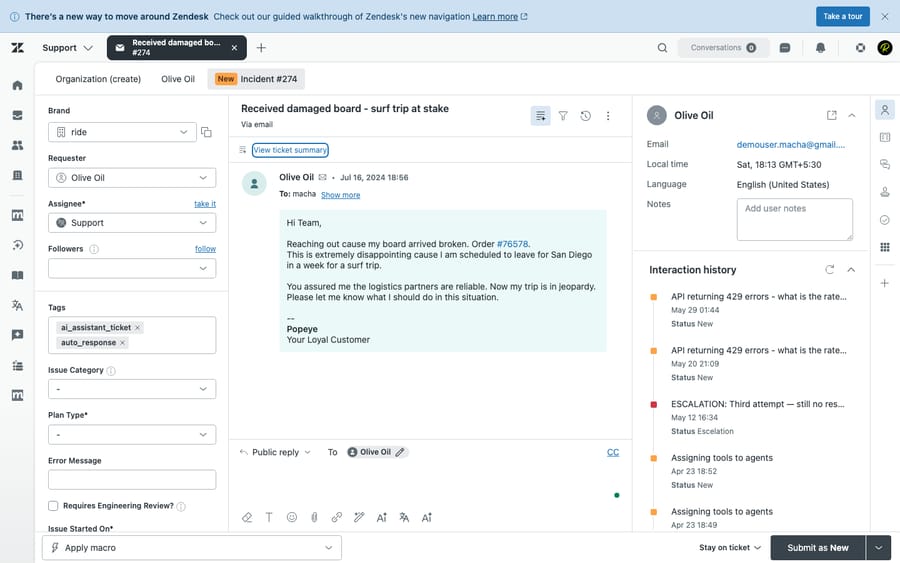
The bundle is written as an internal note, so it's visible to your team but never to the customer, and the priority and assignee changes show up in the ticket's own fields, no separate doc to chase.
4. Alert the team in Slack
Finally, the agent posts to your escalations channel with Send Message, so the brief lands where humans are actually paying attention. No one has to be staring at the queue to know a hot one just came in.
Posted to #escalations: "Ticket #4920: billing dispute (Urgent). Customer frustrated, 3 interactions. 2 orders in 30 days (one partially fulfilled). $198 charged, one disputed. Assigned to Senior Support. Recommend reviewing the partial fulfillment before responding."
The senior agent reads one Slack message and one internal note, and they already know the story. That's the difference between an escalation and a good escalation.
Why use an agent instead of native helpdesk rules?
Most helpdesks can already raise priority and ping Slack with a trigger or automation, and if all you need is "tag X → notify channel," use the native rule; it's free and simple. The reason to use a Macha agent is the content of the bundle, not the plumbing.
Native triggers are deterministic: they move fields and fire webhooks, but they can't read a messy thread and write a coherent two-line summary, and they certainly can't reconcile a Shopify fulfillment state against a disputed Stripe charge and tell the senior agent which one to look at first. That synthesis, turning four systems' worth of raw data into a brief a human can act on, is the AI part, and it's the part agents struggle to do by hand under SLA pressure.
So the honest division of labor:
- Native helpdesk automation for the simple stuff: SLA timers, round-robin, "notify channel on urgent tag."
- A Macha agent when the value is in understanding and assembling context across commerce, billing, and conversation history.
Macha sits on top of your helpdesk, so you don't replace any of those native rules: the agent runs alongside them and does the cognitive work they can't. If you're on Zendesk, the Macha on Zendesk page walks through how that layering works in practice.
When is automated escalation overkill or risky?
Automation is only as good as its guardrails. A few honest caveats:
- Don't auto-escalate everything. If your escalation condition is too loose, you'll flood the senior queue and the Slack channel until people tune it out. Scope the trigger to a deliberate signal, a specific tag or priority, not "any update."
- The bundle is only as good as your connectors. If Shopify or Stripe isn't connected (or the customer can't be matched), the agent should say so in the note rather than guess. Treat unmatched data as a flag, not a gap to paper over.
- Keep a human at the actual decision. This workflow prepares the escalation: it bundles context, sets priority, and alerts. The judgement call (issue the refund, approve the exception) stays with the senior agent. That's deliberate: escalations exist because a human should decide.
- Cost tracks tickets, not steps. Macha bills per ticket, one conversation, charged once, so an escalation that bundles orders, charges and history into one brief costs the same as a one-line handoff. What a busy escalation path does add is noise, so set the trigger tightly. See the pricing page for the current plans.
- Don't make the brief a black box. The point is that a human can verify it in seconds. Keep the summary short and fact-anchored (order numbers, charge amounts) so the senior agent can sanity-check it against the source, which is also why Macha writes it into the ticket rather than hiding it.
How does it fit with the rest of your support stack?
This escalation agent rarely lives alone. It pairs naturally with a front-line resolver agent that handles the easy tickets and only trips the escalation tag when it's genuinely stuck, so the senior team sees fewer, better-prepared escalations. The same context-gathering pattern also underpins related workflows like reopened-ticket handling and internal-note enrichment; once your Shopify, Stripe, and Slack connectors are in place, the agent can be pointed at any of them.
Escalation automation playbooks (Atomicwork's, for instance) also cover two adjacent patterns worth knowing about: proactive triggers, escalating off a sentiment or keyword signal before a customer asks for a manager, and historical-solution surfacing, where the brief includes how similar past tickets were resolved. Both are natural extensions of the same agent: a sentiment shift is just another condition on the trigger, and surfacing prior resolutions is a matter of pointing the agent at your knowledge base or past-ticket source alongside the order and billing tools.
FAQ
Which helpdesks does this work with? Macha runs on top of Zendesk, Freshdesk, Gorgias, Front, HubSpot or Intercom. The example above uses a Zendesk escalation trigger (Priority Changed, or a Custom Webhook on a tag), but the pattern, watch for an escalation signal, gather context, write a brief, alert the team, is the same on any supported helpdesk.
What systems can the context bundle pull from? Anything you connect. This use case uses Shopify (orders), Stripe (billing), and Slack (alerts), but the agent can also read from Notion, Confluence, Google Workspace, Airtable and more, see the full integrations list. You choose which tools the escalation agent is allowed to call.
Does Macha decide whether to escalate, or just handle the handoff? Both are possible. You can trigger this agent off an explicit escalation tag your team applies, or have an upstream resolver agent decide it's stuck and apply that tag itself. Either way, the senior agent, a human, makes the final call on the issue.
Will this make customers repeat themselves less? That's the whole point. By writing the prior context into the ticket and the Slack alert, the senior agent picks up where things left off instead of starting cold, the handoff best practice that helpdesk vendors and support leaders consistently recommend.
How much does it cost to run? Macha bills per ticket, one conversation, charged once, however many lookups the agent makes to build the brief. Pricing starts at $299 a month for 750 tickets, about $0.40 each. Setup is done for you on the trial and every plan: the Macha team connects Shopify, Stripe and Slack, builds the agent and tests it on your past tickets, and the price includes a dedicated success manager who handles your changes afterwards, such as new escalation rules, instruction changes or new tools. Check pricing for current plans.
How do you try it?
If your escalations land on senior agents as a single cold line, this is a fast win. Start a free trial ($50 of usage, no credit card required), connect your helpdesk plus Shopify, Stripe, and Slack, and build an escalation agent that hands your senior team a complete brief every time, or read the docs for the full walkthrough.
Written by Abbas (Customer Support & AI, Macha) · Reviewed by Ankeet Guha (Co-founder & CTO) · Published 2026-06-24 · Last updated 2026-09-24.
Sources: Freshworks: AI-to-human handoff, BlueTweak: AI-to-human handoff best practices, Zendesk: ticket escalation guide, Atomicwork: automate ticket escalation, Supportbench: handoffs without repetition.






