Shopify
 Stripe
 Slack
Slack Notion
 Google Workspace
 Confluence

17 FAQ Page Examples From SaaS, Travel, Fintech and Retail Brands (2026)


A good FAQ page answers the questions customers actually send to support, in the words they use, with the number or setting they need. Below are 17 FAQ page examples, all real pages we opened on October 13, 2026, from SaaS, subscription, travel, fintech and retail brands, each with what it does well and the one thing worth copying. After the examples comes the step most FAQ example lists cover in one line: how to choose your questions from support ticket data instead of guessing, with a test run of an AI agent doing it on 12 made-up tickets.
Key takeaways
- The 17 FAQ page examples on this page, checked on October 13, 2026, come from SaaS, subscription, travel, fintech and retail brands including Basecamp, Zoom, IKEA, Revolut and Southwest.
- IKEA's US FAQ page lists more than 100 questions, many in the customer's own words, such as whether the middle support of a bed was missing from the package.
- Google stopped showing FAQ rich results in Search from May 7, 2026, yet Figma's and Calendly's pricing pages still carried FAQPage markup on October 13, 2026.
- Gartner's 2024 survey of 5,728 customers found only 14% of service issues were fully resolved in self-service, and in 43% of cases customers couldn't find relevant content.
- In an October 13, 2026 test, a Macha agent grouped 12 made-up billing tickets into 6 FAQ entries and marked 2 of them ANSWER NEEDED where the policy didn't cover the question.
Which FAQ page example should you copy?
Find the problem your FAQ page has today, then go to the example that solves it.
| Brand | Industry | FAQ type | What to copy |
|---|---|---|---|
| Basecamp | SaaS | Pricing page FAQ | Answers the doubt a buyer is too polite to ask, with the number in the question |
| Zoom | SaaS | Pricing page FAQ | Finance and procurement questions (VAT, W-9, payment terms) |
| Dropbox | SaaS | Plans page FAQ | Questions written from the buyer's situation ("We're a very small team") |
| Calendly | SaaS | Pricing page FAQ | Says exactly what happens when the trial ends |
| Figma | SaaS | Pricing page FAQ | One answer split by plan instead of a vague "it depends" |
| Duolingo | Subscription | Help center FAQ | Grouped by topic, with cancel and refund questions in plain view |
| Netflix | Subscription | Help center | Popular topics and self-service quick links under the search box |
| Spotify | Subscription | Help center | Billing articles titled the way people complain ("Charged twice") |
| Peloton | Subscription and hardware | Help center | Entry by product, with a system status badge beside search |
| Airbnb | Travel | Help center | Separate tabs for guests and each kind of host |
| Southwest Airlines | Travel | Help center | Topics ordered by the stage of the trip |
| Revolut | Fintech | Help center | Each category card shows its top 3 article links |
| Monzo | Fintech | Help center | The emergency (lost or stolen card) comes before everything else |
| Venmo | Fintech | Help center | A one-line description under every topic |
| IKEA | Retail | Single FAQ page | More than 100 questions in customer language, grouped by problem |
| Allbirds | Retail | Policy FAQ | A short summary of the policy above the questions |
| Patagonia | Retail | Help center | The two most common jobs as buttons above the FAQ |
If you're building a full help center rather than one FAQ page, our Zendesk help center explainer covers categories, sections and structure. For a ready-made set of replies to send when the FAQ doesn't answer the question, see our canned responses examples. If you're writing your own, our FAQ template has a copy-ready FAQ document and an entry format AI agents retrieve correctly.
SaaS FAQ page examples
SaaS FAQs mostly live on the pricing page, because that's where a buyer stops and decides whether to email sales. Each question answered there is one fewer pre-sales ticket.
1. Basecamp: the pricing question nobody wants to ask out loud
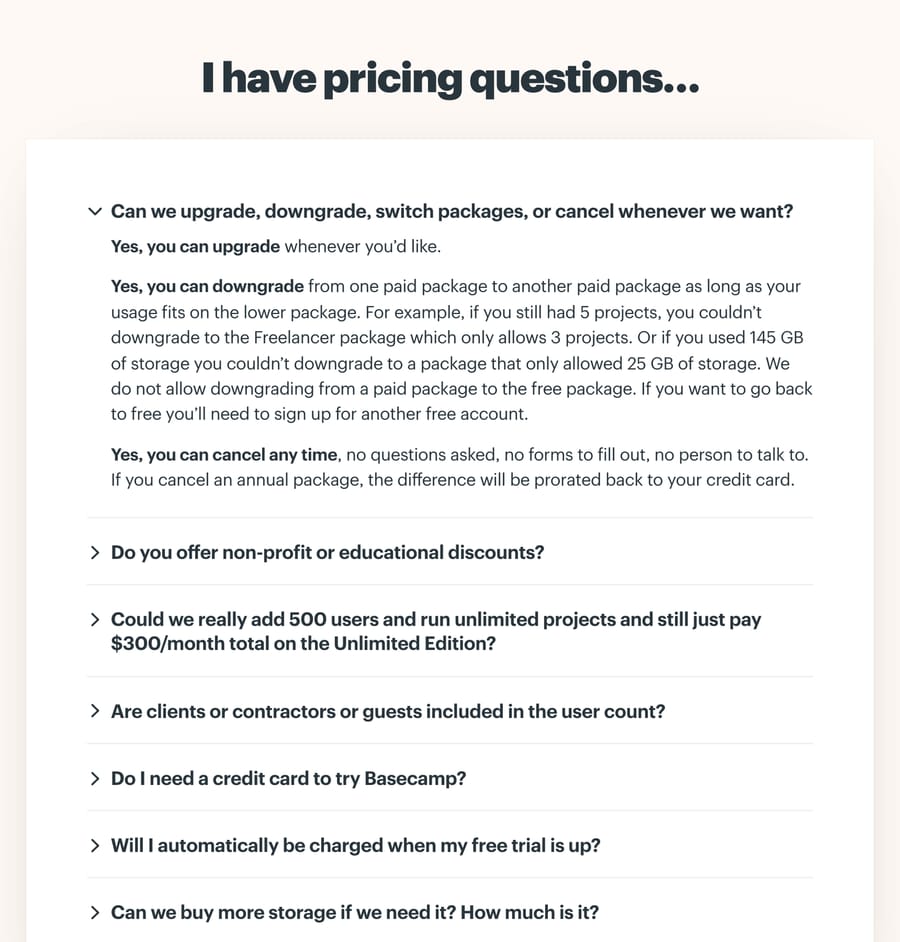
Basecamp's pricing page has a FAQ headed "I have pricing questions..." with questions such as "Could we really add 500 users and run unlimited projects and still just pay $300/month total on the Unlimited Edition?" That's the skeptical question a buyer would otherwise send to sales, written with the numbers in it. The downgrade answer uses a worked example: with 5 projects you can't drop to the Freelancer package, which allows 3. The same page also puts a small "?" tooltip beside each plan feature, so the question gets answered where it comes up.
Copy this: write the doubt as the customer would phrase it, numbers included, and answer it with an example.
2. Zoom: the questions finance teams ask
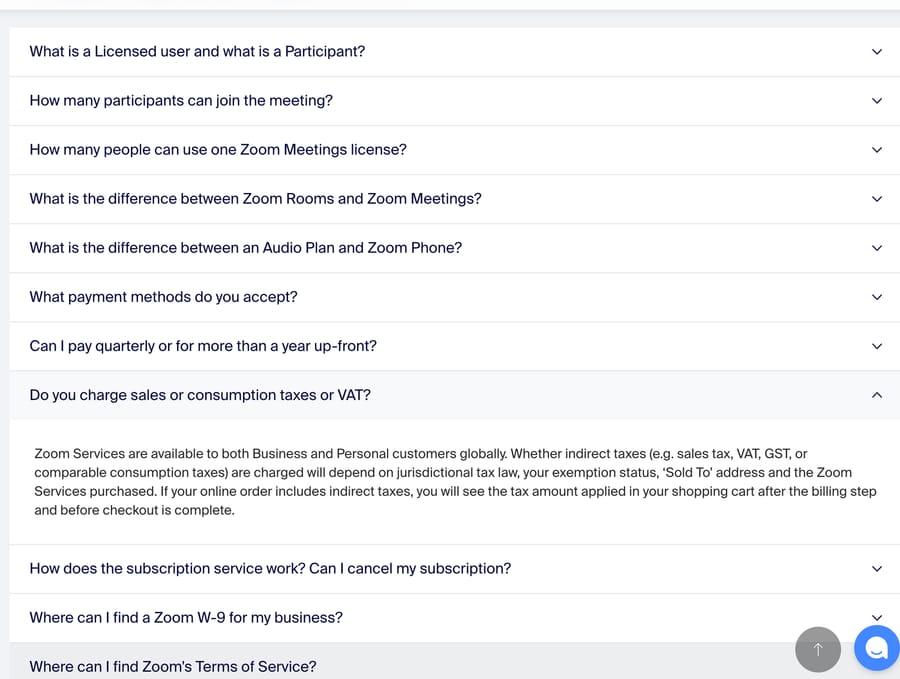
Zoom's pricing FAQ has 13 questions. Three of them come from whoever pays the bill: "Do you charge sales or consumption taxes or VAT?", "Can I pay quarterly or for more than a year up-front?" and "Where can I find a Zoom W-9 for my business?" It opens with definitions ("What is a Licensed user and what is a Participant?"), which settles the seat-counting question before the billing ones.
Copy this: if you sell to businesses, add the procurement questions. They arrive as tickets from people who have never used your product.
3. Dropbox: questions written from the buyer's situation
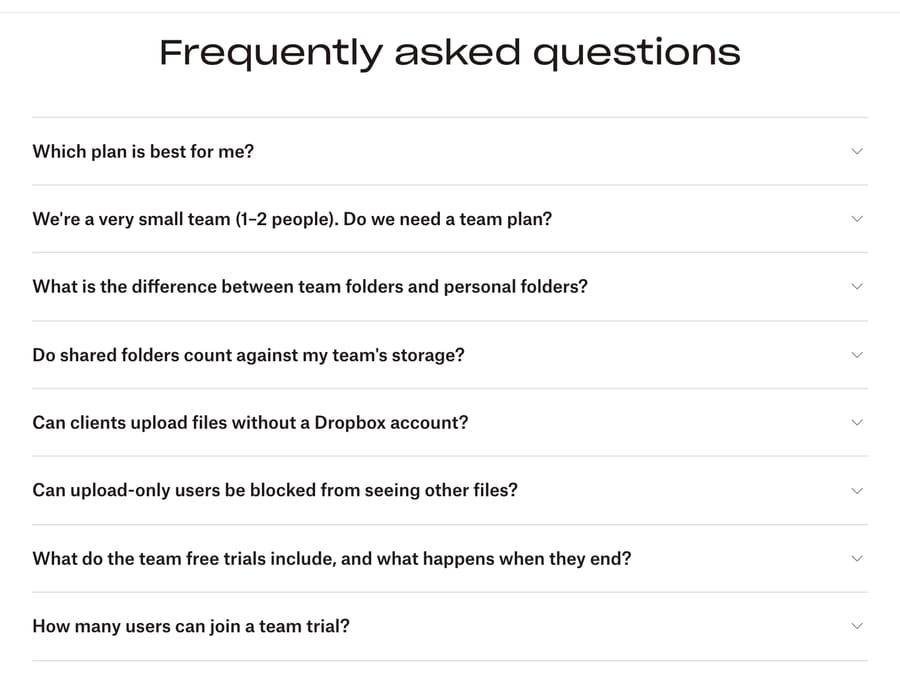
Dropbox's plans page FAQ has 8 questions, and the second one is "We're a very small team (1-2 people). Do we need a team plan?" That's the buyer describing their own situation. Others cover the edge cases that create tickets after purchase: whether shared folders count against team storage, whether clients can upload without an account, and what happens when a team trial ends.
Copy this: phrase at least some questions as "We're a [situation]. Do we need [thing]?"
4. Calendly: what happens when the trial ends
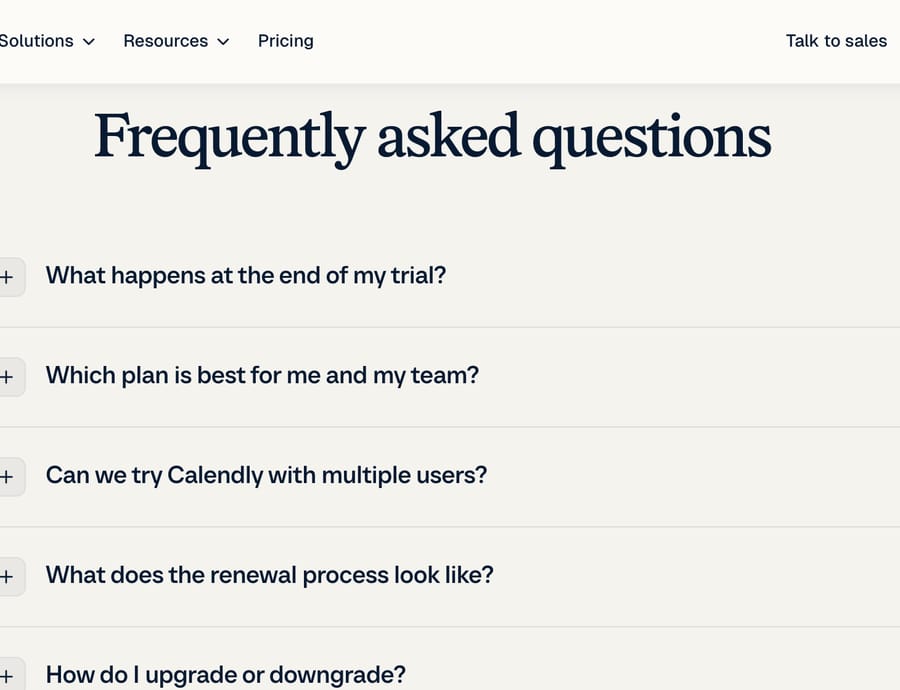
Calendly's pricing FAQ has 7 questions, and the first is "What happens at the end of my trial?" The answer is specific: after the 14-day trial you're moved to the Free tier automatically and can keep using it. The payment answer lists the accepted cards, says PayPal is for customers outside the United States, and says when invoice payment is available ($5,000 on Standard or Teams, $15,000 on Enterprise).
Copy this: answer "what happens when..." questions with the default outcome first.
5. Figma: one answer, split by plan
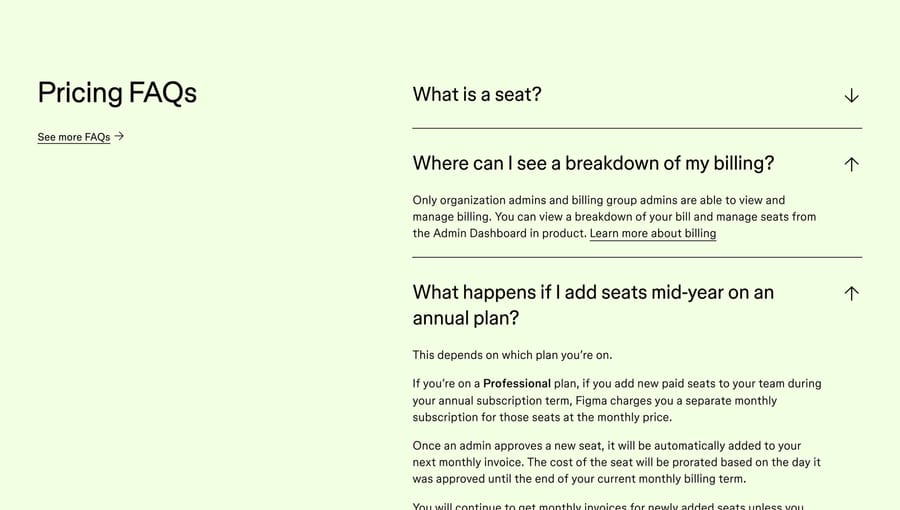
Figma's "Pricing FAQs" include "What happens if I add seats mid-year on an annual plan?" The answer starts with "This depends on which plan you're on" and then actually does the splitting: on the Professional plan, new seats added during an annual term are billed as a separate monthly subscription, prorated from the day an admin approves them. A "See more FAQs" link leads to the longer list.
Copy this: when the honest answer is "it depends", say what it depends on and give each case.
Subscription FAQ page examples
Subscription businesses get the same three questions forever: how do I cancel, why was I charged, and can I get a refund. The best help centers put those within one click.
6. Duolingo: cancel and refund in plain view
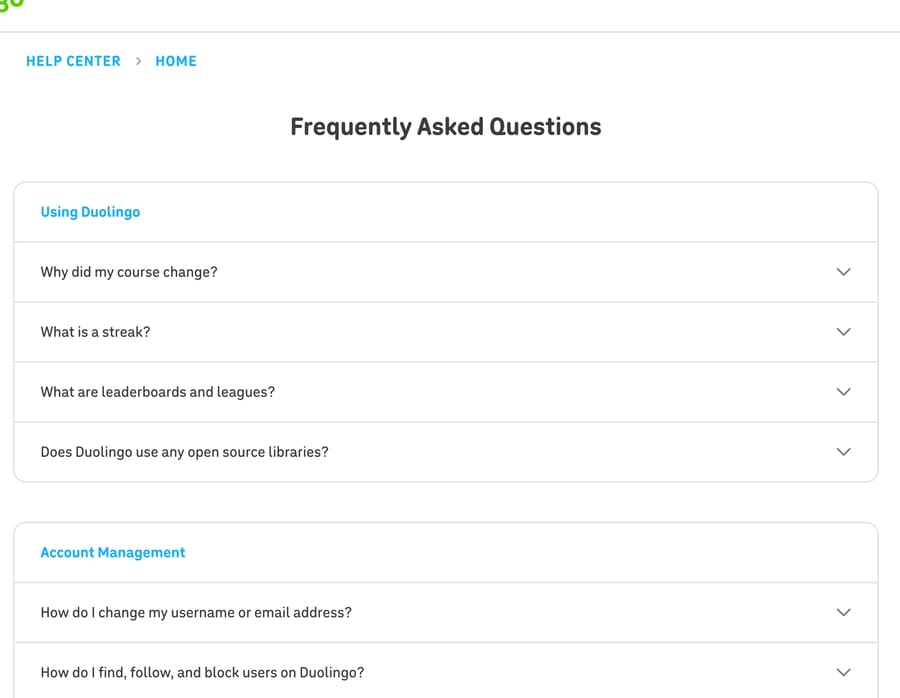
Duolingo's help center home is a single FAQ grouped under headings such as Using Duolingo and Account Management. Further down the same page, "How do I cancel my Super Duolingo subscription?" and "How do I request a refund?" sit in the list as questions anyone can open. It ends with "Still unsure about something?" and a route to more help.
Copy this: don't hide the cancel question. Customers who can't find it file a ticket instead.
7. Netflix: search first, then the four most common topics
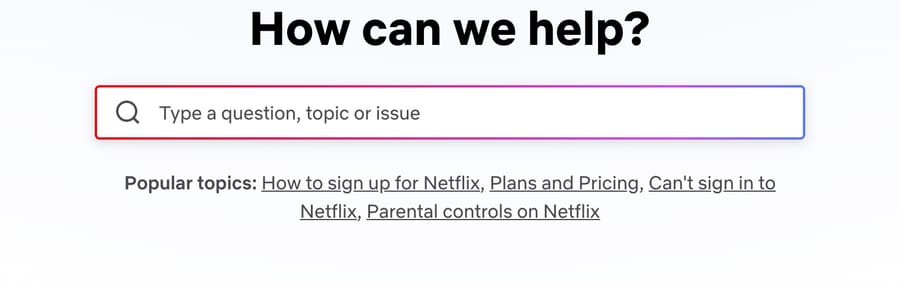
The Netflix Help Center opens on a search box, with four popular topics directly underneath: signing up, plans and pricing, can't sign in, and parental controls. Further down, a Quick Links block goes straight to the actions people come to do (reset password, update email, update payment method) instead of to articles about them.
The weak spot is the front page itself: past those four topics, a visitor who doesn't know the right search term has to scroll to a topic list.
Copy this: if an answer is "go to this setting and change it", link the setting.
8. Spotify: billing articles named the way people complain
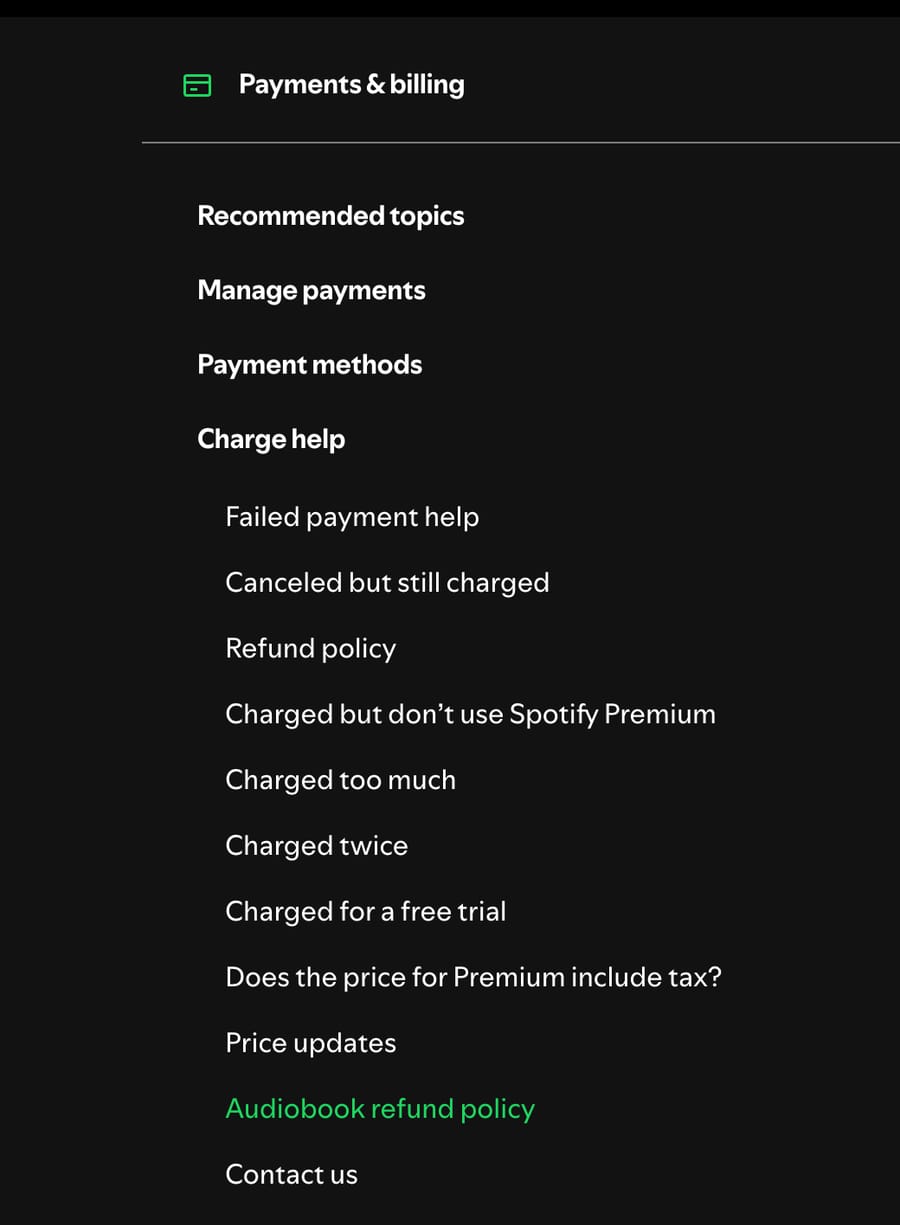
Spotify Support opens with an Ask box that states it's an AI-powered tool, then a Browse help articles list. Expanding Payments & billing shows a Charge help group whose article titles read like ticket subject lines: "Canceled but still charged", "Charged twice", "Charged too much" and "Charged for a free trial".
Copy this: title billing answers with the customer's complaint, not your internal process name.
9. Peloton: pick your product first
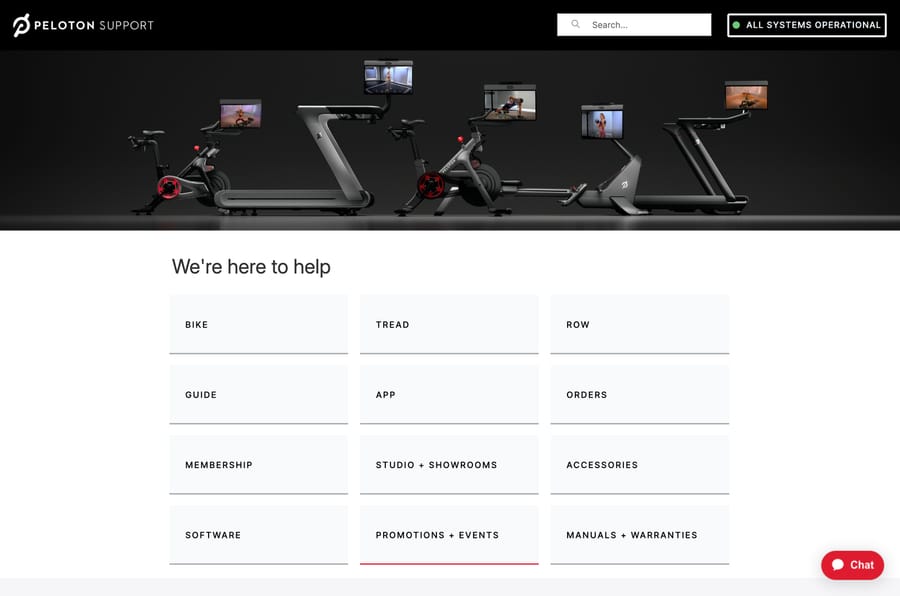
Peloton Support asks you to pick what you need help with (Bike, Tread, Row, App, Orders, Membership and so on) before showing any questions, and shows an "All systems operational" status badge beside the search box. For a company selling several devices and a membership, that removes a whole class of "which product do you mean?" follow-ups.
Copy this: if you sell more than one product, make the product the first choice and show service status where people search.
Travel FAQ page examples
Travel support is time-sensitive: the same customer asks different questions a month before the trip and an hour before departure.
10. Airbnb: tabs by who is asking
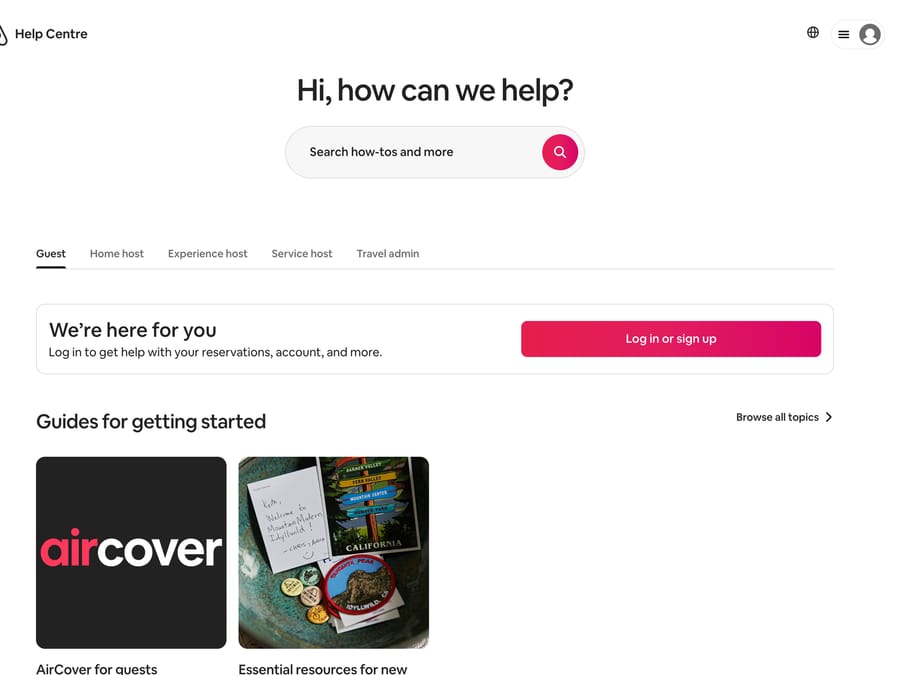
Airbnb's help center has tabs for Guest, Home host, Experience host, Service host and Travel admin, so a guest never reads a host's cancellation rules. Its top articles show a one-line answer under each title, for example that if a host cancels, the guest gets a full refund or help rebooking.
Copy this: if two kinds of customer ask the same question with different answers, split them before they start reading.
11. Southwest Airlines: topics in trip order
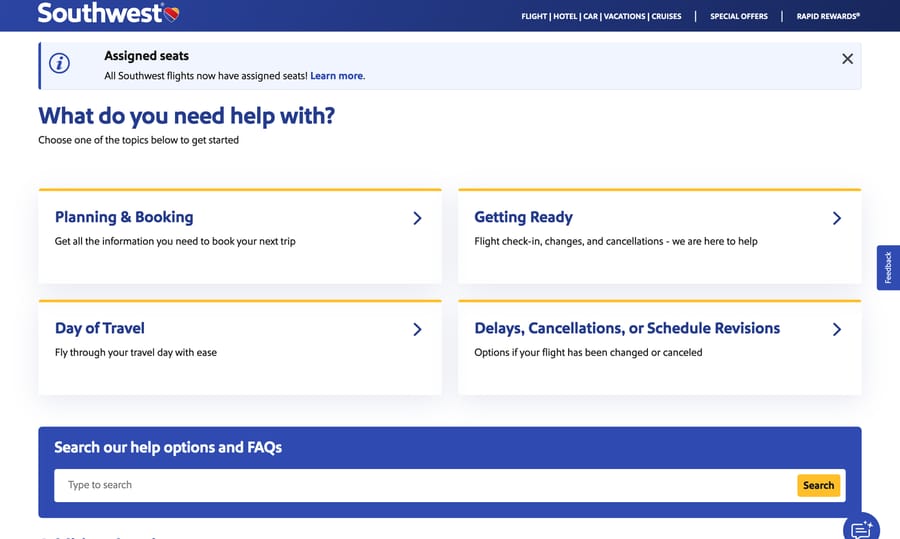
Southwest's help center lists its main topics in the order a trip happens: Planning & Booking, Getting Ready, Day of Travel, and Delays, Cancellations, or Schedule Revisions. A banner at the top announced that all Southwest flights now have assigned seats, a policy change that was bound to generate questions.
Copy this: order topics by the customer's timeline, and put this month's policy change at the top while it's new.
Fintech FAQ page examples
Money questions carry more anxiety than any other kind, so the best fintech help centers lead with safety and make the urgent path obvious.
12. Revolut: 3 article links on every category card
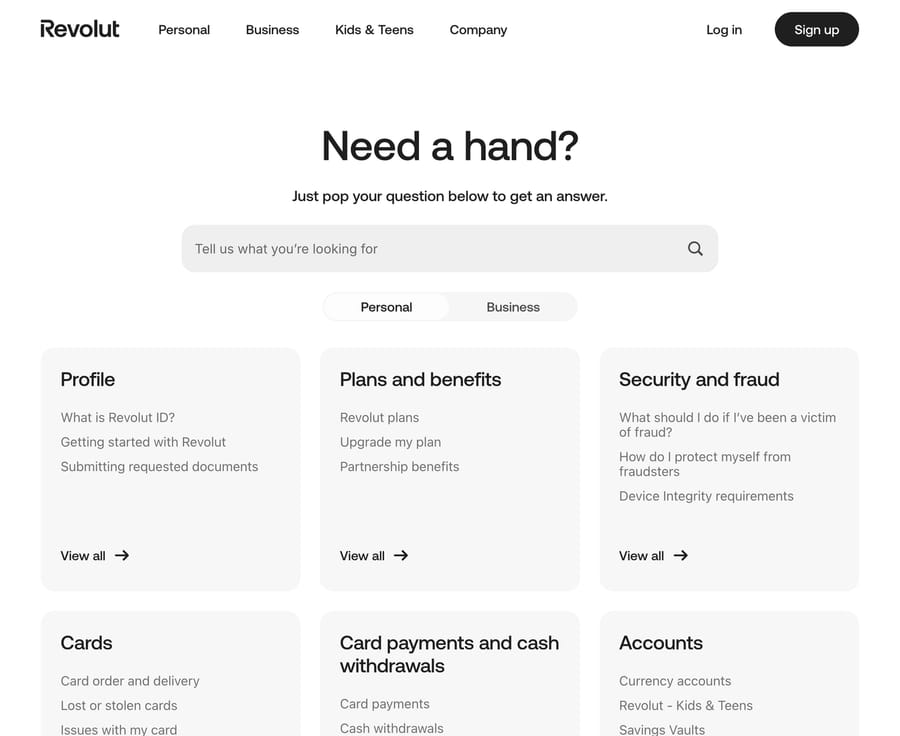
Revolut's help center opens with "Need a hand?" and a question box, then a Personal and Business toggle. Every category card (Profile, Plans and benefits, Security and fraud, Cards and more) lists three article links before a "View all" link. Under Security and fraud, the first is "What should I do if I've been a victim of fraud?"
Copy this: show your three most-used answers per category on the front page, so most visitors never need "View all".
13. Monzo: the emergency comes first
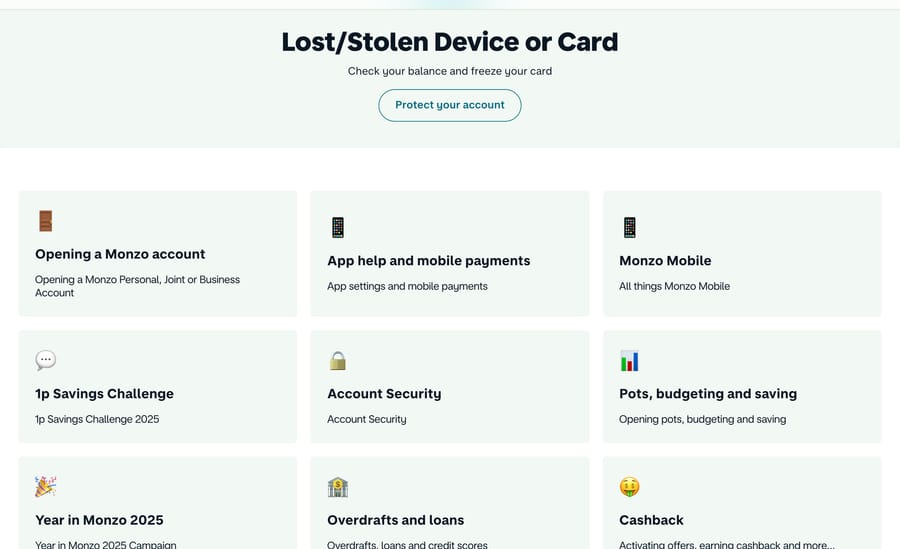
Monzo's help page puts a "Lost/Stolen Device or Card" block, with a "Protect your account" button, above every other topic. The categories below (opening an account, app help, pots and saving, overdrafts and loans) each carry a short description.
Copy this: find the one question where minutes matter and put it above the rest.
14. Venmo: a one-line description under every topic
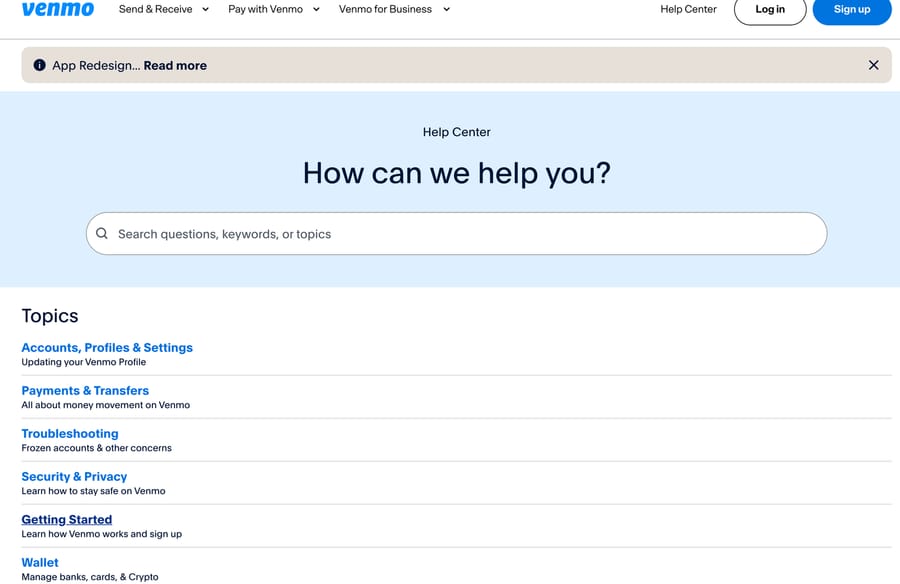
Venmo's help center lists topics with a one-line description under each, such as Troubleshooting described as "Frozen accounts & other concerns". The featured articles include "Common Scams on Venmo" and a "Venmo Tax FAQ", which is a separate FAQ for a seasonal question set.
Copy this: give seasonal questions (taxes, holiday shipping, renewal season) their own FAQ instead of mixing them into the main list.
Retail FAQ page examples
Retail FAQs are about orders, returns and broken things. The examples here are deliberately few; the patterns above apply to stores too.
15. IKEA: more than 100 questions in the customer's own words
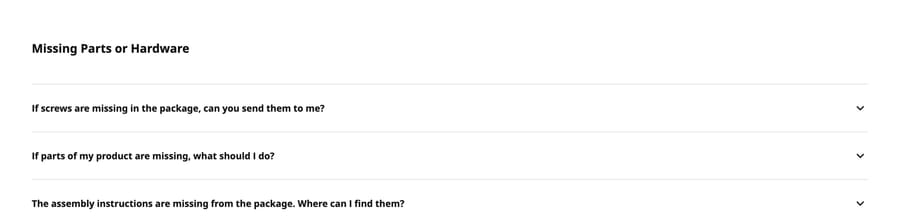
IKEA's US FAQ page carried more than 100 questions on October 13, 2026, grouped under headings such as Damaged Items and Missing Parts or Hardware. Many are written as a customer would type them: "I don't have the middle support of my bed. Was it missing from the package?" and "I purchased an item in the store location, but I left it at the register. What should I do?" Its search box says "Type your question here (no numbers)". The length is also the risk: without search and grouping, 100 questions on one page would be a wall.
Copy this: keep the customer's phrasing, including first person. These questions read like they were lifted from tickets, which is why people searching with the same words find them.
16. Allbirds: a short policy summary before the questions
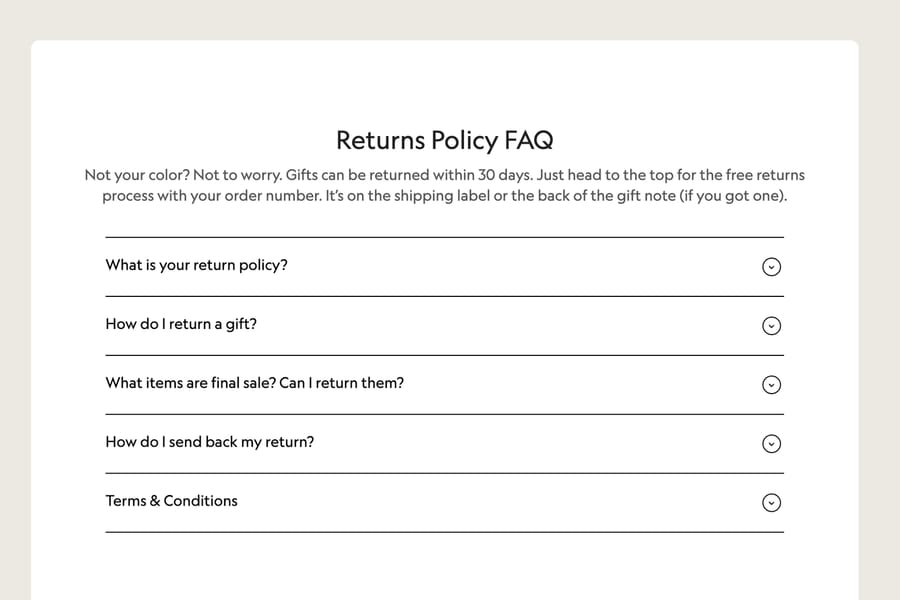
Allbirds' help page opens its Returns Policy FAQ with a short summary: gifts can be returned within 30 days, and the order number is on the shipping label or the back of the gift note. Only then come the 4 questions, starting with "What is your return policy?"
Copy this: put a plain-language summary above the questions. Many visitors only need the summary.
17. Patagonia: the two biggest jobs as buttons
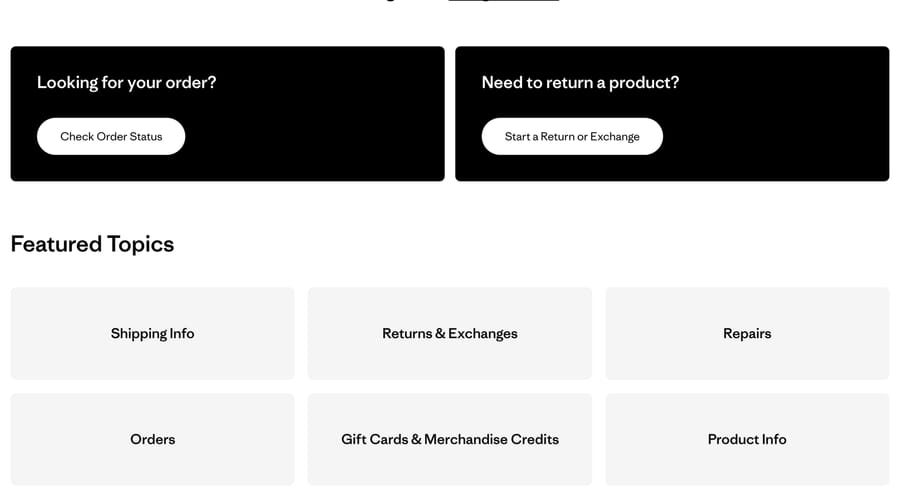
Patagonia's help center (help.patagonia.com) puts two buttons above its featured topics: Check Order Status and Start a Return or Exchange. Below the topics it lists phone and chat hours and showed an estimated wait time of 1 to 2 minutes when we looked.
Copy this: if two questions make up most of your tickets, replace them with buttons that do the job.
What do the best FAQ pages have in common?
Across the 17 pages, five patterns repeat:
- Customer wording beats internal wording. Spotify's "Charged twice", IKEA's bed support question and Dropbox's "We're a very small team" are all phrased as a customer would write them. Internal names ("Billing adjustments", "Seat management") only help people who already know your product.
- The number is in the answer. Calendly's 14-day trial, Allbirds' 30 days and Basecamp's $300 a month answer the question without a follow-up. An answer that says "contact us for details" sends a ticket.
- Billing and cancellation are easy to find. Duolingo, Zoom and Calendly list cancel, refund or renewal questions in the main FAQ rather than a separate policy page, and Spotify gives charge complaints their own group.
- Urgent paths come first. Monzo's lost card block and Southwest's delays topic sit above everything else.
- Short lists, then depth. Revolut shows 3 links per category card and Figma links to "See more FAQs". Nobody reads a 100-question page top to bottom; IKEA gets away with it because of search and grouping.
There's an incentive problem behind weak FAQ pages. They're usually written by whoever owns the website, and that person sees page views, not tickets. So the FAQ fills up with questions the company would like to be asked ("What makes us different?") while the questions that cost support time, such as "I canceled but got billed again", stay in the inbox. Counting tickets puts those questions back on the page.
How do you pick FAQ questions from ticket data instead of guessing?
The questions your customers send are already in your help desk. Picking FAQ questions is a counting exercise, and it takes an afternoon for a month of tickets.
- Export a month of solved tickets. Take subject, first message and any tags or ticket fields. A month is enough for most teams; at a few thousand tickets a month, two weeks is plenty.
- Remove tickets an FAQ can't fix. Bugs, outages, account-specific disputes and anything that needs a person to look at the customer's data stay out. An FAQ answers questions with the same answer for everyone.
- Group by the underlying question, not the wording. "I cancelled but got billed again" and "charged on the 3rd even though I cancelled on the 1st" are one question. Tags help, but most teams tag by category ("billing"), which is too coarse for an FAQ.
- Count, then rank. Any question that shows up several times a month is a candidate. The top 10 to 20 make your first FAQ.
- Write the question in the customers' words. Pick the clearest phrasing from the tickets in that group rather than inventing a neat one, as IKEA and Spotify do.
- Answer from policy, and flag the gaps. If nobody can write the answer without checking with finance or product, you've found a policy gap. Get the decision first, then write the answer.
- Re-run it every quarter. New features, price changes and policy changes create new questions. Compare the next month's tickets against the FAQ: anything that still arrives often either isn't on the FAQ or isn't answered well.
Gartner's 2024 survey of 5,728 customers is a good argument for doing this: only 14% of service issues were fully resolved in self-service, and "in 43% of cases, customers couldn't find content relevant to their issue" (Gartner, August 19, 2024). Our self-service statistics page has the other surveys. If you already have a help center, our knowledge base coverage audit applies the same counting to existing articles, and turning past tickets into a knowledge base covers the step after the FAQ.
Does FAQ schema markup still matter in 2026?
For Google's rich results, no. Google's Search Central changelog says the FAQ rich result "will no longer appear in Google Search starting May 7, 2026", and a later entry removed the documentation because the feature is no longer shown (Google Search Central documentation updates). Since 2023 it had only been shown for well-known government and health websites.
Some sites kept the markup anyway. On October 13, 2026, Figma's and Calendly's pricing pages both still carried FAQPage structured data. It does no harm, and it keeps each question and answer machine-readable for any system that parses the page. But nobody should add an FAQ section to a page in 2026 expecting expandable questions under the Google result. The reason to have an FAQ is the reader, and the questions that decide whether it works come from your tickets.
What happened when we gave an AI agent 12 made-up tickets?
We tried the counting method with an AI agent on our own Macha Demo workspace. The agent, named "P12-T7 FAQ from tickets", had no tools and no knowledge sources. Its instructions told it to group tickets by the underlying question, rank the groups, write each FAQ question in the customers' words, answer only from the policy facts we pasted, and write "ANSWER NEEDED" instead of guessing. It could also keep a one-ticket group if the ticket was about money, security or account access.
We pasted 12 made-up tickets from a fictional scheduling app, plus 4 lines of billing policy. Nothing here came from a real customer. The policy lines, in full:
Annual plans can be refunded in full within 14 days of the charge. Monthly plans aren't refunded; canceling stops the next charge.
Renewal happens on the renewal date shown in Settings > Billing. Canceling before that date stops the renewal; access continues to the end of the paid period.
Invoices and receipts: Settings > Billing > Invoices, each one downloadable as a PDF. A VAT or tax ID added under Billing details appears on every invoice issued after it's added.
Seats: admins add seats under Admin > Members > Add seat. A seat added mid-cycle is charged pro rata for the rest of the cycle and can be removed before the next renewal.
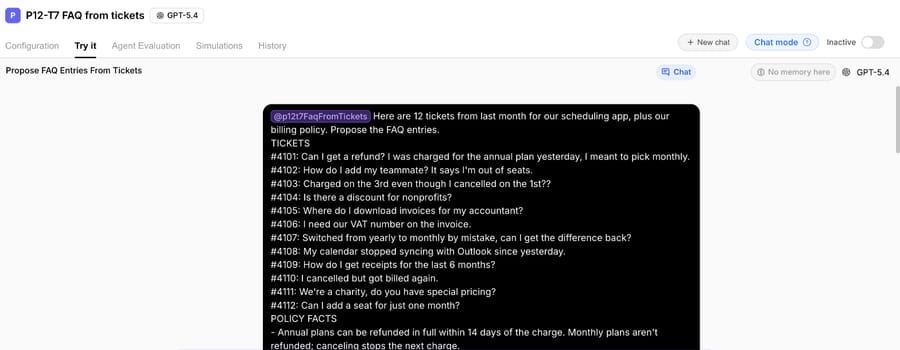
The agent answered in 37 seconds:
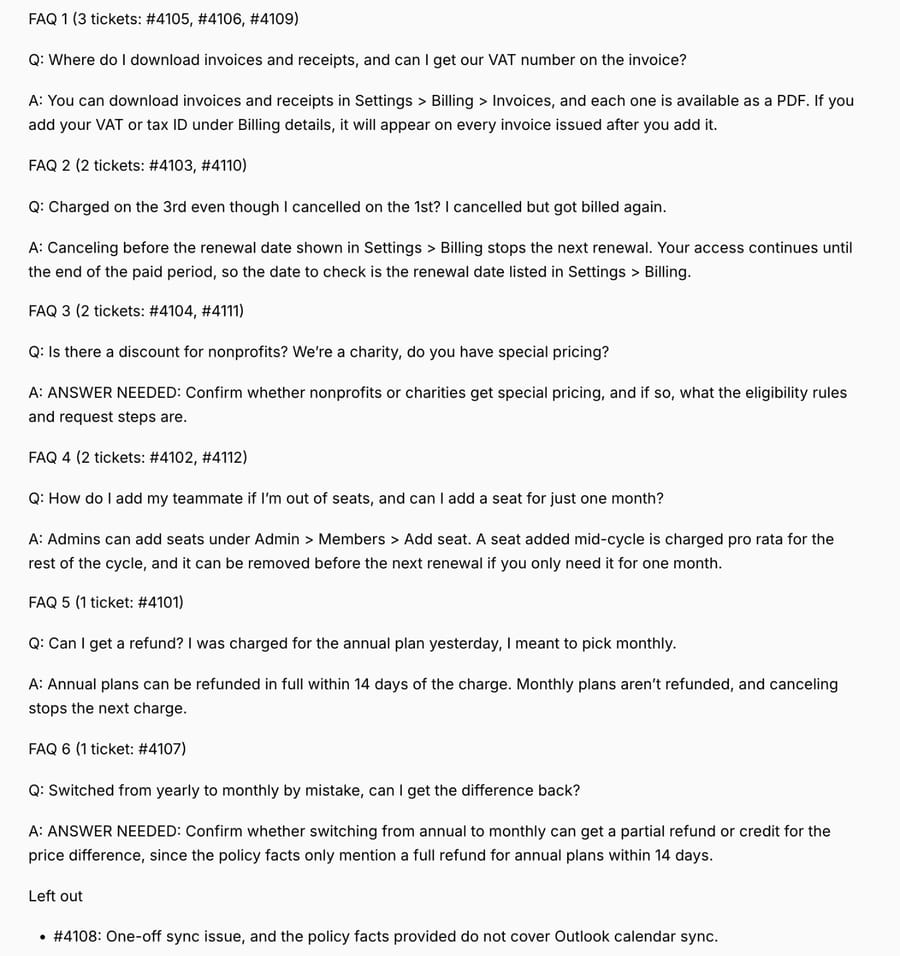
- 4 groups of 2 or more tickets. Invoices, receipts and the VAT number became one entry (3 tickets). Two "I canceled but got billed" tickets, two nonprofit pricing questions and two seat questions each became one entry.
- 2 single-ticket entries kept on purpose. The annual-plan refund (#4101) and the "can I get the difference back" ticket (#4107) are about money, so the one-off exception applied.
- 2 entries marked ANSWER NEEDED. Our policy said nothing about nonprofit pricing or partial refunds when switching from annual to monthly, so the agent listed the question and named the decision the team has to make.
- 1 ticket left out. The Outlook sync problem (#4108) is a one-off technical issue with no policy behind it.
The ANSWER NEEDED lines are the most useful part of the output. Two of the 6 FAQ questions customers asked had no written policy, and you'd only find that out by counting tickets. The other thing worth copying is that the questions kept the customers' wording, down to "Charged on the 3rd even though I cancelled on the 1st?" That reads less polished than "Billing after cancellation", and it's what a customer types into a search box. Our guide to writing agent instructions covers how to structure rules like "never guess" so an agent follows them.
Where Macha fits
The ticket-counting exercise above is the first thing Macha's team does with a new customer. Macha fits teams already running Zendesk, Freshdesk, Gorgias, Front, HubSpot or Intercom who know their help center is out of date and don't have the time to read a month of tickets to fix it. The Knowledge Builder turns solved tickets into draft articles, and the AI agent answers new tickets from the same help center, drafted as internal notes in safe mode so a person approves each reply before it goes out.
It's the done-for-you option: the Macha team analyzes your past tickets, fills the knowledge gaps for your first ticket category, builds the agent on your help desk and runs it in safe mode until the drafts are right. That's included on the trial and every plan, and the trial gives you $50 of free usage (about 125 tickets), no credit card, no time limit. Plans run at about $0.40 per ticket (pricing), which includes setup and a dedicated success manager who handles your changes, such as a new FAQ topic or the next ticket category. Our guide to answering tickets from knowledge base articles shows how that works on a live ticket.
If your team gets a few dozen tickets a week, you don't need any of this. Read the tickets yourself once a quarter and update the FAQ.
Frequently asked questions
What is a good example of an FAQ page?
Basecamp's pricing FAQ and IKEA's US FAQ are two strong ones for different reasons. Basecamp answers the skeptical buyer question with numbers in it, and IKEA lists more than 100 questions in customers' own words, grouped by problem.
How many questions should an FAQ page have?
Start with the 10 to 20 questions that appear most often in a month of tickets. The pricing page FAQs in our examples run from 7 questions (Calendly) to 13 (Zoom). A large retail FAQ like IKEA's can carry more than 100, but only with search and grouping.
How do I decide which questions go in my FAQ?
Count them in your support tickets. Group a month of tickets by the underlying question, drop anything that needs a person to look at the account, and rank the rest by how often they appear.
Should an FAQ page use accordions?
Most of the examples here do (Zoom, Dropbox, Figma, Calendly, IKEA, Duolingo), because a list of questions is easier to scan than a wall of answers. Keep the answer text on the page, not loaded only on click, so search finds it.
Is an FAQ page the same as a knowledge base?
No. An FAQ page is a short list of common questions with short answers; a knowledge base is a full library of articles. Many of the examples here, like Revolut and Netflix, use an FAQ-style front page as the entrance to a larger knowledge base.
How we researched this
- FAQ pages opened October 13, 2026: all 17 pages above, in a headless Chrome session set to US English. We work from India, so a few sites served regional variants (Airbnb served its regional English site). Question counts are from the page text we captured that day; FAQs change, so check the live page before quoting one.
- Brands: chosen for public, well-known FAQ pages across SaaS, subscription, travel, fintech and retail. None of them is a Macha customer, and nothing on this page comes from customer data.
- Google's FAQ change: the Search Central documentation updates log, read October 13, 2026. Gartner: the August 19, 2024 press release on self-service resolution (5,728 customers).
- Ranking pages read October 13, 2026: Pylon's best FAQ pages post (January 8, 2026), which features 7 brands, and Elementor's FAQ examples post (February 10, 2021), which features 10.
- Run live on October 13, 2026: a test agent named "P12-T7 FAQ from tickets" on our Macha Demo org, inactive, with no triggers, no tools and no knowledge sources. We ran it once in its Try it chat on 12 made-up tickets and 4 made-up policy lines; the screenshots show that run unedited. It read nothing from any help desk and wrote nothing anywhere.
If you'd like the Macha team to read your tickets and build the FAQ and the agent that answers from it, start a Macha trial.