





 Shopify
 Stripe
 Slack
Slack Notion
 Google Workspace
 Confluence

How Do You Auto-Reply to Support Tickets Using Knowledge Base Articles?


Most support queues carry a long tail of questions a Help Center article already answers, such as password resets, billing email changes and return windows. The slow part is a person reading each ticket, finding that article and pasting the right steps into a reply.
Key takeaways
- Auto-replying from a knowledge base in Macha takes a New Ticket trigger plus four tool steps: Get Ticket, Search Articles, Add Public Reply, then Update Status and Update Tags.
- Macha matches a customer's password-reset question to the 'How to Reset Your Password' article at a 95% match, replies with the numbered steps and sets the ticket to Solved.
- Zendesk's documentation for messaging AI agents with agentic AI says that when no relevant knowledge is found, the AI agent tells the customer it can't answer instead of guessing.
- CoSupport reports a 30 to 50% decrease in ticket backlogs from AI automation, a vendor backlog figure rather than a measured deflection rate for any one queue.
- Macha charges $299 a month for 750 tickets, about $0.40 per ticket, and that includes setup by the Macha team and a dedicated success manager who handles later changes.

To auto-reply to tickets from knowledge base articles, you connect your Help Center to an AI agent, fire it on a New Ticket trigger, and let it run four steps: read the ticket, search your articles, post a public reply built from the best match, then set the status and a tag such as kb-auto-resolved. Repetitive questions get answered the moment they land, and your agents spend the day on tickets that need a person.
With Macha, that agent sits on top of the help desk you already run. Macha is not a helpdesk and it isn't trying to replace Zendesk, Freshdesk, Gorgias, Front, HubSpot or Intercom. It reads from the knowledge sources you already maintain and writes back into the same ticket your team is looking at.
| Stage | What happens | Macha tool (Zendesk connector) |
|---|---|---|
| Trigger | A customer opens a new ticket | New Ticket (fires on the first customer message) |
| Read | Macha pulls the ticket subject, body, tags and requester | Get Ticket |
| Find | The agent searches your Help Center for the best-matching article | Search Articles |
| Reply | It writes a grounded answer and posts it on the ticket | Add Public Reply |
| Close | It sets the status and applies a tag for reporting | Update Status, Update Tags |
What does "auto-reply from a knowledge base" actually mean?
Two ideas get bundled together here, and they behave differently:
- Article suggestion or search. The customer types a question into a Help Center widget and gets a list of articles to read. This is classic self-service deflection. It's useful, but the customer still does the reading and the interpreting.
- A written answer in the ticket. The AI reads the specific ticket, finds the matching article, and replies in plain language with the actual steps ("Here's how to reset your password: 1, 2, 3…"), then closes or pends the ticket. The customer gets an answer, not a reading assignment.
This use case is the second kind. The distinction matters because the second is what lightens the queue: a real answer resolves the ticket, while a link often produces a follow-up.
Here's the worked example used throughout:
Customer: "How do I reset my password? I've tried the login page but can't find the option." Macha (searches the Help Center, finds "How to Reset Your Password" at a 95% match): "Here's how to reset your password: 1. Go to the login page and click Forgot Password 2. Enter your email address 3. Check your inbox for the reset link (check spam too) 4. Click the link and set your new password The link expires in 24 hours. Let me know if you run into any issues!" Macha then sets the ticket status to Solved and tags it kb-auto-resolved.
No agent touched it. The answer comes from a real article, it's written in plain language, and the ticket is closed and tagged so you can count how much volume this handled.
What do you need to set up in Macha?
The table above is the whole run: one trigger and a handful of tool calls against your help desk, orchestrated by an agent. Three building blocks make it work, and each maps to a part of the Macha dashboard.
1. Connect your knowledge sources
The reply is only as good as what the agent is allowed to read. Macha's Zendesk connector syncs your Help Center as a live knowledge source, and Macha can also crawl a website, ingest uploaded documents, or connect live sources like Google Docs, Notion and Confluence. A policy that lives in your internal wiki can ground an answer just as well as a published article. (See the Data Sources docs for the full list.)

If your answers live in Zendesk Guide, that's the most direct setup: the agent reads from the same articles your customers already see.
2. Build the agent that writes the reply
The agent is where you set the rules: which model it uses, which knowledge sources it can search, and how it should behave. That covers tone, when to answer, and when not to. You write instructions like "Only reply when you find an article that clearly answers the question with high confidence. Otherwise, leave the ticket for a human and add an internal note." That guardrail is what keeps auto-reply honest.

3. Set the trigger
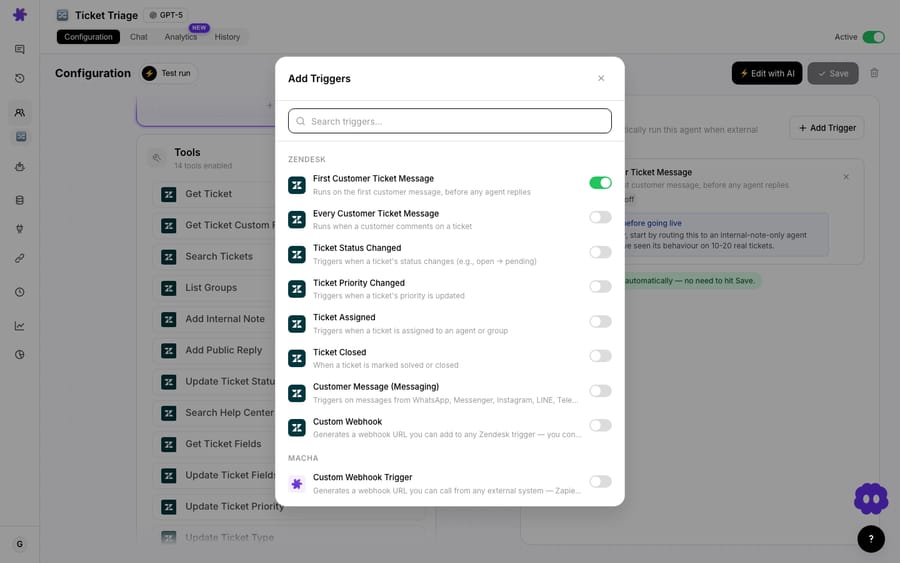
Finally, you tell Macha when to run. For this workflow the trigger is New Ticket on your Zendesk account, which fires on the first customer message before any agent replies. You can narrow it with a condition so the agent only fires on tickets that look like common questions (for example, by group, tag or channel). Triggers can also be Slack messages, webhooks or schedules, but a new-ticket trigger is the natural fit here. (Triggers docs.)
How does the agent avoid making up answers?
The agent isn't free-associating. It does retrieval first, then writing: it searches your indexed knowledge, retrieves the closest article, and is instructed to answer from that article. If nothing matches well, the right behavior is to stay quiet and escalate, not to guess.
The major help desks apply the same principle to their own generative replies. Zendesk's documentation for messaging AI agents with agentic AI says that when a knowledge reply runs and no relevant knowledge is found, "the AI agent informs the customer that it can't answer their question" (Zendesk help). Freshworks' Freddy AI Agent also grounds its replies in your knowledge base. The difference with Macha is that one agent can read across several sources (Help Center plus your Notion wiki, say) and take actions on the ticket afterward, not just paste an answer.
A good knowledge-grounded reply has three properties:
- It's sourced. Every answer traces back to a specific article. If the article is wrong, you fix the article and every future reply improves.
- It knows its limits. No confident match, no auto-reply. The ticket goes to a human untouched.
- It's measurable. The
kb-auto-resolvedtag turns "how much did this deflect?" into a Zendesk view you can count.
Should the agent draft replies or send them?
Going from zero to fully automated replies overnight makes a lot of teams nervous, and reasonably so. You don't have to.
- Draft for review. Instead of posting a public reply, the agent writes the answer as an internal note and leaves the ticket for an agent to approve, edit and send. Your team gets a pre-written, sourced answer while a human stays in the loop. This is the Draft ticket responses for agent review variant of the same workflow.
- Auto-send. Once you trust the agent on a category (order status, password resets, return-policy questions), you switch those to post publicly and close the ticket, as in the example above.
A sensible rollout: start in draft mode on one or two well-documented categories, watch the suggested replies for a week, and promote the categories that are consistently correct to auto-send. You're never forced into all-or-nothing.
When should you not use a knowledge-base auto-reply?
This pattern suits a specific shape of ticket and fits others poorly. Being honest about the boundary is what keeps customers happy.
- Questions that need account data, not an article. "Where is my order?" or "Why was I charged twice?" aren't answered by a static article. They need a live lookup against Shopify or Stripe. That's a different Macha workflow, and a very doable one, but it isn't this one. Don't point a KB-only agent at order-status tickets.
- Thin or stale knowledge. If the article is outdated, the reply will be confidently outdated. Auto-reply makes the quality of your knowledge base visible, which is healthy, but it means you should clean up your top articles before you switch on auto-send.
- Emotional or high-stakes tickets. Complaints, cancellations, churn risk, anything legal or safety-related. Route these to a person. A correct but robotic article reply to an angry customer makes things worse.
- Ambiguous questions. If the agent can't find a high-confidence match, the correct outcome is to escalate, not improvise. Set that guardrail in the agent instructions and resist lowering the confidence bar to lift your deflection number.
The teams that get the most out of this treat the auto-reply rate as a quality metric, not a vanity metric: a smaller set of correct deflections beats a large set of mediocre ones.
How much ticket volume will it take off your team?
Nobody can promise you a number, and vendor figures in this category measure different things. CoSupport, for example, says companies using AI automation typically see a 40–60% reduction in first response time and a 30–50% decrease in ticket backlogs (CoSupport). That is a backlog figure from a vendor, not a measured deflection rate for your queue. Your actual rate depends on how much of your volume is repetitive and how good your articles are. Macha automates the action of answering; the outcome depends on your queue and your knowledge base.
What you can count on is the mechanics: an instant first response on matched tickets, every reply traceable to a source, and a tag on each auto-resolved ticket so you can see in your own Zendesk reporting how much volume this took off your team's plate.
How much does it cost?
Macha bills per ticket: one conversation, charged once however many steps it takes, not per deflection and not per resolution. Reading the ticket, searching knowledge and writing the reply all belong to the same ticket, and the model you choose doesn't change the price. The plan starts at $299 a month for 750 tickets, about $0.40 each, and the next tier is $599 for 1,500. Because the charge is per conversation and not per outcome, the bill never hangs on an outcome definition you don't control. That price includes setup: the Macha team analyzes your past tickets, builds the knowledge base and this agent, and runs it in safe mode, with drafts as internal notes, until the drafts are right. After go-live a dedicated success manager handles your changes, such as new categories, instruction edits and new tools. You can try it on the free trial ($50 of usage, no credit card required), and the full plan breakdown is on the pricing page.
How do you set it up, step by step?
On the trial and every plan, the Macha team does these steps for you. Your part is connecting your help desk and knowledge sources, which takes about 15 minutes. Here is what the build involves:
- Connect your helpdesk. Link Zendesk, Freshdesk, Gorgias, Front, HubSpot or Intercom so Macha can read tickets and post replies. See Macha on Zendesk.
- Connect your knowledge. Add your Help Center as a source, and optionally a website crawl, uploaded docs, or a live Notion, Confluence or Google Docs source.
- Build the agent. Give it the knowledge sources, a model, and clear instructions, including the rule to escalate when it isn't confident.
- Start in draft mode. Have it write internal-note suggestions first. Review for a week.
- Promote to auto-send on the categories that prove reliable, set the New Ticket trigger, and add a tag like
kb-auto-resolvedso you can measure the impact.
FAQ
Does Macha replace my helpdesk? No. Macha is an AI agent layer that runs on top of Zendesk, Freshdesk, Gorgias, Front, HubSpot or Intercom. It reads and writes in the same tickets your team already uses, and you keep your helpdesk exactly as it is.
Where does the answer come from? From your own knowledge: your Zendesk Help Center, a crawled website, uploaded documents, or live sources like Notion, Confluence and Google Docs. The agent retrieves the best-matching article and answers from it, so replies trace back to content you control.
What happens if there's no matching article? The agent is instructed not to guess. With no confident match it leaves the ticket for a human, optionally adding an internal note flagging the gap, which tells you what to write next.
Can I review replies before they're sent? Yes. Run the agent in draft mode and it posts answers as internal notes for an agent to approve and send. Promote categories to fully automatic only when you trust them.
Can it close the ticket too? Yes. The workflow can set the status (Solved, Pending and so on) and apply a tag like kb-auto-resolved so the deflection shows up in your standard helpdesk reporting.
What about questions that need order or billing data? Those need a live lookup, not an article. That's a different Macha workflow that connects Shopify or Stripe. A knowledge-base auto-reply is for questions a published article can fully answer.
Want to see it on your own tickets? Read more about Macha on Zendesk, browse the docs, or explore other Macha use cases.






