Shopify
 Stripe
 Slack
Slack Notion
 Google Workspace
 Confluence

FAQ Template: 8 Copy-Ready FAQ Documents for Customers, Your Team and AI Agents (2026)


When self-service fails, the most common reason is that the customer couldn't find content relevant to their issue: that was the cause in 43% of failures in Gartner's August 2024 survey of 5,728 customers, which also found only 14% of issues fully resolved in self-service. Below are 8 FAQ templates you can copy: a blank FAQ document, a single-entry format, filled FAQ examples for a SaaS product, a B2B service and an online store, an internal FAQ for support agents, an FAQ page layout, and a version formatted so an AI agent retrieves the right answer. Each uses [square bracket] placeholders, and the writing rules come before the templates.
Key takeaways
- This page has 8 FAQ templates: a blank FAQ document, a single-entry format, SaaS, B2B and ecommerce examples, an internal agent FAQ, an FAQ page layout and an AI-ready format.
- In Gartner's August 2024 survey of 5,728 customers, 43% of self-service failures happened because customers couldn't find content relevant to their issue.
- Every FAQ entry should answer in its first sentence, keep its conditions in the same entry, and name an owner and a last-reviewed date so stale answers get caught.
- Since August 8, 2023, Google shows FAQ rich results only for well-known, authoritative government and health websites, so FAQPage markup rarely changes how a business FAQ looks in search.
- In an October 13, 2026 test, a Macha agent given a 5-entry FAQ in this page's AI-ready format answered a 4-seat question from the right entry and handed a 30-seat request to a person, as the entry's escalation line said.

Which FAQ template should you use?
Find what you're writing, then jump to the template. "Reader" is who the FAQ is for; "format" is where it usually lives.
| What you're writing | Template | Reader | Format |
|---|---|---|---|
| A new FAQ from scratch | #1 Blank FAQ document | Anyone | Doc, then help center |
| One question at a time | #2 Single FAQ entry | Anyone | Help center article or doc section |
| Software or subscription product | #3 SaaS FAQ example | Customers | Help center |
| Agency, consultancy or B2B service | #4 B2B service FAQ example | Clients and buyers | Website page or PDF for procurement |
| Online store | #5 Ecommerce FAQ example | Shoppers | FAQ page on the store |
| Answers your team gives but customers never see | #6 Internal agent FAQ | Support agents | Agent-only articles |
| The page layout itself | #7 FAQ page template | Customers | Web page |
| An FAQ an AI agent will answer from | #8 AI-ready FAQ format | AI agent and customers | Knowledge base |
If you want to see how real companies lay out their public FAQ pages, our FAQ page examples cover that; this page is the document you fill in.
What goes in an FAQ document?
An FAQ document has two parts: a header that says who owns it and when it was last checked, and a list of entries that each answer one question. Most FAQ templates online stop at a list of sample questions. The header and the per-entry fields are what keep an FAQ correct six months later, when the refund window has changed and nobody remembers which article mentions it.
Every entry needs five things:
- The question in the customer's words. "Can I get my money back?" beats "Refund eligibility".
- A direct answer in the first sentence. Yes, no, a number, or a place to click.
- The conditions. Which plans, regions or order types it applies to, and the exceptions.
- The next step. A setting path, a link or what to do if the answer doesn't fit.
- An owner and a last-reviewed date. The person who changes the policy should be the person who updates the entry.
How many questions? Pylon's guide suggests 8 to 15 for a typical page. We'd count from your tickets instead: the questions that come in every week belong in the FAQ, and the ones that came in once don't, whatever the total. Our knowledge base coverage audit walks through finding them.
Template #1: Blank FAQ document
Copy this into a doc, fill the header, and add one block per question. Keep it in a shared doc while you write; publish to your help center when the answers are agreed.
FAQ: [Product or company name]
Audience: [Customers / Prospects / Support team]
Owner: [Name, team]
Last reviewed: [Date]
Next review: [Date, e.g. 6 months out or after any policy change]
Policy sources: [Links to the refund policy, terms, pricing page]

CATEGORY: [Getting started]

Q: [Question, in the words customers use]
A: [Direct answer in one sentence.] [One or two sentences of detail.]
Applies to: [Plans, regions, order types]
Not covered: [Exceptions]
Next step: [Setting path, link, or "Reply to this email and we'll ..."]
Owner: [Name] | Last reviewed: [Date]

Q: [Next question]
A: ...

CATEGORY: [Billing and plans]
...

CATEGORY: [Account and security]
...

CATEGORY: [Contact and support]
Q: How do I reach a person?
A: [Channel, hours with time zone, expected response time.]
Four to six categories is enough for most products: getting started, billing and plans, using the product, account and security, and contact. Name categories after what the customer is trying to do, not after your internal teams.
Template #2: Single FAQ entry
Use this when you add one question to an existing help center, or when a teammate asks "can you write that up as an FAQ?".
Q: [Question in the customer's words]
A: [Answer in one sentence: yes, no, a number or where to click.]
[Detail: how it works, in 1 to 3 sentences.]
[Condition: "This applies to [who]. If [exception], [what happens instead]."]
[Next step: "To [do the thing], go to [Settings path]." or a link.]
The order matters. A customer scanning the page reads the first sentence and stops if it answers them, so the detail and the conditions come after the answer, never before it.
Template #3: SaaS FAQ example
A filled FAQ document example for a made-up invoicing app. Swap in your own product and policies; every number here is a placeholder value, not a recommendation.
FAQ: [Product], last reviewed [Date], owner [Billing lead]
Getting started
How long is the free trial? The trial lasts 14 days and includes every feature. You won't be charged unless you choose a plan before it ends.
Can I import invoices from another tool? Yes, you can import a CSV of past invoices from Settings > Import. Most tools, including [Competitor A] and [Competitor B], export a file in the right shape; the import page lists the columns it needs.
Billing and plans
Can I get a refund on an annual plan? You can get a full refund within 30 days of an annual payment. After 30 days the payment isn't refundable, but your plan stays active until the end of the term you paid for. Monthly plans aren't refunded; canceling stops the next charge.
Can I remove seats in the middle of my plan? Yes, the account Owner can remove seats any time from Settings > Team. On a monthly plan your next bill drops straight away. On an annual plan, removed seats aren't refunded for the current term, and you pay for the lower count from your renewal date.
How do I change the email that receives our bills? The Owner can change it in Settings > Billing > Billing contact. The new address gets every bill from the next one onward.
Account and security
Do you support two-factor authentication? Yes, with an authenticator app. SMS codes aren't supported. Admins can require two-factor authentication for everyone in Settings > Security.
What happens to my data if I cancel? Your invoices stay available read-only for 12 months after you cancel, and you can export them as CSV or PDF any time from Settings > Data export.
Contact
How do I reach a person? Email [Support email] or use the chat in the app, [Hours with time zone]. We reply within [Response time].
Template #4: B2B service FAQ example
B2B buyers read an FAQ during procurement, so the questions are about contracts, data and who does what. This one is for a made-up agency; the same shape fits a consultancy, an implementation partner or a managed service.
FAQ for clients: [Company], last reviewed [Date], owner [Account lead]
How does a typical engagement start? Every engagement starts with a [Length, e.g. two-week] discovery phase at a fixed price of [Price]. At the end you get a written plan and a quote for the full project, and you can stop there with no further commitment.
What do you need from our team? One decision-maker who can approve work within [Number] business days, and access to [Systems] by the kickoff date. Delays in access move the timeline by the same number of days.
How is billing handled? We invoice [Monthly in arrears / 50% upfront and 50% on delivery], payable within [Number] days. Purchase orders are fine; send the PO number before the first invoice so it appears on every one.
Will you sign our NDA or DPA? Yes. We can sign your NDA as is. For a DPA we usually use ours, which is at [Link]; if your legal team needs changes, send them to [Legal contact] and expect a reply within [Number] business days.
Who owns the work you produce? You own everything we deliver for you once the related invoice is paid. We keep the right to reuse general methods and tools that aren't specific to your business.
What happens if we need to pause or end the contract? Either side can end the contract with [Number] days' written notice. You pay for work done up to the end date, and we hand over everything produced so far within [Number] business days.
Template #5: Ecommerce FAQ example
Most store FAQs cover four topics: shipping, returns, order changes and payment. Keep the policy numbers here identical to your policy pages; an FAQ that says 30 days while the returns page says 14 gets quoted back at you.
FAQ: [Store name], last reviewed [Date], owner [Ops lead]
When will my order ship? Orders placed before [Cutoff time and time zone] on a business day ship the same day. Others ship the next business day, and you get tracking by email when the order leaves.
How long does delivery take? Standard delivery takes [Number] to [Number] business days in [Country] after the order ships. Express takes [Number] to [Number] business days. International times are on the [Shipping page link].
Can I change or cancel my order? Yes, within [Number] hours of ordering, by replying to your order confirmation email. After that the order is usually packed, and you can return it instead.
What's your return policy? You can return unused items within [Number] days of delivery for a refund to your original payment method. [Exceptions, e.g. final-sale items and opened cosmetics can't be returned.] Start a return at [Returns portal link].
When will I get my refund? We refund within [Number] business days of receiving the return. Your bank can take another [Number] to [Number] business days to show it.
Which payment methods do you accept? [List]. Your card is charged when you place the order, not when it ships.
Template #6: Internal agent FAQ
An internal FAQ answers the questions your support team asks each other: what to check before answering, which exception a lead can approve, which macro to use. Customers never see it, so it can hold the reasoning a public FAQ leaves out. Zendesk lets you set an article's visibility so only agents can read it, and Freshdesk does the same with a folder set to agents only; our guides to the Zendesk knowledge base and the Freshdesk knowledge base show where.
INTERNAL FAQ: [Team name] (agents only)
Owner: [Support lead] | Last reviewed: [Date]

Q: [The question as customers ask it]
Answer to give: [What the customer should hear, or the macro name]
Check first: [System and field to look at, e.g. order status in Shopify, plan in billing]
Exceptions: [Who can approve what, e.g. team lead can extend the return window by 7 days]
Escalate if: [Condition], to [Team or person], via [Channel]
Don't say: [Phrases or promises to avoid]
Related macro: [Macro name]
Two filled entries, one SaaS and one general:
Q: Customer says they were charged twice this month. Answer to give: "Duplicate charge, investigating" macro. Check first: the billing record for two successful charges in the same period. A failed charge followed by a successful retry is one charge, not two. Exceptions: none. Agents don't refund duplicate charges themselves. Escalate if: two successful charges exist. Send to the billing team in the #billing-escalations channel with both charge IDs. Don't say: "It's probably a pending authorization" unless you've checked.
Q: Customer asks to speak to a manager. Answer to give: acknowledge, then ask what outcome they want, using the "Manager request" macro. Check first: whether the ticket has been reopened twice or more. Exceptions: a team lead can call back within 1 business day if the customer asks for a call. Escalate if: the customer mentions legal action, a regulator or a data breach. Assign to [Lead] and don't reply further. Don't say: "My manager will say the same thing."
The "Don't say" line looks odd in a document, but it's the field agents use most. It's where a team writes down the sentence that started last month's complaint.
Template #7: FAQ page template
The layout for a customer-facing FAQ page, top to bottom. Most help centers and website builders give you the accordion; the decisions below are the parts they leave to you.
[Page title: "[Company] FAQ" or "Frequently asked questions"]
[One line: what this page covers and who it's for]
[Search box, if you have more than about 20 questions]

[Category links: Getting started | Billing | Shipping | Returns | Account | Contact]

## [Category 1]
[Question as a heading or accordion title]
[Answer: first sentence answers, then detail, then a link]
...

## Still need help?
[Channel, hours with time zone, expected response time]
[Link to contact form or chat]

[Last updated: Date]
Three page-level choices to make:
- Put answers in text, not images or PDFs. Search engines, screen readers and AI agents read text. An answer that only exists in a policy PDF is invisible to all three.
- Show a last-updated date. It tells the reader whether the shipping times survived the last carrier change.
- Don't count on FAQ rich results. Since August 8, 2023, Google shows FAQ rich results only for "well-known, authoritative government and health websites". FAQPage markup is still valid, but on a business site it rarely changes how the page looks in search.
How do you write FAQ questions and answers?
The person who writes an FAQ is often paid to sell, and that incentive is why a refund answer says "hassle-free" while the 30-day condition lives on the terms page. Support pays for that in tickets: a customer reads the friendly answer, acts on it, and writes in when the condition bites. These rules close that gap.
- Take questions from tickets, not from a brainstorm. Pull the last 90 days of tickets, group them by question, and write the top ones first. The wording customers use goes into the question.
- One question per entry. "Shipping and returns" is two entries.
- Answer in the first sentence. Start with yes, no, a number or a place to click.
- Use real numbers. "Within 30 days of delivery" beats "within a reasonable time".
- Keep conditions in the same entry. If an exception lives on another page, a reader who lands on this entry from search won't see it.
- End with a next step. A setting path, a link or the channel to use, never "please contact us" with no route.
- Write each fact in one place. If the refund window appears in five entries, it will be wrong in at least one after the next policy change. Put it in one entry and link to it.
- Date and own every entry. An owner who changes the policy updates the entry the same day.
Here's how those rules change real answers:
| Instead of | Write |
|---|---|
| "We offer hassle-free returns." | "You can return unused items within 30 days of delivery for a full refund." |
| "Shipping times may vary." | "Standard delivery takes 3 to 5 business days in the US after the order ships." |
| "Please contact support for billing questions." | "The account Owner can change billing details in Settings > Billing. For anything else, email billing@[company]." |
| "It can be enabled in settings." | "Admins can require two-factor authentication in Settings > Security." |
| "Refunds are processed promptly." | "We refund within 5 business days of receiving your return." |
How do you format an FAQ so an AI agent can retrieve it?
AI agents and help center search tools don't read your FAQ top to bottom. Most split long documents into passages, match the customer's question against those passages, and answer from the one or two that score highest. Our explainer on designing knowledge sources for an agent covers the mechanism. For an FAQ, it means each entry has to make sense on its own, cut loose from the heading above it and the entry before it.
That changes four things about how you write:
- Name the subject in the question. "Does it support 2FA?" matches poorly when "it" was defined two screens up. "Does [Product] support two-factor authentication?" matches on its own.
- Add the ways customers actually ask. A line of alternate phrasings ("2FA; MFA; authenticator app") gives the matcher more to hit without cluttering the answer.
- Keep the conditions and the escalation rule inside the entry. An agent that retrieves the answer but not the exception will give the exception-free answer confidently.
- Give each entry an ID. It lets the agent tell a person which entry it used, and lets you trace a wrong reply back to a wrong entry.
Template #8: AI-ready FAQ format
ID: [Short code, e.g. BILL-03]
Q: [Question naming the product or company in full]
Also asked as: [3 to 5 phrasings from real tickets, separated by semicolons]
A: [Direct answer in one sentence.] [Detail in 1 to 2 sentences, with settings paths and numbers.]
Applies to: [Plans, regions, roles]
Escalate if: [Condition where a person should answer instead]
Owner: [Name] | Last reviewed: [Date]
The same entry before and after:
Before: Seats. You can manage your team in settings. Billing adjusts automatically depending on your plan type. Contact us with any questions.
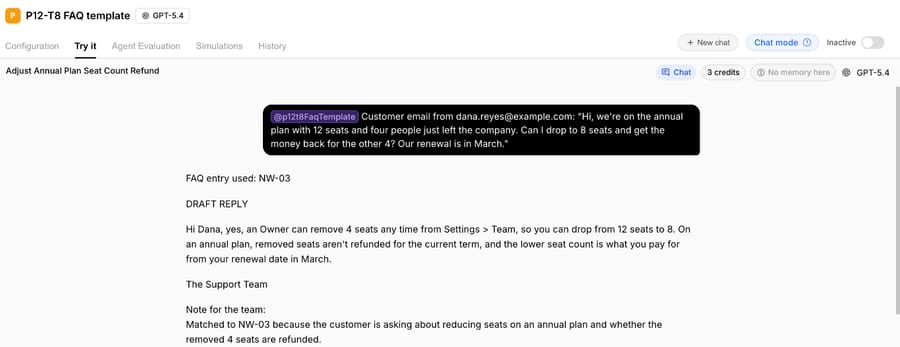
After: ID: NW-03 Q: Can I remove seats in the middle of my Northwind Invoicing plan? Also asked as: reduce users; someone left the team; lower my seat count; pay for fewer seats A: Yes, an Owner can remove seats any time from Settings > Team. On a monthly plan your next bill drops straight away. On an annual plan, removed seats aren't refunded for the current term, and the lower seat count is what you pay for from your renewal date. Applies to: all plans. Only the Owner role can change seats. Escalate if: the customer wants to remove more than 20 seats at once (their account manager handles it).
The "before" isn't wrong. It just can't answer the question a customer actually asks, which is whether they get money back, because the answer depends on the plan type and the entry never says how.
What happened when an AI agent answered from this template?
We put five entries written in template #8 into the instructions of a test agent on our Macha Demo org on October 13, 2026, for a made-up invoicing app called Northwind Invoicing: annual refunds, invoices after canceling, removing seats, the billing email and two-factor authentication. The agent had no tools and no knowledge base attached, so the FAQ was the only thing it could answer from. Its instructions told it to pick exactly one entry, keep every number, setting path and condition as written, and hand the ticket to a person whenever the entry's "Escalate if" line applied.
We ran it twice in the agent's Try it chat, with made-up emails from example.com addresses. The first customer was on an annual plan with 12 seats and asked to drop to 8 and get the money back for the other 4, with a renewal in March. The agent matched entry NW-03, confirmed they could remove the seats from Settings > Team, said removed seats aren't refunded for the current term, and applied the customer's own detail: the lower count is what they'll pay for from the March renewal.
The second customer wanted to go from 60 seats to 30 in one week. That's the same question, so the agent matched the same entry, but the entry's escalation line says anything over 20 seats goes to an account manager. The agent didn't answer the refund question. It wrote a holding reply promising a reply within 1 business day and a note for the team saying why. That run took 5.6 seconds.
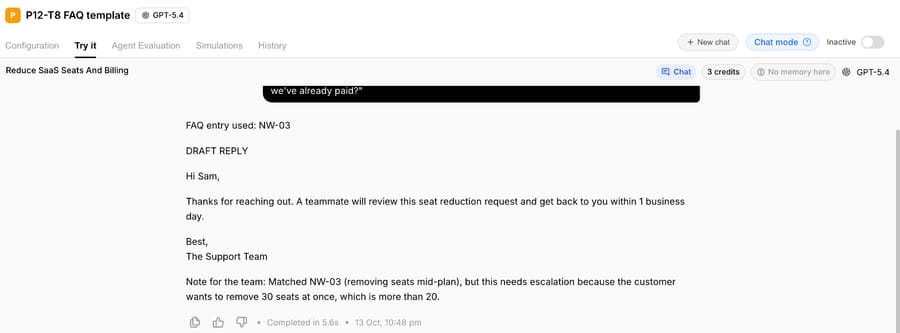
For anyone writing an FAQ, the second run is the useful one. The answer and the exception were in the same entry, so the agent saw both. If the 20-seat rule had lived on a separate "Enterprise accounts" page, a retrieval system could easily have found the seats answer without it, and the reply would have told a 60-seat customer the self-serve answer. The other thing we checked was the wording: every number and setting path in both replies came straight from the entry. Our guide to writing agent instructions covers how to separate behavior (pick one entry, escalate when told) from the knowledge itself.
Where should you publish your FAQ?
Write it in a doc, then publish each entry as a help center article so customers, search engines and your AI agent all read the same text.
| Help desk | Where the customer FAQ lives | Our guide |
|---|---|---|
| Zendesk | Help Center articles (Zendesk Knowledge) | Zendesk Guide explained |
| Freshdesk | Solutions articles, shown on the portal | Freshdesk knowledge base |
| Gorgias | Help Center | Gorgias Help Center |
| Front | Knowledge base | Front's knowledge base |
| Intercom | Help Center articles | Intercom Help Center setup |
| HubSpot | Knowledge base | HubSpot's knowledge base guide |
An FAQ answers the question before a ticket exists. Once a ticket arrives anyway, the reply usually comes from a saved response; our canned responses examples and customer service email templates cover that side, and they work best when they quote the same numbers as the FAQ.
Where Macha fits
Macha suits teams on Zendesk, Freshdesk, Gorgias, Front, HubSpot or Intercom who already have an FAQ or help center and want an AI agent to answer tickets from it inside the help desk, instead of in a separate chat widget. The agent searches the knowledge you connect, answers from the matching entry, and in safe mode leaves the reply as an internal note for a person to approve. When the FAQ has a gap, the AI Knowledge Builder can write draft articles from your solved tickets; our post on turning past tickets into a knowledge base shows how.
With the done-for-you setup, the Macha team reads your past tickets, finds the questions your FAQ is missing, builds the knowledge base and the agent, and keeps it in safe mode until the replies are right. That's included on the trial ($50 of free usage (about 125 tickets), no credit card, no time limit) and on every plan at about $0.40 per ticket (pricing), along with a dedicated success manager who updates the agent's knowledge when a policy changes.
If your FAQ gets a few questions a week and your team answers the rest in minutes, a well-kept help center is enough on its own.
Frequently asked questions
What is an FAQ template?
An FAQ template is a reusable structure for frequently asked questions: a header with an owner and a review date, categories, and entries that each hold a question, a direct answer, the conditions and a next step. Template #1 above is a blank one you can copy.
How do I write an FAQ document?
Pull the questions from your last 90 days of tickets, write each one in the customer's words, answer it in the first sentence, keep the conditions in the same entry, and give every entry an owner and a last-reviewed date. Then publish the entries to your help center.
How many questions should an FAQ have?
As many as customers actually ask often. Pylon suggests 8 to 15 for a typical page; a product with several plans or regions usually needs more, grouped into four to six categories with a search box once you pass about 20.
What's the difference between an FAQ and a knowledge base?
An FAQ is a short list of direct answers to common questions. A knowledge base also holds longer how-to articles, troubleshooting steps and reference material. Most teams keep the FAQ as one section of their knowledge base.
Should I add FAQ schema markup to my FAQ page?
You can, and it's still valid structured data, but since August 8, 2023 Google shows FAQ rich results only for well-known, authoritative government and health websites. On a business site, clear text answers do more than the markup.
How we researched this
- Self-service data: Gartner's press release of August 19, 2024 (source), a survey of 5,728 customers fielded in December 2023: 14% of issues fully resolved in self-service, and in 43% of self-service failures customers couldn't find relevant content. Read through our stats archive, October 13, 2026.
- Search change: Google Search Central, "Changes to HowTo and FAQ rich results" (August 8, 2023), read October 13, 2026.
- Ranking pages read October 13, 2026: Gladly's ecommerce FAQ template (updated October 6, 2026), Pylon's template for an FAQ document (January 8, 2026), the source of the 8 to 15 questions guideline, and HeroThemes' list of WordPress FAQ designs (updated July 19, 2026). None of them includes an internal agent FAQ. Gladly gives tips on writing answers an AI can quote, but no entry format with IDs, alternate phrasings or an escalation line, and its copyable filled template is for ecommerce only.
- Help desk visibility settings: from our own guides to the Zendesk and Freshdesk knowledge bases, linked above.
- Run live on October 13, 2026: a test agent named "P12-T8 FAQ template" on our Macha Demo org, inactive with no triggers, no tools and no knowledge sources, with the five Northwind Invoicing entries from template #8 in its instructions. We ran it twice in its Try it chat on made-up emails from example.com addresses. Nothing was sent to anyone and no system was written to. On a live help desk the FAQ would usually sit in a connected knowledge source rather than the instructions; we put it in the instructions so the test showed the format alone.
- The templates are ours, written for this page. Northwind Invoicing, every policy value and every question is synthetic. Bracketed values are for you to fill and aren't recommendations about your policy.
If you'd like an agent that answers tickets from your own FAQ, start a Macha trial and the team will build it with you.