





 Shopify
 Stripe
 Slack
Slack Notion
 Google Workspace
 Confluence

How Do You Design a Knowledge Base for an AI Support Agent So It Answers Correctly?


An AI support agent answers correctly when its knowledge base holds one canonical source per fact, keeps fast-changing content in live sources, and gives each agent only what it needs. The model is rarely the bottleneck; conflicting or stale documents are.
Key takeaways
- A knowledge base for an AI support agent answers correctly when each fact lives in one canonical source, because a model cannot tell which of two conflicting chunks is right.
- Macha's document uploads accept PDF, DOCX, TXT, CSV and XLSX files up to 20MB each, 10 files at a time, and suit stable content like a finalized returns policy.
- Website crawls in Macha default to a Crawl Depth of 10, can go up to 50, and are capped at 200 pages per source, so a crawl should target a docs sub-path.
- Live connector sources such as Notion, Confluence and Google Docs read the latest content every time, which suits pricing, SLAs and escalation rules that change often.
- Macha's AI Knowledge Builder, added 12 August 2026, turns resolved Zendesk tickets into knowledge base articles and merges near-duplicates instead of creating a second article.

To design a knowledge base an AI support agent answers correctly from, keep one canonical source per fact, put fast-changing content like pricing and SLAs in live sources such as Notion, Confluence or Google Docs, and give each agent only the sources it needs. The model is rarely the bottleneck. An agent will confidently quote the wrong return window if the only place that window is written down is a three-year-old PDF that contradicts your live help center.
Most teams under-invest here. They connect a help center, upload a folder of documents, and assume retrieval will sort it out. It won't, not on its own. The agents that answer correctly are backed by a knowledge base that was designed: scoped deliberately, deduplicated, kept current, and shaped so the retrieval layer finds the one right answer instead of three competing ones.
The examples below come from how knowledge sources behave inside Macha, the AI agent layer that sits on top of your existing Zendesk, Freshdesk, Gorgias, Front, HubSpot or Intercom help desk. Macha builds agents that resolve and triage tickets using your knowledge plus live tools. The same principles apply if you build your own retrieval stack.
Which source type should each kind of knowledge use?
A sane day-one shape for a support knowledge library:
| Knowledge | Source type | Why |
|---|---|---|
| Returns / refund policy | Upload (DOCX/PDF) | Stable, authoritative, one canonical file |
| Escalation & routing rules | Live (Notion/Confluence) | Changes often; edited by the team |
| Public how-to articles | Connected Help Center | Already maintained; auto-current |
| Product documentation | Crawl a docs sub-path | Broad, self-maintaining |
| Pricing / status page | Add single webpage | One canonical URL, no crawler drift |
| Answers from past tickets | AI Knowledge Builder, or Studies → knowledge source | Real questions, real answers |
Scope each source to the agents that need it, start narrow, and expand only when a real ticket proves a gap.
What is a knowledge source for an AI agent?
In Macha, a knowledge source is any body of content your agents can search to answer a question: uploaded documents, a crawled website, a single indexed webpage, a live connector feed from Google Workspace, Notion or Confluence, a connected Zendesk Help Center, or an AI Knowledge Builder source generated from your resolved tickets. You manage them all from one Sources page.
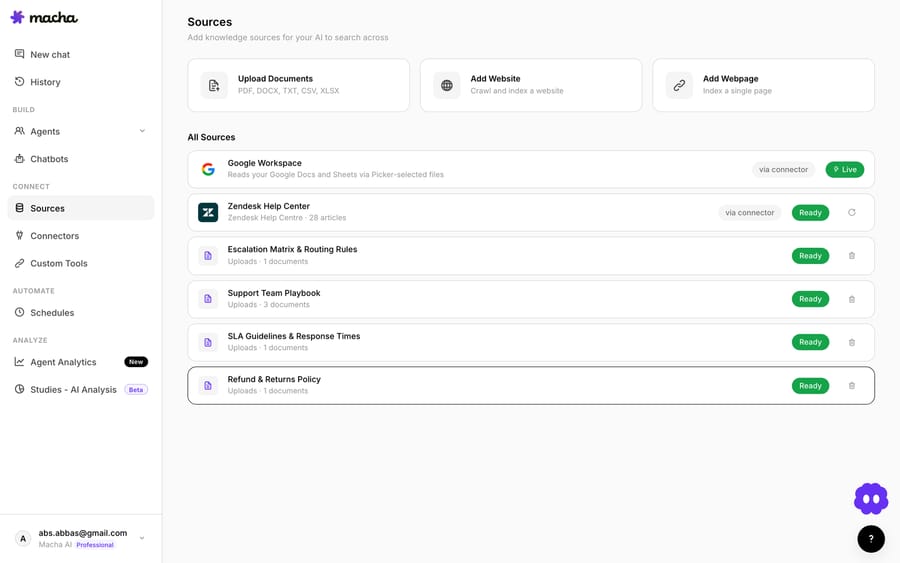
There are two fundamentally different kinds of source, and the difference matters for how you design:
- Indexed snapshots: uploaded files, crawled sites, and single webpages. Macha ingests the content once. Small files get injected directly into the agent's prompt; larger files are chunked, embedded, and searched on demand. The agent reads the version that existed at ingestion time until you re-index.
- Live connector sources: Google Docs and Sheets, Notion pages, Confluence spaces, and your help center. These read the latest content in real time. Edit the underlying doc and the agent sees the change with no re-upload.
That single distinction drives a lot of design decisions. Anything that changes often (pricing, SLAs, seasonal policies) belongs in a live source so it can never go stale. Anything stable and authoritative, such as a finalized returns policy or a runbook, is fine as an indexed upload. Get this wrong and your agent will cite a number that was correct last quarter.
Should policies and procedures be written differently for an AI agent?
Before you organize anything, it helps to separate the two kinds of content a knowledge base for an AI agent actually holds, because they want to be written differently:
- Declarative knowledge: facts and policies. "Returns are accepted within 30 days." "The Pro plan includes priority support." This is reference material the agent quotes. It should be short, unambiguous, and stated once, in one place.
- Procedural knowledge: steps and decisions. "How to process a warranty replacement," "when to escalate a billing dispute." This is workflow the agent follows. It should be written as explicit, ordered steps with the branch conditions made obvious, not buried in narrative prose.
The common failure is writing procedural knowledge as if it were declarative: a wall of paragraphs describing a process the agent then has to reverse-engineer into steps. Write the steps as steps. A retrieval-augmented agent reproduces structure it can see; it rarely invents structure that isn't there.
Chunking and metadata, briefly
You don't tune the embedding pipeline in Macha, but understanding how it splits content tells you how to write for it. Documents are broken into chunks, passages of a few hundred words, that get embedded and retrieved individually. The agent usually sees the matching chunk, not the whole file. Two practical consequences:
- Keep one idea per chunk. A clear heading every few hundred words gives the splitter a natural boundary and keeps a single retrieved passage self-contained. A rule split across two chunks ("EU customers…" in one, "…get 30 days" in the next) retrieves badly.
- Front-load the answer. Lead each section with the fact or the first step, then add context. Retrieval rewards passages where the answer is near the top.
Metadata is the other half. Descriptive filenames and headings are signal the retrieval layer uses: "SLA Guidelines & Response Times" out-retrieves "Support Doc v4 FINAL." Naming sources for the topic they own, and scoping them to the right agent (more on that below), is the lightweight tagging that keeps the right chunk surfacing for the right question.
Why does one source of truth per fact matter most?
The single biggest predictor of whether an agent answers correctly isn't volume; it's consistency. Regal's RAG playbook puts it plainly: "ensure each piece of knowledge gives a single, unambiguous source of truth on that topic", and when two chunks even appear to disagree, add context or combine them into one explicit decision-tree chunk. The reason is simple and a little humbling: when two chunks disagree, the model can't reason its way to which one is right. It just picks one. Often the wrong one.
So the first design pass on any knowledge library is a deduplication and reconciliation pass, not an addition pass:
- Find the duplicates. Search your sources for the same topic ("refund," "shipping time," "cancellation") and you'll usually find it described in three places with three slightly different answers.
- Pick the canonical home. One source owns each fact. The returns policy lives in one document. Everything else either links to it or is deleted.
- Collapse contradictions into a decision tree. When edge cases genuinely differ ("EU customers get 30 days, US gets 14"), don't leave that as two vague paragraphs in two files. Write it as one explicit, conditional chunk so the agent retrieves the whole rule at once.
You are not building a comprehensive archive. You are building the smallest set of documents that unambiguously answers your real questions. Less, but correct, beats more-but-conflicting every time.
Should you upload, crawl or index a single page?
Macha gives you three ways to add non-connector knowledge, and each suits a different kind of content. Choosing the right one is half the battle.
Upload documents for stable, authoritative policy
Uploads accept PDF, DOCX, TXT, CSV and XLSX files, up to 20MB each and 10 files at a time. This is the right home for the canonical artifacts: your returns policy, escalation matrix, SLA guidelines, support team playbook.

A few design notes that pay off:
- One topic per file, named for the topic. "SLA Guidelines & Response Times" retrieves better than "Support Doc v4 FINAL." Filenames and headings are signal the retrieval layer uses.
- Strip the noise. A 40-page onboarding deck with two pages of actual policy is worse than a two-page policy doc. Extra prose dilutes retrieval and burns context.
- Prefer text-native files. A clean DOCX or TXT chunks far more reliably than a scanned-image PDF.
Crawl a website for breadth you don't want to hand-curate
The Add Website path crawls and indexes a site. You set a Crawl Depth (how many link-hops deep to follow), which defaults to 10 and goes up to 50, with a system limit of 200 pages per source.

Crawling is powerful and easy to misuse. The trap is pointing it at your whole marketing site and indexing careers pages, blog archives, and legal boilerplate that have nothing to do with support, all of which become retrieval noise. Design it instead:
- Crawl a sub-path, not the root. Point it at
docs.yoursite.comor/help, not the homepage. - Keep depth shallow on purpose. Depth 2–3 from a documentation index usually captures the real content; depth 50 mostly captures the long tail you didn't want.
- Mind the 200-page ceiling. If a site is bigger than that, split it into focused sources by section rather than letting the crawler choose 200 pages at random.
(One field note: Macha raised the crawler's per-page size limit from 512KB to 2MB in April 2026 because content-heavy pages, such as large e-commerce and docs pages, were silently failing to ingest. If you crawled a big site before then and it looked thin, it's worth re-running.)
Index a single webpage for one canonical URL
The Add Webpage path indexes exactly one URL. Use it when a single page is the authority: a status page, one pricing page, a specific policy article, and you don't want a crawler wandering off it.
How do you keep an AI agent's knowledge from going stale?
The most underused accuracy lever is the live connector source. Connect Google Workspace, Notion, or Confluence and Macha automatically creates a data source that reads the current content every time, with no re-upload and no re-index. (Connecting Confluence auto-creates a source the same way Google and Notion do; for Google, a native file picker lets you select specific Docs and Sheets instead of pasting document IDs.)
The design move here is to put your volatile knowledge where your team already edits it. If your support leads keep the escalation runbook in Notion and update it weekly, connect Notion rather than exporting a PDF every Friday that's wrong by Monday. The agent then answers from the same living document your humans trust. This is the cleanest way to keep "one source of truth" and "always current" at the same time. They're usually in tension, and a live connector resolves it.
Your helpdesk's own knowledge base counts too. A connected Zendesk Help Center appears as a source (in the library above it shows 28 published articles, indexed and Ready), so the public articles your team already maintains become agent knowledge for free. For the deeper Zendesk-specific setup, see how Macha works on top of Zendesk.
Should every AI agent see every knowledge source?
Connecting a source to your workspace is not the same as giving it to an agent. On each agent's configuration page, the Data Sources card controls which sources that specific agent can search, and a per-source scope toggle lets you choose All documents or hand-pick Selected ones.
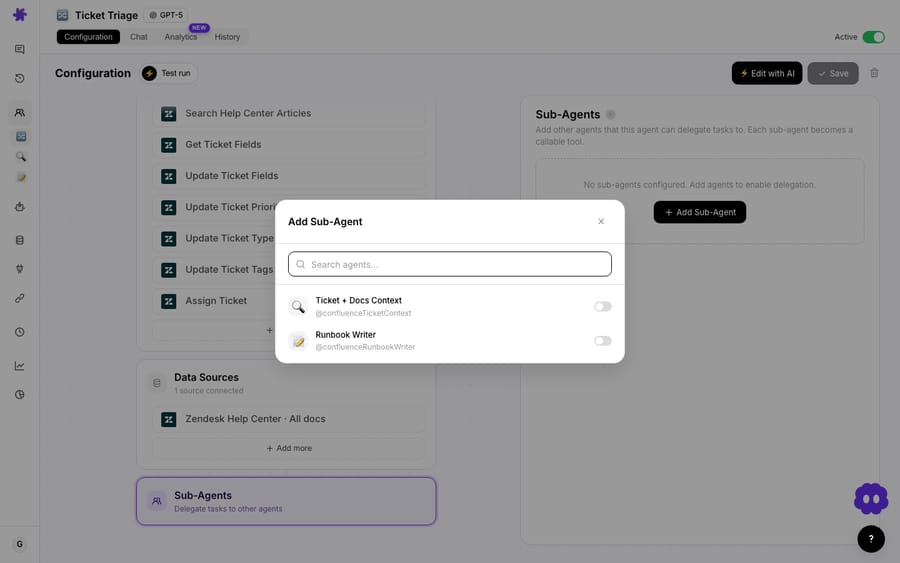
This is where teams quietly fix a lot of wrong answers. A billing agent that can also see your shipping FAQ will sometimes retrieve a shipping chunk for a payment question and confidently answer off-topic. Narrow knowledge improves precision. Give the refund agent the refund policy and the order data, not the entire library.
Sub-agents take this further: in Macha, a parent agent can hand off to narrower specialist sub-agents (refund, shipping, technical), and each sub-agent can be scoped to its own sources. That gives you a clean division of labor, such as a "Policy" sub-agent scoped to policy docs and a "Product" sub-agent scoped to product docs, instead of one generalist agent rummaging through everything. Smaller, well-scoped knowledge per agent is almost always more accurate than one big shared pile.
How do you find what your knowledge base is missing?
A knowledge library is never finished. Every authoritative guide on the subject, from Zendesk to support-AI vendors, lands on the same cadence: review regularly, and mine your own tickets for the questions your knowledge doesn't yet answer. The questions customers actually ask are the spec for what your knowledge base is missing.
Macha has two ways to turn tickets into knowledge. The AI Knowledge Builder (added 12 August 2026) reads your resolved Zendesk tickets and turns each one into a new KB article or merges it into a similar article already there, so the same question worded two ways doesn't produce two articles. A relevance pass drops auto-replies, spam and thin threads first, and every generated article stays editable. The result is a normal knowledge source, chunked and embedded like an uploaded PDF.
The second is Studies, bulk AI analysis over your real ticket history. Run a study that summarizes and categorizes the last few weeks of tickets, and the topics with no clean answer in your sources are your content backlog. Better still, a completed Study can be pushed straight into a knowledge source: each result row becomes an indexed document (the fields you select are merged into one article body per record), so insights mined from real resolved tickets become searchable context on the next live ticket. Analyze the past, then let the present agents draw on it.
The practical loop:
- Ship a tight, deduplicated set of sources.
- Watch what the agent gets wrong or escalates.
- Trace each miss to a gap or a contradiction in knowledge, not the model.
- Fix the source, re-index, repeat.
Most "the AI is dumb" complaints are knowledge bugs, not model bugs. Fix the source and the answer fixes itself.
What goes wrong even with a well-designed knowledge base?
No approach is free. Be honest about the trade-offs:
- Indexed sources go stale silently. An uploaded PDF or a crawled site reflects the moment you ingested it. If the underlying content changes, you have to re-index. Nothing prompts you. For anything that moves, prefer a live connector.
- Crawlers over-collect by default. Left at high depth on a root domain, a crawl pulls in marketing and legal pages that degrade retrieval. Scope the path and keep depth shallow.
- More sources is not more accuracy. Past a point, adding documents lowers precision because retrieval has more near-duplicates to confuse. Prune as deliberately as you add.
- Indexing and analysis take time. A big crawl or a big study runs for minutes or hours, and everything it pulls in then has to earn its place in retrieval, so scope both. Billing itself is per ticket: one conversation, charged once, however many documents the agent reads to answer it. See the pricing page for current tiers.
- Live sources inherit their source's mess. A connected Notion workspace full of half-finished drafts will feed the agent half-finished drafts. Connect the clean spaces, not the scratchpad.
FAQ
What's the difference between a knowledge source and a connector in Macha? A connector is the integration that lets an agent take actions (look up an order, update a ticket). A knowledge source is content an agent can read to answer questions. Some connectors (Google Workspace, Notion, Confluence, a Zendesk Help Center) also auto-create a live knowledge source when you connect them. See the docs for the full breakdown.
Does Macha chunk and embed my documents? Yes. Small files are injected directly into the agent's prompt; larger files are chunked, embedded, and searched on demand. You don't configure the embedding pipeline; you control what goes in and which agent can see it.
How do I keep knowledge from going stale? Use live connector sources (Google Docs, Notion, Confluence, your help center) for anything that changes. They read the latest content with no re-upload. Reserve uploads and crawls for stable, authoritative content, and re-index when it changes.
Should every agent see every source? No. Scope each agent's Data Sources to what it actually needs, and use Selected rather than All documents when an agent only needs part of a source. Narrower knowledge means more precise answers. Sub-agents each get their own scoped knowledge base for the same reason.
How do I find what my knowledge base is missing? Mine your tickets. Run a Study over recent tickets to surface the topics your sources don't answer cleanly, then add or fix those documents. You can push the study results back in as a new source, or point the AI Knowledge Builder at resolved Zendesk tickets to draft articles from them.
How large should a knowledge base for an AI agent be? As small as it can be while still answering your real questions. Past a point, extra documents add near-duplicates that make retrieval less precise, so prune as deliberately as you add.
Where should you start?
Designing knowledge sources is the highest-leverage hour you'll spend on an AI support agent, more than prompt-tuning or model choice. Start with one canonical document per fact, put volatile knowledge behind a live connector, scope each agent tightly, and let your tickets tell you what's missing.
Want to try it on your own content? Start a free trial ($50 of usage, no credit card, no time limit), connect your help desk, add your first sources, and watch your agent answer from knowledge you actually trust. The Macha docs have the full walkthrough.
Written by Abbas (Customer Support & AI, Macha) · Reviewed by Ankeet Guha (Co-founder & CTO) · Published 2026-06-24 · Last updated 2026-09-24.






