Intercom
 Shopify
 Stripe
 Slack
Slack Notion
 Google Workspace
 Confluence

What Is Zendesk Guide? The Complete Knowledge Base Overview


If you've poked around Zendesk for more than an hour, you've run into three words that seem to mean the same thing — Guide, Help Center, and knowledge base — used almost interchangeably in menus, docs, and sales decks. They're related, but they're not the same, and untangling them is the fastest way to understand how self-service actually works in Zendesk.
Key takeaways
- Zendesk Guide is the knowledge base product where support teams write, organize and publish help content that is then served publicly through the Help Center.
- Zendesk Guide content follows a three-level hierarchy of Categories, Sections and Articles, with sections nestable up to five levels deep and up to 200 sections per section.
- Zendesk hides a Help Center's only category from end users when there is just one category, showing its sections directly on the home page instead.
- Zendesk's generative search 'Quick answer' feature requires a Professional or Enterprise plan plus theme configuration, and includes up to 100,000 eligible searches a month across Suite and Guide plans.
- Zendesk Guide is bundled into Suite plan tiers: Guide Lite with Suite Team, Guide Professional with Suite Growth and Professional, and Guide Enterprise with Suite Enterprise and Enterprise Plus.
Here's the short version: Zendesk Guide is the knowledge base product. It's the engine — the place where you write, organize, publish, and search your help content, and where the AI features that read that content live. The Help Center is the customer-facing website that Guide powers: the public page with the search bar and the category tiles your customers actually visit. One is the back office; the other is the storefront. (We go deep on the storefront in Zendesk Help Center explained, and untangle all three terms in knowledge base vs. Help Center vs. Guide.)
This guide is the complete, plain-English tour of Guide: what it is, how content is structured, the features that matter (search, AI answers, publishing workflows, content blocks, themes, community), how it's packaged and priced, why a knowledge base is worth the effort in the first place, and — because it's increasingly the point — how a good KB becomes the fuel that lets an AI agent resolve tickets on its own. Everything here is verified against Zendesk's own documentation.
Guide vs. the Help Center: clearing it up first
This trips up almost everyone, so it's worth nailing before anything else.
- Zendesk Guide is the product: the knowledge management system inside Zendesk. When you're logged in as an agent or admin and you write an article, arrange categories, set publishing permissions, or turn on AI search, you're working in Guide.
- The Help Center is the output: the branded, public-facing site (e.g.
support.yourcompany.com) that Guide generates and serves to your customers. It's where end users land, search, read articles, and — if you've enabled it — submit tickets or post in the community.
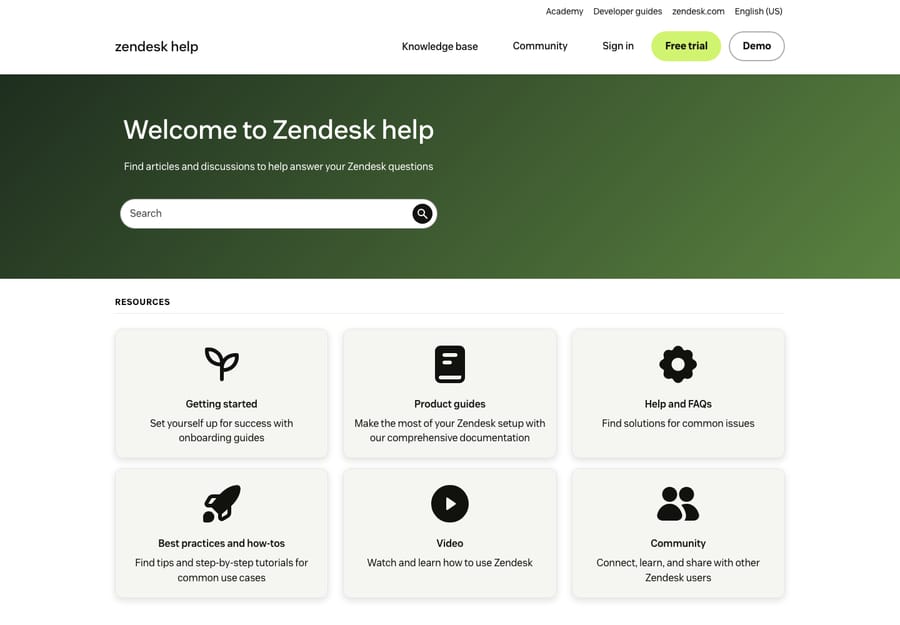
A clean analogy: Guide is to your Help Center what a CMS like WordPress is to your published blog. You author and manage in one; customers experience the other. A single Guide instance can power a knowledge base, a self-service portal where customers track their tickets, and a community forum — all under the same Help Center roof.
How Guide content is structured: Categories → Sections → Articles
Every Zendesk knowledge base uses the same three-level content hierarchy. Get this model right and everything else — navigation, permissions, search — falls into place.
- Categories are the top-level containers. Think of them as the big buckets on your Help Center home page: Getting Started, Billing, Troubleshooting. Categories hold sections.
- Sections live inside categories and group related articles — for a software company, a Billing category might contain Invoices, Refunds, and Plan changes sections. Sections can also be nested inside other sections, up to five levels deep with up to 200 sections per section, so larger libraries can build real sub-topic trees.
- Articles are the actual help content — the how-tos, FAQs, and policies — and they live inside sections.
A few details that catch new admins off guard, straight from Zendesk's hierarchy docs:
- If your Help Center has only one category, that category is hidden from end users — they'll just see its sections. So a single-category KB looks "flatter" than you might expect.
- Visibility permissions are set at the article level, not the section level. That's how you publish some articles to everyone, restrict others to signed-in customers, and keep internal-only articles visible to agents alone — all within the same section.
- Only users with the Knowledge admin role can add, edit, or delete categories and sections. Regular agents can draft and (with permission) publish articles, but the structure itself is admin-controlled.
The practical takeaway: resist the urge to over-structure. A handful of broad categories with clear sections beats fifty hyper-specific buckets that confuse both authors and customers.
The core capabilities of Zendesk Guide
Guide is more than a folder tree of articles. These are the features that make it a real knowledge management system.
Search
Search is the heart of any knowledge base — most customers never browse categories, they type a question. Guide's Help Center search indexes your articles (and, on higher plans, community posts and federated external content) and ranks results. Good search depends entirely on good content: clear titles, real keywords, and articles that match how customers actually phrase things.
Generative search (AI answers)
On top of classic keyword search, Zendesk offers generative search — the "Quick answer" box that appears at the top of search results and synthesizes a direct, conversational answer from your top-matching articles instead of just listing blue links. It requires a Professional or Enterprise plan plus theme configuration, and Zendesk includes up to 100,000 eligible searches per month across Suite and Guide plans, with a Generative Search Extender add-on beyond that (details here). The important caveat: a generated answer is only as good as the article behind it. Thin or contradictory content produces thin or contradictory answers.
Team Publishing (drafting, review, approval)
Team Publishing is Guide's editorial workflow. It lets agents draft articles, assign reviewers, and route content through an approval step before it goes live — so a stray edit doesn't ship to customers unreviewed. You can verify articles on a schedule, flag content that's gone stale, and keep a clear owner on every page. For any team with more than one or two authors, this is what keeps a KB trustworthy instead of drifting out of date.
Content blocks
Content blocks are reusable snippets of content stored independently from any single article — a disclaimer, a set of troubleshooting steps, a support hours notice. Drop the block into ten articles, and when the underlying info changes you edit it once and every article updates. This is a quiet superpower for keeping a large KB consistent; we cover the mechanics and gotchas in Zendesk content blocks explained.
Themes
The look of your Help Center is controlled by themes. Zendesk ships a default theme (Copenhagen) that's responsive and customizable out of the box, and you can edit colors, layout, and copy with no code — or go further with custom HTML/CSS/JavaScript and the templating language for a fully branded experience. How far you take it, and the trade-offs of customizing, are covered in Zendesk Help Center themes.
A note on Content Cues
You may still see references to Content Cues — an older feature that surfaced AI-suggested topics your KB was missing based on ticket trends. Worth knowing for context, but Zendesk removed Content Cues effective May 1, 2025. Its job — spotting content gaps from real ticket data — is now better served by AI tooling and by analyzing your own ticket history. If a guide tells you to "turn on Content Cues," it's out of date.
Community and the customer portal
Guide also powers two adjacent experiences under your Help Center. The customer portal lets signed-in users see and track their own tickets — the self-service layer beyond articles, which we cover in the Zendesk self-service portal. And Gather adds community forums where customers help each other and your team curates the best answers (Gather is included on Suite Professional and above). Together with the knowledge base, these are the three pillars of self-service that Guide brings together.
How Guide is packaged and priced
Guide isn't a separate purchase for most customers anymore — it's bundled into the Zendesk Suite. The tier you're on determines which Guide features you get (official plan breakdown):
- Guide Lite — included with Suite Team. The basics: a knowledge base and Help Center.
- Guide Professional — included with Suite Growth and Suite Professional (and available as a paid add-on on any Support plan). Adds multiple languages, richer customization, and Team Publishing-style workflows.
- Guide Enterprise — included with Suite Enterprise and Enterprise Plus (also a paid add-on). The full set: advanced publishing controls, content blocks, and the AI-driven knowledge features.
A bit of history for anyone on an older contract: Zendesk used to sell standalone Guide plans, and accounts from before May 2, 2017 may sit on a "Guide Legacy" tier. Those legacy standalone plans are no longer supported, and new customers buy Guide as part of the Suite. If you're unsure what you've got, check Admin Center → Subscription in your own account rather than trusting any blog (including this one) — Zendesk adjusts packaging periodically.
Why a knowledge base matters
It's easy to treat the KB as a "nice to have" you'll get to eventually. The economics say otherwise.
- Deflection. Every customer who finds their answer in an article is a ticket your team never has to touch. At any real volume, that's the single biggest lever on support cost.
- 24/7 self-service. Your knowledge base never sleeps, never goes on break, and answers instantly — across time zones and at 2 a.m. when no agent is online.
- Consistency. A published article gives every customer the same correct answer, instead of ten agents improvising ten slightly different ones.
- Faster agents. A good KB doesn't just help customers — agents link to articles in replies, cutting handle time and onboarding new hires faster.
The honest counterpoint: a knowledge base only delivers any of this if it's maintained. A stale, half-finished KB deflects nothing and erodes trust. The work is in keeping it current — which is exactly why Guide's publishing workflows and reusable content blocks exist.
How a great KB powers AI agents
Here's the part that's changed the calculus on knowledge bases in the last couple of years. Your KB used to be read by humans. Now it's also read by AI — and that raises the stakes on getting it right.
Generative search (above) is one example: it turns your articles into conversational answers inside the Help Center. But the bigger shift is AI agents that resolve tickets. When a customer emails or chats in, an AI agent can read your knowledge base, find the relevant article, and either answer directly or draft a reply for a human to approve — the same content, now doing the work at the front line instead of waiting to be searched. We walk through that wiring in connecting a knowledge base to an AI agent.
The dependency runs one direction: the AI is only as good as the KB behind it. A clean, well-structured, current knowledge base is the fuel. A messy one produces confident, wrong answers — which is worse than no answer at all.
Where Macha fits (a quick aside). Macha is an AI agent layer that runs on top of Zendesk — it's not a help desk and not a replacement for Zendesk or Guide. It reads your existing Guide knowledge base (plus past tickets and other sources) to auto-draft replies, triage, and resolve routine tickets, leaving anything it can't handle as a normal ticket for a human. It bills per ticket — one conversation, charged once, covering every automated step in it (summarize, tag, route, look up data, draft, or resolve) whichever model you choose — never per resolution, so the bill never hangs on an outcome definition you don't control. The relevant point for this article: a good Guide KB is what makes any AI layer, Macha included, actually useful. You can try it free — $50 of free usage, no credit card required.
Best practices and common mistakes
A few habits separate a knowledge base that pulls its weight from one that gathers dust.
Do:
- Start with a few broad categories. Structure can always grow; over-structuring early just confuses people.
- Write titles the way customers search. "How do I get a refund?" beats "Refund policy v2."
- Use Team Publishing and a review cadence. Assign owners, set verification dates, and retire stale articles on a schedule.
- Reuse with content blocks. Anything that appears in more than one article — hours, disclaimers, steps — belongs in a block.
- Mine your tickets for gaps. The questions agents answer over and over are the articles you're missing.
Avoid:
- Treating launch as "done." A KB is a living product, not a one-time project.
- Deep nesting no one can navigate. Five levels are possible; that doesn't mean you should use them.
- Internal jargon in customer-facing articles. Write for the customer, not the org chart.
- Forgetting article-level permissions. Publishing an internal note to the public web is an easy, embarrassing mistake — set visibility deliberately.
- Letting search results rot. If customers keep searching a term and finding nothing, that's a content brief, not a dead end.
Frequently asked questions
What is Zendesk Guide? Zendesk Guide is Zendesk's knowledge base product — the system where you create, organize, publish, and search help content, and where Guide's AI features live. It powers the customer-facing Help Center, where end users actually read articles and search for answers.
What's the difference between Zendesk Guide and the Help Center? Guide is the back-end product you manage; the Help Center is the public-facing website Guide generates for your customers. You author and organize content in Guide; customers experience it on the Help Center. See knowledge base vs. Help Center vs. Guide for a full breakdown.
How is a Zendesk knowledge base structured? Content uses a three-level hierarchy: Categories (top-level buckets) contain Sections (which can nest several levels deep), and Sections contain Articles (the actual content). Visibility permissions are set per article, and only Knowledge admins can manage categories and sections.
Is Zendesk Guide included in the Zendesk Suite? Yes. Guide Lite comes with Suite Team, Guide Professional with Suite Growth and Professional, and Guide Enterprise with Suite Enterprise and Enterprise Plus. Older standalone "Guide Legacy" plans exist but are no longer supported — check your subscription in Admin Center to confirm your tier.
Does Zendesk Guide have AI? Yes — most notably generative search, which produces a synthesized "Quick answer" from your articles (Professional/Enterprise plus theme setup). Beyond Zendesk's native AI, an AI agent layer can read your Guide knowledge base to draft and resolve tickets; the better your KB, the better any of these features perform.
How does the knowledge base help with AI ticket resolution? AI agents read your published articles to answer customer questions automatically — directly in the Help Center or inside tickets. The KB is the source of truth the AI draws from, so a clean, current knowledge base is what makes automated resolution accurate. See connecting a knowledge base to an AI agent.
The bottom line
Zendesk Guide is the knowledge base product behind your Help Center — the engine where content is written, structured into Categories → Sections → Articles, published through review workflows, and made searchable (increasingly with AI). It comes bundled into the Zendesk Suite, with more features as you climb tiers, and the legacy standalone plans are gone. A well-kept Guide KB pays for itself twice: once by deflecting tickets and serving customers 24/7, and again by acting as the fuel that lets AI agents resolve work on their own. Start broad, keep it current, write the way customers search — and from here, go deeper on the pieces that matter most: the Help Center, the self-service portal, content blocks, and themes.
Guide structure and packaging verified against Zendesk's official documentation, June 2026. Zendesk updates its product and plans periodically — confirm specifics in your own account before relying on them.
Add AI agents to your Zendesk
Macha reads the ticket, drafts the reply and takes the action, inside the Zendesk you already run.