Intercom
 Shopify
 Stripe
 Slack
Slack Notion
 Google Workspace
 Confluence

What's the Difference Between Zendesk Guide, Help Center and Knowledge Base?


Zendesk Guide is the product you license, the Help Center is the customer-facing site it publishes, and the knowledge base is the articles section inside that site. Zendesk now also calls Guide "Zendesk Knowledge" and its console "Knowledge admin", which adds a fourth name to the same three layers.
Key takeaways
- In Zendesk, Guide is the product that builds and manages self-service, the Help Center is the customer-facing site Guide produces, and the knowledge base is the articles section inside that Help Center.
- Zendesk renamed Guide admin to Knowledge admin and increasingly calls the Guide product Zendesk Knowledge, though both names still appear across its product, billing and documentation.
- A Zendesk Help Center contains a knowledge base for articles, an optional community forum, and a customer portal where customers submit and track their tickets.
- The Zendesk community forum, one component of the Help Center, is available on Suite Professional and up, not on lower-tier plans.
- Zendesk's AI agents, which replaced Answer Bot, read knowledge base articles to suggest answers, so their answers are only as good as the articles behind them.
In Zendesk, Guide is the product you license to build self-service, the Help Center is the customer-facing site Guide publishes, and the knowledge base is the articles section inside that Help Center. They are three layers of one self-service stack, not three names for the same thing, and Zendesk's own documentation draws the same lines. Get the layers straight and the rest of Zendesk's self-service vocabulary falls into place.
What is the difference between Guide, Help Center and knowledge base?
- Guide is the product — the Zendesk feature you license that lets you build and manage self-service. (Zendesk increasingly surfaces it as Zendesk Knowledge, managed in Knowledge admin, formerly Guide admin — same thing, newer name.)
- Help Center is the site that Guide produces — the public, customer-facing destination people actually visit.
- Knowledge base is the articles section within the Help Center — one of its components, alongside the Community and the Customer portal (the "My Activities" / ticket-submission area).
So Guide makes a Help Center, and the knowledge base is part of that Help Center. Three layers, not three synonyms.
What is an easy way to remember the difference?
If the Zendesk terms still feel slippery, map them onto something you already know — a website:
- Guide is the CMS (the WordPress, the engine). It's the back-end tool where you create, organize, theme, and publish. Your customers never see it; your admins and writers live in it.
- Help Center is the website the CMS publishes — the live
yourcompany.zendesk.com/hc/...destination with a homepage, navigation, search, and branding. - Knowledge base is the docs section of that website — the library of help articles. Important, central, but still just one part of the site, which can also host a community forum and a "submit a ticket / my tickets" area.
Nobody says "WordPress" when they mean "our blog page." Same logic: don't say "Guide" when you mean an article, and don't say "knowledge base" when you mean the whole site.
How do the terms compare side by side?
| Term | What it is | Scope | Example |
|---|---|---|---|
| Guide (a.k.a. Zendesk Knowledge / Knowledge admin) | The product / engine you license to build and manage self-service | Widest — the whole authoring + management layer | "We pay for Guide on our Suite plan." / "Publish that draft in Knowledge admin." |
| Help Center | The customer-facing site Guide produces | The site as a whole (KB + community + customer portal) | "Search our Help Center at support.acme.com." |
| Knowledge base | The articles section inside the Help Center | One component of the site | "That answer is in the knowledge base under Billing." |
| Community (related) | Customer-to-customer Q&A forum in the Help Center | A sibling component of the KB (Suite Professional+) | "A user posted that in the community." |
| Customer portal / My Activities (related) | Where customers submit and track their tickets | A sibling component of the KB | "Check your open requests in the portal." |
What is Zendesk Guide, and what is it called now?
Guide is the self-service component of Zendesk — the thing you license. It's the authoring and administration layer: where you write and structure articles, theme the site, set permissions and workflows, manage approvals, and turn on features. Your customers never see it.
The naming trips people up in 2026 because Zendesk has been rebranding this layer. The management console that was Guide admin is now Knowledge admin, and Zendesk often refers to the product as Zendesk Knowledge rather than Zendesk Guide. Both names are still in circulation across the product, billing, and docs, so treat "Guide," "Zendesk Knowledge," and "Knowledge admin" as the same engine at different vintages. Zendesk's own docs describe Knowledge admin plainly as "the interface for managing knowledge and configuring your help center" — i.e., the engine that produces the site.
The mental shortcut: Guide is what admins and writers use. The Help Center is what customers see.
What is the Zendesk Help Center made of?
The Help Center is the user-facing, self-service site that Guide builds and publishes. Per Zendesk's documentation, it's "the user-facing, self-service interface that contains a knowledge base, community (if available), and customer portal." In other words, the Help Center is the container, and it's made of components:
- A branded, customer-facing support site — the homepage, theme, navigation, and search wrapper.
- The knowledge base — "for publishing self-service content" (more on this below).
- The community — "for customer collaboration," where customers ask and answer each other's questions. It's available on Suite Professional and up.
- The customer portal — "where customers submit tickets and also manage their tickets" (the "My Activities" area, request forms, and ticket history).
This is the single most useful correction to make: the Help Center is not the knowledge base. The knowledge base is one slice of it. When you say "our Help Center," you're naming the whole destination — articles, forum, and the place people open and track tickets.
What counts as the knowledge base?
The knowledge base is the section of the Help Center that holds your official help articles — "the official content provided by your company or organization," in Zendesk's words. It's organized into a clean hierarchy: categories contain sections, and sections contain articles. That's the structure end users browse and search.
The knowledge base sits alongside the community and the customer portal inside the Help Center. The simplest tell for whether "knowledge base" is the right word: are you talking specifically about published help articles (the how-tos, FAQs, policies)? Then it's the knowledge base. If you're talking about the broader site — including the forum or the ticket-submission flow — that's the Help Center.
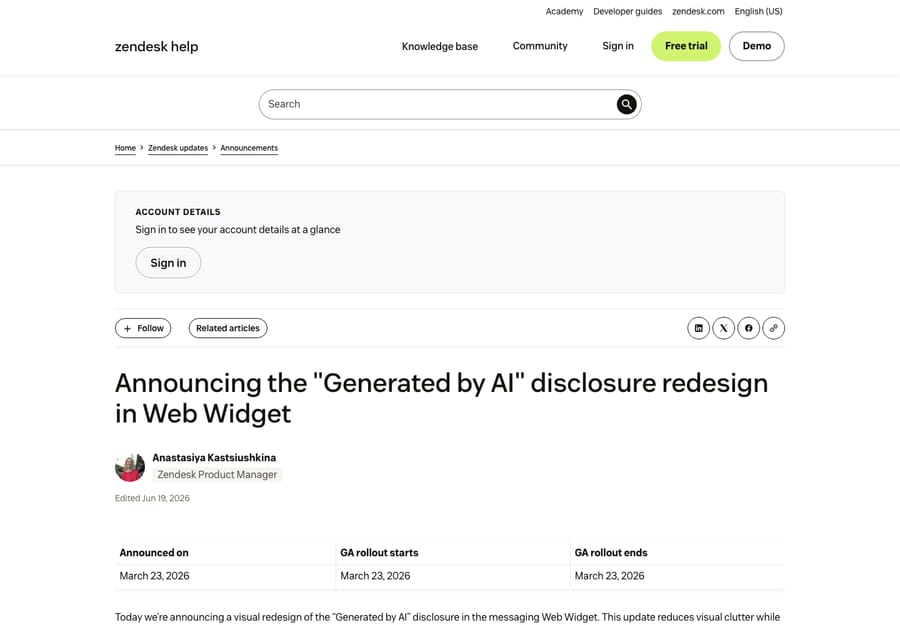
That screenshot is the payoff of the whole hierarchy: an article (the unit of the knowledge base), rendered inside a Help Center (the site), all produced and managed by Guide (the engine). For a deeper tour of the authoring side, see our Zendesk Guide & knowledge base explainer; for the customer-facing site itself, see the Zendesk Help Center explained.
How do the self-service portal, AI agents and Support fit in?
Three adjacent terms get tangled into the same knot:
- Self-service portal vs. Help Center. People often say "self-service portal" to mean the whole customer-facing site — which, in Zendesk, is the Help Center. The "portal" part (specifically the customer portal / My Activities) is the ticket-submission-and-tracking component within it. We break the portal down in the Zendesk self-service portal guide.
- Answer Bot / AI agent vs. the knowledge base. These are not the same layer. The knowledge base is the content (your articles). Zendesk's AI — historically Answer Bot, now folded into Zendesk's AI agents — is a mechanism that reads that content to suggest or surface answers automatically. The bot is only as good as the knowledge base behind it; the KB is the source, the bot is the reader.
- Guide vs. Support. Support is Zendesk's ticketing product (agents, tickets, queues). Guide is the self-service product (articles, Help Center). They integrate tightly — and the customer portal that lets people submit tickets lives in the Help Center — but they're distinct products with distinct jobs: Support handles the conversation, Guide handles the self-serve content.
When should you use each word?
- Say "Guide" (or "Zendesk Knowledge" / "Knowledge admin") when you mean the product or the place you manage things — licensing, plans, authoring, theming, permissions. "Who has Guide admin access?"
- Say "Help Center" when you mean the whole customer-facing site — the URL you'd send someone to, the thing with search and navigation and a community and a ticket form. "Add a banner to the Help Center."
- Say "knowledge base" when you mean the articles specifically — the help content, its categories and sections. "That belongs in the knowledge base, not the community."
Use the wrong one and people will still mostly understand you — but in a config conversation ("turn it on," "give them access," "where does this live?") the precision actually saves time.
Where does an AI layer fit on top of the knowledge base?
Once the layers are clear, the AI question gets clearer too. Your knowledge base is content. Your Help Center is where customers read it. The open question is how much of the answering a machine can do on top of that — and this is where an AI agent layer like Macha fits. Macha isn't a Help Center, a knowledge base, or a Zendesk replacement; it's an AI layer that sits on top of your existing Zendesk. Connected to your knowledge base (and your tickets), it can read your articles to draft and deliver answers automatically — turning static content into resolved conversations — while anything it can't handle stays a normal ticket for a human.
Worth being honest about the trade-offs: an AI layer is another tool to manage, and it only performs as well as the knowledge base you point it at — thin or stale articles make for a weak agent, no matter the model. On cost, Macha bills per ticket — one conversation, charged once however many articles it reads, replies it drafts and lookups it makes along the way, from $299 a month for 750 tickets — not per resolution or per "deflection." If your knowledge base is solid but nobody's reading it, that gap — content that exists but doesn't get used — is exactly what an AI layer closes. You can try it free — $50 of free usage, no credit card required.
Frequently asked questions
What is the difference between Zendesk Guide and Help Center? Guide is the product — the Zendesk feature you license to build and manage self-service (now often called Zendesk Knowledge, managed in Knowledge admin). The Help Center is the customer-facing site that Guide produces. In website terms, Guide is the CMS and the Help Center is the published website.
Is the Zendesk knowledge base the same as the Help Center? No. The knowledge base is the articles section inside the Help Center. The Help Center is the whole site and also contains the community (customer forum) and the customer portal (where people submit and track tickets). All articles are in the Help Center, but not everything in the Help Center is the knowledge base.
What is Zendesk Guide called now? Zendesk has been rebranding Guide as Zendesk Knowledge, and the admin console formerly called Guide admin is now Knowledge admin. Both names still appear across Zendesk's product, billing, and documentation, so "Guide" and "Zendesk Knowledge" refer to the same self-service engine.
What are the components of a Zendesk Help Center? Per Zendesk's docs, a Help Center includes a branded customer-facing support site, a knowledge base (your official self-service articles), a community (customer-to-customer forum, on Suite Professional and up), and a customer portal (the "My Activities" area where customers submit and manage tickets).
Is Answer Bot part of the knowledge base? No. The knowledge base is your content (the articles). Answer Bot — now part of Zendesk's AI agents — is a mechanism that reads that content to surface or suggest answers automatically. The AI is only as good as the knowledge base it draws from.
Do I need Guide to have a knowledge base in Zendesk? Yes. The knowledge base is published and managed through Guide (Zendesk Knowledge), and it is delivered to customers inside the Help Center that Guide produces. There's no Zendesk knowledge base without the Guide/Knowledge layer behind it.
Which word should you use in a config conversation?
Three words, three layers: Guide is the engine (the product you manage), Help Center is the site that engine publishes (the whole customer-facing destination), and the knowledge base is the articles section inside that site — sitting next to the community and the customer portal. The website analogy keeps it straight: CMS, website, docs section. Say "Guide" for the tool, "Help Center" for the site, "knowledge base" for the articles, and your self-service conversations stop talking past each other. From here, go deeper on Zendesk Guide and the knowledge base, the Help Center, or the self-service portal.
Terminology checked against Zendesk's official documentation, September 2026. Zendesk renames and reorganizes these products periodically (Guide → Zendesk Knowledge is a live example) — confirm the current labels in your own account before relying on them.
Add AI agents to your Zendesk
Macha reads the ticket, drafts the reply and takes the action, inside the Zendesk you already run.