Intercom
 Shopify
 Stripe
 Slack
Slack Notion
 Google Workspace
 Confluence

Zendesk Self-Service Portal: What It Is & How It Works


Most support teams start by answering every question by hand. It works — right up until volume outgrows the inbox, and you realize a huge share of those questions are the same questions: "How do I reset my password?" "Where's my invoice?" "What's your return policy?" A self-service portal is the fix. It lets customers help themselves — find answers, track their own requests, and resolve routine issues — without ever waiting on an agent. And the demand is real: Zendesk's own research notes that 69% of customers want to resolve as many issues as possible on their own.
Key takeaways
- In Zendesk, the self-service portal is the Help Center itself, made up of a knowledge base for articles, an optional community forum, and a customer portal for tracking tickets.
- Zendesk's own research finds that 69% of customers want to resolve as many issues as possible on their own, and 61% say fast resolution is a top sign of good service.
- The Zendesk customer portal area, once called My Activities, is now named Requests and lists each ticket's Subject, ID, Created, Updated, Status and Requester columns.
- The community component of a Zendesk self-service portal is available on Suite Professional and above, and customer-portal ticket management is not available on Suite Team.

In Zendesk, the self-service portal is the Help Center. This guide explains what that actually means in plain English: the three components that make up the portal, how end users access it (and why signing in matters), how it connects to ticket deflection, and how to drive the adoption that makes it pay off. The mechanics here are verified against Zendesk's own documentation.
What the Zendesk self-service portal is
In Zendesk terms, the self-service portal = the Help Center — the customer-facing site where people go to help themselves instead of contacting an agent. It's powered by Zendesk Guide, and it's made up of three components (per Zendesk's docs):
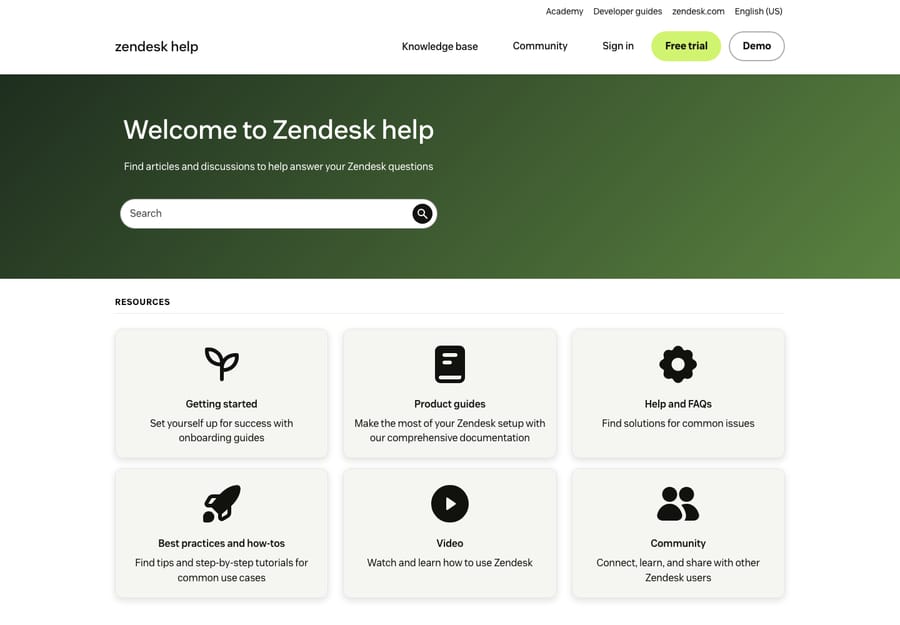
- The knowledge base — your collection of articles, organized into categories and sections, where customers find answers to how-to and policy questions. This is the workhorse of self-service and the part most people picture when they hear "help center." We go deep on it in the Zendesk Guide knowledge base explained.
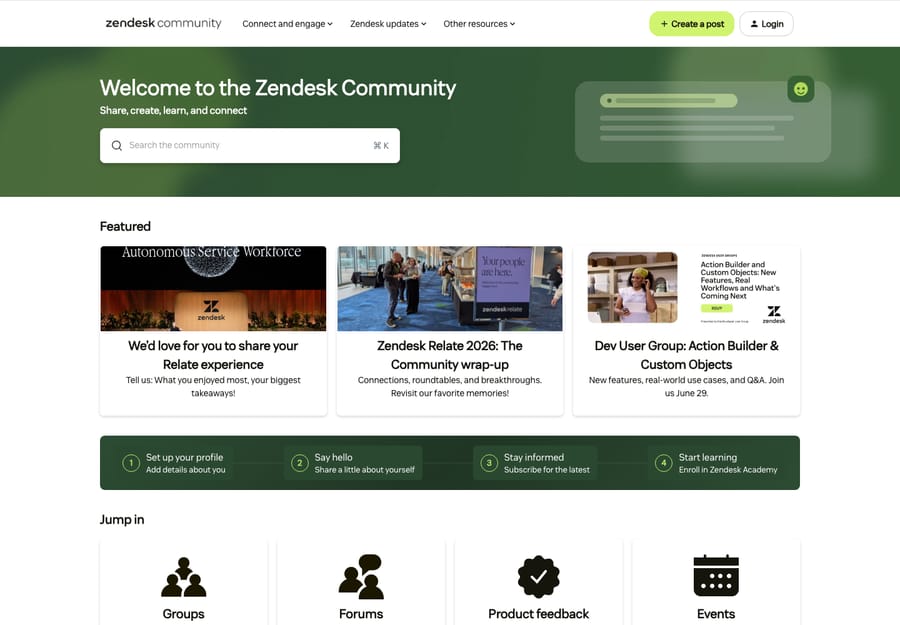
- The community — an optional discussion forum where customers connect, crowdsource support, share tips, and give you product feedback. Peers answer peers, and good community posts often become knowledge base articles.
- The customer portal — where signed-in customers submit tickets and, crucially, view and track their own requests under My Activities. This is the piece teams most often forget is part of "self-service," but it's what turns the portal from a brochure into an account.
Increasingly there's a fourth piece layered on top: an AI agent / answer bot that deflects questions at the point of contact — surfacing articles (or answering outright) inside the chat widget before a ticket is ever created. More on that below.
If you want the full tour of the container these all live in, see the Zendesk Help Center explained. For this guide, the mental model is what matters: knowledge base (find answers), community (ask peers), customer portal (track your own requests), and an AI layer (resolve before a ticket starts).
Why self-service matters
Self-service isn't just a nice-to-have content project — it's one of the highest-leverage things a support team can build. Three reasons stand out:
- Deflection lowers cost. Every question a customer answers themselves is a ticket an agent never has to touch. As Zendesk puts it, a self-service transaction is a fraction of the cost of one handled by an agent. Good self-service "deflects" high-frequency, repetitive issues so your team can spend its time on the genuinely hard ones.
- It's what customers actually prefer. This is the part teams underestimate. With 69% of customers wanting to self-resolve and 61% saying fast resolution is a top sign of a good experience, a strong portal isn't a downgrade from "real" support — for most simple questions, it is the better experience.
- It works 24/7 and scales. A knowledge base answers questions at 2 a.m. on a holiday, in every timezone, with zero added headcount. As ticket volume grows, a good portal absorbs the increase instead of forcing a linear hire-more-agents response. It also doubles as SEO content and training material for new hires.
The honest caveat: self-service only delivers these wins if the content is good and the portal is easy to find. A thin, stale knowledge base buried behind a hard-to-spot link deflects nothing. We'll get to that.
How end users access the portal
Here's a distinction that trips up a lot of new admins: anonymous browsing vs. signed-in access.
- Anonymous (signed-out) users can typically browse the knowledge base and read community posts. They can also submit a request if you allow it. This is great for SEO and for first-time visitors who just want an answer fast.
- Signed-in users get the parts that require an identity. Anonymous visitors can browse and search articles and submit a request — but per Zendesk, tracking your own requests, commenting on and participating in the community, and following or voting on content require the user to be signed in. In other words, someone without an account can still find an answer or file a ticket; they just can't follow its progress or engage with your content.
So the decision isn't only "should people log in to read articles" — it's "do I want customers to have a persistent account where they can see their ticket history." For most B2B and account-based products, the answer is yes.
The customer portal: the Requests list (formerly "My Activities")
This is the self-service piece that's really a portal in the account sense. Once a customer is signed in, they click their profile icon (upper-right on any Help Center page) and open their Requests — the area Zendesk used to label My Activities and now simply calls Requests. There they see their tickets — by default showing the Subject, ID, Created, Updated, Status, and Requester columns for each request.
From here a customer can:
- Track status of open requests without emailing "any update?"
- Add a comment to follow up on an existing ticket (which reopens/continues it) instead of starting a duplicate.
- Follow articles or community posts to get notified of changes.
- If they belong to a shared organization, view and follow tickets across their whole team.
That request list is the difference between a help center that only shows content and one that lets customers manage their relationship with your support. It's also a quiet deflector: a customer who can check status themselves doesn't open a "what's happening with my ticket" follow-up.
How the portal ties to ticket deflection
The portal connects back to your ticketing system at the exact moment a customer is about to contact you — and that's where deflection happens.
- In the Help Center itself, the structure does the work: a good search box and well-organized categories let someone find the answer before they reach the "Submit a request" form. Some teams even surface relevant articles on the contact form as the customer types their subject.
- In the chat / messaging widget, the deflection moves to the point of contact. The Zendesk Web Widget can surface knowledge base articles in the corner of your site, and an AI agent / answer bot can go further — answering the question conversationally, drawing on your articles, and only creating a ticket when it genuinely needs a human. That's the modern version of "deflection": resolve at first touch instead of routing to a queue.
The thread tying it together: deflection is only as good as the knowledge base behind it. The widget, the bot, and the on-form suggestions all read from the same articles — so investing in clear, complete content is what makes every deflection channel work.
Setting up the portal: plan and configuration notes
A few practical notes for getting the portal live (always confirm specifics in your own account, since Zendesk changes details over time):
- Activate the Help Center. Self-service ships with Zendesk Suite plans (and Guide is the product behind it). One plan caveat worth knowing up front: the knowledge base is universal, but the community is available on Suite Professional and above, and customer-portal ticket management is not available on Suite Team — so request tracking and peer forums depend on your tier. An admin activates the Help Center from Guide; it starts in a setup/restricted state so you can build content before going public, then you set it live.
- Choose your sign-in / access model. Decide whether end users must register and sign in, can sign in via SSO or social login, or can browse and submit anonymously. Remember the trade-off: no sign-in means no request tracking, following, or voting.
- Decide on ticket management. You can run a full portal (articles + request submission + tracking), a knowledge-base-only site, or a requests-only ("tickets-only") portal — Zendesk supports turning ticket management on or off depending on the experience you want.
- Enable the community if you want one. It's optional; turn it on only if you'll actually moderate and seed it, because an empty or unmanaged forum looks worse than none at all.
- Brand and structure it. Theme the Help Center to match your site, set up clear categories/sections, and — most importantly — make the portal findable (more below).
Driving adoption: best practices and common mistakes
Building the portal is the easy half. Getting customers to use it is where most teams leave value on the table.
Best practices:
- Write for the question, not the feature. Title articles the way customers phrase the problem ("Why was I charged twice?") rather than internally ("Billing reconciliation policy"). Search and SEO both reward this.
- Make the portal impossible to miss. Link it from your site nav, your app, your email signatures, and your order/confirmation emails — not just a tiny footer link.
- Surface articles at the point of contact. Use the web widget and the contact form's article suggestions so customers see answers before they submit.
- Close the loop from tickets to content. Mine your recurring tickets for the articles you're missing. Every "we keep getting asked X" is a missing knowledge base page.
- Keep it fresh. Review top articles on a schedule, prune stale ones, and watch which searches return no results.
Common mistakes:
- A thin or stale knowledge base. A handful of outdated articles deflects nothing and erodes trust. Depth and accuracy are the whole game.
- A hard-to-find portal. If customers can't see it, they'll email instead. Buried links are the single most common reason a "finished" portal underperforms.
- Confusing sign-in settings. Turning off sign-in to reduce friction quietly disables request tracking and following — sometimes the exact features you wanted. Match the access model to the behavior you want.
- Launching an unmoderated community. A forum full of unanswered posts signals neglect. Only open one if you'll tend it.
- Treating it as "done." Self-service is a living product. Measure deflection and search success, and keep iterating.
Where an AI layer fits: from showing answers to resolving them
Here's the limitation worth naming honestly. A traditional self-service portal shows customers answers — it surfaces an article and hopes they read it, apply it, and don't open a ticket anyway. It's deflection by display. For straightforward how-to questions that's plenty. But a portal can't ask a clarifying question, look up the customer's order, or actually do the thing being asked.
That's the gap an AI agent layer like Macha fills. It sits on top of your existing Zendesk (it's not a help desk and not a Zendesk replacement) and connects to the same knowledge base your portal already uses. Instead of just linking an article, it can hold a conversation, pull in account context, take an action via your connected tools, and resolve the routine request end to end — while anything it can't handle becomes a normal Zendesk ticket with full context for a human.
The honest framing: it's another layer to set up, and it only performs as well as the knowledge and rules you connect to it. On pricing, Macha bills per ticket — one conversation, charged once, however many steps it takes to finish (answering, looking up an order, tagging, resolving) — never per deflection or per resolution, because automation is broader than a single outcome. It starts at $299 a month for 750 tickets, about $0.40 each. If your portal is deflecting some volume but customers still fall through to tickets for anything beyond a simple lookup, that's exactly the gap a resolving AI layer closes. You can try it free — $50 of free usage, no credit card required.
Frequently asked questions
What is the Zendesk self-service portal? It's the Help Center — Zendesk's customer-facing site (powered by Guide) where people help themselves instead of contacting an agent. It's made up of a knowledge base (articles), an optional community (peer forum), and a customer portal where signed-in customers submit and track their own requests under My Activities.
What's the difference between the Help Center, the knowledge base, and the customer portal? The Help Center is the whole self-service site. The knowledge base is the articles inside it. The customer portal is the part where signed-in customers view, track, and follow up on their tickets (My Activities). The knowledge base and customer portal are both components of the Help Center, alongside the optional community.
Do customers have to sign in to use the Zendesk self-service portal? Not to read. Anyone can usually browse articles and community posts anonymously, and you can allow anonymous request submission. But to view and track their requests, follow articles, or vote, customers must be signed in — that's a Zendesk requirement, not a setting you can work around.
How does a self-service portal deflect tickets? By letting customers find the answer before they contact you. Search and clear categories help inside the Help Center; the web widget and on-form article suggestions surface answers at the point of contact; and an AI agent / answer bot can resolve the question conversationally — so a ticket is only created when a human is genuinely needed.
How do I increase self-service adoption? Write articles in the customer's own words, make the portal highly visible (nav, app, emails — not just the footer), surface articles in the widget and on the contact form, and continuously mine recurring tickets for missing content. Adoption is a function of findability plus content quality.
Can the portal actually resolve issues, not just show articles? On its own, a portal displays answers. To resolve — ask clarifying questions, look up account data, take an action — you need an AI agent layer on top, such as Macha, connected to the same knowledge base and your tools. It handles routine requests end to end and hands the rest to a human as a normal ticket. See AI agents for Zendesk.
The bottom line
The Zendesk self-service portal is the Help Center, and it's three things working together: a knowledge base for finding answers, a community for peer Q&A, and a customer portal where signed-in customers track their own requests. Done well, it deflects your most repetitive tickets, meets the 69% of customers who'd rather self-resolve, and scales support 24/7 without linear headcount — but only if the content is genuinely good and the portal is genuinely easy to find. Build the knowledge base properly (start here), choose a sign-in model that matches the experience you want, and surface answers at every point of contact. And when you want the portal to resolve questions rather than just display them, an AI layer on top is the next step.
Self-service mechanics verified against Zendesk's official documentation, June 2026. Zendesk updates its product periodically — confirm specifics in your own account before relying on them.
Add AI agents to your Zendesk
Macha reads the ticket, drafts the reply and takes the action, inside the Zendesk you already run.