





 Shopify
 Stripe
 Slack
Slack Notion
 Google Workspace
 Confluence

How Do You Resolve Duplicate-Charge Complaints Automatically Without Refunding an Auth Hold?


A Macha agent reads the customer's payments in Stripe, refunds the extra charge only when two identical charges have both posted, and explains an authorization hold without refunding anything. That split matters because many "charged twice" tickets are one real charge sitting next to a pending hold.
Key takeaways
- A Macha agent resolves duplicate-charge tickets by reading Stripe payment status, refunding only when two identical charges have posted and explaining authorization holds without a refund.
- Stripe says an online card authorization is usually valid for 7 days, so a pending hold next to the real charge drops off on its own and needs no refund.
- Stripe says a refunded customer sees the credit about 5 to 10 business days later, and an early refund can appear as a reversal instead.
- For duplicate-charge tickets, the Macha agent needs only three Stripe tools: Get Customer, List Payments and Create Refund, so it cannot cancel subscriptions.
- Macha bills $299 a month for 750 tickets, about $0.40 per ticket, so a duplicate-charge resolution with several Stripe lookups costs one ticket.

A Macha agent resolves a duplicate-charge complaint by reading the customer's payments in Stripe, refunding the extra charge only when two identical charges have both posted, and explaining the authorization hold (no refund) when one of the two lines is still pending. The catch is that many reported "double charges" are not duplicates at all. They're an authorization hold sitting next to the real captured charge: two line items, one actual payment. An agent that refunds on sight hands money back for charges the customer was never billed for. So the job has two halves: refund the genuine duplicates fast, and correctly talk down the false alarms without a refund.
| What the customer reports | What's usually true | Correct resolution |
|---|---|---|
| "Two charges for $65 yesterday" | An authorization hold + the settled capture | No refund. An uncaptured online card hold typically lasts up to 7 days, then drops off |
| "Two identical $65 charges, both posted" | A genuine duplicate (retry, double-submit) | Refund the extra charge |
| "Charged $65 but I cancelled" | One real charge, refund owed | Refund, but that's a cancellation, not a duplicate |
Macha is an AI agent layer that sits on top of the help desk you already run (Zendesk, Freshdesk, Gorgias, Front, HubSpot or Intercom) and connects to Stripe, so the agent reads the actual payment record and takes a real action on it instead of guessing from the ticket text.
Why does a customer see two charges when they paid once?
That first table row is the landmine. When you pay by card, the merchant first authorizes the card to confirm funds exist, then later captures the money, often when the order ships. The bank may show the hold and the capture as two separate lines, and to a customer that looks exactly like being billed twice (Authorization hold, Wikipedia). Stripe's own docs say that card statements from some issuers "don't always distinguish between authorisations and captured (settled) payments," and that an online card authorization is usually valid for 7 days before the funds are released (Stripe: place a hold on a payment method). Major retailers publish whole help-center articles on this confusion (Levi's, ExpertVoice). A true duplicate is different and rarer: the same amount posted (not pending) twice against the same order, usually from a payment retry or a double-clicked checkout.
An agent that can't tell these apart shouldn't be issuing refunds. An agent that reads Stripe directly can.
What does the agent do, step by step?
The trigger comes from your help desk; every action that touches money happens in Stripe; the reply and ticket update happen back in the help desk.
- Trigger: Ticket Created in Zendesk, where the agent's classifier recognizes a duplicate-charge complaint.
- Stripe → Get Customer: match the requester's email to the Stripe customer record.
- Stripe → List Payments: pull recent payments and inspect them. Are there two posted charges of the same amount, or one charge plus a pending authorization?
- Decision: genuine duplicate, or an auth hold the agent should explain rather than refund.
- Stripe → Create Refund: only for a confirmed duplicate, refunding the extra charge. Stripe sends refunds back to the original payment method only.
- Zendesk → Add Comment: reply to the customer with the specifics and a realistic timeline.
- Zendesk → Update Ticket: set status to Solved and tag it (
duplicate-charge-refunded) so it's auditable later.
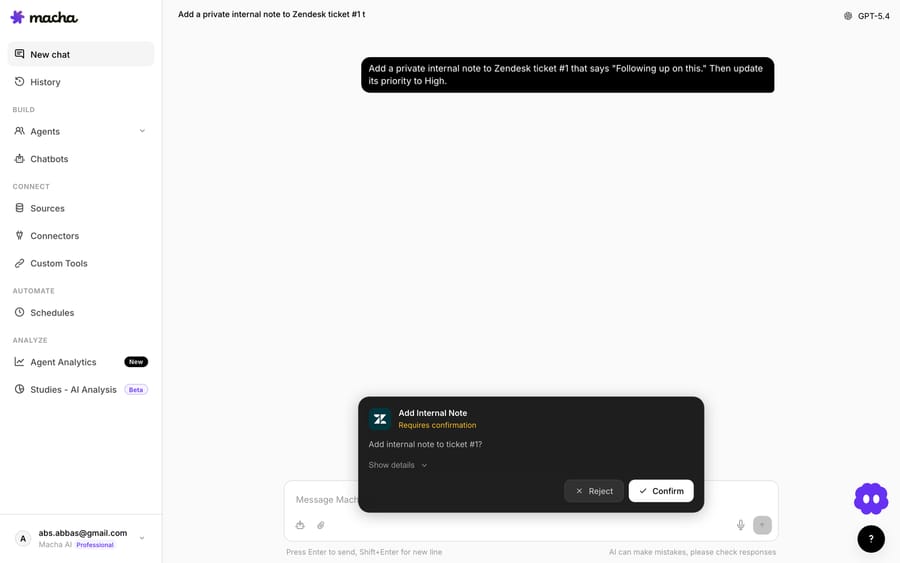
The order matters: the agent reads before it writes. Get Customer and List Payments are read-only lookups; Create Refund is the only action that moves money, and it's gated behind the agent actually confirming a duplicate in the payment data.
What do you need to connect?
Two connections do the work. You connect Stripe with an API key, and you connect your help desk. For most teams running this flow that's Zendesk.

The Stripe connector exposes a focused set of actions, including Get Customer, List Payments, Get Payment, Get Charge, Create Refund and Cancel Subscription. For this use case you need Get Customer, List Payments and Create Refund. Give the agent exactly those tools and nothing more, so it cannot cancel a subscription or touch a customer it has no business touching.

Stripe is an action connector here, not a trigger source: Macha doesn't watch Stripe for events in this flow. The event that starts everything is the ticket landing in your help desk, which is where you want the human-facing record of the whole interaction to live.
How do you stop the agent from over-refunding?
The agent's instructions are where you encode the judgment. A reasonable shape:
- Verify identity first. Match the ticket email to a Stripe customer with Get Customer. If there's no match, don't guess. Hand off to a human.
- Inspect, don't assume. Use List Payments and compare amounts, timestamps and status. Two charges of the same amount, both succeeded/posted, against the same order is a duplicate. One posted charge plus a pending/uncaptured authorization is not. Explain the hold and that it typically drops off within about 7 days instead.
- Refund the extra one only. Never refund the original. On a confirmed duplicate, refund the surplus charge.
- Set expectations honestly. Stripe says a customer sees a refund as a credit about 5 to 10 business days after it's issued, depending on the bank. A refund issued shortly after the original charge may show up as a reversal instead: the duplicate line simply disappears and no separate credit appears. The reply should say both, and never promise "instant."
- Escalate the gray zones. Partial captures, multi-item orders, disputes already filed, currency mismatches, anything over a threshold amount: route to a human.
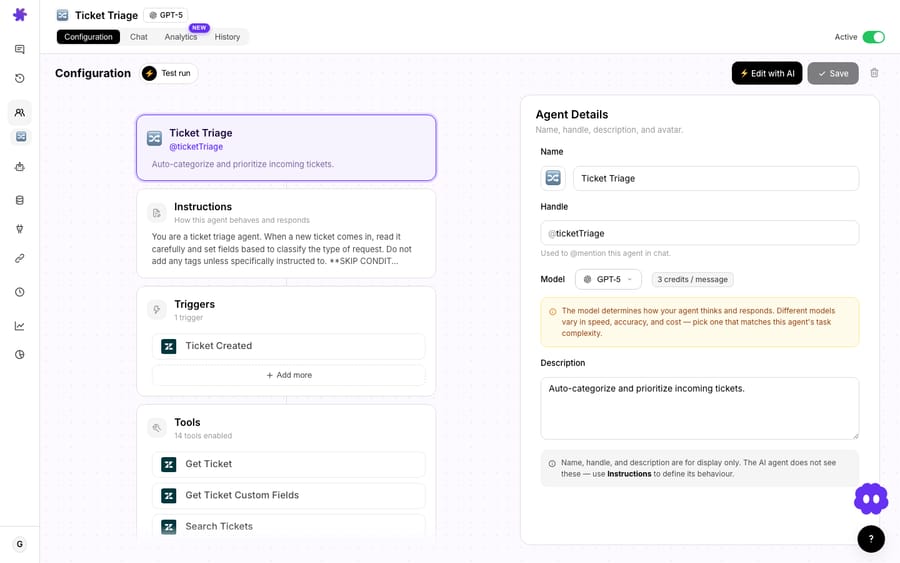
For higher-risk refunds you can keep a human in the loop with a confirmation step: the agent does the diagnosis and drafts the action, and a person clicks approve before money moves. That hybrid is often the right starting posture. Let the agent prove its judgment on the read-only diagnosis before you let it refund unattended.
What should the customer reply say?
For a real duplicate, the reply is fast and specific. The agent quotes the actual amounts and dates it found in Stripe, not a canned apology:
You're right, I can see two charges of $65.00 from yesterday (March 4) on your account, and the second one is a duplicate. I've refunded the extra $65.00 to your original card. Depending on your bank it can take 5 to 10 business days to show as a credit, or the duplicate line may simply disappear from your statement. Sorry for the scare, and thanks for flagging it.
And for the false alarm, the agent resolves the worry without spending your money:
Good news: you weren't charged twice. What you're seeing is a temporary authorization hold your bank places to confirm the funds, sitting next to the real charge for your order. The hold isn't a second payment and it will drop off on its own within a few days. Your order total was $65.00, charged once.
That second reply is what separates an agent reading live payment data from a chatbot pattern-matching on the word "twice." One of them protects your margin.
When should this not run unattended?
This use case is high-value, but it has sharp edges:
- The auth-hold trap is the whole risk. If your agent can't reliably read payment status from Stripe and distinguish pending from posted, do not let it auto-refund. An agent refunding auth holds is worse than no automation.
- Subscriptions look like duplicates but aren't. Two charges a month apart on a recurring plan are two billing cycles. Scope the agent to recent same-day, same-amount charges.
- Don't refund into a dispute. If the customer has already filed a chargeback, a refund on top of it can pay them twice. Stripe's refund docs recommend accepting or challenging the dispute rather than refunding (Stripe: refund and cancel payments). When a dispute exists, escalate and let a human reconcile it.
- Partial captures and split shipments create legitimate multiple charges for one order. These are not duplicates; flag for review.
- High-value or fraud-adjacent cases belong with a person. Set an amount ceiling above which the agent diagnoses and drafts but does not act.
Every refund the agent issues is logged on the ticket with a tag, so finance and support share an audit trail the first time someone asks "wait, why did we refund this?"
What does it cost to run?
Macha bills per ticket: one conversation, charged once, however many steps the agent takes to finish it, and never per refund or per resolution. Pricing starts at $299 a month for 750 tickets, about $0.40 per ticket, on one plan priced by ticket volume, with setup and monitoring by the Macha team included. A duplicate-charge resolution takes a couple of Stripe lookups, a refund, a reply and a ticket update, and all of that lands on the one charge, so a ticket the agent works hard on costs the same as one it answers in a line. See the pricing page for every tier, or start a free trial ($50 of usage, no credit card required) and watch what your real tickets consume.
FAQ
Can Macha tell a real duplicate charge from an authorization hold? That's the point of reading Stripe directly. The agent inspects payment status and amounts via List Payments: two posted charges of the same amount for one order is a duplicate; one posted charge plus a pending authorization is a hold it should explain, not refund.
Does the agent refund automatically, or does a human approve? Your choice. You can let it refund confirmed duplicates unattended, or gate the Create Refund action behind a human confirmation step for anything over a threshold you set.
Which helpdesks does this work with? Macha runs on top of Zendesk, Freshdesk, Gorgias, Front, HubSpot or Intercom. The trigger and the customer-facing reply live in your help desk; the payment actions happen in Stripe.
Will it issue partial refunds? Stripe's Create Refund supports full or partial amounts, and you can't refund more than the original charge. For the duplicate-charge case the agent refunds the surplus charge; partial-capture situations are better escalated to a human.
How long until the customer sees the money? Stripe says about 5 to 10 business days, depending on the bank. A refund issued soon after the charge may appear as a reversal, where the duplicate line drops off the statement instead of a credit showing up. The agent says so rather than promising "instant."
Is Stripe the only payment connector? Macha also connects to Razorpay, but its tools are read-only (Get Payment, List Payments, List Orders, Get Customer). On Razorpay the agent can diagnose a duplicate and draft the reply, while a person issues the refund. The full read, confirm, refund, reply loop runs on Stripe.
How do you get started?
Duplicate-charge complaints are the rare ticket where automation is safer and faster than a rushed human, provided the agent reads the payment record before it refunds. Connect Stripe and your help desk, give the agent exactly the tools it needs, and start it in confirm-first mode. Browse more billing and payments use cases, read the docs, or start a free trial ($50 of usage, no credit card required) and point it at your real queue.
Written by Abbas (Customer Support & AI, Macha) · Reviewed by Ankeet Guha (Co-founder & CTO) · Published 2026-06-24 · Last updated 2026-09-24.






