





 Shopify
 Stripe
 Slack
Slack Notion
 Google Workspace
 Confluence

How Do You Automate Refund Requests Safely With an AI Agent?


A refund is the one support action you can't take back: once Create Refund runs in Stripe, the money heads back to the original payment method. The safe way to automate it is to let an AI agent do the lookup and the policy check, and keep a confirmation gate on the step that moves money.
Key takeaways
- A safe refund agent reads the ticket, finds the payment in Stripe, checks it against policy and drafts the reply, then pauses at a confirmation gate before Create Refund moves money.
- US retail returns were projected to reach $890 billion in 2024, about 16.9% of annual retail sales, according to the National Retail Federation.
- In a case documented by eesel, an AI agent issued a $708 refund for a full year of subscription when the customer had asked for one month at $59.
- Stripe says a refunded customer sees the credit about 5 to 10 business days later, and a customer can still dispute a charge while a refund is pending.
- An automated refund on Macha costs one ticket, about $0.40 on the entry tier of $299 a month for 750 tickets, however many steps the agent takes.

To process refund requests automatically and safely, let an AI agent do the slow part of each refund (read the ticket, find the payment in Stripe with List Payments, check it against your policy, draft the reply) and then pause on a confirmation gate before Create Refund moves any money. You get the speed of automation on the lookup-and-decide work, and a human (or a tightly-scoped rule) on the one irreversible step. We'll build it on Macha, the AI agent layer that sits on top of the helpdesk you already run (Zendesk, Freshdesk, Gorgias, Front, HubSpot or Intercom) and connects to Stripe for the payment side.
| Refund type | Suggested handling |
|---|---|
| Full refund, in policy window, under your ceiling (e.g. $50) | Agent issues it autonomously once trusted |
| Above the ceiling or out of window | Agent prepares it; a human confirms |
| Partial or pro-rated | Human-confirmed until the math is tested |
| Possible fraud or goodwill exception | Routed to a person |
Refunds are not a small line item. US retail returns were projected to reach $890 billion in 2024, about 16.9% of annual retail sales, per the National Retail Federation. A meaningful share of those land in your support queue as a one-line "I'd like a refund." That's the volume an agent can absorb. The risk is what happens when it gets one wrong.
What goes wrong when an AI agent automates refunds?
The cautionary tale doing the rounds this year, documented in eesel's refund guide, which traces it to a developer's r/buildinpublic post: an AI support agent misread a ticket and issued a $708 refund — a full year of subscription — when the customer had only asked for one month ($59). The developer shut the automation off entirely afterward. The model wasn't broken. It just had an unbounded money-moving tool and no gate between "decide" and "do." That one ticket is the whole argument for this post.
And customers are watching. CNBC reported on 1 April 2026 that the AI call center is "off to a rocky start", with consumers complaining about chatbots that stand between them and a refund. People are quick to feel cheated when a bot mishandles their money. So the bar for a refund agent isn't "fast." It's fast on the safe 80%, and visibly careful on the rest.
What does an automated refund workflow look like?
This is one of Macha's built-in use cases, and the shape is deliberately boring — which is what you want when money is involved:
| Step | Tool / action | What happens |
|---|---|---|
| Trigger | Zendesk — Ticket Created | Customer writes in requesting a refund |
| 1 | Zendesk — Get Ticket | Agent reads the full ticket + thread |
| 2 | Stripe — Get Customer | Find the customer by email |
| 3 | Stripe — List Payments | Pull their payment history, identify the charge |
| 4 | Policy check | Compare against your refund policy (window, eligibility, amount) |
| 5 | Stripe — Create Refund | Full or partial refund — gated behind confirmation |
| 6 | Zendesk — Add Comment | Reply on the ticket confirming the refund |
| 7 | Zendesk — Update Ticket | Status → Solved, tag refund-processed |
The customer's view is one message and a fast resolution:
Customer: "I'd like a refund for my last purchase. The product didn't meet my expectations." Macha: (looks up customer in Stripe — last payment $45.00 on Feb 28; checks it against the 30-day policy; pauses for confirmation; issues full $45.00 refund) Macha: "I'm sorry to hear the product didn't meet your expectations. I've processed a full refund of $45.00 — you should see it reflected in your account within 5–10 business days. Is there anything else I can help with?"
Behind that exchange, the ticket gets solved and tagged refund-processed so your reporting stays clean. Every step is a real tool call against your live systems — not a canned answer.
Step 1: How do you connect Zendesk and Stripe?
Macha is the agent layer; your systems stay yours. Connect your helpdesk so the agent can read tickets and reply, and connect Stripe so it can look up payments and issue refunds. The Stripe connector page lists ten actions, and the split between read and write is the whole safety story:
- Read (safe to run freely):
Get Customer,Get Payment,List Payments,Get Charge,Get Subscription,List Subscriptions,List Invoices - Write (money moves):
Create Refund(full or partial, with an optional reason),Cancel Subscription,Create Payment Link
You grant the agent only the tools the job needs. A refund agent gets the read tools it needs plus Create Refund — and nothing that could cancel a subscription.
Step 2: How do you write your refund policy into the agent?
In the agent builder you give the agent its instructions and grant it exactly the tools the job needs — the four Stripe read tools plus Create Refund, the policy rules in the instruction box, your refund policy attached as a knowledge source. This is where "automate refunds" becomes "automate refunds according to our policy," and it's the difference between a helpful agent and a liability.
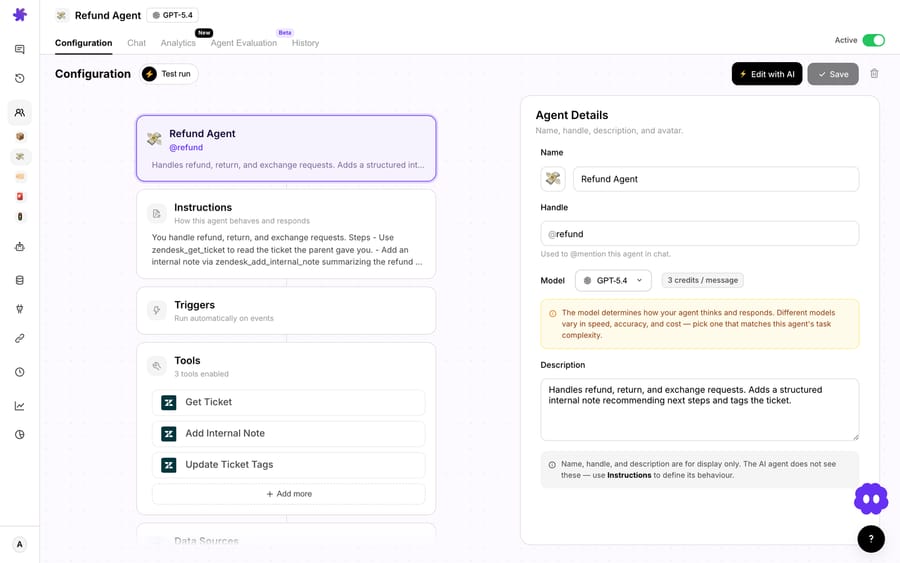
Your instructions should encode the actual decision rules a senior agent would use, for example:
- Eligibility window — "Only refund payments made within the last 30 days; outside the window, route to a human instead of refunding."
- Amount band — "Auto-process full refunds up to $50. For anything above $50, prepare the refund details but do not issue it — leave it for an agent to confirm."
- Partial logic — "If the customer keeps part of a multi-item order, refund only the returned items at their line price; never refund shipping on a partial return."
- Tone — "Acknowledge the reason, apologise once, state the amount and the 5–10 business day timeline."
For policy that's longer than a few rules, attach your refund policy doc as a knowledge source (a Notion page, a help-center article, a PDF). The agent reads it on every ticket, so when the policy changes you edit one document instead of re-prompting the agent. That's how the policy check in step 4 actually works — it's grounded in your written policy, not the model's guess about what's fair.
A partial refund, worked end-to-end
Partials are where naive automation quietly leaks money, so it's worth seeing the math the agent should follow. Say a customer ordered three items for $90 ($30 each) plus $8 shipping — a $98 charge in Stripe — and returns one item, keeping two. The agent's job is not to refund a third of $98. It reads the line items, refunds one item at its $30 line price, leaves shipping alone (the order still shipped), and calls Create Refund for a partial $30.00 against the original $98 charge — not a new, separate refund. If your policy restocks at a 10% fee, the same rule produces $27.00 ($30 − $3). Either way the agent shows its working in the confirmation prompt — "Partial refund $30.00 of the $98.00 charge (1 of 3 items; shipping retained)" — so the human sanctioning it can see the arithmetic, not just a number. Encode that rule once; the agent applies it identically on every ticket, which is exactly where a tired human at 5pm makes the $98/3 mistake.
Step 3: How does the confirmation gate stop a bad refund?
Here's the design decision the $708 mistake teaches: a money-moving tool should never fire silently. Macha builds that in at two levels.
At configuration time, write tools are flagged as high-impact. When you toggle on a tool that changes state, Macha shows an activation confirmation modal with a severity-themed warning and explicit confirm/cancel labels — you can't enable a destructive capability by accident — and it pins a persistent advisory card on the agent's config page reminding you how to use it safely. Stripe's Create Refund and Shopify's create_refund both ship as confirmation-gated write operations, and the same rule auto-applies to any custom API tool you build on a POST/PUT/PATCH/DELETE method.
At run time, the safest pattern is to keep a human on the irreversible click. Run the refund agent in copilot / chat mode, where write actions require an explicit confirmation before they execute: the agent does the lookup, the policy check, and presents "Refund $45.00 to original payment method?" — your agent clicks confirm, and only then does Stripe move the money. The human never has to find the charge, calculate the amount, or draft the reply. They just sanction one decision the AI already did the legwork for.
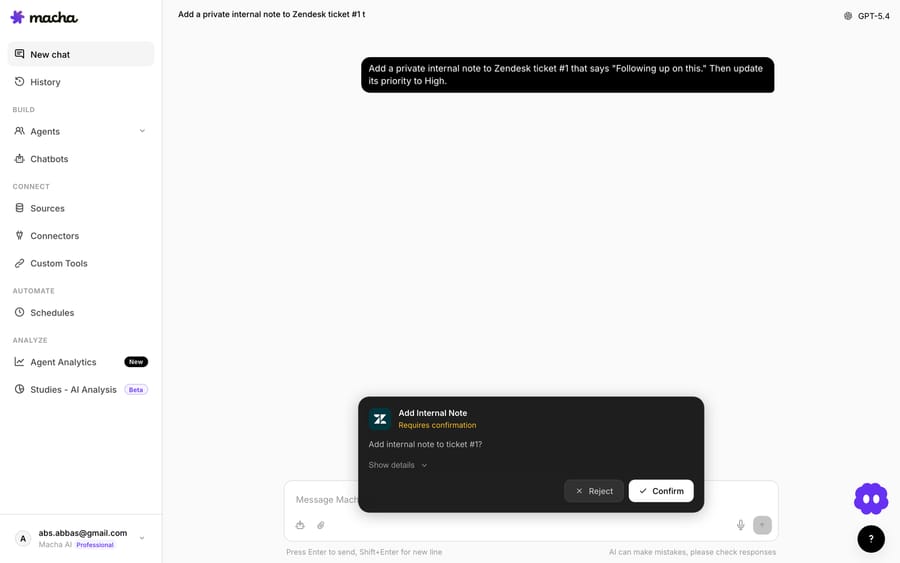
You scale autonomy from there, deliberately:
- Simulate on historical tickets first. Before the agent touches a live charge, run it against a batch of past refund tickets and read what it would have done — which it would have refunded, for how much, which it would have routed. This is the cheapest place to catch a bad amount band or a misread policy, because no money moves. (eesel makes the same point: run the agent on real historical tickets and check the predicted outcome before go-live.) Macha's agent simulations replay past tickets against an agent for exactly this kind of dry-run (see the docs); see our blog for the deeper walkthrough on analysing historical tickets before automating.
- Start in copilot mode — every refund confirmed by a human. Watch it for a week.
- Carve out the safe band — once you trust it on, say, full refunds under $50 within the policy window, let those run autonomously and keep everything else (high-value, out-of-window, partials, anything that smells like fraud) on the human-confirmed path or routed to a person.
- Audit continuously — Macha preserves the full conversation and the raw trigger payload on every autonomous run, so you have a record of exactly what the agent saw and did on each refund.
This is the consensus pattern across the field, not a Macha quirk. eesel's refund guide puts it bluntly: "The difference between an AI refund workflow that cuts costs 43% and one that destroys a customer relationship in a single ticket is not the model. It is where you put the guardrails." Macha just makes the guardrail a default instead of something you remember to build.
Does refunding fast reduce chargebacks?
It can. A customer who gets a legitimate refund quickly has less reason to go to their bank, and an agent that resolves eligible refunds in minutes instead of a 24–48 hour approval loop closes that window sooner. It isn't a guarantee: Stripe's refund docs warn that a customer can still dispute a charge while a refund is pending, and that on bank debits a proactive refund plus a bank-initiated dispute can pay the customer twice. If a dispute is already open, Stripe recommends answering the dispute rather than refunding. (The flip side — never auto-refund something that looks like fraud just to dodge a dispute — is exactly what the amount band and the human-confirm path are for.)
How much does an automated refund cost?
Macha bills per ticket — one conversation, charged once, however many steps the agent takes inside it. A clean refund flow is a handful of actions: read the ticket, find the customer, list payments, decide, refund, reply, update. All seven sit inside the same ticket, so an automated refund costs one ticket — about $0.40 on the entry tier, $299 a month for 750 — not a flat "per resolution" fee, and no more when the agent has to check twice. See the pricing page for the tiers, or start a free trial ($50 of usage, no credit card required) and watch it run on your own tickets.
When should you not fully automate refunds?
Automating refunds well means being honest about where to stop. Keep these on the human-confirmed or human-only path:
- High-value refunds. Set a dollar ceiling for autonomy and mean it. The $708-instead-of-$59 incident happened because there was no ceiling.
- Anything that smells like fraud. Repeat refunders, mismatched details, brand-new accounts asking for the max — flag and route, don't refund.
- Out-of-policy "exceptions." The goodwill refund for a long-time customer is a human judgement call. Let the agent surface the context; let a person make the exception.
- Emotionally charged tickets. A furious customer wants to feel heard before they're processed. Route distress to a human — a correct refund delivered coldly can still cost you the relationship, which is the consumer-sentiment risk CNBC flagged.
- Partial / pro-rated math you haven't tested. Validate partial-refund logic in copilot mode on real tickets before trusting it unattended.
The rule of thumb: automate the lookup and the decision everywhere; automate the money-movement only inside a band you've explicitly verified. Everything else is a human confirming one click.
FAQ
Can the AI agent actually issue the refund, or just draft it? Both, and that's your choice. In copilot mode it prepares everything and waits for a human to confirm the Create Refund call. For a band you trust (e.g. full refunds under a set amount, within policy), you can let it issue them autonomously while routing everything else.
What stops it from refunding the wrong amount? Three layers: your written policy in the agent's instructions and knowledge source (eligibility window, amount band, partial logic), the confirmation gate on the write action itself, and your human-confirm path for anything above the autonomous band. The agent reads the actual charge from Stripe's List Payments, so it refunds against a real payment, not a number it inferred.
Which helpdesks and payment tools does this work with? Macha layers on top of Zendesk, Freshdesk, Gorgias, Front, HubSpot or Intercom for the ticket side, and connects to Stripe (and Shopify, whose create_refund is likewise confirmation-gated) for the money side. It's an agent layer, not a helpdesk — you keep the tools you already run.
Can a refund be reversed if the agent gets it wrong? Rarely. Stripe's docs say some card refunds can be cancelled from the Dashboard for a short period before they reach the customer, but once a refund lands you can't pull it back. Treat it as irreversible; that's the reason the confirmation gate and amount band exist.
How long does a Stripe refund take to reach the customer? Stripe says the customer sees the credit about 5–10 business days after the refund, depending on their bank. Refunds issued shortly after the charge may show as a reversal instead, where the original charge simply drops off the statement.
How much does each automated refund cost? One ticket — about $0.40 on the entry tier — however many steps it takes (lookup, policy check, refund, reply, update). Pricing is per ticket, not per resolution; see the pricing page.
Where should you start?
If refunds are quietly eating your team's hours, this is the highest-leverage agent you can ship — if you put the gate where the money moves. Connect Stripe and your helpdesk, encode your policy, start in copilot mode, and widen autonomy as the agent earns it. The Macha docs have the full agent and connector walkthrough, and a free trial ($50 of usage, no credit card required) gets you building on real tickets today. If you're on Zendesk specifically, the Macha on Zendesk page covers the connector side in depth.
Written by Abbas (Customer Support & AI, Macha) · Reviewed by Ankeet Guha (Co-founder & CTO) · Published 2026-06-24 · Last updated 2026-09-24.






