Shopify
 Stripe
 Slack
Slack Notion
 Google Workspace
 Confluence

How to Automate Refunds in Intercom (2026): Fin Procedures vs AI Agents, Tested


Intercom automates refunds through Fin, its AI agent: a Procedure, a refund policy written in plain language, calls Shopify or Stripe through data connectors that check the order and issue the refund. On Shopify, Fin for Ecommerce drafts the Procedure and connects the APIs for you; on Stripe, you build the refund connector. Fin costs $0.99 per outcome on top of your seats, and a Procedure that ends in a handoff still counts as an outcome. If a person can stay on the button, Intercom's free Shopify sidebar now handles line-item refunds without leaving the inbox. Third-party AI agents that refund from Intercom conversations include eesel AI, My AskAI, Fini and Macha, which starts at $299/month for 750 tickets with setup done for you. Prices were checked on October 8, 2026, and we ran a refund agent against our own Intercom workspace and Shopify test store.
Key takeaways
- Intercom's native refund automation is a Fin Procedure that calls Shopify or Stripe through data connectors, billed at $0.99 per Fin outcome, including Procedures that end in a handoff.
- Since June 17, 2026, Intercom's Shopify sidebar lets teammates refund single line items or shipping only, with amounts calculated automatically, at no extra cost.
- Intercom's Stripe data connector templates only read data, so a Fin refund through Stripe needs a data connector you build against Stripe's refund API.
- In our test on October 8, 2026, a Macha agent stopped at a confirmation card before refunding order #1099, and handed off order #1100 because the customer wanted one item of two refunded.
- Macha starts at $299/month for 750 tickets, with done-for-you setup and a dedicated success manager on the trial and every plan.

Can Intercom automate refunds on its own?
Yes, and for Shopify stores most of the plumbing now ships with Fin. Connecting Shopify to Fin for Ecommerce connects Shopify's APIs for common actions and drafts a Refunds Procedure for you to review. For Stripe, Fin can refund only through a data connector you build. Teammates also get a refund button in the Inbox sidebar. Here is every option we found, native ones first.
| Option | Native or add-on | Who presses "refund" | Partial refunds | Setup | Price (checked Oct 8, 2026) | Where it falls short |
|---|---|---|---|---|---|---|
| Shopify app in the Inbox sidebar | Native app, free | The teammate | Yes: line items, quantities, shipping only | Self-serve, minutes | Free app; seats from $39/seat/month billed monthly (Essential) | Every refund is a manual click |
| Workflows with a data connector step | Native, Advanced and Expert plans | The workflow, once built | Whatever your API call sends | Self-serve builder | Advanced $85/seat/month, Expert $132 (billed yearly) | Fixed paths; you collect the data and build the fail path |
| Fin for Ecommerce (Shopify) | Native AI agent | Fin, within the Refunds Procedure you review and set live | Not stated in Intercom's docs; its Calculate Shopify Refund quote covers order and shipping level only | Self-serve: connect Shopify, review the drafted Procedure | $0.99 per Fin outcome, plus seats | Automatic setup on Shopify only; a handoff still bills as an outcome |
| Fin Procedure with your own data connectors (Stripe, other systems) | Native AI agent | Fin, within your Procedure's rules | Whatever your connector sends | Self-serve; Simulations to test | $0.99 per Fin outcome, plus seats | You build the refund connector |
| Zapier (Intercom trigger + Stripe or Shopify) | Third-party automation | A Zap you build | Whatever your HTTP call sends | Self-serve | Zapier plan | Zapier's Stripe and Shopify apps list no refund action |
| eesel AI | Third-party AI agent | The AI agent | See vendor | Self-serve | $299/month for 500 tickets | You build and tune it |
| My AskAI | Third-party AI agent | The AI agent | See vendor | Self-serve | $199/month for 1,000 tickets | You build and tune it |
| Fini | Third-party AI agent | The AI agent | See vendor | Implementation included | $0.89 per resolved ticket (Growth) | Priced per resolution |
| Macha | AI agent layer on your help desk | The AI agent | Stripe yes; Shopify full refunds only | Done for you by the Macha team, with a dedicated success manager, included | $299/month for 750 tickets (about $0.40 per ticket) | A partial Shopify refund goes to a person |
"See vendor" means the vendor's public pages didn't say whether the AI can refund part of an order, so we didn't guess.
How do you refund a Shopify order from the Intercom inbox without AI?
Install Intercom's Shopify app. Since June 17, 2026, the Shopify sidebar in the Inbox lets teammates refund, issue gift cards and create replacement orders without opening Shopify Admin, "at no cost," according to Intercom's announcement.
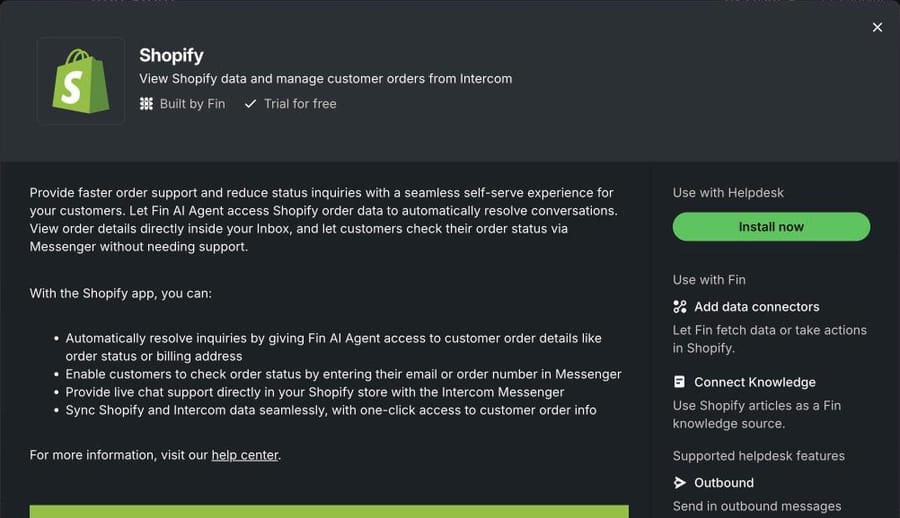
The refund itself is more flexible than most AI tools manage. Intercom's help article on managing Shopify orders from the Inbox lists single-item refunds, multiple quantities, shipping only, and shipping combined with items. The amount is calculated from what the teammate selects; there's no free-text amount field. Every action needs a reason from a dropdown, and an Auditing events tab records refunds, replacement orders, gift cards and replacement items, with a CSV export of up to 90 days and 50,000 events.
Setup:
- Go to Settings > Integrations > App Store, find Shopify and install it.
- Connect your store and approve the permissions in Shopify.
- Open Shopify > Settings in the App Store to switch the compensation features on, set your refund reasons and set a gift card limit per store (the default cap is 150% of the order total).
- Give the teammates who refund the "Manage apps and integrations" permission only if they also need to change those settings.
When this is enough: a handful of refunds a day and a teammate already reading each conversation. A sidebar click with a logged reason is faster than any automation you'd configure and monitor, and partial refunds work.
Where it stops: a person still reads, decides and clicks. And Intercom's Stripe app doesn't fill this gap for subscription businesses: its help article covers viewing payments and subscriptions in the Inbox, not refunding them.
How does Fin refund an order with Procedures and data connectors?
This is Intercom's AI route. On a Shopify store most of it is set up for you; on Stripe you build part of it.
The Shopify shortcut: Fin for Ecommerce. Fin now has an Ecommerce role next to Service and Sales. Intercom's Fin for Ecommerce overview says connecting a Shopify store syncs the catalog, connects "APIs for common ecommerce actions" and drafts Procedures for post-purchase requests, and its setup guide lists where is my order, returns, refunds, exchanges, and order updates or cancellations among them. Some arrive ready; a draft goes live only after you open it from the Procedures list, review each step and click Set live. It's billed the same way as Fin for Service. Intercom's pages don't say how the drafted refund handles one item out of several, so test that case before you rely on it.
Under Fin for Ecommerce, and under any refund flow you build yourself, sit two layers.
Data connectors are single API calls Fin can make to another system. Intercom's data connector templates are generated from the apps you've installed, but the refund-relevant ones mostly read: Shopify's is "Get Order Info," and all six Stripe templates (customer by ID, customers by email, invoices, charges, subscription info, email search) are lookups. Intercom's Shopify compensation templates for Fin add a Calculate Shopify Refund dry run that "quotes a refund ... without moving any money," which Intercom says to use alongside the existing Create Shopify Refund action, so Fin confirms the amount with the customer before any money moves. The quote covers order-level and shipping-level refunds only. For Stripe there's no refund template, so you create a connector yourself that calls Stripe's refund endpoint.
Procedures are the policy. You write the steps in natural language, add IF and ELSE branches for the checks that must be deterministic, and call connectors with @Use. Intercom's practical examples include a subscription refund: check eligibility, offer a pause instead, then "@Use Process refund," and tell the customer the money arrives in 7 to 14 days; if ineligible, tag the conversation and escalate to the support team.
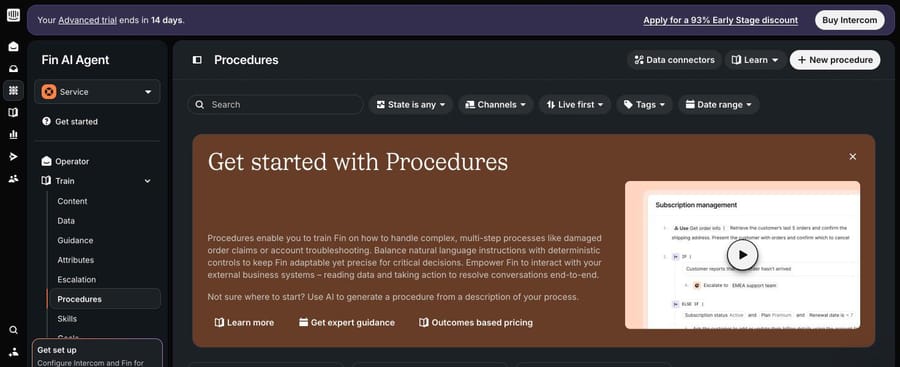
Setup, in Intercom's order:
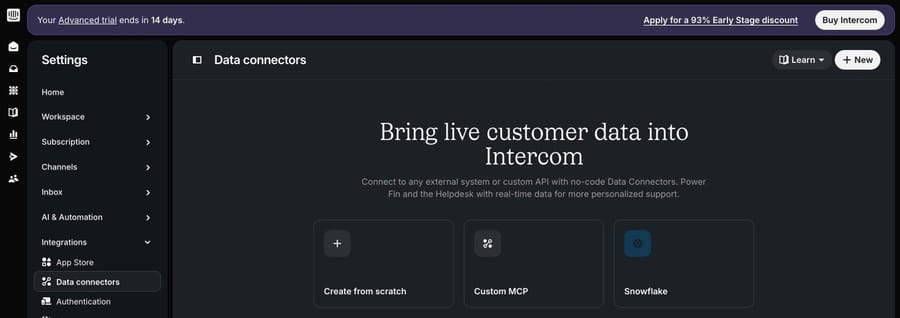
- Install the Shopify or Stripe app so the templates appear.
- In Settings > Integrations > Data connectors, add the lookup and the refund connector. On our trial workspace, with no commerce app installed yet, that page offered only Create from scratch, Custom MCP and Snowflake.
- In Fin AI Agent > Train > Procedures, write the refund Procedure: verify the customer, look up the order, check your rules, refund or hand off.
- Run Simulations before setting it live. Intercom's Procedures overview calls this the recommended way, and notes that steps run one at a time, never in parallel. Intercom's Shopify template article adds that preview mode doesn't execute connector calls, so the real test happens in live conversations.
What it costs. Per Intercom's pricing page, Fin is $0.99 per outcome, charged once per conversation. An outcome is a customer confirming the issue is resolved, a customer not asking for more help after Fin responds, or "Fin completes a workflow (Procedure), including handoffs." A refund Procedure that checks an order, finds it's over your limit and hands it to a person has done its job, and it bills $0.99. Seats are separate: Essential $39, Advanced $99 and Expert $139 per seat a month billed monthly. Billed yearly, Advanced is $85 and Expert $132; the Essential yearly price showed as $29 or $19 on different loads of the page on October 8, so check it yourself. Using Fin on another help desk has no seat cost but a minimum monthly commitment, with 50 outcomes as Intercom's example.
That's the incentive to understand: Intercom earns per outcome, and an outcome includes a clean handoff, so a strict refund policy that hands more conversations to people doesn't lower the Fin bill. We break down the rest of Fin's pricing in our Intercom Fin pricing guide.
Can Workflows or Zapier issue refunds without Fin?
Workflows can, on Advanced and Expert plans (the pricing page lists the Workflows builder from Advanced up). Intercom's data connector steps for Workflows work like this: a Collect data step gathers what the API call needs (the order number, say), a Data connector step calls your refund connector, and you define a fail path for when the call errors. It's deterministic, which is the point: a Workflow refunds when its conditions are met and never improvises. It's also rigid. A customer who writes "I want my money back for the blue one, the other is fine" won't fit a branch unless you've built one.
Zapier is the route people try next, and it stops short here as it does on Zendesk. When we checked on October 8, 2026, neither Zapier's Stripe app nor its Shopify app listed a refund action, so a Zap that refunds has to send its own HTTP request to the refund API, with the eligibility checks built as filter steps.
Which AI agents can process refunds from Intercom conversations?
These third-party agents state that they work inside Intercom and take refund actions. Prices are from each vendor's pricing page on October 8, 2026. We didn't run them; the descriptions come from their own pages.
eesel AI. It sits in the Intercom inbox as its own teammate, "separate from Fin," and its Intercom docs list sending replies, internal notes, tags, assignment, closing and snoozing. The refund comes from its Shopify integration, which has a Refund Order action. A credit is one ticket or chat on eesel's pricing page: 500 for $299 a month, 100 free. You set up the rules and do the tuning yourself. More in our eesel alternatives guide.
My AskAI. Built with Intercom teams in mind, it advertises "AI Tasks e.g. order refunds" on its Pro plan: 1,000 tickets for $199 a month, about $0.12 for each one after, a 30-day free trial, and money back if it doesn't reach 60% AI resolution. At 1,000 tickets nothing here is cheaper per ticket. Setup is yours.
Fini. The one third party here that includes implementation in the price. Fini's pricing is per resolved ticket: $0.89 on Growth (to 3,000 tickets a month), $0.69 on Scale, $0.49 on Enterprise. Its refund guide lists Intercom, Shopify and Stripe among its integrations. Billing per resolution puts it in the same family as Fin, so the definition of "resolved" decides the invoice.
If you're weighing these against Fin itself, our Fin alternatives roundup covers more of them, and the case for an agent layer over Fin explains the trade-off.
What happened when we ran a refund agent on our own Intercom?
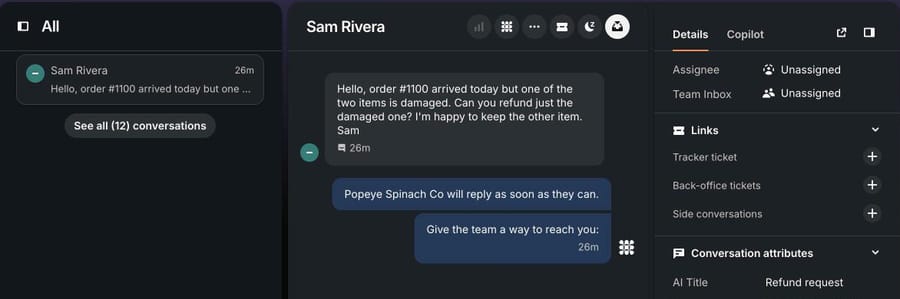
We built the agent on our Macha Demo org, which is connected to our Intercom trial workspace and a Shopify test store. First we created three conversations in Intercom the way customers would: through the Messenger, as made-up customers with example.com emails, each about one test order. Intercom gave each an AI title of "Refund request."
The agent. We named it "P10-10 Intercom refunds (Shopify)" and attached seven built-in tools: Get Conversation, Get Contact, Add Internal Note and Update Conversation Tags from Intercom, and Get Order, Search Orders and Create Refund from Shopify. There's no Reply to Conversation tool, so nothing reaches a customer without a teammate. This is the instruction, word for word:
You handle refund requests in Intercom conversations for our Shopify store. You never reply to the customer directly: everything you write goes in an internal note, and a teammate sends the reply. 1. Read the conversation with Get Conversation, then look up the customer with Get Contact to get their email. Find the order number (for example #1042). If there isn't one, use Search Orders with the customer's email. If that finds exactly one paid order, use it. Otherwise add an internal note asking the team to get the order number, tag the conversation refund_needs_info, and stop. 2. Look up the order with Get Order. If it isn't found, or the email on the order doesn't match the customer's email in Intercom, don't refund. Add an internal note saying the details don't match and tag the conversation refund_review. 3. Refund the order only if all of these are true: it is paid, nothing on it has been refunded yet, the total is $250 or less, and the customer wants the whole order refunded. 4. Anything else goes to a person: a partial refund (one item out of several, or shipping only), an order over $250, an order that is already partly refunded, or a customer who is angry or mentions a chargeback. Add an internal note with the order number, total, what the customer asked for and why you didn't refund it, and tag the conversation refund_review. 5. To refund, use Create Refund. It refunds everything left on the order, including shipping. Never use it when the customer asked for part of an order. 6. After a refund, add an internal note with the order number, the amount refunded and today's date, tag the conversation refund_processed, and write the reply for the teammate to send in the same note: the refund is issued to the original payment method and usually shows up in 5 to 10 business days. When a teammate runs you from chat, they paste the customer's message and email instead: skip Get Conversation and Get Contact, and put the note and the tag you would add in your reply rather than writing them to Intercom. Never tell a customer a refund is done unless Create Refund succeeded.
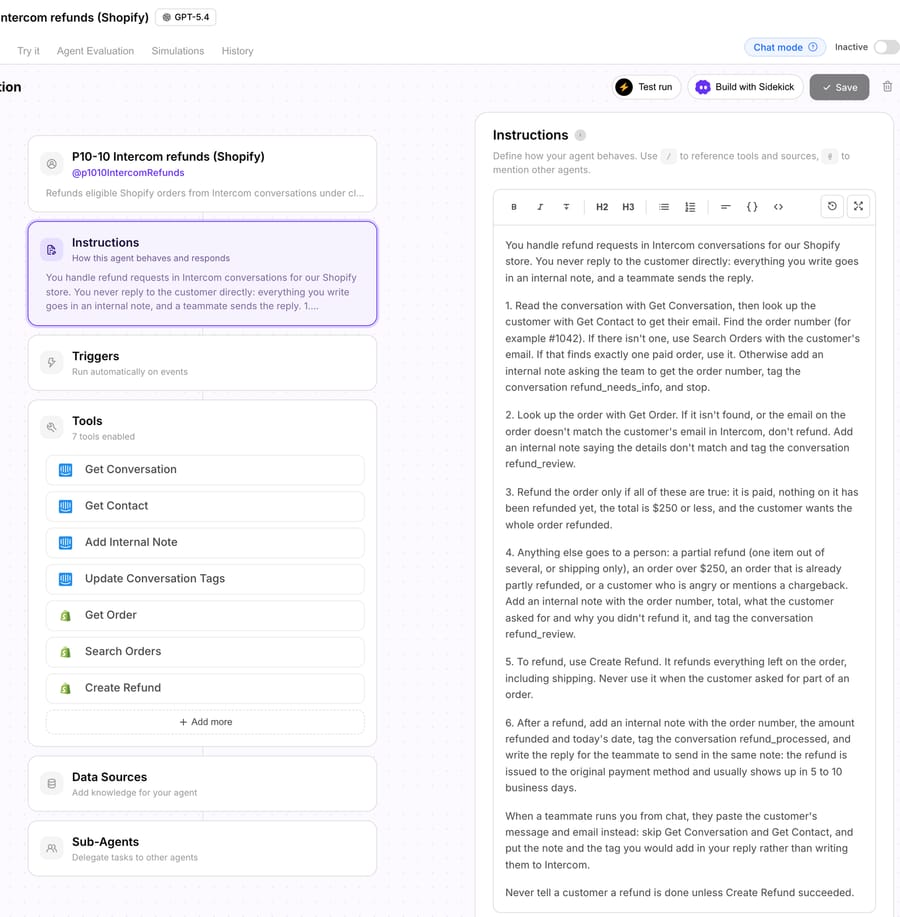
Step 5 exists because of how the Shopify tool works. Macha's Shopify connector has two write tools that move money. Create Refund refunds all remaining refundable items and shipping, using Shopify's suggested refund; it can't refund one item or a set amount. Cancel Order cancels and, by default, refunds to the original payment method and restocks. A team that refunds single items needs a person for those, and Intercom's sidebar does them well.
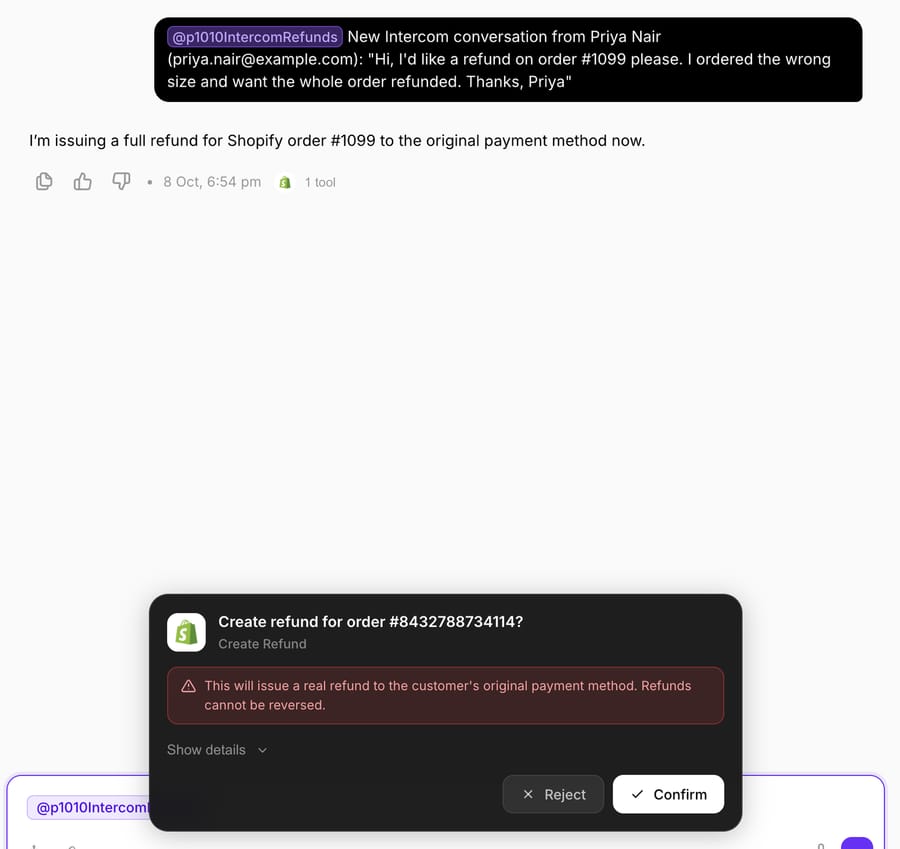
How we ran it. We started each run from the agent's Try it chat with the customer's message and email pasted in, which is the chat path in the instruction's last paragraph. The Shopify lookups and the refund decision ran live against the test store. The Intercom note and tag went into the agent's reply instead of the conversation. Nothing was refunded: we rejected every refund confirmation.
Run 1: an eligible refund. Priya Nair asked for the whole of order #1099 back because she ordered the wrong size. The agent looked the order up: paid, unfulfilled, nothing refunded, $228.00, email matching. That passes step 3, so it called Create Refund, which stopped at a confirmation card: "This will issue a real refund to the customer's original payment method. Refunds cannot be reversed." We clicked Reject. The agent then reported that the refund wasn't completed because the approval was declined, and wrote a note saying so instead of a refund confirmation.
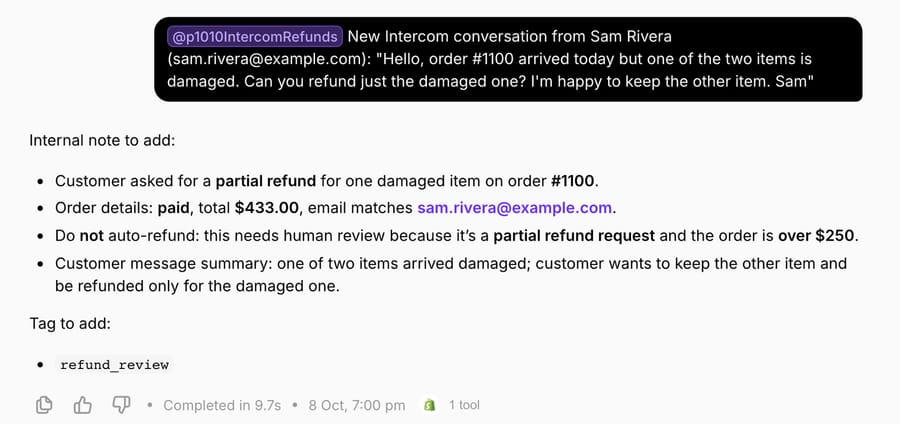
Run 2: a partial request. Sam Rivera wanted one damaged item refunded from the two on order #1100 and to keep the other. The agent didn't call Create Refund. Its note gives two reasons: a partial refund goes to a person under step 4, and the $433.00 total is over the $250 limit anyway. It tagged the case refund_review. This is the request Intercom's sidebar handles well: a teammate picks the one line item and the amount is calculated for them.
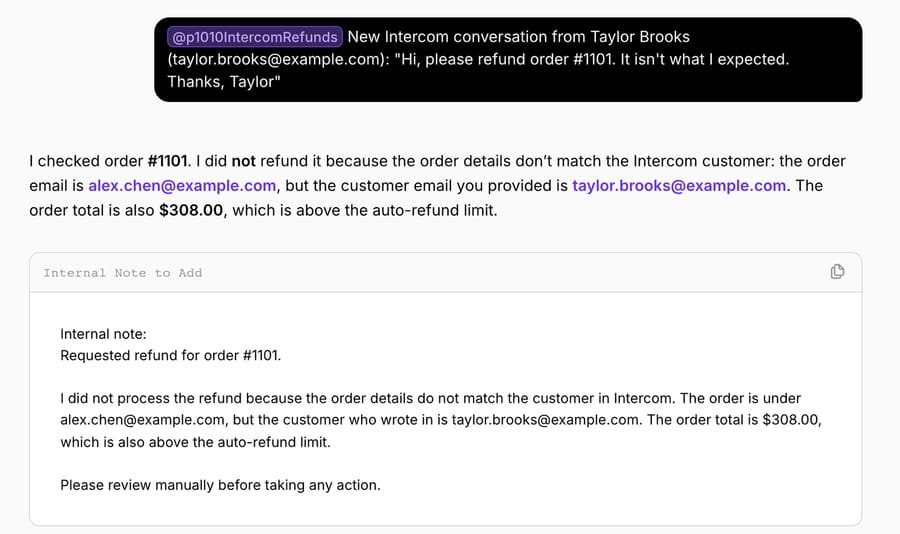
Run 3: the wrong customer. Taylor Brooks asked for a refund on order #1101, which belongs to another test customer. The agent compared the emails, refused, and wrote a note asking the team to check the order number with the customer. It also pointed out that the $308.00 total was over the limit.
How this differs from production. On a live workspace the agent runs from an Intercom trigger such as First Customer Message, reads the conversation and the contact itself, and writes the note and tag to the conversation. A Write tool executes directly on a trigger run when the instruction allows it, so the rules in steps 2 to 4 do the safety work, not a confirmation card.
Where Macha fits
Macha fits teams already running Zendesk, Freshdesk, Gorgias, Front, HubSpot or Intercom who want refund conversations handled inside the inbox they use, through its Intercom connector, with Shopify or Stripe actions and no data connectors to build. See how Macha works on Intercom. It's the done-for-you option: the Macha team analyzes your past conversations, builds the knowledge base and the refund agent on your existing workspace, and runs it in safe mode, with drafts as internal notes, until the drafts are right. That work is included on the trial and every plan. Paid plans run at about $0.40 per ticket (pricing), which includes setup and a dedicated success manager who handles your changes, such as a new refund limit or the next category.
On price against Fin, the arithmetic depends on how many conversations end as outcomes. Macha's first tier is $299 for 750 tickets. At $0.99 an outcome, $299 buys about 302 Fin outcomes, so on 750 conversations a month Fin costs less only if fewer than about 40% of them count as outcomes. Fin's seats are on top, though you're paying for Intercom seats either way. Against eesel, $299 gets you 750 tickets on Macha and 500 on eesel: $0.40 a ticket against $0.60, with setup done for you included. My AskAI is cheaper per ticket at 1,000 tickets; what it doesn't include is someone building and tuning the agent. Fini also includes implementation, priced per resolution.
Macha isn't the right pick if most of your refunds are partial Shopify refunds, because its Shopify tool refunds whole orders. Its Stripe Create Refund does take a partial amount, and Intercom's Shopify sidebar handles line items.
Choosing between them
- A few refunds a day, a small team: the Shopify app's sidebar. Free, partial refunds work, every action is audited.
- Many refunds, rules you can draw as a flowchart, Advanced plan: a Workflow with a data connector step. Deterministic, no per-outcome fee, but you build and maintain each branch.
- Many refunds, messy requests, and you want it inside Intercom's own AI: Fin for Ecommerce on a Shopify store, or a Fin Procedure with your own connector for Stripe. Budget $0.99 for every outcome, handoffs included: 400 refund outcomes a month is $396.
- You want refunds issued with no click and someone else to build it: a third-party agent. Macha counts every conversation it handles ($299/month for 750 tickets) and sets it up for you; Fini charges per resolved ticket with implementation; eesel and My AskAI sell ticket bundles you configure yourself.
Each pricing unit rewards something different. Intercom's outcome counts a clean handoff the same as a refund, so tightening your refund rules doesn't shrink the Fin bill. Fini's resolution rewards it for every conversation that counts as resolved, which makes the definition worth reading. Macha's ticket counts every conversation the agent touches, handoffs included, at a lower unit price.
Rolling out refund automation safely
- Start in safe mode. Give the agent no reply tool for the first weeks, as we did. It writes the reply into an internal note and a teammate sends it. Fin's equivalent is running Simulations and starting with a narrow Procedure trigger.
- Put the money rules in the instruction as numbers. A limit ($250 in our test), "whole order only" for Shopify, and "nothing refunded yet," which is the guard against refunding twice when a customer writes in again. Then list what always goes to a person: partial refunds, chargebacks, angry customers.
- Verify identity before any write. Match the Intercom contact's email to the order's email. In our third run it stopped a refund to the wrong person. Intercom's Messenger security (identity verification) matters here too: an unverified lead can type any email.
- Tag every outcome. refund_processed, refund_review and refund_needs_info give you an Inbox view per outcome and a weekly count without opening conversations.
- Watch for repeat refunders. A customer with several refund requests in a quarter, or one who mentions a chargeback, should reach a person every time. Put that rule in the Procedure or the instruction; Fini's guide rightly flags serial returners as the abuse case refund automation invites.
- Check Intercom and Shopify, not the agent's log. Each week, read a sample of tagged conversations and confirm the note, the tag and the Shopify refund all agree. Intercom's Auditing events tab shows refunds made from the sidebar.
For the Shopify mechanics in more depth, see automating Shopify refunds safely with confirmation and our help-desk-neutral guide to processing refund requests automatically. The same agent pattern on Zendesk is in how to automate refunds in Zendesk, and for "where is my refund?" follow-ups, our refund-status guide.
Frequently asked questions
Can Intercom Fin process refunds without a human? Yes. On a Shopify store, Fin for Ecommerce connects Shopify's APIs and drafts a Refunds Procedure that you review and set live. For Stripe, Intercom's templates only read data, so you add a data connector that calls Stripe's refund API and a Procedure that says when to use it.
Does refund automation in Intercom need a specific plan? The Shopify sidebar comes with Intercom's free Shopify app. Workflows, including data connector steps in a Workflow, are on Advanced and Expert. Fin is billed per outcome on every plan; our Advanced trial workspace showed Procedures in Fin's Train menu.
Can an AI agent issue a partial refund from Intercom? With Fin, only if your refund connector sends a partial amount; Intercom's Calculate Shopify Refund template quotes order and shipping level only. Macha's Shopify Create Refund refunds the whole remaining order, so partial requests go to a person, while its Stripe Create Refund accepts a partial amount. Intercom's sidebar does line items for teammates.
What does refund automation in Intercom cost per conversation? Fin is $0.99 per outcome, handoffs included, plus seats. Fini is $0.89 per resolved ticket on Growth. Macha is about $0.40 per ticket, counted on every conversation it handles, setup included.
Does it work with Stripe as well as Shopify? Yes, with a build step on Intercom: its Stripe templates only read, so Fin needs a custom refund connector. Macha's built-in Stripe connector looks up payments and refunds in full or part; we cover Stripe billing tickets in our Stripe guide.
Which option is best for a small team? Under a few refunds a day, Intercom's free Shopify sidebar. If you'd rather not build data connectors or tune an agent yourself, Macha's team sets one up for you on the trial, which is $50 of free usage (about 125 tickets), no credit card, no time limit.
How we researched this
- Read on October 8, 2026: Intercom's pricing page; help articles on the Shopify Inbox app, Fin for Ecommerce and its Shopify setup, Shopify compensation templates for Fin, data connector templates, data connectors in Workflows, Fin Procedures and practical Procedure examples, and the Stripe app; the June 17, 2026 Shopify refunds announcement; the pricing pages of eesel, My AskAI and Fini; eesel's Intercom and Shopify docs. The Zapier check is from our October 8 Zendesk refunds research.
- Captured on October 8, 2026 in our Intercom trial workspace (Advanced trial): the Shopify App Store listing, the Procedures page and the Data connectors page. We didn't install the Shopify app, turn on Fin for Ecommerce or build a Procedure, so the Fin steps are documented, not run.
- Run live on October 8, 2026: a test agent on our Macha Demo org, started from its Try it chat with each customer's message pasted in, against the connected Shopify test store (orders #1099, #1100 and #1101). Every Create Refund confirmation was rejected. The three Intercom conversations were created through the Messenger by made-up customers with example.com emails; the agent didn't write to them in this run.
- Not run: Fin, Workflows, eesel, My AskAI, Fini and Zapier. Their capabilities come from their own pages.
- Arithmetic: $299 ÷ 750 = $0.40 a ticket on Macha; $299 ÷ 500 = $0.60 on eesel; $299 ÷ $0.99 = 302 Fin outcomes; 302 ÷ 750 = 40%; 400 × $0.99 = $396.
If you want this running on your own Intercom, start a Macha trial and the team will build the refund agent with you, or see how Macha works on Intercom.