





 Shopify
 Stripe
 Slack
Slack Notion
 Google Workspace
 Confluence

What guardrails does an autonomous AI support agent need? Debounce, caps, auto-disable and loop safety


An autonomous agent that acts on a malformed event, a trigger loop or a runaway schedule can send fifty replies in a minute and burn a month of ticket volume in an afternoon. Four operational guardrails, enforced outside the model, keep that worst case bounded.
Key takeaways
- An autonomous support agent needs four operational guardrails, debounce, caps, auto-disable and loop safety, enforced at the execution layer so they hold when the model misbehaves.
- Macha's debounce defaults are 0 seconds for new event-driven triggers, 15 seconds for Zendesk messaging and 10 seconds for Slack DMs, with a force-fire at 25 events.
- Macha's scheduled triggers enforce a 1 hour minimum interval, 24 runs per trigger per day, and 3 concurrent runs per organization.
- A Macha trigger auto-disables and emails the owner after 5 consecutive failures, and a 30-minute stale-lock cleanup stops a crashed run blocking the next one.
- Zendesk restarts its trigger cycle whenever a trigger updates a ticket, so a processed tag plus an exclusion condition is the loop guard a team must add itself.

An autonomous support agent needs four operational guardrails: debounce (collapse bursts of events into one run), caps (a 1-hour minimum schedule interval and 24 runs per trigger per day in Macha), auto-disable (trip after 5 consecutive failures and email the owner), and loop safety (trigger conditions and tags that stop an agent re-firing on its own update). They live outside the model, at the execution layer, so they hold even when the model misbehaves, hallucinates a tool call, or gets fed garbage. Below are the defaults Macha ships so an agent on top of Zendesk or any of Zendesk, Freshdesk, Gorgias, Front, HubSpot or Intercom can't run away from you.
| Failure mode | Guardrail | Macha default |
|---|---|---|
| Chatty/duplicate events → overlapping runs | Debounce | 0 / 15s msg / 10s Slack; force-fire at 25 events or 2 min |
| Misconfigured schedule → runaway cost | Interval + daily cap + concurrency | min 1h · 24/day · 3 concurrent |
| Bulk job → accidental five-figure bill | Record cap + estimate gate | 20k/run · confirm before spend |
| Broken integration → infinite retries | Auto-disable circuit breaker | trip after 5 consecutive failures + email |
| Trigger fires on its own action → loop | Conditions + unique tags + delegation cap | 3-level sub-agent depth, write only when triggered |
If you only remember one principle: the failure you're defending against is not "the agent gives a slightly wrong answer." It's "the agent does the right thing 500 times in a row because nothing told it to stop."
Which guardrails are these, and which are they not?
"AI agent guardrails" is a broad term, and it helps to split it into two families.
The first is content / input-output guardrails — the controls that police what flows in and out of the model on a single run. This class includes PII masking and redaction (stripping emails, card numbers and personal data before they reach the model or get logged), prompt-injection defence (catching "ignore your instructions" payloads buried in a ticket, a web page, or a knowledge-base doc), and output / hallucination validation (checking the agent's reply is grounded in retrieved sources, on-topic, and free of toxic or off-brand content before it's sent). These are essential, and any serious deployment needs them.
The second is operational / behavioural guardrails — the controls that govern how often and how autonomously the agent runs across many invocations: debounce, rate limits, run caps, circuit breakers, and loop protection. This is the family that decides whether one bad input becomes one bad reply or five hundred.
The four here are the second family. Content guardrails answer "is this single response safe and accurate?"; operational guardrails answer "can this agent run away from us?" It's the operational ones that teams most often skip, because they don't show up in a demo. They only show up on the invoice and in the customer complaint. The four below are the operational guardrails Macha ships by default.
Why can't the model enforce these guardrails itself?
IBM frames AI guardrails as structured safety mechanisms that keep AI systems operating within defined boundaries, and makes the point that the strongest of them sit outside the model itself and enforce safety at the execution layer rather than relying on the model to police its own behaviour. Galileo, Blaxel and others converge on the same four universal patterns: artifact verification (human approval before destructive actions), privilege boundaries (what the agent is even allowed to touch), context hygiene, and rate limiting (preventing runaway loops). The common refrain across vendor write-ups is a single hard number — "Maximum N tool calls per conversation" — because an agent stuck in a recursive loop will otherwise make thousands of API calls before anyone notices the bill. (IBM, Galileo, Blaxel.)
The reason the model can't police this itself is simple: by the time the model is deciding what to do, it has already been invoked. The decision to invoke it — how often, in response to what, how many times in a row — has to be made by the platform around the model. That's where the four guardrails below sit.
What is debounce, and what are Macha's default windows?
The first runaway risk is chatty event sources. A single customer action in a helpdesk rarely fires one clean event. A messaging conversation emits an event per message as someone types "hi", "I have a", "problem with my order". A buggy webhook source can emit the same ticket update three times. If your agent fires once per event, you get three overlapping runs racing each other, three replies, and a confused customer.
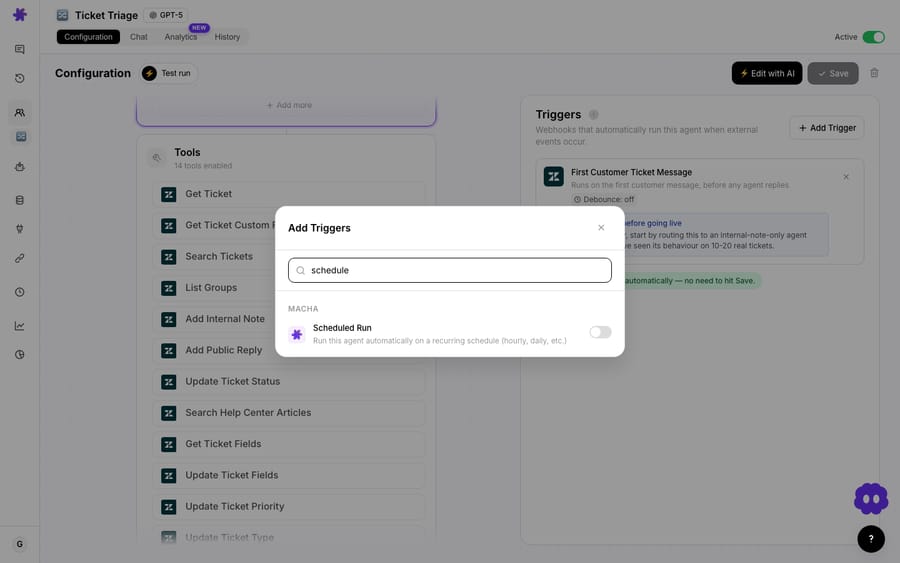
Debounce fixes this by waiting a short, configurable delay after an event before firing. If more events for the same entity arrive inside that window, the timer resets and they collapse into one run. In Macha, every event-driven trigger now carries a Debounce chip: any Zendesk or Freshdesk ticket event, any Slack mention or DM, any messaging event lets you set a delay in seconds.
The defaults are deliberately conservative:
| Trigger type | Default debounce |
|---|---|
| New event types (e.g. ticket events) | 0 — off |
| Zendesk messaging | 15 seconds |
| Slack DMs | 10 seconds |
New event types default to off because debounce trades latency for safety — you don't want to silently delay a ticket-event agent that the operator expected to be instant. Messaging and Slack default on because those streams are genuinely chatty. Cron and unkeyed universal-webhook triggers don't show the chip at all: debouncing a clock or a per-org webhook makes no sense.
The safety valve inside the safety valve
Debounce introduces its own failure mode: a malformed source that never stops emitting events would reset the timer forever and hold the agent indefinitely. So debounce has its own circuit-breaker. A debounce bucket is force-fired when either of two things happens first:
- it accumulates 25 events, or
- it has waited a total of 10× the debounce window (hard-capped at 2 minutes).
That's the pattern worth internalising: every guardrail needs a guardrail. A delay that can be extended without limit is itself a denial-of-service waiting to happen, so the force-fire ceiling guarantees the agent always eventually runs, even against a broken event stream.
How do caps bound how often an agent runs?
Debounce controls bursts. Caps control totals. The classic catastrophe in autonomous systems isn't one bad action — it's the same action repeated at machine speed. Caps are the boundary that makes the worst case finite and predictable.
Macha's scheduled (cron) triggers are the clearest example, because a schedule is the easiest thing in the world to misconfigure into a money pit. Set "run every minute" on an agent that pulls Stripe metrics and posts to Slack, and you've built a machine that fires 1,440 times a day until somebody notices. So the scheduler ships with three hard ceilings:
| Cap | Value | What it prevents |
|---|---|---|
| Minimum interval | 1 hour | "Run every minute" cost blowups |
| Daily run cap | 24 runs per trigger per day | A misconfigured cron looping all day |
| Org concurrency | 3 concurrent runs | Many schedules stampeding at once |
The polling loop itself runs every 60 seconds, but the minimum interval you can schedule is an hour — the polling cadence and the run cadence are deliberately different things. There's also a stale-lock cleanup at 30 minutes, so a run that dies mid-execution can't hold its lock forever and block the next legitimate run.

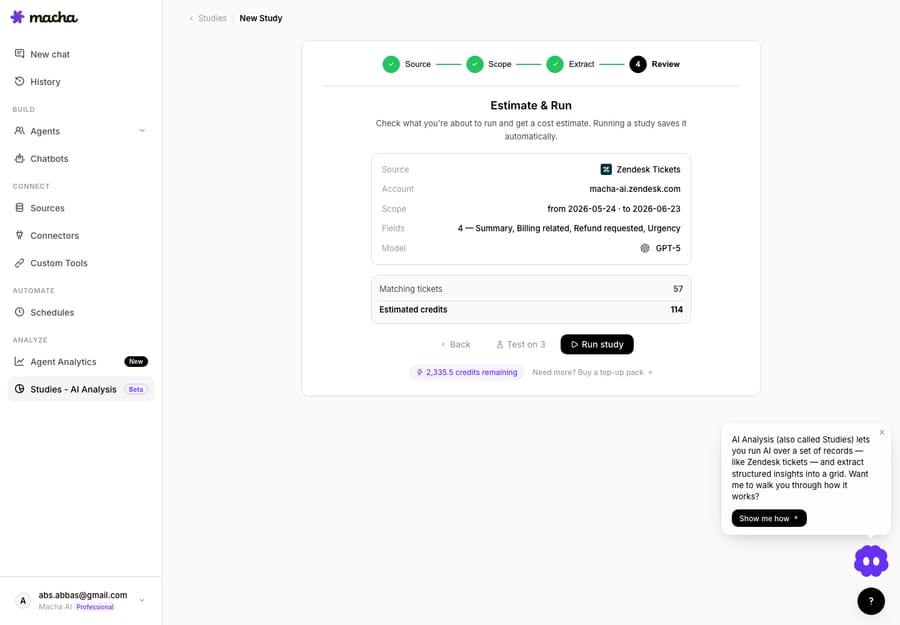
The same philosophy shows up wherever an agent can do work in bulk. Macha Studies — batch AI analysis over thousands of tickets — enforces a hard 20,000-record cap per run and makes you pass an estimate-and-confirm gate (exact record count and total cost) before anything runs; you can cancel anytime and you're billed only for records that actually processed. For bigger jobs you split by date range. The cap isn't there to limit you — it's there so a fat-fingered query can't accidentally bill a number with five zeros in it.
When you're sizing caps for your own agents, the question to ask is never "how high could legitimate volume go?" It's "what's the most damage a bug could do before a human looks at it tomorrow morning?" Cap to that.
What happens when a trigger keeps failing?
Debounce and caps assume things are basically working. Auto-disable is for when they aren't. If a trigger fails — a connector's token expired, a downstream API is down, a tool is misconfigured — the worst response is to keep retrying forever, failing loudly, and (if each attempt does partial work) corrupting state along the way.
So Macha's triggers auto-disable after 5 consecutive failures, with an email notification. This is a textbook circuit breaker: after a threshold of failures, the breaker trips, the trigger stops firing, and a human gets told. It converts an indefinite, silent, escalating failure into a single bounded one with an alert attached. Five in a row is the right shape — it tolerates a transient blip (one timeout, a momentary 500) without tripping, but a genuinely broken integration trips fast instead of grinding all day.
The discipline this enforces on you is the part teams underrate: an auto-disabled trigger is a signal, not a nuisance. When that email lands, something is actually wrong upstream — an expired credential, a renamed field, a dead endpoint. The breaker bought you a clean stop and a notification instead of a 2,000-line error log and a surprise on the invoice. Fix the cause, then re-enable.
It's worth distinguishing auto-disable (a safety trip) from Macha's agent toggle (a deliberate pause). When you toggle an agent off on purpose, Macha doesn't delete its Zendesk webhooks or triggers — it sets them to inactive on Zendesk's side and flips them back to active when you re-enable, so any Zendesk Trigger you built in your own Admin Center that points at Macha keeps its resource IDs and survives the pause. One is the breaker tripping; the other is you flipping the switch. Both stop the agent; neither leaves orphaned wiring behind.
How do you stop an agent looping on its own ticket updates?
Loops are the guardrail problem that's specific to agents living on top of a helpdesk, and they're the one most likely to bite a team that's new to automation. The mechanism is mundane and brutal:
A trigger fires on ticket updated. Your agent updates the ticket. That update fires the ticket updated trigger again. Which runs the agent again. Forever.
This isn't a Macha quirk — it's how Zendesk's own trigger engine works. Zendesk documents it plainly: "If a ticket trigger updates a ticket during the cycle, the cycle starts over." The same page notes a ticket "could loop through the ticket trigger list several times" on a single update. When an outside agent is the thing updating the ticket, each of its updates starts a fresh cycle, so the guard has to be in your design, not left to the platform (Zendesk: About triggers, Creating ticket triggers).
The fixes are well-established, and they're the heart of Macha's Zendesk setup best practices:
- Specific conditions that go false after the action runs. If your trigger condition is still true after the agent acts, it will fire again. Scope it so that the agent's own change makes the condition no longer match — this is the single most important loop guard.
- Unique tags as a "done" marker. Have the agent add a tag like
macha_processed, and add "tag is notmacha_processed" to the trigger condition. The agent can't process the same ticket twice because its own first pass disqualifies it. - Order notifications last, and don't let an agent react to its own notification events.
- Watch for cross-system loops — agent updates ticket → ticket syncs to another tool → that tool fires a webhook → webhook re-runs the agent. The fix is the same: a marker the loop checks for.
Macha adds platform-level loop protection on top of your trigger design. Sub-agents — where one agent delegates to specialists — are limited to 3 levels deep with circular-reference prevention, so agent A can't delegate to B which delegates back to A in an infinite delegation chain. And there's a quieter, deeper guard worth naming: sub-agents are read-only during interactive chat and only gain write permissions (replies, ticket updates) when running autonomously via triggers. You can poke at an agent in chat all day without it touching a live ticket; write power switches on only in the controlled, triggered path where your loop guards live.
How do the four guardrails work together?
No single guardrail is sufficient, and that's by design. Each one catches a different failure mode, and they're cheap to stack; the summary table at the top maps each failure mode to the guardrail and Macha default that catches it.
The mental model is defense in depth: debounce stops the burst, caps bound the total, auto-disable stops the bleeding, and loop safety stops the cycle from ever starting. A failure has to defeat all four to actually hurt you.
Where do guardrails go wrong?
Guardrails aren't free, and a few honest caveats keep you from cargo-culting them:
- Debounce trades latency for safety. A 15-second debounce means a 15-second delay before the agent responds. For a triage agent that's nothing; for a live-chat agent a customer is staring at, it's noticeable. Tune per agent, don't blanket-apply.
- Caps set too low throttle legitimate work. A 1-hour minimum interval means a "check every 10 minutes" use case isn't a scheduled trigger — it should be an event-driven one. Match the guardrail to the workload; don't fight it.
- Auto-disable can hide a chronic problem. If a trigger keeps tripping the breaker, re-enabling it without fixing the cause just resets the countdown. Treat repeated trips as a bug report, not a reset button.
- Loop guards depend on you. Macha's depth limit and read-only-in-chat rule are automatic, but the specific-conditions-and-unique-tags discipline is yours to apply in your trigger design. Zendesk will re-run the trigger cycle on every update; building so the cycle finds nothing to do is the job.
- Guardrails are not a substitute for a staged rollout. The single best guardrail isn't a number — it's running the agent in internal-note / suggest-only mode on 10–20 real tickets before you let it reply to customers (Macha even nudges this in-product, visible on the trigger card above). Watch what it actually does before you hand it write access to your queue.
FAQ
What's the difference between a guardrail and a prompt instruction? A prompt instruction is a request to the model ("don't reply more than once"); a guardrail is enforced by the platform regardless of what the model decides. Instructions guide behavior; guardrails bound it. You want both, but you trust the guardrail.
What is debounce in an AI agent trigger? A short, configurable delay after an event before the agent fires. If more events for the same entity arrive during the delay, they collapse into a single run. It stops chatty sources (typing indicators, duplicate webhooks) from spawning overlapping agent runs.
How do I stop an AI agent from looping on Zendesk tickets? Give the trigger a condition that becomes false after the agent acts, and have the agent add a unique "processed" tag that the trigger excludes. That way the agent's own first action disqualifies the ticket from a second run. Zendesk restarts the trigger cycle whenever a trigger updates a ticket, so don't rely on the platform to stop it.
What happens when a Macha trigger keeps failing? After 5 consecutive failures it auto-disables and emails you. That's a circuit breaker — fix the upstream cause (often an expired credential or a changed field), then re-enable. There's also a 30-minute stale-lock cleanup so a crashed run can't block future ones.
Are scheduled agents available on every plan? Scheduled (cron) triggers are on every plan. Macha doesn't gate features by tier — the tiers on the pricing page differ only in how many tickets a month they include. Caps like the 1-hour minimum interval apply everywhere.
Which guardrail should you set up first?
Start with loop safety, because it's the one the platform can't do for you: add the processed tag and its exclusion condition before the first trigger goes live. Caps and auto-disable are on by default, and debounce only needs attention on chatty sources like messaging. With all four in place, the worst case stops being "unbounded" and becomes "bounded, alerted, and reversible."
Want to see the defaults in your own account? Start a free trial ($50 of usage, no credit card required), connect your helpdesk, and build a triage agent in suggest-only mode first — or read the Zendesk setup & best-practices docs for the loop-safety checklist in full. More on building agents that act safely on the Macha blog.
Written by Abbas (Customer Support & AI, Macha) · Reviewed by Ankeet Guha (Co-founder & CTO) · Published 2026-06-24 · Last updated 2026-06-24.






